2020 TOYOTA PRIUS PRIME reset
[x] Cancel search: resetPage 181 of 792
PRIUS PRIME_OM_OM47C77U_(U)
1812-2. Charging
2
Plug-in hybrid system
The error warning indicator on the CCID (Charging Circuit Inter rupting
Device) flashes.
Electrical leakage detection
function or self- diagnostic
function operates and power
is cut off
When the voltage is insufficient, the error
warning indicator may flash when there is
noise interference. Perform a reset and con-
nect to a proper power source. ( P. 118)
If charging does not start, immediately stop
charging and contact your Toyota dealer.
Charging indicator does not illuminate, even though charging co nnector
is connected.
The plug is not properly con-
nected to the outletCheck whether the plug is properly con-
nected to the outlet.
Charging connector is not
securely connected to
charging inlet
Check the connection status of the charging
connector.
• When connecting the charging connec- tor, make sure not to touch the latch
release button. Insert the charging con-
nector securely until you hear a click. The
charging connector may not be connected
correctly if the latch release button is
pressed while inserting.
• After connecting the charging connector,
check that the latch release button is not
pressed and the charging indicator is
turned on.
If the charging indicator does not illuminate,
even though the charging connector is
securely connected, there may be a mal-
function in the system. Immediately stop
charging and contact your Toyota dealer.
Hybrid battery (traction bat-
tery) is already fully chargedWhen the hybrid battery (traction battery) is
fully charged, charging is not performed.
The charging equipment
does not operatePlease contact the facility manager when
there is a problem with charging equipment.
Likely causeCorrection procedure
Page 198 of 792
198
PRIUS PRIME_OM_OM47C77U_(U)
3. Instrument cluster
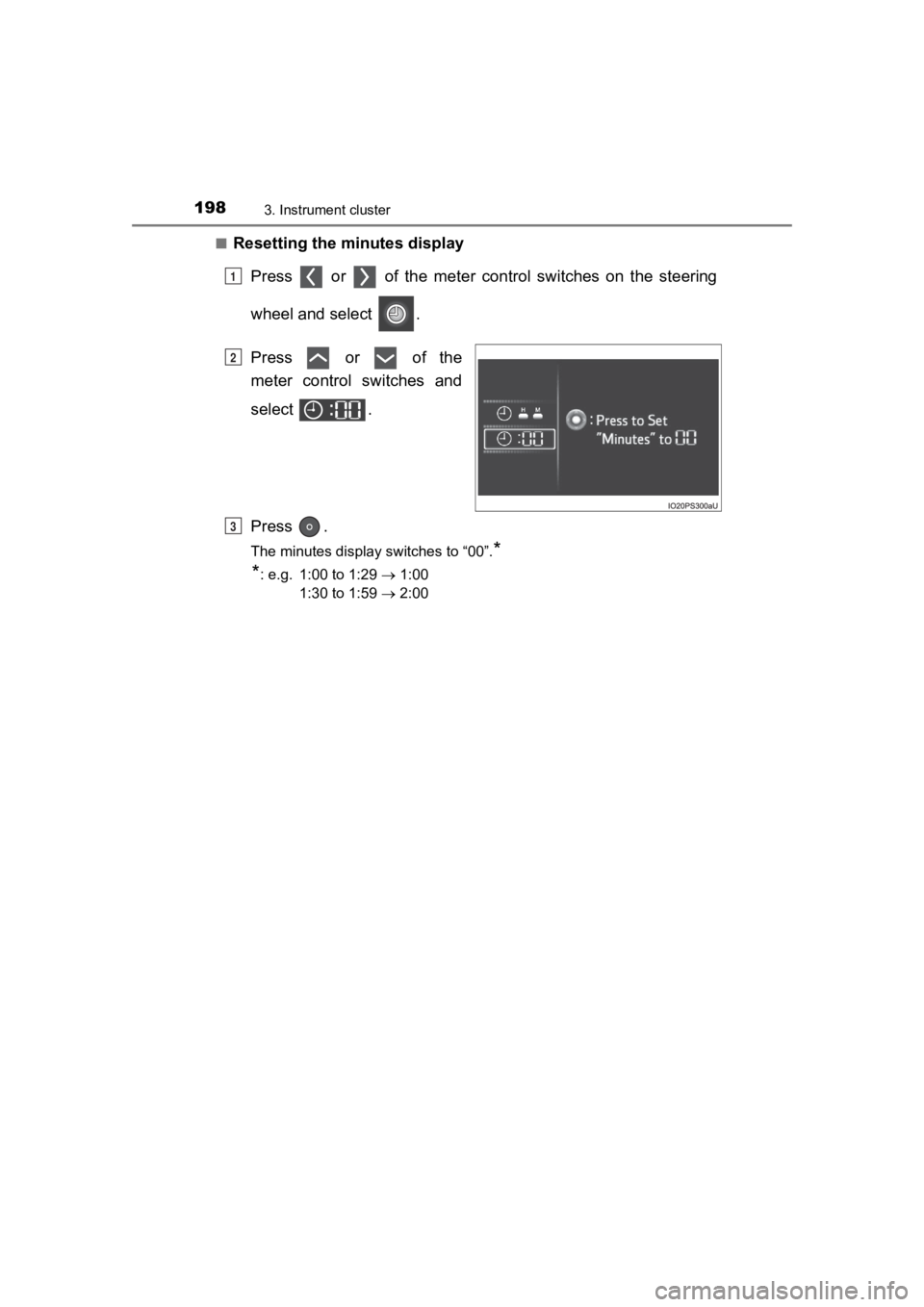
■Resetting the minutes displayPress or of the meter cont rol switches on the steering
wheel and select .
Press or of the
meter control switches and
select .
Press .
The minutes display switches to “00”.*
*
: e.g. 1:00 to 1:29 1:00
1:30 to 1:59 2:00
1
2
3
Page 199 of 792
PRIUS PRIME_OM_OM47C77U_(U)
1993. Instrument cluster
3
Instrument cluster
■The meters and display illuminate when
The power switch is in ON mode.
■ Adjusting the instrume nt cluster brightness (P. 194)
● The brightness levels that can be selected differ depending on whether the
tail lights are on and surrounding brightness levels, as shown in the table
below.
*: 22 levels of the brightness are displayed on the setting scree n. However,
the brightness setting will be the brightest when other than 1st level (the
darkest) is selected. If other than 1st or 22nd level is select ed, when the
tail lights are turned on in a dark place, the instrument clust er brightness
setting will be the selected level.
● If the taillights are illuminated in a dark environment, the in strument cluster
light dims. However, when the brightness of the instrument clus ter is set to
minimum or maximum (1st or 22nd level of the instrument cluster bright-
ness), even if the taillights are illuminated, the instrument c luster light will
not dim.
■ When disconnecting and reconnecting 12-volt battery terminals
The settings of the clock will be reset.
■ Calendar setting
●Until the calendar setting is completed, the check screen is di splayed every
time the power switch is turned to ON mode.
● After the calendar information is set, it can be changed in the “Meter Cus-
tomize” settings. ( P. 246)
The tail lights are offThe tail lights are on
In a bright place2 levels*2 levels*
In a dark place22 levels
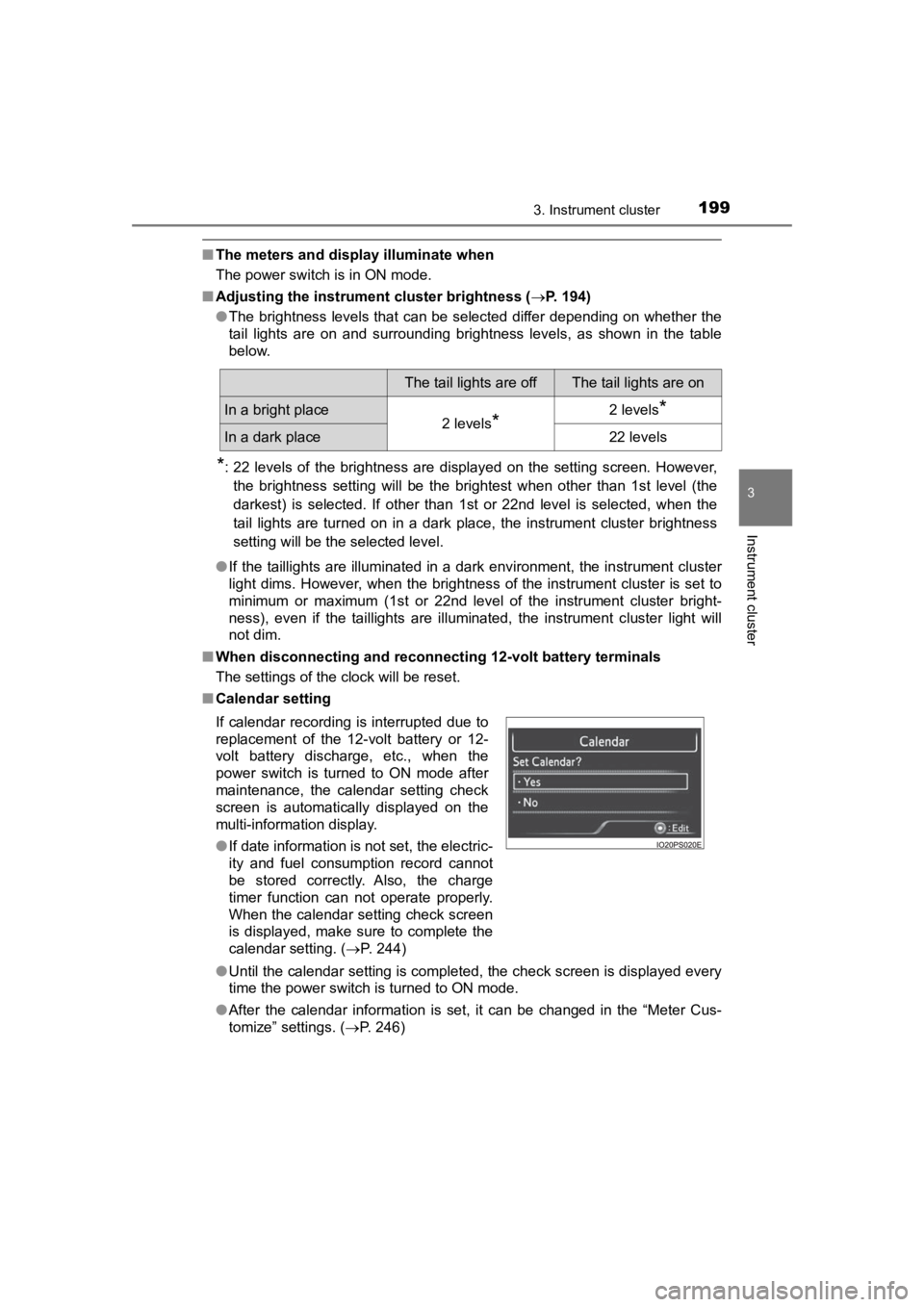
If calendar recording is interrupted due to
replacement of the 12-volt battery or 12-
volt battery discharge, etc., when the
power switch is turned to ON mode after
maintenance, the calendar setting check
screen is automatically displayed on the
multi-information display.
● If date information is not set, the electric-
ity and fuel consumption record cannot
be stored correctly. Also, the charge
timer function can not operate properly.
When the calendar setting check screen
is displayed, make sure to complete the
calendar setting. ( P. 244)
Page 212 of 792
212
PRIUS PRIME_OM_OM47C77U_(U)
3. Instrument cluster
*1: If is pressed and held while this item is displayed, the information is
reset.
*2: This item is reset each time the hybrid system starts.
*3: This value is not displayed if electricity needed for EV driving is not remain- ing.
*4: When the air conditioning system is operating, the icon displa y changes to
and the driving range with the air conditioning system on is d is-
played.
*5: The EV driving range may shorten even when not driving due to power
consumption by the system.
Mileage display Average fuel consumption display
1ODO (Odometer) Total mileage
Average fuel consumption since
last resetAverage fuel consumption since
last reset
*1
2TRIP A (Trip meter A)Mileage since last reset
*1
TRIP A average fuel consumption
Average fuel consumption since
TRIP A was reset
*1
3TRIP B (Trip meter B)Mileage since last reset
*1
TRIP B average fuel consumptionAverage fuel consumption since
TRIP B was reset
*1
4
(Mileage since hybrid sys-
tem was started) Mileage since hybrid system
started
*2
Average fuel con sumption after
hybrid system started Average fuel consumption since
hybrid system was started
*2
5
(Distance to empty)
Approximate distance vehicle
can travel based on current
remaining fuel amount
Blank screen
6
(EV driving range)
Approximate driving range using
only the electric motor (traction
motor) ( P. 108)
*3, 4, 5
Blank screen
7Blank screenBlank screen
12
Page 215 of 792
PRIUS PRIME_OM_OM47C77U_(U)
2153. Instrument cluster
3
Instrument cluster
Display contentsDetail
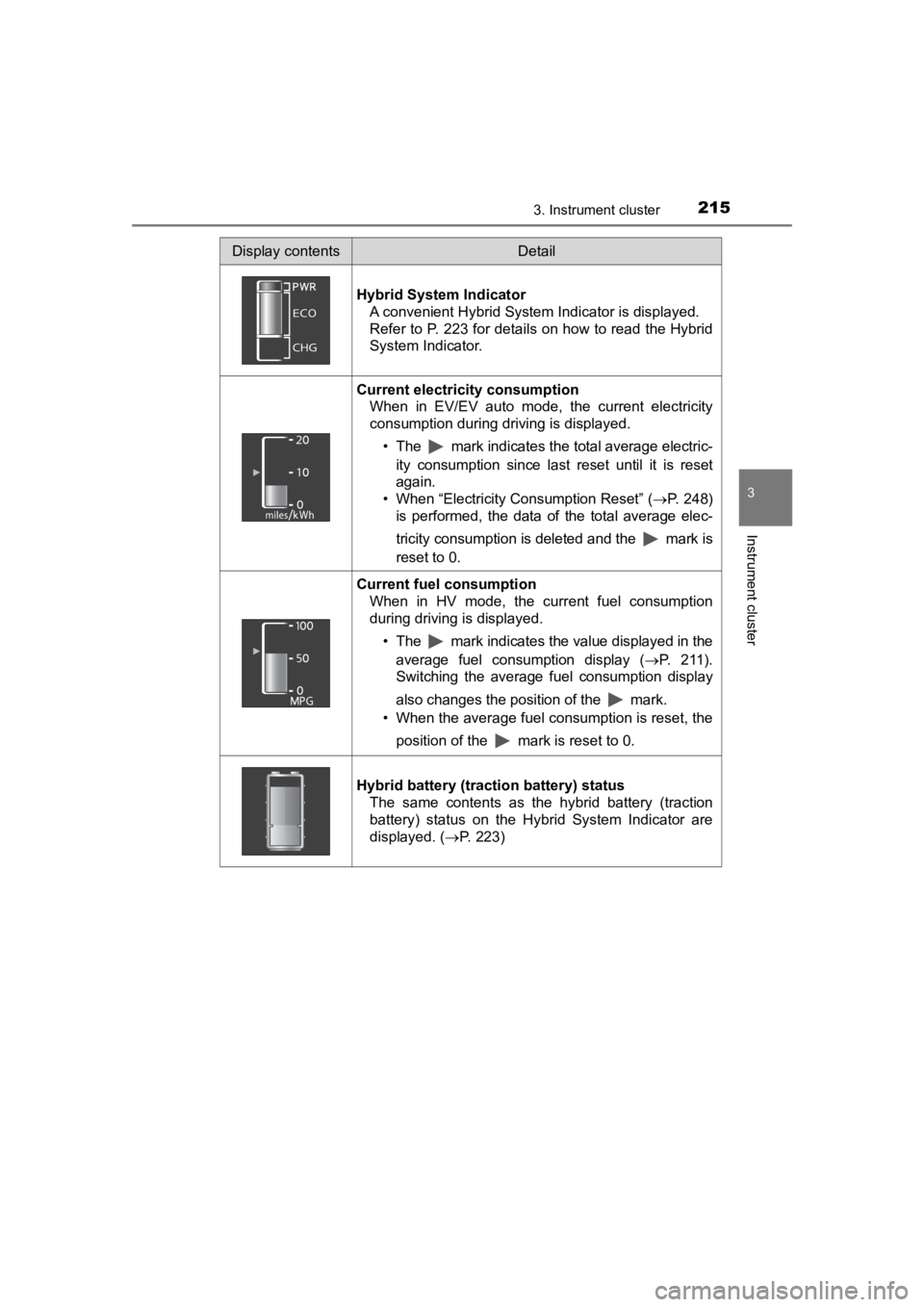
Hybrid System Indicator A convenient Hybrid System Indicator is displayed.
Refer to P. 223 for details on how to read the Hybrid
System Indicator.
Current electricity consumption When in EV/EV auto mode, the current electricity
consumption during driving is displayed.
• The mark indicates the total average electric-ity consumption since last reset until it is reset
again.
• When “Electricity Consumption Reset” ( P. 248)
is performed, the data of the total average elec-
tricity consumption is deleted and the mark is
reset to 0.
Current fuel consumption
When in HV mode, the current fuel consumption
during driving is displayed.
• The mark indicates the value displayed in theaverage fuel consumption display ( P. 2 1 1 ) .
Switching the average fuel consumption display
also changes the position of the mark.
• When the average fuel consumption is reset, the
position of the mark is reset to 0.
Hybrid battery (traction battery) status The same contents as the hybrid battery (traction
battery) status on the Hybrid System Indicator are
displayed. ( P. 223)
Page 227 of 792
PRIUS PRIME_OM_OM47C77U_(U)
2273. Instrument cluster
3
Instrument cluster
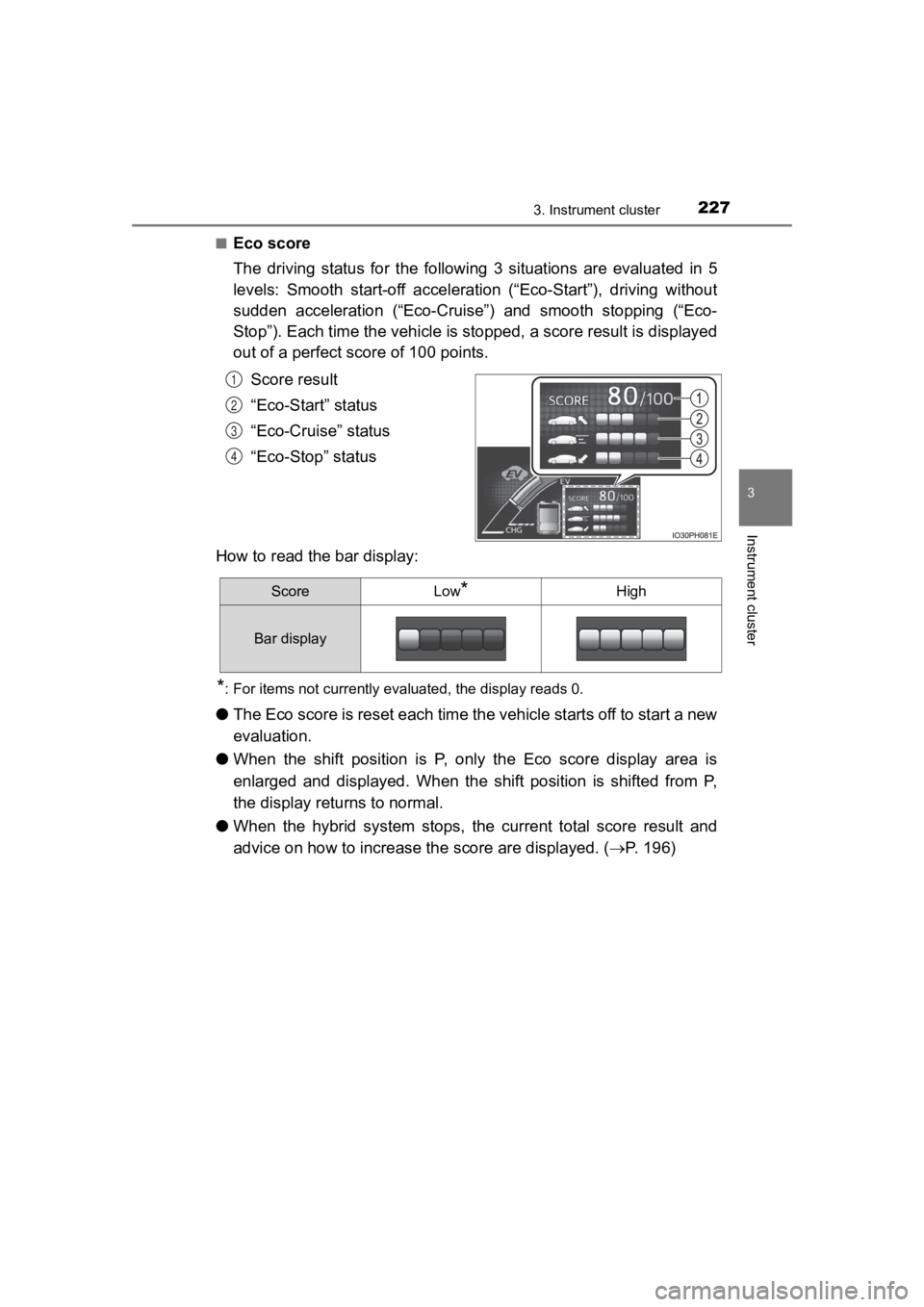
■Eco score
The driving status for the following 3 situations are evaluated in 5
levels: Smooth start-off acceleration (“Eco-Start”), driving wi thout
sudden acceleration (“Eco-Cruise”) and smooth stopping (“Eco-
Stop”). Each time the vehicle i s stopped, a score result is displayed
out of a perfect score of 100 points.
Score result
“Eco-Start” status
“Eco-Cruise” status
“Eco-Stop” status
How to read the bar display:
*: For items not currently evaluated, the display reads 0.
● The Eco score is reset each time the vehicle starts off to star t a new
evaluation.
● When the shift position is P, only the Eco score display area i s
enlarged and displayed. When the shift position is shifted from P,
the display returns to normal.
● When the hybrid system stops, the current total score result an d
advice on how to increase th e score are displayed. (P. 196)
1
2
3
4
ScoreLow*High
Bar display
Page 232 of 792
232
PRIUS PRIME_OM_OM47C77U_(U)
3. Instrument cluster
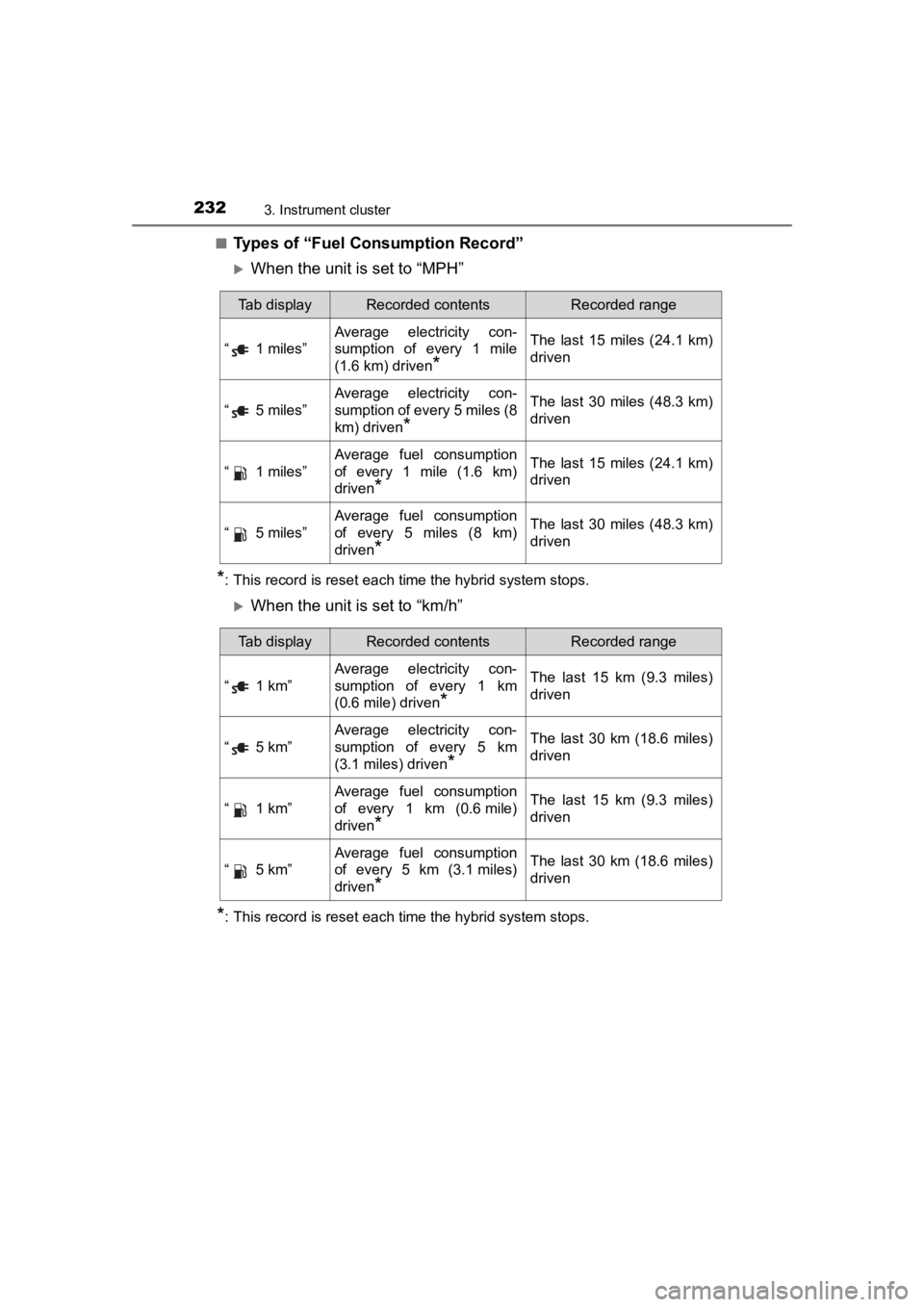
■Types of “Fuel Consumption Record”
When the unit is set to “MPH”
*: This record is reset each time the hybrid system stops.
When the unit is set to “km/h”
*: This record is reset each time the hybrid system stops.
Tab displayRecorded contentsRecorded range
“ 1 miles”
Average electricity con-
sumption of every 1 mile
(1.6 km) driven
*
The last 15 miles (24.1 km)
driven
“ 5 miles”
Average electricity con-
sumption of every 5 miles (8
km) driven
*
The last 30 miles (48.3 km)
driven
“ 1 miles”
Average fuel consumption
of every 1 mile (1.6 km)
driven
*
The last 15 miles (24.1 km)
driven
“ 5 miles”
Average fuel consumption
of every 5 miles (8 km)
driven
*
The last 30 miles (48.3 km)
driven
Tab displayRecorded contentsRecorded range
“ 1 km”
Average electricity con-
sumption of every 1 km
(0.6 mile) driven
*
The last 15 km (9.3 miles)
driven
“ 5 km”
Average electricity con-
sumption of every 5 km
(3.1 miles) driven
*
The last 30 km (18.6 miles)
driven
“ 1 km”
Average fuel consumption
of every 1 km (0.6mile)
driven
*
The last 15 km (9.3 miles)
driven
“ 5 km”
Average fuel consumption
of every 5 km (3.1 miles)
driven
*
The last 30 km (18.6 miles)
driven
Page 234 of 792
234
PRIUS PRIME_OM_OM47C77U_(U)
3. Instrument cluster
◆“Drive Monitor”
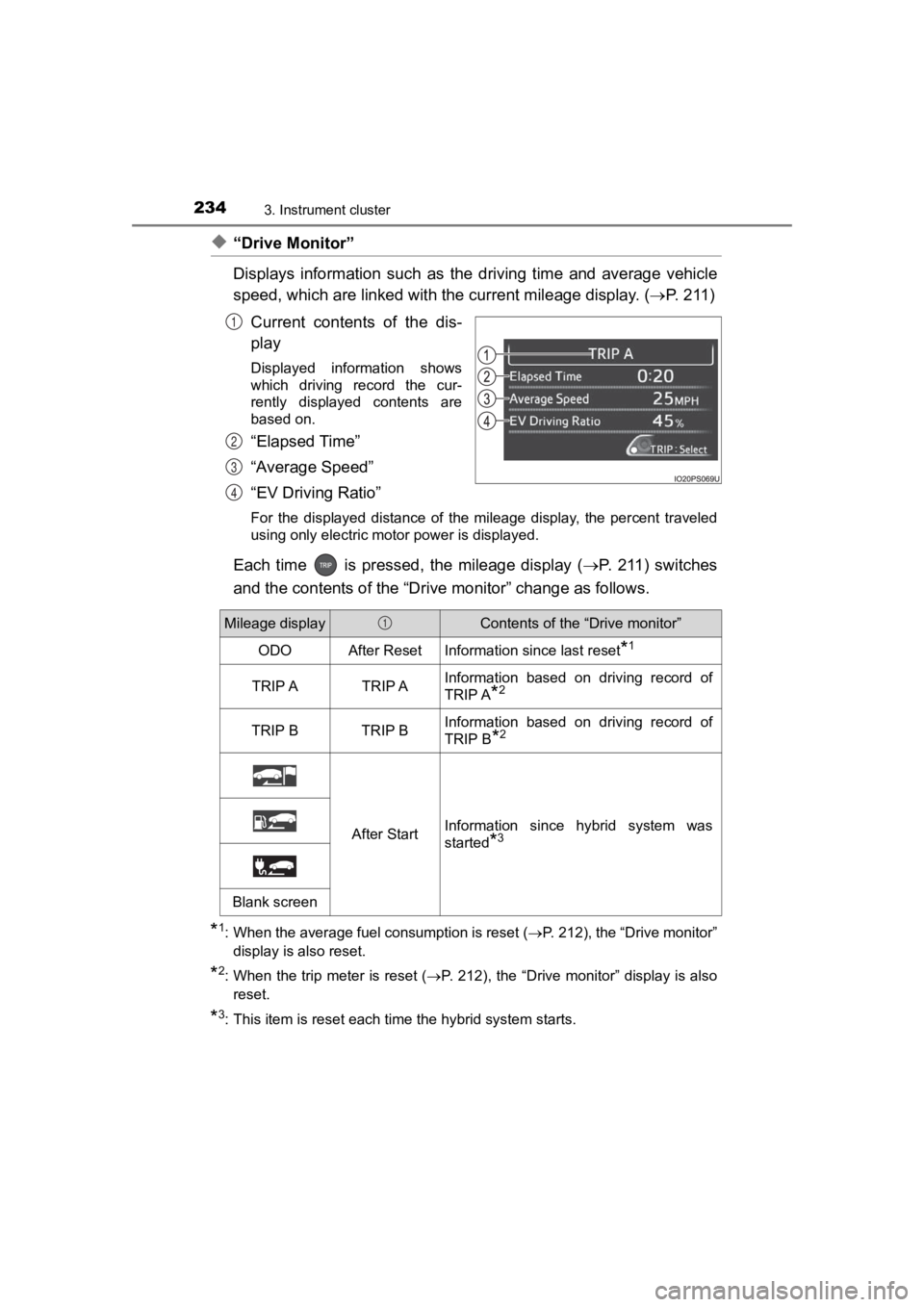
Displays information such as the driving time and average vehicle
speed, which are linked with the current mileage display. ( P. 2 1 1 )
Current contents of the dis-
play
Displayed information shows
which driving record the cur-
rently displayed contents are
based on.
“Elapsed Time”
“Average Speed”
“EV Driving Ratio”
For the displayed distance of the mileage display, the percent traveled
using only electric motor power is displayed.
Each time is pressed, the mileage display ( P. 2 11 ) s w i t c h e s
and the contents of the “Dri ve monitor” change as follows.
*1: When the average fuel consumption is reset ( P. 212), the “Drive monitor”
display is also reset.
*2: When the trip meter is reset ( P. 212), the “Drive monitor” display is also
reset.
*3: This item is reset each time the hybrid system starts.
1
2
3
4
Mileage displayContents of the “Drive monitor”
ODOAfter ResetInformation since last reset*1
TRIP ATRIP AInformation based on driving record of
TRIP A
*2
TRIP BTRIP BInformation based on driving record of
TRIP B
*2
After StartInformation since hybrid system was
started
*3
Blank screen
1