2020 TOYOTA HILUX Start Stopp
[x] Cancel search: Start StoppPage 5 of 744

5
1
9
8
6
5
4
3
2
HILUX_OM_OM0K321E_(EE)
7
6-4. Using the other interior
features
Other interior features ........548
• Sun visors ......................548
• Vanity mirror ..................548
• Clock .............................549
• Power outlets .................550
• Grocery bag hooks ........552
• Coat hooks ....................553
• Armrest ..........................553
7-1. Maintenance and care
Cleaning and protecting
the vehicle exterior ..........556
Cleaning and protecting
the vehicle interior ...........560
7-2. Maintenance
Maintenance
requirements....................563
7-3. Do-it-yourself maintenance
Do-it-yourself service
precautions ......................566
Hood ..................................568
Engine compartment..........570
Tires ...................................590
Tire inflation pressure ........593
Wheels ...............................595
Air conditioning filter ..........597
Wireless remote control/
electronic key battery.......599
Checking and
replacing fuses ................602
Light bulbs .........................607
8-1. Essential information
Emergency flashers .......... 624
If your vehicle has to
be stopped in an
emergency ...................... 625
8-2. Steps to take in an
emergency
If your vehicle needs
to be towed ..................... 627
If you think something is
wrong .............................. 632
Fuel pump shut off
system (gasoline engine
only) ................................ 633
If a warning light turns on
or a warning buzzer
sounds ............................ 634
If a warning message is
displayed ......................... 643
If you have a flat tire .......... 649
If the engine will not
start ................................. 666
If the electronic key does
not operate properly
(vehicles with smart
entry & start system) ....... 668
If the vehicle battery is
discharged ...................... 672
If your vehicle
overheats ........................ 678
If you run out of fuel
and the engine stalls
(diesel engine only) ......... 682
If the vehicle becomes
stuck................................ 683
7Maintenance and care
8When trouble arises
Page 130 of 744

1301-4. Theft deterrent system
HILUX_OM_OM0K321E_(EE)
Do one of the following to deactivate or stop the alarms:
Except for Kazakhstan, Armenia and Morocco
● Unlock the doors.
● Start the engine. (The alarm will be deactivated or stopped after a
few seconds.)
For Kazakhstan, Armenia and Morocco
● Unlock the doors using the entry function (vehicles with smart
entry & start system) or the wireless remote control.
● Start the engine. (The alarm will be deactivated or stopped after a
few seconds.)
■ System maintenance
The vehicle has a maintenance-free type alarm system.
■ Items to check before locking the vehicle
To prevent unexpected triggering of the alarm and vehicle theft, make sure of
the following:
● Nobody is in the vehicle.
● The windows are closed before the alarm is set.
● No valuables or other personal items are left in the vehicle.
Deactivating or stopping the alarm
Page 157 of 744

1572. Instrument cluster
2
Instrument cluster
HILUX_OM_OM0K321E_(EE)
●Eco Saving
Select to set or change the fuel consumption comparison and
fuel price.
● Initialization
Registered or changed meter settings will be deleted or returned
to their default setting.
■ Pop-up display
In some situations, such as when a switch operation is performed, a pop-up
display will be temporarily display ed on the multi-information display.
The pop-up display function can be set on/off. ( P. 720)
■ Eco Score
Driving conditions are displayed in 5 stages and divided into 3 categories:
start, cruise and stop. Every time the vehicle is stopped, the score is dis-
played. (Every time the vehicle is accelerated the score that was last dis-
played is reset. Accumulative scores are not calculated.)
Eco cruise
Displays the eco level calculated from acceleration operation amount when
driving the vehicle
Eco stop
Displays the eco level calculated from time between releasing the accelera-
tor pedal and vehicle stop
Eco Score
Totals the counts of the eco start, eco
cruise and eco stop, and displays the
result.
Eco start
Displays the eco level calculated from
degree of acceleration when starting
the vehicle
1
2
3
4
Page 199 of 744
1993-2. Opening, closing and locking the doors
3
Operation of each component
HILUX_OM_OM0K321E_(EE)
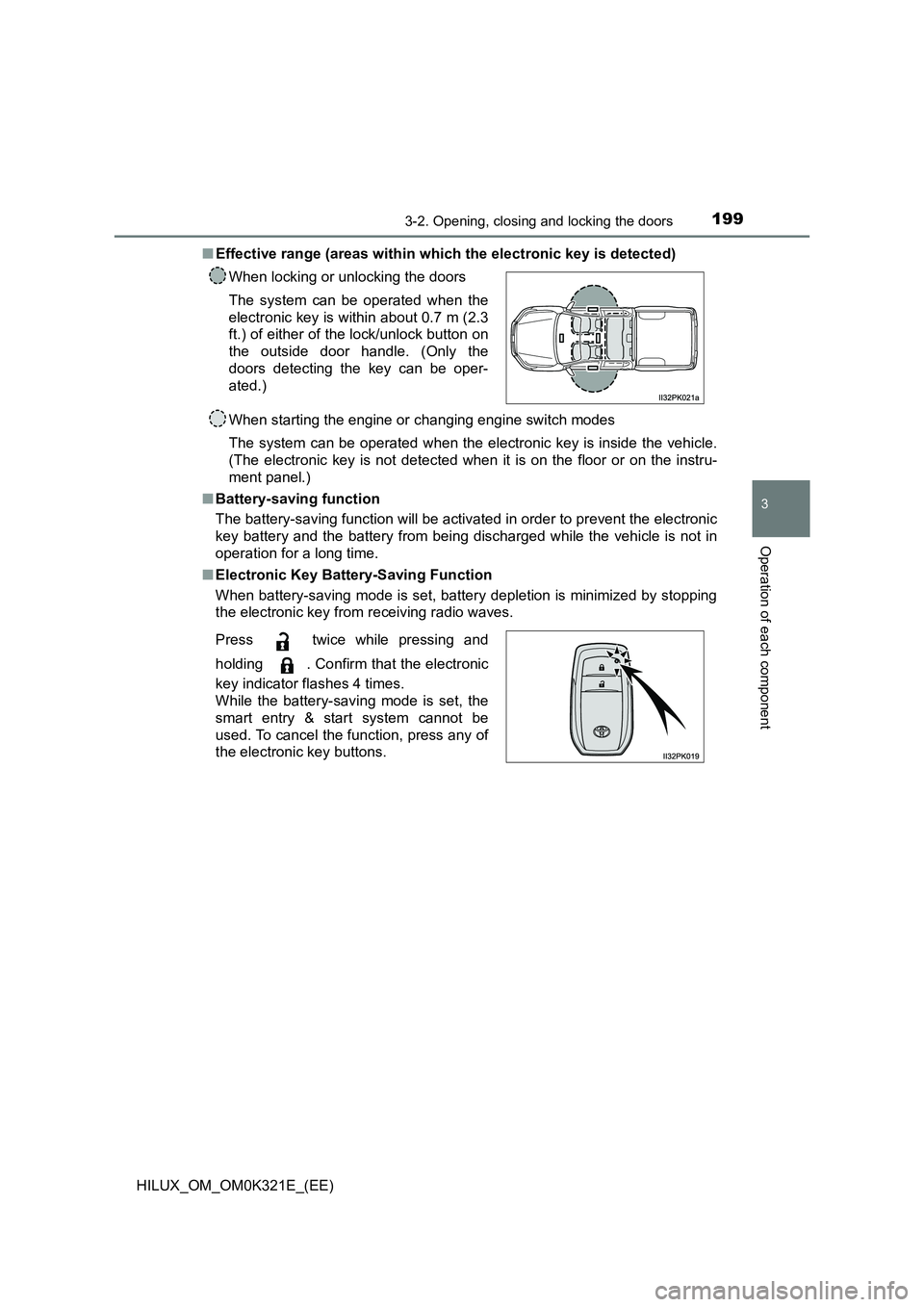
■ Effective range (areas within which the electronic key is detected)
When starting the engine or changing engine switch modes
The system can be operated when the electronic key is inside the vehicle.
(The electronic key is not detected when it is on the floor or on the instru-
ment panel.)
■ Battery-saving function
The battery-saving function will be activated in order to prevent the electronic
key battery and the battery from being discharged while the vehicle is not in
operation for a long time.
■ Electronic Key Battery-Saving Function
When battery-saving mode is set, battery depletion is minimized by stopping
the electronic key from receiving radio waves.
When locking or unlocking the doors
The system can be operated when the
electronic key is within about 0.7 m (2.3
ft.) of either of the lock/unlock button on
the outside door handle. (Only the
doors detecting the key can be oper-
ated.)
Press twice while pressing and
holding . Confirm that the electronic
key indicator flashes 4 times.
While the battery-saving mode is set, the
smart entry & start system cannot be
used. To cancel the function, press any of
the electronic key buttons.
Page 203 of 744
2033-2. Opening, closing and locking the doors
3
Operation of each component
HILUX_OM_OM0K321E_(EE)
■ If the smart entry & start system does not operate properly
● Locking and unlocking the doors: Use the mechanical key. (P. 668)
● Starting the engine: P. 669
■ Electronic key battery depletion
● The standard battery life is 1 to 2 years.
● If the battery becomes low, an alarm will sound in the cabin when the engine
stops.
● As the electronic key always receives radio waves, the battery will become
depleted even if the electronic key is not used. The following symptoms indi-
cate that the electronic key battery may be depleted. Replace the battery
when necessary. ( P. 599)
• The smart entry & start system or the wireless remote control does not
operate.
• The detection area becomes smaller.
• The LED indicator on the key surface does not turn on.
● To avoid serious deterioration, do not leave the electronic key within 1 m (3
ft.) of the following electrical appliances that produce a magnetic field:
•TVs
• Personal computers
• Cellular phones, cordless phones and battery chargers
• Recharging cellular phones or cordless phones
• Table lamps
• Induction cookers
■ If “KEY LEFT INSIDE VEHICLE”/“Key left inside vehicle” is shown on the
multi-information display (if equipped)
An attempt was made to lock the doors using the smart entry & start system
while the electronic key was still inside the vehicle, or an attempt was made
to lock either front door by opening a door and putting the inside lock button
into the lock position, then closing the door by pulling on the outside door
handle with the electronic key still inside the vehicle.
Retrieve the electronic key from the vehicle and lock the doors again.
■ Customization that can be configured at any authorized Toyota retailer
or Toyota authorized repairer, or any reliable repairer
Settings (e.g. smart entry & start system) can be changed.
(Customizable features: P. 718)
■ If the smart entry & start system has been deactivated in a customized
setting
● Locking and unlocking the doors:
Use the wireless remote control or mechanical key. ( P. 188, 668)
● Starting the engine and changing engine switch modes: P. 669
● Stopping the engine: P. 287
Page 249 of 744
2493-5. Opening and closing the windows
3
Operation of each component
HILUX_OM_OM0K321E_(EE)
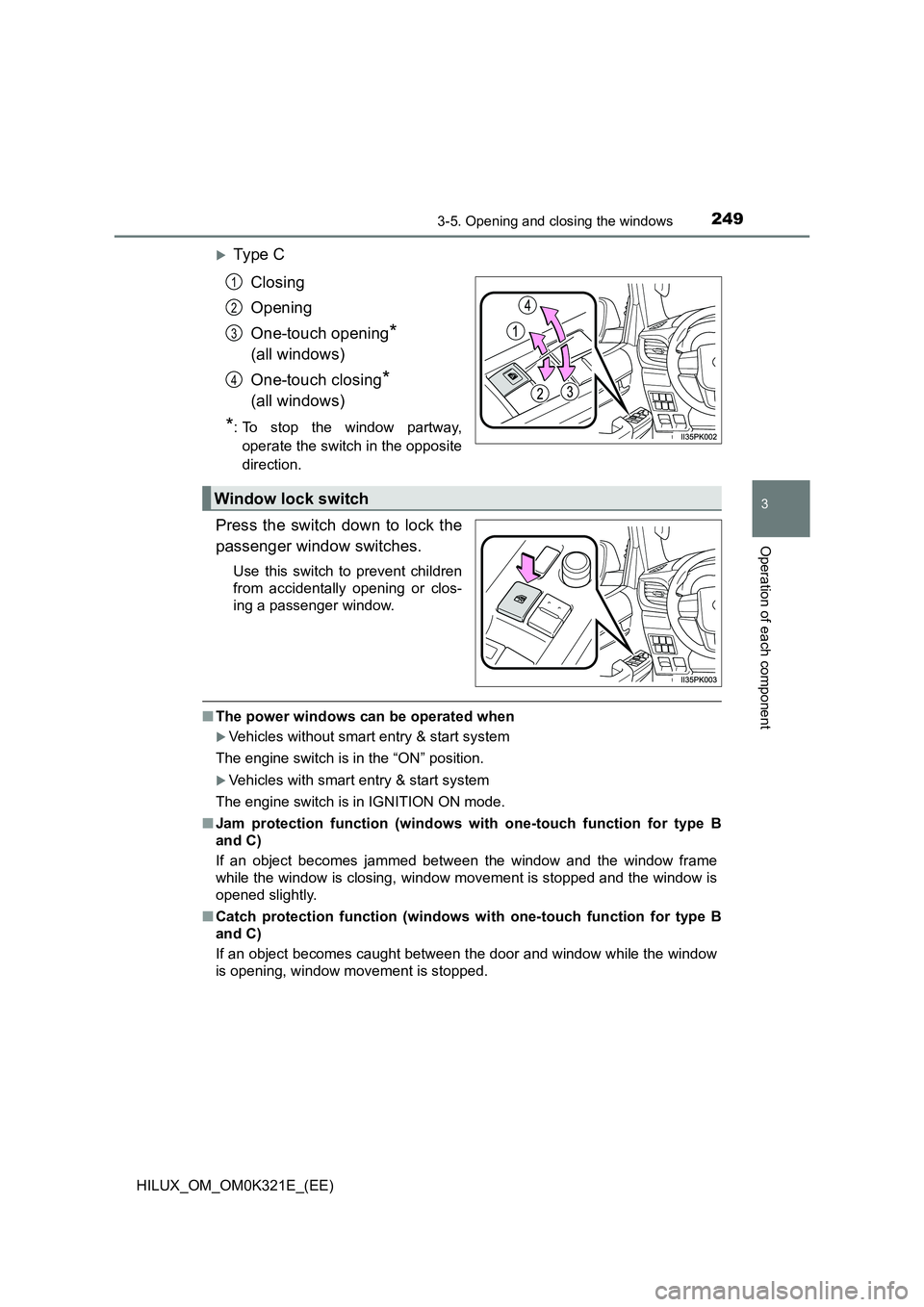
Ty pe C
Closing
Opening
One-touch opening*
(all windows)
One-touch closing*
(all windows)
*: To stop the window partway,
operate the switch in the opposite
direction.
Press the switch down to lock the
passenger window switches.
Use this switch to prevent children
from accidentally opening or clos-
ing a passenger window.
■ The power windows can be operated when
Vehicles without smart entry & start system
The engine switch is in the “ON” position.
Vehicles with smart entry & start system
The engine switch is in IGNITION ON mode.
■ Jam protection function (windows with one-touch function for type B
and C)
If an object becomes jammed between the window and the window frame
while the window is closing, window movement is stopped and the window is
opened slightly.
■ Catch protection function (windows with one-touch function for type B
and C)
If an object becomes caught between the door and window while the window
is opening, window movement is stopped.
1
2
3
4
Window lock switch
Page 255 of 744
2554-1. Before driving
4
Driving
HILUX_OM_OM0K321E_(EE)
Automatic transmission
With the shift lever in D, depress the brake pedal.
If necessary, set the parking brake.
If the vehicle is to be stopped for an extended period of time, shift the shift
lever to P or N. ( P. 293)
Manual transmission
While depressing the clutch pedal, depress the brake pedal.
If necessary, set the parking brake.
If the vehicle is to be stopped for an extended period of time, shift the shift
lever to N. ( P. 300)
Automatic transmission
With the shift lever in D, depress the brake pedal.
Set the parking brake ( P. 307), and shift the shift lever to P
( P. 293).
Vehicles without smart entry & start system:
Turn the engine switch to the “LOCK” position to stop the engine.
Vehicles with smart entry & start system:
Press the engine switch to stop the engine.
Lock the door, making sure that you have the key on your person.
If parking on a hill, block the wheels as needed.
Stopping
Parking the vehicle
1
2
1
2
1
2
3
4
Page 259 of 744
2594-1. Before driving
4
Driving
HILUX_OM_OM0K321E_(EE)
WARNING
Observe the following precautions.
Failure to do so may result in death or serious injury.
■ When starting the vehicle
On vehicles with automatic transmission, always keep your foot on the
brake pedal while stopped with the engine running. This prevents the vehi-
cle from creeping.
■ When driving the vehicle
● Do not drive if you are unfamiliar with the location of the brake and accel-
erator pedals to avoid depressing the wrong pedal.
• Accidentally depressing the accelerator pedal instead of the brake
pedal will result in sudden acceleration that may lead to an accident.
• When backing up, you may twist your body around, leading to a diffi-
culty in operating the pedals. Make sure to operate the pedals properly.
• Make sure to keep a correct driving posture even when moving the
vehicle only slightly. This allows you to depress the brake and accelera-
tor pedals properly.
• Depress the brake pedal using your right foot. Depressing the brake
pedal using your left foot may delay response in an emergency, result-
ing in an accident.
● Do not drive the vehicle over or stop the vehicle near flammable materials.
The exhaust system and exhaust gases can be extremely hot. These hot
parts may cause a fire if there is any flammable material nearby.
● During normal driving, do not turn off the engine. Turning the engine off
while driving will not cause loss of steering or braking control, but the
power assist to these systems will be lost. This will make it more difficult to
steer and brake, so you should pull over and stop the vehicle as soon as it
is safe to do so.
However, in the event of an emergency, such as if it becomes impossible
to stop the vehicle in the normal way: P. 625