2020 TOYOTA HILUX Long mode
[x] Cancel search: Long modePage 65 of 744
651-2. Child safety
1
HILUX_OM_OM0K321E_(EE)
For safety and security
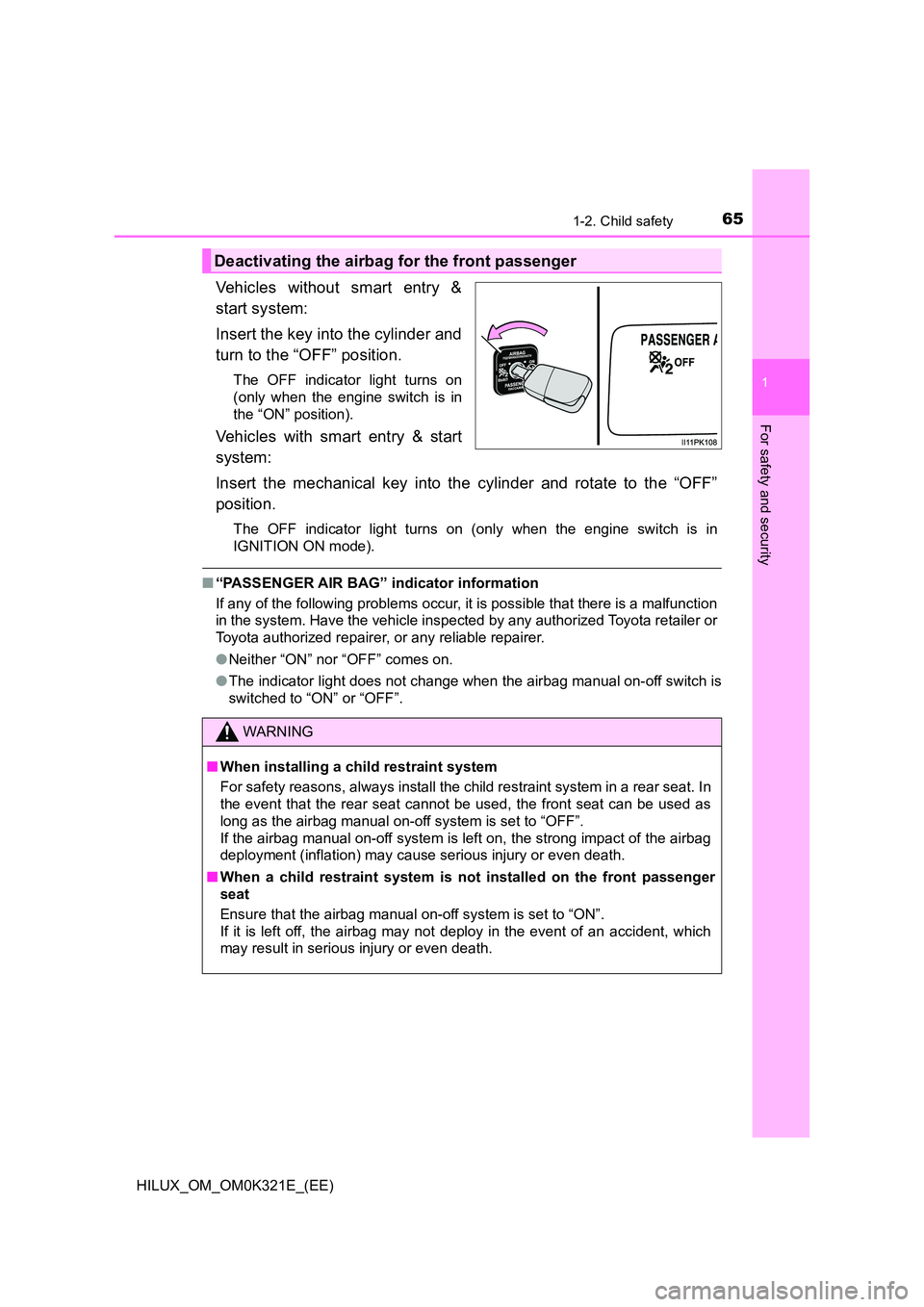
Vehicles without smart entry &
start system:
Insert the key into the cylinder and
turn to the “OFF” position.
The OFF indicator light turns on
(only when the engine switch is in
the “ON” position).
Vehicles with smart entry & start
system:
Insert the mechanical key into the cylinder and rotate to the “OFF”
position.
The OFF indicator light turns on (only when the engine switch is in
IGNITION ON mode).
■ “PASSENGER AIR BAG” indicator information
If any of the following problems occur, it is possible that there is a malfunction
in the system. Have the vehicle inspected by any authorized Toyota retailer or
Toyota authorized repairer, or any reliable repairer.
● Neither “ON” nor “OFF” comes on.
● The indicator light does not change when the airbag manual on-off switch is
switched to “ON” or “OFF”.
Deactivating the airbag for the front passenger
WARNING
■ When installing a child restraint system
For safety reasons, always install the child restraint system in a rear seat. In
the event that the rear seat cannot be used, the front seat can be used as
long as the airbag manual on-off system is set to “OFF”.
If the airbag manual on-off system is left on, the strong impact of the airbag
deployment (inflation) may cause serious injury or even death.
■ When a child restraint system is not installed on the front passenger
seat
Ensure that the airbag manual on-off system is set to “ON”.
If it is left off, the airbag may not deploy in the event of an accident, which
may result in serious injury or even death.
Page 148 of 744
1482. Instrument cluster
HILUX_OM_OM0K321E_(EE)
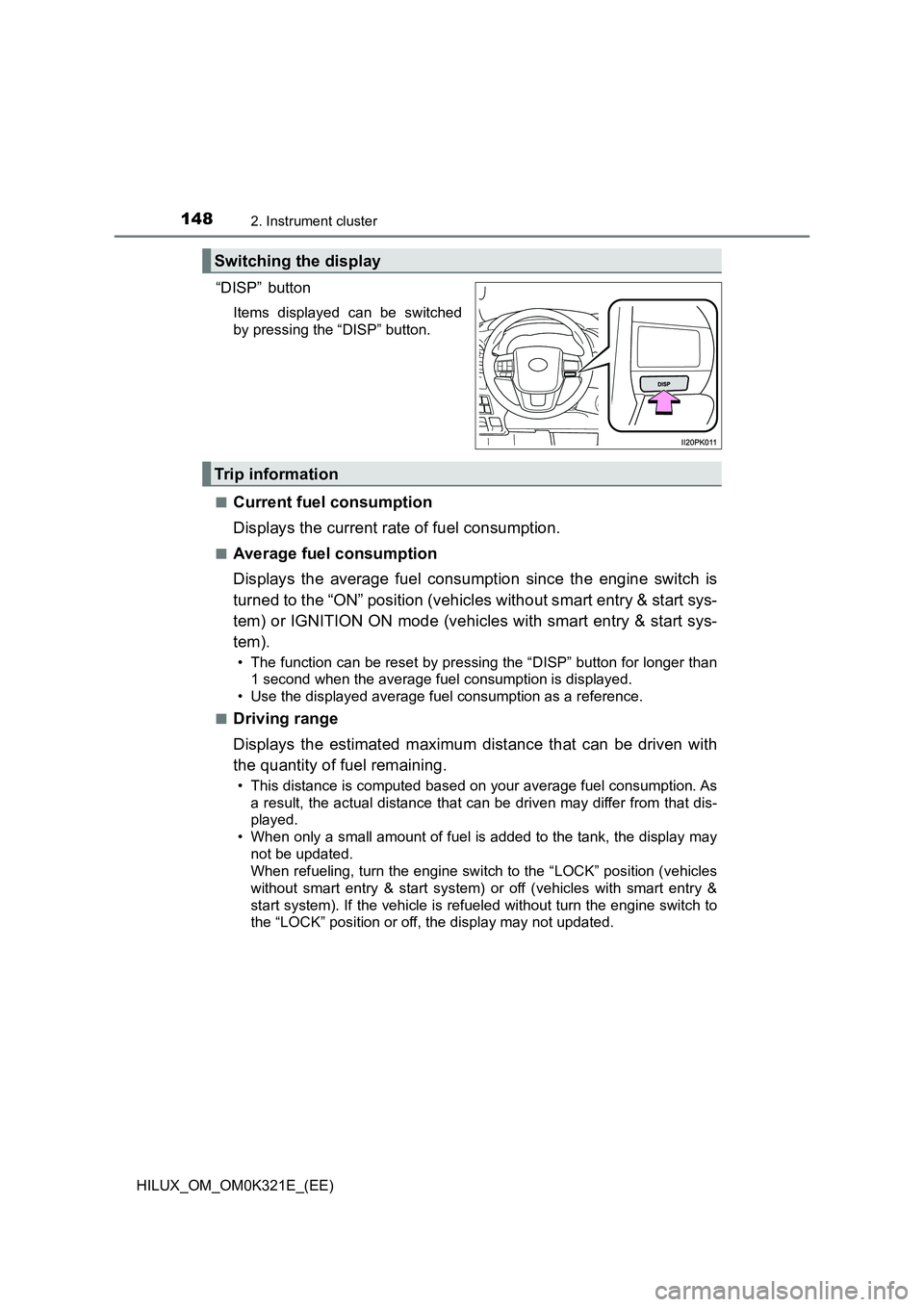
“DISP” button
Items displayed can be switched
by pressing the “DISP” button.
■Current fuel consumption
Displays the current rate of fuel consumption.
■Average fuel consumption
Displays the average fuel consumption since the engine switch is
turned to the “ON” position (vehicles without smart entry & start sys-
tem) or IGNITION ON mode (vehicles with smart entry & start sys-
tem).
• The function can be reset by pressing the “DISP” button for longer than
1 second when the average fuel consumption is displayed.
• Use the displayed average fuel consumption as a reference.
■Driving range
Displays the estimated maximum distance that can be driven with
the quantity of fuel remaining.
• This distance is computed based on your average fuel consumption. As
a result, the actual distance that can be driven may differ from that dis-
played.
• When only a small amount of fuel is added to the tank, the display may
not be updated.
When refueling, turn the engine switch to the “LOCK” position (vehicles
without smart entry & start system) or off (vehicles with smart entry &
start system). If the vehicle is refueled without turn the engine switch to
the “LOCK” position or off, the display may not updated.
Switching the display
Trip information
Page 149 of 744

1492. Instrument cluster
2
Instrument cluster
HILUX_OM_OM0K321E_(EE)
■Average vehicle speed
Displays the average vehicle speed since the engine switch is
turned to the “ON” position (vehicles without smart entry & start sys-
tem) or IGNITION ON mode (vehicles with smart entry & start sys-
tem).
The function can be reset by pressing the “DISP” button for longer than
1 second when the average vehicle speed is displayed.
■Elapsed time
Displays the elapsed time after the engine switch is turned to the
“ON” position (vehicles without smart entry & start system) or IGNI-
TION ON mode (vehicles with smart entry & start system).
• When the engine switch is turned on, time is counted from 00:00. When
the time exceeds 99:59, the counter returns to 00:00.
• The function can be reset by pressing the “DISP” button for longer than
1 second when the elapsed time is displayed.
■Eco Driving Indicator Zone Display
Displays Zone of Eco driving with current Eco driving ratio based on
acceleration. ( P. 140)
■Display off
A blank screen is displayed.
■ Setting display automatic cancelation
In the following situations, setting display in which the settings can be
changed through the “DISP” button will automatically be turned off.
● If a warning message appears while the setting display is displayed
● When the vehicle begins to move while the setting display is displayed
■ When disconnecting and reconnecting battery terminals
The trip information data and settings will be reset.
■ Liquid crystal display
Small spots or light spots may appear on the display. This phenomenon is
characteristic of liquid crystal displays, and there is no problem continuing to
use the display.
■ Customization
Settings (e.g. on/off operation of the Eco Driving Indicator Light) can be
changed.
(Customizable features: P. 718)
Page 167 of 744

1673-1. Key information
3
Operation of each component
HILUX_OM_OM0K321E_(EE)
To take out the mechanical key,
slide the release lever and take
the key out.
The mechanical key can only be
inserted in one direction, as the
key only has grooves on one side.
If the key cannot be inserted in a
lock cylinder, turn it over and re-
attempt to insert it.
After using the mechanical key, store it in the electronic key. Carry the
mechanical key together with the electronic key. If the electronic key bat-
tery is depleted or the entry func tion does not operate properly, you will
need the mechanical key. ( P. 668)
■Panic mode (if equipped)
■ When required to leave the vehicle’s key with a parking attendant
Lock the glove box as circumstances demand. ( P. 541)
Vehicles without smart entry & start system
Carry the master key for your own use and provide the attendant with the
valet key.
Vehicles with smart entry & start system
Remove the mechanical key for your own use and provide the attendant with
the electronic key only. If there is the supplementary key, carry the supple-
mentary key for your own use as well as the mechanical key.
Using the mechanical key (vehicles with smart entry & start sys-
tem)
When is pressed for longer than
about one second, an alarm will sound
intermittently and the vehicle lights will
flash to deter any person from trying to
break into or damage your vehicle.
To stop the alarm, press any button on the
wireless remote control.
Page 199 of 744
1993-2. Opening, closing and locking the doors
3
Operation of each component
HILUX_OM_OM0K321E_(EE)
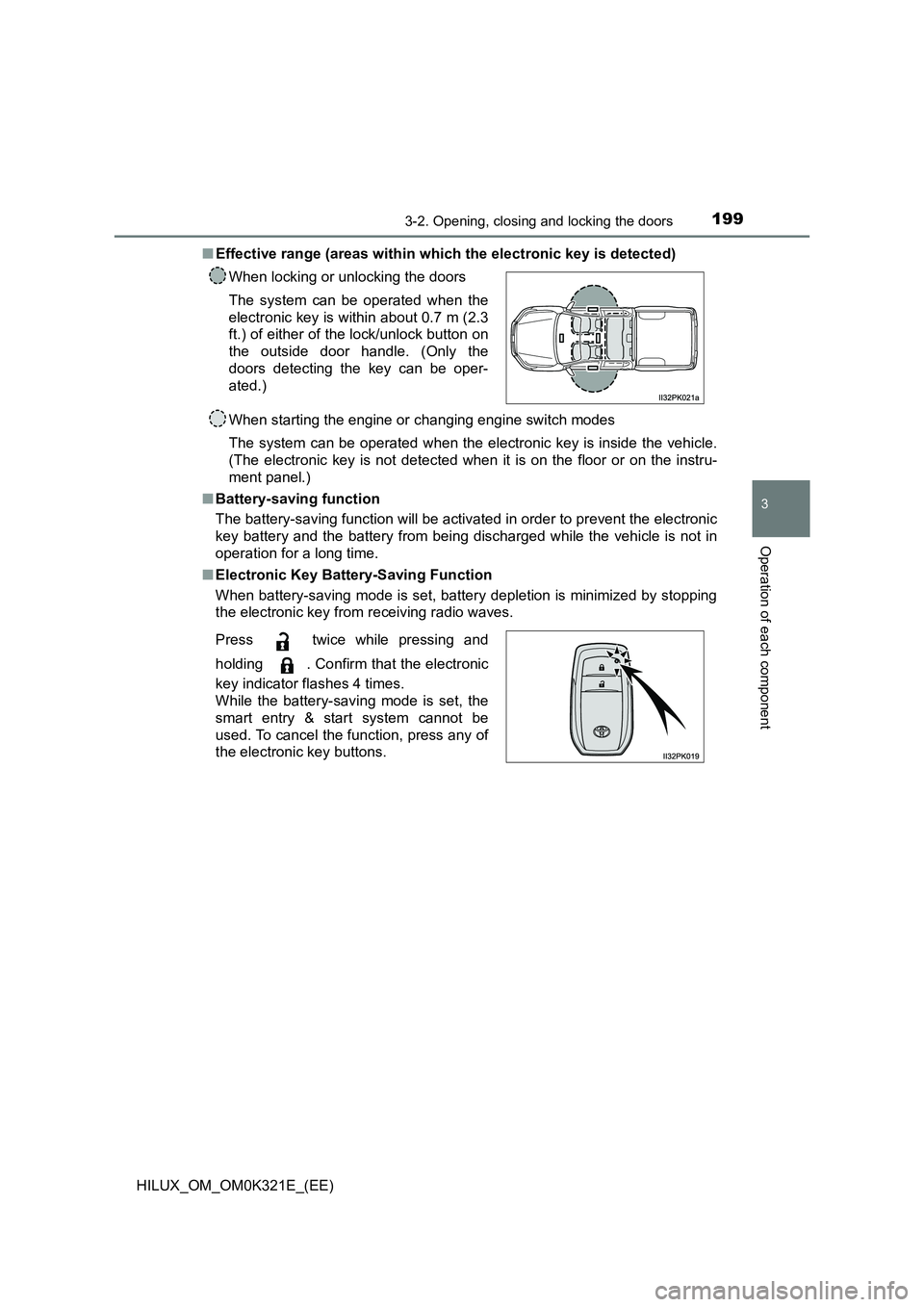
■ Effective range (areas within which the electronic key is detected)
When starting the engine or changing engine switch modes
The system can be operated when the electronic key is inside the vehicle.
(The electronic key is not detected when it is on the floor or on the instru-
ment panel.)
■ Battery-saving function
The battery-saving function will be activated in order to prevent the electronic
key battery and the battery from being discharged while the vehicle is not in
operation for a long time.
■ Electronic Key Battery-Saving Function
When battery-saving mode is set, battery depletion is minimized by stopping
the electronic key from receiving radio waves.
When locking or unlocking the doors
The system can be operated when the
electronic key is within about 0.7 m (2.3
ft.) of either of the lock/unlock button on
the outside door handle. (Only the
doors detecting the key can be oper-
ated.)
Press twice while pressing and
holding . Confirm that the electronic
key indicator flashes 4 times.
While the battery-saving mode is set, the
smart entry & start system cannot be
used. To cancel the function, press any of
the electronic key buttons.
Page 272 of 744

2724-1. Before driving
HILUX_OM_OM0K321E_(EE)
■Important points regarding stability
Vehicle movement resulting from uneven road surfaces and strong
crosswinds will affect handling. The vehicle may also be rocked by
passing buses or large trucks. Frequently check behind when mov-
ing alongside such vehicles. As soon as such vehicle movement
occurs, immediately start to decelerate smoothly by slowly applying
the brakes. Always steer the vehicle straight ahead while braking.
■Passing other vehicles
Consider the total combined length of your vehicle and trailer and
ensure that the vehicle-to-vehicle distance is sufficient before exe-
cuting lane changes.
■Transmission information
Vehicles with manual transmission: To maintain engine braking effi-
ciency when using engine braking, do not use 5th gear and 6th
gear.
Vehicles with automatic transmission: To maintain engine braking
efficiency when using engine braking, do not use the transmission
in D. Transmission shift range position must be in 4 or lower, in S
mode.
■If the engine overheats
Towing a loaded trailer up a long, steep incline in temperatures
exceeding 30 C (85F) may result in the engine overheating. If the
engine coolant temperature gauge indicates that the engine is over-
heating, turn the air conditioning off immediately, leave the road and
stop the vehicle in a safe place. ( P. 678)
■When parking the vehicle
Always place wheel chocks under the wheels of both the vehicle
and trailer. Firmly set the parking brake and shift the shift lever to P
for automatic transmissions, and 1 or R for manual transmissions.
Page 273 of 744
2734-1. Before driving
4
Driving
HILUX_OM_OM0K321E_(EE)
WARNING
Follow all the instructions described in this section. Failure to do so could
cause an accident resulting in death or serious injury.
■ Trailer towing precautions
When towing, make sure that none of the weight limits are exceeded.
( P. 2 7 4 )
■ Vehicle speed in towing
Observe the legal maximum speeds for trailer towing.
■ Before descending hills or long declines
Reduce speed and downshift. However, never downshift suddenly while
descending steep or long down hill grades.
■ Operation of the brake pedal
Do not hold the brake pedal depressed often or for long periods of time.
Doing so may result in the brake overheating or reduce braking effects.
■ To avoid accident or injury
● The gross combination mass (sum of your vehicle mass plus its load and
the total trailer mass) must not exceed the following:
Single-cab models
5530 kg (12192 lb.): Pre Runner
5850 kg (12897 lb.): 4WD models
Smart-cab models
5850 kg (12897 lb.)
Double-cab models
5850 kg (12897 lb.): Models for model code destination W* except Pre
Runner for Israel and Turkey
*: See “Checking your vehicle’s model” if you are not sure of which model
your vehicle is. ( P. 1 2 ) .
● Do not use the following systems when trailer towing.
• Cruise control (if equipped)
• Dynamic radar cruise control (if equipped)
Page 289 of 744
2894-2. Driving procedures
4
Driving
HILUX_OM_OM0K321E_(EE)
Check that “TURN OFF VEHICLE”/“Turn off vehicle” on the multi-
information display is off.
■ Note for the electronic key
Carry the electronic key on your person, for example in your pocket.
The smart entry & start system does not operate properly if the electronic key
is on the floor or the instrument panel, or in the door pockets, cup holders or
auxiliary boxes.
■ Auto power off function
Vehicles with automatic transmission
If the vehicle is left in ACCESSORY mode for more than 20 minutes or IGNI-
TION ON mode (the engine is not running) for more than an hour with the
shift lever in P, the engine switch will automatically turn off. However, this
function cannot entirely prevent battery discharge. Do not leave the vehicle
with the engine switch in ACCESSORY or IGNITION ON mode for long peri-
ods of time when the engine is not running.
Vehicles with manual transmission
If the vehicle is left in ACCESSORY mode for more than 20 minutes or IGNI-
TION ON mode (the engine is not running) for more than an hour, the engine
switch will automatically turn off. However, this function cannot entirely pre-
vent battery discharge. Do not leave the vehicle with the engine switch in
ACCESSORY or IGNITION ON mode for long periods of time when the
engine is not running.
■ Operation of the engine switch
If the switch is not pressed shortly and firmly, the engine switch mode may
not change or the engine may not start.
■ Electronic key battery depletion
P. 203
■ Conditions affecting operation
P. 201
■ Note for the entry function
P. 202
■ If the engine does not start
The engine immobilizer system may not have been deactivated. ( P. 105)
Contact any authorized Toyota retailer or Toyota authorized repairer, or any
reliable repairer.
4