2020 TOYOTA HILUX clutch
[x] Cancel search: clutchPage 288 of 744
2884-2. Driving procedures
HILUX_OM_OM0K321E_(EE)
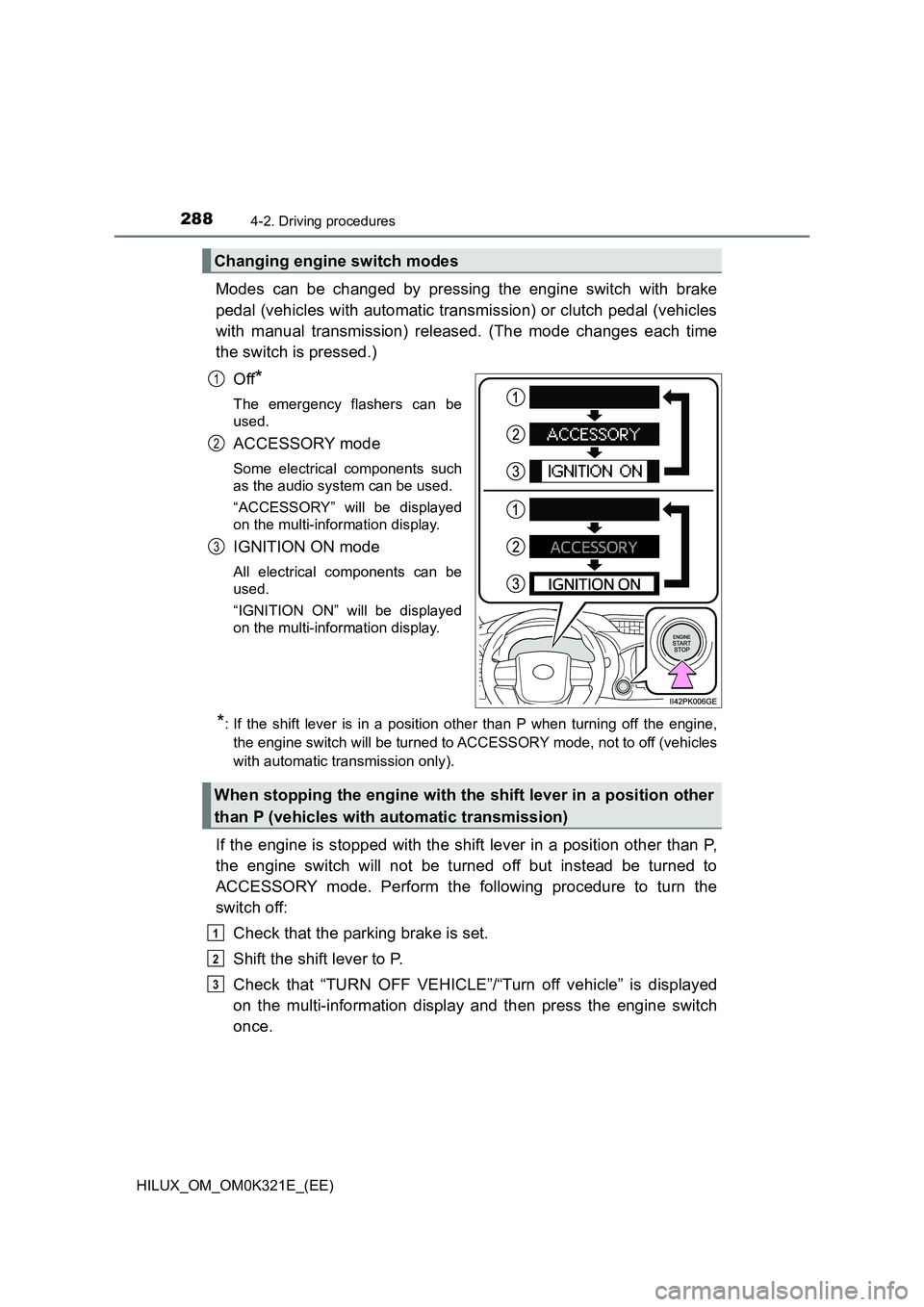
Modes can be changed by pressing the engine switch with brake
pedal (vehicles with automatic transmission) or clutch pedal (vehicles
with manual transmission) released. (The mode changes each time
the switch is pressed.)
Off*
The emergency flashers can be
used.
ACCESSORY mode
Some electrical components such
as the audio system can be used.
“ACCESSORY” will be displayed
on the multi-information display.
IGNITION ON mode
All electrical components can be
used.
“IGNITION ON” will be displayed
on the multi-information display.
*: If the shift lever is in a position other than P when turning off the engine,
the engine switch will be turned to ACCESSORY mode, not to off (vehicles
with automatic transmission only).
If the engine is stopped with the shift lever in a position other than P,
the engine switch will not be turned off but instead be turned to
ACCESSORY mode. Perform the following procedure to turn the
switch off:
Check that the parking brake is set.
Shift the shift lever to P.
Check that “TURN OFF VEHICLE”/“Turn off vehicle” is displayed
on the multi-information display and then press the engine switch
once.
Changing engine switch modes
1
2
3
When stopping the engine with the shift lever in a position other
than P (vehicles with automatic transmission)
1
2
3
Page 291 of 744
2914-2. Driving procedures
4
Driving
HILUX_OM_OM0K321E_(EE)
WARNING
■When starting the engine
Always start the engine while sitting in the driver’s seat. Do not depress the
accelerator pedal while starting the engine under any circumstances.
Doing so may cause an accident resulting in death or serious injury.
■ Caution while driving
If engine failure occurs while the vehicle is moving, do not lock or open the
doors until the vehicle reaches a safe and complete stop. Activation of the
steering lock in this circumstance may lead to an accident, resulting in
death or serious injury.
■ Stopping the engine in an emergency
● If you want to stop the engine in an emergency while driving the vehicle,
press and hold the engine switch for more than 2 seconds, or press it
briefly 3 times or more in succession. ( P. 625)
However, do not touch the engine switch while driving except in an emer-
gency. If the engine switch is pressed while the vehicle is moving, the
warning message “PUSH AND HOLD ENGINE SWITCH FOR EMER-
GENCY STOP”/“Push and hold engine switch for emergency stop” is dis-
played on the multi-information display and a buzzer sounds. Turning the
engine off while driving will not cause loss of steering or braking control,
but the power assist to these systems will be lost. This will make it more
difficult to steer and brake, so you should pull over and stop the vehicle as
soon as it is safe to do so.
● To restart the engine after turning off the engine while driving, shift the shift
lever to N (automatic transmission) or depress the clutch pedal (manual
transmission) and then press the engine switch.
Page 300 of 744
3004-2. Driving procedures
HILUX_OM_OM0K321E_(EE)
Manual transmission
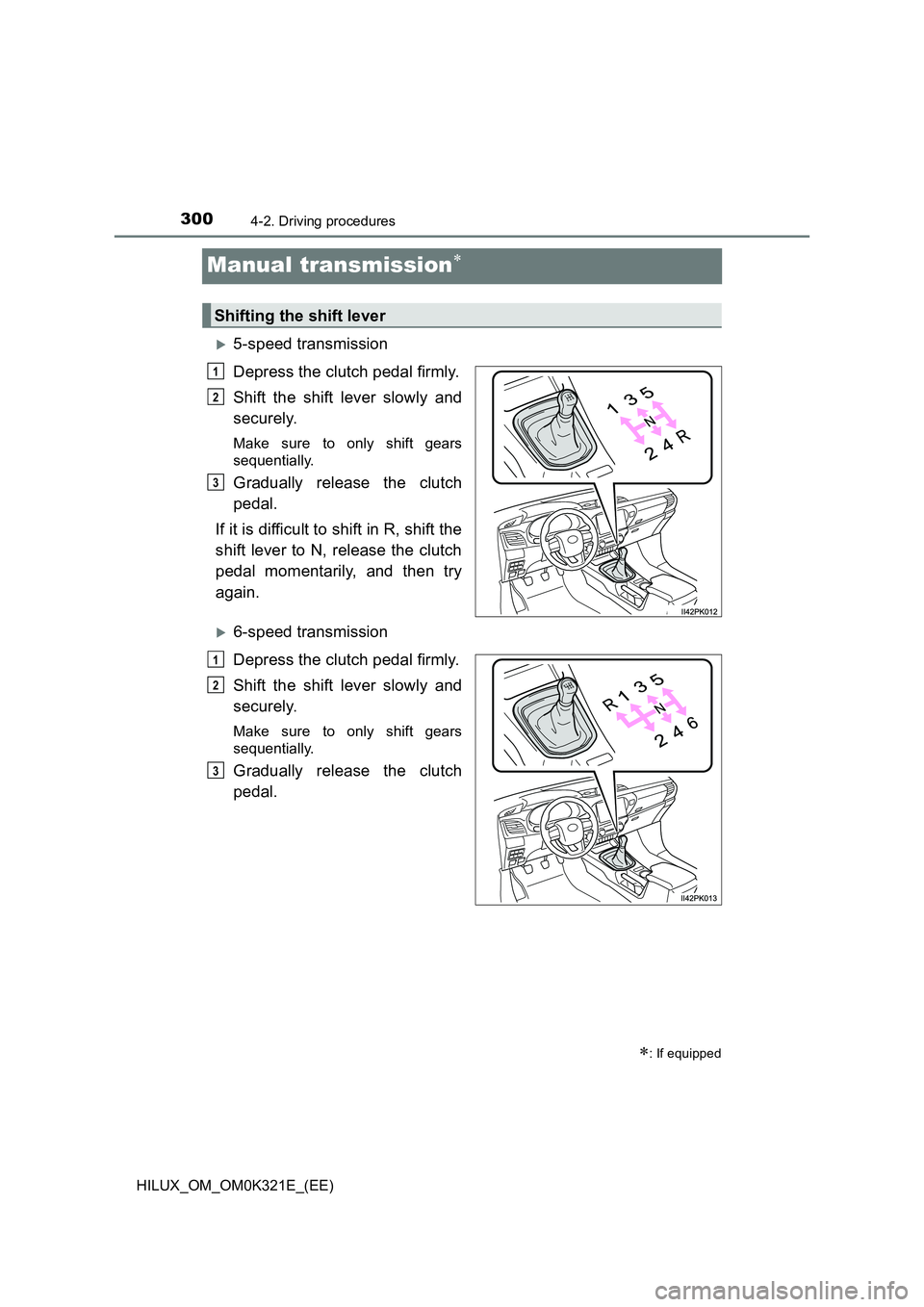
5-speed transmission
Depress the clutch pedal firmly.
Shift the shift lever slowly and
securely.
Make sure to only shift gears
sequentially.
Gradually release the clutch
pedal.
If it is difficult to shift in R, shift the
shift lever to N, release the clutch
pedal momentarily, and then try
again.
6-speed transmission
Depress the clutch pedal firmly.
Shift the shift lever slowly and
securely.
Make sure to only shift gears
sequentially.
Gradually release the clutch
pedal.
: If equipped
Shifting the shift lever
1
2
3
1
2
3
Page 305 of 744
3054-2. Driving procedures
4
Driving
HILUX_OM_OM0K321E_(EE)
■ Operation of the air conditioning system in Eco drive mode (vehicles
with automatic air conditioning system)
Eco drive mode controls the heating/cooling operations and fan speed of the
air conditioning system to enhance fuel efficiency ( P. 531). To improve air
conditioning performance, adjust the fan speed or turn off Eco drive mode.
■ Deactivation of the driving mode
● Eco drive mode will not be canceled until the “ECO MODE” button is
pressed, even if the engine is turned off after driving in Eco drive mode.
● Power mode will be canceled if the engine is turned off after driving in power
mode.
■ Reverse warning buzzer (6-speed transmission)
A buzzer will sound to alert the driver if the shift lever is shifted to the R posi-
tion.
NOTICE
■ To prevent damage to the vehicle
● Shift the shift lever to R only when the vehicle is stationary.
● Do not rest your hand on or hold the shift lever any time other than when
shifting.
● In order not to cause the engine to overrev, make sure to only shift gears
sequentially.
● Do not release the clutch pedal suddenly, as doing so may cause damage
to the clutch or transmission.
Page 379 of 744

3794-5. Using the driving support systems
4
Driving
HILUX_OM_OM0K321E_(EE)
■Dynamic radar cruise control can be set when
● The shift lever is in D. (Vehicles with automatic transmission)
● The shift lever is in range 2nd or higher. (Vehicles with manual transmission)
● Depending on the control mode, this item can be set at the following
speeds.
• Vehicle-to-vehicle distance control mode: Approximately 30 km/h (20
mph) or more
• Constant speed control mode: Approximately 30 km/h (20 mph) or more
■ Accelerating after setting the vehicle speed
The vehicle can accelerate by operating the accelerator pedal. After acceler-
ating, the set speed resumes. However, during vehicle-to-vehicle distance
control mode, the vehicle speed may decrease below the set speed in order
to maintain the distance to the preceding vehicle.
■ Shift position selection (vehicles with manual transmission)
Select a shift position according to the vehicle speed. If the engine speed is
too high or too low, control may be automatically canceled.
■ Automatic cancelation of vehicle-to-vehicle distance control mode
Vehicle-to-vehicle distance control mode is automatically canceled in the fol-
lowing situations.
● Actual vehicle speed falls below approximately 25 km/h (16 mph).
● VSC is activated.
● TRC/A-TRC is activated for a period of time.
● When the VSC, TRC/A-TRC system is turned off.
● The sensor cannot detect correctly because it is covered in some way.
● Pre-collision braking is activated.
● When the shift lever is in N or the clutch pedal is depressed for a certain
amount of time or more. (Vehicles with manual transmission)
● 4WD models: Switching the transfer mode is not completed within 5 sec-
onds while the cruise control system is on.
If vehicle-to-vehicle distance control mode is automatically canceled for any
reasons other than the above, there may be a malfunction in the system.
Contact any authorized Toyota retailer or Toyota authorized repairer, or any
reliable repairer.
Page 380 of 744
3804-5. Using the driving support systems
HILUX_OM_OM0K321E_(EE)
■ Automatic cancelation of constant speed control mode
Constant speed control mode is automatically canceled in the following situa-
tions:
● Actual vehicle speed is more than approximately 16 km/h (10 mph) below
the set vehicle speed.
● Actual vehicle speed falls below approximately 30 km/h (20 mph).
● VSC is activated.
● TRC/A-TRC is activated for a period of time.
● When the VSC, TRC/A-TRC system is turned off.
● Pre-collision braking is activated.
● When the shift lever is in N or the clutch pedal is depressed for a certain
amount of time or more. (Vehicles with manual transmission)
● 4WD models: Switching the transfer mode is not completed within 5 sec-
onds while the cruise control system is on.
If constant speed control mode is automatically canceled for any reasons
other than the above, there may be a malfunction in the system. Contact any
authorized Toyota retailer or Toyota authorized repairer, or any reliable
repairer.
■ The Dynamic Radar Cruise Control with Road Sign Assist may not oper-
ate properly when
As the Dynamic Radar Cruise Control with Road Sign Assist may not oper-
ate properly in conditions in which RSA may not operate or detect correctly
( P. 365), when using this function, make sure to check the speed limit
sign displayed.
In the following situations, the set speed may not be changed to the recog-
nized speed limit by pushing the lever up or down.
● If speed limit information is not available
● When the recognized speed limit is the same as the set speed
● When the recognized speed limit is outside of the speed range that the
dynamic radar cruise control system can operate
■ Brake operation
A brake operation sound may be heard and the brake pedal response may
change, but these are not malfunctions.
■ Warning messages and buzzers for dynamic radar cruise control
Warning messages and buzzers are used to indicate a system malfunction or
to inform the driver of the need for caution while driving. If a warning message
is shown on the multi-information display, read the message and follow the
instructions. ( P. 337, 643)
Page 384 of 744
3844-5. Using the driving support systems
HILUX_OM_OM0K321E_(EE)
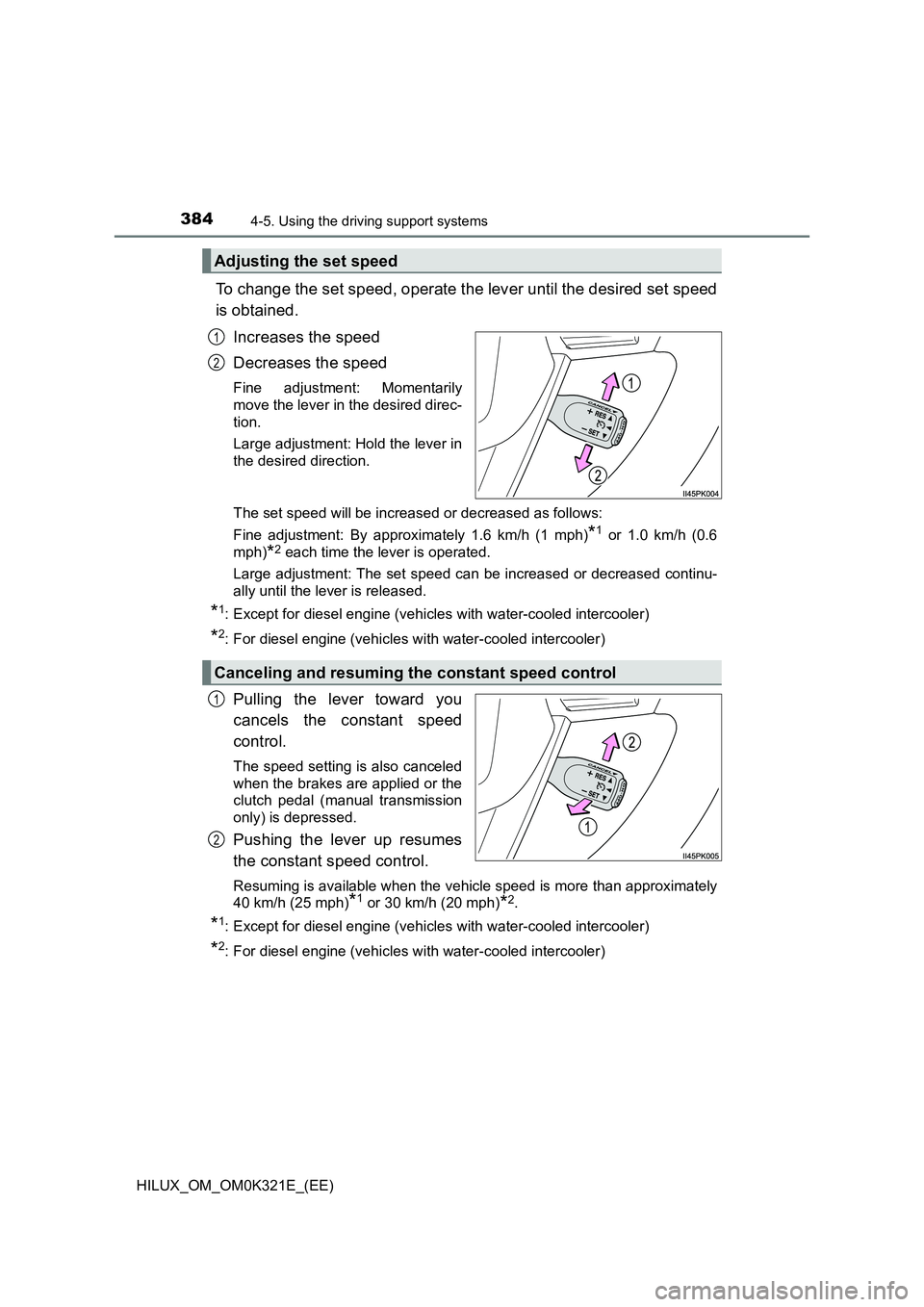
To change the set speed, operate the lever until the desired set speed
is obtained.
Increases the speed
Decreases the speed
Fine adjustment: Momentarily
move the lever in the desired direc-
tion.
Large adjustment: Hold the lever in
the desired direction.
The set speed will be increased or decreased as follows:
Fine adjustment: By approximately 1.6 km/h (1 mph)*1 or 1.0 km/h (0.6
mph)*2 each time the lever is operated.
Large adjustment: The set speed can be increased or decreased continu-
ally until the lever is released.
*1: Except for diesel engine (vehicles with water-cooled intercooler)
*2: For diesel engine (vehicles wi th water-cooled intercooler)
Pulling the lever toward you
cancels the constant speed
control.
The speed setting is also canceled
when the brakes are applied or the
clutch pedal (manual transmission
only) is depressed.
Pushing the lever up resumes
the constant speed control.
Resuming is available when the vehicle speed is more than approximately
40 km/h (25 mph)*1 or 30 km/h (20 mph)*2.
*1: Except for diesel engine (vehicles with water-cooled intercooler)
*2: For diesel engine (vehicles wi th water-cooled intercooler)
Adjusting the set speed
1
2
Canceling and resuming the constant speed control
1
2
Page 404 of 744
4044-5. Using the driving support systems
HILUX_OM_OM0K321E_(EE)
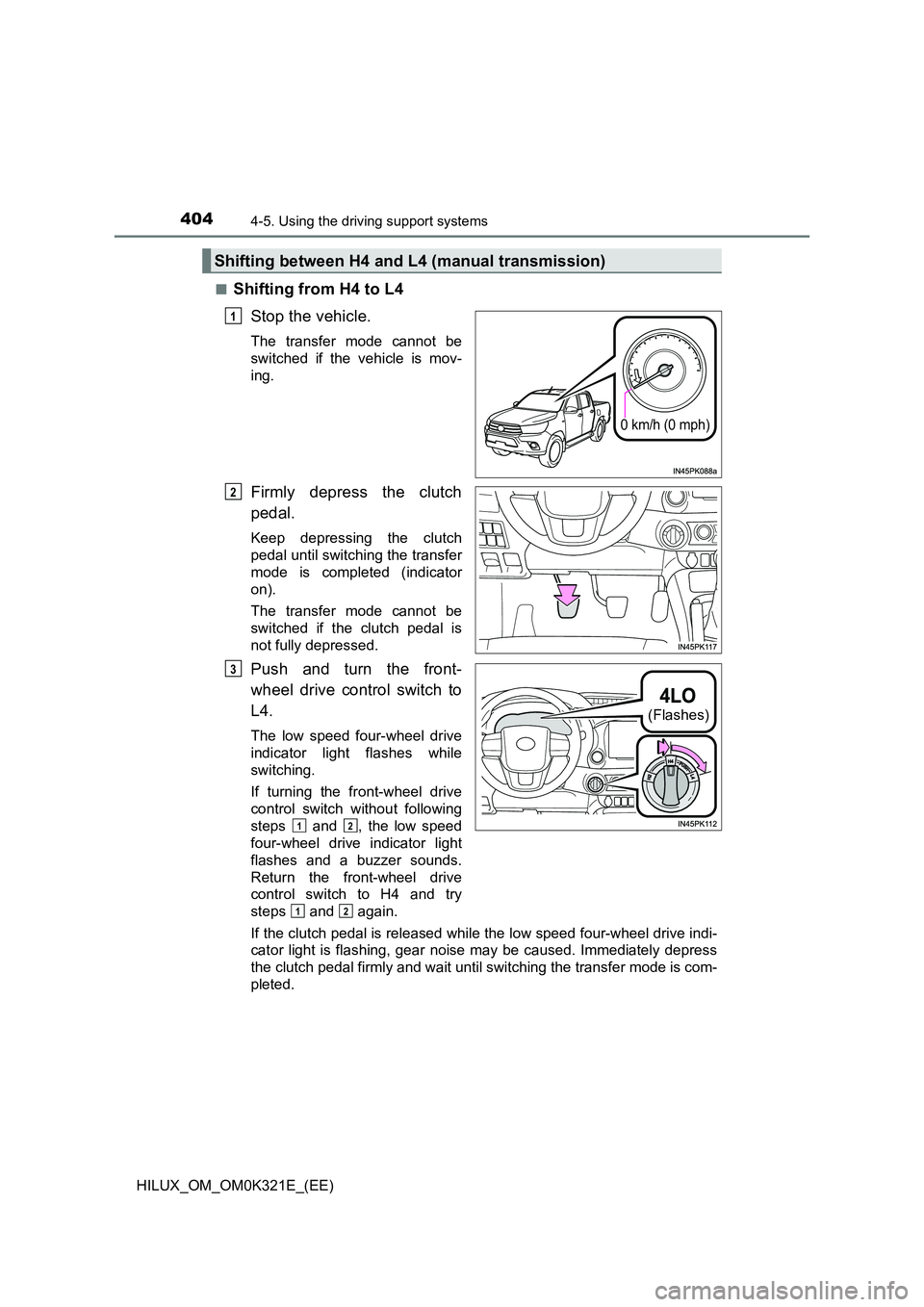
■Shifting from H4 to L4
Stop the vehicle.
The transfer mode cannot be
switched if the vehicle is mov-
ing.
Firmly depress the clutch
pedal.
Keep depressing the clutch
pedal until switching the transfer
mode is completed (indicator
on).
The transfer mode cannot be
switched if the clutch pedal is
not fully depressed.
Push and turn the front-
wheel drive control switch to
L4.
The low speed four-wheel drive
indicator light flashes while
switching.
If turning the front-wheel drive
control switch without following
steps and , the low speed
four-wheel drive indicator light
flashes and a buzzer sounds.
Return the front-wheel drive
control switch to H4 and try
steps and again.
If the clutch pedal is released while the low speed four-wheel drive indi-
cator light is flashing, gear noise may be caused. Immediately depress
the clutch pedal firmly and wait until switching the transfer mode is com-
pleted.
Shifting between H4 and L4 (manual transmission)
0 km/h (0 mph)
1
2
(Flashes)
3
12
12