Page 3 of 596

3
1
8 7
6
5
4
3
2
9
4RUNNER (U)4-1. Before driving
Driving the vehicle ............. 176
Cargo and luggage............ 186
Vehicle load limits ............. 191
Trailer towing..................... 192
Dinghy towing.................... 208
4-2. Driving procedures Engine (ignition) switch (vehicles without a
smart key system) ........... 209
Engine (ignition) switch (vehicles with a
smart key system) ........... 212
Automatic transmission ..... 218
Turn signal lever................ 223
Parking brake .................... 224
4-3. Operating the lights and wipers
Headlight switch ................ 225
Automatic High Beam ....... 231
Fog light switch ................. 235
Windshield wipers and washer ............................ 237
Rear window wiper and washer ............................ 240
4-4. Refueling Opening the fuel tank cap .................................. 243 4-5. Using the driving
support systems
Toyota Safety Sense P ...... 246
PCS (Pre-Collision System)..... 254
LDA (Lane Departure Alert)..... 265
Dynamic radar cruise control.............................. 273
Intuitive parking assist ....... 286
Four-wheel drive system (part-time 4WD
models)............................ 293
Four-wheel drive system (full-time 4WD
models)............................ 297
Active traction control system ............................. 301
AUTO LSD system ............ 303
Rear differential lock system ............................. 305
Downhill assist control system ............................. 308
Crawl Control ..................... 311
Multi-terrain Select............. 314
Driving assist systems ....... 321
4-6. Driving tips Winter driving tips .............. 330
Off-road precautions .......... 334
4Driving
Page 18 of 596
18Pictorial index
4RUNNER (U)
■Switches
Outside rear view mirror switches . . . . . . . . . . . . . . . . . . . . P. 160
Instrument panel light control dial . . . . . . . . . . . . . . . . . . . . . P. 89
Automatic High Beam switch . . . . . . . . . . . . . . . . . . . . . . . . P. 231
Windshield wiper de-icer switch
*1. . . . . . . . . . . . . . . . P. 342, 349
Automatic running boards switch
*1 . . . . . . . . . . . . . . . . . . P. 128
Power outlet main switch
*1 . . . . . . . . . . . . . . . . . . . . . . . . . P. 372
Window lock switch . . . . . . . . . . . . . . . . . . . . . . . . . . . . . . . . P. 162
Door lock switches . . . . . . . . . . . . . . . . . . . . . . . . . . . . . . . . P. 113
Power window switches . . . . . . . . . . . . . . . . . . . . . . . . . . . . P. 162
Driving position memory switches
*1. . . . . . . . . . . . . . . . . . P. 149
1
2
3
4
5
6
7
8
9
10
Page 85 of 596
852. Instrument cluster
2
Instrument cluster
4RUNNER (U)
The indicators inform the driver of the operating state of the vehicle’s
various systems.
Indicators
Turn signal indicator
( P. 223)*1“TRAC OFF” indicator
(P. 323)
(U.S.A.)
Headlight indicator
(P. 225)*1, 2 Slip indicator ( P. 322)
(Canada)
Tail light indicator
(P. 225) *1VSC OFF indicator
(P. 323)
Headlight high beam
indicator ( P. 228)
Automatic High Beam
indicator ( P. 231)
Front fog light indicator
( P. 235)
*5Cruise control indicator
(P. 273)
*4Security indicator
(P. 76, 79)*5Dynamic radar cruise
control indicator
(P. 273)
*1, 3Eco Driving Indicator
Light ( P. 97)*5Cruise control set indica-
tor (P. 273)
(U.S.A.)
Parking brake indicator
(P. 224)*1, 6PCS warning light
(P. 254)
(Canada)
Parking brake indicator
(P. 224)
“AIR BAG
ON/OFF”
indicator
(P. 46)*1, 4
(U.S.A.)
“AIR BAG
ON/OFF”
indicator
(P. 46)*1, 4
(Canada)
Page 175 of 596

175
Driving4
4RUNNER (U)4-1. Before driving
Driving the vehicle ............. 176
Cargo and luggage ........... 186
Vehicle load limits ............. 191
Trailer towing..................... 192
Dinghy towing ................... 208
4-2. Driving procedures Engine (ignition) switch (vehicles without a
smart key system) ........... 209
Engine (ignition) switch (vehicles with a
smart key system) ........... 212
Automatic transmission ..... 218
Turn signal lever................ 223
Parking brake .................... 224
4-3. Operating the lights and wipers
Headlight switch ................ 225
Automatic High Beam ....... 231
Fog light switch ................. 235
Windshield wipers and washer ............................ 237
Rear window wiper and washer ............................ 240
4-4. Refueling Opening the fuel tank cap .................................. 243 4-5. Using the driving
support systems
Toyota Safety Sense P ..... 246
PCS (Pre-Collision System) .... 254
LDA (Lane Departure Alert) .... 265
Dynamic radar cruise control ............................. 273
Intuitive parking assist....... 286
Four-wheel drive system (part-time 4WD
models) ........................... 293
Four-wheel drive system (full-time 4WD
models) ........................... 297
Active traction control system ............................ 301
AUTO LSD system (2WD models) ................. 303
Rear differential lock system ............................ 305
Downhill assist control system ............................ 308
Crawl Control .................... 311
Multi-terrain Select ............ 314
Driving assist systems ...... 321
4-6. Driving tips Winter driving tips ............. 330
Off-road precautions ......... 334
Page 228 of 596
2284-3. Operating the lights and wipers
4RUNNER (U)
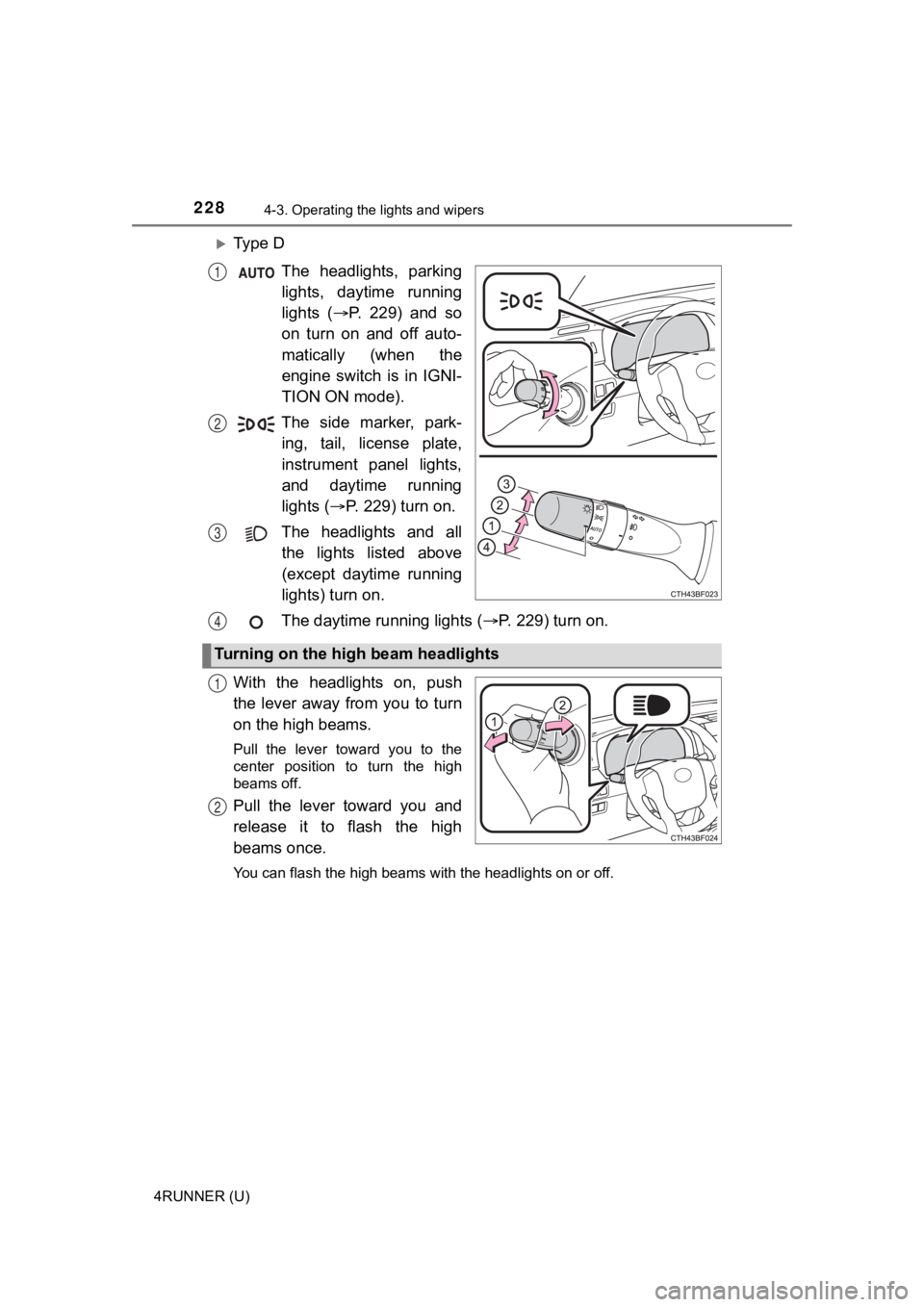
Ty p e DThe headlights, parkinglights, daytime running
lights ( P. 229) and so
on turn on and off auto-
matically (when the
engine switch is in IGNI-
TION ON mode).
The side marker, park- ing, tail, license plate,
instrument panel lights,
and daytime running
lights ( P. 229) turn on.
The headlights and all the lights listed above
(except daytime running
lights) turn on.
The daytime running lights ( P. 229) turn on.
With the headlights on, push
the lever away from you to turn
on the high beams.
Pull the lever toward you to the
center position to turn the high
beams off.
Pull the lever toward you and
release it to flash the high
beams once.
You can flash the high beams with the headlights on or off.
1
2
3
Turning on the high beam headlights
4
1
2
Page 229 of 596

2294-3. Operating the lights and wipers
4
Driving
4RUNNER (U)
■Daytime running light system
●The daytime running lights illuminate using the same lights as the headlight
high beam and illuminate dimmer than the headlight high beam.
● To make your vehicle more visible to other drivers during dayti me driving,
the daytime running lights turn on automatically when all of the following
conditions are met. (The daytime running lights are not designe d for use at
night.)
• The engine is running
• The parking brake is released
• The headlight switch is in the , (type A only), (type C
and D), or
* (type B and D) position
*: When the surroundings are bright
The daytime running lights remain on after they illuminate, eve n if the park-
ing brake is set again.
Type A and B: Daytime running lights can be turned off by opera ting the
switch.
● Compared to turning on the headlights, the daytime running ligh t system
offers greater durability and consumes less electricity, so it can help improve
fuel economy.
■ Headlight control sensor (if equipped)
The sensor may not function properly if an
object is placed on the sensor, or anything
that blocks the sensor is affixed to the
windshield.
Doing so interferes with the sensor
detecting the level of ambient light and
may cause the automatic headlight sys-
tem to malfunction.
Page 231 of 596
2314-3. Operating the lights and wipers
4
Driving
4RUNNER (U)
Push the lever away from you
with the headlight switch in the
or position.
Press the Automatic High
Beam switch.
The Automatic High Beam indica-
tor will come on when the system
is operating.
Automatic High Beam
The Automatic High Beam uses a camera sensor located behind
the upper portion of the windshi eld to assess the brightness of
the lights of vehicles ahead, streetlights, etc., and automatic ally
turns the high beams on or off as necessary.
WARNING
■Limitations of the Automatic High Beam
Do not overly rely on the Automatic High Beam. Always drive saf ely, taking
care to observe your surroundings and turning the high beams on or off
manually if necessary.
■ To prevent incorrect operation o f the Automatic High Beam syste m
Do not overload the vehicle.
Activating the Automatic High Beam
1
2
Page 232 of 596
2324-3. Operating the lights and wipers
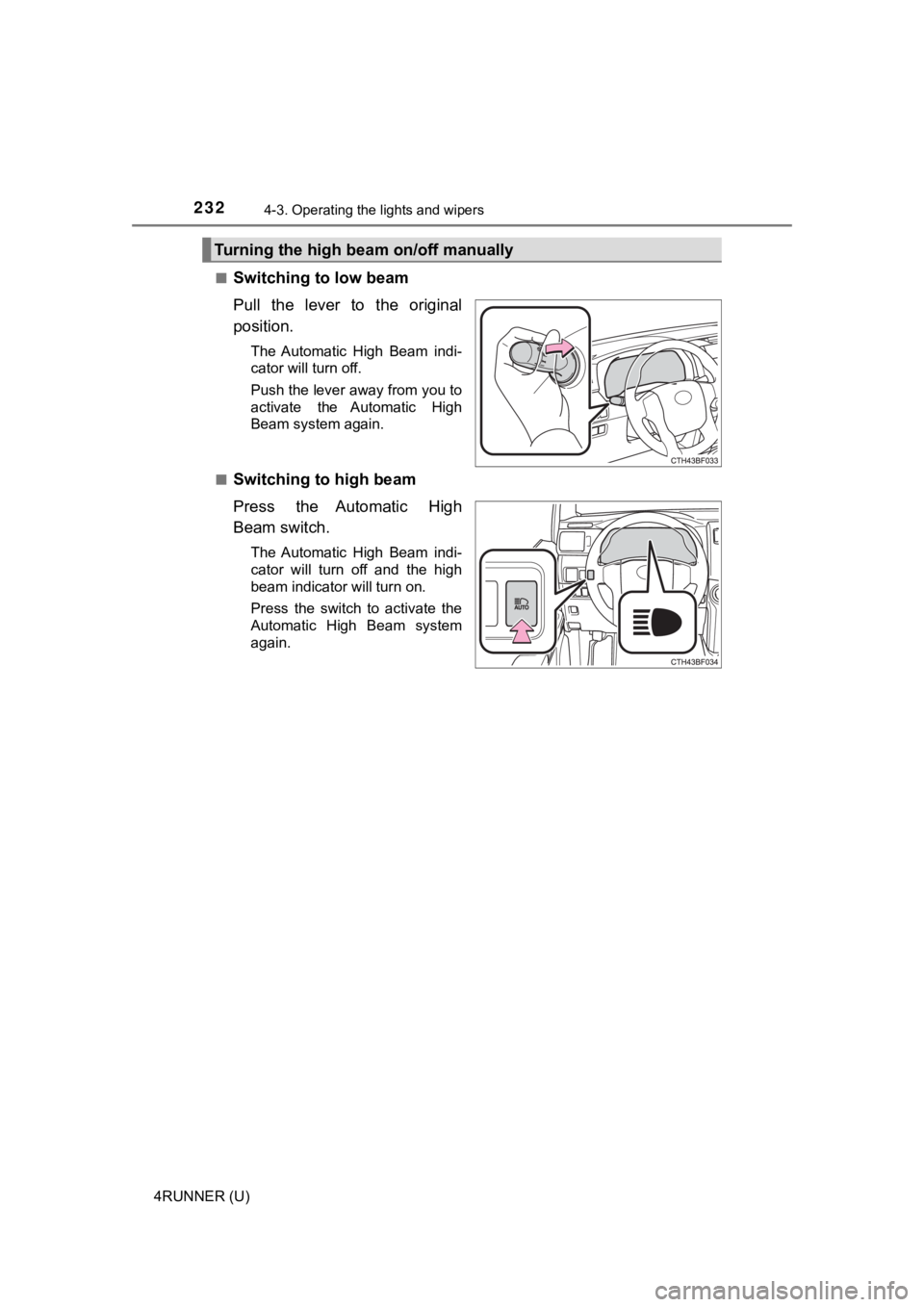
4RUNNER (U)■
Switching to low beam
Pull the lever to the original
position.
The Automatic High Beam indi-
cator will turn off.
Push the lever away from you to
activate the Automatic High
Beam system again.
■
Switching to high beam
Press the Automatic High
Beam switch.
The Automatic High Beam indi-
cator will turn off and the high
beam indicator will turn on.
Press the switch to activate the
Automatic High Beam system
again.
Turning the high beam on/off manually