Page 389 of 596
389
Maintenance and care6
4RUNNER (U)6-1. Maintenance and care
Cleaning and protecting the vehicle exterior .......... 390
Cleaning and protecting the vehicle interior ........... 393
6-2. Maintenance Maintenance requirements ................... 396
General maintenance........ 398
Emission inspection and maintenance (I/M)
programs......................... 401
6-3. Do-it-yourself maintenance
Do-it-yourself service precautions ..................... 402
Hood ................................. 405
Engine compartment ......... 406
Tires .................................. 420
Tire inflation pressure ....... 434
Wheels .............................. 437
Air conditioning filter.......... 440
Wireless remote control/ electronic key battery ...... 442
Checking and replacing fuses ............................... 445
Light bulbs......................... 448
Page 416 of 596
4166-3. Do-it-yourself maintenance
4RUNNER (U)■
After recharging/reconnecting the battery (vehicles with a smar t key sys-
tem)
The engine may not start. Follow the procedure below to initial ize the system.
Shift the shift lever to P.
Open and close any of the doors.
Restart the engine.
● Unlocking the doors using the smart key system may not be possi ble imme-
diately after reconnecting the battery. If this happens, use the wireless
remote control or the mechanical key to lock/unlock the doors.
● Start the engine with the engine switch in ACCESSORY mode. The engine
may not start when the engine switch turned from off. However, the engine
will operate normally from the second attempt.
● The engine switch mode is recorded by the vehicle. If the batte ry is recon-
nected, the vehicle will return the engine switch mode to the s tatus it was in
before the battery was disconnected. Make sure to turn off the engine
before disconnect the battery. Take extra care when connecting the battery
if the engine switch mode prior to discharge is unknown.
If the system will not start even after multiple attempts, contact your Toyota
dealer.
WARNING
■ Chemicals in the battery
Batteries contain poisonous and corrosive sulfuric acid and may produce
hydrogen gas which is flammable and explosive. To reduce the ri sk of death
or serious injury, take the following precautions while working on or near the
battery:
● Do not cause sparks by touching the battery terminals with tool s.
● Do not smoke or light a match near the battery.
● Avoid contact with eyes, skin and clothes.
● Never inhale or swallow electrolyte.
● Wear protective safety glasses when working near the battery.
● Keep children away from the battery.
1
2
3
Page 442 of 596
4426-3. Do-it-yourself maintenance
4RUNNER (U)
●Flathead screwdriver
● Small flathead screwdriver
● Lithium battery CR2016 (vehicles without a smart key system), o r
CR1632 (vehicles with a smart key system)
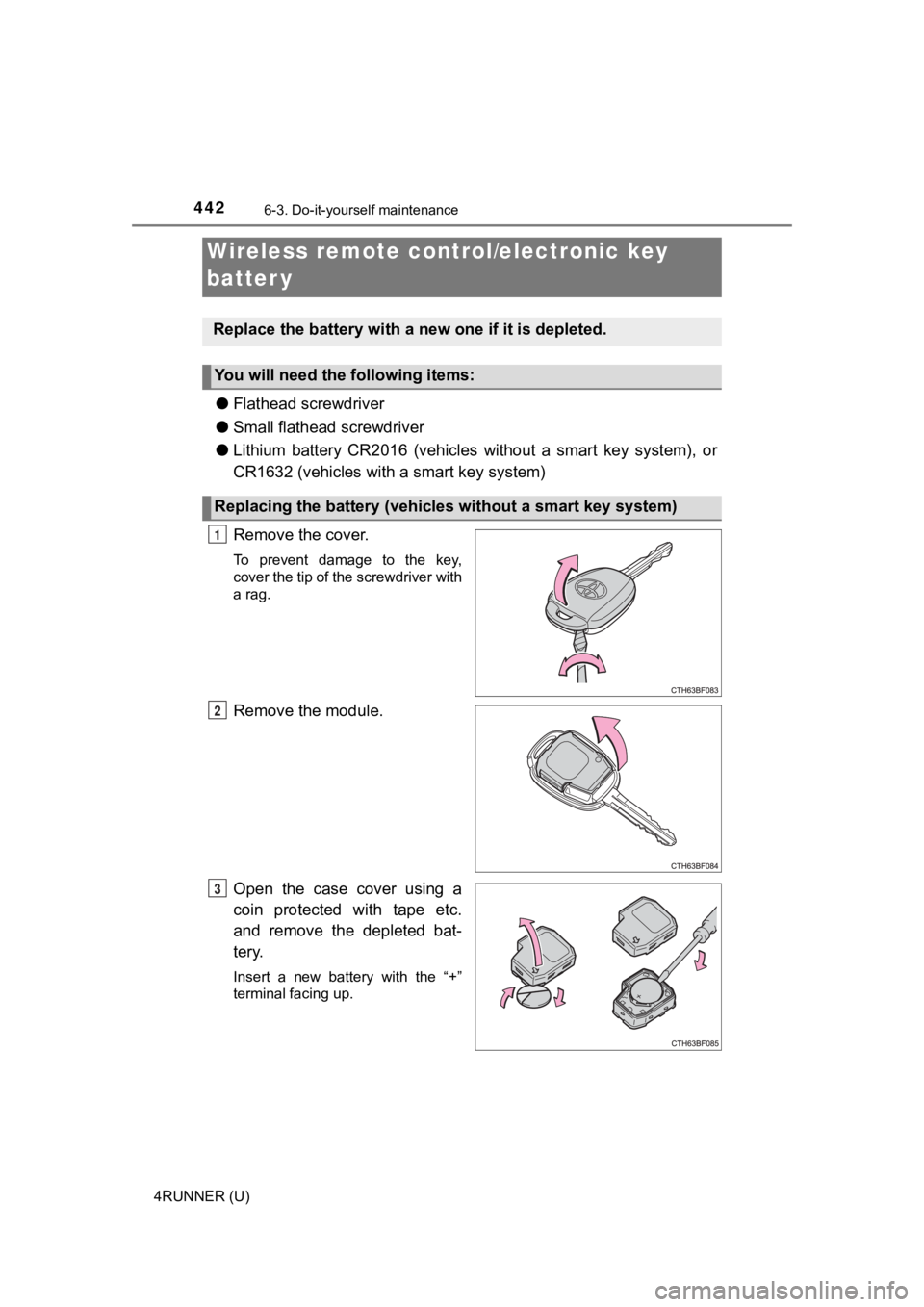
Remove the cover.
To prevent damage to the key,
cover the tip of the screwdriver with
a rag.
Remove the module.
Open the case cover using a
coin protected with tape etc.
and remove the depleted bat-
tery.
Insert a new battery with the “+”
terminal facing up.
Wireless remote control/electronic key
batter y
Replace the battery with a n ew one if it is depleted.
You will need the following items:
Replacing the battery (vehicles without a smart key system)
1
2
3
Page 444 of 596
4446-3. Do-it-yourself maintenance
4RUNNER (U)
■Use a CR2016 (vehicles without a smart key system) or CR1632 (v ehicles
with a smart key system) lithium battery
● Batteries can be purchased at your Toyota dealer, local electri cal appliance
shops or camera stores.
● Replace only with the same or equivalent type recommended by the manu-
facturer.
● Dispose of used batteries according to local laws.
■ If the electronic key battery is depleted
The following symptoms may occur:
●The smart key system and wireless remote control will not funct ion properly.
● The operational range will be reduced.
WARNING
■Removed battery a nd other parts
These parts are small and if swallowed by a child, they can cause choking.
Keep away from children. Failure to do so could result in death or serious
injury.
NOTICE
■ For normal operation after replacing the battery
Observe the following precautions to prevent accidents:
● Always work with dry hands.
Moisture may cause the battery to rust.
● Do not touch or move any other component inside the remote cont rol.
● Do not bend either of the battery terminals.
Page 510 of 596
5107-2. Steps to take in an emergency
4RUNNER (U)
Use the mechanical key
( P. 104) in order to perform the
following operations:
Locks all the doors
Closes the windows and moon
roof (turn and hold)
*
( P. 164, 172)
Unlocks all the doors
Turning the key rearward unlocks the driver’s door. Turning the key once
again unlocks the other doors.
Opens the windows and moon roof (turn and hold)*
( P. 164, 172)
*: This setting must be customized at your Toyota dealer.
If the electronic key does not operate
properly (vehicles with a smar t key system)
If communication between the electronic key and vehicle is
interrupted ( P. 122) or the electronic key cannot be used
because the battery is depleted, the smart key system and wire-
less remote control cannot be used. In such cases, the doors
can be opened and the engine c an be started by following the
procedure below.
Locking and unlocking the doors
1
2
3
4
Page 515 of 596

5157-2. Steps to take in an emergency
7
When trouble arises
4RUNNER (U)
■Starting the engine when t he battery is discharged
The engine cannot be started by push-starting.
■ To prevent battery discharge
●Turn off the headlights and the audio system while the engine is off.
● Turn off any unnecessary electrical components when the vehicle is running
at a low speed for an extended period, such as in heavy traffic .
■ Charging the battery
The electricity stored in the battery will discharge gradually even when the
vehicle is not in use, due to natural discharge and the draining effects of cer-
tain electrical appliances. If the vehicle is left for a long t ime, the battery may
discharge, and the engine may be unable to start. (The battery recharges
automatically during driving.)
■ When recharging or replacing the battery
●Vehicles with a smart key system: In some cases, it may not be possible to
unlock the doors using the smart key system when the battery is dis-
charged. Use the wireless remote control or the mechanical key to lock or
unlock the doors.
● The engine may not start on the first attempt after the battery has recharged
but will start normally after the second attempt. This is not a malfunction.
● Vehicles with a smart key system: The engine switch mode is memorized by
the vehicle. When the battery is reconnected, the system will r eturn to the
mode it was in before the battery was discharged. Before disconnecting the
battery, turn the engine switch off.
If you are unsure what mode the engine switch was in before the battery dis-
charged, be especially careful when reconnecting the battery.
● Make sure that the key is not inside the vehicle when rechargin g or replac-
ing the battery. The key may be locked in the vehicle if the al arm is acti-
vated. ( P. 80)
Page 549 of 596
5498-2. Customization
8
Vehicle specifications
4RUNNER (U)■
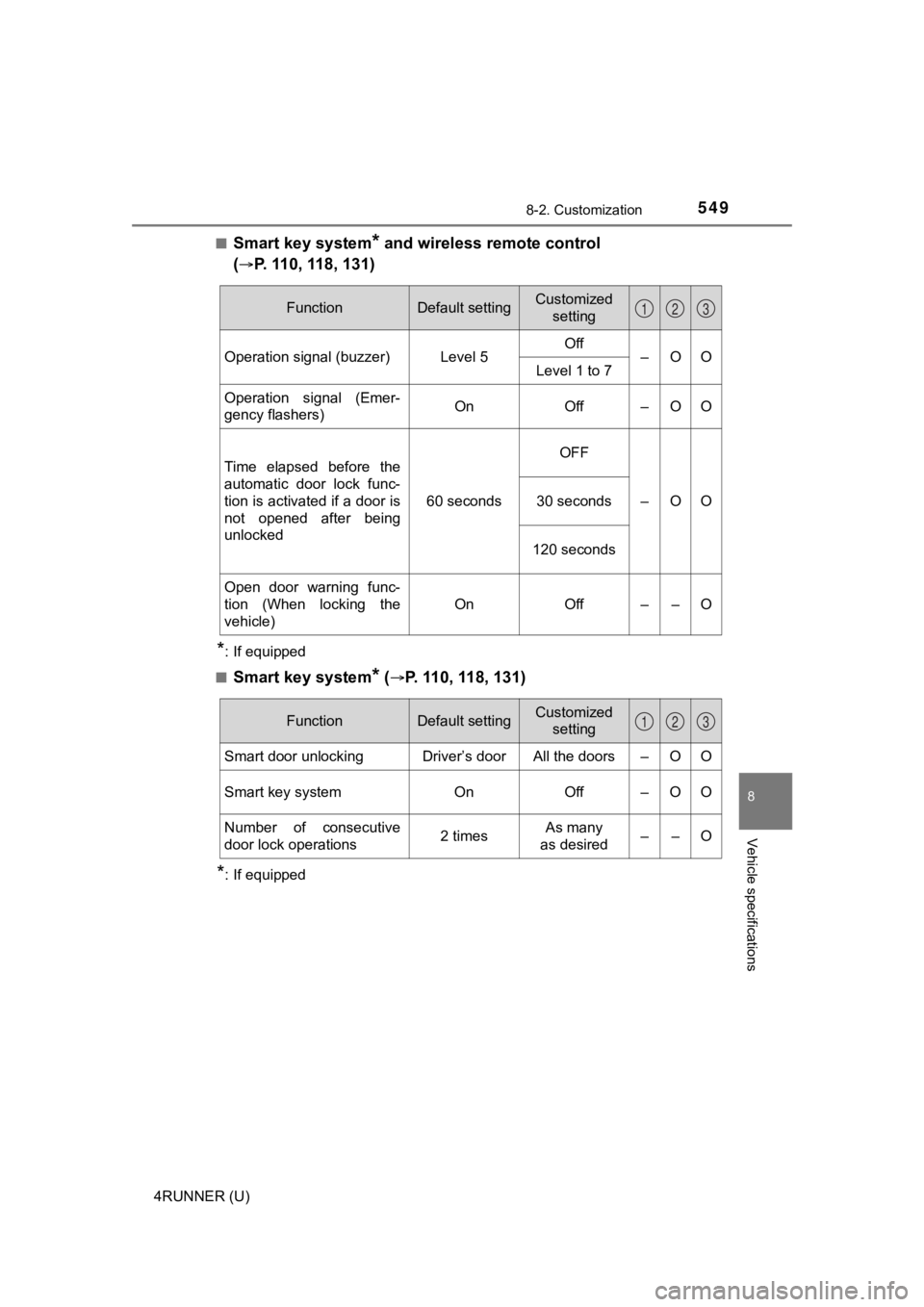
Smart key system* and wireless remote control
(
P. 110, 118, 131)
*: If equipped
■
Smart key system* (P. 110, 118, 131)
*: If equipped
FunctionDefault settingCustomized setting
Operation signal (buzzer) Level 5 Off
–OO
Level 1 to 7
Operation signal (Emer-
gency flashers) On Off – O O
Time elapsed before the
automatic door lock func-
tion is activated if a door is
not opened after being
unlocked 60 secondsOFF
–OO
30 seconds
120 seconds
Open door warning func-
tion (When locking the
vehicle) On Off – – O
123
FunctionDefault settingCustomized
setting
Smart door unlocking Driver’s door All the doors – O O
Smart key system On Off – O O
Number of consecutive
door lock operations 2 timesAs many
as desired ––O
123
Page 550 of 596
5508-2. Customization
4RUNNER (U)■
Wireless remote control (P. 102, 110, 131)
■Driving position memory* (P. 149)
*: If equipped
■
Automatic light control system* (P. 225)
*: If equipped
FunctionDefault settingCustomized setting
Wireless remote control OnOff – – O
Panic functionOnOff – – O
Unlocking operation Driver’s door
unlocked in
one step, all
doors
unlocked in
two stepsAll doors
unlocked in
one step
–OO
123
FunctionDefault settingCustomized
setting
Selecting the door linking
driving position memory
with door unlock operation Driver’s door All doors – – O
123
FunctionDefault settingCustomized
setting
Time elapsed before head-
lights automatically turn off
after doors are closed 30 secondsOff
–OO
60 seconds
90 seconds
Light sensor sensitivity Level 3 Levels 1 to 5 – O O
123