Page 5 of 247
Touchscreen Overview
The main components of the touchscreen are shown here. The touchscreen is used to control
many features that, in traditional cars, are controlled using physical buttons (for example,
adjusting the heating and air conditioning, headlights, etc.). You can also use the touchscreen to
customize Model X to suit your preferences.
Warning: Always pay attention to road and traffic conditions when driving. To minimize driver
distraction and ensure the safety of vehicle occupants as well as other road users, avoid using
the touchscreen to adjust settings while the vehicle is in motion.
Note: The image below is provided for demonstration purposes only. Depending on vehicle
options, software version and market region, your touchscreen may appear slightly different.
Touchscreen Overview
4Model X Owner
Page 26 of 247
of metal. Take the smartphone out of the case
and place the phone in the charger.
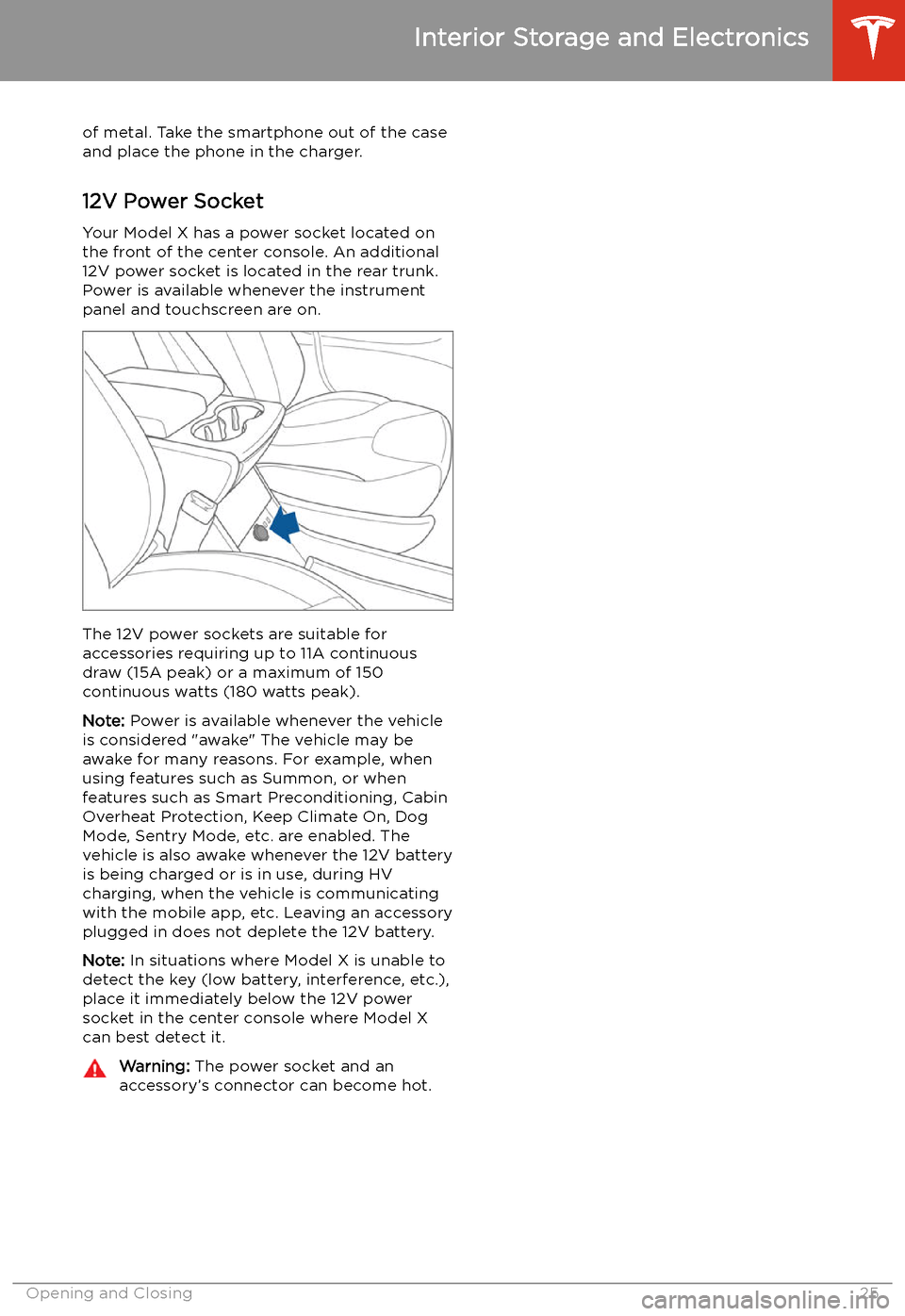
12V Power Socket Your Model X has a power socket located on
the front of the center console. An additional
12V power socket is located in the rear trunk.
Power is available whenever the instrument
panel and touchscreen are on.
The 12V power sockets are suitable for
accessories requiring up to 11A continuous
draw (15A peak) or a maximum of 150
continuous watts (180 watts peak).
Note: Power is available whenever the vehicle
is considered "awake" The vehicle may be awake for many reasons. For example, when
using features such as Summon, or when features such as Smart Preconditioning, Cabin
Overheat Protection, Keep Climate On, Dog Mode, Sentry Mode, etc. are enabled. The
vehicle is also awake whenever the 12V battery
is being charged or is in use, during HV
charging, when the vehicle is communicating
with the mobile app, etc. Leaving an accessory
plugged in does not deplete the 12V battery.
Note: In situations where Model X is unable to
detect the key (low battery, interference, etc.),
place it immediately below the 12V power
socket in the center console where Model X can best detect it.
Warning: The power socket and an
accessory
Page 73 of 247
IndicatorDescription
Trailer mode (if equipped) is active. See Towing and Accessories on page 94.
Appears when some of the stored energy in the Battery may not be available due
to cold weather conditions. If Model X is plugged in, you can heat your Battery by
turning on climate control with the mobile app. The snow
Page 86 of 247
range. In addition to heating the Battery, thesesettings also cool the battery when necessary
(for example, while driving at high speeds,
during rapid acceleration, driving for long
periods, etc.).
Launch Mode
Launch Mode, available on Performance All-
Wheel Drive vehicles only, provides optimum acceleration on surfaces with good traction.
Note: Hard acceleration including, but not
limited to, using launch mode, increases stress
on the vehicle
Page 151 of 247
Climate Controls
Overview of Climate Controls
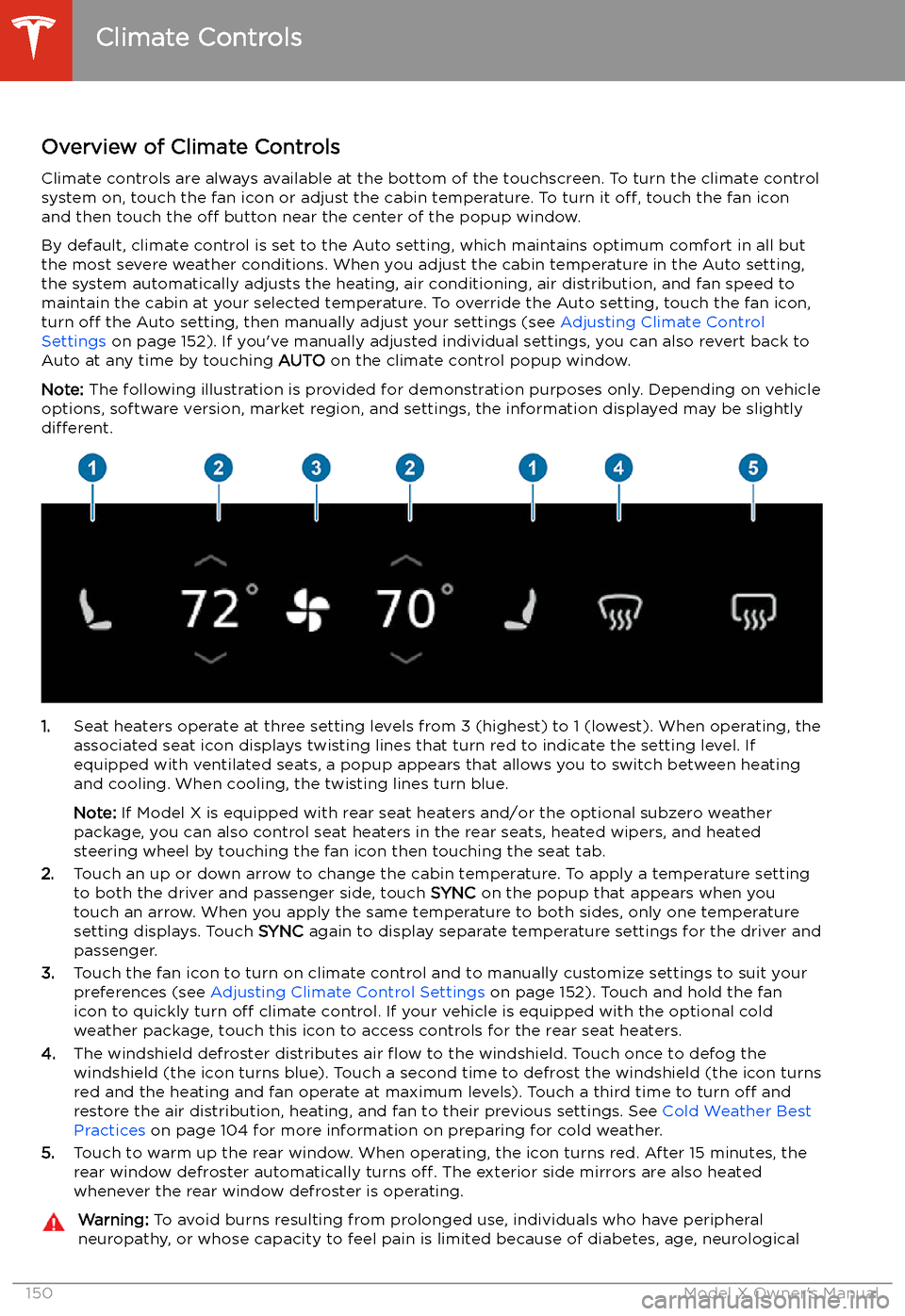
Climate controls are always available at the bottom of the touchscreen. To turn the climate control system on, touch the fan icon or adjust the cabin temperature. To turn it off, touch the fan icon
and then touch the off button near the center of the popup window.
By default, climate control is set to the Auto setting, which maintains optimum comfort in all but
the most severe weather conditions. When you adjust the cabin temperature in the Auto setting,
the system automatically adjusts the heating, air conditioning, air distribution, and fan speed to maintain the cabin at your selected temperature. To override the Auto setting, touch the fan icon,
turn off the Auto setting, then manually adjust your settings (see Adjusting Climate Control
Settings on page 152). If you
Page 152 of 247
injury, or some other condition, should exercise caution when using the climate controlsystem and seat heaters.
Note: The climate control system is powered by the high voltage battery. Therefore, prolonged use
decreases driving range.Climate Controls
Using the Touchscreen151
Page 156 of 247
Note: You can direct the outer face level vents
toward the side windows to help defrost or
defog them.
Cabin Air Filter
Model X has an air filter that prevents pollen,
industrial fallout, road dust and other particles
from entering through the vents. Tesla
recommends replacing the cabin air filter
every 2 years.
Tesla recommends replacing the HEPA air
filter (if equipped) every 3 years.
Cabin Overheat Protection
The climate control system can reduce the
temperature of the cabin in extremely hot
ambient conditions for a period of up to twelve hours after you exit Model X. TouchControls > Safety & Security > Cabin Overheat
Protection and choose:
Page 183 of 247
Charging
Electric Vehicle Components
High Voltage Components
1. Front Motor
2. Air Conditioning Compressor
3. Forward Junction Box
4. High Voltage Cabling
5. Battery Coolant Heater
6. DC-DC Converter
7. Cabin Heater
8. High Voltage Battery
9. On-board Charger
10. Charge Port
11. Rear Motor
12. HV Cable to Rear HVAC Assembly
Warning:
The high voltage system has no user serviceable parts. Do not disassemble, remove
or replace high voltage components, cables or connectors. High voltage cables are typically colored orange for easy identification.Warning: Read and follow all instructions provided on the labels that are attached to Model X.
These labels are there for your safety.Warning: In the unlikely event that a fire occurs, immediately contact your local fire
emergency responders.
Electric Vehicle Components
182Model X Owner