2020 Ram ProMaster City engine
[x] Cancel search: enginePage 83 of 350

80 GETTING TO KNOW YOUR INSTRUMENT PANEL
Change Engine Oil — If Equipped
Your vehicle may be equipped with an engine oil change
indicator system. The “Change Engine Oil” message will
display in the instrument cluster display. The engine oil
change indicator system is duty cycle based, which means
the engine oil change interval may fluctuate, dependent
upon your personal driving style.
Unless reset, this message will continue to display each time
you turn the ignition switch to the ON/RUN position. To
turn off the message temporarily, push and release the
MENU button. To reset the oil change indicator system (after
performing the scheduled maintenance), refer to the
following procedure.
1. Turn the ignition switch to the ON position (do not start the engine).
2. Fully push the accelerator pedal slowly, three times, within 10 seconds.
3. Turn the ignition switch to the OFF/LOCK position.
NOTE:
If the indicator message illuminates when you start the
vehicle, the oil change indicator system did not reset. If
necessary, repeat this procedure.
Instrument Cluster Display Menu Items
Speed Beep
This function is used to set a speed limit (MPH or km/h); the
driver is alerted when this limit is exceeded.
To set the desired speed limit:
1. Push the MENU button briefly. The display will show the
wording (SPEED BEEP) and the unit (MPH) or (km/h)
previously set.
2. If the function is on, push and release the up or down
arrow button to select the required speed limit and then
push MENU to confirm.
NOTE:
The speed may be set in the range from 20 to 125 MPH (30 to
200 km/h) according to the previously chosen unit.
The setting will increase/decrease by five units each time the
up or down arrow button is pushed. Hold down the up or
down arrow button to automatically increase/decrease the
setting rapidly. Complete the adjustment when you
approach the desired value.
2020_RAM_PROMASTER_CITY_OM_USA=GUID-7B6A7FCA-79B0-423F-95C5-ED2A949C3D13=1=en=.book Page 80
Page 86 of 350

GETTING TO KNOW YOUR INSTRUMENT PANEL 83
Start Of Trip Procedure
With the ignition on, push and hold the TRIP button for over
two seconds to reset trip information.
Exit Trip
1. To exit the Trip function, wait until all the values havebeen displayed or hold the MENU button for longer than
one second.
2. Briefly push and release the MENU button to go back to the menu screen or push and hold the MENU button
(approximately one second) to go back to the main screen
without storing settings.
Trip Functions
Both trip functions are resettable (reset — start of new trip).
“Trip A” can be used to display the figures relating to:
• Range
• Trip distance A
• Average Economy A
• Instantaneous Economy • Average speed A
• Travel time A (driving time)
“Trip B” can be used to display the figures relating to:
• Trip distance B
• Average Economy B
• Average speed B
• Travel time B (driving time)
NOTE:
“Trip B” functions may be excluded (see “Trip B Data”).
“Range” and “Instantaneous Economy” cannot be reset.
Values Displayed
Range
This indicates the distance which may be traveled with the
fuel remaining in the tank, assuming that driving conditions
will not change. The message “----” will appear on the
display in the following cases:
• Distance less than 30 miles (or 50 km).
• The vehicle is parked for a long time with the engine
running.
3
2020_RAM_PROMASTER_CITY_OM_USA=GUID-7B6A7FCA-79B0-423F-95C5-ED2A949C3D13=1=en=.book Page 83
Page 87 of 350

84 GETTING TO KNOW YOUR INSTRUMENT PANEL
NOTE:
The range depends on several factors: driving style, type of
route (freeway, residential, mountain roads, etc.), conditions
of use of the vehicle (load, tire pressure, etc.). Trip planning
must take into account the above notes.
Travel Distance
This value shows the distance covered since the last reset.
Average Fuel Consumption
This value shows the approximate average consumption
since the last reset.
Current Fuel Consumption
This indicates the fuel consumption. The value is constantly
updated. The message “----” will appear on the display if the
vehicle is parked with the engine running.
Average Speed
This value shows the vehicle's average speed as a function of
the overall time elapsed since the last reset.
Travel Time
This value shows the time elapsed since the last reset.WARNING LIGHTS AND MESSAGES
The warning/indicator lights will illuminate in the instrument
panel together with a dedicated message and/or acoustic signal
when applicable. These indications are indicative and precau-
tionary and as such must not be considered as exhaustive and/
or alternative to the information contained in the Owner’s
Manual, which you are advised to read carefully in all cases.
Always refer to the information in this chapter in the event of a
failure indication. All active telltales will display first if appli -
cable. The system check menu may appear different based upon
equipment options and current vehicle status. Some telltales are
optional and may not appear.
Red Warning Lights
Air Bag Warning Light
This light will turn on for four to eight seconds as a bulb
check when the ignition is placed in the ON/RUN or
MAR/ON/RUN position. If the light is either not on
during startup, stays on, or turns on while driving, have the
system inspected at an authorized dealer as soon as possible.
This light will illuminate with a single chime when a fault with
the Air Bag Warning Light has been detected, it will stay on until
the fault is cleared. If the light comes on intermittently or
remains on while driving, have an authorized dealer service the
vehicle immediately.
2020_RAM_PROMASTER_CITY_OM_USA=GUID-7B6A7FCA-79B0-423F-95C5-ED2A949C3D13=1=en=.book Page 84
Page 89 of 350

86 GETTING TO KNOW YOUR INSTRUMENT PANEL
Operation of the Brake Warning Light can be checked by turning
the ignition switch from the OFF position to the ON/RUN posi-
tion. The light should illuminate for approximately two seconds.
The light should then turn off unless the parking brake is applied
or a brake fault is detected. If the light does not illuminate, have
the light inspected by an authorized dealer.
The light also will turn on when the parking brake is applied
with the ignition switch in the ON/RUN position.
NOTE:
This light shows only that the parking brake is applied. It
does not show the degree of brake application.
Battery Charge Warning Light
This warning light will illuminate when the battery
is not charging properly. If it stays on while the
engine is running, there may be a malfunction with
the charging system. Contact an authorized dealer as soon as
possible.
This indicates a possible problem with the electrical system
or a related component. Door Open Warning Light
This indicator will illuminate when one or more
door(s) are not fully closed.
NOTE:
If the vehicle is moving and a door is opened, there will also
be a single chime.
Electronic Throttle Control (ETC) Warning Light This warning light will illuminate to inform of a
problem with the Electronic Throttle Control (ETC)
system. If a problem is detected while the vehicle is
running, the light will either stay on or flash depending on
the nature of the problem. Cycle the ignition when the
vehicle is safely and completely stopped and the transmis -
sion is placed in the PARK (P) position. The light should turn
off. If the light remains on with the vehicle running, your
vehicle will usually be drivable; however, see an authorized
dealer for service as soon as possible.
2020_RAM_PROMASTER_CITY_OM_USA=GUID-7B6A7FCA-79B0-423F-95C5-ED2A949C3D13=1=en=.book Page 86
Page 90 of 350

GETTING TO KNOW YOUR INSTRUMENT PANEL 87
If the light continues to flash when the vehicle is running,
immediate service is required and you may experience
reduced performance, an elevated/rough idle, or engine
stall and your vehicle may require towing. The light will
come on when the ignition is placed in the ON/RUN or
MAR/ON/RUN position and remain on briefly as a bulb
check. If the light does not come on during starting, have the
system checked by an authorized dealer.
Engine Coolant Temperature Warning Light This warning light warns of an overheated engine
condition. If the engine coolant temperature is too
high, this indicator will illuminate and a single
chime will sound. If the temperature reaches the upper limit,
a continuous chime will sound for four minutes or until the
engine is able to cool, whichever comes first.
If the light turns on while driving, safely pull over and stop
the vehicle. If the A/C system is on, turn it off. Also, shift the
transmission into NEUTRAL (N) and idle the vehicle. If the
temperature reading does not return to normal, turn the
engine off immediately and call for service.
Refer to “If Your Engine Overheats” in “In Case Of Emer -
gency” for further information. Oil Pressure Warning Light
This warning light will illuminate to indicate low
engine oil pressure. If the light turns on while
driving, stop the vehicle, shut off the engine as soon
as possible, and contact an authorized dealer. A chime will
sound when this light turns on.
Do not operate the vehicle until the cause is corrected. This
light does not indicate how much oil is in the engine. The
engine oil level must be checked under the hood.
Transmission Temperature Warning Light — If Equipped
This warning light will illuminate to warn of a high
transmission fluid temperature. This may occur with
strenuous usage such as trailer towing. If this light
turns on, stop the vehicle and run the engine at idle or
slightly faster, with the transmission in PARK (P) or
NEUTRAL (N), until the light turns off. Once the light turns
off, you may continue to drive normally.
WARNING!
If you continue operating the vehicle when the
Transmission Temperature Warning Light is illuminated
you could cause the fluid to boil over, come in contact
with hot engine or exhaust components and cause a fire.
3
2020_RAM_PROMASTER_CITY_OM_USA=GUID-7B6A7FCA-79B0-423F-95C5-ED2A949C3D13=1=en=.book Page 87
Page 91 of 350
88 GETTING TO KNOW YOUR INSTRUMENT PANEL
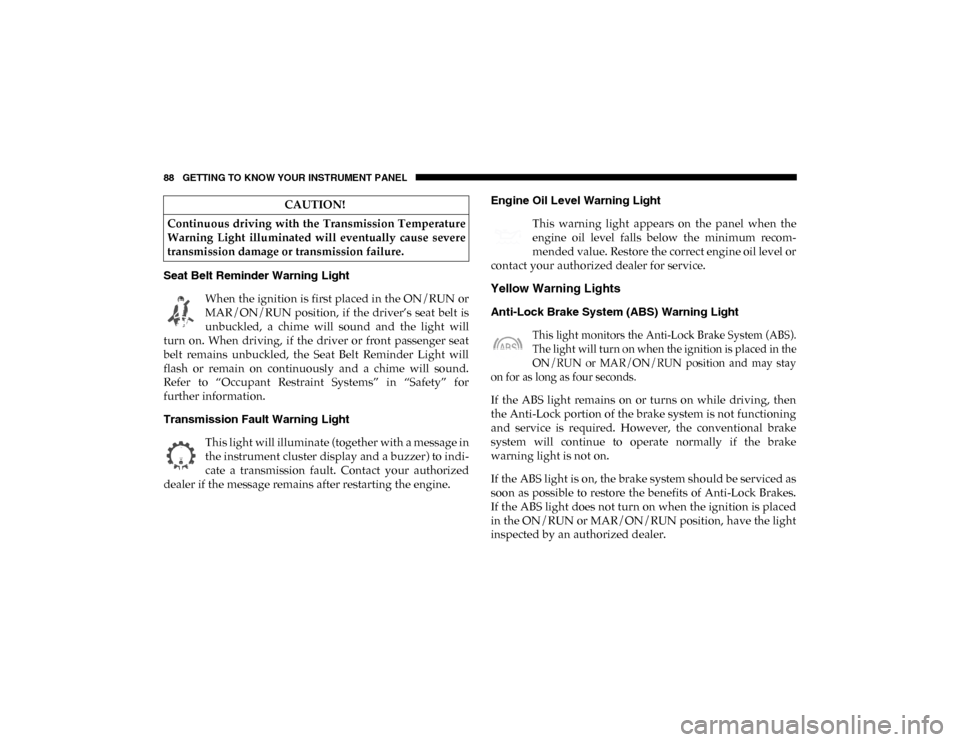
Seat Belt Reminder Warning Light When the ignition is first placed in the ON/RUN or
MAR/ON/RUN position, if the driver’s seat belt is
unbuckled, a chime will sound and the light will
turn on. When driving, if the driver or front passenger seat
belt remains unbuckled, the Seat Belt Reminder Light will
flash or remain on continuously and a chime will sound.
Refer to “Occupant Restraint Systems” in “Safety” for
further information.
Transmission Fault Warning Light
This light will illuminate (together with a message in
the instrument cluster display and a buzzer) to indi -
cate a transmission fault. Contact your authorized
dealer if the message remains after restarting the engine. Engine Oil Level Warning Light
This warning light appears on the panel when the
engine oil level falls below the minimum recom -
mended value. Restore the correct engine oil level or
contact your authorized dealer for service.
Yellow Warning Lights
Anti-Lock Brake System (ABS) Warning Light
This light monitors the Anti-Lock Brake System (ABS).
The light will turn on when the ignition is placed in the
ON/RUN or MAR/ON/RUN position and may stay
on for as long as four seconds.
If the ABS light remains on or turns on while driving, then
the Anti-Lock portion of the brake system is not functioning
and service is required. However, the conventional brake
system will continue to operate normally if the brake
warning light is not on.
If the ABS light is on, the brake system should be serviced as
soon as possible to restore the benefits of Anti-Lock Brakes.
If the ABS light does not turn on when the ignition is placed
in the ON/RUN or MAR/ON/RUN position, have the light
inspected by an authorized dealer.
CAUTION!
Continuous driving with the Transmission Temperature
Warning Light illuminated will eventually cause severe
transmission damage or transmission failure.
2020_RAM_PROMASTER_CITY_OM_USA=GUID-7B6A7FCA-79B0-423F-95C5-ED2A949C3D13=1=en=.book Page 88
Page 92 of 350

GETTING TO KNOW YOUR INSTRUMENT PANEL 89
Low Fuel Warning LightWhen the fuel level reaches approximately 2–3 gal
(9–11 L) this light will turn on, and remain on until
fuel is added.
Generic Warning Light The Generic Warning Light will illuminate if any of
the following conditions occur: Engine Oil Pressure
Sensor Failure, External Light Failure, Parking
Sensor Failure, Fuel Cut-Off Fail/Intervention, Generic
Failure on Trailer, or Air Bag telltale recovery.
The telltale will blink in case of an Air Bag Warning Light
Failure. Contact an authorized dealer immediately for
service.
Tire Pressure Monitoring System (TPMS) Warning Light
The warning light switches on and a message is
displayed to indicate that the tire pressure is lower
than the recommended value and/or that slow pres -
sure loss is occurring. In these cases, optimal tire duration
and fuel consumption may not be guaranteed. Should one or more tires be in the condition mentioned
above, the display will show the indications corresponding
to each tire.
Each tire, including the spare (if provided), should be
checked monthly when cold and inflated to the inflation
pressure recommended by the vehicle manufacturer on the
vehicle placard or tire inflation pressure label. If your vehicle
has tires of a different size than the size indicated on the
vehicle placard or tire inflation pressure label, you should
determine the proper tire inflation pressure for those tires.
As an added safety feature, your vehicle has been equipped
with a Tire Pressure Monitoring System (TPMS) that illumi
-
nates a low tire pressure telltale when one or more of your
tires is significantly under-inflated. Accordingly, when the
low tire pressure telltale illuminates, you should stop and
check your tires as soon as possible, and inflate them to the
CAUTION!
Do not continue driving with one or more flat tires as
handling may be compromised. Stop the vehicle,
avoiding sharp braking and steering. If a tire puncture
occurs, repair immediately using the dedicated tire
repair kit and contact an authorized dealer as soon as
possible.
3
2020_RAM_PROMASTER_CITY_OM_USA=GUID-7B6A7FCA-79B0-423F-95C5-ED2A949C3D13=1=en=.book Page 89
Page 94 of 350

GETTING TO KNOW YOUR INSTRUMENT PANEL 91
Engine Check/Malfunction Indicator Warning Light (MIL)
The Engine Check/Malfunction Indicator Light
(MIL) is a part of an Onboard Diagnostic System
called OBD II that monitors engine and automatic
transmission control systems. This warning light will illu -
minate when the ignition is in the ON/RUN position before
engine start. After placing the ignition to the ON/RUN
position, if there is a problem with the Sentry Key System,
the Vehicle Security Light will turn on. This condition will
result in the engine being shut off after two seconds. If the
bulb does not come on when turning the ignition switch
from OFF to ON/RUN, have the condition checked
promptly.
NOTE:
This warning light will illuminate when the vehicle security
alarm system has detected an attempt to break into the
vehicle.
Certain conditions, such as a loose or missing gas cap, poor
quality fuel, etc., may illuminate the light after engine start.
The vehicle should be serviced if the light stays on through
several typical driving styles. In most situations, the vehicle
will drive normally and will not require towing. When the engine is running, the MIL may flash to alert
serious conditions that could lead to immediate loss of
power or severe catalytic converter damage. The vehicle
should be serviced by an authorized dealer as soon as
possible if this occurs.
WARNING!
A malfunctioning catalytic converter, as referenced
above, can reach higher temperatures than in normal
operating conditions. This can cause a fire if you drive
slowly or park over flammable substances such as dry
plants, wood, cardboard, etc. This could result in death
or serious injury to the driver, occupants or others.
CAUTION!
Prolonged driving with the Malfunction Indicator Light
(MIL) on could cause damage to the vehicle control
system. It also could affect fuel economy and
driveability. If the MIL is flashing, severe catalytic
converter damage and power loss will soon occur.
Immediate service is required.3
2020_RAM_PROMASTER_CITY_OM_USA=GUID-7B6A7FCA-79B0-423F-95C5-ED2A949C3D13=1=en=.book Page 91