2020 Peugeot Partner instrument panel
[x] Cancel search: instrument panelPage 116 of 260

11 4
Driving
The selection screen closes after a few
moments.
This setting becomes the new cruise speed.
To change the cruise speed setting using the speed suggested by the Speed Limit Recognition
and Recommendation:
►
The suggested speed is displayed on the
instrument panel.
►
Press button
5 once; a message is displayed,
confirming the memorisation request.
►
Press button
5 again to save the suggested
speed.
The value is immediately shown as the new
speed setting on the instrument panel.
Temporarily exceeding the
programmed speed
If needed (when overtaking, for example) it is
possible to exceed the programmed speed by
pressing the accelerator pedal.
Cruise control is temporarily overridden and the
programmed speed setting flashes.
To return to the programmed speed, simply
release the accelerator pedal.
Once the vehicle has returned to the
programmed speed, cruise control takes over
again and the programmed speed setting stops
flashing.
When descending a steep hill, the cruise
control system cannot prevent the
vehicle from exceeding the programmed
speed.
You may have to brake to control the speed of
your vehicle. In this case, the cruise control is
automatically paused.
To activate the system again, with the vehicle
speed above 25 mph (40
km/h), press button
4.
Switching off
► Turn the thumbwheel 1 to the "0” position: the
cruise control information disappears from the
screen.
Malfunction
Dashes are displayed (flashing, initially, then
fixed) in the event of a cruise control system
malfunction.
Have the system checked by a PEUGEOT
dealer or a qualified workshop.
Adaptive Cruise Control
Refer to the General recommendations on the
use of driving and manoeuvring aids and to
Cruise control - particular recommendations.
This system automatically maintains the speed
of your vehicle at a value which you set (speed
setting), while keeping a safe distance from the
vehicle in front (target vehicle), and which has
been set beforehand by the driver. The system
automatically manages the acceleration and
deceleration of the vehicle.
With the Stop function , the system manages
the braking until the vehicle comes to a complete
stop.
To do so, it has a camera located at the top of
the windscreen and, depending on version, a
radar located in the front bumper.
Primarily designed for driving on main
roads and motorways, this system only
works with moving vehicles driving in the
same direction as your vehicle.
If the driver operates a direction indicator
to overtake a slower vehicle, the cruise
control allows the vehicle to temporarily
approach the vehicle in front to assist the
overtaking manoeuvre, without ever
exceeding the speed setting.
Some vehicles present on the road may
not be properly seen or may be poorly
interpreted by the camera and/or radar (e.g. a
lorry), which may lead to a poor assessment
of the distances and lead to the vehicle
inappropriately accelerating or braking.
Steering mounted control
1. ON (CRUISE position) / OFF (position0)
2. Activation of cruise control at the current
speed / decrease speed setting
3. Activation of cruise control at the current
speed / increase speed setting
Page 118 of 260

11 6
Driving
Cruise control remains active after
changing gear regardless of the gearbox
type.
When the driver attempts to reactivate
cruise control which was paused, the
message "Activation not possible, unsuitable
conditions" is briefly displayed if reactivation
is not possible (safety conditions not met).
Modifying the programmed speed setting
with the Speed Limit Recognition and
Recommendation function
► Press 5 to accept the speed suggested by
the function in the instrument panel, then press
again to confirm.
To prevent any sudden acceleration or deceleration of the vehicle, select a
speed setting fairly close to the current speed
of the vehicle.
Changing the inter-vehicle distance
► Press 6 to display the distance setting
thresholds (“Distant”, “Normal”, “Close“), then
press again to select a threshold.
After a few seconds, the option is accepted and
will be memorised when the ignition is switched
off.
Temporarily exceeding the speed setting
► Press the accelerator pedal fully . Distance
monitoring and cruise control are deactivated as long as acceleration is maintained. "Cruise
control suspended" is displayed.
System deactivation
► Turn knob 1 upwards to the OFF position.
Displays in the instrument
panel
7.
Vehicle detected by the system (full symbol)
8. Cruise control active (colour not in grey)
9. Value of the speed setting
10. Speed suggested by the Speed Limit
Recognition and Recommendation
11 . Vehicle held stationary (versions with
automatic gearbox)
12.Inter-vehicle distance setting
13. Position of the vehicle detected by the
system
Messages and alerts
The display of these messages or alerts
is not sequential.
"Cruise control paused" or "Cruise control
suspended" following a brief acceleration
by the driver.
"Cruise control active", no vehicle
detected.
"Cruise control paused", vehicle detected.
"Cruise control active", vehicle detected.
"Take back control" (orange).
►
Brake or accelerate, depending on the
context.
"Take back control" (red).
►
T
ake back control of the vehicle
immediately: the system cannot manage the
current driving situation.
"Activation not possible, conditions
unsuitable". The system refuses to
activate cruise control, as the necessary
conditions are not fulfilled.
Stop function
"Cruise control paused" (for a few
seconds).
The system has brought the vehicle to a
complete stop and is holding it immobilised:
cruise control is paused.
The driver must accelerate to move off again,
then reactivate cruise control.
Operating limits
Cruise control operates by day and night, in fog
or moderate rainfall.
Certain situations cannot be managed by the
system and require driver intervention.
Elements not detected by the system:
– Pedestrians, some cyclists, animals.
– Stationary vehicles (traffic jam, breakdown,
etc.).
– Vehicles crossing your lane.
– Vehicles driving in the opposite direction.
Situations in which the driver must pause the
cruise control system:
– Vehicles in a tight bend.
– When approaching a roundabout.
Page 121 of 260

11 9
Driving
6– Following an impact to the windscreen close to
the detection camera.
The system is automatically deactivated after the use of certain "space-saver"
type spare wheels is detected (smaller
diameter).
The system is automatically deactivated
after detection of a fault with the brake pedal
switch or with at least two brake lamps.
It is possible that warnings are not given,
are given too late or seem unjustified.
Consequently, always stay in control of your
vehicle and be prepared to react at any time
to avoid an accident.
After an impact, the function automatically stops operating. Contact a
PEUGEOT dealer or a qualified workshop to
have the system checked.
Distance Alert
It warns the driver that their vehicle is at risk of
collision with the vehicle in front or a pedestrian
present in their traffic lane.
Operation
Depending on the degree of risk of collision
detected by the system and the alert threshold
chosen by the driver, several different levels
of alert may be triggered and displayed in the
instrument panel.
They take account of the vehicle dynamics, the
speeds of your vehicle and the one in front, the
environmental conditions and the operation of
the vehicle (cornering, actions on the pedals,
etc.) to trigger the alert at the best moment.
Level 1 (orange): visual alert only,
signalling that the vehicle in front is very
close.
The message "
Vehicle close" is displayed.
Level 2 (red): visual and audible alert,
signalling that a collision is imminent.
The message "
Brake!" is displayed.
Level 3: finally, in some cases, a haptic alert
in the form of micro-braking can be given,
confirming the risk of collision.
Where the speed of your vehicle is too
high approaching another vehicle, the
first level of alert may not be displayed: the
level 2 alert may be displayed directly.
Important: the level
1 alert is never displayed
for a stationary obstacle or when the " Close"
trigger threshold has been selected.
Modifying the alert trigger threshold
This threshold determines how you wish to be
warned of the presence of a moving or stationary
vehicle in front of you, or a pedestrian present in
your traffic lane.
The current threshold can be modified via the vehicle
configuration menu.
You can select one of three pre-defined
thresholds:
–
"Distant",
–
"Normal",
–
"Close".
The last threshold selected is memorised when
the ignition is switched off.
Intelligent emergency
braking assistance
If the driver brakes, but not sufficiently to avoid a
collision, this system will supplement the braking,
within the limits of the laws of physics.
This assistance will only be provided if you press
the brake pedal.
Page 122 of 260

120
Driving
Active Safety Brake
This function, also called automatic emergency
braking, intervenes following the alerts if the
driver does not react quickly enough and does
not operate the vehicle's brakes.
It aims to reduce the speed of impact or avoid a
collision where the driver fails to react.
Operation
The system operates under the following
conditions:
–
The vehicle's speed does not exceed 37 mph
(60 km/h) when a pedestrian is detected.
–
The vehicle's speed does not exceed 50 mph
(80 km/h) when a stationary vehicle is detected.
– The vehicle's speed is between 6 mph and
53 mph (10 km/h and 85 km/h) when a moving
vehicle is detected.
This warning lamp flashes (for about 10 seconds) once the function is acting on
the vehicle's brakes.
With an automatic gearbox, in the event of
automatic emergency braking until the vehicle
comes to a complete stop, keep the brake
pedal pressed down to prevent the vehicle from
starting off again.
With a manual gearbox, in the event of automatic
emergency braking until the vehicle comes to a
complete stop, the engine may stall.
The driver can maintain control of the vehicle at any time by sharply turning the
steering wheel and/or pressing the
accelerator pedal.
Operation of the function may be felt by
slight vibration in the brake pedal.
If the vehicle comes to a complete stop, the
automatic braking is maintained for 1 to 2
seconds.
Deactivation/Activation
By default, the system is automatically activated
at every engine start.
This system can be deactivated or activated via
the vehicle settings menu.
Deactivation of the system is signalled by
the illumination of this indicator lamp,
accompanied by the display of a message.
Malfunction
In the event of a system malfunction, this
warning lamp comes on on the instrument
panel, accompanied by an onscreen message
and an audible signal.
Contact a PEUGEOT dealer or a qualified
workshop to have the system checked.
If these warning lamps come on
after the engine has been switched
off and then restarted, contact a PEUGEOT
dealer or a qualified workshop to have the
system checked.
Active Lane Keeping Assistance
Refer to the General recommendations on the
use of driving and manoeuvring aids .
Using a camera located at the top of the
windscreen to identify lane markings on the road
and at the edges of the road (depending on
version), the system corrects the trajectory of the
vehicle while alerting the driver if it detects a risk
of unintentionally crossing a line or hard shoulder
(depending on version).
This system is particularly useful on motorways
and main roads.
Conditions for operation
– The speed of the vehicle must be between 40
and 112 mph (65 and 180 km/h).
– The traffic lane must be delimited by a dividing
line.
– The driver must hold the wheel with both
hands.
– The change of trajectory must not be
accompanied by operation of the direction
indicators.
– The ESC system must be activated and not
faulty.
The system helps the driver only when there is a risk of the vehicle involuntarily
wandering from the lane it is being driven in. It
Driving situations and related alerts
The table below describes the alerts and messages displayed in different driving situations.
These alerts are not displayed sequentially.
Page 126 of 260

124
Driving
– driving on damaged, unstable or very slippery
(ice) road surfaces,
–
unfavourable weather conditions,
–
driving on a speed circuit,
–
driving on a rolling road.
Deactivation / Activation
► Press this button to deactivate / reactivate the
system at any time.
Deactivation is signalled by the lighting of
the indicator lamp in the button and this
warning lamp in the instrument panel.
The system is automatically reactivated every
time the ignition is switched on.
Malfunction
In the event of a system
malfunction, these warning lamps
come on on the instrument panel, accompanied
by an onscreen message and an audible signal.
Have the system checked by a PEUGEOT
dealer or a qualified workshop.
Blind Spot Monitoring
System
Refer to the General recommendations on the
use of driving and manoeuvring aids .
This system includes sensors, placed on the
sides of the bumpers, and warns the driver of
the potentially dangerous presence of another
vehicle (car, truck, motorcycle) in the blind spot
areas of their vehicle (areas hidden
from the
driver's field of vision).
A warning lamp appears in the door mirror on the
side in question:
–
fixed
, immediately, when being overtaken;
– flashing , after a delay of about one second,
when overtaking a vehicle slowly , and when the
direction indicator is used.
Activation / Deactivation
Activation or deactivation is set via the vehicle
configuration menu.
The system state remains in memory when the ignition is switched off.
The system is automatically deactivated when towing with a towbar approved by
PEUGEOT.
Conditions for operation
– All vehicles are moving in the same direction
and in adjacent lanes.
–
The speed of your vehicle must be between 7
and 87 mph (12 and 140
km/h).
–
When overtaking a vehicle, the speed
difference is less than 6
mph (10 km/h).
–
When overtaken by a vehicle, the speed
difference is less than 16
mph (25 km/h).
–
T
raffic is flowing normally.
–
Overtaking a vehicle over a certain period of
time and the vehicle being overtaken remains in
the blind spot.
–
Y
ou are driving on a straight or slightly curved
road.
– Your vehicle is not pulling a trailer, a caravan,
etc.
Operating limits
Page 127 of 260

125
Driving
6– Your vehicle is not pulling a trailer, a caravan,
etc.
Operating limits
No alert is triggered in the following conditions:
– In the presence of non-moving objects (parked
vehicles, barriers, street lamps, road signs, etc.).
–
Oncoming traffic.
–
Driving on a winding road or a sharp corner
.
–
When overtaking or being overtaken by a very
long vehicle (lorry
, bus, etc.) that is detected
in the rear blind spot but is also present in the
driver’s front field of vision.
–
When overtaking quickly
.
–
In very heavy traffic: vehicles detected in
front and behind are confused with a lorry or a
stationary object.
Malfunction
If the event of malfunction, this warning
lamp comes on in the instrument panel,
accompanied by the display of a message.
Contact a PEUGEOT dealer or a qualified
workshop to have the system checked.
The system may suffer temporary interference in certain weather conditions
(rain, hail, etc.).
In particular, driving on a wet surface or
moving from a dry area to a wet area can
cause false alerts (for example, the presence
of a fog of water droplets in the blind spot
angle is interpreted as a vehicle).
In bad or wintry weather, ensure that the
sensors are not covered by mud, ice or snow.
Take care not to cover the warning zone in
the door mirrors or the detection zones on the
front and rear bumpers with adhesive labels
or other objects; they may hamper correct
operation of the system.
Active Blind Spot Monitoring System
In addition to the fixed warning lamp in the door
mirror on the side in question, a correction of
trajectory will be felt if you attempt to cross a
lane marking with the direction indicators on, to
help you avoid a collision.
This system is the combination of the Active
Lane Keeping Assistance and Blind Spot
Monitoring System.
These two functions must be activated and in
operation.
Page 130 of 260

128
Driving
Visual assistance
It supplements the audible assistance, without
taking account of the vehicle's trajectory, by
displaying bars on the screen that represent the
distance between the obstacle and the vehicle
(white: more distant obstacles, orange: close
obstacles, red: very close obstacles).
When the obstacle is very close, the "Danger"
symbol is displayed on the screen.
Front parking sensors
In addition to the rear parking sensors, the front
parking sensors are triggered when an obstacle
is detected in front and the speed of the vehicle
is still below 6 mph (10 km/h).
The front parking sensors are interrupted if the
vehicle stops for more than three seconds in
forward gear, if an obstacle is no longer detected
or when the speed of the vehicle exceeds 6
mph
(10
km/h).
The sound emitted by the speaker (front or rear) locates the obstacle in relation to
the vehicle, in the vehicle trajectory, in front or
behind.
Side parking sensors
Using four additional sensors located on the
sides of the front and rear bumpers, the system
records the position of fixed obstacles during
the manoeuvre and signals them when they are
located by the sides of the vehicle.
Only fixed obstacles are signalled
correctly. Moving obstacles detected at
the beginning of the manoeuvre may be
signalled mistakenly, while moving obstacles
which appear at the sides of the vehicle and
which were not previously recorded will not be
signalled.
The objects memorised during the manoeuvre will no longer be stored after
switching off the ignition.
Deactivation / Activation
Without audio system
► To deactivate or activate the system, press
this button.
The indicator lamp is lit when the system is
deactivated.
With audio system or touch screen
The setting is done in the vehicle configuration menu.
The state of the system stays in the memory
when the ignition is switched off.
The rear parking sensors system will be deactivated automatically if a trailer or
bicycle carrier is connected to a towing device
installed in accordance with the
manufacturer's recommendations.
In this case, the outline of a trailer is displayed
at the rear of the image of the vehicle.
Operating limits
If the boot is heavily loaded, the vehicle may tilt,
affecting distance measurements.
Malfunction
In the event of a malfunction when
changing into reverse, this warning lamp
comes on on the instrument panel, accompanied
by an onscreen message and an audible signal
(short beep).
Contact a PEUGEOT dealer or a qualified
workshop to have the system checked.
Reversing camera
Refer to the General recommendations on the
use of driving and manoeuvring aids .
With the ignition on, this system uses a camera
located near the third brake lamp to display
a view of the rear of your vehicle on the
reproduction screen (if it is a panel van or has a
solid partition).
The reversing camera is activated automatically
when reverse gear is engaged. The image
is displayed on the reproduction screen. The
reproduction screen switches off when the
gearbox is in neutral or in a forward gear.
Page 131 of 260
129
Driving
6installed in accordance with the
manufacturer's recommendations.
In this case, the outline of a trailer is displayed
at the rear of the image of the vehicle.
Operating limits
If the boot is heavily loaded, the vehicle may tilt,
affecting distance measurements.
Malfunction
In the event of a malfunction when
changing into reverse, this warning lamp
comes on on the instrument panel, accompanied
by an onscreen message and an audible signal
(short beep).
Contact a PEUGEOT dealer or a qualified
workshop to have the system checked.
Reversing camera
Refer to the General recommendations on the
use of driving and manoeuvring aids .
With the ignition on, this system uses a camera
located near the third brake lamp to display
a view of the rear of your vehicle on the
reproduction screen (if it is a panel van or has a
solid partition).
The reversing camera is activated automatically
when reverse gear is engaged. The image
is displayed on the reproduction screen. The
reproduction screen switches off when the
gearbox is in neutral or in a forward gear.
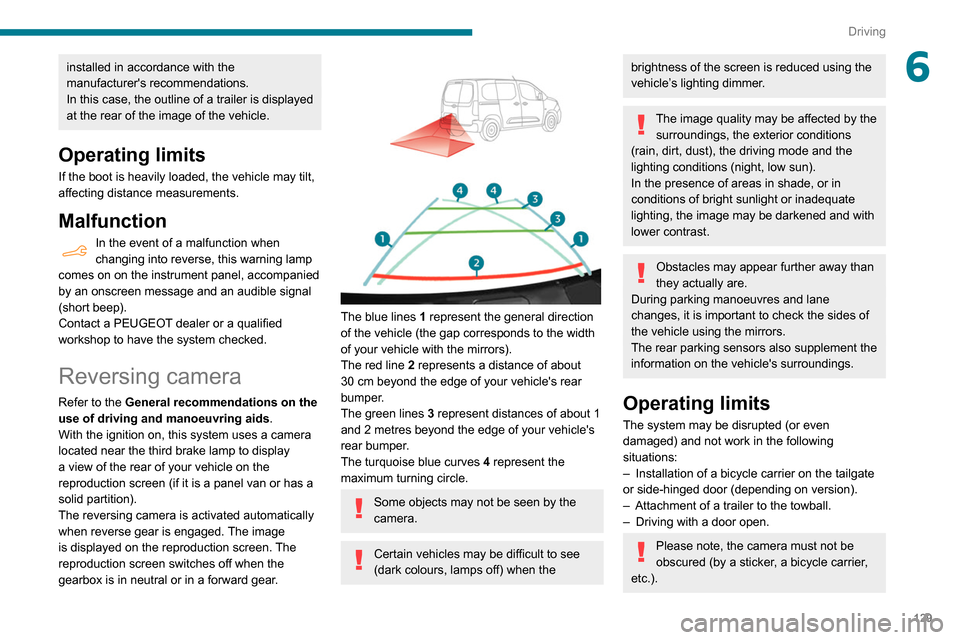
The blue lines 1 represent the general direction
of the vehicle (the gap corresponds to the width
of your vehicle with the mirrors).
The red line 2 represents a distance of about
30
cm beyond the edge of your vehicle's rear
bumper.
The green lines 3 represent distances of about 1
and 2 metres beyond the edge of your vehicle's
rear bumper.
The turquoise blue curves 4 represent the
maximum turning circle.
Some objects may not be seen by the
camera.
Certain vehicles may be difficult to see
(dark colours, lamps off) when the
brightness of the screen is reduced using the
vehicle’s lighting dimmer.
The image quality may be affected by the surroundings, the exterior conditions
(rain, dirt, dust), the driving mode and the
lighting conditions (night, low sun).
In the presence of areas in shade, or in
conditions of bright sunlight or inadequate
lighting, the image may be darkened and with
lower contrast.
Obstacles may appear further away than
they actually are.
During parking manoeuvres and lane
changes, it is important to check the sides of
the vehicle using the mirrors.
The rear parking sensors also supplement the
information on the vehicle's surroundings.
Operating limits
The system may be disrupted (or even
damaged) and not work in the following
situations:
–
Installation of a bicycle carrier on the tailgate
or side-hinged door (depending on version).
–
Attachment of a trailer to the towball.
–
Driving with a door open.
Please note, the camera must not be
obscured (by a sticker, a bicycle carrier,
etc.).