2020 Peugeot Partner instrument panel
[x] Cancel search: instrument panelPage 108 of 260

106
Driving
Manoeuvring aids
The driver must always check the
surroundings of the vehicle before and during
the whole manoeuvre, in particular using the
mirrors.
Radar
The operation of the radar as well as the
associated functions may be impaired through
the accumulation of dirt (mud, frost, etc.), in
certain difficult weather conditions (very heavy
rain, snow) or if the bumper is damaged.
If the front bumper is to be repainted, contact
a PEUGEOT dealer or a qualified workshop;
certain types of paint could interfere with the
operation of the radar.
Driving aids camera
This camera and its associated functions
may be impaired or not work if the windscreen
area in front of the camera is dirty, misty,
frosty, covered with snow, damaged or
masked by a sticker.
On versions with camera alone, this message
indicates to you that the camera is obstructed:
"Driving aids camera: visibility limited, see
user guide".
In humid and cold weather, demist the
windscreen regularly.
Poor visibility (inadequate street lighting,
heavy rain, thick fog, snowfall), dazzle
(headlamps of an oncoming vehicle, low sun,
reflections on a damp road, leaving a tunnel,
alternating shade and light) can also impair
detection performance.
In the event of a windscreen replacement,
contact a PEUGEOT dealer or a qualified
workshop to recalibrate the camera;
otherwise, the operation of the associated
driving aids may be disrupted.
Other cameras
The images from the camera(s)
displayed on the touch screen or on the
instrument panel may be distorted by the
relief.
In the presence of areas in shade, or in
conditions of bright sunlight or inadequate
lighting, the image may be darkened and with
lower contrast.
Obstacles may appear further away than they
actually are.
Sensors
The operation of the sensors as well as
the associated functions may be disturbed
by sound interference such as that emitted
by noisy vehicles and machinery (e.g. lorries,
pneumatic drills), by the accumulation of
snow or dead leaves on the road or in the
event of damaged bumpers and mirrors.
When reverse gear is engaged, an audible
signal (long beep) indicates that the sensors
may be dirty.
A front or rear impact to the vehicle can
upset the sensors’ settings, which is not
always detected by the system: distance
measurements may be distorted.
The sensors do not systematically detect
obstacles that are too low (pavements, studs)
or too thin (trees, posts, wire fences).
Certain obstacles located in the sensors’ blind
spots may not be detected or may no longer
be detected during the manoeuvre.
Certain materials (fabrics) absorb sound
waves: pedestrians may not be detected.
Maintenance
Clean the bumpers and door mirrors and
the field of vision of the cameras regularly.
When washing your vehicle at high pressure,
direct the spray from at least 30
cm away
from the sensors and cameras.
Mats
The use of mats not approved by
PEUGEOT may interfere with the operation of
the speed limiter or cruise control.
To avoid any risk of jamming the pedals:
► ensure that the mat is secured correctly,
► never fit one mat on top of another.
Units of speed
Ensure that the units of speed displayed
on the instrument panel (mph or km/h) are
those for the country you are driving in.
If this is not the case, when the vehicle is
stationary, set the display to the required
units of speed so that it complies with what is
authorised locally.
In case of doubt, contact a PEUGEOT dealer
or a qualified workshop.
Speed Limit Recognition
and Recommendation
Refer to the General recommendations on the
use of driving and manoeuvring aids .
This system displays the maximum authorised
speed in the instrument panel, according to
the speed limits in the country in which you are
driving, using:
Page 109 of 260

107
Driving
6► ensure that the mat is secured correctly,
► never fit one mat on top of another .
Units of speed
Ensure that the units of speed displayed
on the instrument panel (mph or km/h) are
those for the country you are driving in.
If this is not the case, when the vehicle is
stationary, set the display to the required
units of speed so that it complies with what is
authorised locally.
In case of doubt, contact a PEUGEOT dealer
or a qualified workshop.
Speed Limit Recognition
and Recommendation
Refer to the General recommendations on the
use of driving and manoeuvring aids .
This system displays the maximum authorised
speed in the instrument panel, according to
the speed limits in the country in which you are
driving, using:
– Speed limit signs detected by the camera.
– Speed limit details from the navigation system
mapping.
Navigation mapping should be regularly
updated in order to receive accurate
speed limit information from the system.
–
Signs indicating an intersection area detected
by the camera.
Sign detected Suggested speed (calculated)
Entry into an
intersection area Example:
Without PEUGEOT
Connect Nav
10 mph or 20
km/h
(depending on
the units of the
instrument panel) With PEUGEOT Connect NavDisplay of the
speed in force in the
country in which you are driving.
–
Certain qualifier plates are detected by the
camera.
Qualifier plate detected Display of the
speed associated with the qualifier plate
Speed limit in rain Examples:
If the wiper control stalk is in the
"intermittent wipe"
or "automatic wipe" position (in order
to activate the rain sensor):
68 mph (110
km/h)
(for example)
Speed limit if towing
If an approved towing device is fixed to the vehicle:
56 mph (90
km/h)
(for example)
Speed limit
applicable over a certain distance Example:
43 mph (70 km/h)
(for example)
Page 110 of 260
108
Driving
Qualifier plate detected Display of the
speed associated with the qualifier plate
Speed limit for
vehicles whose gross vehicle
weight or gross
train weight is less than 3.5 tonnes
56 mph (90 km/h)
(for example)
Speed limit in snow Example:
If the exterior
temperature is below 3°C:
19 mph (30
km/h)
(for example)
with a "snowflake" symbol
Speed limit at certain times Example:
19 mph (30 km/h)
(for example)
with a "clock" symbol
The units for the speed limit (mph or km/h) depend on the country you are
driving in.
This should be taken into account so that you
observe the speed limit.
For the system to work correctly when
changing country, the speed unit in the
instrument panel must correspond to that of
the country you are driving in.
The automatic reading of road signs is a driving aid system and does not always
display speed limits correctly.
The speed limit signs present on the road
always take priority over the display by the
system.
The system is designed to detect signs that
conform to the Vienna Convention on road
signs.
Specific speed limits, such as those for
heavy goods vehicles, are not displayed.
The display of the speed limit in the
instrument panel is updated when passing
a speed limit sign intended for cars (light
vehicles).
Activation / Deactivation
By default, the system is automatically activated
at every engine start.
It is set via the vehicle
configuration menu.
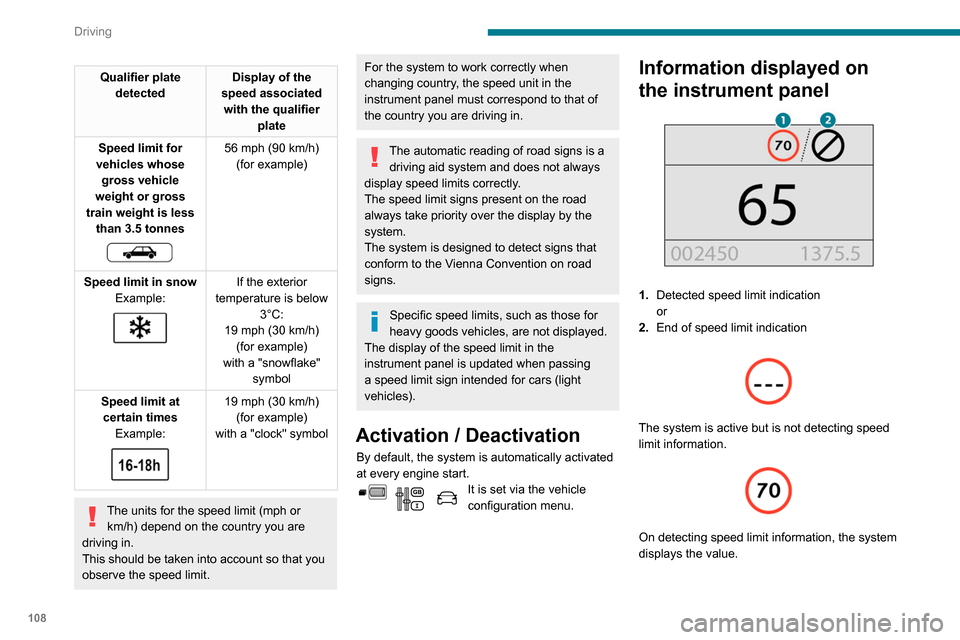
Information displayed on
the instrument panel
1. Detected speed limit indication
or
2. End of speed limit indication
The system is active but is not detecting speed
limit information.
On detecting speed limit information, the system
displays the value.
In the case of suggested maximum speeds, the
first time the vehicle exceeds the suggested
speed by more than 3 mph (5 km/h) (e.g. 59
mph (95 km/h)), the speed is displayed flashing
for 10 seconds.
Operating limits
The system does not take account of reduced
speed limits, especially those imposed in the
following cases:
– atmospheric pollution,
– when towing,
– driving with a space-saver type spare wheel or
snow chains fitted,
– Tyre repaired using the temporary puncture
repair kit,
– young drivers.
It is possible for the system to not display the
speed limit if it does not detect a speed limit
sign within a preset period and in the following
situations:
– road signs that are obstructed, do not comply
with the standard, are damaged or distorted,
– obsolete or incorrect maps.
Page 111 of 260
109
Driving
6
In the case of suggested maximum speeds, the
first time the vehicle exceeds the suggested
speed by more than 3 mph (5 km/h) (e.g. 59
mph (95
km/h)), the speed is displayed flashing
for 10 seconds.
Operating limits
The system does not take account of reduced
speed limits, especially those imposed in the
following cases:
–
atmospheric pollution,
–
when towing,
–
driving with a space-saver type spare wheel or
snow chains fitted,
–
T
yre repaired using the temporary puncture
repair kit,
–
young drivers.
It is possible for the system to not display the
speed limit if it does not detect a speed limit
sign within a preset period and in the following
situations:
–
road signs that are obstructed, do not comply
with the standard, are damaged or distorted,
–
obsolete or incorrect maps.
Recommendation
In addition to Speed Limit Recognition and
Recommendation, the driver can select the
speed displayed as a speed setting for the speed
limiter or cruise control using the speed limiter or
cruise control memorisation button.
For more information on the Speed
limiter, Cruise control or Adaptive
cruise control, refer to the corresponding
sections.
Steering mounted controls
1. Speed limiter/cruise control mode selection
2. Memorise the speed setting
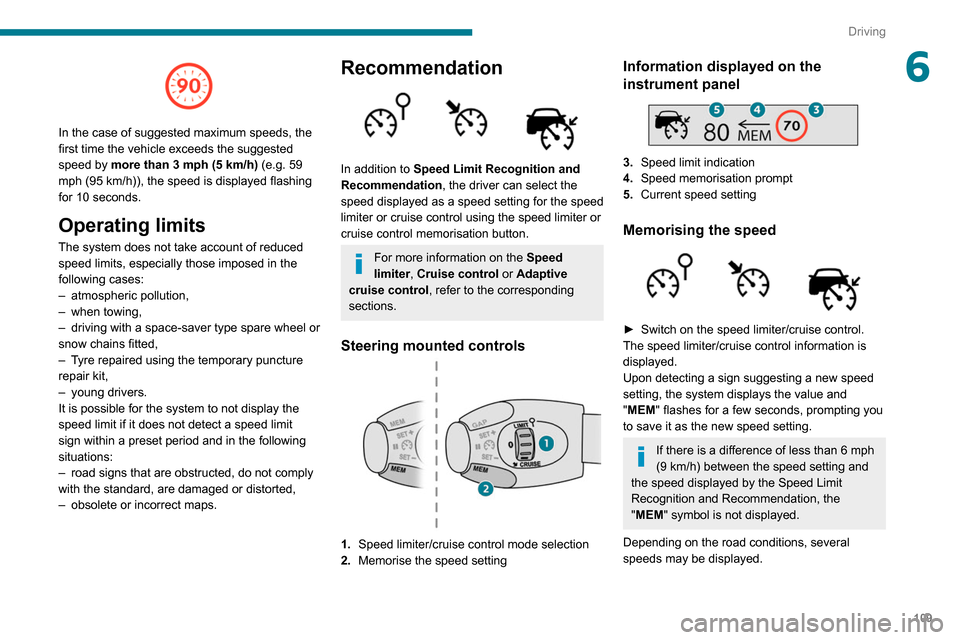
Information displayed on the
instrument panel
3.Speed limit indication
4. Speed memorisation prompt
5. Current speed setting
Memorising the speed
► Switch on the speed limiter/cruise control.
The speed limiter/cruise control information is
displayed.
Upon detecting a sign suggesting a new speed
setting, the system displays the value and
"
MEM" flashes for a few seconds, prompting you
to save it as the new speed setting.
If there is a difference of less than 6 mph
(9 km/h) between the speed setting and
the speed displayed by the Speed Limit
Recognition and Recommendation, the
"MEM" symbol is not displayed.
Depending on the road conditions, several
speeds may be displayed.
Page 112 of 260

11 0
Driving
► Press button 2once to save the suggested
speed value.
A message is displayed, confirming the request.
►
Press button
2again to confirm and save the
new speed setting.
After a predetermined period, the screen returns
to the normal display.
Extended Traffic Sign
Recognition
Refer to the General recommendations on the
use of driving and manoeuvring aids .
This additional system recognises these road
signs and displays them in the instrument panel
if the appropriate display mode is selected.
One-way street: if you start driving the wrong
way down a one-way street, an alert message,
including the sign's symbol, is displayed in the
instrument panel (request to check the traffic
direction).
Other signs: when approaching one of these
signs, the sign’s symbol is displayed in the
instrument panel.
The actual road signs always take priority over the display from the system.
The signs must comply with the Vienna
Convention on road signs.
Activation / Deactivation
It is set via the vehicle
configuration menu.
Speed limiter
Refer to the General recommendations on the
use of driving and manoeuvring aids .
This system prevents the vehicle from
exceeding the speed programmed by the
driver (speed setting).
The speed limiter is switched on manually.
The minimum speed setting is 19 mph (30
km/h).
The speed setting remains in the system
memory when the ignition is switched off.
Steering mounted control
1. ON (LIMIT position) / OFF (position 0)
2. Reduce the speed setting
3. Increase the speed setting
4. Pause / resume speed limiter with the speed
setting previously stored 5.
Depending on version:
Display of speed thresholds recorded using
Memorising speeds
or
Use the speed suggested by the Speed Limit
Recognition and Recommendation ( MEM
display)
6. Display and adjustment of the programmed
inter-vehicle distance
For more information on Memorising speeds
or on the Speed Limit Recognition and
Recommendation, refer to the corresponding
sections.
Information displayed on
the instrument panel
6. Speed limiter mode selection indication
7. Speed limiter on/pause status indication
8. Programmed speed setting value
9.Speed suggested by the Speed Limit
Recognition and Recommendation
Switching on/pausing
► Turn thumbwheel 1 to the "LIMIT" position to
select the speed limiter; the function is paused.
► If you are satisfied with the limit speed setting
(most recent speed setting programmed in the
system), press button 4 to switch the speed
limiter on.
► Pressing button 4 again temporarily pauses
the function.
An audible warning will sound if the vehicle's speed exceeds the speed
setting for an extended period.
Adjusting the limit speed setting
You do not have to switch the speed limiter on in
order to set the speed.
To modify the limit speed setting based on the
vehicle’s current speed:
Page 113 of 260

111
Driving
69.Speed suggested by the Speed Limit
Recognition and Recommendation
Switching on/pausing
► Turn thumbwheel 1 to the "LIMIT" position to
select the speed limiter; the function is paused.
► If you are satisfied with the limit speed setting
(most recent speed setting programmed in the
system), press button
4 to switch the speed
limiter on.
► Pressing button 4 again temporarily pauses
the function.
An audible warning will sound if the vehicle's speed exceeds the speed
setting for an extended period.
Adjusting the limit speed setting
You do not have to switch the speed limiter on in
order to set the speed.
To modify the limit speed setting based on the
vehicle’s current speed: ►
Briefly press button
2 or 3 to change the
value in steps of + or - 1 mph (1.6 km/h).
►
Press and hold button
2
or 3 to change the
value in steps of + or - 5 mph (8 km/h).
To change the limit speed setting using memorised speeds, via the touch screen:
►
press button
5 to display the memorised
speed settings,
►
press the button for the desired speed
setting.
The selection screen closes after a few
moments.
This setting becomes the new limit speed.
T
o change the limit speed setting based on the
speed suggested by the Speed Limit Recognition
and Recommendation:
►
the suggested speed is displayed on the
instrument panel,
►
press button
5 once; a message is displayed,
confirming the memorisation request,
►
press button
5 again to save the suggested
speed.
The speed is immediately displayed as the new
speed setting on the instrument panel.
Temporarily exceeding the
speed setting
► Press the accelerator pedal down fully .
The speed limiter is deactivated temporarily and
the displayed speed setting flashes.
Release the accelerator pedal to return to below
the programmed speed.
When the limit speed is exceeded but this is not
due to action by the driver (in case of a steep
slope, for example), an audible signal triggers
immediately.
On a steep descent or in the event of
sharp acceleration, the speed limiter will
not be able to prevent the vehicle from
exceeding the speed setting.
Brake if necessary to control the speed of
your vehicle.
Once the speed of the vehicle returns to the
programmed setting, the speed limiter functions
again: the display of the speed setting becomes
fixed again.
Switching off
► Turn the thumbwheel 1 to the "0" position:
the display of information on the speed limiter
disappears.
Page 114 of 260

11 2
Driving
Malfunction
Dashes are displayed (flashing, initially, then
fixed) in the event of a speed limiter malfunction.
Have the system checked by a PEUGEOT
dealer or a qualified workshop.
Cruise control - particular
recommendations
For the safety of everyone, only use the
cruise control where the driving
conditions allow running at a constant speed
and keeping an adequate safety distance.
Remain vigilant when the cruise control is
activated. If you hold one of the speed setting
modification buttons, a very rapid change in
the speed of your vehicle may occur.
When descending a steep hill , the cruise
control system cannot prevent the vehicle
from exceeding the set speed. Brake if
necessary to control the speed of your
vehicle.
On steep climbs or when towing, the set
speed may not be reached or maintained.
Exceeding the programmed speed
setting
You can temporarily exceed the speed
setting by pressing the accelerator pedal (the
programmed speed flashes).
To return to the speed setting, release the
accelerator pedal (when the set speed is
reached again, the displayed speed stops
flashing).
Operating limits
Never use the system in the following
situations:
–
in an urban area with the risk of
pedestrians crossing the road,
–
in heavy traffic,
–
on winding or steep roads,
–
on slippery or flooded roads,
–
in unfavourable climatic conditions,
–
driving on a speed circuit,
–
driving on a rolling road,
–
use of snow chains, non-slip covers or
studded tyres.
Programmable cruise
control
Refer to the General recommendations on the
use of driving and manoeuvring aids and to
Cruise control - particular recommendations.
This system automatically keeps the vehicle’s speed at the cruise value
programmed by the driver (speed setting),
without using the accelerator pedal.
The cruise control is switched on manually.
It requires a minimum vehicle speed of 25 mph
(40
km/h).
With a manual gearbox, third gear or higher must
be engaged.
With an automatic gearbox, mode
D
or second
gear or higher in mode
M
must be engaged.
The cruise control remains active after changing gear, regardless of the gearbox
type, on engines fitted with Stop & Start.
Switching off the ignition cancels any
speed setting.
Steering mounted control
1. ON (CRUISE position) / OFF (position 0)
2. Activation of cruise control at the current
speed / decrease speed setting
3.Activation of cruise control at the current
speed / increase speed setting
4. Pausing / resumption of cruise control with
the speed setting previously stored
5. Depending on version:
Display of speed thresholds recorded using
Memorising speeds
or
Use the speed suggested by the Speed Limit
Recognition and Recommendation ( MEM
display)
For more information on Memorising speeds
or on the Speed Limit Recognition and
Recommendation, refer to the corresponding
sections.
Information displayed on
the instrument panel
6. Cruise control mode selection indication
Page 115 of 260

11 3
Driving
63.Activation of cruise control at the current
speed / increase speed setting
4. Pausing / resumption of cruise control with
the speed setting previously stored
5. Depending on version:
Display of speed thresholds recorded using
Memorising speeds
or
Use the speed suggested by the Speed Limit
Recognition and Recommendation ( MEM
display)
For more information on Memorising speeds
or on the Speed Limit Recognition and
Recommendation, refer to the corresponding
sections.
Information displayed on
the instrument panel
6. Cruise control mode selection indication 7.
Cruise control pause/resume status indication
8. Programmed speed setting value
9. Speed suggested by the Speed Limit
Recognition and Recommendation
Switching on/pausing
► Turn thumbwheel 1 to the "CRUISE" position
to select cruise control mode; the function is
paused.
► Press button 2 or 3 to activate cruise control
and save a speed setting when the vehicle has
reached the desired speed; the vehicle’s current
speed is saved as the speed setting.
►
Release the accelerator pedal.
► Pressing button 4 temporarily pauses the
function.
►
Pressing button 4
again restores operation of
the cruise control (ON).
Operation of the cruise control can also
be paused temporarily:
–
by pressing the brake pedal.
–
automatically
, if the electronic stability
control (ESC) system is triggered.
Changing the cruise speed
setting
The cruise control must be active.
To change the cruise speed setting, based on
the vehicle’s current speed:
►
In +/-
1 mph (1.6 km/h) steps, briefly press
button
2 or 3 as often as necessary.
►
Continuously
, in steps of +/- 5 mph (8 km/h),
press and hold button
2
or 3.
Pressing and holding button 2 or
3 results in a rapid change in the speed
of your vehicle.
As a precaution, we recommend setting a cruise speed similar to the vehicle’s
current speed, to avoid any sudden
acceleration or deceleration.
To change the cruise speed setting using memorised speed settings and from the touch
screen:
►
Press button
5 to display the memorised
speed settings.
►
Press the button for the desired speed
setting.