2020 Peugeot Partner Fuel
[x] Cancel search: FuelPage 24 of 260

22
Instruments
Setting the date and time
Without audio system
Set the date and time via the instrument panel
display.
► Press and hold this button.
► Press one of these buttons to select
the setting to be changed.
► Briefly press this button to confirm.
► Press one of these buttons to change
the setting and confirm again to record
the change.
► Or press the thumbwheel on the steering
wheel.
Trip reset
The reset is performed when the trip counter is
displayed.
►
Press the button on the end of the
wiper
control stalk
for more than two seconds.
►
Press the thumbwheel on the steering wheel
for more than two seconds.
► Press this button for more than 2 seconds.
A few definitions…
Range
(miles or km)Distance that can still be travelled with the
fuel remaining in the tank (based on the
average fuel consumption over the last few miles
(kilometres) travelled).
This value may vary following a change in the driving style or terrain, resulting in
a significant change in the spot fuel
consumption.
When the range falls below 19 miles (30
km),
dashes are displayed.
After filling with at least 5 litres of fuel, the range
is recalculated and is displayed if it exceeds 62
miles (100
km).
If dashes instead of figures continue to
be displayed when driving, contact a
PEUGEOT dealer or a qualified workshop.
Spot fuel consumption
(mpg or l/100 km or km/l)Calculated during the last few seconds.
This function is only displayed at speeds above 19 mph (30 km/h).
Average fuel consumption
(mpg or l/100 km or km/l)Calculated since the last trip computer
reset.
Average speed
(mph or km/h)Calculated since the last trip computer
reset.
Distance travelled
(miles or km)Calculated since the last trip computer
reset.
Stop & Start time counter
(minutes/seconds or hours/minutes)
If your vehicle is fitted with Stop & Start, a time
counter calculates the time spent in STOP mode
during a journey.
It resets to zero every time the ignition is
switched on.
Page 26 of 260
24
Access
Electronic key with
remote control function
and built-in key,
Remote control key
This allows the central locking or unlocking of the
vehicle using the door lock or remotely.
It also allows the vehicle to be located, the fuel
filler cap to be removed and refitted and the
engine to be started or switched off, as well as
providing protection against theft.
The remote control buttons are not active with the ignition switched on.
Unfolding / Folding the key
► Press this button to unfold or fold the key .
The remote control may be damaged if
you do not press the button.
Keyless Entry and Starting
This allows the remote central locking or
unlocking of the vehicle.
It is also used to locate and start the vehicle, as
well as providing protection against theft.
Integral key
This is used to lock and unlock the vehicle when
the remote control cannot operate:
–
remote control battery discharged, vehicle
battery discharged or disconnected, etc.
–
vehicle located in an area subject to strong
electromagnetic interference.
► Keep this button 1 pulled across to remove
the key 2 from the device.
If the alarm is activated, the audible
signal triggered on opening a door with
the key (integral with the remote control) will
stop when the ignition is switched on.
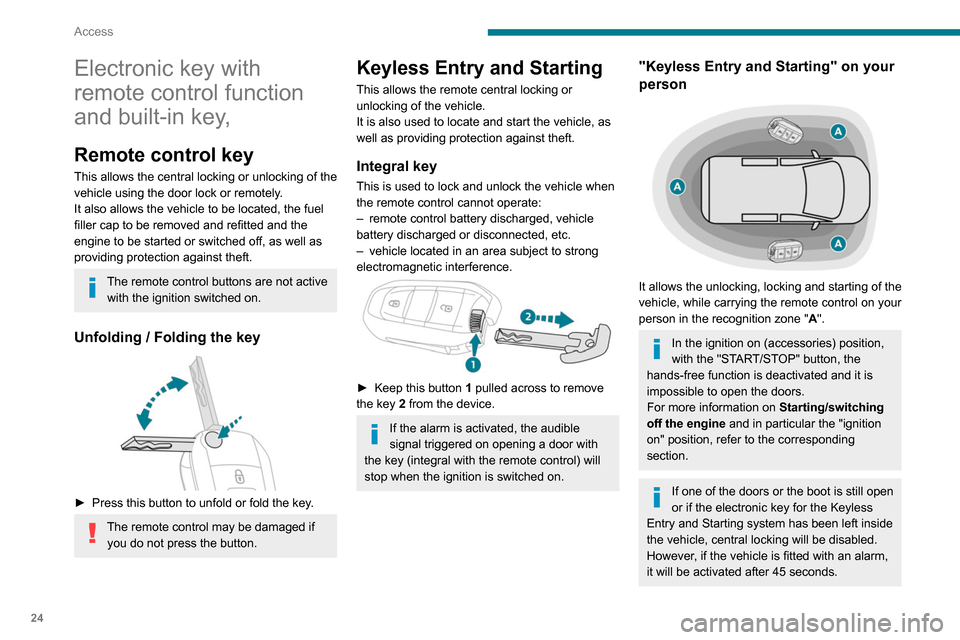
"Keyless Entry and Starting" on your
person
It allows the unlocking, locking and starting of the
vehicle, while carrying the remote control on your
person in the recognition zone " A".
In the ignition on (accessories) position,
with the "START/STOP" button, the
hands-free function is deactivated and it is
impossible to open the doors.
For more information on Starting/switching
off the engine and in particular the "ignition
on" position, refer to the corresponding
section.
If one of the doors or the boot is still open
or if the electronic key for the Keyless
Entry and Starting
system has been left inside
the vehicle, central locking will be disabled.
However
, if the vehicle is fitted with an alarm,
it will be activated after 45
seconds.
Page 44 of 260

42
Ease of use and comfort
► Slot the armrest into the backrest, ensuring
that you align the bayonet lugs with the holes.
►
Push the armrest shaft towards the backrest.
►
While holding it in this position, rotate the
armrest towards the front.
The armrest is once
again secured onto the backrest.
Storage compartment under
the seat
► Lift the passenger ’s seat cushion to access
the storage compartment.
Heated seat control
► Approximately 30 seconds after starting the
engine, press the control.
The temperature is controlled automatically
.
Pressing again interrupts operation.
If you press the control while the engine
is not running, the request will be
memorised for approximately 2 minutes.
With the two-seat front bench seat, the driver's
seat control switches the heating on or off for the
bench seat’s outer seat.
Do not use the function when the seat
is not occupied.
Reduce the heating intensity as soon as
possible.
When the seat and passenger compartment
have reached a satisfactory temperature,
switch the function off; reducing electricity
consumption in turn decreases fuel
consumption.
Prolonged use of the heated seats is not
recommended for those with sensitive
skin.
There is a risk of burns for people whose
perception of heat is impaired (illness, taking
medication, etc.).
To keep the heated pad intact and to prevent
a short circuit:
–
do not place sharp or heavy objects on the
seat,
–
do not kneel or stand on the seat,
–
do not spill liquids onto the seat,
–
never use the heating function if the seat
is wet.
Steering wheel
adjustment
► When stationary , pull the control lever to
release the steering wheel.
► Adjust the height and reach.
► Lower the control lever to lock the steering
wheel.
As a safety precaution, these operations must only be carried out while the vehicle
is stationary.
Mirrors
Door mirrors
Adjustment
► Move control A or turn control C (depending
on the version you have) to the right or to the left
to select the corresponding mirror.
► Move control B or C (depending on the
version you have) in any of the four directions to
adjust.
Page 62 of 260

60
Ease of use and comfort
Switch off the rear screen and door
mirror defrosting function as soon as
possible, as decreasing electrical
consumption in turn reduces fuel
consumption.
Rear screen demisting/defrosting can
only operate with the engine is running.
Additional heating/ ventilation system
Heating
This is an additional and separate system which
heats the passenger compartment and improves
defrosting performance.
This indicator lamp is lit while the system is programmed or set in operation
remotely via the remote control.
It flashes during the whole duration of the
heating and goes off at the end of the heating
cycle or when stopped using the remote control.
Ventilation
This system allows ventilation of the passenger
compartment with exterior air to improve the
temperature experienced on entering the vehicle
in summer.
Programming
With Bluetooth® audio system
► Press the MENU button to access the
main menu.
►
Select "
Pre-heat. / Pre-ventil.".
►
Select "
Activation" and, if necessary, for
programming, “Parameters".
►
Select "
Heating" to heat the engine and
passenger compartment or " Ventilation" to
ventilate the passenger compartment.
► Select:
• the first clock to set/save the time at which
the pre-heating temperature will be reached,
•
the second clock to set/save a second time
at which the pre-heating temperature will be
reached,
Using these two clocks and depending
on the season you can, for example,
select one or the other start time.
A message on the screen confirms your
choice.
With PEUGEOT Connect Radio
Press Connect-App to display the main
page.
Then press "Programmable heating/ ventilation ".
►
Select the "
Status" tab to activate/deactivate
the system.
►
Select the "
Other settings" tab to choose
the "Heating" mode, to heat the engine and
passenger compartment, or " Ventilation" to
ventilate the passenger compartment.
►
Then set/save the time at which the
preheating temperature will be reached for each
selection.
Press this button to save.
With PEUGEOT Connect Nav
► Press the " Applications" menu.
►
Press the "
Vehicle Apps" tab.
► Press " Temperature programming".
►
Press the "
Status" tab to activate/deactivate
the system.
► Press the "Parameters " tab to select
"Heating" mode to heat the engine and
passenger compartment or " Ventilation" mode
to ventilate the passenger compartment.
► Then set/save the activation time for each
selection.
► Press "OK" to confirm.
You must allow at least 60 minutes
between programming operations.
Long range remote control
(Depending on version.)
This enables you to switch the heating in
the passenger compartment on or off from a
distance.
The remote control has a range of about 0.6
miles (1 km) in open country.
Page 63 of 260

61
Ease of use and comfort
3► Press the "Parameters" tab to select
"Heating" mode to heat the engine and
passenger compartment or " Ventilation" mode
to ventilate the passenger compartment.
►
Then set/save the activation time for each
selection.
►
Press "
OK" to confirm.
You must allow at least 60 minutes between programming operations.
Long range remote control
(Depending on version.)
This enables you to switch the heating in
the passenger compartment on or off from a
distance.
The remote control has a range of about 0.6
miles (1
km) in open country.
On
► Pressing and holding this button starts
the heating immediately (confirmed by the
green indicator lamp coming on briefly).
Off
► Pressing and holding this button stops
the heating immediately (confirmed by the
red indicator lamp coming on briefly).
The indicator lamp in the remote control flashes for about 2 seconds if the vehicle
has not received the signal, in which case
you should move to a different location and
repeat the command.
Changing the battery
The indicator lamp in the remote control will
change to orange if the battery charge is low.
If the indicator lamp is not on, the battery is
discharged.
► Use a coin to unscrew the cap and replace
the battery .
The maximum heating period is about 45 minutes depending on the climatic
conditions.
The ventilation is activated provided that the battery is sufficiently charged.
The heating is activated provided that:
–
the battery charge and the fuel level are
sufficient,
–
the engine has been started since the
previous heating cycle,
–
60
minutes have elapsed between two
heating requests.
The programmable heating is supplied by the vehicle fuel tank. Before use, make
sure that you have sufficient fuel. If the fuel
tank is on reserve, you are strongly
recommended not to program the heating.
The additional heating must always be
switched off while refuelling to avoid any risk
of fire or explosion.
To avoid the risks of poisoning or asphyxia, the programmable heating
must not be used, even for short periods, in a
Page 75 of 260

73
Safety
5The lighting of the indicator lamp and a voice
message confirm that the call has been made to
the emergency services*.
‘Peugeot Connect SOS’ immediately locates
your vehicle and puts you in contact with the
appropriate emergency services**.
►
Pressing again immediately cancels the
request.
The indicator lamp flashes when the vehicle
data is sent, and then remains lit when
communication is established.
If an impact is detected by the airbag
control unit, an emergency call is made
automatically, independently of the
deployment of any airbags.
‘Peugeot Connect SOS’ is a service that
can be accessed free of charge.
System operation
– Upon switching on the ignition, if the indicator
lamp lights up red, then green, and then goes
out: the system is operating correctly
.
–
If the indicator lamp is fixed red: system
malfunction
–
If the indicator lamp flashes red: replace the
emergency battery
.
* In accordance with the general conditions of use of the service, available from dealers an\
d subject to technological and technical limitations.
** In areas covered by ‘Peugeot Connect SOS’ and ‘Peugeot Connect Assistance’.
The list of countries covered and telematic services provided is availab\
le from dealers or on the website for your country.
In the latter two cases, emergency and
assistance call services may not work.
Contact a dealer or a qualified repairer as soon
as possible.
The system fault does not prevent the vehicle from being driven.
Data processing
All processing of personal information by
the "Peugeot Connect SOS" system (PE112)
complies with the framework for protection
of personal information established by
Regulation 2016/679 (GDPR) and Directive
2002/58/EC of the European Parliament
and the Council, and in particular, seeks to
protect the vital interests of the data subject,
in accordance with Article
6.1, paragraph d) of
Regulation 2016/679.
Personal information processing is strictly
limited to the management of the "Peugeot
Connect SOS" system used with the “112”
European single emergency call number.
The "Peugeot Connect SOS" system is able
to collect and process only the following
data relating to the vehicle: chassis number,
type (passenger vehicle or light commercial
vehicle), fuel type or power source, most
recent three locations and direction of travel,
and a timestamped log file recording the
automatic activation of the system.
The recipients of the processed data are the
emergency call handling centres designated
by the relevant national authorities in the
territory in which they are located, enabling
priority reception and handling of calls to the
“112” emergency number.
Data storage
Data contained in the system’s memory
is not accessible from outside the system until
a call is made. The system is not traceable
and is not continuously monitored in its
normal operating mode.
The data in the system's internal memory is
automatically and continuously erased. Only
the vehicle’s three most recent locations are
stored.
When an emergency call is triggered, the data
log is stored for no more than 13
hours.
Access to data
You have the right to access the data
and, if necessary, submit a request to
rectify, erase or restrict the processing of
any personal information not processed in
accordance with the provisions of Regulation
Page 80 of 260

78
Safety
On a descent, with the vehicle stationary, if you
release the accelerator and brake pedals, the
system will release the brakes to set the vehicle
gradually in motion.
The brake lamps light up automatically when the
system is regulating.
If the speed exceeds 19 mph (30 km/h),
regulation is paused automatically, the
indicator lamp goes back to grey in the
instrument panel, but the green indicator lamp in
the button remains on.
Regulation resumes automatically when the
speed falls below 19 mph (30 km/h) again, if the
slope and pedal release conditions are met.
You can depress the accelerator or brake pedal
again at any time.
Off
► Press the button until its indicator lamp goes
off; the indicator lamp on the instrument panel
also goes off.
At speeds above 43 mph (70 km/h), the system
is automatically deactivated; the indicator lamp in
the button goes off.
Malfunction
In the event of a system malfunction, this
warning lamp comes on on the instrument
panel, accompanied by an onscreen message.
Have the system checked by a PEUGEOT
dealer or a qualified workshop.
You can deactivate the ASR and DSC systems by turning the knob to the "OFF"
position.
The ASR and DSC systems will no longer act on the operation of the engine
or of the brakes in the event of a change of
trajectory.
These systems are reactivated automatically
from 31 mph (50
km/h) and whenever the
ignition is switched on.
Recommendations
Your vehicle is designed principally to
drive on tarmac roads but it allows you to
occasionally drive on other less passable
terrain.
However, it does not permit off-road driving
such as:
–
crossing and driving on terrain which
could damage the underbody or strip away
components (fuel pipe, fuel cooler
, etc.) due
to obstacles or stones in particular,
–
driving on terrain with steep gradients and
poor grip,
–
crossing a stream.
Hill Assist Descent
Control
System that provides assistance when
descending on loose or soft surfaces (gravel,
mud, etc.) or a steep gradient.
This system reduces the risk of slip or loss of
control of the vehicle when descending, whether
going forward or in reverse.
During a descent, it assists the driver in
maintaining a constant speed, depending on the
gear engaged, while progressively releasing the
brakes.
For the system to activate, the slope
must be greater than 5%.
The system can be used with the gearbox in
neutral.
Otherwise engage a gear corresponding to
the speed to prevent the engine stalling.
With an automatic gearbox, the system can
be used with the selector at N, D or R.
When the system is regulating, the Active
Safety Brake system is automatically
deactivated.
The system is not available: – if the speed of the vehicle is above 43
mph (70
km/h),
–
if the speed of the vehicle is being
controlled by the
Adaptive Cruise Control,
depending on the type of gearbox.
Switching on
By default, the system is not selected.
The state of the function is not saved when the
ignition is switched off.
The driver can select the system when the
engine is running, when the vehicle is stationary
or when moving at speeds up to approximately
31 mph (50
km/h).
► To select the system, at speeds below
31 mph (50 km/h), press this button until
its indicator lights up; this lamp appears in green
in the instrument panel.
The system becomes active at speeds below 19
mph (30
km/h).
►
When the vehicle begins its descent, you can
release the accelerator and brake pedals; the
system regulates the speed:
– if the gearbox is in first or second gear ,
the speed decreases and the
indicator
lamp flashes rapidly,
–
if the gearbox is in neutral or if the clutch pedal
is depressed, the speed decreases and the
indicator
lamp flashes slowly; in this case, the
maintained descent speed is lower.
Page 104 of 260

102
Driving
and from N to R. This will not cause any damage
to the gearbox.
Do not exceed 60 mph (100 km/h), local speed
restrictions permitting.
Have it checked by a PEUGEOT dealer or a
qualified workshop.
There is a risk of damage to the gearbox:– if you press the accelerator and
brake pedals at the same time (braking or
acceleration must be done only with the right
foot),
–
if you force the selector from position P
to
another position when the battery is flat.
To reduce fuel consumption when stationary for long periods with the
engine running (traffic jam, etc.), position the
selector on N and apply the parking brake.
If your vehicle has an automatic gearbox,
do not try to start the engine by pushing
the vehicle.
Gear efficiency indicator
(Depending on engine.)
This system helps reduce fuel consumption by
recommending the most appropriate gear.
Operation
Depending on the driving situation and the
vehicle's equipment, the system may advise to
skip one or more gears.
Gear shift recommendations should not be
considered compulsory. In fact, the road layout,
the traffic density and safety remain the deciding
factors when choosing the best gear. The driver
therefore remains responsible for deciding
whether or not to follow the indications issued by
the system.
This function cannot be deactivated.
With an automatic gearbox, the system is
only active in manual operation.
The information appears in the instrument panel, in the form of an ascending or
descending arrow and the recommended gear.
The system adapts its gear shift recommendation according to the driving
conditions (slope, load, etc.) and the driver’s
requirements (power, acceleration, braking,
etc.).
The system never suggests:
–
engaging first gear;
–
engaging reverse.
Stop & Start
The Stop & Start function puts the engine temporarily into standby - STOP mode - during
phases when the vehicle is stopped (red lights,
queues, etc.). The engine restarts automatically
- START mode - as soon as the driver wishes to
move off again.
Primarily designed for urban use, the function
is intended to reduce fuel consumption and
exhaust emissions as well as the noise level
when stationary.
The function does not affect the functionalities of
the vehicle, in particular the braking.
Opening the bonnet
Before doing anything under the bonnet,
deactivate the Stop & Start system to avoid
any risk of injury caused by the engine
restarting automatically.
Driving on flooded roads
Before entering into a flooded area, it is
strongly recommended that you deactivate
the Stop & Start system.
For more information on Driving
recommendations, particularly on flooded
roads, refer to the corresponding section.
Deactivation/Activation
With button
► To deactivate or reactivate the system, press
this button.
The indicator lamp is lit when the system is
deactivated.
With audio system/touch screen
The system is activated and deactivated via the vehicle
configuration menu.
If the system has been deactivated in
STOP mode, the engine restarts
immediately.
The system reactivates automatically whenever the engine is started by the
driver.