2020 Peugeot Boxer ABS
[x] Cancel search: ABSPage 116 of 196

11 4
In the event of a breakdown
Front/Rear► Press the points indicated by the arrows, then remove the courtesy lamp.► Open the protective flap.► Remove the bulb by separating the two contacts.► Check that the new bulbs are securely held between the two contacts.► Close the protective flap.► Fix the courtesy lamp in its housing and make sure it is locked.
Rear lamps
1.Brake lamps
Type B, P21W - 21W
2. Brake lamps / Sidelamps
Type B, P21/5W - 21W et 5W
3. Direction indicators
Type B, PY21W - 21W
4. Reversing lamps
Type A, W16W - 16W
5. Foglamp
Type A, W16W - 16W
For more information on the Types of
bulbs , refer to the corresponding
section.
► Remove the faulty bulb, then open the rear doors.
► Remove the corresponding access flap by removing its seven fixing screws (van)
or
► Remove the corresponding access flap by pulling its handle to unclip it (combi).► Disconnect the electrical connector by pressing on its central tab.► Remove the two fixing nuts from the lens unit.► From the outside, pull the lens unit.
► Remove the six fixing screws from the bulb holder.► Open the three retaining tabs and pull the bulb holder out of its housing.► Change the bulb.► Carry out the operations in reverse order to reposition each bulb.
Number plate lamps
Type C, C5W - 5W
Page 117 of 196

11 5
In the event of a breakdown
8
► Remove the six fixing screws from the bulb holder.► Open the three retaining tabs and pull the bulb holder out of its housing.► Change the bulb.► Carry out the operations in reverse order to reposition each bulb.
Number plate lamps
Type C, C5W - 5W
► Press the dot, indicated by the arrow, and remove the clear plastic.► Remove the faulty bulb by separating the two contacts.► Once the bulb is replaced, make sure that the new bulb is locked between the two contacts.► Replace the clear plastic and press down to lock it.
Third brake lamp
Type A, W5W - 5W (x 4)
► Remove the two fixing screws from the lamp unit.► Pull the lamp unit out towards you.
► Remove the bulb holder by pinching the two tabs inwards.► Remove the faulty bulb by pulling on it.► Change the bulb.
Page 119 of 196

11 7
In the event of a breakdown
8FusesA (amperes)Allocation
12 7.5Right-hand dipped beam headlamp
13 7.5Left-hand dipped beam headlamp
32 7.5Passenger compartment lighting (+ battery)
34 7.5Minibus passenger compartment lighting - Hazard warning lamps
36 10Audio system - Air conditioning controls - Alarm - Tachograph - Battery cut-off computer - Additional
heating programmer (+ battery)
37 7.5Brake lamps switch - Third brake lamp - Instrument panel (+ key)
38 20Door central locking (+ battery)
42 5ABS sensor and computer - ASR sensor - DSC sensor - Brake lamps switch
43 20Windscreen wiper motor (+ key)
47 20Driver-side electric window motor
48 20Passenger-side electric window motor
49 5Park assist computer - Audio system - Steering-mounted controls - Central and side control pane\
ls -
Auxiliary control panel - Battery cut-off computer (+ key)
50 7.5Airbags and pretensioners computer
51 5Tachograph - Power steering computer - Air conditioning - Reversing lamps - Diesel fuel filter water
sensor - Flowmeter (+ key)
53 7.5Instrument panel (+ battery)
90 7.5Left-hand main beam headlamp
91 7.5Right-hand main beam headlamp
92 7.5Left-hand foglamp
93 7.5Right-hand foglamp
Page 121 of 196

11 9
In the event of a breakdown
8
FusesA (amperes)Allocation
1 40ABS pump supply
2 50Diesel pre-heating unit
3 30Ignition switch - Starter
4 40Diesel heater
5 20/50Passenger compartment ventilation with programmable additional heating (+ battery)
6 40/60
Maximum speed passenger compartment cooling fan unit (+ battery)
740/50/60Minimum speed passenger compartment cooling fan unit (+ battery)
8 40Passenger compartment cooling fan unit (+ key)
9 15Rear 12 V socket (+ battery)
10 15Horn
Page 122 of 196
120
In the event of a breakdown
FusesA (amperes)Allocation
14 15Front 12 V socket (+ battery)
15 15Cigarette lighter (+ battery)
19 7.5Air conditioning compressor
20 30Screenwash/headlamp wash pump
21 15Fuel pump supply
23 30ABS solenoid valves
24 7.5Auxiliary control panel - Door mirror control and folding (+ key)
30 15Door mirror defrosting
12 V battery
Procedure for starting the engine using another
battery or charging a discharged battery.
Lead-acid starter batteries
Batteries contain harmful substances
such as sulphuric acid and lead.
They must be disposed of in accordance
with regulations and must not, in any
circumstances, be discarded with household
waste.
Take used remote control batteries and
vehicle batteries to a special collection point.
Protect your eyes and face before
handling the battery.
All operations on the battery must be carried
out in a well ventilated area and away from
naked flames and sources of sparks, so as to
avoid the risk of explosion or fire.
Wash your hands afterwards.
Accessing the battery
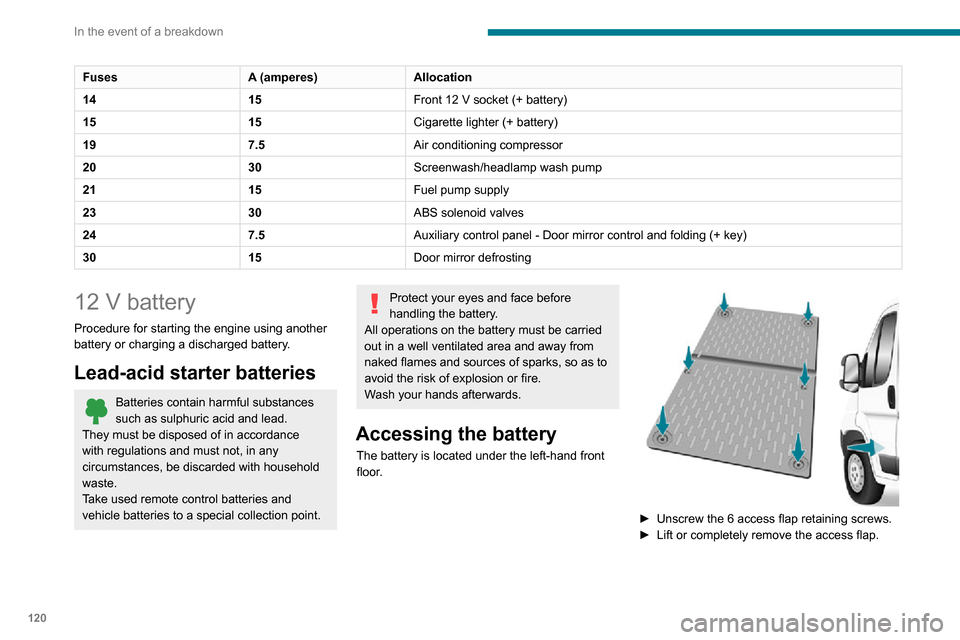
The battery is located under the left-hand front
floor.
► Unscrew the 6 access flap retaining screws.
► Lift or completely remove the access flap.
Page 172 of 196

170
Touch screen audio and telematics system
Global voice commands
These commands can be made from any screen page after
pressing the voice recognition or telephone
button located on the steering wheel, as long as
there is no telephone call in progress.
Help
Provide generic help to the user by offering
some available commands.
Cancel
Close the current voice sequence.
Repeat
Repeat the last spoken voice message to the
user.
Voice tutorial
Provide a detailed description to the user on how
to use the voice system.
"Telephone" voice
commands
If a telephone is connected to the system,
the following voice commands can be
made from any main screen page after pressing
the telephone button located on the steering
wheel, as long as there is no telephone call in
progress.
If no telephone is connected, a voice message
announces: "No telephone is connected.
* This function is av ailable only if the telephone connected to the system supports downloading of contacts and recent calls and if the corresponding download has been performed.
** This function is available only if the telephone connected to the system supports the text message reading function.
Connect a telephone and try again” and the
voice session will be closed.
It is possible to replace the "Mobile phone" tag with three other available tags: "Home"; "Office"; "Other".
Call* > Henri Dupont
Dial the telephone number associated with the
contact Henri Dupont.
Call* > Henri Dupont > Mobile phone
Dial the telephone number with the mobile phone
tag associated with the contact Henri Dupont.
Call number > 0123456789
Call number 0123456789.
Redial
Call the number or contact of the last call made.
Call back
Call the number or contact of the last call
received.
Recent calls*
View the complete list of recent calls: outgoing,
missed and incoming.
Outgoing calls *
View the list of outgoing calls.
Missed calls*
View the list of missed calls.
Incoming calls *
View the list of incoming calls.
Directory *
View the directory of the connected telephone.
Search* > Henri Dupont
View Henri Dupont's contact information in the
directory with all of the numbers saved.
Search* > Henri Dupont > Mobile phone
View the telephone number with the mobile
phone tag associated with the contact Henri
Dupont.
View messages **
View the list of text messages received by the
connected telephone.
If the telephone allows the recording of
the "First Name" (Henri) and the
"Surname" (Dupont) in two separate fields,
perform the following voice commands:
– "Call" > "Henri" > "Dupont" or "Call" > "Dupont" > "Henri".– "Search" > "Henri" > "Dupont" or "Search" > "Dupont" > "Henri".
"AM/FM/DAB radio" voice
commands
The following commands can be made from any main screen page after pressing
the voice recognition button located on the
steering wheel, as long as there is no telephone
call in progress.
Tune to > 105.5 > FM
Tune the radio to the 105.5 frequency of the FM
band.
Tune to > 940 > AM
Tune the radio to the 940 frequency of the AM
band.
Tune to * > Magic > FM
Tune the radio to the station Magic.
Tune to DAB channel ** > Absolute Radio
Tune the DAB radio to the Absolute Radio
channel.
"Media" voice commands
The following commands can be made from any main screen page after pressing
the voice recognition button located on the
steering wheel, as long as there is no telephone
call in progress.
Listen to track > "Track 1 "
Play the track “Track 1”.Listen to album > "Album 1"
Play the songs of the album “Album 1”.
Listen to artist > "Artist 1"
Play the songs of the artist “Artist 1”.Listen to music style > "Jazz"
Play the songs of the music style “Jazz”.
Listen to playlist > "Playlist 1"
Play the songs of the playlist “Playlist1”.
Listen to podcast > "Radio 1"
Play the podcast “Podcast 1”.
* It is possible to replace "Magic" with any other FM station name received by the radio. Not all radio stations provide this service.
** It is possible to replace "Absolute Radio" with any other DAB channel received by the radio. Not all DAB channels provide this service.
Page 173 of 196

171
Touch screen audio and telematics system
12Tune to > 105.5 > FM
Tune the radio to the 105.5 frequency of the FM
band.
Tune to > 940 > AM
Tune the radio to the 940 frequency of the AM
band.
Tune to * > Magic > FM
Tune the radio to the station Magic.
Tune to DAB channel ** > Absolute Radio
Tune the DAB radio to the Absolute Radio
channel.
"Media" voice commands
The following commands can be made from any main screen page after pressing
the voice recognition button located on the
steering wheel, as long as there is no telephone
call in progress.
Listen to track > "Track 1"
Play the track “Track 1”.Listen to album > "Album 1"
Play the songs of the album “Album 1”.
Listen to artist > "Artist 1"
Play the songs of the artist “Artist 1”.Listen to music style > "Jazz"
Play the songs of the music style “Jazz”.
Listen to playlist > "Playlist 1"
Play the songs of the playlist “Playlist1”.
Listen to podcast > "Radio 1"
Play the podcast “Podcast 1”.
* It is possible to rep lace "Magic" with any other FM station name received by the radio. Not all radio stations provide this service.
** It is possible to replace "Absolute Radio" with any other DAB channel received by the radio. Not all DAB channels provide this service.
Listen to audio book > "Book 1"
Play the audio book "Book 1”.
Listen to track number > "5"
Play track number “5”.Select > "USB"
Select the USB media support as the active
audio source.
Browse > "Album"
View the list of available albums.
"Navigation" voice
commands
The following commands can be made from any main screen page after pressing
the voice recognition or telephone button located
on the steering wheel, as long as there is no
telephone call in progress.
Go home
Display the route home.
2D mode
Switch to 2D mode.
3D mode
Switch to 3D mode.
Clear route
Clear the displayed route.
Add a favourite
Display the favourites screen page.
Repeat instruction
Repeat the last spoken voice message.
"Text message" voice
commands
The following commands can be made from each main screen after pressing the
telephone button located on the steering wheel,
as long as there is no telephone call in progress.
Send a text message to > 0123456789
Start the voice procedure to send a preset text
message using the system.
Send a text message to > Henri Dupont >
Mobile phone
Start the voice procedure to send a preset text
message using the system.
View text message > Henri Dupont > Mobile
phone
View the list of text messages downloaded by
the phone.
"Hands-free calls" voice
commands
The following commands are available when a call is in progress.
The commands can be made from any screen
page during a call after pressing the telephone
button located on the steering wheel.
Send 0123456789
The selection tones are sent for 0123456789.
Send Voicemail password
Page 178 of 196

176
Alphabetical index
A
ABS 52Accessories 51Active Safety Brake 84, 86AdBlue® 101AdBlue® tank 102Adjusting the date 18Adjusting the seat angle 27
Adjusting the seat belt height 55Adjusting the time 18Advice on driving 5, 64–65Airbags 57–59Airbags, curtain 58Airbags, front 57–58Airbags, lateral 58Air conditioning 31, 35–36Air conditioning, additional 35–36Air conditioning, automatic 33Air conditioning, manual 32–33Air vents 31Alarm 24–25Anti-lock braking system (ABS) 52Armrest, front 28ASR 52Assistance, emergency braking 52, 86Audible warning 51Audio streaming (Bluetooth) 162–163Audio system 151
B
Battery 67, 120Battery, 12 V 98, 120Blind spot sensors 83BlueHDi 12, 98Bluetooth (hands-free) 154, 166–167Bluetooth (telephone) 154, 166–167Bonnet 94
Brake discs 99–100Brakes 99–100Braking, automatic emergency 84, 86Brightness 6Bulbs (changing) 111Bulbs (changing, type) 111
C
Cable, audio 153, 162Cable, Jack 153, 162Capacity, fuel tank 90CD 162CD, MP3 162Centre console 4Changing a bulb 111Checking the levels 96–98Checks 98–100Checks, routine 98–100Children 56Child seats 56, 58–59Cigar lighter 43
Collision Risk Alert 84–85Configuration, vehicle 13, 18Container, AdBlue® 101–102Control, heated seats 28Control stalk, lighting 46Control stalk, wipers 49Courtesy lamp, front 38–40, 42Courtesy lamp, rear 43Courtesy lamps 43
Cruise control 78–80
D
DAB (Digital Audio Broadcasting) - Digital radio 161Dashboard 4Daytime running lamps 46Daytime running lamps, LED 46Deactivating the passenger airbag 57, 59Dimensions 129Dipstick 96Direction indicators 46Display screen, instrument panel 6, 69Driving 64–65Driving abroad 46Driving aids camera (warnings) 74Driving aids (recommendations) 73Driving economically 5DSC 52Dynamic stability control (DSC) 52–53