2020 OPEL ASTRA K Speed
[x] Cancel search: SpeedPage 122 of 305

120Instruments and controlsDisplay
Press é and select Sport or Touring
mode. Sport mode includes more
vehicle information, Tour mode
includes more media information.
This setting is only available with
Uplevel display.
Info Page Options
A list of all pages in the Info Menu is displayed, see above. Select the
pages to be displayed in the Info
Menu. Selected pages have a 0.
Non viewable functions have a blank checkbox.
Home Page Options
Select, which values are shown on
the Driver Information Center home
page, e.g. speed or fuel range.
Adaptive Cruise
Activates or deactivates adaptive
cruise control 3 179.
Speed Warning
The speed warning page allows you
to set a speed that you do not want to
exceed.Speed limit can only be set when
speed warning is enabled. Once the
speed is set, this feature can be
turned off by pressing Å while
viewing this page. If the selected
speed limit is exceeded, a pop-up
warning is displayed with a chime.
Tyre Load
The tyre pressure category according to the actual tyre inflation pressure
can be selected 3 251.
Gauges
● Oil Temperature
Displays engine oil temperature
in degrees Celsius.
● Battery Voltage
Displays the vehicle battery
voltage. During engine running
voltage can vary between 12 V
and 15.5 V. Temporary voltage
below 12 V is possible when high
electrical load is used.
● AdBlue
Displays the level of the Adblue
tank 3 163.
● IFE-AFE
Displays both instantaneous and
average fuel economy.
● Fuel Range
Displays average remaining
distance with remaining fuel in
the tank.
● Blank Page
Displays a blank gauge.
Software information
Displays the open source software
information.
Page 125 of 305

Instruments and controls123
On Uplevel display press 9 on the
steering wheel to confirm a message.
Vehicle and service messages
The vehicle messages are displayed
as text. Follow the instructions given
in the messages.
Messages in the Info Display
Some important messages may
appear additionally in the
Info Display. Some messages only pop-up for a few seconds.
Warning chimes
If several warnings appear at the
same time, only one warning chime
will sound.
When starting the engine or whilst driving
The warning chime regarding not
fastened seat belts has priority over
any other warning chime.
● If seat belt is not fastened.
● If a door or the tailgate is not fully
closed when starting off.
● If a certain speed is exceeded with parking brake applied.
● If adaptive cruise control deactivates automatically.
● If approaching a vehicle ahead too closely.
● If a programmed speed or speed
limit is exceeded.
● If a warning message appears in the Driver Information Centre.
● If the electronic key is not in the passenger compartment.● If the parking assist detects an object.
● If an unintended lane change occurs.
● If the exhaust filter has reached the maximum filling level.
● If safety function of the power tailgate detects obstacles in the
moving area.
When the vehicle is parked and / or the driver's door is opened
● With exterior lights on.
During an Autostop ● If the driver's door is opened.
● If any condition for an Autostop is
not fulfilled.
Battery voltage When the vehicle battery voltage is
running low, a warning message will
appear in the Driver Information
Centre.
Page 126 of 305
124Instruments and controls1. Switch off any electricalconsumers which are not requiredfor a safe drive, e.g. seat heating,
heated rear window or other main consumers.
2. Charge the vehicle battery by driving continuously for a while or
by using a charging device.
The warning message will disappear
after the engine has been started
twice without a voltage drop.
If the vehicle battery cannot be
recharged, have the cause of the fault
remedied by a workshop.Vehicle personalisation
The vehicle's behaviour can be
personalised by changing the settings in the Info Display.
Some of the personal settings for
different drivers can be memorised individually for each vehicle key.
Memorised settings 3 25.
Depending on vehicle equipment and
country-specific regulations some of
the functions described below may
not be available.
Some functions are only displayed or
active when the engine is running.
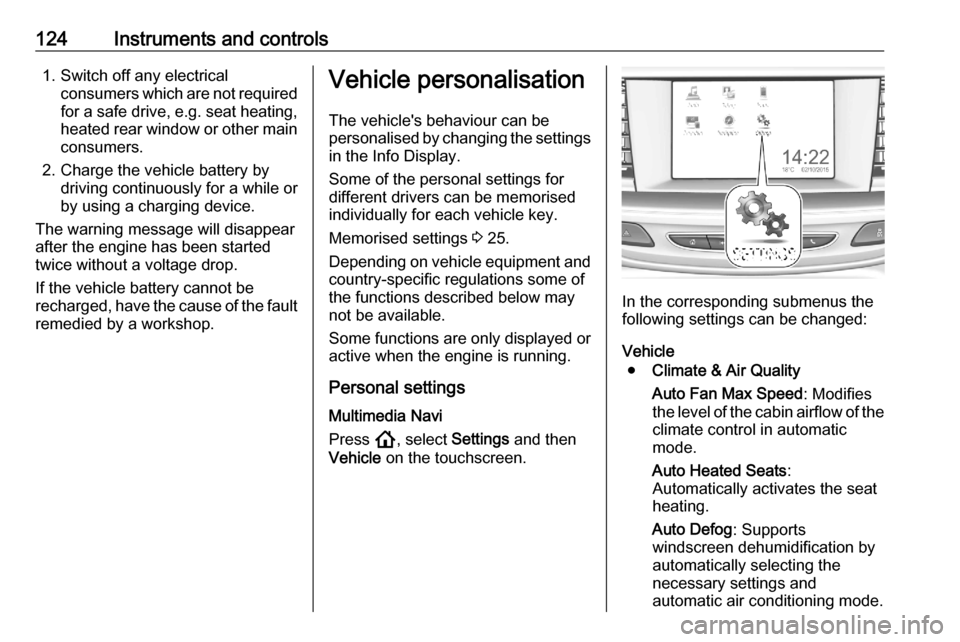
Personal settings Multimedia Navi
Press !, select Settings and then
Vehicle on the touchscreen.
In the corresponding submenus the
following settings can be changed:
Vehicle ● Climate & Air Quality
Auto Fan Max Speed : Modifies
the level of the cabin airflow of the climate control in automatic
mode.
Auto Heated Seats :
Automatically activates the seat
heating.
Auto Defog : Supports
windscreen dehumidification by
automatically selecting the
necessary settings and
automatic air conditioning mode.
Page 129 of 305

Instruments and controls127System
To change Time/Date, see Clock
3 97.
Select Language to open a list of
available languages for the Info
Display and Driver Information
Center. Select desired language.
Apps
See Infotainment manual.
Vehicle ● Climate and Air Quality
Auto Fan Speed : Modifies the
level of the cabin airflow of the
climate control in automatic
mode.
Auto heated seats : Automatically
activates the seat heating.
Auto Demist : Supports
windscreen dehumidification by
automatically selecting the
necessary settings and
automatic air conditioning mode.
Auto Rear Demist : Automatically
activates heated rear window.● Collision/Detection Systems
Forward Collision System :
Deactivates the system
completely, activates warning
chimes only or warning chimes in combination with automatic
brake functionality.
Front Pedestrian Detection :
Activates warning chimes only or
warning chimes in combination
with automatic brake functionality or deactivates the system
completely.
Adaptive Cruise Go Notifier :
Activates or deactivates the reminder message to drive off
when the adaptive cruise control
holds the vehicle at standstill.
Lane Change Alert : Activates or
deactivates side blind zone alert.
Park Assist : Activates or
deactivates the parking assist.
Activation is selectable with or
without attached trailer coupling.
Rear Cross Traffic Alert :
Activates or deactivates rear cross traffic alert.● Comfort and Convenience
Auto Memory Recall : Changes
the settings to the recall of
memorised settings for power
seat adjustment.
Easy Exit Driver's Seat : Activates
or deactivates easy exit function of the power seat.
Chime Volume : Changes the
volume of warning chimes.
Handsfree Liftgate/Boot Lid
Control : Changes the hands-free
function settings of the power tailgate.
Reverse Tilt Mirror : Changes the
parking assist function of the exterior mirrors.
Auto Mirror Folding : Activates or
deactivates folding of the exterior
mirrors with the remote control.
Personalisation by Driver :
Activates or deactivates the
personalisation function,
depending on which key is being
used.
Rain Sense Wipers : Activates or
deactivates automatic wiping
with rain sensor.
Page 133 of 305

Lighting131Tail lightsTail lights are illuminated together
with low/high beam and sidelights.
Automatic light control
When the automatic light control
function is switched on and the
engine is running, the system
switches between daytime running
lights and headlights automatically
depending on the external lighting
conditions and information given by
the rain sensor system.
Daytime running light 3 134.
Automatic headlight activation
During poor lighting conditions
headlights are switched on.
Additionally, headlights are switched
on if the windscreen wipers have
been activated for several wipes.
LED headlights 3 134.
Tunnel detection
When a tunnel is entered headlights
are switched on immediately.
High beam assist
The camera in the windscreen
detects the lights of oncoming or
preceding vehicles. Once activated,
high beam assist remains active and switches high beam on and off
automatically. The latest setting of the high beam assist will remain after theignition is switched on again.
It switches automatically to low beam
when:
● Driving in urban areas.
● It is foggy or snowy.
● Fog lights are switched on.If there are no restrictions detected, the system switches back to high
beam.
This feature allows the high beam to
function as main driving light at night.
Each LED on right or left side is
triggered or faded out particularly according to the traffic situation. This
gives the best light distribution
without dazzling other road users.
High beam is switched on
automatically at a speed above
50 km/h. High beam is switched off at a speed below 35 km/h, but highbeam assist remains active.
Page 136 of 305

134LightingSelect the relevant setting in Settings
I Vehicle .
Info Display 3 121.
Vehicle personalisation 3 124.
Every time the ignition is switched on,
f flashes for approx. 4 seconds as a
reminder.
To deactivate, use the same
procedure as described above. f will
not flash when function is
deactivated.
Control indicator f 3 113.
Daytime running lights
Daytime running lights increases
visibility of the vehicle during daylight.
They are switched on automatically
during daytime when engine is
running.
The system switches between
daytime running lights and headlights automatically, depending on the
lighting conditions.
Automatic light control 3 131.LED headlights
LED and Matrix-LED headlights for
low and high beam ensure better
visibility under all conditions.
Matrix-LED headlight contains
beyond that a variety of particular
LEDs in each headlight which
enables the control of different
lighting programmes.
Light distribution and intensity of light
are variably triggered depending on
the lighting conditions, road type and
driving situation. The vehicle adapts
the headlights automatically to the
situation to enable optimal light
performance for the driver. Some
functions of the LED headlights can
be deactivated or activated in the
vehicle personalisation menu. Select
the relevant setting in Settings I
Vehicle in the Info Display.
Vehicle personalisation 3 124.
The following lighting functions are
available with light switch in position
AUTO or 9.Town light
Activated automatically at a speed up
to approx. 55 km/h and in situations
with exterior ambient light. The light is
wide and symmetrical. A special
beam pattern is designed to avoid
glare for other road users.
Country light
Activated automatically at a speed
above approx. 55 km/h when driving
in rural areas. The illumination of the
current lane and the side of the roadis improved. Oncoming and
preceding vehicles are not dazzled.
Page 137 of 305

Lighting135Curve light
Particular LEDs, based on steering
angle and speed, are additionally
triggered to improve lighting in
curves. This function is activated at
speeds from 40 km/h to 70 km/h and
reacts to steering angle.
Cornering light
When turning off, depending on the
steering angle and the turn lights, particular LEDs are triggered which
illuminate the direction of travel. It is
activated up to a speed of 40 km/h.
Reverse parking function
To assist driver's orientation when
parking, both corner lights and
reversing light illuminate when
headlights are on and reverse gear is
engaged. They remain illuminated for
a short time after disengaging reverse gear or until driving faster than
7 km/h in a forward gear.
Automatic headlight levelling
To prevent oncoming traffic from being dazzled, headlight levelling is
automatically adjusted based on
inclination information measured by
front and rear axle, acceleration or
deceleration and vehicle speed.
Headlights when driving abroad 3 133.
Fault in LED headlight system When the system detects a failure in
the LED headlight system, it selects a
preset position to avoid dazzling of
oncoming traffic. A warning is
displayed in the Driver Information
Centre.Hazard warning flashers
Operated by pressing ¨.
The illustrations show different
versions.
In the event of an accident with airbag
deployment, the hazard warning
flashers are activated automatically.
Page 143 of 305

Climate control141Climate controlClimate control systems.............141
Air conditioning system ...........141
Electronic climate control system .................................... 143
Auxiliary heater ........................149
Air vents ..................................... 149
Adjustable air vents .................149
Fixed air vents ......................... 149
Maintenance .............................. 150
Air intake ................................. 150
Air conditioning regular operation ................................ 150
Service .................................... 150Climate control systems
Air conditioning system
Illustration shows functions which
may not be available for your
particular vehicle.
Controls for: ● Fan speed E
● Temperature
● Air distribution §,x and y
● Air conditioning A/C
● Demisting and defrosting %
● Air recirculation n
● Heated rear window and exterior
mirrors f
● Heated seats ß
Heated rear window Ü 3 45.
Heated exterior mirrors Ü 3 41.
Heated seats ß 3 56.
Ventilated seats A 3 56.
Heated steering wheel A 3 93.
Cooling A/C
Press A/C to switch on cooling.
Activation is indicated by the LED in
the button. Cooling is only functional
when the engine is running and
climate control fan is switched on.