2020 OPEL ASTRA K Speed
[x] Cancel search: SpeedPage 94 of 305

92Instruments and controlsInstruments and
controlsControls ....................................... 93
Steering wheel adjustment ........93
Steering wheel controls .............93
Heated steering wheel ...............93
Horn ........................................... 94
Windscreen wiper and washer ..94
Rear window wiper and washer ...................................... 96
Outside temperature ..................97
Clock ......................................... 97
Power outlets ............................. 99
Inductive charging ...................100
Ashtrays .................................. 101
Warning lights, gauges and indi‐ cators ......................................... 101
Instrument cluster ....................101
Speedometer ........................... 104
Odometer ................................ 105
Trip odometer .......................... 105
Tachometer ............................. 106
Fuel gauge .............................. 106
Engine coolant temperature gauge ..................................... 106
Service display ........................ 107Control indicators ....................108
Turn lights ................................ 108
Seat belt reminder ...................108
Airbag and belt tensioners .......109
Airbag deactivation ..................109
Charging system .....................110
Malfunction indicator light ........110
Brake and clutch system .........110
Electric parking brake ..............110
Electric parking brake fault ......110
Antilock brake system (ABS) ...111
Gear shifting ............................ 111
Following distance ...................111
Lane keep assist .....................111
Electronic Stability Control off . 111
Electronic Stability Control and Traction Control system .........111
Traction Control system off .....112
Engine coolant temperature ....112
Preheating ............................... 112
AdBlue ..................................... 112
Tyre pressure monitoring system .................................... 112
Engine oil pressure ..................112
Low fuel ................................... 113
Immobiliser .............................. 113
Exterior light ............................ 113
High beam ............................... 113
High beam assist .....................113
LED headlights ........................ 113Front fog lights......................... 114
Rear fog light ........................... 114
Cruise control .......................... 114
Adaptive cruise control ............114
Vehicle detected ahead ...........114
Pedestrian detection ................114
Speed limiter ........................... 114
Traffic sign assistant ................115
Door open ................................ 115
Displays ..................................... 115
Driver Information Centre ........115
Info Display .............................. 121
Vehicle messages ......................122
Warning chimes .......................123
Battery voltage ........................ 123
Vehicle personalisation ..............124
Telematics service .....................129
Emergency call ........................129
Page 95 of 305

Instruments and controls93Controls
Steering wheel adjustment
Unlock lever, adjust steering wheel,
then engage lever and ensure it is
fully locked.
Do not adjust steering wheel unless
vehicle is stationary and steering
wheel lock has been released.
Steering wheel controls
Cruise control and speed limiter are
operated via the controls on the left
side of the steering wheel.
Additionally, forward collision alert
can be set by using the controls on the
left side of the steering wheel.
Infotainment system can be operated
via the controls on the steering wheel.
Driver assistance systems 3 176.
Further information is available in the
Infotainment manual.
Heated steering wheel
Activate heating by pressing *.
Activation is indicated by the LED in
the button.
Page 106 of 305

104Instruments and controlsOverviewOTurn lights 3 108XSeat belt reminder 3 108vAirbag and belt tensioners
3 109VAirbag deactivation 3 109pCharging system 3 110ZMalfunction indicator light
3 110RBrake and clutch system 3 110mElectric parking brake 3 110jElectric parking brake fault
3 110uAntilock brake system (ABS)
3 111RGear shifting 3 111EFollowing distance 3 111aLane keep assist 3 111aElectronic Stability Control off
3 111bElectronic Stability Control and
Traction Control system 3 111kTraction Control system off
3 112WEngine coolant temperature
3 112!Preheating 3 112ùAdBlue 3 112wTyre pressure monitoring
system 3 112IEngine oil pressure 3 112YLow fuel 3 113dImmobiliser 3 1138Exterior light 3 113CHigh beam 3 113fHigh beam assist 3 113fLED headlights 3 113>Front fog lights 3 114øRear fog light 3 114mCruise control 3 114 / Adaptive
cruise control 3 114CAdaptive cruise control 3 114AVehicle detected ahead 3 1147Pedestrian detected ahead
3 114LSpeed limiter 3 114LTraffic sign assistant 3 115hDoor open 3 115
Speedometer
Indicates vehicle speed.
Page 108 of 305
106Instruments and controlsTachometer
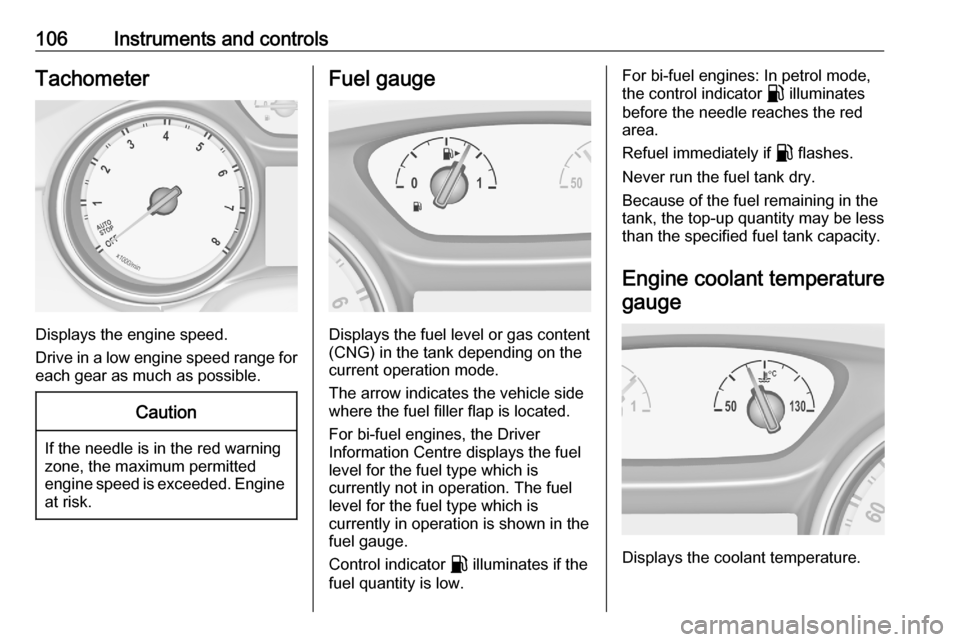
Displays the engine speed.
Drive in a low engine speed range for each gear as much as possible.
Caution
If the needle is in the red warning
zone, the maximum permitted
engine speed is exceeded. Engine at risk.
Fuel gauge
Displays the fuel level or gas content
(CNG) in the tank depending on the current operation mode.
The arrow indicates the vehicle side
where the fuel filler flap is located.
For bi-fuel engines, the Driver
Information Centre displays the fuel
level for the fuel type which is
currently not in operation. The fuel
level for the fuel type which is
currently in operation is shown in the fuel gauge.
Control indicator r illuminates if the
fuel quantity is low.
For bi-fuel engines: In petrol mode,
the control indicator r illuminates
before the needle reaches the red
area.
Refuel immediately if r flashes.
Never run the fuel tank dry.
Because of the fuel remaining in the
tank, the top-up quantity may be less
than the specified fuel tank capacity.
Engine coolant temperature gauge
Displays the coolant temperature.
Page 116 of 305

114Instruments and controlsControl indicator f flashes for approx.
4 seconds after the ignition is switched on as a reminder for
symmetrical headlight 3 133.
Front fog lights
> illuminates green.
The front fog lights are on 3 136.
Rear fog light
ø illuminates yellow.
The rear fog light is on 3 136.
Cruise control m illuminates white or green.
Illuminates white The system is on.
Illuminates green
Cruise control is active. Set speed is
indicated in the Driver Information
Centre.
Cruise control 3 176.Adaptive cruise control
m illuminates white or green.
C illuminates in the Driver
Information Centre.
m illuminates white
The system is on.
m illuminates green
Adaptive cruise control is active.
When Adaptive cruise control is on or active, C with the set speed is
indicated in the Driver Information
Centre.
Adaptive cruise control 3 179.
m illuminates blue
Adaptive cruise control is overrided,
when the accelerator pedal is applied.
When the vehicle is launch from stop
by using the accelerator pedal.
Vehicle detected ahead
A illuminates green or yellow.Illuminates green
A vehicle ahead is detected in the
same lane.
Illuminates yellow The distance to a preceding moving
vehicle gets too small or when
approaching another vehicle too
rapidly.
Adaptive cruise control 3 179.
Forward collision alert 3 187.
Pedestrian detection 7 illuminates yellow.
A pedestrian ahead is detected.
Speed limiter
L illuminates white or green.
Illuminates white The system is on.
Illuminates green
Speed limiter is active. Set speed is
indicated near L symbol.
Page 117 of 305

Instruments and controls115Speed limiter 3 177.
Traffic sign assistant L displays detected traffic signs as
control indicator.
Traffic sign assistant 3 206.
Door open h illuminates red.
A door or the tailgate is open.Displays
Driver Information Centre The Driver Information Centre is
located in the instrument cluster.
Depending on the version and the
instrument cluster, the Driver
Information Centre is available as
Baselevel display or Uplevel display.
Driver Information Centre indicates
depending on the equipment:
● overall and trip odometer
● vehicle information
● trip / fuel information
● driving economy information ● vehicle and warning messages● audio and infotainment information
● phone information
● navigation information
● vehicle settingsBaselevel display
Selecting menus and functions
The menus and functions can be
selected via the buttons on the
indicator lever.
Page 119 of 305

Instruments and controls117Vehicle and service messages are
popped-up in the Driver Information Centre if required. Confirm messages
by pressing Å.
Vehicle messages 3 122.
Main menu
Main menus are:
● Trip / fuel information, displayed by Info .
● Audio information, displayed by Audio .
● Navigation information, displayed by Navigation.
● Phone information, displayed by Phone .
● Vehicle information, displayed by
Options .
Some of the displayed functions differ when the vehicle is being driven or at
a standstill and some functions are
only active when the vehicle is being
driven.
Uplevel instrument cluster can be
displayed as Sport mode or Tour
mode. See Options menu, Display.Info Menu, ; or "
The following list contains all possible Info Menu pages. Some may not be
available for your particular vehicle.
Depending on the display some
functions are symbolised.
● Speed
● Trip 1 / Trip A , containing:
Distance
Fuel Economy / Average Fuel
Economy
Average Speed
● Trip 2 / Trip B , containing:
Distance
Fuel Economy / Average Fuel
Economy
Average Speed
● Fuel / Fuel Information ,
containing:
Fuel Range
Instant Fuel Economy
● Oil Life
● Tyre Pressure
● Timer
● Traffic Sign Memory●Following Distance
● Driver Assistance
● Top Consumers
● Economy Trend
● ECO Index
● AdBlue Level
On Baselevel display, the pages Oil
Life , Tyre Pressure , Following
Distance , Traffic Sign Memory ,
AdBlue Level , Tyre Load and Speed
Warning are displayed in the Vehicle
information menu, select ?.
Speed
Digital display of the instantaneous
speed.
Trip 1/A or 2/B
Two independent pages 1/A and 2/B
display the current distance, average
fuel consumption and average speed
since a certain reset.
The distance indicator counts up to a
distance of 9,999 km then restarts at
0.
To reset on Baselevel, press Å and
confirm reset. On Uplevel display,
press é and confirm with Å. This
Page 121 of 305

Instruments and controls119Economy Trend
Displays the average consumption
development over a distance of
50 km. Filled segments display the
consumption in 5 km steps and show
the effect of topography or driving
behaviour on fuel consumption.
ECO Index
The average fuel consumption is indicated on an economic scale. For
economical driving, adapt driving
style to keep the indicator within the
green area. The more the indicator
moves towards red, the higher is the
fuel consumption. Simultaneously the
average consumption value is
indicated.
Depending on vehicle version, the
Eco Index shows values referring to
trip odometer page A/1 or the current
driving cycle. In the last case, the
indicator is reset when ignition is
switched on the next time.
Audio menu G
Enables browsing for music, selecting
from favourites or changing the audio source.
For further information, see
Infotainment manual.
Phone menu $
Enables managing and performing of
phone calls, scrolling through
contacts or operating hands-free
phoning.
For further information, see
Infotainment manual.
Navigation menu §
Enables route guidance.For further information, see
Infotainment manual.
Vehicle information menu, ?,
Options or %
The following list contains all possible Options Menu pages. Some may notbe available for your particular
vehicle. Depending on the display
some functions are symbolised.
● Units
● Display
● Info Page Options
● Home Page Options
● Adaptive Cruise
● Speed Warning
● Tyre Load
● Gauges
● Software Information
● AdBlue Level
Units
Select display unit system: imperial or metric.