2020 NISSAN SENTRA automatic transmission
[x] Cancel search: automatic transmissionPage 345 of 528
The cruise control is automatically can-
celed if:
• You depress the brake or clutch pedal (forManual Transmission models) while
pushing the RES+ or SET- switch. The pre-
set speed is deleted from memory.
• The vehicle slows down more than 8 mph (13 km/h) below the set speed.
• You depress the clutch pedal (for Manual Transmission models), or move the shif t
lever to N (Neutral) (for Continuously Vari-
able Transmission models).
To reset at a faster cruising speed, use
one of the following three methods:
• Depress the accelerator pedal. When the vehicle attains the desired speed, push
and release the SET— switch.
• Push and hold the RES+ switch. When the vehicle attains the speed you desire, re-
lease the switch.
• Push and release the RES+ switch. Each time you do this, the set speed increases
by about 1 mph (1.6 km/h). To reset at a slower cruising speed,
use
one of the following three methods:
• Lightly tap the brake pedal. When the ve- hicle attains the desired speed, push the
SET— switch and release it.
• Push and hold the SET— switch. Release the switch when the vehicle slows to the
desired speed.
• Push and release the SET— switch. Each time you do this, the set speed decreases
by about 1 mph (1.6 km/h).
To resume the preset speed, push and
release the RES+ switch. The vehicle re-
turns to the last set cruising speed when
the vehicle speed is over 25 mph (40 km/h).WARNING
Failure to follow the warnings and in-
structions for proper use of the ICC sys-
tem could result in serious injury or
death.
• The ICC system is only an aid to assist
the driver and is not a collision warn-
ing or avoidance device. It is the driv-
er’s responsibility to stay alert, drive
safely and be in control of the vehicle
at all times.
• Always observe posted speed limits
and do not set the speed over them.
• Always drive carefully and atten-
tively when using the ICC system.
Read and understand the Owner’s
Manual thoroughly before using the
ICC system. To avoid serious injury or
death, do not rely on the system to
prevent accidents or to control the
vehicle’s speed in emergency situa-
tions. Do not use the ICC system ex-
cept in appropriate road and traffic
conditions.
INTELLIGENT CRUISE CONTROL (ICC)
(if so equipped)
Starting and driving5-59
Page 406 of 528
When the vehicle is stopped on a hill, the hill
start assist system automatically keeps
the brakes applied to help prevent the ve-
hicle from rolling backward in the time it
takes the driver to release the brake pedal
and apply the accelerator.
The hill start assist system will operate au-
tomatically under the following conditions:
• The transmission is shif ted to a forwardor reverse gear.
• The vehicle is stopped completely on a hill by applying the brake. The maximum
holding time is 2 seconds. Af ter 2 sec-
onds the vehicle will begin to roll back and
the hill start assist system will stop oper-
ating completely.
The hill start assist system will not operate
when the shif t lever is placed in the N (Neu-
tral) or P (Park) position or on a flat and level
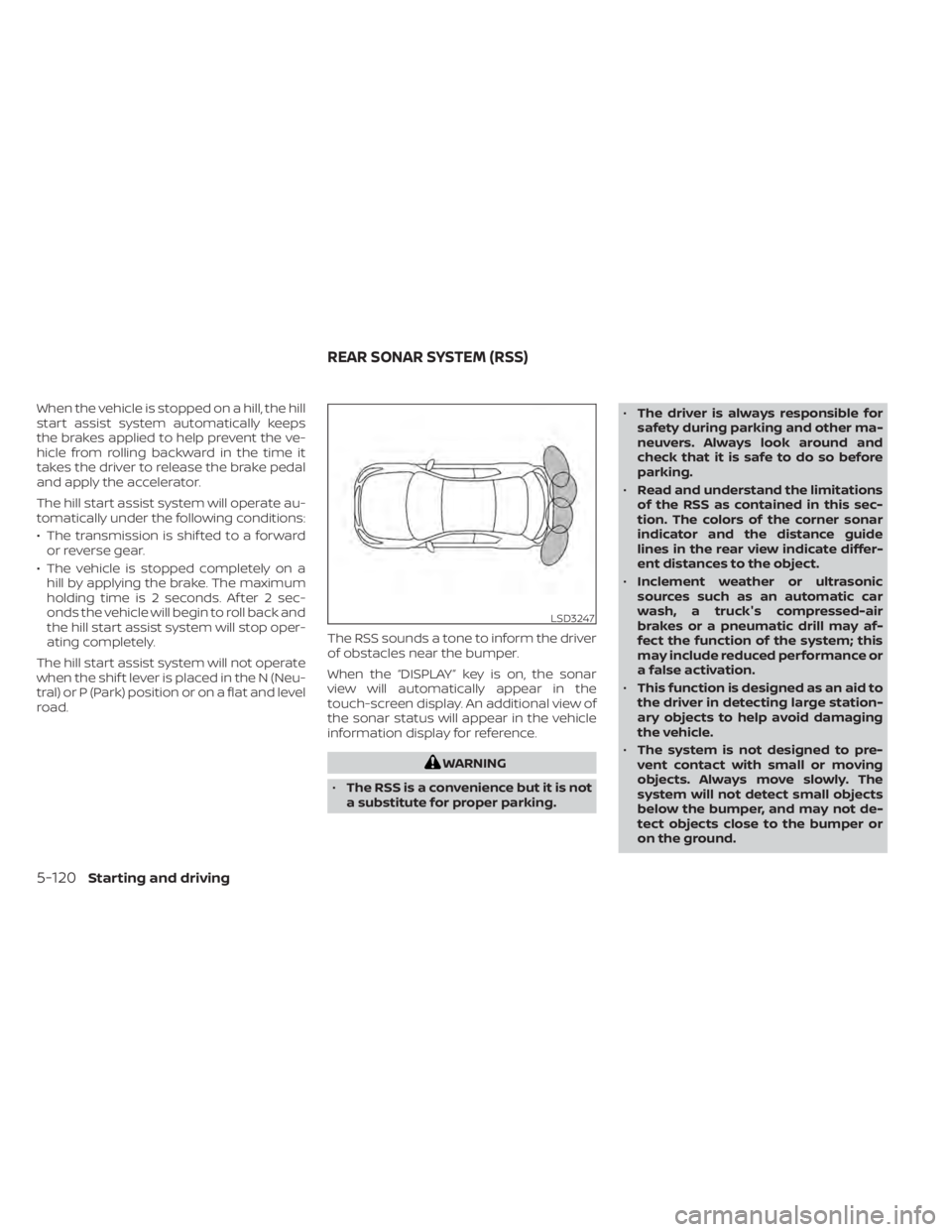
road. The RSS sounds a tone to inform the driver
of obstacles near the bumper.
When the “DISPLAY” key is on, the sonar
view will automatically appear in the
touch-screen display. An additional view of
the sonar status will appear in the vehicle
information display for reference.
WARNING
• The RSS is a convenience but it is not
a substitute for proper parking. •
The driver is always responsible for
safety during parking and other ma-
neuvers. Always look around and
check that it is safe to do so before
parking.
• Read and understand the limitations
of the RSS as contained in this sec-
tion. The colors of the corner sonar
indicator and the distance guide
lines in the rear view indicate differ-
ent distances to the object.
• Inclement weather or ultrasonic
sources such as an automatic car
wash, a truck's compressed-air
brakes or a pneumatic drill may af-
fect the function of the system; this
may include reduced performance or
a false activation.
• This function is designed as an aid to
the driver in detecting large station-
ary objects to help avoid damaging
the vehicle.
• The system is not designed to pre-
vent contact with small or moving
objects. Always move slowly. The
system will not detect small objects
below the bumper, and may not de-
tect objects close to the bumper or
on the ground.
LSD3247
REAR SONAR SYSTEM (RSS)
5-120Starting and driving
Page 450 of 528
CAUTION
• NISSAN recommends using Genuine
NISSAN CVT Fluid NS-3 (or equiva-
lent) ONLY in NISSAN CVTs. Do not mix
with other fluids.
• Do not use Automatic Transmission
Fluid (ATF) or manual transmission
fluid in a NISSAN CVT, as it may dam-
age the CVT. Damage caused by the
use of fluids other than as recom-
mended is not covered under
NISSAN's New Vehicle Limited
Warranty.
• Using fluids that are not equivalent
to Genuine NISSAN CVT Fluid NS-3
may also damage the CVT. Damage
caused by the use of fluids other than
as recommended is not covered un-
der NISSAN's New Vehicle Limited
Warranty.
When checking or replacement of CVT fluid
is required, it is recommended that you visit
a NISSAN dealer for servicing. For additional brake and clutch fluid speci-
fication information, refer to “Recom-
mended fluids/lubricants and capacities”
in the “Technical and consumer informa-
tion” section of this manual.
WARNING
• Use only new fluid from a sealed con-
tainer. Old, inferior or contaminated
fluid may damage the brake and
clutch (if so equipped) systems. The
use of improper fluids can damage
the brake and clutch system and af-
fect the vehicle's stopping ability.
• Clean the filler cap before removing.
• Brake and clutch fluid is poisonous
and should be stored carefully in
marked containers out of reach of
children.
CAUTION
Do not spill the fluid on any painted sur-
faces. This will damage the paint. If fluid
is spilled, immediately wash the sur-
face with water.
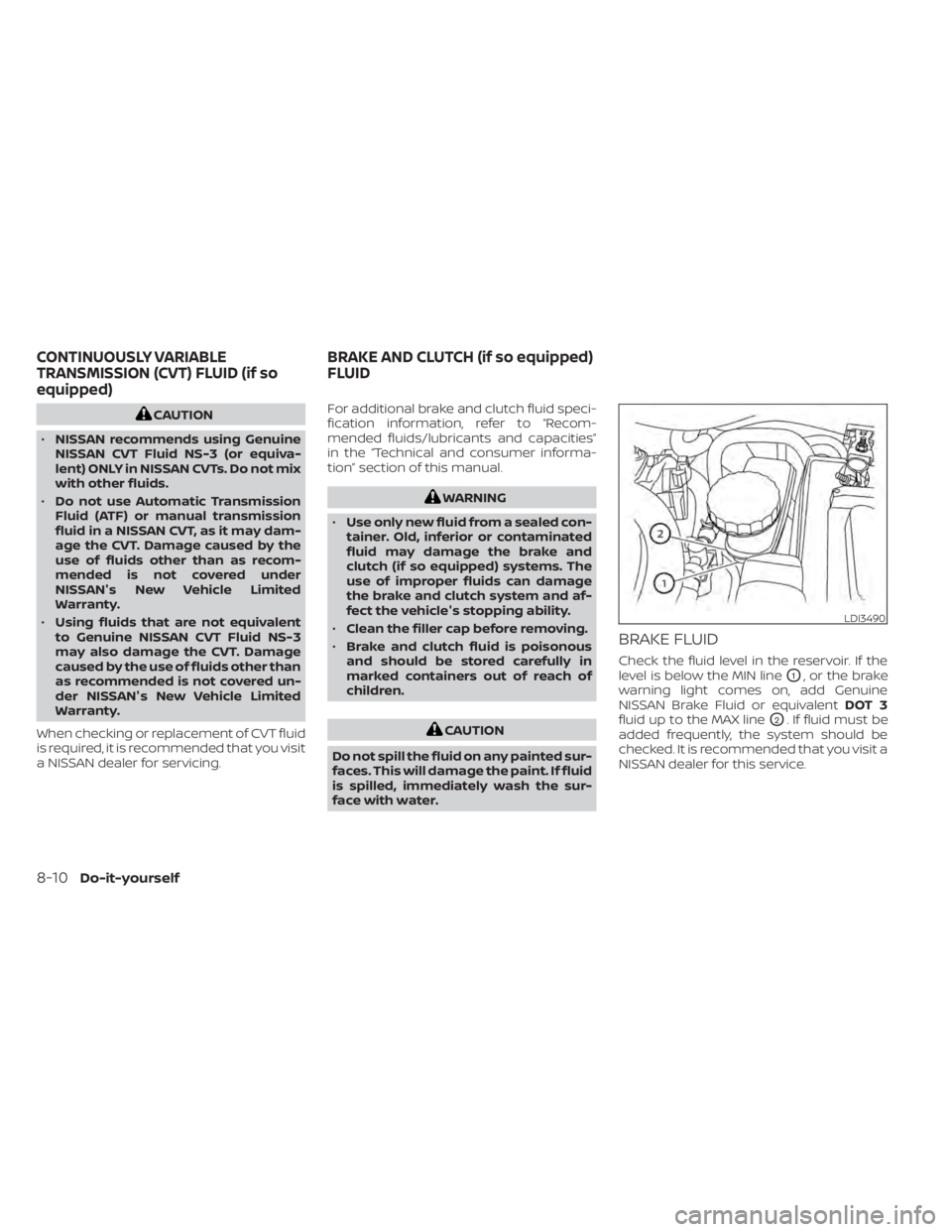
BRAKE FLUID
Check the fluid level in the reservoir. If the
level is below the MIN line
O1, or the brake
warning light comes on, add Genuine
NISSAN Brake Fluid or equivalent DOT 3
fluid up to the MAX line
O2. If fluid must be
added frequently, the system should be
checked. It is recommended that you visit a
NISSAN dealer for this service.
LDI3490
CONTINUOUSLY VARIABLE
TRANSMISSION (CVT) FLUID (if so
equipped) BRAKE AND CLUTCH (if so equipped)
FLUID
8-10Do-it-yourself
Page 523 of 528
Precautions on supplemental restraint
system....................1-44Supplemental restraint system
(Supplemental air bag system).......1-44Switch
Autolight switch..............2-56Automatic power window switch. . . .2-72Fog light switch...............2-61Hazard warning flasher switch......6-2Headlight and turn signal switch. . . .2-55Headlight control switch.........2-55Instrument brightness control.....2-60Power door lock switch..........3-6Rear window and outside mirror defroster
switch................... .2-55Turn signal switch.............2-60
T
Tachometer...................2-5Temperature gauge
Engine coolant temperature gauge. . .2-6Thef t (NISSAN Vehicle Immobilizer System),
engine start...............2-53, 5-14Three-way catalyst...............5-4TiltTelescopic steering............3-28TireFlat tire................. .6-3, 6-4Spare tire...............6-5, 8-39Tire and Loading Information label. .10-14Tire chains.................8-35Tire pressure................8-28
Tire rotation.................8-36Types of tires................8-34Uniform tire quality grading.......10-19Wheel/tire size...............10-10Wheels and tires..............8-28Tire pressure
Low tire pressure warning light.....2-11Tire Pressure Monitoring System
(TPMS)...................... .5-5Towing
2-wheel drive models...........6-134-wheel drive models...........6-13Flat towing................ .10-18Trailer towing...............10-18Towing a trailer................10-18Towing your vehicle..............6-12Traffic Sign Recognition (TSR)........5-26Transceiver
HomeLink® Universal
Transceiver
. . .2-76, 2-77, 2-78, 2-79, 2-80TransmissionContinuously Variable Transmission (CVT)
fluid
......................8-10Driving with Continuously Variable
Transmission (CVT)............5-16Driving with manual transmission. . .5-21Travel (See registering a vehicle in another
country)................... .10-12Trip odometer..................2-5Trunk access through the rear seat. . . .3-25Trunk lid.....................3-24Trunk lid lock opener lever.........3-24Trunk light....................2-76Turn signal switch...............2-60
U
Uniform tire quality grading........10-19USB interface.................4-54USB/iPod® Charging Ports.........4-64
V
Vanity mirror..................3-29Variable voltage control system......8-14Vehicle dimensions and weights.....10-11Vehicle Dynamic Control (VDC)
system.....................5-116Vehicle identification.............10-12Vehicle identification number (VIN). . . .10-12Vehicle identification number (VIN)
(Chassis number)...............10-12Vehicle identification number (VIN)
plate...................... .10-12Vehicle immobilizer system.....2-53, 5-14Vehicle information display.........2-17Vehicle loading information........10-15Vehicle recovery................6-14Vehicle security system...........2-52Vehicle security system
(NISSAN Vehicle Immobilizer System), engine
start
....................2-53, 5-14Vents..................... .4-32Visors......................3-28Voice Prompt Interrupt............4-70
Index11-7