2020 NISSAN SENTRA automatic emergency braking
[x] Cancel search: automatic emergency brakingPage 98 of 528
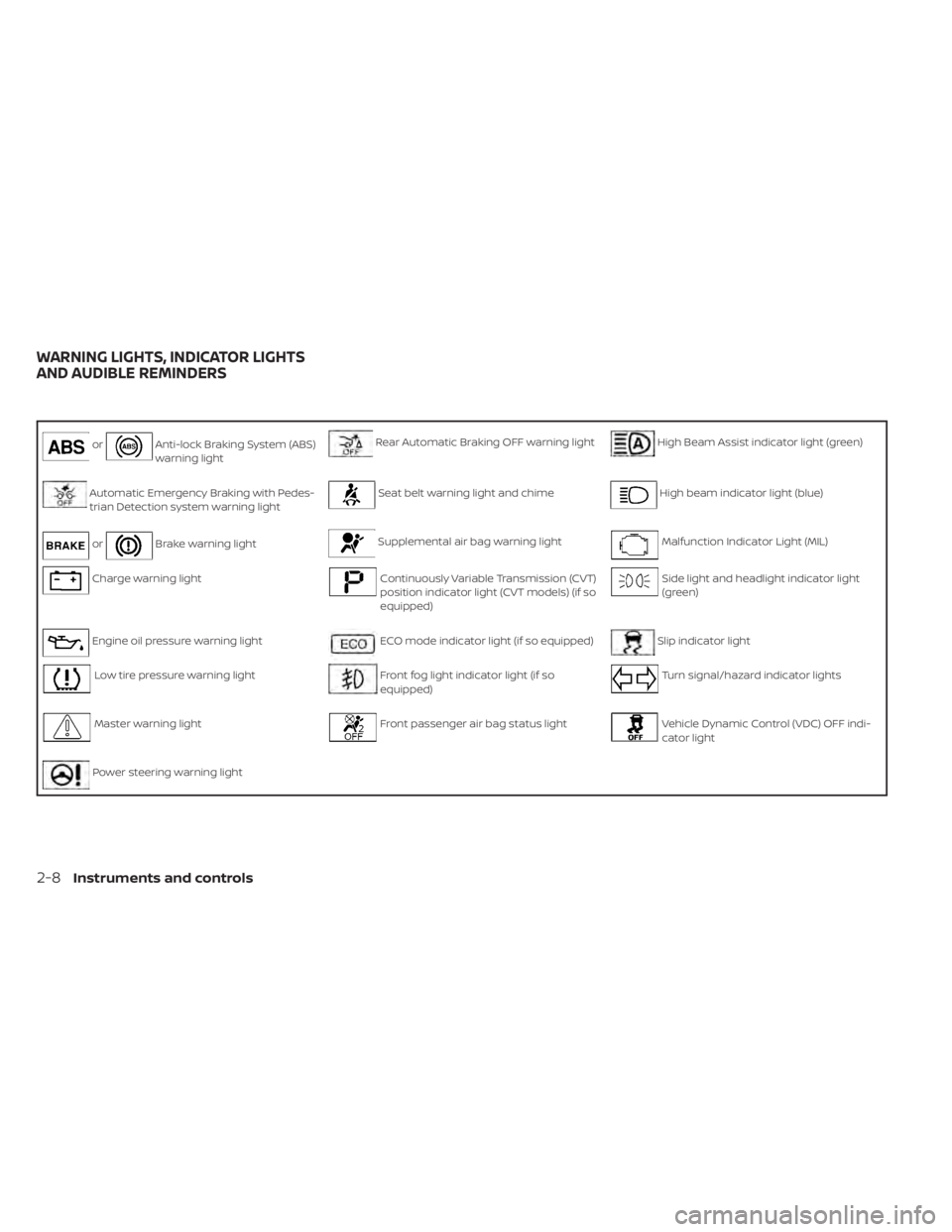
orAnti-lock Braking System (ABS)
warning lightRear Automatic Braking OFF warning lightHigh Beam Assist indicator light (green)
Automatic Emergency Braking with Pedes-
trian Detection system warning lightSeat belt warning light and chimeHigh beam indicator light (blue)
orBrake warning lightSupplemental air bag warning lightMalfunction Indicator Light (MIL)
Charge warning lightContinuously Variable Transmission (CVT)
position indicator light (CVT models) (if so
equipped)Side light and headlight indicator light
(green)
Engine oil pressure warning lightECO mode indicator light (if so equipped)Slip indicator light
Low tire pressure warning lightFront fog light indicator light (if so
equipped)Turn signal/hazard indicator lights
Master warning lightFront passenger air bag status lightVehicle Dynamic Control (VDC) OFF indi-
cator light
Power steering warning light
WARNING LIGHTS, INDICATOR LIGHTS
AND AUDIBLE REMINDERS
2-8Instruments and controls
Page 99 of 528

CHECKING LIGHTS
With all doors closed, apply the parking
brake, fasten the seat belts and place the
ignition switch in the ON position without
starting the engine. The following lights (if
so equipped) will come on:
,,,,,or
The following lights (if so equipped) will
come on briefly and then go off:
,or,,,,
If any light does not come on or operate in
a way other than described, it may indicate
a burned-out bulb and/or a system mal-
function. Have the system checked. It is
recommended that you visit a NISSAN
dealer for this service.
Some indicators and warnings are also dis-
played on the vehicle information display
between the speedometer and tachom-
eter. For additional information, refer to “Ve-
hicle information display” in this section.
WARNING LIGHTS
For additional information on warnings
and indicators, refer to “Vehicle information
display” in this section.
orAnti-lock Braking
System (ABS)
warning light
When the ignition switch is placed in the ON
position, the ABS warning light illuminates
and then turns off. This indicates the ABS is
operational.
If the ABS warning light illuminates while
the engine is running or while driving, it
may indicate the ABS is not functioning
properly. Have the system checked. It is
recommended that you visit a NISSAN
dealer for this service.
If an ABS malfunction occurs, the anti-lock
function is turned off. The brake system
then operates normally but without anti-
lock assistance. For additional information,
refer to “Brake system” in the “Starting and
driving” section of this manual.
Automatic Emergency
Braking (AEB) with
Pedestrian Detection
system warning light
This light comes on when the ignition
switch is placed in the ON position. It turns
off af ter the engine is started.This light illuminates when the AEB with
Pedestrian Detection system is set to OFF
in the vehicle information display.
If the light illuminates when the AEB with
Pedestrian Detection system is on, it may
indicate that the system is unavailable. For
additional information, refer to “Automatic
Emergency Braking (AEB) with Pedestrian
Detection” and “Intelligent Forward Colli-
sion Warning (I-FCW)” in the “Starting and
driving” section of this manual.
orBrake warning
light
This light functions for both the parking
brake and the foot brake systems.
Parking brake indicator
When the ignition switch is placed in the ON
position, the light comes on when the park-
ing brake is applied.
Instruments and controls2-9
Page 109 of 528
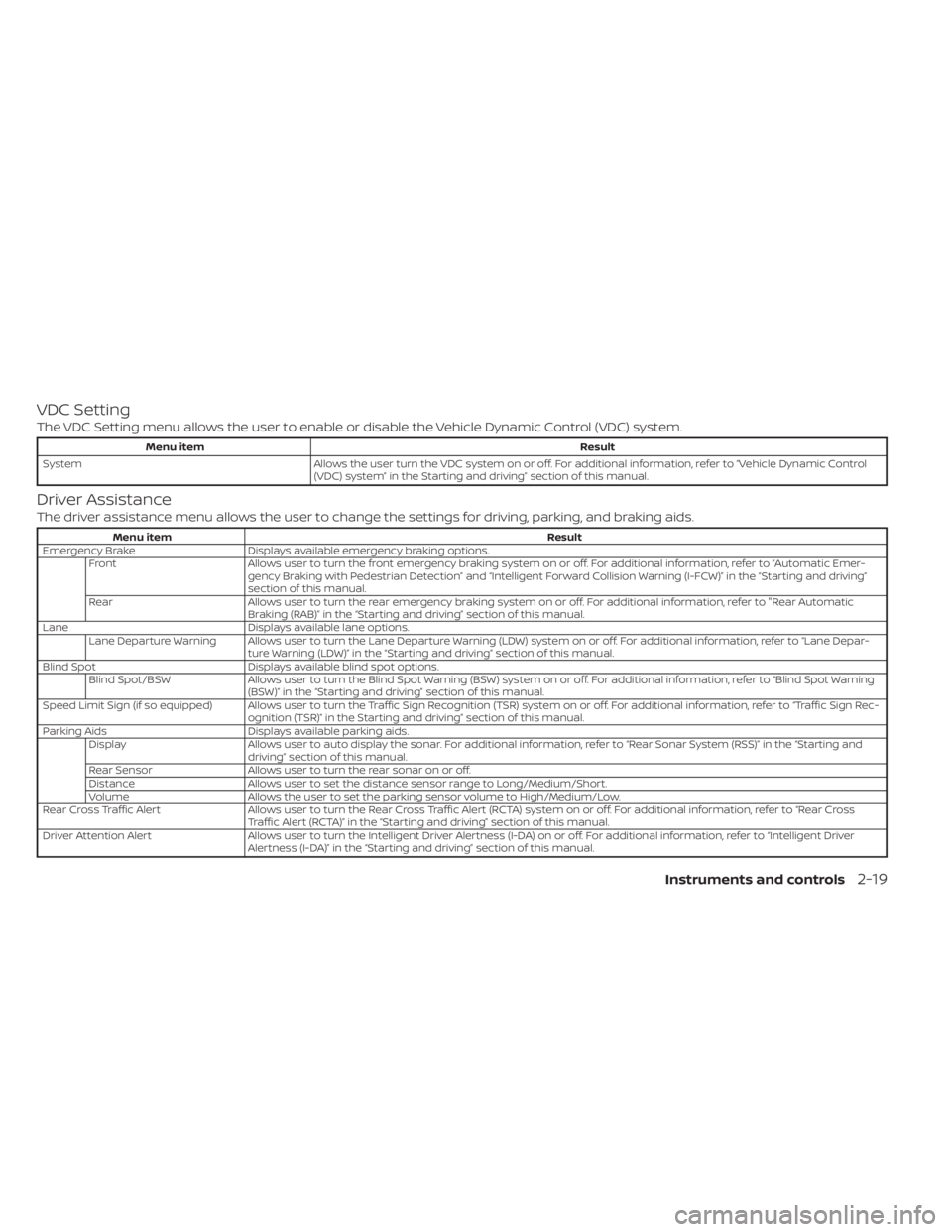
VDC Setting
The VDC Setting menu allows the user to enable or disable the Vehicle Dynamic Control (VDC) system.
Menu itemResult
System Allows the user turn the VDC system on or off. For additional information, refer to “Vehicle Dynamic Control
(VDC) system” in the Starting and driving” section of this manual.
Driver Assistance
The driver assistance menu allows the user to change the settings for driving, parking, and braking aids.
Menu item Result
Emergency Brake Displays available emergency braking options. Front Allows user to turn the front emergency braking system on or off. For additional information, refer to “Automatic Emer- gency Braking with Pedestrian Detection” and “Intelligent Forward Collision Warning (I-FCW)” in the “Starting and driving”
section of this manual.
Rear Allows user to turn the rear emergency braking system on or off. For additional information, refer to "Rear Automatic Braking (RAB)” in the “Starting and driving” section of this manual.
Lane Displays available lane options. Lane Departure Warning Allows user to turn the Lane Departure Warning (LDW) system on or off. For additional information, refer to “Lane Depar- ture Warning (LDW)” in the “Starting and driving” section of this manual.
Blind Spot Displays available blind spot options. Blind Spot/BSW Allows user to turn the Blind Spot Warning (BSW) system on or off. For additional information, refer to “Blind Spot Warning (BSW)” in the “Starting and driving” section of this manual.
Speed Limit Sign (if so equipped) Allows user to turn the Traffic Sign Recognition (TSR) system on or off. For additional information, refer to “TrafficSignRec- ognition (TSR)” in the Starting and driving” section of this manual.
Parking Aids Displays available parking aids.
Display Allows user to auto display the sonar. For additional information, refer to “Rear Sonar System (RSS)” in the “Starting and
driving” section of this manual.
Rear Sensor Allows user to turn the rear sonar on or off.
Distance Allows user to set the distance sensor range to Long/Medium/Short.
Volume Allows the user to set the parking sensor volume to High/Medium/Low.
Rear Cross Traffic Alert Allows user to turn the Rear Cross Traffic Alert (RCTA) system on or off. For additional information, refer to “Rear Cross
Traffic Alert (RCTA)” in the “Starting and driving” section of this manual.
Driver Attention Alert Allows user to turn the Intelligent Driver Alertness (I-DA) on or off. For additional information, refer to “Intelligent Driv er
Alertness (I-DA)” in the “Starting and driving” section of this manual.
Instruments and controls2-19
Page 115 of 528
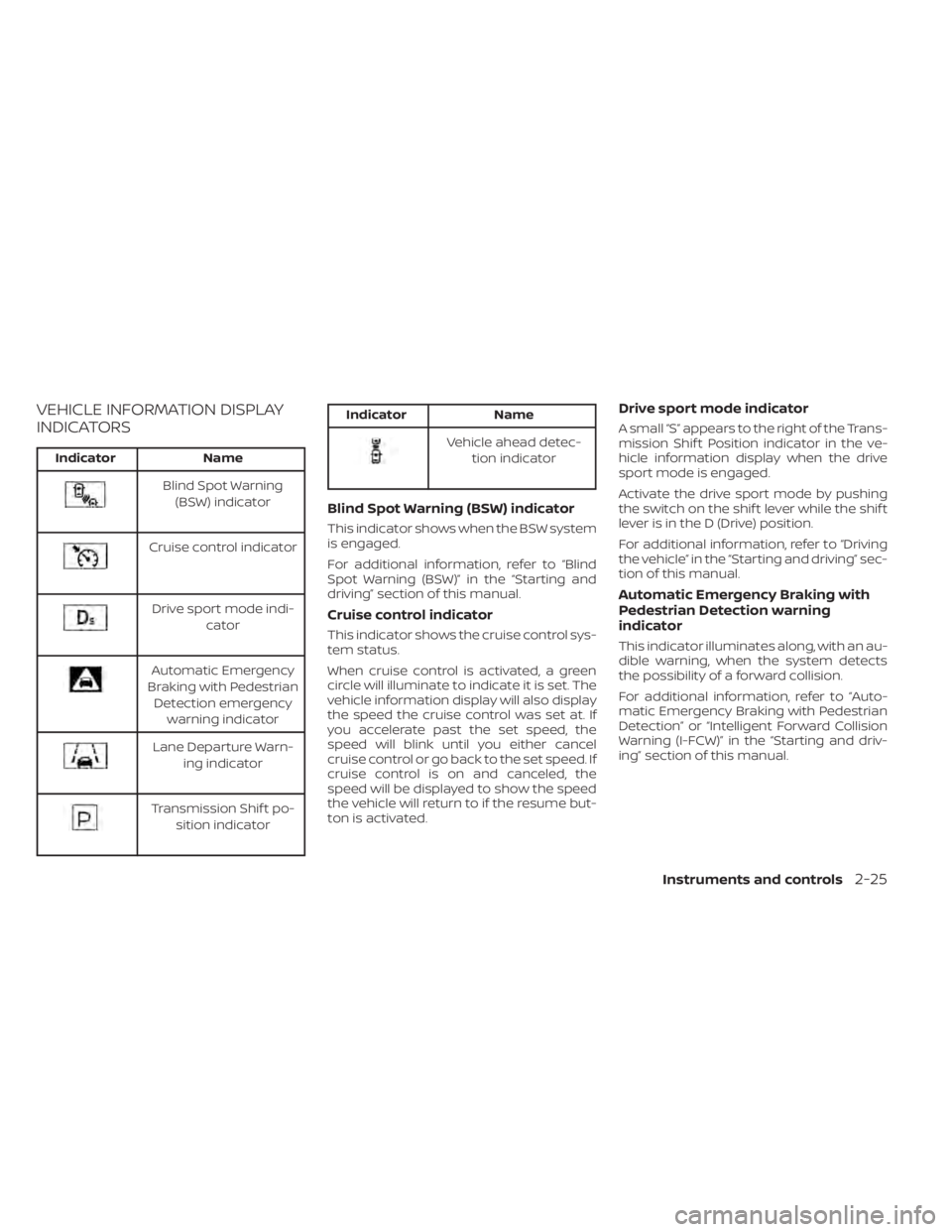
VEHICLE INFORMATION DISPLAY
INDICATORS
IndicatorName
Blind Spot Warning
(BSW) indicator
Cruise control indicator
Drive sport mode indi- cator
Automatic Emergency
Braking with Pedestrian Detection emergency warning indicator
Lane Departure Warn- ing indicator
Transmission Shif t po-sition indicator
Indicator Name
Vehicle ahead detec-
tion indicator
Blind Spot Warning (BSW) indicator
This indicator shows when the BSW system
is engaged.
For additional information, refer to “Blind
Spot Warning (BSW)” in the “Starting and
driving” section of this manual.
Cruise control indicator
This indicator shows the cruise control sys-
tem status.
When cruise control is activated, a green
circle will illuminate to indicate it is set. The
vehicle information display will also display
the speed the cruise control was set at. If
you accelerate past the set speed, the
speed will blink until you either cancel
cruise control or go back to the set speed. If
cruise control is on and canceled, the
speed will be displayed to show the speed
the vehicle will return to if the resume but-
ton is activated.
Drive sport mode indicator
A small “S” appears to the right of the Trans-
mission Shif t Position indicator in the ve-
hicle information display when the drive
sport mode is engaged.
Activate the drive sport mode by pushing
the switch on the shif t lever while the shif t
lever is in the D (Drive) position.
For additional information, refer to “Driving
the vehicle” in the “Starting and driving” sec-
tion of this manual.
Automatic Emergency Braking with
Pedestrian Detection warning
indicator
This indicator illuminates along, with an au-
dible warning, when the system detects
the possibility of a forward collision.
For additional information, refer to “Auto-
matic Emergency Braking with Pedestrian
Detection” or “Intelligent Forward Collision
Warning (I-FCW)” in the “Starting and driv-
ing” section of this manual.
Instruments and controls2-25
Page 116 of 528
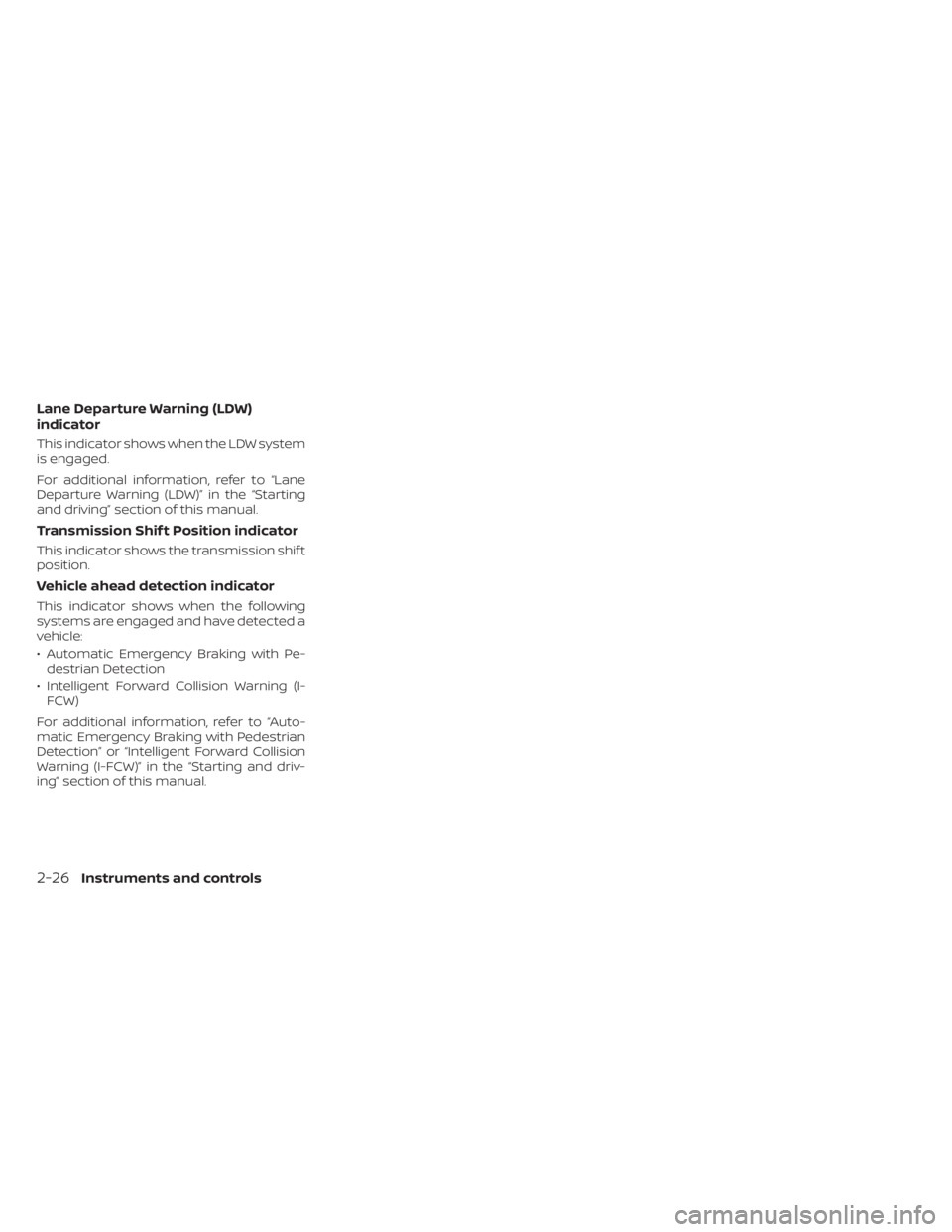
Lane Departure Warning (LDW)
indicator
This indicator shows when the LDW system
is engaged.
For additional information, refer to “Lane
Departure Warning (LDW)” in the “Starting
and driving” section of this manual.
Transmission Shif t Position indicator
This indicator shows the transmission shif t
position.
Vehicle ahead detection indicator
This indicator shows when the following
systems are engaged and have detected a
vehicle:
• Automatic Emergency Braking with Pe-destrian Detection
• Intelligent Forward Collision Warning (I- FCW)
For additional information, refer to “Auto-
matic Emergency Braking with Pedestrian
Detection” or “Intelligent Forward Collision
Warning (I-FCW)” in the “Starting and driv-
ing” section of this manual.
2-26Instruments and controls
Page 122 of 528
CVT Malfunction Service now
This warning illuminates when there is a
problem with the CVT system. If this warn-
ing comes on, have the system checked. It
is recommended that you visit a NISSAN
dealer for this service.
Illumination indicator
This indicator appears when the vehicle
information display screen brightness is
being adjusted.
Outside Temperature Display
The outside temperature display appears
in the center region of the vehicle informa-
tion display.
Low Outside Temperature (if so
equipped)
This warning appears if the outside tem-
perature is below 37°F (3°C). The tempera-
ture can be changed to display in Celsius or
Fahrenheit. For additional information, re-
fer to “Settings” in this section.
Unavailable: Front Radar Obstruction
This warning appears when one or more of
the following systems is not functioning
properly:
• Automatic Emergency Braking with Pe-destrian Detection • Intelligent Forward Collision Warning (I-
FCW)
If one or more of these warnings appear,
have the system checked. It is recom-
mended that you visit a NISSAN dealer for
this service. For additional information, re-
fer to “Automatic Emergency Braking with
Pedestrian Detection” or “Intelligent For-
ward Collision Warning (I-FCW)” in the
“Starting and driving” section of this
manual.
ECO mode indicator
This indicator shows when the ECO mode
is engaged.
For additional information, refer to “ECO
mode” in the “Starting and driving” section
of this manual.
Parking Sensor Error: See Owner’s
Manual
This warning illuminates when there is an
error with the system. For additional infor-
mation, refer to “Rear Sonar System (RSS)”
in the “Starting and driving” section of this
manual.
Not Available System Malfunction (if
so equipped)
This warning appears when one or more of
the following systems (if so equipped) is
not functioning properly.
• Intelligent Cruise Control (ICC)
• Blind Spot Warning (BSW)
• Lane Departure Warning (LDW)
If one or more of these warnings appear,
have the system checked. It is recom-
mended that you visit a NISSAN dealer for
this service.
For additional information, refer to "Intelli-
gent Cruise Control (ICC)”, “Blind Spot Warn-
ing (BSW)” or “Lane Departure Warning
(LDW)” in the “Starting and driving” section
of this manual.
Unavailable: High Camera
Temperature (if so equipped)
This message appears when the camera
detects an interior temperature of more
than 104°F (40°C). For additional informa-
tion, refer to “Traffic Sign Recognition (TSR)”
in the “Starting and driving” section of this
manual.
2-32Instruments and controls
Page 126 of 528
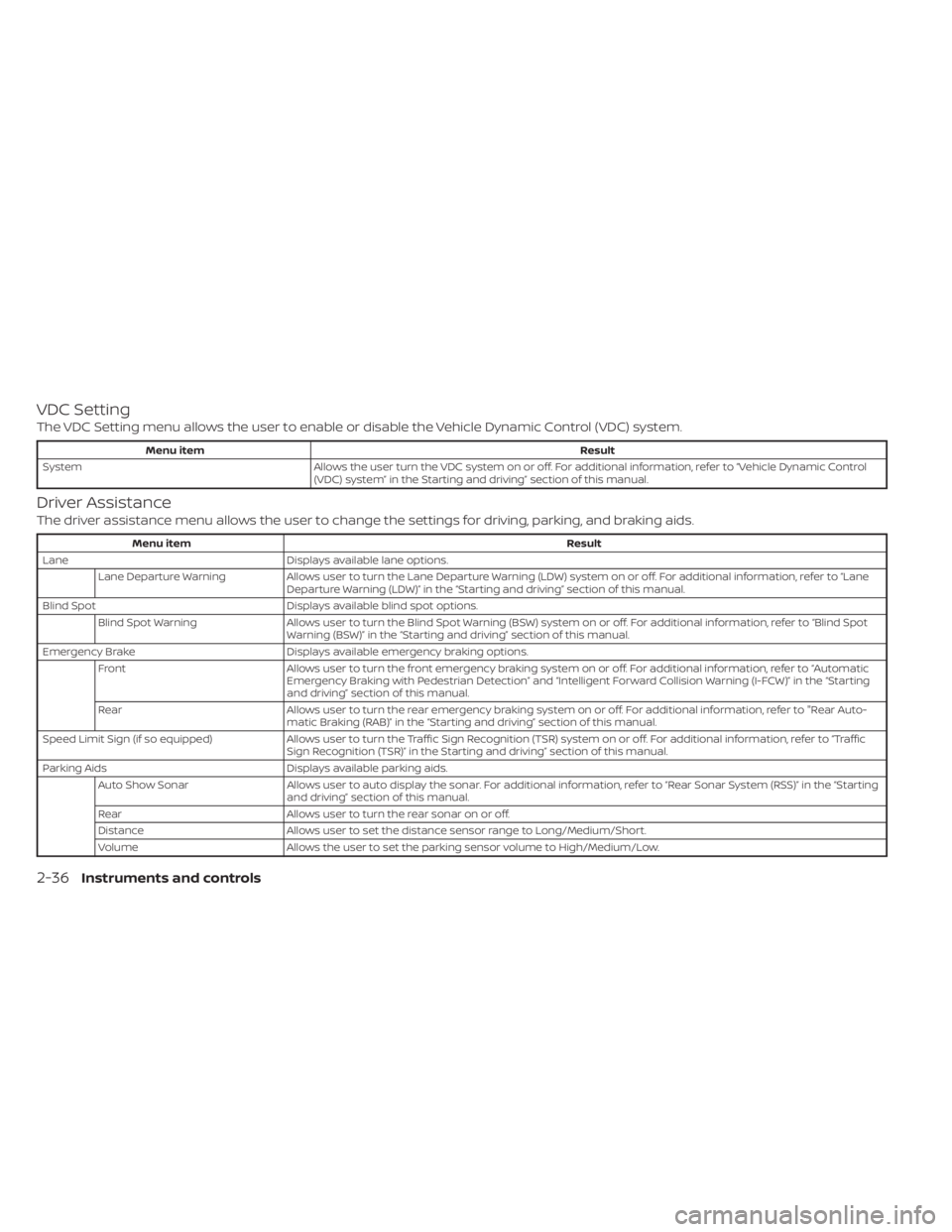
VDC Setting
The VDC Setting menu allows the user to enable or disable the Vehicle Dynamic Control (VDC) system.
Menu itemResult
System Allows the user turn the VDC system on or off. For additional information, refer to “Vehicle Dynamic Control
(VDC) system” in the Starting and driving” section of this manual.
Driver Assistance
The driver assistance menu allows the user to change the settings for driving, parking, and braking aids.
Menu item Result
Lane Displays available lane options.
Lane Departure Warning Allows user to turn the Lane Departure Warning (LDW) system on or off. For additional information, refer to “Lane
Departure Warning (LDW)” in the “Starting and driving” section of this manual.
Blind Spot Displays available blind spot options.
Blind Spot Warning Allows user to turn the Blind Spot Warning (BSW) system on or off. For additional information, refer to “Blind Spot
Warning (BSW)” in the “Starting and driving” section of this manual.
Emergency Brake Displays available emergency braking options.
Front Allows user to turn the front emergency braking system on or off. For additional information, refer to “Automatic
Emergency Braking with Pedestrian Detection” and “Intelligent Forward Collision Warning (I-FCW)” in the “Starting
and driving” section of this manual.
Rear Allows user to turn the rear emergency braking system on or off. For additional information, refer to "Rear Auto-
matic Braking (RAB)” in the “Starting and driving” section of this manual.
Speed Limit Sign (if so equipped) Allows user to turn the Traffic Sign Recognition (TSR) system on or off. For additional information, refer to “Traffi c
Sign Recognition (TSR)” in the Starting and driving” section of this manual.
Parking Aids Displays available parking aids.
Auto Show Sonar Allows user to auto display the sonar. For additional information, refer to “Rear Sonar System (RSS)” in the “Starting
and driving” section of this manual.
Rear Allows user to turn the rear sonar on or off.
Distance Allows user to set the distance sensor range to Long/Medium/Short.
Volume Allows the user to set the parking sensor volume to High/Medium/Low.
2-36Instruments and controls
Page 133 of 528
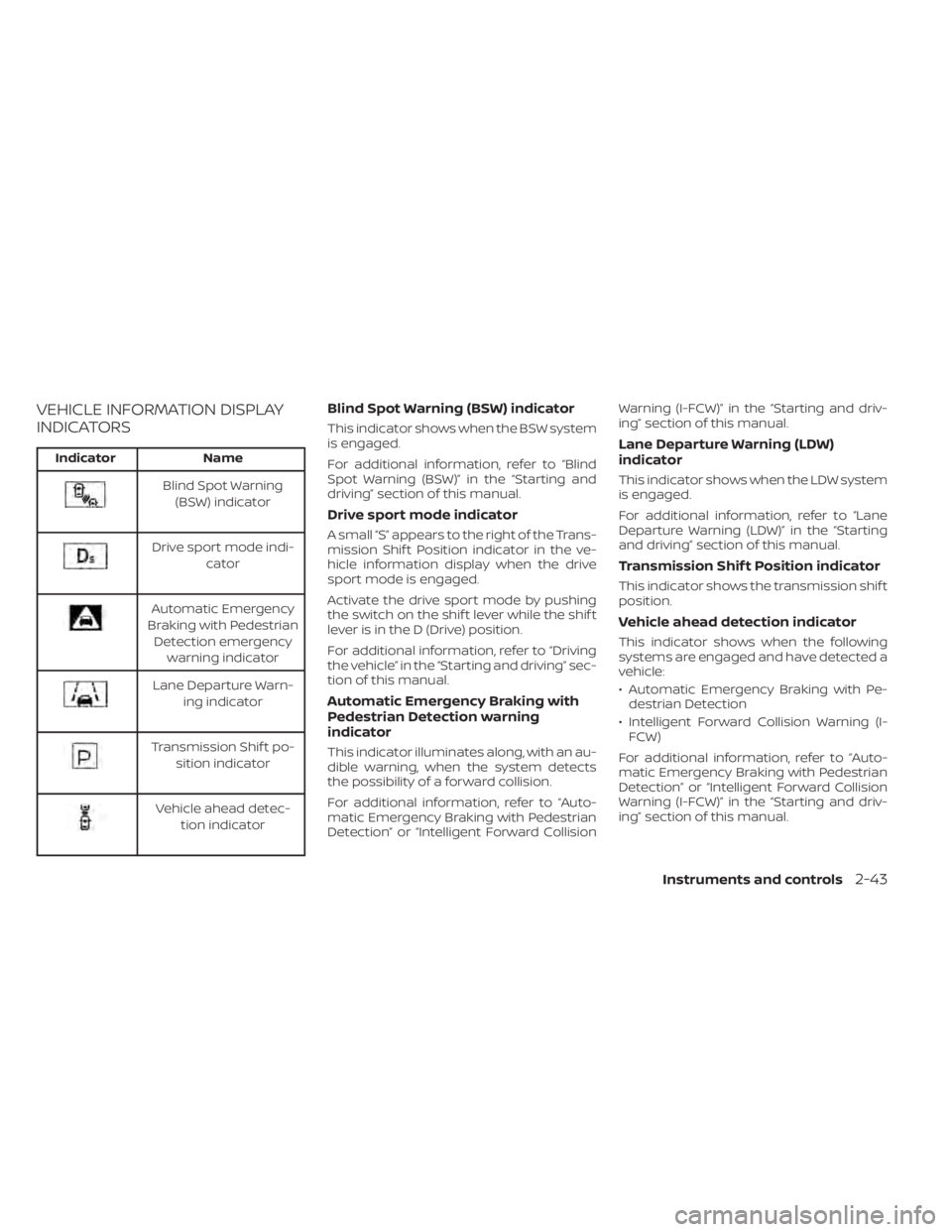
VEHICLE INFORMATION DISPLAY
INDICATORS
IndicatorName
Blind Spot Warning
(BSW) indicator
Drive sport mode indi- cator
Automatic Emergency
Braking with Pedestrian Detection emergency warning indicator
Lane Departure Warn- ing indicator
Transmission Shif t po-sition indicator
Vehicle ahead detec- tion indicator
Blind Spot Warning (BSW) indicator
This indicator shows when the BSW system
is engaged.
For additional information, refer to “Blind
Spot Warning (BSW)” in the “Starting and
driving” section of this manual.
Drive sport mode indicator
A small “S” appears to the right of the Trans-
mission Shif t Position indicator in the ve-
hicle information display when the drive
sport mode is engaged.
Activate the drive sport mode by pushing
the switch on the shif t lever while the shif t
lever is in the D (Drive) position.
For additional information, refer to “Driving
the vehicle” in the “Starting and driving” sec-
tion of this manual.
Automatic Emergency Braking with
Pedestrian Detection warning
indicator
This indicator illuminates along, with an au-
dible warning, when the system detects
the possibility of a forward collision.
For additional information, refer to “Auto-
matic Emergency Braking with Pedestrian
Detection” or “Intelligent Forward Collision Warning (I-FCW)” in the “Starting and driv-
ing” section of this manual.
Lane Departure Warning (LDW)
indicator
This indicator shows when the LDW system
is engaged.
For additional information, refer to “Lane
Departure Warning (LDW)” in the “Starting
and driving” section of this manual.
Transmission Shif t Position indicator
This indicator shows the transmission shif t
position.
Vehicle ahead detection indicator
This indicator shows when the following
systems are engaged and have detected a
vehicle:
• Automatic Emergency Braking with Pe-
destrian Detection
• Intelligent Forward Collision Warning (I- FCW)
For additional information, refer to “Auto-
matic Emergency Braking with Pedestrian
Detection” or “Intelligent Forward Collision
Warning (I-FCW)” in the “Starting and driv-
ing” section of this manual.
Instruments and controls2-43