Page 315 of 518
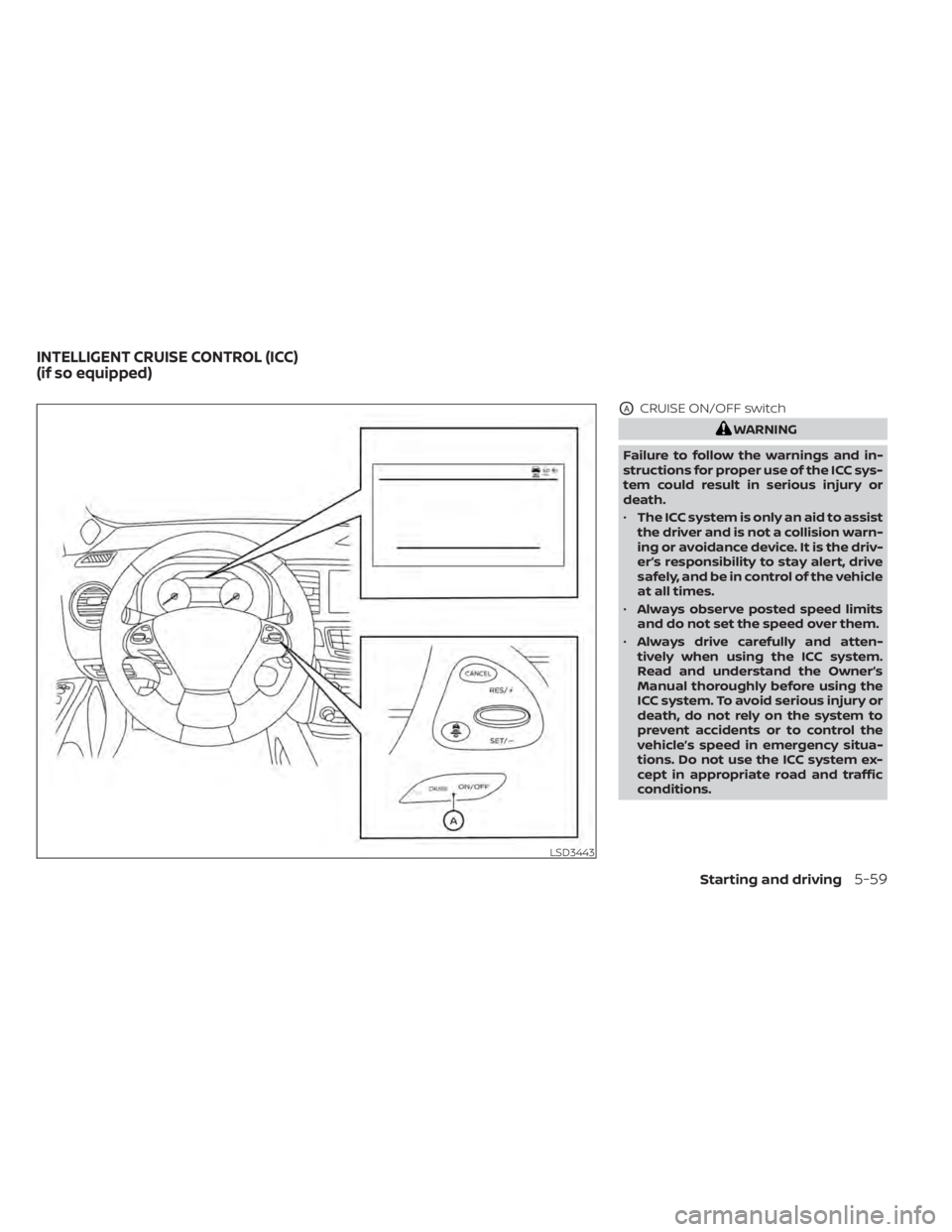
OACRUISE ON/OFF switch
WARNING
Failure to follow the warnings and in-
structions for proper use of the ICC sys-
tem could result in serious injury or
death.
• The ICC system is only an aid to assist
the driver and is not a collision warn-
ing or avoidance device. It is the driv-
er’s responsibility to stay alert, drive
safely, and be in control of the vehicle
at all times.
• Always observe posted speed limits
and do not set the speed over them.
• Always drive carefully and atten-
tively when using the ICC system.
Read and understand the Owner’s
Manual thoroughly before using the
ICC system. To avoid serious injury or
death, do not rely on the system to
prevent accidents or to control the
vehicle’s speed in emergency situa-
tions. Do not use the ICC system ex-
cept in appropriate road and traffic
conditions.
LSD3443
INTELLIGENT CRUISE CONTROL (ICC)
(if so equipped)
Starting and driving5-59
Page 316 of 518
•In the conventional (fixed speed)
cruise control mode, a warning
chime will not sound to warn you if
you are too close to the vehicle
ahead. Pay special attention to the
distance between your vehicle and
the vehicle ahead of you or a collision
could occur.
The ICC system maintains a selected dis-
tance from the vehicle in front of you within
the speed range of 0 to 90 mph (0 to 144
km/h) up to the set speed. The set speed
can be selected by the driver between 20 to
90 mph (32 to 144 km/h).
The vehicle travels at a set speed when the
road ahead is clear.
The ICC system can be set to one of two
cruise control modes:
• Vehicle-to-vehicle distance control
mode: For maintaining a selected dis-
tance between your vehicle and the ve-
hicle in front of you up to the preset speed
• Conventional (fixed speed) cruise con-
trol mode: For cruising at a preset speed Push the CRUISE ON/OFF switchOAto
choose the cruise control mode between
the vehicle-to-vehicle distance control
mode and the conventional (fixed speed)
cruise control mode.
Once a control mode is activated, it cannot
be changed to the other cruise control
mode. To change the mode, push the
CRUISE ON/OFF switch
OAonce to turn the
system off. Then push the CRUISE ON/OFF
switch
OAagain to turn the system back on
and select the desired cruise control mode.
Always confirm the setting in the ICC sys-
tem display.
For the vehicle-to-vehicle distance control
mode, refer to “Vehicle-to-vehicle distance
control mode” in this section.
For the conventional (fixed speed) cruise
control mode, refer to “Conventional (fixed
speed) cruise control mode” in this section.
5-60Starting and driving
Page 317 of 518

HOW TO SELECT THE CRUISE
CONTROL MODE
Selecting the vehicle-to-vehicle dis-
tance control mode:To choose the
vehicle-to-vehicle distance control mode
O1, quickly push and release the CRUISE
ON/OFF switch
OA. Selecting the conventional (fixed speed)
cruise control mode:
To choose the con-
ventional (fixed speed) cruise control mode
O2, push and hold the CRUISE ON/OFF
switch
OAfor longer than approximately 1.5
seconds. For additional information, refer
to “Conventional (fixed speed) cruise con-
trol mode” in this section.
VEHICLE-TO-VEHICLE DISTANCE
CONTROL MODE
In the vehicle-to-vehicle distance control
mode, the ICC system automatically main-
tains a selected distance from the vehicle
traveling in front of you according to that
vehicle’s speed (up to the set speed), or at
the set speed when the road ahead is clear.
The ICC system is intended to enhance the
operation of the vehicle when following a
vehicle traveling in the same lane and di-
rection.
LSD3444LSD3441
Starting and driving5-61
Page 320 of 518
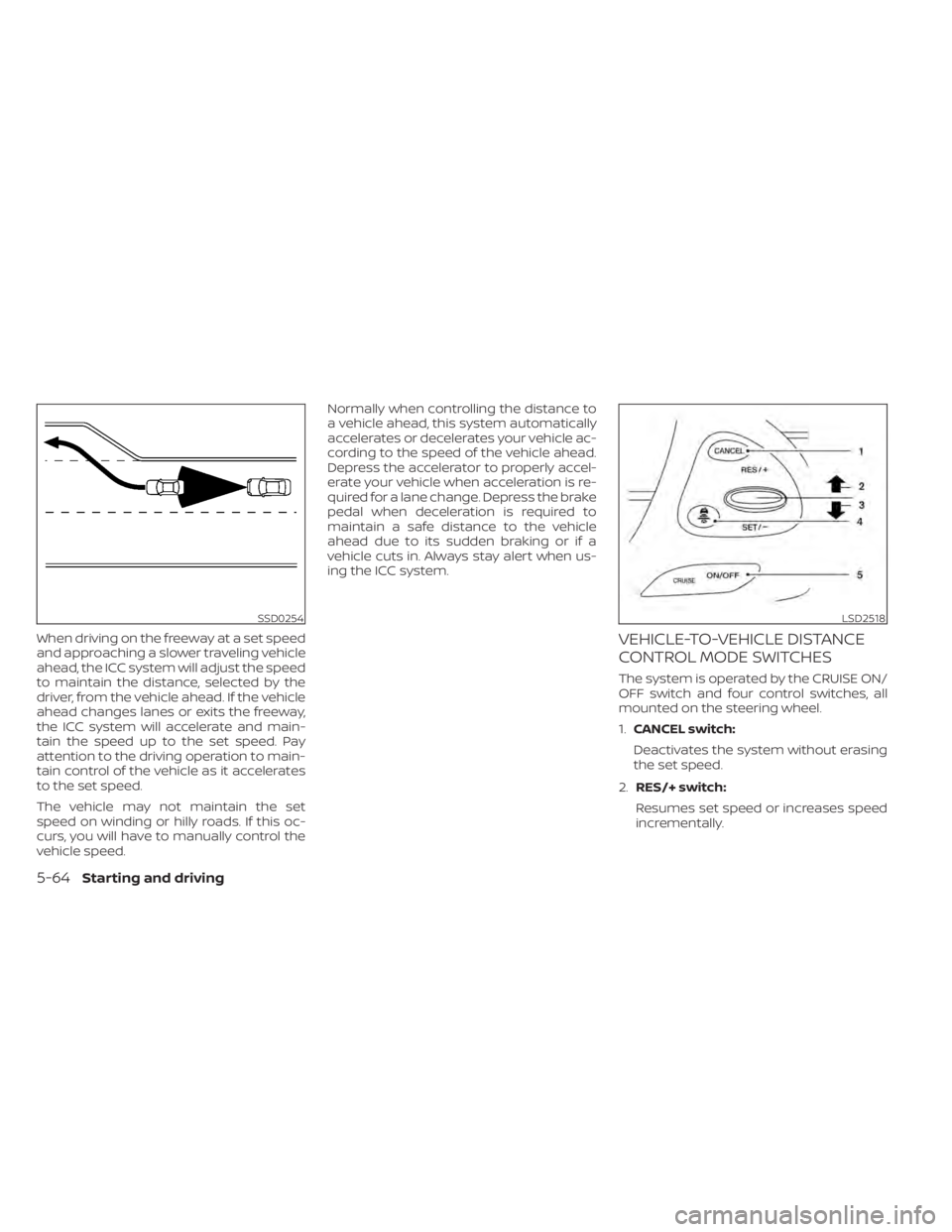
When driving on the freeway at a set speed
and approaching a slower traveling vehicle
ahead, the ICC system will adjust the speed
to maintain the distance, selected by the
driver, from the vehicle ahead. If the vehicle
ahead changes lanes or exits the freeway,
the ICC system will accelerate and main-
tain the speed up to the set speed. Pay
attention to the driving operation to main-
tain control of the vehicle as it accelerates
to the set speed.
The vehicle may not maintain the set
speed on winding or hilly roads. If this oc-
curs, you will have to manually control the
vehicle speed.Normally when controlling the distance to
a vehicle ahead, this system automatically
accelerates or decelerates your vehicle ac-
cording to the speed of the vehicle ahead.
Depress the accelerator to properly accel-
erate your vehicle when acceleration is re-
quired for a lane change. Depress the brake
pedal when deceleration is required to
maintain a safe distance to the vehicle
ahead due to its sudden braking or if a
vehicle cuts in. Always stay alert when us-
ing the ICC system.VEHICLE-TO-VEHICLE DISTANCE
CONTROL MODE SWITCHES
The system is operated by the CRUISE ON/
OFF switch and four control switches, all
mounted on the steering wheel.
1.
CANCEL switch:
Deactivates the system without erasing
the set speed.
2. RES/+ switch:
Resumes set speed or increases speed
incrementally.
SSD0254LSD2518
5-64Starting and driving
Page 321 of 518
3.SET/- switch:
Sets desired cruise speed or reduces
speed incrementally.
4. DISTANCE
switch:
Changes the vehicle’s following dis-
tance: • Long
• Middle
• Short
5. CRUISE ON/OFF Switch:
Master switch to activate the system.
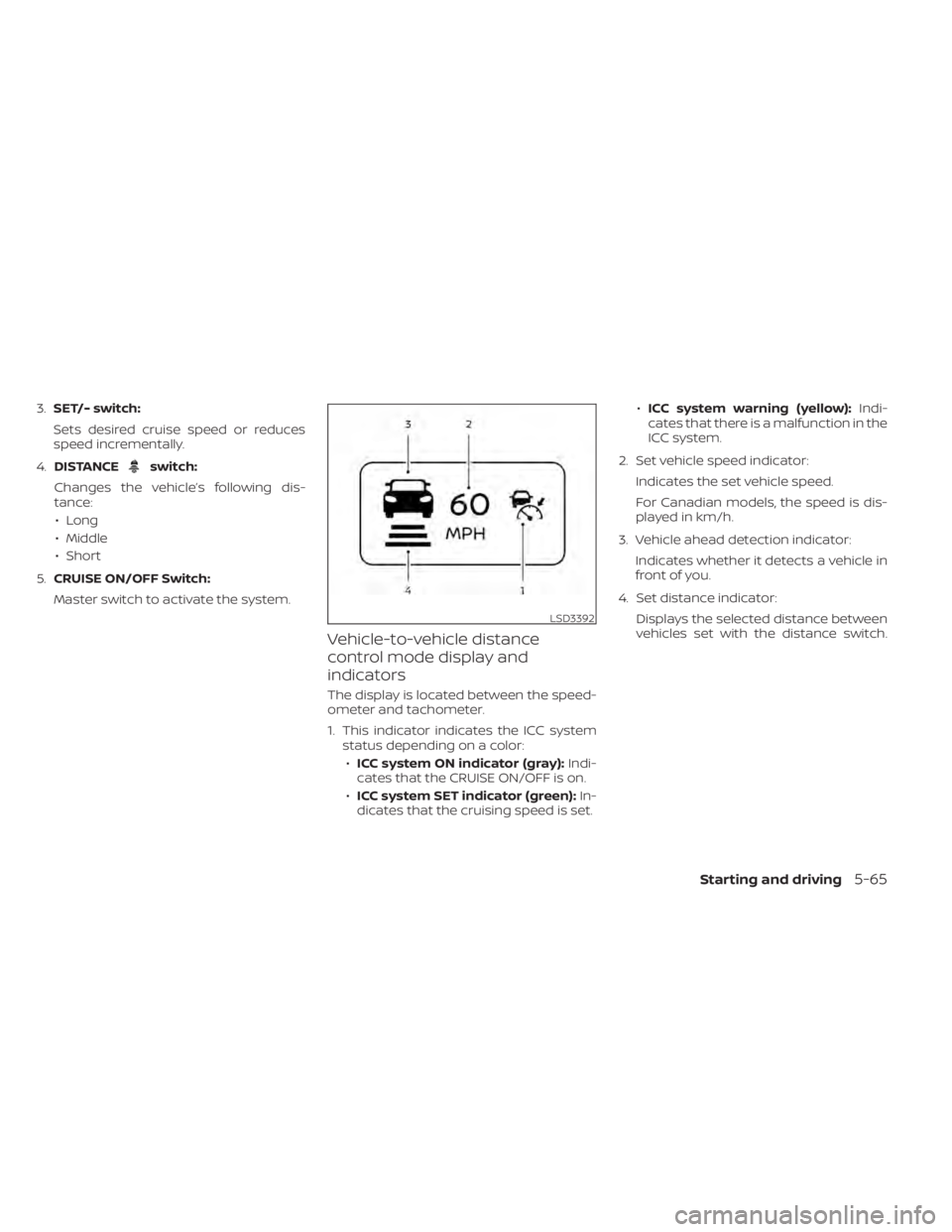
Vehicle-to-vehicle distance
control mode display and
indicators
The display is located between the speed-
ometer and tachometer.
1. This indicator indicates the ICC system status depending on a color:
• ICC system ON indicator (gray): Indi-
cates that the CRUISE ON/OFF is on.
• ICC system SET indicator (green): In-
dicates that the cruising speed is set. •
ICC system warning (yellow): Indi-
cates that there is a malfunction in the
ICC system.
2. Set vehicle speed indicator: Indicates the set vehicle speed.
For Canadian models, the speed is dis-
played in km/h.
3. Vehicle ahead detection indicator: Indicates whether it detects a vehicle in
front of you.
4. Set distance indicator: Displays the selected distance between
vehicles set with the distance switch.
LSD3392
Starting and driving5-65
Page 322 of 518
Operating vehicle-to-vehicle
distance control mode
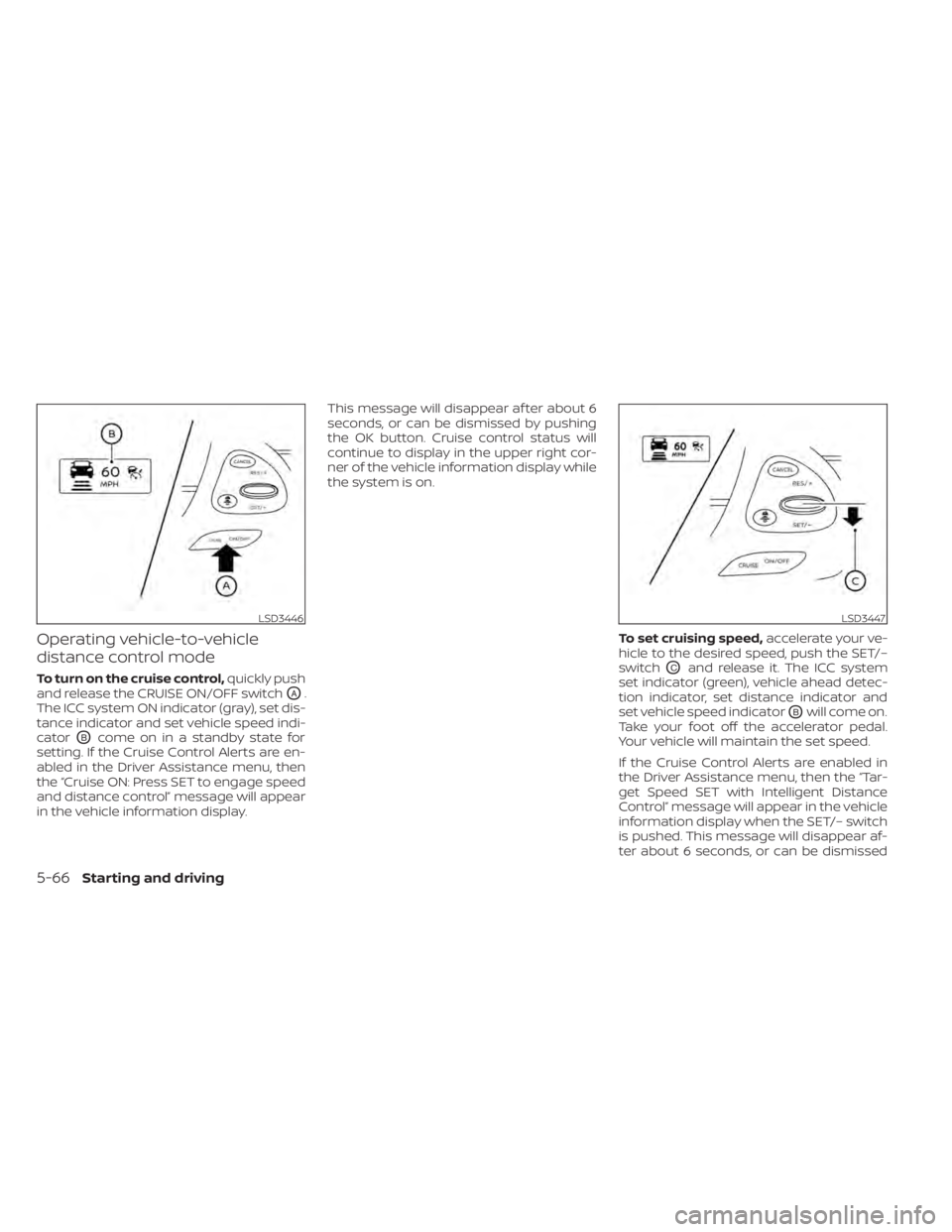
To turn on the cruise control,quickly push
and release the CRUISE ON/OFF switch
OA.
The ICC system ON indicator (gray), set dis-
tance indicator and set vehicle speed indi-
cator
OBcome on in a standby state for
setting. If the Cruise Control Alerts are en-
abled in the Driver Assistance menu, then
the “Cruise ON: Press SET to engage speed
and distance control” message will appear
in the vehicle information display. This message will disappear af ter about 6
seconds, or can be dismissed by pushing
the OK button. Cruise control status will
continue to display in the upper right cor-
ner of the vehicle information display while
the system is on.
To set cruising speed,accelerate your ve-
hicle to the desired speed, push the SET/–
switch
OCand release it. The ICC system
set indicator (green), vehicle ahead detec-
tion indicator, set distance indicator and
set vehicle speed indicator
OBwill come on.
Take your foot off the accelerator pedal.
Your vehicle will maintain the set speed.
If the Cruise Control Alerts are enabled in
the Driver Assistance menu, then the “Tar-
get Speed SET with Intelligent Distance
Control” message will appear in the vehicle
information display when the SET/– switch
is pushed. This message will disappear af-
ter about 6 seconds, or can be dismissed
LSD3446LSD3447
5-66Starting and driving
Page 323 of 518
by pushing the OK button. Cruise control
status will continue to display in the upper
right corner of the vehicle information dis-
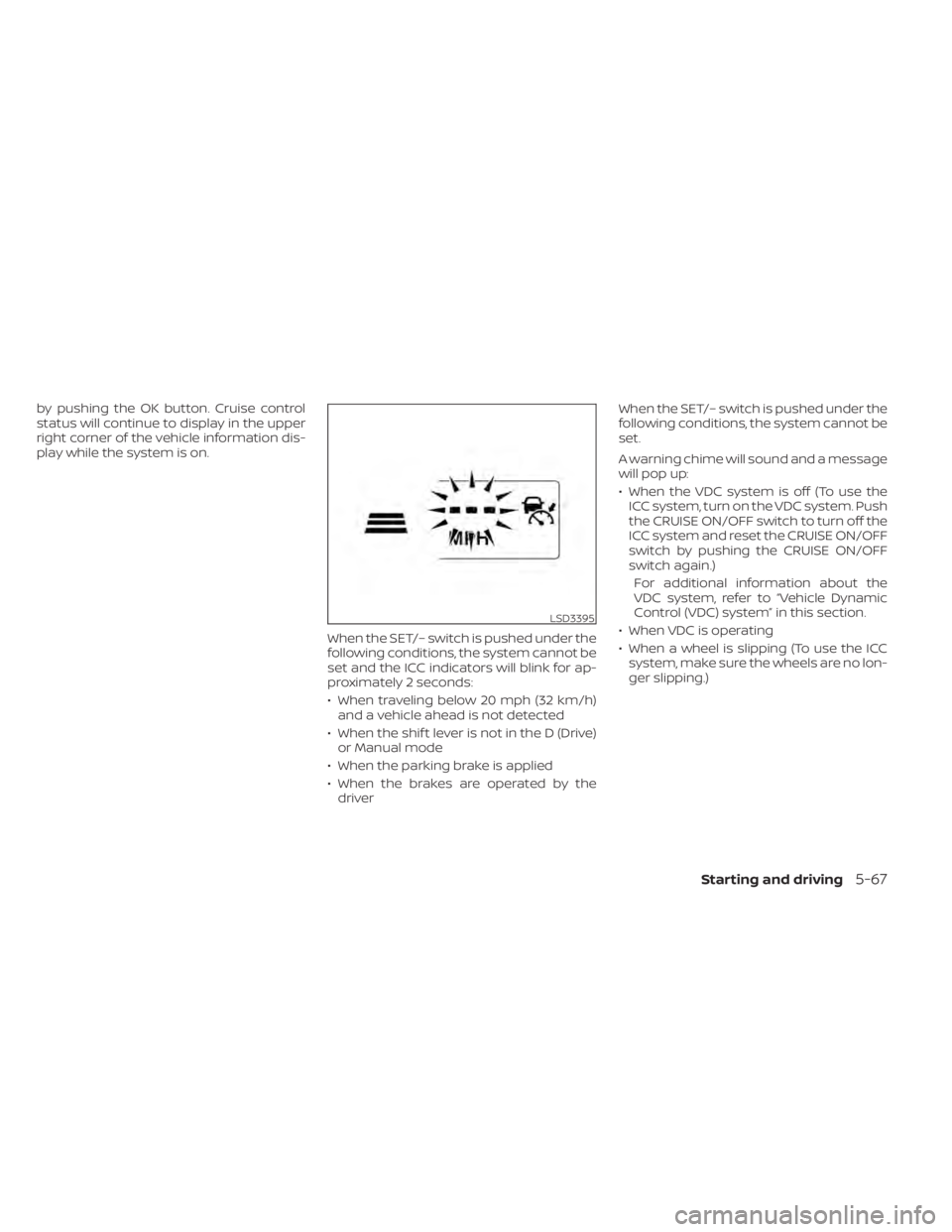
play while the system is on.When the SET/– switch is pushed under the
following conditions, the system cannot be
set and the ICC indicators will blink for ap-
proximately 2 seconds:
• When traveling below 20 mph (32 km/h)and a vehicle ahead is not detected
• When the shif t lever is not in the D (Drive) or Manual mode
• When the parking brake is applied
• When the brakes are operated by the driver When the SET/– switch is pushed under the
following conditions, the system cannot be
set.
A warning chime will sound and a message
will pop up:
• When the VDC system is off (To use the
ICC system, turn on the VDC system. Push
the CRUISE ON/OFF switch to turn off the
ICC system and reset the CRUISE ON/OFF
switch by pushing the CRUISE ON/OFF
switch again.)
For additional information about the
VDC system, refer to “Vehicle Dynamic
Control (VDC) system” in this section.
• When VDC is operating
• When a wheel is slipping (To use the ICC system, make sure the wheels are no lon-
ger slipping.)
LSD3395
Starting and driving5-67
Page 324 of 518
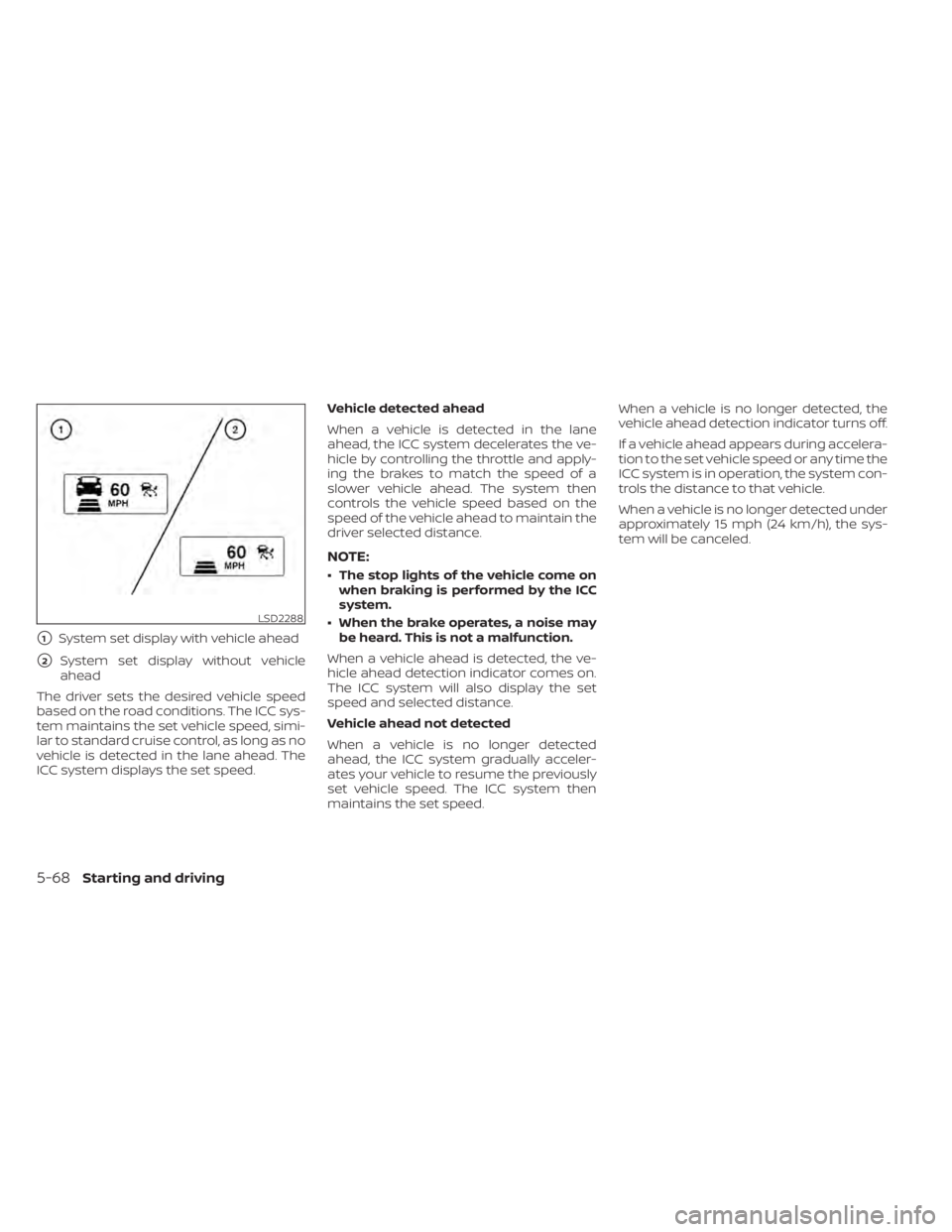
�1System set display with vehicle ahead
�2System set display without vehicle
ahead
The driver sets the desired vehicle speed
based on the road conditions. The ICC sys-
tem maintains the set vehicle speed, simi-
lar to standard cruise control, as long as no
vehicle is detected in the lane ahead. The
ICC system displays the set speed. Vehicle detected ahead
When a vehicle is detected in the lane
ahead, the ICC system decelerates the ve-
hicle by controlling the throttle and apply-
ing the brakes to match the speed of a
slower vehicle ahead. The system then
controls the vehicle speed based on the
speed of the vehicle ahead to maintain the
driver selected distance.
NOTE:
• The stop lights of the vehicle come on
when braking is performed by the ICC
system.
• When the brake operates, a noise may be heard. This is not a malfunction.
When a vehicle ahead is detected, the ve-
hicle ahead detection indicator comes on.
The ICC system will also display the set
speed and selected distance.
Vehicle ahead not detected
When a vehicle is no longer detected
ahead, the ICC system gradually acceler-
ates your vehicle to resume the previously
set vehicle speed. The ICC system then
maintains the set speed. When a vehicle is no longer detected, the
vehicle ahead detection indicator turns off.
If a vehicle ahead appears during accelera-
tion to the set vehicle speed or any time the
ICC system is in operation, the system con-
trols the distance to that vehicle.
When a vehicle is no longer detected under
approximately 15 mph (24 km/h), the sys-
tem will be canceled.
LSD2288
5-68Starting and driving