2020 NISSAN LEAF service indicator
[x] Cancel search: service indicatorPage 409 of 596
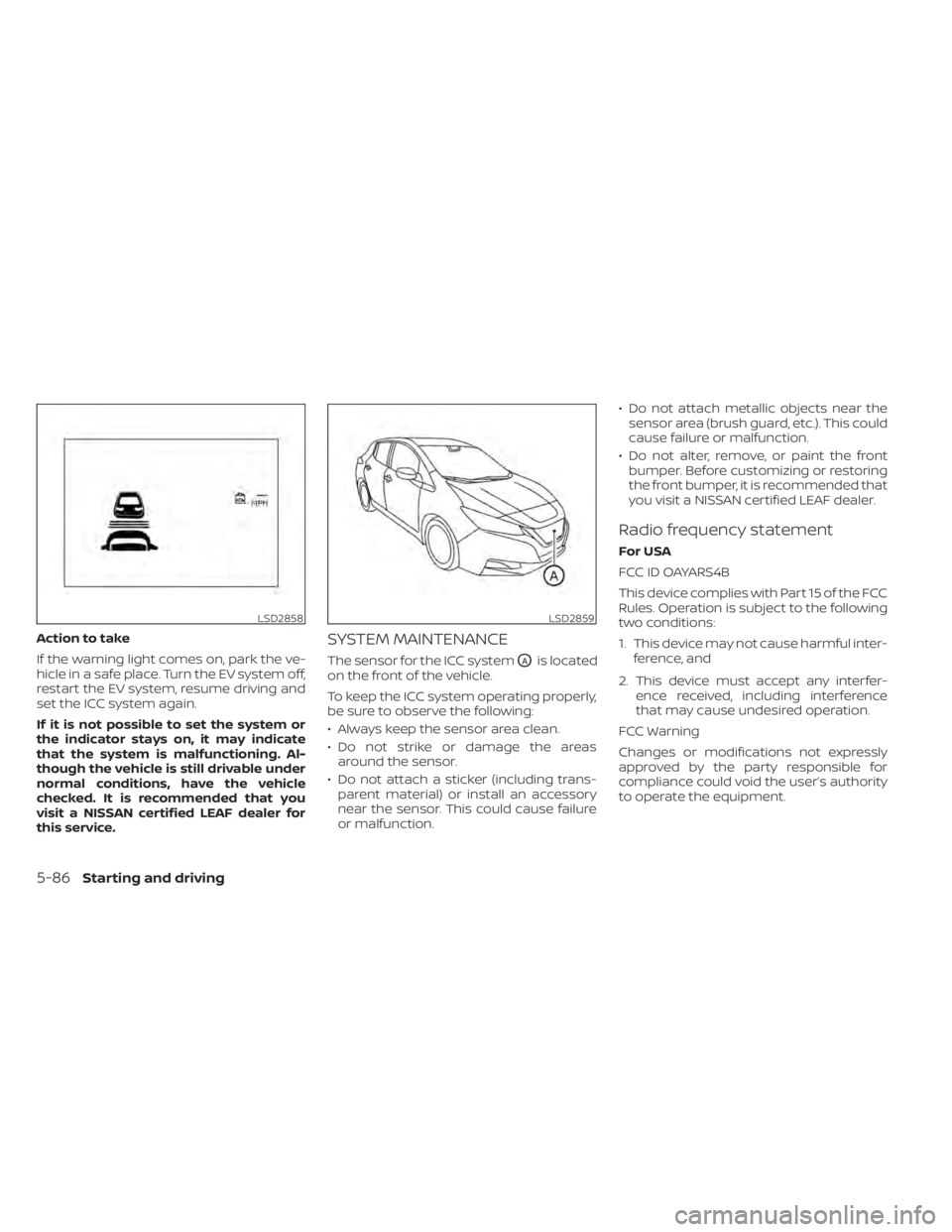
Action to take
If the warning light comes on, park the ve-
hicle in a safe place. Turn the EV system off,
restart the EV system, resume driving and
set the ICC system again.
If it is not possible to set the system or
the indicator stays on, it may indicate
that the system is malfunctioning. Al-
though the vehicle is still drivable under
normal conditions, have the vehicle
checked. It is recommended that you
visit a NISSAN certified LEAF dealer for
this service.SYSTEM MAINTENANCE
The sensor for the ICC systemOAis located
on the front of the vehicle.
To keep the ICC system operating properly,
be sure to observe the following:
• Always keep the sensor area clean.
• Do not strike or damage the areas around the sensor.
• Do not attach a sticker (including trans- parent material) or install an accessory
near the sensor. This could cause failure
or malfunction. • Do not attach metallic objects near the
sensor area (brush guard, etc.). This could
cause failure or malfunction.
• Do not alter, remove, or paint the front bumper. Before customizing or restoring
the front bumper, it is recommended that
you visit a NISSAN certified LEAF dealer.
Radio frequency statement
For USA
FCC ID OAYARS4B
This device complies with Part 15 of the FCC
Rules. Operation is subject to the following
two conditions:
1. This device may not cause harmful inter- ference, and
2. This device must accept any interfer- ence received, including interference
that may cause undesired operation.
FCC Warning
Changes or modifications not expressly
approved by the party responsible for
compliance could void the user’s authority
to operate the equipment.
LSD2858LSD2859
5-86Starting and driving
Page 415 of 596
System temporarily unavailable
A chime sounds under the following condi-
tions and the control is automatically can-
celed:
• When the vehicle slows down more than8 mph (13 km/h) below the set speed
• When the shif t lever is not in the D (Drive) or B mode
• When the parking brake is applied
• When the VDC operates (including the traction control system)
• When a wheel slips
When the system is not operating properly,
the chime sounds and the color of the
cruise indicator will change to orange.
Action to take
If the color of the cruise indicator changes
to orange, stop the vehicle in a safe place
and place the shif t lever in the P (Park) po-
sition. Turn the EV system off, restart the EV
system, resume driving, and then perform
the setting again. If it is not possible to set or the indicator
stays on, it may indicate that the system
is malfunctioning. Although the vehicle
is still drivable under normal conditions,
have the vehicle checked. It is recom-
mended that you visit a NISSAN certified
LEAF dealer for this service.
WARNING
Failure to follow the warnings and in-
structions for proper use of the ProPI-
LOT Assist system could result in seri-
ous injury or death.
• ProPILOT Assist is not a self-driving
system. Within the limits of its capa-
bilities, as described in this manual, it
helps the driver with certain driving
activities.
• The ProPILOT Assist system is not a
replacement for proper driving pro-
cedures and is not designed to cor-
rect careless, inattentive or absent-
minded driving. ProPILOT Assist will
not always steer the vehicle to keep it
in the lane. The ProPILOT Assist sys-
tem is not designed to prevent loss of
control. It is the driver’s responsibility
to stay alert, drive safely, keep the
vehicle in the traveling lane, and be in
control of the vehicle at all times.
PROPILOT ASSIST (if so equipped)
5-92Starting and driving
Page 437 of 596

ICC system malfunction
If the ICC system malfunctions, it will be
turned off automatically, a chime will
sound, and the speed control status warn-
ing (orange) will illuminate.
Action to take:
If the warning light comes on, stop the ve-
hicle in a safe place. Turn the EV system off,
restart the EV system and set the ICC sys-
tem again. If it is not possible to set the ICC
system or the indicator stays on, it may be
a malfunction. Although the normal driving
can be continued, the ICC system should
be inspected. It is recommended that you
visit a NISSAN certified LEAF dealer for this
service.
ICC sensor maintenance
The radar sensor is located on the front of
the vehicle.
To keep the ICC system operating properly,
be sure to observe the following:
• Always keep the sensor area clean.
• Do not strike or damage the areasaround the sensor. • Do not attach a sticker (including trans-
parent material) or install an accessory
near the sensor. This could cause failure
or malfunction.
• Do not attach metallic objects near the sensor area (brush guard, etc.). This could
cause failure or malfunction.
• Do not alter, remove, or paint the front bumper.
Before customizing or restoring the front
bumper, it is recommended that you visit a
NISSAN certified LEAF dealer.
The camera sensor is located above the
inside mirror.
To keep the proper operation of the sys-
tems and prevent a system malfunction,
be sure to observe the following:
• Always keep the windshield clean.
• Do not attach a sticker (including trans- parent material) or install an accessory
near the camera unit.
• Do not place reflective materials, such as white paper or a mirror, on the instru-
ment panel. The reflection of sunlight
may adversely affect the camera unit’s
capability of detecting the lane markers. • Do not strike or damage the areas
around the camera unit. Do not touch the
camera lens or remove the screw located
on the camera unit.
If the camera unit is damaged due to an
accident, it is recommended that you visit a
NISSAN certified LEAF dealer.
STEERING ASSIST
WARNING
Failure to follow the warnings and in-
structions for proper use of the Steer-
ing Assist could result in serious injury
or death.
• The Steering Assist is not a replace-
ment for proper driving procedures
and is not designed to correct care-
less, inattentive or absent-minded
driving. The Steering Assist will not
always steer the vehicle to keep it in
the lane. It is not designed to prevent
loss of control. It is the driver’s re-
sponsibility to stay alert, drive safely,
keep the vehicle in the traveling lane,
and be in control of the vehicle at all
times.
5-114Starting and driving
Page 443 of 596

Steering Assist cancel
Under the following conditions, the Steer-
ing Assist cancels, and the Steering Assist
status indicator and the Steering Assist in-
dicator turn off, and the “Not Available Bad
Weather” warning message will appear:
• When unusual lane markers appear inthe traveling lane or when the lane
marker cannot be correctly detected for
some time due to certain conditions (for
example, a snow rut, the reflection of light
on a rainy day, the presence of several
unclear lane markers)
• When the windshield wiper operates in the high (HI) speed operation (the Steer-
ing Assist is disabled when the wiper op-
erates for more than approximately 10
seconds)
Action to take:
Turn the ICC system off using the CANCEL
switch. When the conditions listed above
are no longer present, turn the ICC system
on again.
Steering Assist malfunction
When the system malfunctions, it turns off
automatically. The Steering Assist status
warning illuminates (orange). A chime may
sound depending on the situation.
Action to take:
Stop the vehicle in a safe location, place the
vehicle in the P (Park) position, turn the EV
system off, restart the EV system, resume
driving, and set the Intelligent Cruise Con-
trol system again. If the warning (orange)
continues to illuminate, the Steering Assist
is malfunctioning. Although the vehicle is
still drivable under normal conditions, have
the system checked. It is recommended
that you visit a NISSAN certified LEAF dealer
for this service.
Steering Assist maintenance
The camera sensor is located above the
inside mirror.
To keep the proper operation of the system
and prevent a system malfunction, be sure
to observe the following:
• Always keep the windshield clean.
• Do not attach a sticker (including trans- parent material) or install an accessory
near the camera unit. • Do not place reflective materials, such as
white paper or a mirror, on the instru-
ment panel. The reflection of sunlight
may adversely affect the camera unit’s
capability of detecting the lane markers.
• Do not strike or damage the areas around the camera unit. Do not touch the
camera lens or remove the screw located
on the camera unit.
If the camera unit is damaged due to an
accident, it is recommended that you visit a
NISSAN certified LEAF dealer.
Radio frequency statement
For USA
FCC ID OAYARS4B
This device complies with Part 15 of the FCC
Rules. Operation is subject to the following
two conditions:
1. This device may not cause harmful inter- ference, and
2. This device must accept any interfer- ence received, including interference
that may cause undesired operation.
5-120Starting and driving
Page 475 of 596

I-DA SYSTEM LIMITATIONS
WARNING
Listed below are the system limitations
for the I–DA system. Failure to operate
the vehicle in accordance with these
system limitations could result in seri-
ous injury or death.
• The I-DA system may not operate
properly and may not provide an
alert in the following conditions:
– Poor road conditions such as an
uneven road surface or pot holes.
– Strong side wind.
– If you have adopted a sporty driv-
ing style with higher cornering
speeds or higher rates of
acceleration.
– Frequent lane changes or
changes to vehicle speed.
• The I–DA system will not provide an
alert in the following conditions:
– Vehicle speeds lower than 37 mph
(60 km/h).
– Short lapses of attention.
– Instantaneous distractions such
as dropping an object.
System malfunction
If the Intelligent Driver Alertness system
malfunctions, the system warning mes-
sage will appear in the vehicle information
display and the function will be stopped
automatically.
Action to take
Stop the vehicle in a safe location, place the
vehicle in P (Park) position, turn the EV sys-
tem off and restart the EV system. If the
system warning message continues to ap-
pear, have the system checked. It is recom-
mended that you visit a NISSAN certified
LEAF dealer for this service. The ECO mode helps reduce power con-
sumption by reducing acceleration when
compared to the same accelerator pedal
position in the D (Drive) position. Use the
ECO mode for maximum driving range and
for city driving.
To turn on the ECO mode, push the ECO
switch. The ECO mode indicator appears
on the vehicle information display.
To turn off the ECO mode, push the ECO
switch again. The ECO mode indicator will
turn off.
LSD2907LSD3669
ECO MODE
5-152Starting and driving
Page 480 of 596

You may hear a noise when the steering
wheel is operated quickly. However, this is
not a malfunction.
If the power steering warning light
illuminates while the READY to drive indica-
tor light is on, it may indicate the power
steering system is not functioning properly
and may need servicing. Have the power
steering system checked. It is recom-
mended that you visit a NISSAN certified
LEAF dealer for this service. For additional
information, refer to “Power steering warn-
ing light” in the “Instruments and controls”
section of this manual.
The power assist for steering stops operat-
ing when both the power steering warning
light and READY to drive indicator light are
illuminated. You will still have control of the
vehicle. However, greater steering effort is
needed, especially in sharp turns and at
low speeds.
BRAKE PRECAUTIONS
This vehicle is equipped with two braking
systems:
1. Hydraulic brake system
2. Regenerative brake system
Hydraulic brake system
The hydraulic brake system is similar to the
brakes used on conventional vehicles.
The brake system has two separate hy-
draulic circuits. If one circuit malfunctions,
you will still have braking at two wheels.
Regenerative brake system
The primary purpose of the regenerative
brake system is to provide some power to
help recharge the Li-ion battery and ex-
tend driving range. A secondary benefit is
“engine braking” that operates based on
battery conditions.
In the D (Drive) range, when the accelerator
is released, the regenerative brake system
provides some deceleration and gener-
ates power for the Li-ion battery. Power is
also generated when the brake pedal is
applied.When you put the shif t lever in the B mode
and take your foot off the accelerator
pedal, more regenerative brake is applied
than in the D (Drive) position. However, dur-
ing high-speed driving you may feel that
regenerative brake provides less decelera-
tion than the engine braking in an ordinary
vehicle. This is normal.
Less deceleration is provided by the regen-
erative brake system when the Li-ion bat-
tery is fully charged. Regenerative brake is
automatically reduced when the Li-ion
battery is fully charged to prevent the Li-ion
battery from becoming overcharged. Re-
generative brake is also automatically re-
duced when the battery temperature is
high/low (indicated by the red/blue zones
on the battery temperature gauge) to pre-
vent Li-ion battery damage.
The brake pedal should be used to slow or
stop the vehicle depending on traffic or
road conditions. The vehicle brakes are not
affected by regenerative brake system op-
eration.
BRAKE SYSTEM
Starting and driving5-157
Page 498 of 596

To shut off the EV system in an emergency
situation while driving, perform the follow-
ing procedure.
• Rapidly push the power switch three con-secutive times in less than 1.5 seconds, or
• Push and hold the power switch for more than 2 seconds.TIRE PRESSURE MONITORING
SYSTEM (TPMS)
This vehicle is equipped with TPMS. It moni-
tors tire pressure of all tires. When the low
tire pressure warning light is lit, and the “Tire
Pressure Low — Add Air” warning appears
on the vehicle information display, one or
more of your tires is significantly under-
inflated. If the vehicle is being driven with
low tire pressure, the TPMS will activate and
warn you of it by the low tire pressure warn-
ing light. This system will activate only
when the vehicle is driven at speeds above
16 mph (25 km/h). For additional informa-
tion, refer to “Warning lights, indicator lights
and audible reminders” in the “Instruments
and controls” section and “Tire Pressure
Monitoring System (TPMS)” in the “Starting
and driving” section of this manual.
WARNING
• Radio waves could adversely affect
electric medical equipment. Those
who use a pacemaker should contact
the electric medical equipment
manufacturer for the possible influ-
ences before use. •
If the low tire pressure warning light
illuminates while driving, avoid sud-
den steering maneuvers or abrupt
braking, reduce vehicle speed, pull
off the road to a safe location and
stop the vehicle as soon as possible.
Driving with underinflated tires may
permanently damage the tires and
increase the likelihood of tire failure.
Serious vehicle damage could occur
and may lead to an accident and
could result in serious personal in-
jury. Check the tire pressure for all
four tires. Adjust the tire pressure to
the recommended COLD tire pres-
sure shown on the Tire and Loading
Information label to turn the low tire
pressure warning light OFF. If the
light still illuminates while driving af-
ter adjusting the tire pressure, a tire
may be flat or the TPMS may be mal-
functioning. If you have a flat tire, re-
pair it as soon as possible. If no tire is
flat and all tires are properly inflated,
have the vehicle checked. It is recom-
mended that you visit a certified
LEAF dealer for this service.
EMERGENCY EV (Electric Vehicle)
SHUT OFF FLAT TIRE
In case of emergency6-3
Page 525 of 596

–The Climate Ctrl. Timer is not ac-
tive or operating. For additional
information, refer to “Climate Ctrl.
Timer” in the “Monitor, climate, au-
dio, phone and voice recognition
systems” section of this manual.
– The 12-volt battery is not being
charged by the Li-ion battery and
that all charging status indicator
lights are off. For additional infor-
mation, refer to “Charging the 12-
volt battery ” in the “EV overview”
section and “Charging status indi-
cator lights” in the “Charging” sec-
tion of this manual.
• The power switch is in the OFF posi-
tion. Place the power switch in the ON
position and then in the OFF position
to prevent the 12-volt battery auto-
matically being charged by the Li-ion
battery. For additional information,
refer to “Charging the 12-volt bat-
tery ” in the “EV overview” section of
this manual.
The “Maintenance and do-it-yourself ” sec-
tion gives instructions regarding only
those items that are relatively easy for an
owner to perform. A Genuine NISSAN Service Manual is also
available. For additional information, refer
to “Owner’s manual/service manual order
information” in the “Technical and con-
sumer information” section of this manual.
You should be aware that incomplete or
improper servicing may result in operating
difficulties and could affect your warranty
coverage.
If in doubt about any servicing,
it is recommended that you visit a
NISSAN certified LEAF dealer.
8-6Maintenance and do-it yourself