2020 MITSUBISHI OUTLANDER Sound system
[x] Cancel search: Sound systemPage 174 of 443

Brake auto hold (if so equipped)
Features and controls 5-93
5
N00517600364
Your vehicle is equipped with power brakes for more braking force with less brake pedal effort.Your brakes are designed to operate at full capacity, even if the power assist is not being used.If the power assist is not being used, the effort needed to press the brake pedal is greater. If you should lose the power assist for some reason, the brakes will still work. If the power brake unit or either of the twobrake hydraulic systems stops working prop- erly, the rest of the brake system will still work, but the vehicle will not slow down asquickly. You will know this ha
s happened if you find
you need to press the brake down farther, orharder when slowing down or stopping, or if the brake warning light and the warning dis- play in the multi-information display comeon.
N00550700124
The disc brakes have an alarm that makes a metallic squeal when
the brake pads have
worn down enough to need service.If you hear this sound, have the brake pads replaced at an authorized Mitsubishi Motors dealer or a repair facility of your choice.
N00592000080
When the vehicle is st
opped at traffic lights
etc., the vehicle can be
held stationary with
the brake auto hold system even if yourelease your foot from the brake pedal. When the accelerator pedal is depressed, the brakes are released.
Power brakes
WA R N I N G Never coast downhill
with the engine OFF.
Keep the engine running whenever your vehicle is in motion. If you turn off the engine while driving, the power brakebooster will stop wo
rking and your brakes
will not work as well.
If the power assist is lost or if either brake hydraulic system stops working properly,take your vehicle to
an authorized Mit-
subishi Motors dealer or a repair facility of your choice immediately.
Brake pad wear alarm
WA R N I N G Driving with worn brake pads will make it harder to stop, and can cause an accident.
Brake auto hold
(if so equipped)
WA R N I N G
WA R N I N G Do not overly rely on the brake auto hold system. On steep slope, depress the brakepedal firmly because the system may nothold the vehicle stationary. Never leave the vehicle while it is being stopped by the brake auto hold system. When leaving the vehi
cle, apply the park-
ing brake and move th
e selector lever to
the “P” (PARK) position. Do not use brake auto hold system when driving on slippery roads. The system may not hold the vehicle stationary and could result in an accident. NOTE
While operating the brake auto hold system, you may hear an operati
on noise to increase
braking force when the system detected the movement of the vehicl
e. This does not indi-
cate a malfunction.
BK0278200US.book 93 ページ 2019年4月10日 水曜日 午前10時59分
Page 175 of 443

Brake auto hold (if so equipped) 5-94 Features and controls
5
If the brake auto hold switch is pressed while all of the following conditions are met, the system will change to the standby state and the indicator light (A) on the switch comeson. The ignition switch or
the operation mode
in ON. The driver’s seat belt is fastened. The driver’s door is closed.
When the vehicle is
stopped by depressing
the brake pedal with the selector lever in any position other than “P” (PARK) or “R”(REVERSE), the brake auto hold activates and the vehicle will be
held stationary.
The brake auto hold indicator light in theinstrument cluster will come on while the system activates.
How to use brake auto hold
To turn on brake auto hold
NOTE
When the brake auto hold system cannot be used, a buzzer will sound and the following warning will appear on the information screen in the multi information display.
• If this warning appear
s, confirm that all of
the conditions for system operation are metand that there is no malfunction in the sys-tem. • If this warning appear
s, fasten the driver’s
seat belt.
If any of the following occur while the sys- tem is standby state, the brake auto hold sys-tem will be turned off automatically and the indicator light on the switch goes off. A buzzer will sound a
nd the message will
appear on the information screen in the multi information display. • When the driver’s seat
belt is unfastened.
• When the driver’s door is opened.• When there is a malfunction in the systemNOTE
If keeping pressing the brake auto hold switch after setting
the brake auto hold to
ON (stand by), the brake auto hold willreturn to OFF as a protection function is operated. After returning to OFF, the brake auto holdwill not be switched to
ON (Stand by) even if
the brake auto hold switch is pressed. To set the brake auto hold to
ON, restart the engine
and press the brake auto hold switch again.
To activate brake auto hold
NOTE
or
BK0278200US.book 94 ページ 2019年4月10日 水曜日 午前10時59分
Page 176 of 443
Brake auto hold (if so equipped)
Features and controls 5-95
5
Depress the acceleration
pedal with the selec-
tor lever in any position other than “P” (PARK) or “N” (NEUTRAL). The brakes are released, and the brake autohold indicator light in
the instrument cluster
will go off.
CAUTION Release the brake pedal only after the brake auto hold indicator li
ght has illuminated.
NOTE
In the following situations, the brake auto hold system may not
operate temporarily.
• The vehicle is stoppe
d on a slippery road.
• The vehicle was stoppe
d while the steering
wheel was turned all the way to the left or right. • The vehicle is being turned on a parking lot turntable. If this occurs, the brake auto hold system will return to the normal operation if youdepress the accelerator
pedal and the vehicle
starts moving again. If the following operation is performed, the brake auto hold will be
deactivated and the
brake auto hold indicator light in the instru-ment cluster goes off. • When shifting the selector lever to the “P” (PARK) or “R” (REVERSE) position with depressing the brake pedal. • When the Electric park
ing brake is applied
by using the Electric
parking brake switch.
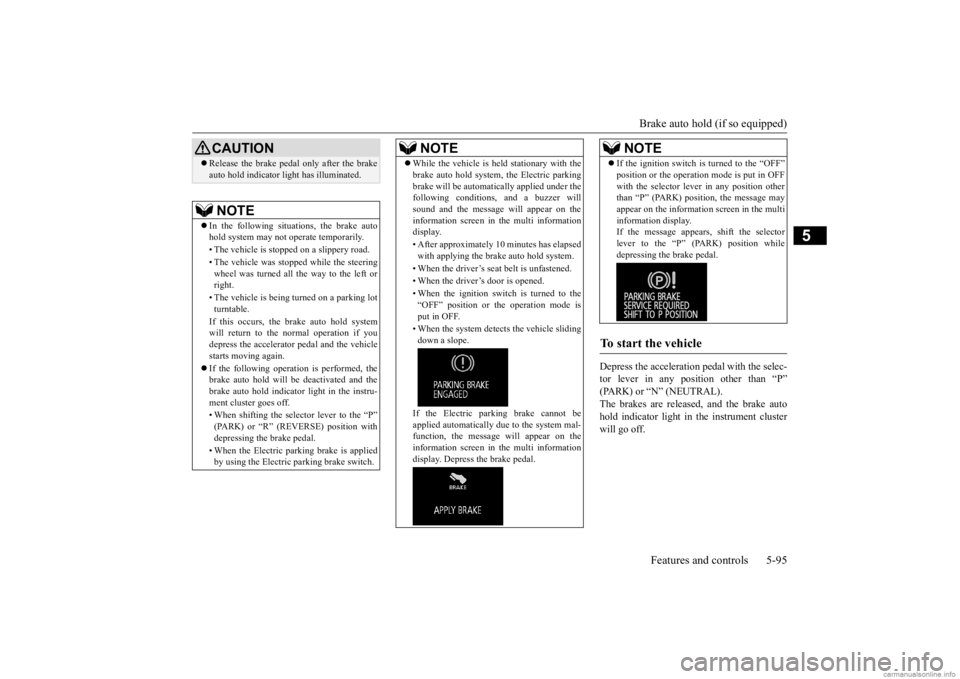
While the vehicle is held stationary with the brake auto hold system, the Electric parkingbrake will be automati
cally applied under the
following conditions, and a buzzer will sound and the message will appear on the information screen in the multi informationdisplay. • After approximately 10 minutes has elapsed with applying the brake auto hold system. • When the driver’s seat
belt is unfastened.
• When the driver’s door is opened. • When the ignition switch is turned to the “OFF” position or th
e operation mode is
put in OFF. • When the system detect
s the vehicle sliding
down a slope. If the Electric park
ing brake cannot be
applied automatically due to the system mal- function, the message
will appear on the
information screen in the multi informationdisplay. Depress the brake pedal.NOTE
If the ignition switch is turned to the “OFF” position or the operation mode is put in OFFwith the selector leve
r in any position other
than “P” (PARK) position, the message may appear on the information screen in the multi information display.If the message appears, shift the selector lever to the “P” (PARK) position while depressing the brake pedal.
To start the vehicle
NOTE
BK0278200US.book 95 ページ 2019年4月10日 水曜日 午前10時59分
Page 177 of 443

Hill start assist (if so equipped) 5-96 Features and controls
5
Press the brake auto hold switch to turn off the brake auto hold. The indicator light on the switch goes off. If you want to turn off the system while thebrake auto hold indicator light is illuminated, press the switch with
depressing the brake
pedal.
N00562601097
The hill start assist makes it easy to start off on a steep uphill sl
ope by preventing the
vehicle from moving backwards. It keeps thebraking force for about 2 second when you move your foot from the brake pedal to the accelerator pedal.
N00562701128
1. Stop the vehicle completely using the brake pedal. 2. Release the brake pedal and the hill startassist will maintain the braking force applied while stopped
for approximately 2
seconds.
3. Depress the accelera
tor pedal and the hill
start assist will gr
adually decrease the
braking force as the vehicle starts moving.
N00562801103
If an abnormal condition occurs in the sys-tem, the following display/indicator will turnon.
To turn off brake auto hold
NOTE
If the brake auto hold system is turned off without the brake peda
l being depressed, a
buzzer will sound and the message will appear on the information screen in the multiinformation display.
Hill start assist
(if so equipped)
CAUTION Do not overly rely on the hill start assist to prevent backwards movement of the vehicle.Under certain circumstances, even when hillstart assist is activated, the vehicle may move backwards if the brake pedal is not suf- ficiently depresse
d, if the vehicle is heavily
loaded, or if the road is very steep or slip- pery. The hill start assist is not designed to keep the vehicle stopped in
place on uphill slopes
for more than 2 seconds. When facing uphill, do not rely on using the hill start assist to
maintain a stopped position
as an alternative to depressing the brake pedal. Doing so could cause an accident. Do not turn the igniti
on switch to the “OFF”,
“LOCK” or “ACC” po
sition while the hill
start assist is operating. The hill start assist could stop operating,
which could result in
an accident.
To operate
NOTE
The hill start assist is activated when all of the following c
onditions are met.
• The engine is running. (The hill start assist
will not be activated
while the engine is st
arting or immediately
after the engine is started.) • The selector lever is
in any position other
than “P” (PARK) or “N” (NEUTRAL). • The vehicle is comple
tely stationary, with
the brake pedal depressed. • The parking brake is released. The hill start assist wi
ll not operate if the
accelerator pedal is
depressed before the
brake pedal is released. The hill start assist also operates when reversing on an uphill slope.
Warning display
- ASC indicator
BK0278200US.book 96 ページ 2019年4月10日 水曜日 午前10時59分
Page 179 of 443

Anti-lock braking system 5-98 Features and controls
5
Operation of anti-lock braking system is not restricted situati
ons where brakes are
applied suddenly. This system may also prevent the wheels from locking when you drive over manholes, steel roadworkplates, road markings
, or any uneven road
surface. When the anti-lock braking system is in use, you may feel the brake pedal vibrat- ing and hear a unique
sound. It may also
feel as if the pedal
resists being pressed.
In this situation, simply hold the brake pedal down firmly. Do not pump thebrake, which will result in reduced braking performance.
N00531601684
Warning light Warning display If there is a malfunction in the system, the anti-lock braking system warning light will come on and the warning display will appearon the information screen in the multi-infor- mation display. Under normal conditions, the anti-lock brak-ing system warning light only comes on when the ignition switch is turned to the “ON” position or the operati
on mode is put in ON
and goes off a few seconds later.
N00531701702
Avoid hard braking and high-speed driv- ing. Stop the vehicle in a safe place. Test the system by restarting the engineand driving at a speed of approximately 12 mph (20 km/h) or higher. If the warning light / display then remainsoff during driving, there is no abnormal condition.
CAUTION The anti-lock braking system cannot prevent accidents. It is your responsibility to takesafety precautions a
nd to drive carefully.
To prevent failure of the anti-lock braking system, be sure all 4 wheels and tires are the same size and the same type.NOTE
A whining sound is emitted from the engine compartment when driving immediately after starting the engine. These are the nor-mal sounds the anti-lock braking system makes when performing a self-check. It does not indicate a malfunction.
The anti-lock braking system can be used after the vehicle has
reached a speed over
approximately 6 mph (10 km/h). It stopsworking when the vehicle slows below 3 mph (5 km/h).
Anti-lock braking system warn- ing light / display
NOTE
CAUTION Any of the following indicates that the anti- lock braking system is not functioning andonly the standard brake system is working.(The standard brake system is functioning normally.) If this happe
ns, take your vehicle
to an authorized Mits
ubishi Motors dealer or
a repair facility of your choice. • When the ignition switch is in the “ON”position or the operation
mode is put in ON,
the warning light doe
s not come on or it
remains on and does not go off• The warning light comes on while driving• The warning display
appears while driving
If the warning light / display illuminate while driving If only the anti-lock braking sys- tem warning light/display illumi-nate
BK0278200US.book 98 ページ 2019年4月10日 水曜日 午前10時59分
Page 182 of 443

Active stability control (ASC) Features and controls 5-101
5
N00559200021
On slippery surfaces, the traction control function prevents the drive wheels from spin- ning excessive, thus
helping the vehicle to
start moving from a stopped condition. It also
provides sufficient driv
ing force and steering
performance as the vehicle turns while press-ing the acceleration pedal.
N00559300019
The skid control function is designed to helpthe driver maintain control of the vehicle on slippery roads or during rapid steering maneuvers. It works by controlling the engineoutput and the brake on each wheel.
N00559401307
The ASC is automatically activated when theignition switch is turned to the “ON” posi-tion. You can deactivate
the system by press-
ing down the ASC OFF switch for 3 seconds or longer. When the ASC is deactivated, the indica- tor will turn on. To reactivate the ASC, momentarily press the ASC OFF switch; the indicator is turned off.
Do not install any af
termarket limited slip
differential (LSD) on your vehicle. The ASCmay stop functioning properly.NOTE
An operation noise may be emitted from the engine compartment in the following situa-tions. The sound is associated with checking the operations of the ASC. At this time, you may feel a shock from the brake pedal if youdepress it. These do not indicate a malfunc- tion. • When the ignition switch is set to the “ON” position. • When the vehicle is driven for a while after the engine is turned on.
When the ASC is acti
vated, you may feel a
vibration in the vehicle body or hear a whin- ing sound from the engine compartment.This indicates that the system is operating normally. It does not i
ndicate a malfunction.
When the anti-lock braking system warning light is illuminated, the ASC is not active.
Traction control function
CAUTION
CAUTION When driving a vehicle on a snowy or icy road, be sure to install snow tires and drivethe vehicle at moderate speeds.
Skid control function
NOTE
The skid control func
tion operates at speeds
of about 9 mph (15 km/h) or higher.
ASC OFF switch
CAUTION For safety reasons, the ASC OFF switch should be operated when your vehicle isstopped. Be sure to keep the ASC on while driving in normal circumstances.
BK0278200US.book 101 ページ 2019年4月10日 水曜日 午前10時59分
Page 188 of 443

Adaptive Cruise Control System (ACC) (if so equipped)
Features and controls 5-107
5
Also, the set speed dr
iving may be deacti-
vated as follow: When the engine speed rises and approaches the tachom
eter’s red zone (the
red-coloured part of the tachometer dial).
N00518901433
If the set speed driving is deactivated by thecondition described in “To deactivate” on page 5-106, you can resume the previouslyset speed by push up the “RES +” switch (C) while driving at a speed of approximately 25 mph (40 km/h) or higher.The “SET” indicator appears on the informa- tion screen in the meter cluster. Under either of the following conditions, however, using the switch does not allow you to resume the previously set speed. In thesesituations, repeat the
speed setting procedure:
The CRUISE CONTROL ON/OFF switch is pressed. The operation mode is put in OFF. Indicator goes off.
N00576800048
ACC maintains a set speed with no need for you to use the accelera
tor pedal. Using a sen-
sor (A), the system also measures the relative speed and distance betw
een your vehicle and
a vehicle in front, and
maintains a set follow-
ing distance between
your vehicle and the
vehicle in front by au
tomatically decelerating
your vehicle if it becomes too close to the vehicle in front. The cruising set speed can be set from 25mph (40 km/h) to 110 mph (180 km/h). The distance can be select
ed from three levels.
If the vehicle in front decelerates, the ACCwill automatically apply limited braking to maintain the distance, a
nd if the front vehicle
then accelerates, the ACC will automaticallyaccelerate your vehicle
up to the set speed. If
your vehicle is approa
ching too close to the
front vehicle, a buzzer will sound and a warn-ing is shown in the multi information display. When the ACC detects no vehicle ahead, the set speed will be maintained.Conventional cruise cont
rol mode without the
distance control can
also be selected.
Stop lights are illuminated during automaticbraking.
CAUTION When the set speed driving is deactivated automatically in any
situation other than
those listed above, th
ere may be a system
malfunction. Press the CRUISE CONTROL ON/OFF switch to turn off the cruise control and haveyour vehicle inspected by an authorized Mit- subishi Motors dealer or
a repair facility of
your choice.
To resume the set speed
Adaptive Cruise Control System (ACC)
(if so equipped)
BK0278200US.book 107 ページ 2019年4月10日 水曜日 午前10時59分
Page 191 of 443

Adaptive Cruise Control System (ACC) (if so equipped) 5-110 Features and controls
5
Press the “ACC ON/OFF” switch to turn off the ACC.
With the ACC turned on, push down the “SET -” switch while driving, and when your vehicle reaches your de
sired speed, release
the “SET -” switch. The ACC will activateand initiate the speed control to maintain the set speed. The set indicator comes on, the set speed is indicated and the following distance indicator changes to the ‘active’ display. Also a buzzerwill sound.
You can set the speed
anywhere from approx-
imately 25 mph (40 km/h) to 110 mph (180km/h). While a vehicle in front
is being detected and
your vehicle speed is
between approximately
6 mph (10 km/h) and 25 mph (40 km/h), you can activate the ACC. In this case, the set speed will be set at 25 mph (40 km/h).The ACC cannot otherwis
e be activated while
your vehicle is traveling less than 25 mph (40 km/h) or greater than 110 mph (180 km/h).
NOTE
Every time the operation mode is turned to the “OFF” position, the ACC is turned off.
To turn off ACC
NOTE
The ACC can be turned off even while the ACC is active. Every time the operation mode is turned off, the ACC is turned off and the set speed iserased.
To activate ACC control
NOTE
When any of the following conditions are present, the ACC will not activate. • When your vehicle speed is lower than approximately 6 mph (10 km/h) or greater than 110 mph (180 km/h). • When your vehicle is driven at speeds between approximately 6 mph (10 km/h) and 25 mph (40 km/h) and the ACC is notdetecting a vehi
cle in front.
• When ASC is in the OFF position.• While ABS, ASC or
TCL is activated.
• When the selector leve
r is in positions other
than “D” (DRIVE) and “Ds” (DOWN- SHIFT & SPORTY DRIVING). • While the brake pedal is depressed. • While the parking brake is applied. • When the ACC system has judged that the performance for detect
ing a front vehicle is
degraded.
BK0278200US.book 110 ページ 2019年4月10日 水曜日 午前10時59分