2020 MERCEDES-BENZ S-CLASS phone
[x] Cancel search: phonePage 177 of 602

St
arting thev ehic le(Remo teOnline) &
WARNIN GRisk ofcrus hing orentr ap‐
ment duet ou nintentio nalstar tin go fthe
engine
Limbs couldbecrushed ortra pped ifth e
engine isstar tedu nint entionall yduring
ser vice ormaint enanc ework. #
Alw ayss ecur ethe engine agains tunin‐
te ntio nalstar tin gb efor ec arrying out
maint enanceorrepair work. Re
quirement s:
R Park position 005Disselect ed.
R The anti- thefta larms ystem isno ta ctiv ated.
R The panic alarmisnotactiv ated.
R The hazar dwarning light system isswitc hed
of f.
R The hood isclosed.
R The door sareclosed andlocked.
R The windo wsand slidin gsunroof arec losed. #
Startt he vehicle using thes mar tphon e.
Af tere very vehicle star t,th ee ngine runs for
te nm inutes.
Yo uc an car ryout amaximum oftwoc onsec u‐
tiv es tartin ga ttem pts. The vehicle mustbes tar‐
te do ncew itht he Smar tKey bef oret rying to
st ar tt he vehicle again withthe smar tphone. you
can stop thev ehicle again atanyt ime.
% Further information canbefound inthe
smar tphone app.
Secur ingthee ngine agains tstar ting before
car rying out maintenance orrepair work: #
Swi tcho nthe hazar dwarning light system.
or #
Unloc kthe door s.
or #
Open aside windo worthe sliding sunroof. Br
eaking-in notes Mer
cede s-AMG vehicl es:obse rvet he notesi n
th eS upplement .Other wise, youm ayfailto rec‐
ogni zedangers. To
preser vethee ngine during thef irst
1, 000 miles(1,500 km):
R Drivea tvarying road spee dsand engine
spee ds.
R Drivet he vehicle indrivep rogram A
or ;.
R Shif ttot he next highes tgear atthev eryl at‐
es tw hen then eedle reac hes thel astthir d
bef oret he reda reai nt he tach ome ter.
R Donots hift do wn agear manuall yino rder to
br ak e.
R Avoid overstrai ning thev ehicle, e.g.driving at
full thro ttle .
R Donotd epress thea ccelera torp eda lpast
th ep ressur epoint (kickdo wn).
R Onlyincr ease thee ngine speed gradually and
accelera tethev ehicle tofull spee dafter
1, 000 miles(1,500 km).
This also app liesw hent he engine orpar tsof the
dr ivet ra in have been replaced. Dr
iving andparking 17
5
Page 274 of 602
#
Toselect aradio station :swi peupw ards or
do wn wardso nthe left-hand Touc hC ontrol.
Select ingfreq uency rang eo rstat ionp rese t
lis t #
Press thel eft-hand Touc hC ontrol. #
Toselect thef requ ency rang e/s tation
pr ese tlist: swipe upwards ordown wardso n
th el eft-hand Touc hC ontrol. #
Press thel eft-hand Touc hC ontrol. Med
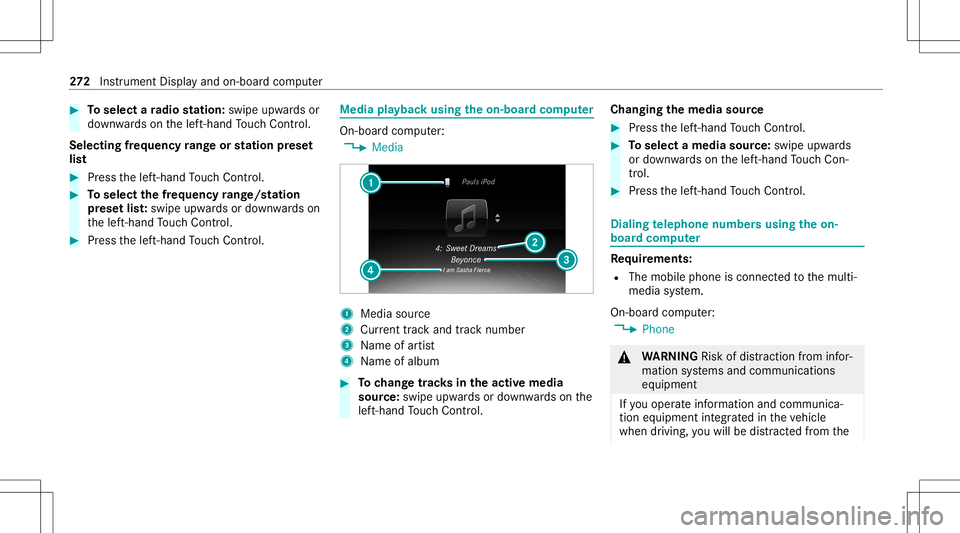
iapla yba ckusing theo n-boa rdcom puter On-boar
dcom put er:
4 Media 1
Media source
2 Current trac ka nd trac kn um ber
3 Name ofartis t
4 Name ofalb um #
Tochang etrack sint he activ emedia
sour ce:swipe upwards ordown wardso nthe
lef t-hand Touc hC ontrol. Cha
nging them ediasour ce #
Press thel eft-hand Touc hC ontrol. #
Toselect amedia source:swipe upwards
or down wardso nthe left-hand Touc hC on‐
tr ol. #
Press thel eft-hand Touc hC ontrol. Diali
ngtelephone numbersusing theo n-
boar dcom puter Re
quirement s:
R The mobile phoneisc onnec tedt ot he multi‐
media system.
On- boar dcom put er:
4 Phone &
WARNIN GRisk ofdist ra ction from infor‐
mati onsystems andcomm unication s
eq uipment
If yo uo per atei nfor mat ionand comm unic a‐
tio ne quipme ntintegratedi nt he vehicle
when driving, youw illbe distract edfrom the 27
2
Instrument Displayand on-boar dcom put er
Page 275 of 602
tr
af fics ituation. Thiscouldalso cau seyout o
lose control of thev ehicle. #
Onlyoper atet his equipme ntwhen the
tr af fics ituation per mits. #
Ifyo uc anno tb es ureo fthis, stop the
ve hicle whilstpaying attention toroad
and trafficc ondi tions andoperate the
eq uipment withthe vehicle statio nary. When
telephon ing,youm usto bse rvet he legal
re qu iremen tsfort he countr yinw hichyou are
cur rentl yd rivi ng.
The mostrecen ttelephone connection s(dialed,
re cei veda nd missed calls)ared ispla yedi nt he
Phone menu. #
Toselect thet elephone number: swipe
upw ards ordown wardso nthe left-hand
To uc hC ontrol. #
Press thel eft-hand Touc hC ontrol.
If th erei so nlyo ne telephone number
sa ve dt oa ne ntry:thet elephone numberis
select ed. #
Ifth erea remu ltip letelephone numbers
sa ve dt oa ne ntry:swipe upwards ordown‐ wa
rdso nthe left-hand Touc hC ontrol to
select thed esir edtelephon enumb er. #
Press thel eft-hand Touc hC ontrol.
The telephon enumb erisdialed.
The follo wing displa ysma yappear instead ofthe
te lephon enumb ersd ialed:
R Please Wait...:t he applicatio niss tartin g.
When aBluetooth®
connecti ontothem obile
phone isno te stablish ed,them enu for
aut hor izin gand con nectingam obilephon eis
displa yedo nthe multimedia system
(/ page341).
R Import ingContac ts...:t he cont acts from the
mobil ephone orfrom astora ge medium are
being impor ted.
Ac cep ting/r eject ingacall
When your eceiv eacall,theInc oming Call-mes‐
sag eappear sonthe Head-up Display. #
Swi peupwa rdso rdow nwards on thel eft-
hand Touc hC ontrol and select0061 (Acc ep t)
or 0076 (Reject ). #
Press thel eft-hand Touc hC ontrol. The
callmaybea ccep ted/r ejec tedu sing the
0061 or0076 buttons onthes teer ing wheel. Ad
jus tingthe Head-up Displ aysettings on
th eo n-boa rdcom puter On-boar
dcom put er:
4 Head-up Disp.
The follo wing charact eristic so fthe Head-up Dis‐
pla ycan be adjus ted:
R Position
R Bright ness
R Display Content #
Toselect charact eristics :swi peupw ards or
do wn wardso nthe left-hand Touc hC ontrol. #
Press thel eft-hand Touc hC ontrol. #
Toadjus tthe value: swipe upwards or
do wn wardso nthe left-hand Touc hC ontrol. #
Press thel eft-hand Touc hC ontrol. In
stru ment Displa yand on-boar dcom put er 27
3
Page 281 of 602

R
avoid loud noises that caus einter fere nce
wh ilem aking avoice command entry,e.g.
th eb lowe r.
Av oice tagi nt he addr essbook isno trecog ‐
niz ed:
R onlycreates ensible addressbook entriesin
th es ystem/mo bilephone, e.g.entersur‐
name andfirs tn am eint he cor rect field. R
donotu se anya bbr eviation s,unn eces sary
spaces orspec ialcharact ers.
If as tatio nliste ntry isno trecog nized:
R sayt he Read outstation listvoice com mand . Essentia
lvoice comm ands Ov
ervie wo fswitc hvoice comm ands Swit
chvoice com mand scan be used toopen
cer tain applicat ions.The voice com mand selec‐
tion canbeused rega rdless ofthea pplication
th at iscur rently active.
Switc hvoice comm ands Vo
ice comm and Function
Navigation To
switc hton avigati on mod e
Ma p To
switc htom apdisp lay
Address book To
switc htoa ddr ess book
Telep hone To
switc htot elephone mode
Text message To
switc htot extm essage s
Radio To
switc htor adio mode
Media To
switc htom edia mode Vo
ice Cont rolS ystem 27
9
Page 286 of 602
Ov
ervie wo ftelephone voice comm ands Yo
uc an use thet elephone voice com mand sto
mak ephone callsorsear chthro ugh thea ddr ess
book .
Te lephone voice comm ands Vo
ice comm and Function
Call
esap hone call.Alladdr essbook names area vailable.
Sear chfor con tact
ches fora nd disp lays ac ontact. Alladdress bookname sareavailable.
Out goin gcalls Dis
playsthel astc all
Redial Select
sthe lastphone number dialed Ov
ervie wo fradio voice comm ands Ra
dio voice com mand scan also beused when
th er adio applicatio nisr unn ingi nt he bac k‐
gr ound. 28
4
Voice Cont rolS ystem
Page 297 of 602
#
Tohide thec ontr olmenu :swipe down with
tw of ing ers. Th es wipe mu ststar tint he
upp erarea ofthet ouc hpad . Main
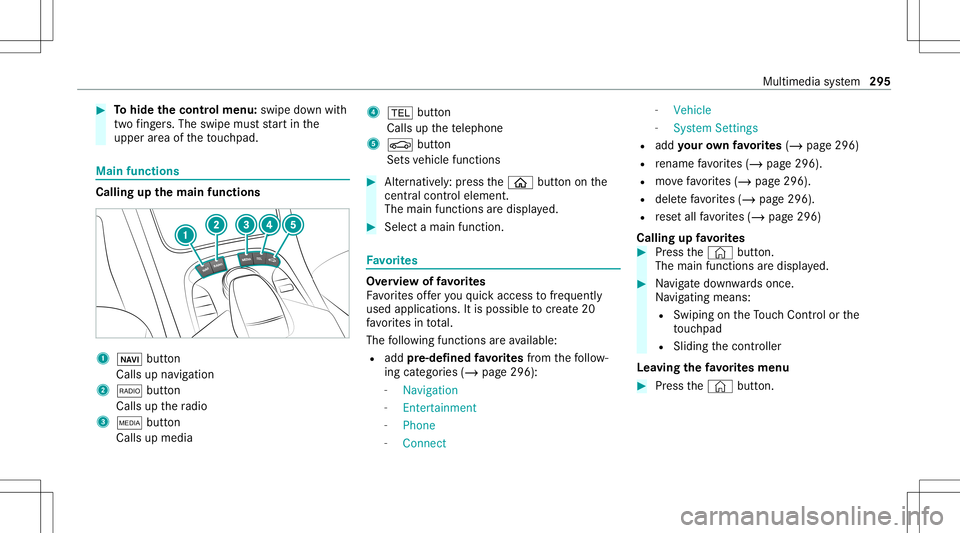
functions Call
ingupthem ainf unctions 1
00CB button
Calls upnavig ation
2 002A button
Calls upther adio
3 00FD button
Calls upmedia 4
002B button
Calls upthet elephone
5 00D4 button
Se tsvehicle functions #
Alternativ ely:press the00E2 buttononthe
centr alcontr oleleme nt.
The mainfuncti onsared ispl ay ed. #
Select amainfunc tion. Fa
vo rite s Ov
ervie wo ffav orites
Fa vorite so ffer youq uicka ccess tofreq uently
use dapplica tions. Itis possi bletocrea te 20
fa vo rite si nt otal.
The follo wing functionsareavailable:
R add pre-d efined favo rite sfrom thef ollo w‐
ing categor ies(/ page296):
- Navigat ion
- Enter tain men t
- Phon e
- Conn ect -
Vehic le
- Syst emSettings
R add your ow nfavo rite s(/ pag e296)
R renam efavo rite s( /pag e296).
R movefavo rite s( /pag e296).
R dele tefavo rite s( / pag e296).
R rese ta llfa vo rite s( / pag e296)
Calling upfavo rite s #
Press the© button.
The main functionsaredispla yed. #
Navig ated ownwards onc e.
Na vig ating means:
R Swipi ngon theT ouc hControl or the
to uc hpad
R Slid ingthec ontroller
Lea ving thef avo rite sm enu #
Press the© button. Multimedia
system 295
Page 300 of 602

On
them ultimedia system #
Turn volume control 1.
The volume ofthec urrent radio ormedia
sour ceisset.The volume ofother audi o
sour cescan beadjus teds epar ately.
Ad jus tthis inthef ollo wing situations:
R Dur ing atraf fica nnou ncement
R Dur ing anavigati on annou ncement The
volume ofthen avigation announ ce‐
ment chang esinacc ordanc ewitht he vol‐
ume ofthec urrent med iasou rce.
R Dur ing atelephone call
R When entering orexitin gap arkin gspace
while using ActiveP arking Assist
Se tting inthem enu #
Sele ctSyst eminthem ultimedia system. #
Select Audio. #
Select avolume setting. #
Setthe volume. Ent
ering charact ers Usi
ngthec har acterinput functi on &
WARNIN GRisk ofdist ra ction from infor‐
mati onsystems andcomm unication s
eq uipment
If yo uo per atei nfor mat ionand comm unic a‐
tio ne quipme ntintegratedi nt he vehicle
when driving, youw illbe distract ed from the tr
af fics ituation. Thiscouldalso cau seyout o
lose control of thev ehicle. #
Onlyoper atet his equipme ntwhen the
tr af fics ituation per mits. #
Ifyo uc anno tb es ureo fthis, stop the
ve hicle whilstpaying attention toroad
and trafficc ondi tions andoperate the
eq uipment withthe vehicle statio nary. Yo
um usto bse rvet he legalrequ iremen tsfort he
countr yinw hich youa recur rentl yd rivi ng when
op erati ng them ultimedia system.
Use thec har acterinput funct ioninthef ollo wing
situations, fore xamp le:
R Renam ingafavo rite
R Entering aPOIoraddres s
R Making aphone call
The follo wing functionsareavailable:
R Select ing achar acterinthec har acterbar
R Writin gac haracteron thet ouc hpad
Char acterinput can bestar tedw ithac ontrol
element andresumed witha nother. 298
Multimedia system
Page 304 of 602

#
Con firm chang eswhen exitin gthe menu.
The dateiss etaut omaticall yviaGPS. Ac
tiv atin g/deac tivatin gvoice amplif ication
to rear passe nger comp artment Re
quirement s:
R Mer cedes- Maybac hvehicles andvehicles
wit hal ong wheelba seonl y.
R Your vehicle iseq uipped withthe Bur mes ter®
sur round soun dsystemo rthe Bur mes ter®
high-end 3Dsurround soun dsystem.
R The ignition isswitc hedon.
R Door s,side windo wsand thep anor ama roof
wit hp owe rtilt/sli dingpanel arec losed .
Mul timedi asyst em:
4 System 5
Audio
5 Voice Amplific ationtoRear
The func tion suppor tscomm unication between
th ed rive r/f ront passe nger and vehicle occu‐
pants inther ear passeng ercom partment .When
vo ice amplif icat ion torear passe nger com part‐ men
tisa ctivat ed, thes ignals pickedu pbythe
micr ophone area mp lifi ed and playedb acko ver
th es peak ersi nt he rear passe nger com part‐
men t,depen dingupon vehicle noise leve ls. An
aut omat icadjus tment occursb ased onspeak er
vo lume andambien tnois eino rder toimprove
speec hintelligi bility andmaint ainthen atura l‐
ness ofspeec h. #
Activate0073 ordeacti vate 0053 thef unc tion . Connectivity
Switc
hingtransmission ofthev ehic lepos i‐
tio no n/off
Mul timedi asystem:
4 System 5
ö Connec tivity #
Select Transm itVehicle Pos.. #
Activate0073 ordeacti vate 0053 thef unc tion . Blue
tooth® Inf
orma tion abou tBluet oo th®
Bl ue tooth®
tech nol ogy isas tandar dfor shor t-
ra ng ew irel es sd atat ransf erup toappr oximat ely
32. 8ft(10 m).
Yo uc an use Blue tooth®
to connect your mob ile
phon etot he multimedia system and usethef ol‐
lo wing function s,fore xamp le:
R Han ds-free system witha ccess tothef ollo w‐
ing options:
- cont acts (/page346)
- call lists (/ page348)
- text mes sage (/ pag e349)
R Interne tc onnec tion (/page361)
R Listening tomusi cviaBlue tooth®
audio
R Trans ferring business cards(vCar ds)intot he
ve hicle
Blue tooth®
is ar egis tere dt rademar kofBlue‐
to othS pecial Interes tG roup (SIG) Inc.
% Interne tc onn ection viaBlue tooth®
is no t
av ailable inall coun tries. 302
Multimed iasystem