Page 153 of 682
#
Toswitc hof f:pr ess butt on2 repeat edly
until both indic ator lam psgo out. Wi
reless chargin gof themobil eph one and
connecti onwit hth eex terior ant enna No
teson wir elessl ych argin gth emobil e
ph one &
WARNIN GRisk ofinju rydue toobject s
being stowe dincor rectl y
If obje ctsintheve hicle interior arestowe d
inc orrectly ,th ey can slide orbe throw n
ar oun dand hitvehicle occupants. Inaddi‐
tion, cupholder s,open stow agespac esand
mobi lephon ere cep tacle scanno tal wa ys
re tain all obje ctsth ey cont ain.
The reisarisk ofinjur y,par ticular lyin the
ev ent ofsudden braking orasudden chang e
in dir ect ion. #
Alw aysst ow object sso that they can‐
no tbe throw nar ou nd insuch situa‐
tions. #
Alw aysmak esur eth at obj ect sdo not
pr otru de from stow agespac es,lugg age
ne ts or stow agene ts. #
Close theloc kable stow agespac es
bef orest ar tin gajo ur ne y. #
Alw aysst ow and securehea vy,har d,
poin ted, shar p-edg ed,fragile orbulky
objec tsinthetrunk/ loadcompartmen t. Obser
vetheno teson loadi ngtheve hicle. &
WARNIN GRisk offire from placing
objects inthemobile phonestow age
com partment
Ther eis arisk offire ,in par ticular ,if yo u
place moreth an onemobi lephon ein the
mobil ephone stow agecom partment . #
Apar tfr om amobi lephon e,do not
place anyot her object sin themobile
phone stow agecom partment ,espe ‐
ciall yth ose made ofme tal. *
NO
TEDama getoobject scaused by
placing them inthemobile phonestow ‐
ag ecom partment If
obj ect sar eplace din themobile phone
st ow agecom partment ,th ey ma ybe dam‐
ag ed byelectr omagne ticfields. #
Donotplace credit cards, stor ag e
media orother objects sensitiveto
electr omagne ticfields inthemobile
phone stow agecom partment . *
NO
TEDama getothemobile phone
st ow agecom partment caus edbyliquids If
liq uids enterthemobile phonestow age
com partment ,th ecom partmen tma ybe
damag ed. #
Ensur eth at no liquids enterthemobile
phone stow agecom partment . Alw
aysobser vetheno tesfo rper sons withelec‐
tr onic medica laid s(/ page29). Seats
andstow ing 15
1
Page 155 of 682
%
Alist of com patible mobilephones canbe
fo und at:ht tp s:// www .merced es-ben z-
mob ile.com/ Mat
infron tof thestow agecom partment inthe
re ar armr est Mat
inthecent ercons oleofthere ar passe nger
com partment (onlyMer cedes-Ma ybachve hicles
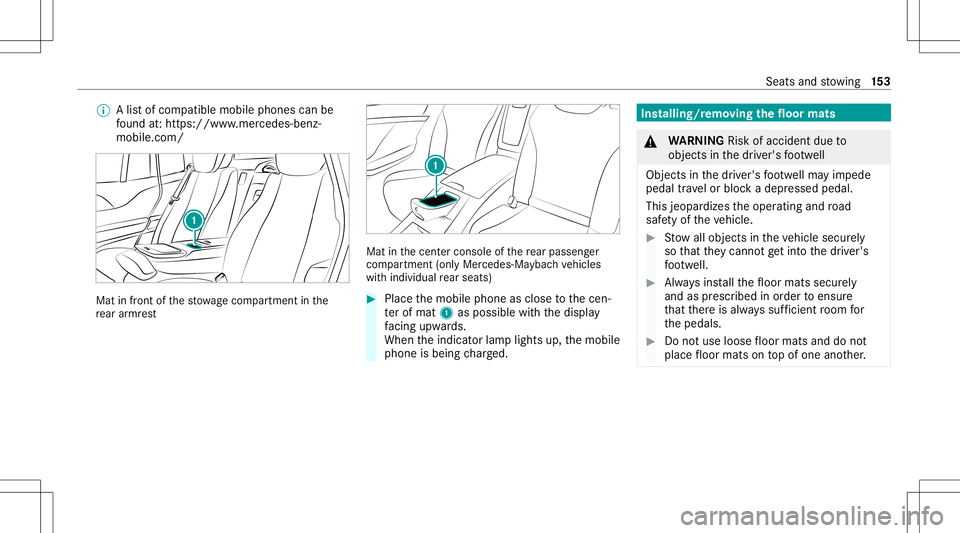
wit hindividual rear seat s) #
Place themobile phoneasclose tothecen‐
te rof mat 1aspossi blewithth edispla y
fa cing upwa rds.
When theindicat orlam plights up,themobile
phone isbeing charge d. Ins
talling/r emoving thefloor mats &
WARNIN GRisk ofacci dent dueto
object sin thedr iver's foot we ll
Obj ectsin thedr iver's foot we llma yim pede
pedal trav el or bloc kadepr essed pedal.
This jeopar dizestheoper ating androad
saf etyof theve hicle. #
Stow allobj ect sin theve hicle secur ely
so that they canno tget intoth edr iver's
fo ot we ll. #
Alw aysins tallth efloor mats securely
and asprescr ibed inorder toensur e
th at ther eis alw ayssuf ficie ntroom for
th epedals. #
Donotuse loose floor mats anddonot
place floor mats ontopof one another. Seats
andstow ing 15
3
Page 156 of 682
#
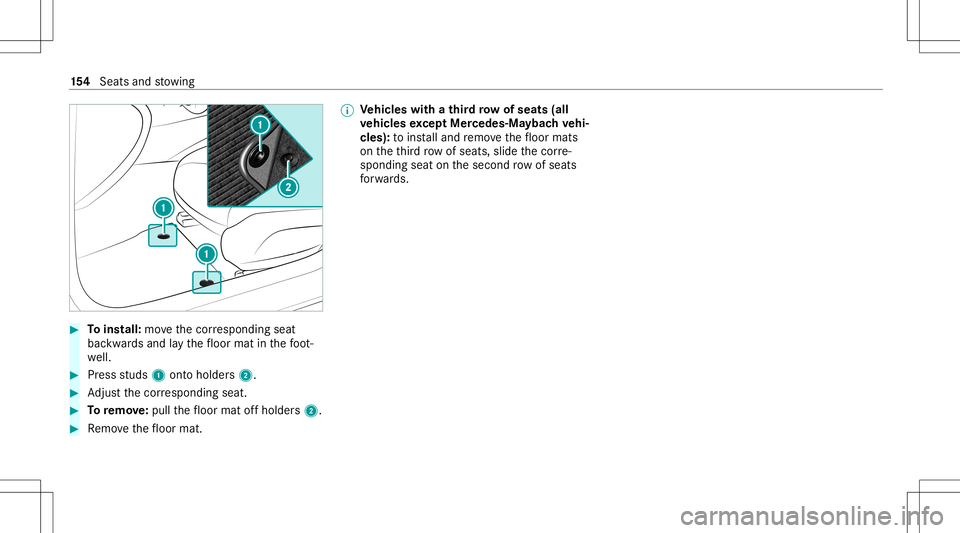
Toins tall: movethecor responding seat
bac kwards and lay th efloor mat inthefo ot ‐
we ll. #
Press studs 1onto holder s2. #
Adjus tth ecor responding seat. #
Toremo ve:pull thefloor mat offholder s2. #
Remo vethefloor mat. %
Ve
hicl eswith ath ird ro w of sea ts(all
ve hicl esexc eptMer cedes- Mayba chvehi‐
cle s): toins talland remo vethefloor mats
on theth ird row ofseats, slidethecor re‐
sponding seatonthesecon drow ofseats
fo rw ards. 15
4
Sea tsand stow ing
Page 174 of 682
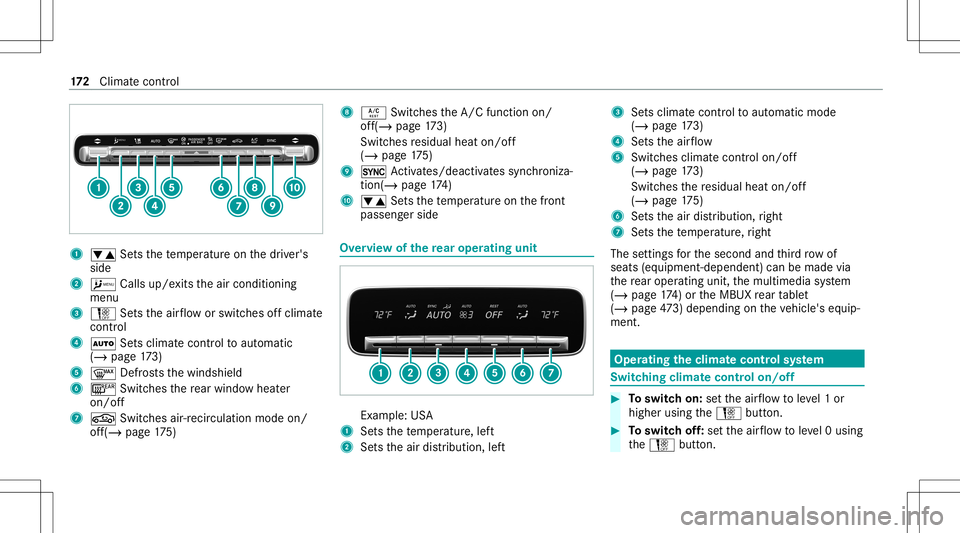
1
0082 Setsthete mp eratur eon thedr iver's
side
2 A Callsup/exitstheair con ditionin g
menu
3 H Setstheair flow orswitc hesoffclimat e
cont rol
4 0058 Setsclimat econtr olto aut omat ic
(/ page17 3)
5 0064 Defrosts thewindshield
6 006C Switchesthere ar wind owheat er
on/of f
7 0072 Switchesair-recir culation modeon/
of f(/ page17 5) 8
0056 Switches theA/C function on/
of f(/ page17 3)
Swi tches residua lheat on/of f
(/ page17 5)
9 0 Activates /de activatessync hroniza‐
tion(/ page17 4)
A 0082 Setsthete mp eratur eon thefront
passeng erside Ov
ervie wof there ar oper ating unit Ex
am ple:US A
1 Setsthete mp eratur e,lef t
2 Setstheair distribution, left 3
Setsclimat econ trol to aut omat icmode
(/ page17 3)
4 Setstheair flow
5 Switches climat econtr olon/of f
(/ page 173)
Swi tches there sidua lheat on/of f
(/ page17 5)
6 Setstheair distribution, right
7 Setsthete mp eratur e,right
The settings forth esecon dand third row of
seats (equipment- dependent )can bemade via
th ere ar oper atingunit ,th emultimedia system
(/ page17 4) or theMBUX rear table t
(/ page47 3) dep ending ontheve hicle's equip‐
ment. Oper
ating theclima tecont rolsy stem Switc
hingclima tecont rolon/of f #
Toswitc hon: setth eair flow toleve l1 or
higher usingtheH button. #
Toswitc hof f:se tth eair flow toleve l0 using
th eH button. 17
2
Climat eco ntro l
Page 176 of 682
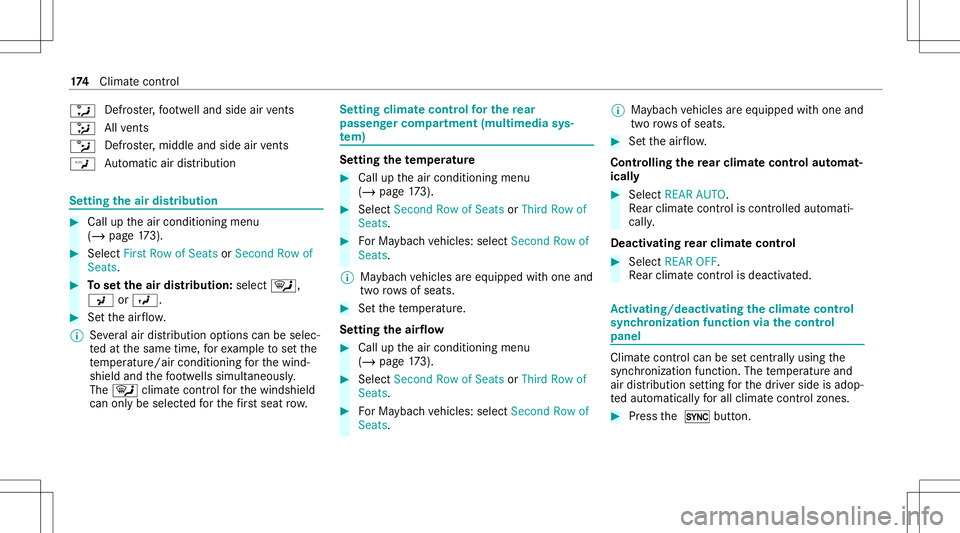
0086
Defr
oster,fo ot we lland side airvents
008F All
vents
0087 Defr
oster,middl eand side airvents
00A2 Au
tomatic airdistribu tion Se
tting theair distribut ion #
Call uptheair con ditionin gmenu
(/ page17 3). #
Select FirstRo wof Sea tsor Second Rowof
Sea ts. #
Tosetth eair distribut ion: selec t0061,
009C or009B. #
Setth eair flow .
% Severalair distribution option scan beselec ‐
te dat thesame time,forex am ple tosetth e
te mp eratur e/air conditionin gfo rth ewind‐
shield andthefo ot we llssimult aneousl y.
The 0061 climat econt rolfo rth ewindshield
can onlybe select edforth efirs tse at row . Se
tting climat econtr olforthe rear
passe nger comp artment (multime diasys‐
te m) Se
ttin gthe temp eratur e #
Call uptheair con ditionin gmenu
(/ page17 3). #
Select Second Rowof Sea tsor Thi rdRowof
Sea ts. #
ForMa yba chvehicles: selectSecond Rowof
Seats.
% Maybac hve hicles areeq uipped withone and
tw orow sof seats. #
Setth ete mp eratur e.
Se tting theair flow #
Call uptheair con ditionin gmenu
(/ page17 3). #
Select Second Rowof Sea tsor Thi rdRowof
Sea ts. #
ForMa yba chvehicles: selectSecond Rowof
Seats. %
Maybac hve hicles areeq uipped withone and
tw orow sof seats. #
Setth eair flow .
Contr olling there ar climat eco ntr olaut omat‐
ical ly #
Select REAR AUTO.
Re ar clim atecon trol iscon trolled automat i‐
call y.
Deact ivat ing rear climat eco ntr ol #
Select REAROFF.
Re ar clim atecon trol isdeac tivated. Ac
tiv atin g/deac tivatin gthe climat eco ntr ol
syn chronizat ionfunction viathecontr ol
pa nel Climat
econ trol can besetcen trall yusing the
sync hronization function.Thetemp eratur eand
air distribution setting forth edr iver side isadop‐
te daut omatic allyfo rall clima tecontr olzones. #
Press the 0 button. 17
4
Climat eco ntro l
Page 334 of 682
Vo
ice comm and Colloquialexam ple Function
Current speedlimit Iwould liketohear thespeed limit Calls
upthecur rent spe edlimit.
Ou tsid etemp erature Iwo uld like tofind outwh atthe
temp erature outsid eis like Ca
lls up theoutside temp eratur e.
Aver ageconsumption Whatisthe curren taverage con-
sumption ? Calls
upave rage consu mption.
Veh icleda ta Canyo uplea se disp laythe vehicle
da ta menu ? Ca
lls up theve hicle data.
Range Tellmethe current range Call
sup thecur rent rang eda ta.
Assi stance menu Showmethe driver assista nce set-
ting s Dis
play sth eassis tance settings .
Cl ima tecontro lmenu Iwo uld like tosee theclima tecon-
trol menu Disp
lays theclimat econ trol settings.
Light menu Iwould liketochange thelight set-
ting s Displa
ysthelight settings.
Seats menu Iwould liketoswitch toseat menu Displa
ystheseat adjus tmentse ttings. 332
Voice Cont rolSy stem
Page 476 of 682
&
WARNIN GRisk ofbeco ming trap ped
th ro ugh oper ationof theMBUX rear tab‐
le toutside theve hicle
If th eMBUX rear table tis oper ated outside
th eve hicle, seats canbemo vedusing the
seat control.Ve hicle occupants andanimals
could become trapped bytheseat adjus t‐
ment . #
Onlyoper ateth eseat control when
inside theve hicle. &
WARNIN GRisk ofinju ryas are sult of
th eMBUX rear table tno tbeing secured
in theve hicle
If th eMBUX rear table tis loose intheve hicle
int erior ,it could bethrow nar ou nd and
th er eb yhit vehicle occupants. #
Alw ayssecur elylockth eMBUX rear
ta ble tin thebr ac ketint end edforth at
pur pose . The
MBU Xre ar table tcon sistsof atab let
(/ page47 4) andabrac ketint egr ated inthe
bac kres t(/ page47 5).
If th eta ble thas been pairedwithth emultimedia
sy stem, theMBUX rear table tcan makese ttings
on themultimedia system from there ar
passe nger com partment .
% The function ofoperatin gth emultimedia
sy stem withth epair edtable t,can be
bloc kedin themultimedia system.
The MBUX rear table tcan also beused outside
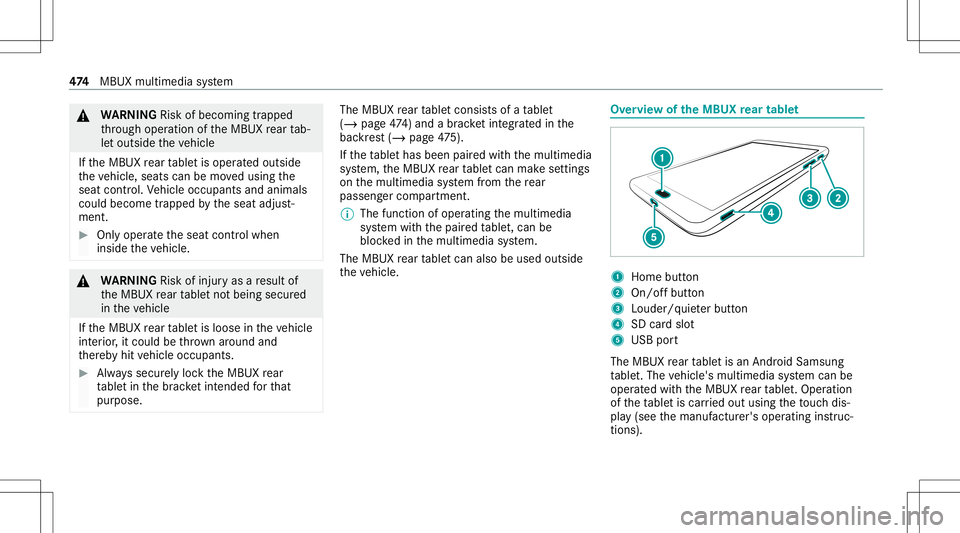
th eve hicle. Ov
ervie wof theMB UX rear tab let 1
Home button
2 On/of fbutt on
3 Loud er/quiet er butt on
4 SDcardslo t
5 USB port
The MBUX rear table tis an Android Samsun g
ta ble t.The vehicle's multimedia system can be
oper ated withth eMBUX rear table t.Oper ation
of theta ble tis car ried out using theto uc hdis‐
pla y(see themanuf acturer'soper ating instruc‐
tion s). 47
4
MBUX multimedia system
Page 519 of 682

%
The datasho wnintheimag esisexam ple
dat a. The
tirepr essur eta ble showsthere comme nded
tir epr ess ures forall tires app rove dfo rth is vehi‐
cle. The recomme ndedtirepr ess ures apply for
cold tires und ervarious oper ating condit ions,i.e.
loading and/orspeedoftheve hicle.
If one ormor etir esizes precede atir epr essur e,
th etir epr essur einf ormation follo wing isonl y
va lid forth ose tiresizes.
The load condit ions"partially laden" and"fully
laden" aredef ined intheta ble fordif fere nt num ‐
be rs of passeng ersand amounts oflugg age. The
actual number ofseats maydif ferfr om this. Som
etir epr essur eta bles onlysho wtherim
diame terins tead ofthecom pletetiresize, e.g.
R1 8.The rim dia me teris par tof thetir esize and
can befound onthetir eside wall(/ page529 ).
Be sureto also obse rveth efo llo wing further
re lat ed subje cts:
R Noteson tirepr essur e(/ page51 5)
R Tire and Loadi ngInfo rm atio nplacar d
(/ page52 2) R
Max imum tirepr essur e(/ page52 8) Chec
kingtirepr essu resmanu ally #
Read thetir epr essur efo rth ecur rent operat‐
ing cond itions from theTire and Loadi ng
In fo rm atio nplacar dor thetir epr essur e
ta ble. Obser vetheno teson tirepr essur e. #
Remo vetheva lve cap ofthetir eto be
ch ecked. #
Press thetir epr essur ega ug esec urelyon to
th eva lve. #
Read thetir epr essur e. #
Ifth etir epr essur eis lowe rth an there com‐
mend edvalue, increase thetir epr essur eto
th ere comme ndedvalue. #
Ifth etir epr essur eis higher than there com‐
mend edvalue, release air.To do so, press
do wn theme talpin intheva lve, e.g. using
th etip ofapen forex am ple. Then checkth e
tir epr es su re again usin gth etir epr essur e
ga ug e. #
Screw theva lve cap ontoth eva lve. Wheels
andtires 51
7