2020 MERCEDES-BENZ GLC USB
[x] Cancel search: USBPage 367 of 610
Multimedia
system:
4 © 5
Mercedes me&Apps
5 Dashc am #
Ifse veralUSB device sar econ nectedwit h
th emultimedia system, select theUSB
de vice (/page36 4). #
Select theIndividual Recording orLoop
Recording recor ding mod e.
If Indi vidualRe cord ingissel ect edand the
memor yis full there cor ding stops. Anindi‐
vidual recor ding isau tomatical lyprotect ed
ag ains tbeing overwritt en.
If Loo pRe cord inghasbe en select ed ,se veral
shor tvideo files arere cor ded .Whe nth e
memor ylimi tis reac hed, theoldes tvideo file
is dele tedand recor ding iscontinu edauto‐
matical ly. #
Tostar t:select StartRecording .
The lengt hof there cor ding issho wn. The
Ple ase donot remo vethe stora gemed ium.
mess ageap pea rs.The video file isstor ed on
th eUSB device. #
Toend: selectEn dRecor ding. A
repor tma yappear inthefo llo wing cases :
R Forth eIndividual Recording recor ding mod e:
th ememor yis full orther ear eonl ya fe w
minut esrecor ding time available. Thevideo
re cor ding stops orwill bestopped immi‐
nent ly.
Chan getheUSB device ordele teavide ofile.
R Ifavideo recor ding hasst ar tedand a
nation albor der isde tected, theNation alBor-
der Crossed. Pleaseobserve thecount ry-
specific regulations onvideo recording. mes‐
sag eappear s.
This function isno tav ailable inall coun tries.
R The cam erais no tfun ction al,theCamera
Unavailable messageappear s.
Ha ve thecamer ach eckedat an aut hor ized
Mer cedes- BenzCent er.
Dele ting adash camvideo recor ding
Re quirement s:
R AUSB device withvideo recordings iscon‐
nect edwith themultimedia system
(/ page405). %
Youar eleg allyre sponsible foroper ation and
use ofthedashcam functions.The legal
re qu iremen tsrelatin gto oper ation anduse
of thedashcam canvary dependin gon the
cou ntryin whi chthedashcam isoper ated.
Ther efor e, obser vetheleg alrequ iremen ts,in
par ticular thedat apr otect ion regulations, in
yo ur count ry.
Fo rth is reason ,bef oreusin gth edashcam
inf orm yourself about there gulation details
fo rth ere spectiv ecountr y.
This funct ionisno tper mitt edinall count ries.
Multimedia system:
4 © 5
Mercedes me&Apps
5 Dashc am #
Select thep symbol.
The RECORDINGS menuappear s. #
Select Vfora video file. #
Selec tDelet e. #
Selec tYes. #
Todel eteall vid eofiles: select 0062. #
Selec tDelet eAll Entries . MBUX
multim ediasystem 365
Page 368 of 610
Conf
iguringdashca msettings
Re quirement s:
R AUSB device iscon nectedwit hth emultime‐
dia system (/ page405).
Multimedia system:
4 © 5
Mercedes me&Apps
5 Dashc am #
Select Z. #
Tosho wmessag esafte rpass inga
nati onalbo rder: swit chon National Bor-
ders Alert.
The displa ybutt onisactiv ated.
A messag eappear sin thefo llo wing situa‐
tion s:
R Avideo isbeing recor ded .
R The vehicle haspassed anational border.
% This funct ionisno tav ailable inall coun tries. #
Tostar taut omatic videore cor ding:selec t
Aut omat icVideo Recording. #
ActivateAuto matic Vide oRe cord ing.
The disp lay bu tton isacti vated. When the
ve hicle isstar ted, video recor ding star ts
aut omat ically.
% This funct ionisno tav ailable inall coun tries. Te
lephone Te
lephon y No
teson telephon y &
WARNIN GRisk ofdist ra ction from oper‐
ati ng integr ated commu nication equip‐
ment whiletheve hicle isin mo tion
If yo uoper ateco mm unic ationeq uipme nt
int egrat edintheve hicle when driving, you
will bedistract edfrom thetra ffic situat ion.
This could alsocause youto lose control of
th eve hicle. #
Onlyoper ateth is eq uipmen twhen the
tr af fic situ ation per mits. #
Ifyo ucan notbe sur eof this, stop the
ve hicle whilstpa ying attention toroad and
traffic condi tions andoperate the
eq uipment withth eve hicle statio nary. &
WARNIN GRisk ofan acci dent from
ope rating mob ile comm unicati onequip ‐
ment while th eve hicle isin mo tion
Mobile communication sde vices distract the
dr iver from thetraf fic situ ation. Thiscou ld
al so cau sethedr iver tolose control of the
ve hicle. #
Asthedr iver ,onl yoper atemobile com‐
municat ionsdevices when theve hicle is
st atio nary. #
Asave hicle occupant, onlyuse mobile
communication sde vices inthear eas
int ended forth is pur pose, e.g.inthe
re ar passe nger com partment . Yo
umus tobse rveth eleg alrequ iremen tsforth e
cou ntryin whi chyouar ecur rentl ydr ivi ng when
op erati ng mob ile comm unicati onequip ment in
th eve hicle. 366
MBUX multimedia system
Page 377 of 610
Edit
ingthefo rm atofaco ntact's name
Mul timedi asy stem:
4 © 5
Phone 5
Z #
Select General. #
Select NameFormat.
The follo wing option sar eav ailable:
R Last Name ,Fir stName
R Last Name FirstName
R FirstName LastName #
Select anoptio n. Ov
ervie wof impor tingcontact s
Contact sfrom various sour ces Sour
ce Requirement s
ò USBdevice TheUSB device is
con nectedwit hth e
USB port.
ñ Bluetooth®
con‐
nectio n If
th esendin gof
vCar dsvia Blue tooth®
is suppor ted, vCar ds
can berecei vedon
mobile phones ornet‐
book s,forex am ple.
Blue tooth®
is act iva‐
te din themultimedia
sy stem and onthe
re spectiv ede vice
(see themanuf actur‐
er's oper ating instruc‐
tion s). Im
por ting contacts intoth econtact smenu
Multi media system:
4 © 5
Phone 5
Z 5
General
5 Import Contacts #
Select amobile phone
whic hth econ tacts should be impor ted. #
Select anoption .
Sa ving amobile phonecontact
Multimedia system:
4 © 5
Phone 5
g #
Select ó0048 intheline ofthemobile
phone contact. #
Sele ct0062. #
Sele ctSave toVeh icle. #
Sele ctYes .
The cont actsave din themultimedia system
is identif iedbytheq symbol.
Calling acontact
Multimedia system:
4 © 5
Phone 5
g #
Select ªSearch forContac ts. MBUX
multimedia system 37
5
Page 383 of 610
#
Ifyo ucan notbe sur eof this, stop the
ve hicle whilstpa ying attention toroad
and traffic condi tions andoperate the
eq uipment withth eve hicle statio nary. Yo
umus tobse rveth eleg alrequ iremen tsforth e
cou ntryin whi chyouar ecur rentl ydr ivi ng when
op erati ng themultimedia system.
Wi th Mer cedes-Ben zLink youcan usemob ile
phon efun ction svia themultimedia system. Itis
oper ated using theto uc hsc reen orthevo ice-
opera tedcon trol system. Youcan activat eth e
vo ice- opera tedcon trol system bypressing and
holding the£ buttononthemultifunc tion
st eer ing wheel.
When usingMercedes- BenzLinkviathevo ice-
opera tedcon trol system, themultimedia system
can still be oper ated via theVo ice Cont rolSy s‐
te m (/ page266).
The Mercedes-Benz Linkcontr olbo xsupp lemen‐
ta ry equipment isrequ ired forth is. This isavaila‐
ble atan aut hor izedMer cedes-Ben zCent er. On
lyone mobile phoneatatime canbeconn ec‐
te dvia Mer cedes- BenzLink tothemultimedia
sy stem.
When amobile phoneiscon nect edwith
Mer cedes- BenzLink,onl yone additional mobile
phone canbecon nect edusing Bluetooth®
wit h
th emultimedia system when intwophone
mode.
% The Mercedes- BenzLinkcontrol bo xuses
th eAn droid oper ating system.
% The service prov ider isresponsible forth ese
apps andtheser vices andcontent conne c‐
te dto it.
No teson Mer cedes-Benz Link
If amobile phoneisused withMer cedes-B enz
Link ,USB access usingthemedia menuispossi‐
ble forth is mobile phone.
% Onlyone routeguidan cecan beact ive at a
tim e.Ifro uteguidan ceisact ive on themulti‐
media system, itis closed whenrouteguid‐
anc eis star tedon themobile phone. Connecting
Mercedes-Benz Linkwithth e
mu ltim edia system
Re quirement s:
R The vehicle iseq uipped withth eMer cedes-
Benz Linkcontrol bo x.
R The Mercedes- BenzLinkappisins talled on
th emobile phone.
R The mobile phoneisswitc hedon.
R Mer cedes- BenzLinkiscon nect edtothemul‐
timedia system viatheç USBportusing
a suit able cable (/page405).
% The firs tacti vatio nof Me rcedes-B enzLink
on themultimedia system mus tbe car ried
out when theve hicle isstatio naryfo rsaf ety
re ason s. MBU
Xmult imed iasystem 38
1
Page 385 of 610
Con
trol or theSir i®
vo ice- oper ated con trol sys‐
te m. Youcan activat eth evo ice- opera tedcon trol
sy stem bypressing andholding the£ button
on themultifunc tionsteer ing wheel.
When usingApple CarPla y®
via thevo ice- oper‐
at ed con trol system, themultimedia system can
st ill be oper ated via theVo ice Cont rolSy stem
(/ page266).
Onl yone iPhone ®
at atime canbecon nect edvia
Apple CarPla y®
wit hth emultimedia system.
Also foruse ofApple CarPla y®
wit htw ophone
mode, onlyoneadditional mobilephone canbe
connect edusing Blue tooth®
wit hth emultimedia
sy stem.
The availabilit yof App leCarPla y®
ma yva ry
acc ordin gto thecount ry.
The service prov ider isresponsible forth is appli‐
cat ion and theser vices andcontent conne cted
to it.
Apple CarPla y®
is are gis tere dtra demar kof
Apple Inc. Inf
ormat iononApple CarPla y®
When Apple CarPla y®
is being used,theiPod ®
media sourceisno tav ailable forth ere spectiv e
iPhone ®
.
Onl yone routeguidan cecan beact ive at atim e.
If ro uteguidan ceisact ive on themultimedia sys‐
te m, itis closed whenrouteguidan ceisstar ted
on themobile phone.
Connecting aniPhone ®
via Apple CarPla y®
(cable)
Re quirement s:
R The current version ofyour devic e's operat‐
ing system isbeing used(seethemanuf ac‐
tur er's oper ating instruction s).
R Ther eis an Interne tcon nect ionforth efull
ra ng eof func tions forApple CarPla y®
.
R The iPho ne®
is connect edtothemultimedia
sy stem viatheUSB portç using asuit a‐
ble cable (/page405). Multimedia
system:
4 © 5
Mercedes me&Apps
5 Smart phone 5
Apple CarPlay
5 Start Apple CarPlay #
Alternativ e:Ifan Apple CarPla y®
application
is activ e(e.g. when music isbeing playedor
ro uteguidan ceisact ive), youcan callupthe
act ive applic ationusin gth e|, zor
002B application buttons (/page296).
% Contr olusing theapplication buttons canbe
switc hedonoroff(/ page38 4).
Ac cep ting/r eject ingtheda ta protection reg‐
ulat ions
Fo rth einitial star tof theapplication: amessag e
wit hth edat apr otect ion prov ision sappear s. #
Selec tAc cept &St art .
Exitin gApp leCar Play® #
Press the00E2 button. MBUX
multimedia system 383
Page 387 of 610
connect
edusing Bluetoo th®
wit hth emultimedia
sy stem.
The availabilit yof An droid Autoand Android Auto
apps mayva ry acc ordin gto thecount ry.
The service prov ider isresponsible forth is appli‐
cat ion and theser vices andcontent conne cted
to it.
Inf orma tion onAndr oidAuto
If amobil ephone isused withAndr oidAuto,
USB access usingthemedia menuisno tpossi‐
ble forth is mobile phone.
Onl yone routeguidan cecan beact ive at atim e.
If ro uteguidan ceisact ive on themultimedia sys‐
te m, itis closed whenrouteguidan ceisstar ted
on themobile phone.
Connecting amobile phoneviaAndr oidAuto
(wir ed)
Re quirement s:
R The mobile phonesuppor tsAn droid Auto
fr om Andr oid5.0.
R The Andr oidAutoapp isins talled onthe
mobil ephone. R
Inorder touse thete lephon efunc tions,the
mobil ephone mustbe connect edtothemul‐
timedia system viaBlue tooth®
( / pag e369) .
If th er ewa sno prior Interne tconn ection, this
is es tablished withth euse ofthemobile
phone withAn droid Auto.
R The mobile phoneisconn ectedtothemulti‐
media system viatheUSB portç using a
suit able cable (/page405).
R Ther eis an Interne tcon nect ionforth efull
ra ng eof func tions forAndr oidAuto.
Multimedia system:
4 © 5
Mercedes me&Apps
5 Smart phone 5
Android Auto
5 Start Android Auto #
Alternativ e:Ifan Android Autoapplic ationis
act ive (e. g.when music isbein gpla yedor
ro uteguidan ceisact ive), youcan callupthe
act ive applic ationusin gth e|, zor
002B application buttons (/page296).
% Contr olusing theapplication buttons canbe
switc hedonoroff(/ page386). %
The firs tacti vatio nof Andr oid Au toon the
multime diasystem mus tbe car ried out
when theve hicle isstatio naryfo rsaf etyre a‐
son s.
Ac cep ting/r eject ingtheda ta protection reg‐
ulat ions
Fo rth einitial star tof theapplication: amessag e
wit hth edat apr otect ion prov ision sappear s. #
Selec tAc cept &St art .
Exitin gAndr oidAuto #
Press the00E2 button.
% Android Autostar ts aut omat icallywhen the
mobil ephone isconnect edwithth esy stem
using acable. IfAn droid Autowa sno tdis‐
pla yedin thefo re ground beforedisconn ect‐
ing, theapplication star ts inthebac kground
when reconnect ed.Youcan callupAndroid
Au tointhemain menu. MBUX
multimedia system 385
Page 404 of 610
The
multi mediasy stem supportsthefo llo w‐
ing form ats and data media:
Pe rm issible
fi le systems FA
T32, exFA T,NTFS
Pe rm issible
dat acar rier s USB
devices, iPod ®
/iPhon e®
,
MTP devices, Bluetooth®
audio equipme nt
Supp orted
audio form ats MP3
,WMA ,AA C,WA V,FLAC ,
AL AC %
Obser vethefo llo wing notes:
R The multimedia system suppor tsatot al
of up to50,000 files.
R Dat ast or ag emedia upto2TB aresup ‐
por ted(32‑ bitaddr essspace).
R Due tothelarg eva riet yof available
music andvideofiles rega rding encod‐
er s, sam pling ratesand datatransf er
ra tes, pla ybac kcanno tbe guar anteed. R
Due tothewide rang eof USB device s
av ailable onthemar ket,play bac kcann ot
be guar anteed forall USB devices.
R Videos uptoFullHD (1920 x1080 )ar e
suppor ted.
R Cop y-pr otect edmusic andvideo files or
DRM (DigitalRights Management)
enc rypte dfiles can notbe playedbac k.
R MP3 players mus tsupp ortMedi aTr ans ‐
fe rPr oto col (MT P).
In fo rm ation oncopyright protection and
tr ad ema rks
Au dio files whic hyo ucr eat eyo urself (e.g.copies
of dat ast or ag emedia youmak eyo urself )ar e
ge ner ally subject tocop yrigh tpr otect ion. In
man ycount ries, repr oduction sar eno tper mitt ed
wit hout thepr ior con sent ofthecop yright
holder ,eve nfo rpr ivat euse. Makesur eth at you
kno wab ou tth eapplicable copyright regulations
and that youco mp lywith these. Manuf
acturedunder license from Dolb yLabor a‐
to ries. Dolb y,Dol byAudio and thedouble-D sym‐
bol aretrademar ksofDolb yLabor ator ies. 402
MBUX multimedia system
Page 407 of 610
Connect
ingtheda ta sto rage medi umtothe
mu ltim edia system Connecti
ngUSB devices
* NO
TEDama gecau sed byhigh temp era‐
tur es High
temp eratur escan damag eUSB devices. #
Remo vetheUSB device afte ruse and
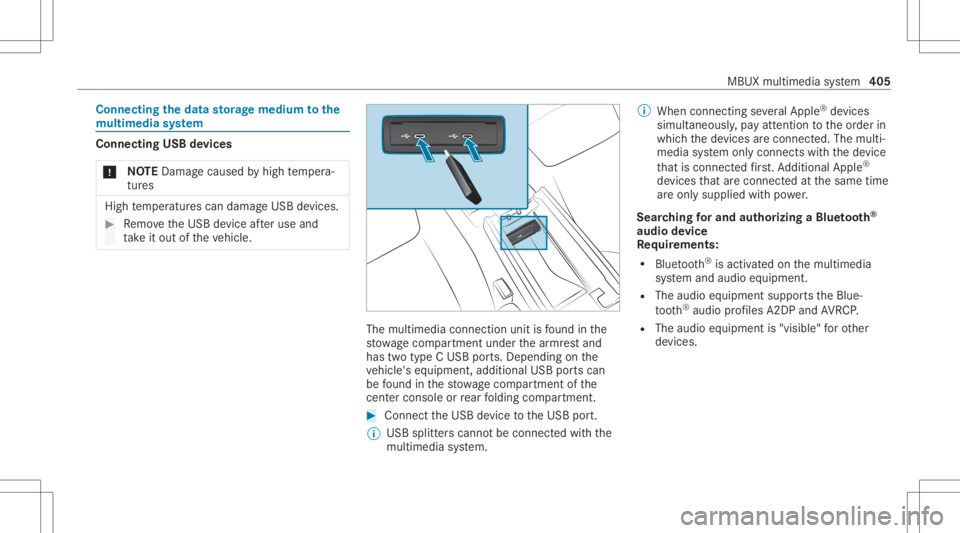
ta ke itout oftheve hicle. The
multimedia connection unitisfound inthe
st ow agecom partment unde rth ear mr estand
has twotype CUSB ports.Depen dingonthe
ve hicle's equipment, additional USBportscan
be found inthestow agecom partment ofthe
cent erconso leor rear folding compartment . #
Conn ecttheUSB device totheUSB port.
% USB splitt erscann otbe con nectedwit hth e
multime diasystem. %
When connect ingseveralApple ®
de vice s
simult aneousl y,pa yatt ent ion totheor der in
whic hth ede vices arecon nect ed.The multi‐
media system onlycon nect swit hth ede vice
th at iscon nectedfirs t. Ad dition alApple ®
de vices that arecon nectedat thesame time
ar eonl ysupplied withpo we r.
Sear ching forand author izing aBlue tooth®
audio devic e
Re quirement s:
R Blue tooth®
is act ivat ed on themultimedia
sy stem and audio equipment.
R The audio equipment supportstheBlue‐
to oth®
audio profiles A2DP and AVRC P.
R The audio equipment is"visible" forot her
de vices. MBUX
multimedia system 405