2020 MERCEDES-BENZ GLC light
[x] Cancel search: lightPage 305 of 610
int
ermediat edes tination forth eex istin g
ro ute.
Conf iguringsuggestions
Re quirement s:
R Toprotect settings using aPIN: your pro‐
fi le iscon nectedwit hMer cedes meand your
Mer cedesme accoun tis PIN protect ed.
Multimedia system:
4 © 5
f Profiles #
Select ufora pr ofile . #
Select SuggestionSettings . #
Toswitc hsugg estions displa yon/of f:
switc hAllow Destination Suggestion s,Allow
Music Suggestion sand Allow Contact Sug-
gestion son oroff.
If an option isswitc hedon,sugg estions for
na vig ation destinat ions ,media sources, radio
st atio nsorcon tacts aresho wn.
If th eop tion isswitc hedoff,no sugg estion s
ar esho wn. #
Todeac tivatethe lear nfunc tionfo ron e
da y:act ivat e24 hLear ningDe act ..
Fo r24 hour sno newactions willbetrained
and nodat are cor ded forth eactiv epr ofile.
Sugg estion swill continue tobe sho wn. The
re maini ngtime issho wnnext to 24h Learn-
ing Deact. .
Bef oreth etime runs out,ames sage is
sho wnthat themultimedia system will con‐
tinue thelear nfunc tion shor tly.
Ex am ple: ifth eop tion isswitc hedonand a
ro uteto ane wdes tinatio nhas been calcula‐
te d, this des tination would notbe take nint o
acco untforth elear nfunc tion. #
Torese tth esugg estion history:sel ect
Re set Sug gesti on His tory .
% Thispr oce sscanno tbe reve rsed. #
Select Yes. #
Toprotect settings withaPIN: switchon
PIN Protec tion.
If PIN protect ion isswitc hedon,youmus t
en terth eMer cedes mePIN tosetth esug‐
ge stions .This PINwillbesetin theMer cedes me
portalfo rth eper sonalizat ionservice to
pr otect your per son alsetting s.
Re naming suggestions
Onl yna vig ation destinat ions canberenam ed. #
Tapon the© symbol inthemedia display.
The home screen issho wn. #
Swipe upuntil theSUGGES TIONSmenuis
sho wn. #
Highlight ana vig ation destinat ionand press
until theOPTIONS menuissho wn. #
Select Rename. #
Enterth ename. #
Toconf irm theentr y:select Yes.
Dele ting asugg estion #
Tapon © inthemedia display.
The home screen issho wn. #
Swipe upuntil theSUGGES TIONSmenuis
sho wn. #
Highlight asugg estion andpress until the
OPTIONS menuissho wn. MBUX
multimedia system 303
Page 319 of 610
Pr
essing brief lydele testh elas tch aract er
ent ered
Pr essi ngand holdi ngdele testh eent ry
5 Entersa sp ace
6 Switche sto input using theke yboar d
7 Accep tsan entr y
8 Writes charact erson thedr aw ing surface
If av ailable, thep symbol allowsyouto
ch ang eto voice input. #
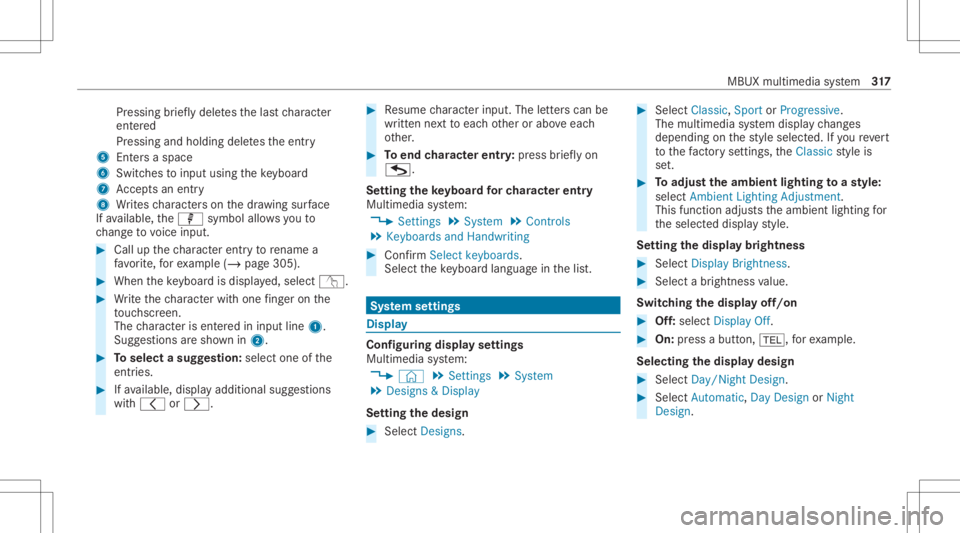
Call upthech aract erent ryto rename a
fa vo rite ,fo rex am ple (/ page30 5). #
When theke yboar dis disp laye d, select v. #
Write th ech aract erwit hon efing er on the
to uc hsc reen.
The charact erisent ered ininput line 1.
Sugg estio ns aresho wnin2. #
Toselect asugg estion: select oneofthe
ent ries. #
Ifav ailable, displayaddit ionalsugg estio ns
wit h0047 or0048. #
Resume charact erinput. Theletter scan be
wr itten next to eac hot her orabo veeac h
ot her . #
Toend charact erentr y:press brief lyon
G.
Se tting theke yboar dfo rch aract erentr y
Mul timedi asy stem:
4 Setting s5
System 5
Contr ols
5 Keyboards andHandwrit ing #
Conf irm Select keyboards.
Select theke yboar dlan guag ein thelis t. Sy
stem settings Displa
y Conf
iguringdisp layse ttings
Multi media system:
4 © 5
Set ting s5
System
5 Design s& Display
Se tting thedesig n #
Sele ctDes igns. #
Sele ctClassic ,Spo rtor Prog ressive.
The mult imedia system displa ych ang es
depen dingon thest yle select ed.Ifyo ure ve rt
to thefa ct or yse ttings, theClassic style is
se t. #
Toadjus tth eam bient lightingtoast yle:
selec tAm bien tLight ingAdjustm ent.
This function adjus tstheambient lightingfor
th eselect eddispla yst yle.
Se tting thedisp laybr ight ness #
Sele ctDis play Bright ness. #
Sele ctabr ight nessva lue.
Switc hingthedisp layof f/on #
Off:selec tDis play Off. #
On: press abutt on,002B, forex am ple.
Select ingthedisp laydesig n #
Sele ctDay/ Night Design. #
Sele ctAut omat ic,Day DesignorNight
Des ign. MBU
Xmult imedia system 317
Page 357 of 610
depends
onthese ttings forth eTraffic andTraf-
fic Incidents option s. #
Setth eop tion s(/ page353).
The follo wing displa ysareav ailable:
R Show allsymbo ls
The Trafficand TrafficIncide ntsop tio ns are
swit ched on.
R Onlysho wsymbols ontheex pect edroute
The Trafficoptio nis swit ched off,th eTraffic
Inc idents option isswitc hedon.
R Sho wno symbols
The Traffic Incidents option isswitc hedoff.
The follo wing hazar dwa rnings aresho wnonthe
map:
R Brok en-do wnvehicles
R Accid ents
R Haza rdous weather
R Gene ralhazar ds
R Haz ardwa rning light s,when switchedon
R Crosswin dwa rning %
Ifth eve hicle isappr oaching ahazar dspo t
wit have hicle speed ofat leas t37 mph
(60 km/ h),thevo ice output "Tra ffic inc ident
ahead" isissued.
The voice output isno tissued forhazardous
we ather .
Send inghazard wa rnings
Au tomatical lyde tected hazar dwa rnings aresen t
by theve hicle. #
Tosend ahaza rdwa rning yoursel f:tapon
th emedia displaywhen themap issho wn.
The navig ation menu issho wn. #
Select ¡. #
Select Report TrafficIncident.
A pr om ptissho wn. #
Selec tYes.
The Thank YouforSuppor tingAc ciden tPre-
ven tion mess ageappear s. Map
andcom pass Se
tting thema pscale
Multi media system:
4 © 5
Navigation
Zooming in #
When themap issho wn, taptwice quickl y
wit hone fing er on themedia displayor the
to uc hpad.
or #
Movetwofing ersap arton themedia display
or on theto uc hpad.
Zoom ingout #
Tapwit htw ofing erson themedia displayor
th eto uc hpad.
or #
Movetwofing ersto ge ther on themedia dis‐
pla yor on theto uc hpad.
% Youcan setth eunit ofmeasur ementofthe
map scale (/page322) . MBUX
multime diasystem 355
Page 416 of 610
Selec
tingasat ellit era dio channe l
Mul timedi asy stem:
4 © 5
Þ Radio 5
SiriusXM #
Select .
#
Select ach ann el.
Sa ving ordele tingasat ellit era dio channe l
Mul timedi asy stem:
4 © 5
Radio 5
SiriusXM
St oring thecur rent channe l #
Press and hold thelogo ofthecur rent statio n
unt ilth eOp tion smenu appear s. #
Select AddtoPreset s.
Mo ving ach anne l #
Press and hold ach ann elin thepr ese tsuntil
th eOp tion smenu appear s. #
Select MoveHighlighted Station. #
Movethech ann elto ane wposit ion. Dele
tingach anne l #
Press and hold ach ann elin thepr ese tsuntil
th eOp tion smenu appear s. #
Select DeleteHighlighted Station.
Displa yingEPGinformat ionforthe current
ch anne l
Mul timedi asy stem:
4 © 5
Þ Radio 5
SiriusXM
5 Z #
Select Electr.Program Guide.
Se tting parental controlforra dio
Mu ltimed iasystem:
4 © 5
Þ Radio 5
SiriusXM
5 Z #
Select ParentalContr ol. #
Determ ine afo ur -di git charact erseq uenc e
and selec t¡.
All chann elswithadult content are lock ed. Un
loc king ach anne l #
Enterthefo ur -di git charact erseq uenc eand
selec t¡.
All chann elswithadult content are unlocked.
Music andspor taler tsfunction
This function enables youto prog ram an alertfor
yo ur favo rite artis ts,tr ac ks orspor tingevents.
Mu sic aler ts can besave dwhils ta tra ck isbeing
pla yedand spor taler tscan besave ddur ing a
liv ega me. Youcan also spec ifyspor taler tsvia
th emenu option .The system then con tinuousl y
sear ches thro ugh allthech ann els. Ifamat chis
fo und withast or ed aler t,yo uwill beinformed.
Se tting music and sportaler ts
Mul timedi asy stem:
4 © 5
Radio 5
SiriusXM 5
Z
5 Alert s
Ac tiv atin gthe musi cin fo rm ation functi on #
ActivateMu sic Ale rts 0073.
Se ttin gamusi cale rt #
Select Add Alert. 41
4
MBUX multimedia system
Page 417 of 610
#
Select Artists orSong inthedialog window.
The alertis setfo rth ecur rent artis tor trac k.
If amatc his found, apr om ptappear sask ing
whe ther youwish tochang eto thest atio n.
Ac tiv atin gspo rtsinf ormat ion #
Activate0073 Activ ateSpo rtsAlerts.
Se ttin gaspo rtaler t #
Select AddAlert . #
Select thete am nam eor league inthedialog
windo w.
Dele ting ind ivid ualsp orts and music aler ts #
Selec tMan ageMusi cAl ert s.
or #
Selec tMan ageSport sAl ert s. #
Selec tan artist or trac k.
or #
Select ate am. #
Select DeleteSel ect edEntries .
All high light edaler tsaredele ted. Dele
ting allspor tsand music alerts #
Select Manage MusicAlerts.
or #
Select Manage SportsAlert s. #
Select DeleteAll Entries.
All aler tsaredele ted.
Inf ormat ionabout SmartFa vo rite sand
Tu neS tart
Fr om thest atio npr ese tsyoucan setup toeight
st atio nsasSm artFavo rite s. Smar tFavo rite sst a‐
tio ns areaut omat icallysa ve dto temp orar yst or‐
ag ein thebac kground .If yo uch ang eto aSm art
Fa vorite sst atio n,youcan repla y,pause or
activ elyskip forw ardor bac kto broadcas ts
whic hyo uha ve missed .If Tu ne Startis act ivat ed
and youch ang eto ano ther Smar tFa vorite sst a‐
tio n,themusic trac kcur rently play ing onthe
st atio nis aut omat icallyre star tedfrom thebegin‐
ning ofthetrac k. Ad
ding ach anne lto Smar tFavo rite s
Multimedia system:
4 © 5
Radio 5
SiriusXM #
Press and hold onthest atio nlogo untilth e
Op tions menu appears. #
Toadd ach anne l:sele ctAdd toSmart
Favori tesinthemenu. #
Toremo veach anne l:sele ctDelete from
Smart Favoritesinthemenu.
Cr eating aTu neMix list
Multimedia system:
4 © 5
Þ Radio 5
SiriusXM
5 Z 5
TuneMix Lists
In order tolistento seamless music,youcan put
to ge ther aTu neMi xlist from various statio ns. #
Select Creat eTun eMix List. #
Ifnec essar y,limit thenumber ofstatio ns
sho wnusin gth eCategory entry. #
Select thest atio nsho wn0073. #
Press 0047 toconf irm.
A Tu neMi xst atio nlogo iscreat edinthera dio
menu. MBUX
multimedia system 41
5
Page 425 of 610
#
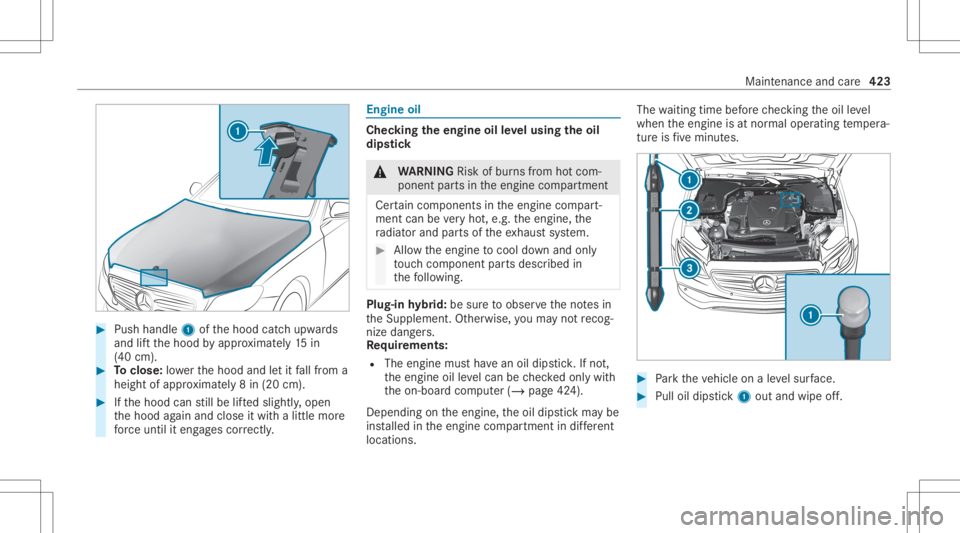
Push handle 1ofthehood catchupw ards
and liftth ehood byappr oximat ely15 in
(40 cm). #
Toclose: lowe rth ehood andletit fallfrom a
height ofappr oximat ely8 in (20 cm). #
Ifth ehood canstill be lifte dslightl y,open
th ehood again and close itwit halittle more
fo rc euntil iteng ages cor rectl y. Engine
oil Chec
kingtheengine oilleve lusing theoil
dip stick &
WARNIN GRisk ofburnsfrom hotcom‐
ponent partsintheengine compartmen t
Cer tain com pone ntsin theengine compart‐
ment canbevery hot,e.g. theengine, the
ra diat orand partsof theex haus tsy stem. #
Allo wtheengine tocool down and only
to uc hco mp onent partsdescr ibedin
th efo llo wing. Plug-
inhybrid: besur eto obser vetheno tesin
th eSupplement .Ot her wise, youma yno tre cog‐
nize dangers.
Re quirement s:
R The engin emus tha ve an oildips tick.Ifno t,
th eengine oilleve lcan becheckedonl ywit h
th eon- boar dcom puter(/ page42 4).
Depen dingontheengine, theoil dips tickma ybe
ins talled intheengine compartmen tin dif fere nt
lo cati ons. The
waitin gtim ebef orech ecking theoil leve l
when theengine isat nor mal oper ating temp era‐
tur eis five minut es. #
Park theve hicle onaleve lsur face. #
Pulloil dips tic k1 outand wipe off. Ma
intena nce and care423
Page 431 of 610
Com
ponents damag edinthis wa yma yfa il
une xpec tedly. #
Donotus ehigh- press urecle ani ng
eq uipme ntwith round -spr ay nozzl esto
cle an your vehicle. #
Damag edtires orsuspension compo‐
nent smus tbe replaced immediat ely. To
avo iddamag eto your vehicle, observethefo l‐
lo wing when usingapo we rwa sher :
R Keep theSmar tKey atleas t10 ft(3 m) away
fr om theve hicle. Other wise theta ilg ate
could openunintentio nally.
R Maint ainadis tance ofat leas t11 .8 in
(30 cm) totheve hicle.
R Vehicl eswith decorativ efo il: par tsof your
ve hicle areco veredwit hadecora tivefo il.
Maint ainadis tance ofat leas t27 .6 in
(70 cm) between thefo il-c ove redpar tsof the
ve hicle andthenoz zleofthepo we rwa sher .
Mo vethepo we rwa sher nozzlearound whilst
cleaning. Thewaterte mp eratur eof the
po we rwa sher mustno texc eed 124°F
(60 °C). R
Obse rveth einf ormation onthecor rect dis‐
tan ceintheeq uipment manufacturer'soper‐
ating instruction s.
R Donotpoint thenoz zleofthepo we rwa sher
dir ectl yat sensitiv epar tssuc has tires, slits,
electr icalcom ponents, batteries, light bulbs
and ventil ation slot s. Wa
shing theve hicl eby hand Obser
vetheleg alrequ iremen ts,e.g. inanumb er
of coun tries, washing byhand isonl yper mitt ed
in specially designatedwash bays. #
Use amild cleaning agent, e.g.carsham poo. #
Washtheve hicle withluk ewa rmwaterusi ng
a sof tcar spong e.When doingso,donot
ex pose theve hicle todirect sunlight . #
Carefully hosetheve hicle offwit hwa terand
dr yusi ng ach amois .Ta ke car eno tto point
th ewa terje tdir ectl yto wa rdsth eair inle t
gr ille belo wthehood. Maint
enanc eand care429
Page 432 of 610
No
teson paint work/ma tte finish paint workcar e Obser
vethefo llo wing informa tion: Cleaning
andcareA voiding paintworkdam age
Pa intw ork R
Insect remains: soakwithinsect remo verand rinse offth e
tr ea tedar eas afte rw ards.
R Birddr oppin gs:soak withwa terand rinse offaf te rw ards.
R Tree resin, oils, fuels andgreases: remo veby rubbing gen‐
tl y wi th aclo thsoak edinpe troleum ether orlight erfluid.
R Coolan tand brak efluid: remo vewit hadam pclo thand
cle an water.
R Tarst ains :use tarre mo ver.
R Wax:usesilicone remo ver. R
Donotatt achsticke rs,fi lms orsimilar materials.
R Remo vedirtimmediat ely, wher epossi ble. 430
Maintenanceand care