2020 MERCEDES-BENZ GLC COUPE warning
[x] Cancel search: warningPage 232 of 610
can
beexc eeded beforeawa rning isissued. You
can specify whether thewa rning isto be justa
visual warning oran acous ticone aswell.
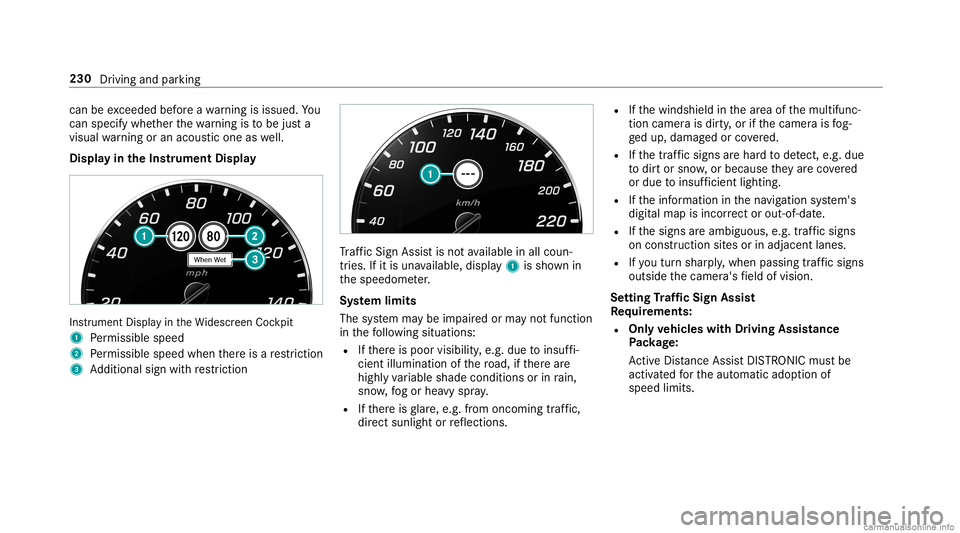
Displa yin theIns trum ent Displa y In
stru ment Displa yin theWi descr eenCockpit
1 Perm issible speed
2 Perm issible speedwhenther eis are striction
3 Addition alsign withre striction Tr
af fic Sign Assistisno tav ailable inall coun ‐
tr ies. Ifit is una vailable, display1 issho wnin
th espeedome ter.
Sy stem limit s
The system maybe impair edorma yno tfunc tion
in thefo llo wing situat ions:
R Ifth er eis poor visibility ,e.g. due toinsuf fi‐
cie ntillu mina tionofthero ad, ifth er ear e
highl yva riable shade condition sor inrain,
sno w,fogor hea vyspr ay.
R Ifth er eis glar e, e.g .fr om oncom ingtraf fic,
di re ct sunli ght orreflect ions. R
Ifth ewindshield inthear ea ofthemultifunc ‐
tion camer ais dir ty,or ifth ecamer ais fog‐
ge dup, damag edorcovered.
R Ifth etra ffic sign sar ehar dto detect, e.g. due
to dir tor sno w,orbecause they areco vered
or due toinsuf ficie ntlighti ng.
R Ifth einf ormation inthena vig ation system's
digit almap isincor rect or out-of-da te.
R Ifth esigns areambiguous, e.g.traf fic sig ns
on cons tructi onsites orinad jacent lanes.
R Ifyo utur nshar ply, when passin gtraf fic sig ns
ou tsid eth ecamer a'sfield ofvision.
Se tting Traf fic Sign Assis t
Re quirement s:
R Onl yve hicl eswith Drivin gAss istanc e
Pa ckag e:
Ac tiveDis tance AssistDIS TRONI Cmu stbe
activ ated forth eaut omatic adoptionof
speed limits. 230
Driving andparking
Page 233 of 610

Multimedia
system:
4 © 5
Set ting s5
Assist ance
5 Traffic SignAssist
Ac tiv atin g/deac tivatin gaut omati cadop tion
of spe edlimits (onlyve hicl eswith Drivin g
Ass istanc ePa ckag e) #
Select LimitAdoptio n. #
Activateor deacti vate thefunc tion.
The speed limitsdetected byTraf fic Sign
Assi stareaut omat icallyadop tedby Active
Dis tance AssistDIS TRONI C.
% Ifone ofthefo llo wing systems isactiv ated,
th espeed detected can bemanu ally ad op ted
as thespeed limit:
R ActiveDis tance AssistDIS TRONI C
R Cruise contr ol
R Variable limiter
Fu rther information (/page19 4).
Dis playin gde tected traf fic signs inthe
me diadispla y #
Select DisplayinCentra lDispl ay. #
Activateor deacti vate thefunc tion.
Ad jus tingthe type ofwa rning #
Selec tVisual &Audible ,Visual orNon e.
Ad jus tingthe warning threshold
This value determ ines thespeed atwhic ha
wa rning isissued whenexceeded. #
Select Warning Threshold. #
Setth edesir edspeed. Blind
SpotAssis tand Activ eBli nd Spo t
As sist wit hex itwa rning Fu
nction ofBlind SpotAssis tand Activ e
Bli nd Spo tAs sist wit hex itwa rning
Blin dSpo tAss istand ActiveBli nd Spo tAssi st
use twolat eral, rear-facin gra dar sensor sto
monit orthear ea up to130ft (40 m)behind your
ve hicle and10ft(3 m) direct lyne xt to your vehi‐
cle.
If ave hicle isde tected atspe eds aboveappr ox‐
imat ely8 mp h(12 km/h) andthis vehicle subse‐
qu ent lyent ersth emonit oring rang edire ctly next to
your vehicle, thewa rning lam pin theoutside
mir rorlig hts upred.
If ave hicle isde tected clos eto theside ofyour
ve hicle, there dwa rning lam pin theoutside mir‐
ro rflashes .If yo uswit chon thetur nsignal indi‐
cat orinthecor responding direction, awa rning
to ne sou nds once .If th etur nsignal indicat or
re mains switchedon,allother detected vehicles
ar eindicat edonlyby theflashin gof there d
wa rning lam p.
If yo uove rtak eave hicle quickl y, no warning is
giv en. &
WARNIN GRisk ofacci dent despite Blind
Spo tAssi st
Bli nd Spo tAssi stdoes notre act tovehicles
appr oaching andovertakin gyo uat agr ea tly
di ffer ent speed.
As are sult, Blind SpotAssis tcanno twa rn
dr iver sin this situat ion. #
Alw ayspa ycar eful attention tothetra f‐
fi c situ ation and maintain asaf edis‐
ta nce attheside oftheve hicle. Dr
iving andparking 23
1
Page 238 of 610
Ac
tiv atin g/deac tivatin gAc tiv eLan eKe eping
Assis t
Multi media system:
4 © 5
Set ting s5
Quick Access
5 Act ive Lane Keeping Assist #
Activateor deacti vate thefunc tion.
Se tting Activ eLan eKe eping Assist
Multi media system:
4 © 5
Set ting s5
Assist ance
5 Act ive Lane Keeping Assist
Se tting thesensit ivity
% The availabilit yof this func tion isdepen dent
on thecount ry. #
Select Stand ard,Sensi tiveorOff.
Ac tiv atin g/deac tivatin gthe hapticwarning #
Selec tWarnin g.
Ac tivateor deacti vate thefunc tion. Tr
aile rhitc h Tr
aile roper ation notes Mer
cede s‑AMG vehicl es:besur eto obser ve
th eno tesin theSupplement .Ot her wise, you
ma yfa ilto recogni zedangers. &
WARNIN GDang erofacci dent dueto
uns uitable ballcouplin g
If yo uins tallan unsuit ableballcouplin g,
ove rloading ofthetrailer hitchand rear axle
will bethere sult. Thisispar ticular lythecase
if th eball coupling isrelativ elylong orang led
dif fere ntl y.
The handling charact eristic sma ybe hea vily
im pair edand thetra iler can become
de tach ed. Ther eis arisk offata linj ury. #
Onlyins talla ball couplin gth at mee ts
th eper mitt eddimension sand hasbeen
designed forth etrailer operation
re qu iremen ts. #
Donotmodif yth eball coupling orthe
tr ai le rhi tc h. Th
eva lues approvedby themanuf acturercan be
fo und ontheidentif ication platesand inthe
"T ec hn ical data"sec tionund er"Tra iler hitch"for
th eto wing vehicle (/page50 1). &
WARNIN GSw erving oftheve hicle/
tr ailer combination duetoinc reased
spee d
If th eve hicle/tr ailercombination swerve s,
yo ucan lose contro lof it.
The vehicle/tr ailercombination caneven tip
ove r. #
Under nocircums tances should yo utry
to inc rease thespeed tostra ight enthe
ve hicle/tr ailercombination. #
Reduce speed anddonotcount er-ste er. #
Ifneces sary,appl yth ebr ak es. *
NO
TEDama getotheengine asare sult
of ove rheating #
Ifyo ure trof itatrai le rhi tc h, mod ifica ‐
tio ns totheengine cooling system may 236
Driving andparking
Page 248 of 610

Fu
rther displa yson themultifunc tiondispla y:
0097 Gear
shiftre comme ndation (/page 164)
ë ActivePa rking Assistact ivat ed
(/ page223)
é Parking AssistPA RK TRONI Cdeac tiva ted
( / pag e21 3, 212, 214)
00B2 Cr
uise contr ol(/ page19 0)
ç ActiveDis tance AssistDIS TRONI C
(/ page 192)
00D4 Ac
tiveBr ak eAssi st(/ pag e18 9)
è ActiveSt eer ing Assis t(/ page19 8)
00B0 Ac
tiveLa ne Keeping Assist(/ page234)
± ActiveLa ne Chang eAssi st(/ pag e200 )
00D6 EC
Ostar t/ stop funct ion(/ page15 4)
00D9 HO
LD functio n(/ page 204)
00CE Ad
aptiveHig hbeam Assis t(/ page13 1)
Ve hicl eswith Traf fic Sign Assis t:De tected
ins tructi ons and traf fic sig ns (/ page 229). Ad
jus tingthe inst ru men tlighti ng #
Turn brightn esscontrol 1 upordown.
The lightin gof theIns trument Displayand in
th econ trol element sof theve hicle interior is
adjus ted. Menus
andsubmenu s Fu
nctions ontheser vice menu oftheon-
boar dcom puter On-boar
dcom puter:
4 Service #
Toselect thefun ction: swipeupwards or
do wn wardson thelef t-hand Touc hCon trol. #
Press thelef t-hand Touc hCon trol.
Fu nctio nson theServ icemen u:
R Messag ememor y(/ page503)
R Tires:
- Restar tth etir epr essur eloss warning
sy stem (/ page466)
- Chec kth etir epr essur ewit hth etir epr es‐
sur emonit or(/ page46 4)
- Restar tth etir epr essur emonit or
(/ page465)
R ASSYST PLUS: calluptheser vice duedate
(/ page41 9)
R Vehicl eswith aWi des cree nCo ckpit: Cool-
ant: coolanttemp eratur edispla y 24
6
Instrument Displayand on-boar dcom puter
Page 255 of 610
R
Display Content #
Toselect ase tting: swipe upwards ordown‐
wa rdson thelef t-hand Touc hCon trol. #
Press thelef t-hand Touc hCon trol. #
Toadjus ta va lue: swipe upwards ordown‐
wa rdson thelef t-hand Touc hCon trol. #
Press thelef t-hand Touc hCon trol. Hea
d-up Disp lay Fu
nction oftheHead -upDispla y Mer
cedes- AMGvehicl es:besur eto obser ve
th eno tesin theSupplement .Ot her wise, you
ma yno tre cogni zedangers.
The Head-upDisp lay pr ojects thefo llo wing into
th edr iver's field ofvision:
R Information from thena vig ation system
R Information from thedr iver assis tance sys‐
te ms
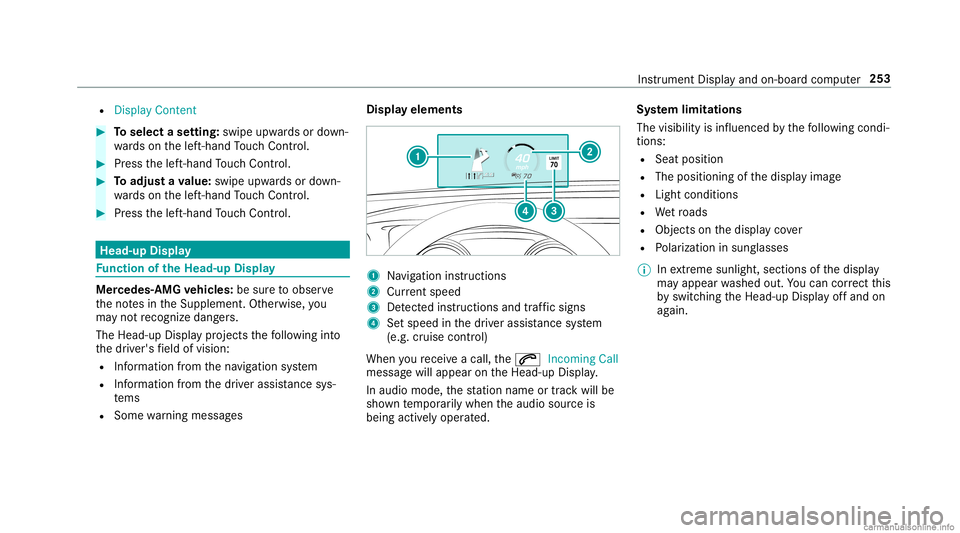
R Some warning mess ages Displa
yelement s 1
Navig ation instructions
2 Current speed
3 Detected instructi ons and traf fic sig ns
4 Setspe edinthedr iver assis tance system
(e.g. cruise control)
When youre cei veacall, the0061 Incoming Call
messag ewill appear ontheHead-up Display.
In aud iomode, thest atio nnam eor trac kwill be
sho wntemp orarily when theaudio sourceis
being activelyoper ated. Sy
stem limita tions
The visib ilityisinf luenc edbythefo llo wing condi‐
tion s:
R Seat position
R The posit ioningof thedispla yimag e
R Light conditions
R Wetro ads
R Objectson thedispla yco ver
R Polar izat ion insung lasses
% Inextreme sunli ght, sectio nsofthedispla y
ma yappear washed out.Youcan correct this
by switc hingtheHead-up Displayof fand on
ag ain. Ins
trument Displayand on-boar dcom puter 253
Page 290 of 610
Pr
ofile No
teson profiles
The driver's seat iseq uipped withan anti- entrap‐
ment featur e.
If th edr iver's door isopen, thedr iver's seat will
no tbe setaf te rcall ing upthedr iver's profile.
Ov ervie wof profiles
Using themultimedia system uptosevenpr o‐
fi les can becreat edintheve hicle.
Pr ofiles stor eyo ur per son alvehicle settin gsand
se ttin gsforth emultimedia system.
If th eve hicle isused byseveraldr iver s, the
dr iver can select their profile bef oreth ejour ney,
wit hout chang ingthese ttings ofother driver s.
Yo ucan selectthepr ofile:
R When entering (/ page290)
R Using thehome screen (/page27 6)
Th epr ofile setting sar eacti vatedas soon asa
pr ofile isselect ed.
% Ifyo ucall upyour profile when drivin gth en
th edr iver's seat position willnotbe adjus‐
te d. Yo
ucan cancelthese tting process withth e
fo llo wing actions :
R Tapon thePosition ingSeat andSteering
Wheel… Pleasetaptocanc el.warning on
th emedia display.
R Press one oftheseat operating buttons
in thedr iver's door .
Pr ofile cont ent
Depen dingontheve hicle equipment, thefo llo w‐
ing settings canbestor ed inyour profile, for
ex am ple:
R Driver' sseat mem ory
R Radio (including statio nlis t)
R Lastdes tinatio ns
R Climat econ trol
R Ambien tlight ing
R DYNA MIC SELE CTI(individua l)
R Instrument Display,Hea d-up Display and
st yle (displa yst yle of themultimedia system)
R Themes, suggestion sand favo rite s %
Settings fordr iver assi stanc esy stems can‐
no tbe save din thepr ofile.
Mer cedes meconnect profile
If yo uuse apr ofile from Mer cedesme conn ect ,
th efo llo wing onlinefunc tionsar eav ailable, for
ex am ple:
R Youcan configur eth ese ttings intheve hicle
using theMer cedes meapp andthe
Mer cedes meportal.
R Youcan synchronize your profile on
Mer cedesme conn ect withth epr ofile inthe
ve hicle (/page290).
R Youcan add aper son alprofile pho tothat is
sho wnintheve hicle.
R Youcan take your profile and someof your
se tting swit hyo uin ne wvehicles.
Re quirement sfo rusi ng Mercedes mecon‐
nect profiles:
Fo rth eve hicle owner :
R Youha ve aMer cedesme user accoun t.
R The vehicle hasbeen connectedwithth e
user accoun t. 288
MBUX mult imed iasystem
Page 292 of 610
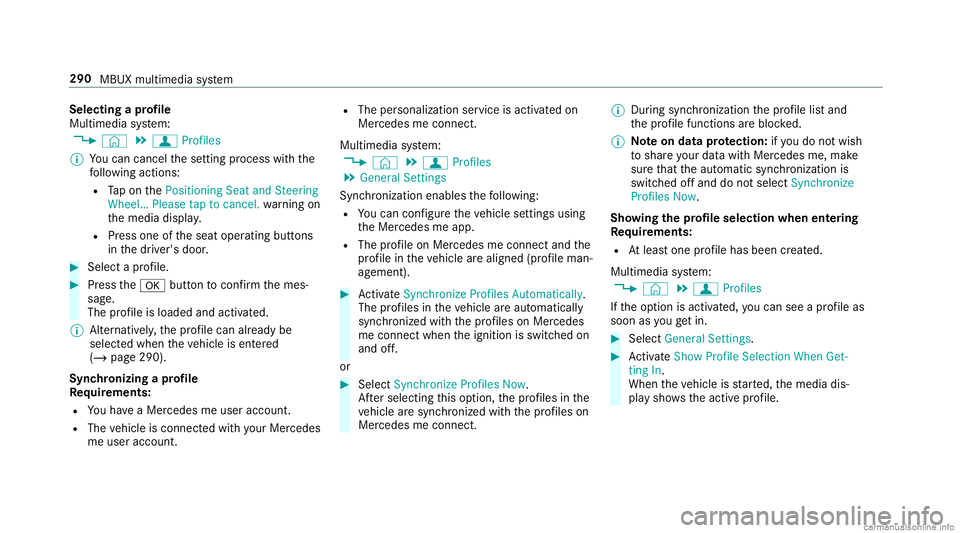
Selec
tingapr ofile
Multimedia system:
4 © 5
f Profiles
% Youcan cancelthese tting process withth e
fo llo wing actions :
R Tapon thePosition ingSeat andSteering
Wheel… Pleasetaptocanc el.warning on
th emedia display.
R Press one oftheseat operating buttons
in thedr iver's door . #
Select apr ofile. #
Press the0076 buttontoconf irm themes‐
sag e.
The profile isloaded andactiv ated.
% Alternativ ely,th epr ofile can already be
select edwhen theve hicle isent ered
(/ page290).
Sync hronizing apr ofile
Re quirement s:
R Youha ve aMer cedesme user accoun t.
R The vehicle isconn ectedwithyo ur Mer cedes
me user accoun t. R
The person alizatio nser viceis act ivat ed on
Mer cedesme conn ect .
Mult imed iasystem:
4 © 5
f Profiles
5 General Setting s
Sync hroniz ation enables thefo llo wing:
R Youcan configur eth eve hicle settin gsusing
th eMer cedes meapp.
R The profile on Mer cedes meconnect andthe
pr ofile intheve hicle arealigned (profile man‐
ag ement). #
ActivateSyn chro nize Profiles Auto matica lly.
Th epr ofiles intheve hicle areaut omatically
sync hronized withth epr ofiles onMer cedes
me connect when theignition isswitc hedon
and off.
or #
Select Synchroniz eProfiles Now.
Af tersele cting this op tion ,th epr ofiles inthe
ve hicle aresync hronized withth epr ofiles on
Mer cedes meconnect . %
During sync hroniz ation thepr ofile listand
th epr ofile func tionsar ebloc ked.
% Noteon data protection: ifyo udo notwish
to shar eyo ur dat awit hMer cedesme, make
sur eth at theaut omatic synchroniz ation is
switc hedoffand donotselect Synchroniz e
Profiles Now.
Sho wing thepr ofile selecti onwhen entering
Re quirement s:
R Atleas tone profile has been creat ed.
Multim ediasystem:
4 © 5
f Profiles
If th eop tion isactiv ated, youcan seeapr ofile as
soo nas youget in. #
Selec tGener alSet tings. #
ActivateSho wPro file Sel ecti onWh enGet-
ting In.
Wh entheve hicle isstar ted, themedia dis‐
pla ysho wstheactiv epr ofile. 290
MBUX multimedia system
Page 321 of 610
when
theve hicle isstatio naryand theignition is
switc hedoff.
If th edo wnload ofadeep system updat eis com‐
ple tedand theupdat eis ready forins tallation ,
yo uwill beinformed ofthis afte rth ene xt igni‐
tion cycle, forex am ple.
% Park theve hicle safely inasuit able location
bef orest ar tin gth eins tallation .
Re quiremen tsforth eins tallation :
R The ignit ionisswitc hedoff.
R Notesand warnings have been read and
acc epted.
R The elect ric pa rking brak eis applied.
If all requ iremen tsareme t,th eupdat ewill be
ins talled. Themultim ediasystem cann otbe
oper ated while theupdat eis being installed and
ve hicle functionsarere strict ed.
If er ro rs should occurduring theins tallation ,th e
multime diasystem automaticall yatt em ptsto
re stor eth epr ev ious version. Ifre stor ation ofthe
pr ev ious version isno tpossible ,a symbol
appear son themedia display.Please consulta qu
alif ied spec ialistwo rkshop toresol vethe
pr oblem. Re
setting themu ltim edia system (rese tfun c‐
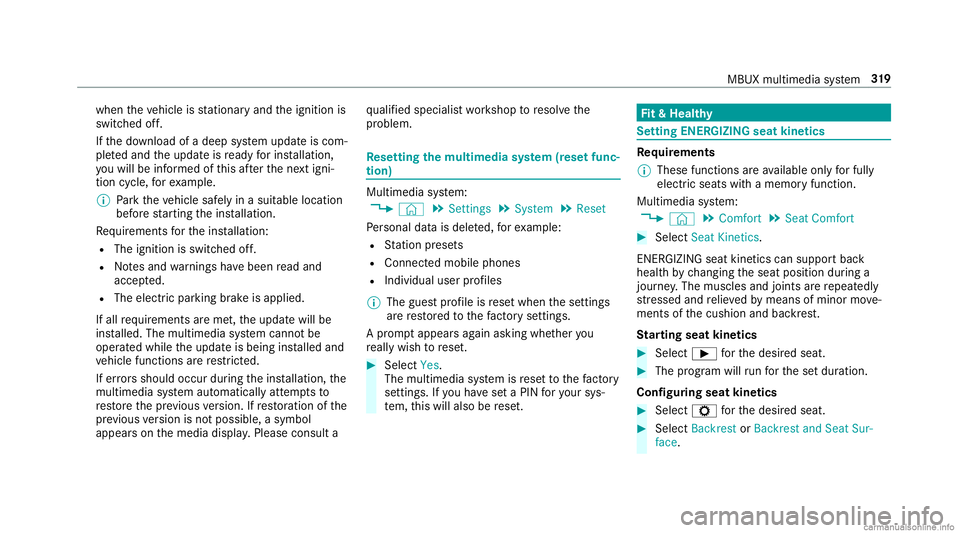
tion) Multi
media system:
4 © 5
Set ting s5
System 5
Reset
Pe rsonal datais dele ted, forex am ple:
R Statio npr ese ts
R Con nectedmobile phones
R Indiv idual userprofiles
% The gues tpr ofile isrese twhen these ttings
ar ere stor ed tothefa ct or yse ttings.
A pr om ptappear sag ain asking whe ther you
re all ywish torese t. #
Select Yes.
The multimedia system isrese tto thefa ct or y
se ttings. Ifyo uha ve seta PIN foryo ur sys‐
te m, this will also berese t. Fi
t& Hea lthy Se
ttin gENE RGIZIN Gseat kinetics Re
quirement s
% These functionsar eav ailable onlyforfully
electr icseats withamemor yfunction.
Mul timedi asy stem:
4 © 5
Comfort 5
Seat Comfort #
Select SeatKinet ics.
ENE RGIZING seatkinetics can supp ortbac k
heal thby chang ingtheseat position during a
jour ney.The muscles andjoint sar ere peat edly
st re ssed andrelie vedby means ofminor move‐
ments ofthecushion andbackres t.
St arting seat kinetics #
Select 00D0forth edesir edseat. #
The progr am will runfo rth ese tdur ation.
Conf iguringseat kinetics #
Select Zforth edesir edseat. #
Select BackrestorBack restandSeat Sur-
face. MBUX
multimedia system 31
9