2020 MERCEDES-BENZ GLB SUV lock
[x] Cancel search: lockPage 166 of 602
%
The actual (maximum) values that can be
ac hie vedfo rengine outputand engine tor‐
qu ema yde viat efrom thecer tified values
wit hin thecount ry-spe cificgu ideline sfo r
per missible toler anc es(basis: UN-ECE No.
85 orcount ry-spe cificgu ideline s).
Fa ctor sth at can influen cethis are, forex am‐
ple:
R Sea leve l
R Fuelgrade
R Outside temp eratur e
% The values displa yedser veonl yas orient a‐
tion. Thevalues forengine outputand
engine torq ue show nin themedia display
ma yde viat efrom theactual values. Calling
upfuel consum ption indicat or Multime
diasystem:
4 © 5
Info #
Select Consumpt ion.
The current and average fuel consum ption is
displa yed. Au
tomatic trans mis sion DI
REC TSE LECT leve r Fu
nction oftheDIRECT SELECT leve r &
WARNIN GRisk ofacci dent dueto inc or‐
re ct gearshif ting
If th eengine speedishigher than theidle
speed andyouen gage thetransmission posi‐
tion 005Bor005E, theve hicle mayacceler ate
shar ply. #
Ifyo uen gage thetransmission position
005B or005E when theve hicle isat a
st ands till,alw aysdepr essthebr ak e
pedal firm lyand donotacc eler ateat
th esame time. &
WARNIN GRisk ofacci dent andinjury
due tochildr enleftunat tende din the
ve hicle
If ch ildr enarelef tunat tende din theve hicle,
th ey cou ld:
R Ope ndoo rs,th er eb yendang ering other
per sons orroad user s.
R Getout and bestru ck byoncom ingtraf‐
fi c.
R Ope rate vehicle equipment andbecome
tr apped, forex am ple.
In addit ion,th ech ildr encould alsosetth e
ve hicle inmo tion, forex am ple by:
R Releasing thepar king brak e.
R Changing thetra nsmiss ionposition .
R Startin gth eve hicle. #
Neverlea vechildr enunat tende din the
ve hicle. #
When leaving theve hicle, alwaysta ke
th eke ywit hyo uand lockth eve hicle. 16
4
Driving and parking
Page 175 of 602
R
Oper ateve hicle equipment andbecome
tr apped, forex am ple.
In addit ion,th ech ildr encould alsosetth e
ve hicle inmo tion, forex am ple by:
R Releasing thepar king brak e.
R Changing thetra nsmiss ionposition .
R Startin gth eve hicle. #
Neverlea vechildr enunat tende din the
ve hicle. #
When leaving theve hicle, alwaysta ke
th eke ywit hyo uand lockth eve hicle. #
Keep theve hicle keyout ofreac hof
ch ildr en. *
NO
TEDama getotheve hicle duetoit
ro lling away #
Alw ayssecur eth eve hicle agains tro ll‐
ing away. #
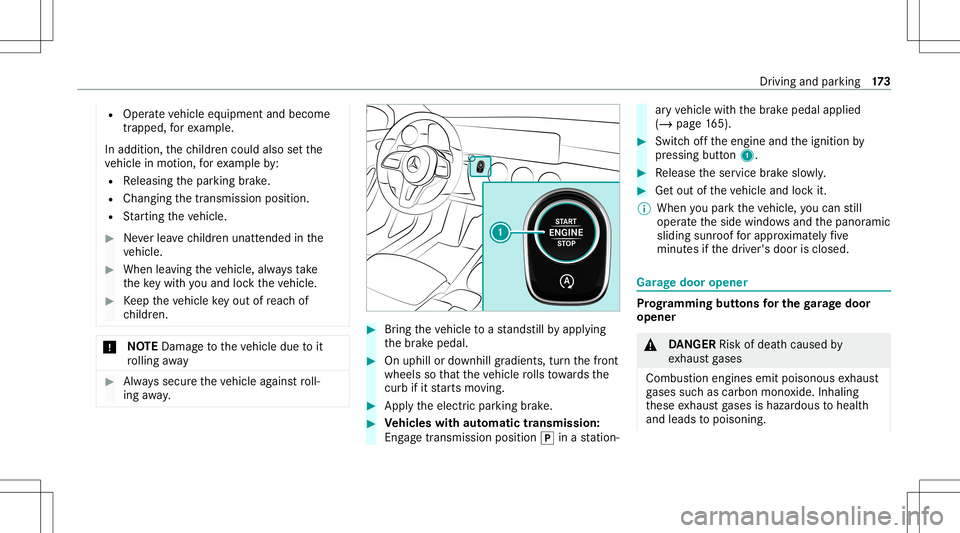
Bring theve hicle toast ands tillby appl ying
th ebr ak epedal. #
Onuphill ordownhill gradients, turnth efront
wheels sothat theve hicle rolls towa rdsth e
curb ifit star ts mo ving. #
App lytheelectr icpar king brak e. #
Vehicl eswith automatic transmiss ion:
Eng agetransmis sionposition 005Dinast atio n‐ ar
yve hicle withth ebr ak epedal applied
(/ page16 5). #
Switc hof fth eengine andtheignition by
pr essing button1. #
Release theser vice brak eslo wly. #
Getout oftheve hicle andlockit.
% When youpar kth eve hicle, youcan still
opera tetheside windo wsand thepanor amic
sliding sunroofforapp roxima tely five
minut esifth edr iver's door isclosed. Gar
agedoor opener Pr
og rammin gbutt onsfo rthe garage doo r
ope ner &
DANG ER Risk ofdeat hcause dby
ex haus tga ses
Combus tionengines emitpoisonous exhaus t
ga ses suchas carbon monoxide.Inhaling
th ese exhaus tga ses ishazar dous tohealt h
and leads topoisonin g. Dr
iving andparking 17
3
Page 180 of 602
Count
ryRadio type approval number
Unit ed
Ar ab Emi‐
ra tes ER4
1849/1 5
Deal erNo: DA35176/1 4
Unit ed
St ates FCC
ID:NZLM UAHL5 Fu
rther information onthedeclar ationofcon ‐
fo rm ity forwir eles sve hicle component s
(/ page25). Elec
tric par king brak e Elec
tric par king brak efunction (applying
aut omaticall y) &
WARNIN GRisk ofacci dent andinjury
due tochildr enleftunat tende din the
ve hicle
If ch ildr enarelef tunat tende din theve hicle,
th ey cou ld:
R Ope ndoo rs,th er eb yendang ering other
per sons orroad user s.
R Getout and bestru ck byoncom ingtraf‐
fi c.
R Ope rate vehicle equipment andbecome
tr apped, forex am ple.
In addit ion,th ech ildr encould alsosetth e
ve hicle inmo tion, forex am ple by:
R Releasing thepar king brak e.
R Changing thetra nsmiss ionposition .
R Startin gth eve hicle. #
Neverlea vechildr enunat tende din the
ve hicle. #
When leaving theve hicle, alwaysta ke
th eke ywit hyo uand lockth eve hicle. #
Keep theve hicle keyout ofreac hof
ch ildr en. The
elect ric pa rking brak eis applied ifth etra ns‐
mission isin position 005Dand one ofthefo llo w‐
ing con dition sis fulf illed:
R The engin eis switc hedoff.
R The seat belttongu eis no tins ertedin the
seat beltbuckleofthedr iver's seat andthe
dr iver's door isopened.
% Toprev ent application: pullthehandle ofthe
electr icpar king brak e.
In thefo llo wing situat ions,th eelectr icpar king
br ak eis also applied:
R ActiveDis tance AssistDIS TRONI Cis bring ing
th eve hicle toast ands till.
R The HOL Dfun ction iske eping theve hicle sta‐
tio nar y. 17
8
Driving and parking
Page 184 of 602

in
front of,behin dor next to theve hicle (depend‐
ing ontheve hicle's equipment).
Depending ontheve hicle's equipment, thera dar
sensor sar eint egr ated behind thebum pers
and/or behindthera diat orgrill. The ultrasonic
sensor sar elocat edinthefront and rear bum p‐
er s. Ke ep these partsfree ofdir t,ice and slush
(/ page423). Thesensor smus tno tbe cov‐
er ed, forex am ple bybicy clerack s, ove rhang ing
loads, sticke rs,fo ilor foils toprotect agains t
st one chipping .Ad dition allicense platebr ac ket
can like wise impair thefunc tion oftheultr asonic
sensor s.In theev ent ofdamag eto thebum pers
or radiat orgrill, orfollo wing acollis ionimpact ing
th ebum persor radiat orgrill, have thefunc tion
of thesensor sch eckedat aqu alif ied spec ialist
wo rkshop. Ifth esensor sar edamag ed,some
dr iving systems anddriving safetysy stems may
no long erfunc tion proper ly. Ov
ervie wof driving systems anddriving
saf etysy stems In
this sect ion, youwill find informa tionab ou t
th efo llo wing drivin gsy stems anddriving safety
sy stems:
R 360° Camer a(/ page22 1)
R ABS (Anti- lockBrak ingSystem)
(/ page18 3)
R ActiveDis tance AssistDIS TRONI C
(/ page 198)
R ActiveBr ak eAssi st(/ pag e18 8)
R ActiveLa ne Keeping Assist(/ page23 7)
R Start-of fassis t(/ page21 2)
R ATTENTION ASSIST(/ page230)
R BAS(Bra keAssis tSyst em) (/page18 3)
R Hill StartAs sis t(/ page21 0)
R DSR (Dow nhi llSpe edReg ulati on)
(/ page 196)
R Sus pens ion wi th adap tivedam pingadjus t‐
men t(/ page21 2) R
EBD (Ele ctroni cBrak efor ce Dis tribution)
(/ page18 7)
R ESP ®
(E lectr oni cSta bility Pro gram)
(/ page18 4)
R Off-road ESP®
(/ page18 7)
R ESP ®
Cr ossw indAssis t(/ page18 7)
R ActiveSpe edLimi tAssi st(/ pag e202 )
R HOLD function (/page21 0)
R STEER CONTR OL(/ page 187)
R ActiveSt eer ing Assis twit hre scue lanefunc‐
tion (/page204)
R ActiveEmerg encyStop Assis t(/ page208)
R ActivePa rking Assist(/ page22 4)
R Parking AssistPA RK TRONI C(/ page21 3)
R Rear vie wcam era(/ page21 8)
R ActiveLa ne Chang eAssi st(/ pag e206 )
R Cruise control (/ page19 4)
R Blind Spo tAssi stand ActiveBli nd Spo tAssi st
wit hex itwa rning (/ page234 )
R Traf fic Sign Assist(/ pag e232) 18
2
Driving and parking
Page 185 of 602
Fu
nction ofABS The
Anti-loc kBr ak eSy stem (ABS )re gulat esthe
br ak epr essur ein critical driving situation s:
R Dur ing braking, e.g.atfull brak eapplication
or insuf ficie nttiretracti on, thewheels are
pr eve nted from lock ing.
R Vehicle steer ability whilebraking isensur ed.
If ABS interve nes when braki ng, youwill feel a
pulsing inthebr ak epedal. Thepulsating brak e
pedal canbeanindicat ionofhazar dous road
con dition sand canserveas are minder totake
ex tra car ewh ile dr ivi ng.
Sy stem limit s
R ABSis act ive from speeds ofappr ox.5 mp h
(8 km/ h).
R ABSma ybe impair edorma yno tfunc tion ifa
malfunc tionhasoccurredand theye l‐
lo w 0025 ABSwa rning lam plight sup con tin‐
uousl yin theins trument clusteraf te rth e
engine isstar ted. Fu
nctions ofOff-road ABS %
Off-road ABS isactiv ated aut omaticall ywhen
yo usele cttheF drive pr ogr am.
Of f-road ABS isspeciall yadap tedfo rdr iving off-
ro ad:
R The fron twheels lockcy clic allydur ing brak‐
ing .
R The brakin gdis tance issho rtened duetothe
digging- ineffect.
Sy stem limit s
R Off-ro ad ABSfun ction sat spee dsbelo w
25 mph(40 km/h).
R IfOf f-road ABS interve nes, theability tosteer
ma ybe restrict ed. Fu
nction ofBA S(Br akeAssis tSy stem) &
WARNIN GRisk ofan acci dent caused by
a malf unctionin BA S(Br akeAssi stSys‐
te m)
If BA Sis mal functi oning,th ebr aking distance
in an eme rgency braki ng situa tionis
incr eased . #
Dep ress thebr ak epedal withfull forc e
in emer gency braki ng situa tions. ABS
pr eve nts thewheels from locking . BA
Ssu ppo rts yo ur eme rgency braking situation
wit hadditional brak efo rc e.
If yo udepr essthebr ak epedal quickl y, BA Sis
acti vated:
R BASau tomatical lyboos tsthebr ak epr es‐
sur e.
R BAScan shorten thebr aking distance.
R ABS preve nts thewheels from locking .
The brak es will func tion asusual onceyo u
re lease thebr ak epedal. BASis dea ctivated. Dr
iving and parking 18
3
Page 316 of 602
Ac
tiv atin g/deac tivatin gPI N protection Re
quirement s:
R Tounlo ckthePIN: ther eis an Interne tcon ‐
nect ion.
R AMer cedes meaccount exists at htt p:/ /
www .mercedes.me .
R Anindividual userprofile isactiv e
(/ page289).
Multimedia system:
4 © 5
Set ting s5
System
5 PIN Protec tion
Se tting thePIN #
Sele ctSet PIN. #
Entera fo ur -di git PIN. #
Enterth efo ur -di git PIN again.
If bo th PINs match,PIN protect ion isactiv e.
Changing thePIN #
Sele ctChang eSet tings. #
Enterth ecur rent PIN . #
Select Chang ePIN . #
Seta ne wPIN .
Ac tiv atin gPI N protection fordat aex por t #
Select Prote ctData Export .
Ac tivateor deacti vate thefunc tion.
Un bloc king thePIN viatheMer cedes mepor‐
tal
If th ePIN has been entered incor rectl yth re e
tim es,th ePIN willbebloc ked. Youcan have a
sing le-use passwordsent toyouvia the
Mer cedes meconn ectonline portalto rese tth e
PIN protect ion. #
Select UnlockPIN. #
Enterth esing le-use password.
PIN protect ion isrese t,and youcan seta
ne wPIN. Sof
twareup date Inf
orma tion onsof twareup dates
A sof twareup date consi stsof thre esteps:
R Downloading orcop ying ofthedat are qu ired
fo rins tallation
R Installation oftheupdat e R
Activati on oftheupdat eby restar tin gth e
sy stem
The multimedia system prov ides amess age
when anupdat eis available.
De pen dingon thesour ce,youcan perform vari‐
ous updat es:
Sof twareupd ates Sour
ceofthe
updat e Up
dat etype
Int erne tN avigation map,sys‐
te m upd ates, Digit al
Oper ator's Manua l
Ext ernal stor ag e
medium, e.g.USB
fl ash drive Na
vig ation maps 31
4
MBUX multimedia system
Page 365 of 602
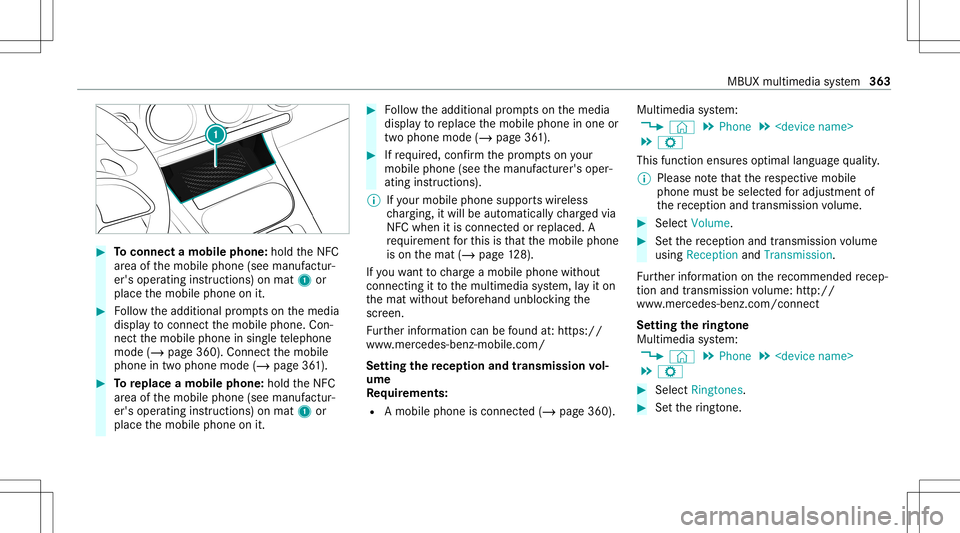
#
Toconnect amob ilephone: holdtheNFC
ar ea ofthemobile phone(seemanuf actur‐
er's oper ating instruction s)on mat 1or
place themobile phoneonit. #
Followtheadditional prom ptson themedia
displa yto connect themobile phone. Con‐
nect themobile phoneinsing letelephon e
mode (/page360 ).Conn ectthemobile
phone intwophone mode(/page36 1). #
Toreplac eamobi lephon e:hol dth eNFC
ar ea ofthemobile phone(seemanuf actur‐
er's oper ating instruction s)on mat 1or
place themobile phoneonit. #
Followtheadditional prom ptson themedia
displa yto replace themobile phoneinone or
tw ophone mode(/page36 1). #
Ifre qu ired, confirm thepr om ptson your
mob ilephon e(see themanuf acturer'soper‐
ating instruction s).
% Ifyo ur mob ilephon esuppo rts wir eless
ch argin g,itwill beaut omat icallych arge dvia
NFC when itis con nectedor replaced. A
re qu iremen tfo rth is isthat themobile phone
is on themat (/page12 8).
If yo uwa nttocharge amobi lephon ewit hout
con nectingit to themultimedia system, lay it on
th emat without beforehand unblockingthe
scr een.
Fu rther information canbefound at:ht tp s://
www .merced es-ben z-mob ile.com/
Se tting there cep tion andtrans mis sion vol‐
um e
Re quirement s:
R Amobile phoneis con nected(/ page360) . Multimedia
system:
4 © 5
Phone 5
5 Z
This function ensur esoptimal languag equ alit y.
% Please note that there spectiv emobile
phone mustbe select edforadju stment of
th ere cep tion andtransm ission volume. #
Selec tVolume. #
Setth ere cep tion andtransm ission volume
using Recept ionand Tran smiss ion.
Fu rther information onthere comme ndedrecep‐
tion andtransm ission volume: http:/ /
www .mercedes-ben z.com/ connect
Se tting theringt one
Multimedia system:
4 © 5
Phone 5
5 Z #
Select Rington es. #
Setth eringt one. MBUX
multimed iasystem 363
Page 391 of 602
Callin
gup thewe bbr ow ser settings
Multimedia system:
4 © 5
Mercedes me&Apps
5 z Browser 5
Z
5 Browser Setting s
The follo wing functionsar eav ailable:
R BlockPop- ups
R Activate Javasc ript
R Allo wCook ies #
Toswitc hafunction on:activ ateth edis‐
pla ybutt on. #
Toswitc hafunction off:deactiv ateth edis‐
pla ybutt on.
Dele ting Interne this tory
Multimedia system:
4 © 5
Mercedes me&Apps
5 z Browser 5
Z
5 Delet eBrowser Data
The follo wing option sar eav ailable:
R All
R Cache R
Cook ies
R History
R Entered URLs
R FormDat a #
Select anoptio n. #
Select Yes.
Ma nagi ngbookm arks
Multimedia system:
4 © 5
Mercedes me&Apps
5 z Browser #
Select ?.
Selecting abookmar k #
Select anent ry.
Cr eat ing abookm ark #
Sele ctAdd Curre ntPage toBoo kmark s.
The book markis creat ed.
Edit ingabookm ark #
Sele ct0048 afte ra bookmar k. #
Select Edit . #
Enterthename. #
Select 0076.
Dele ting abookmar k #
Select 0048afte ra bookmar k. #
Select Dele te. #
Select Yes.
Cl os ingthe brow ser
Multimedia system:
4 © 5
Mercedes me&Apps
5 z Browser #
Select ©. Tu
neIn radio Cal
ling up TuneIn radio
Re quirement s:
R The vehicle isconn ectedwithth eMer cedes
me account .
R The TuneIn radio service isactiv ated inthe
Mer cedes meportal.
R The datavo lume isavailable. MBU
Xmult imed iasystem 389