2020 MERCEDES-BENZ E-CLASS ESTATE warning
[x] Cancel search: warningPage 124 of 489
Ad
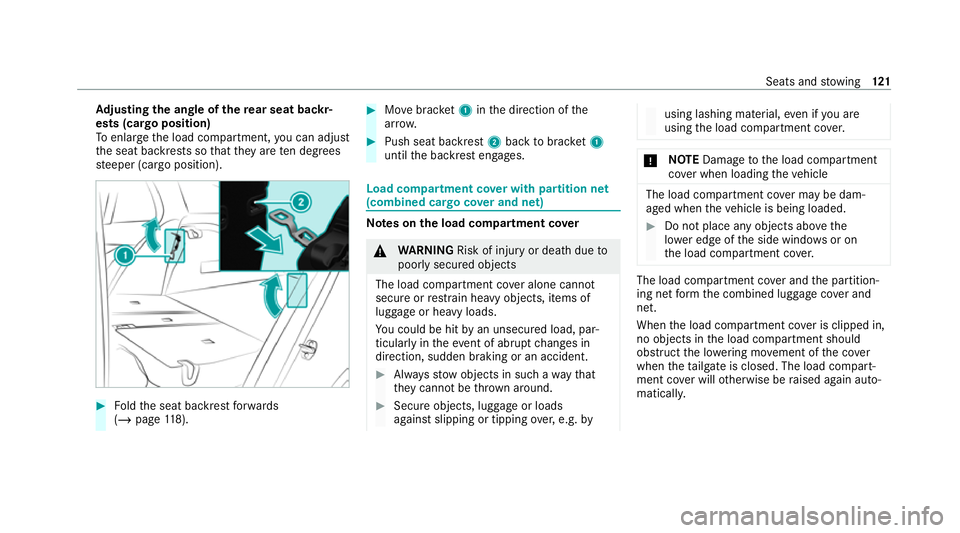
justing the angle of the rear seat backr‐
ests (cargo position)
To enlar gethe load compartment, you can adjust
th e seat backrests so that they are ten degrees
st eeper (cargo position). #
Foldthe seat backrest forw ards
(/ page 118). #
Movebrac ket1 inthe direction of the
ar row. #
Push seat backrest 2back tobrac ket1
until the backrest engages. Load compartment co
ver with partition net
(combined ca rgo co ver and net) Note
s onthe load compa rtment co ver &
WARNING Risk of inju ryor death due to
poorly secured objects
The load compartment co ver alone cannot
secure or restra in heavy objects, items of
luggage or heavy loads.
Yo u could be hit byan unsecured load, par‐
ticular lyin theev ent of abrupt changes in
direction, sudden braking or an accident. #
Alw aysstow objects in such a wayth at
th ey cannot be thro wn around. #
Secure objects, luggage or loads
against slipping or tipping over,e.g. by using lashing material,
even if you are
using the load compartment co ver. *
NO
TEDama getothe load compartment
co ver when loading theve hicle The load compartment co
ver may be dam‐
aged when theve hicle is being loaded. #
Do not place any objects abo vethe
lo we r edge of the side windo wsor on
th e load compartment co ver. The load compartment co
ver and the partition‐
ing net form the combined luggage co ver and
net.
When the load compartment co ver is clipped in,
no objects in the load compartment should
obstruct the lo wering mo vement of the co ver
when theta ilgate is closed. The load compart‐
ment co ver will otherwise be raised again auto‐
matically. Seats and
stowing 121
Page 126 of 489
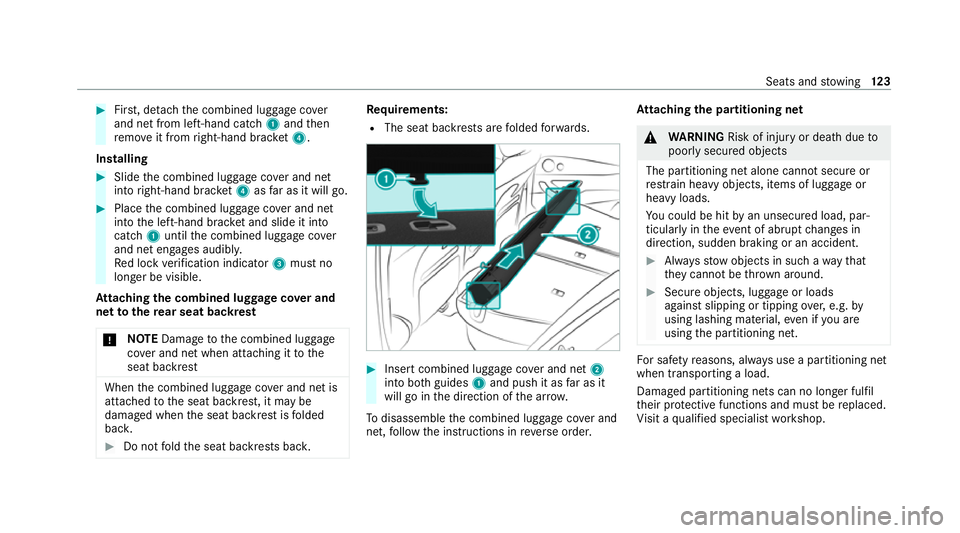
#
First, de tach th e combined luggage co ver
and net from left-hand cat ch1 and then
re mo veit from right-hand brac ket4.
In stalling #
Slide the combined luggage co ver and net
into right-hand brac ket4 asfar as it will go. #
Place the combined luggage co ver and net
into the left-hand brac ket and slide it into
catch 1until the combined luggage co ver
and net engages audibl y.
Re d lock verification indicator 3must no
longer be visible.
At taching the combined luggage co ver and
net tothere ar seat backrest
* NO
TEDama getothe combined luggage
co ver and net when attaching it tothe
seat backrest When
the combined luggage co ver and net is
attached tothe seat backrest, it may be
damaged when the seat backrest is folded
bac k. #
Do not fold the seat backrests bac k. Re
quirements:
R The seat backrests are folded forw ards. #
Insert combined luggage co ver and net 2
into bo thguides 1and push it as far as it
will go in the direction of the ar row.
To disassemble the combined luggage co ver and
net, follow the instructions in reve rse order. At
taching the pa rtitioning net &
WARNING Risk of inju ryor death due to
poorly secured objects
The partitioning net alone cann otsecure or
re stra in heavy objects, items of luggage or
heavy loads.
Yo u could be hit byan unsecured load, par‐
ticular lyin theev ent of abrupt changes in
direction, sudden braking or an accident. #
Alw aysstow objects in such a wayth at
th ey cannot be thro wn around. #
Secure objects, luggage or loads
against slipping or tipping over,e.g. by
using lashing material, even if you are
using the partitioning net. Fo
r saf etyre asons, alw ays use a partitioning net
when transporting a load.
Damaged partitioning nets can no longer fulfil
th eir pr otective functions and must be replaced.
Vi sit a qualified specialist workshop. Seats and
stowing 12 3
Page 128 of 489
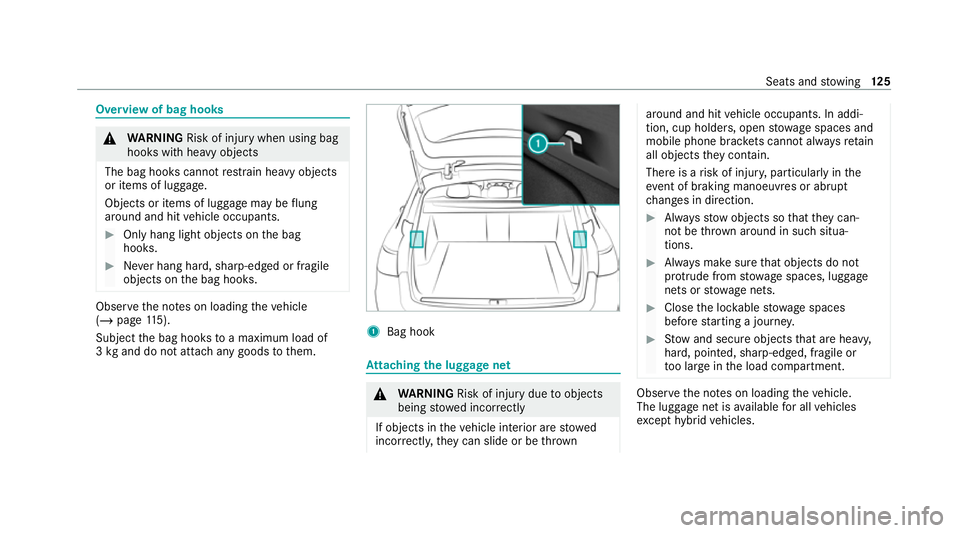
Overview of bag hooks
&
WARNING Risk of inju rywhen using bag
hooks with heavy objects
The bag hooks cannot restra in heavy objects
or items of luggage.
Objects or items of luggage may be flung
around and hit vehicle occupants. #
Only hang light objects on the bag
hooks. #
Never hang hard, sharp-edged or fragile
objects on the bag hooks. Obser
vethe no tes on loading theve hicle
(/ page 115).
Subject the bag hooks toa maximum load of
3 kg and do not attach any goods tothem. 1
Bag hook At
taching the luggage net &
WARNING Risk of inju rydue toobjects
being stowed incor rectly
If objects in theve hicle interior are stowed
incor rectly, they can slide or be thrown around and hit
vehicle occupants. In addi‐
tion, cup holders, open stowage spaces and
mobile phone brac kets cann otalw aysre tain
all objects they contain.
The reis a risk of injur y,particularly in the
ev ent of braking manoeuvres or abrupt
ch anges in direction. #
Alw aysstow objects so that they can‐
not be throw n around in su chsitua‐
tions. #
Alw ays make sure that objects do not
pr otru de from stowage spaces, luggage
nets or stowage nets. #
Close the loc kable stow age spaces
before starting a journe y. #
Stow and secure objects that are heavy,
hard, poin ted, sharp-edged, fragile or
to o lar geinthe load compartment. Obser
vethe no tes on loading theve hicle.
The luggage net is available for all vehicles
exc ept hybrid vehicles. Seats and
stowing 12 5
Page 131 of 489
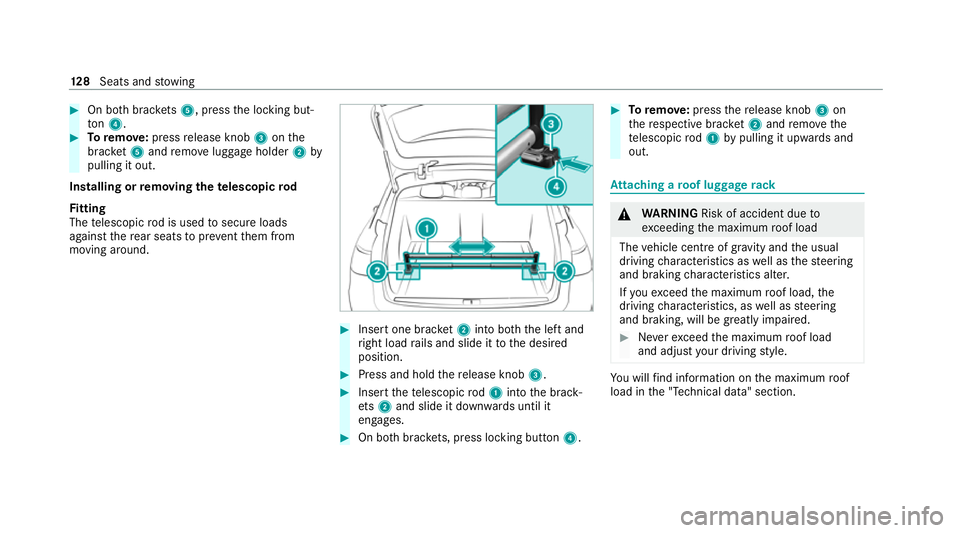
#
On bo thbrac kets 5, press the locking but‐
to n4. #
Toremo ve:press release knob 3onthe
brac ket5 and remo veluggage holder 2by
pulling it out.
Installing or removing the telescopic rod
Fi tting
The telescopic rod is used tosecure loads
against there ar seats topreve ntthem from
moving around. #
Insert one brac ket2 into bo th the left and
ri ght load rails and slide it tothe desired
position. #
Press and hold there lease knob 3. #
Insert thete lescopic rod1 into the brack‐
et s2 and slide it down wards until it
engages. #
On bo thbrac kets, press lo cking button 4. #
Toremo ve: press there lease knob 3on
th ere spective brac ket2 and remo vethe
te lescopic rod1 bypulling it upwards and
out. At
taching a roof luggage rack &
WARNING Risk of accident due to
exc eeding the maximum roof load
The vehicle centre of gravity and the usual
driving characteristics as well as thesteering
and braking characteristics alter.
If yo uexc eed the maximum roof load, the
driving characteristics, as well as steering
and braking, will be greatly impaired. #
Neverexc eed the maximum roof load
and adjust your driving style. Yo
u will find information on the maximum roof
load in the "Technical data" section. 12 8
Seats and stowing
Page 133 of 489
#
Brief lypress the trim element of the co ver on
th e front.
The co ver opens in the direction of the ar row. #
Lift up cap 1ofthe soc ket and insert the
plug of the device.
If yo u ha veconnected a device tothe12 V
soc ket, le ave the co ver of thestow age compart‐
ment open. USB port in
there ar passenger comp artmentYo
u can charge a USB device, such as a mobile
phone, at the USB ports using a suitable charg‐
ing cable.
The devices can be charge d with 5 V (up to3 A)
and when the ignition is switched on. Wire
lesscharging of the mobile phone and
connection with theex terior aerial Note
s on wirelessly charging the mobile
phone &
WARNING Risk of inju rydue toobjects
being stowed incor rectly
If objects in theve hicle interior are stowed
incor rectly, they can slide or be thrown
around and hit vehicle occupants. In addi‐
tion, cup holders, open stowage spaces and
mobile phone recep tacles cannot al ways
re tain all objects within.
There is a risk of injur y,particularly in the
ev ent of sudden braking or a sudden change
in direction. #
Alw aysstow objects so that they can‐
not be throw n around in su chsitua‐
tions. #
Alw ays make sure that objects do not
pr otru de from stowage spaces, luggage
nets or stowage nets. #
Close the loc kable stow age spaces
before starting a journe y. #
Alw aysstow and secure heavy, hard,
poin ted, sharp-edged, fragile or bulky
objects in the boot/load compartment. Obser
vethe no tes on loading theve hicle. &
WARNING Risk offire from placing
objects in the mobile phone stowage
compartment
Placing other objects in the mobile phone
stow age compartment could con stitute a fire
hazard. #
Apart from a mobile phone, do not
place any other objects in the mobile
phone stowage compartment, espe‐
cially those made of me tal. 13 0
Seats and stowing
Page 135 of 489
#
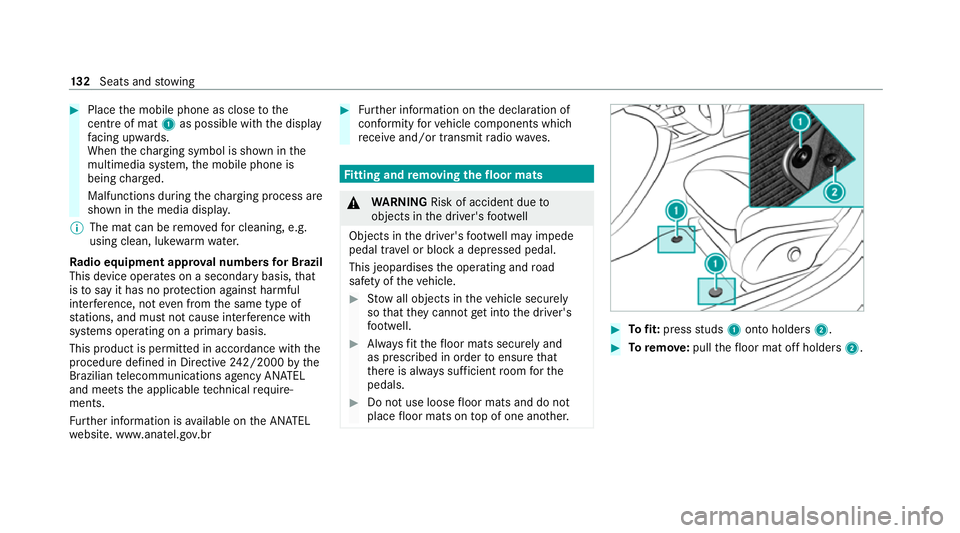
Place the mobile phone as close tothe
centre of mat 1as possible wi th the display
fa cing up wards.
When thech arging symbol is shown in the
multimedia sy stem, the mobile phone is
being charge d.
Malfunctions during thech arging process are
shown in the media displa y.
% The mat can be remo vedfo r cleaning, e.g.
using clean, luk ewarmwate r.
Ra dio equipment appr oval numbers for Brazil
This device operates on a secondary basis, that
is to say it has no pr otection against harmful
inter fere nce, not even from the same type of
st ations, and must not cause inter fere nce wi th
sy stems operating on a primary basis.
This product is permitted in accordance with the
procedure defined in Directive 242/2000 bythe
Brazilian telecommunications agency AN ATEL
and meets the applicable tech nical requ ire‐
ments.
Fu rther information is available on the AN ATEL
we bsite. www.anatel.go v.br #
Further information on the declaration of
confo rmity forve hicle components which
re cei veand/or transmit radio wav es. Fi
tting and removing the floormats &
WARNING Risk of accident due to
objects in the driver's foot we ll
Objects in the driver's foot we ll may impede
pedal tr avel or block a depressed pedal.
This jeopardises the operating and road
saf ety of theve hicle. #
Stow all objects in theve hicle securely
so that they cannot getinto the driver's
fo ot we ll. #
Alw aysfit th efloor mats securely and
as prescribed in order toensure that
th ere is alw ays suf ficient room forthe
pedals. #
Do not use loose floor mats and do not
place floor mats on top of one ano ther. #
Tofit: press studs 1onto holders 2. #
Toremo ve:pull thefloor mat off holders 2.13 2
Seats and stowing
Page 137 of 489
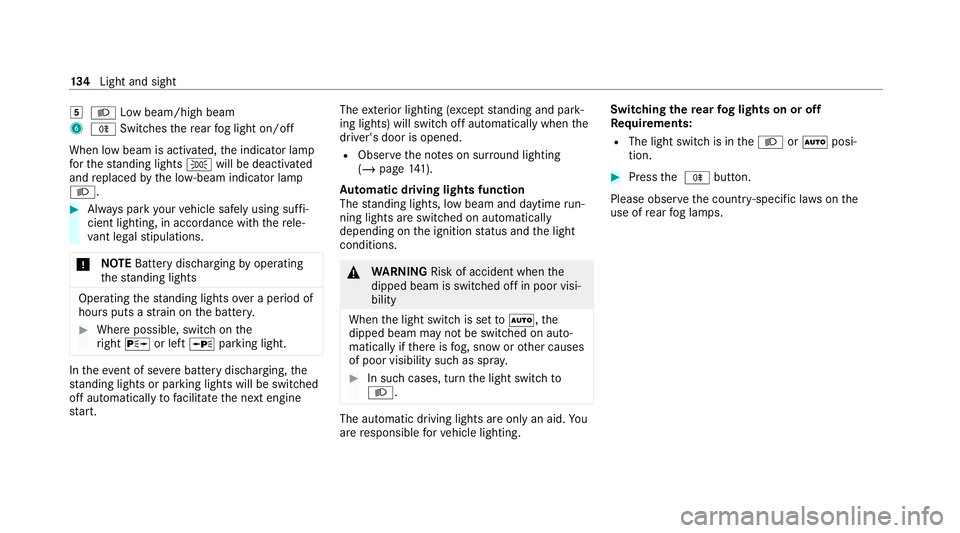
5
L Low beam/high beam
6 R Switches there ar fog light on/off
When low beam is activated, the indicator lamp
fo rth est anding lights Twill be deactivated
and replaced bythe lo w-beam indicator lamp
L. #
Alw ays park your vehicle safely using suf fi‐
cient lighting, in acco rdance with there le‐
va nt le galst ipulations.
* NO
TEBattery discharging byoperating
th est anding lights Operating
thest anding lights over a period of
hours puts a stra in on the batter y. #
Where possible, switch on the
ri ght X or left Wparking light. In
theeve nt of se vere battery discharging, the
st anding lights or parking lights will be swit ched
off automatically tofacilitate the next engine
st art. The
exterior lighting (e xcept standing and park‐
ing lights) will swit choff automatically when the
driver's door is opened.
R Obser vethe no tes on sur round lighting
(/ page 141).
Au tomatic driving lights function
The standing lights, low beam and daytime run‐
ning lights are switched on au tomatically
depending on the ignition status and the light
conditions. &
WARNING Risk of accident when the
dipped beam is switched off in poor visi‐
bility
When the light switch is set toà ,the
dipped beam may not be switched on auto‐
matically if there is fog, snow or other causes
of poor visibility such as spr ay. #
In such cases, turn the light switch to
L . The automatic driving lights are only an aid.
Yo u
are responsible forve hicle lighting. Switching
there ar fog lights on or off
Re quirements:
R The light switch is in theL orà posi‐
tion. #
Press the R button.
Please obser vethe count ry-specific la wsonthe
use of rear fog lamps. 134
Light and sight
Page 138 of 489
Operating
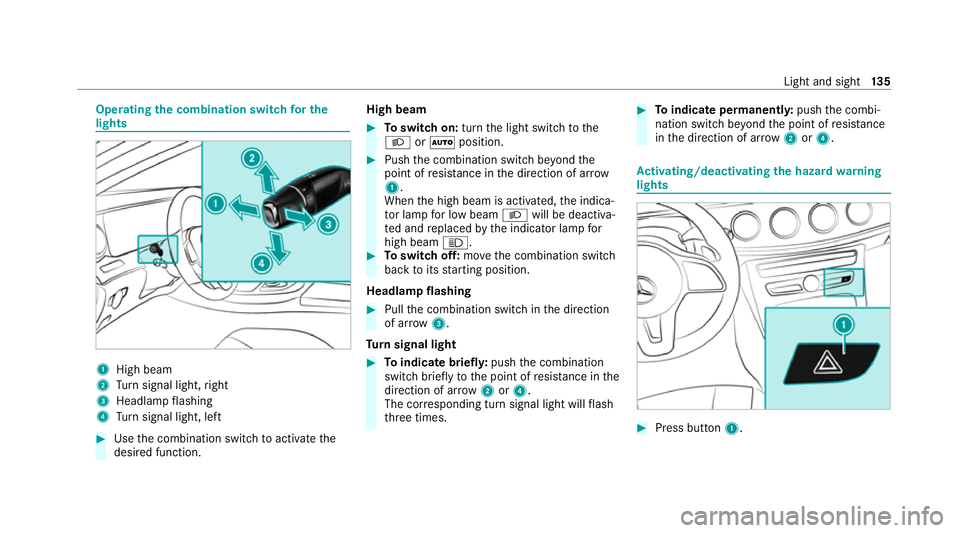
the combination switch for the
lights 1
High beam
2 Turn signal light, right
3 Headlamp flashing
4 Turn signal light, left #
Use the combination switch toactivate the
desired function. High beam #
Toswitch on: turnthe light switch tothe
L orà position. #
Push the combination switch be yond the
point of resis tance in the direction of ar row
1 .
When the high beam is activated, the indica‐
to r lamp for low beam Lwill be deactiva‐
te d and replaced bythe indicator lamp for
high beam K. #
Toswitch off: movethe combination switch
back toits starting position.
Headla mpflashing #
Pull the combination switch in the direction
of ar row3.
Tu rn signal light #
Toindicate briefl y:push the combination
switch briefly tothe point of resis tance in the
direction of ar row2or4.
The cor responding turn signal light will flash
th re e times. #
Toindicate permanentl y:push the combi‐
nation switch be yond the point of resis tance
in the direction of ar row2or4. Ac
tivating/deactivating the hazard warning
lights #
Press button 1. Light and sight
13 5