Obser
vethefo llowing information:
R Warning and indicator lamps (/ page 436)
R Display messages (/ page379)
ETS/4ETS (Electronic Traction Sy stem)
ETS/4E TStraction control is pa rtof ESP ®
and
makes it possible topull away and accelerate on
a slippe rycar riag ew ay.
ETS/4ETS can impr ovetheve hicle's traction by
inter vening in thefo llowing ways:
R The drive wheels are braked individually if
th ey spin.
R More drive torque is transferred tothe wheel
or wheels with traction.
Influence of drive prog rams on ESP ®
The drive programs enable ESP ®
to adapt todif‐
fe re nt we ather and road conditions as well as
th e driver's prefer red driving style. You can
select the drive prog rams using theDY NA MIC
SELECT switch (/ page175).
ESP ®
modes
Depending on the selected drive program, the
appropriate ESP ®
mode will be activated. Yo ucan select
the drive programs using the
DY NA MIC SELECT switch (/ page175).
ESP ®
Comfort
R drive program Aand;
R balance between traction and stability
R recommended for all road sur face conditions
R suitable for bo thdry and dif ficult road condi‐
tions (such as sn owor ice, or when thero ad
is we t from rain)
ESP ®
Sport
R drive prog ram C
R offers stability but with a sporty setup
R allowsthe sporty driver a more active driving
st yle
R only suitable for good road conditions, a dry
ro ad sur face and a clear stre tch of road
ESP ®
Spo rt +
R drive prog ram B
R emphasises theve hicle's ownove rste ering
and under steering characteristics for a more
active driving style R
only suitable for good road conditions, a dry
ro ad sur face and a clear stre tch of road
Off- road ESP ®
R traction-oriented setting up toappr ox
30 km/h
R maximum traction on unpa ved, very une ven
sur faces and easily negotiable off-road ter‐
ra in
R suitable for unpa vedro ads with easily nego‐
tiable off- road terrain or very une ven su rfa‐
ces Ac
tivating/deactivating ESP ®
(Electronic Sta‐
bility Prog ram) Multimedia sy
stem:
4 © 5
Settings 5
Quick access
% ESP®
can only be activated/deactivated
using quick access when at least one other
function is available in quick access. ESP ®
can otherwise be found in theAssistance
menu. Driving and parking
197
&
WARNING Risk of inju ryfrom tightening
wheel bolts and nuts
If yo u tighten the wheel bolts or wheel nuts
when theve hicle is raised, the jack could tip. #
Only tighten wheel bolts or wheel nuts
when theve hicle is on the ground. #
Be sure toobser vethe instructions and
saf ety no tes on "Changing a wheel"
(/ page 350). #
For saf etyre asons, on lyuse wheel bolts
which ha vebeen appr ovedby Mercedes-
Benz and forth e wheel in question. #
Tighten the wheel bolts evenly in a diagonal
pattern in the order indicated until they are
fi nger-tight. #
Unscr ew and remo vethe cent ring pin. #
Tighten the last wheel bolt until it is finger-
tight. #
Lowe rth eve hicle (/ page 359). Lo
weri ngtheve hicle af ter a wheel change Re
quirements:
R The new wheel has been fitted
(/ page 358). #
Tolowe r the vehicle: placethera tchet onto
th e he xagon nut of the jack so that the let‐
te rs "AB" are visible and turn thera tchet of
th e jack tothe left. #
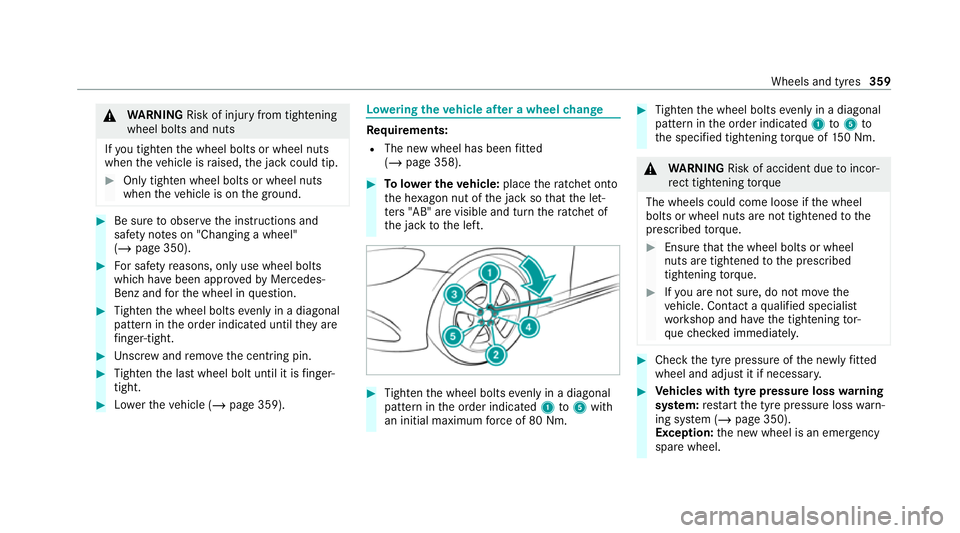
Tighten the wheel bolts evenly in a diagonal
pattern in the order indicated 1to5 with
an initial maximum forc e of 80 Nm. #
Tighten the wheel bolts evenly in a diagonal
pattern in the order indicated 1to5 to
th e specified tightening torque of 150 Nm. &
WARNING Risk of accident due toincor‐
re ct tigh tening torque
The wheels could come loose if the wheel
bolts or wheel nuts are not tightened tothe
prescribed torque. #
Ensu rethat the wheel bolts or wheel
nuts are tightened tothe prescribed
tightening torque. #
Ifyo u are not sure, do not mo vethe
ve hicle. Contact a qualified specialist
wo rkshop and ha vethe tightening tor‐
qu ech ecked immediately. #
Check the tyre pressure of the newly fitted
wheel and adjust it if necessa ry. #
Vehicles with tyre pressure loss warning
sy stem: restart the tyre pressure loss warn‐
ing sy stem (/ page 350).
Exception: the new wheel is an emer gency
spa rewheel. Wheels and tyres
359