2020 MERCEDES-BENZ E-CLASS ESTATE sensor
[x] Cancel search: sensorPage 169 of 489
#
Alw ays secure the engine against unin‐
te ntional starting before car rying out
maintenance or repair work. Re
quirements:
R park position jis selected.
R the anti- theft alarm sy stem is not activated.
R the panic alarm is not activated.
R the hazard warning light sy stem is switched
off.
R The bonn etis closed.
R the doors are closed and loc ked.
R the windo wsand sliding sun roof are closed. #
Start theve hicle using the smartphone.
Af tereve ryengine start, the engine runs for
te n minu tes.
Yo u can car ryout a maximum of two consecu‐
tive starting attem pts. Yo u must start theve hicle
once with theke y before trying tostart the
engine again with the smartphone. you can stop
th eve hicle again at any time. %
Further information can be found in the
smartphone app.
Securing the engine against starting before
car rying out maintenance or repair work: #
switch on the hazard warning light sy stem.
or #
unlock the doors.
or #
open a side window or the sliding sunroof. Ru
nning-in no tes *
NO
TEMercedes-AMG vehicles #
Obser vethe no tes in the Supplement.
Yo u could otherwise failto recognise
dangers. To
preser vethe engine during thefirs t1, 500 km:
R drive at varying road speeds and engine
speeds.
R do not drive at speeds greater than
14 0 km/h. R
drive theve hicle in drive program A
or ;.
R shift tothe next highest gear at theve ry lat‐
est when the needle reaches the last third
before there d area in there v counter.
R do not shift down a gear manually in order to
brake.
R avoidove rstraining theve hicle, e.g. driving at
full thro ttle.
R do not depress the accelera tor pedal past
th e pressure point (kickdown).
R only increase the engine speed gradually and
accelera tetheve hicle tofull speed af ter
1, 500 km.
This also applies when the engine or parts of the
driv etra in ha vebeen replaced.
Please also obser vethefo llowing running-in
no tes:
R in cer tain driving and driving saf ety sy stems,
th e sensors adjust automatically while a cer‐
ta in dis tance is being driven af terth eve hicle
has been delivered or af terre pairs. Full sys‐ 16 6
Driving and pa rking
Page 197 of 489
Driving and driving saf
ety sy stems Driving sy
stems and your responsibility Yo
ur vehicle is equipped with driving sy stems
which assist you in driving, parking and manoeu‐
vring theve hicle. The driving sy stems are only
aids. They are not a substitute foryo ur attention
to the sur roundings and do not relie ve you of
yo ur responsibility per taining toroad traf fic la w.
The driver is alw aysre sponsible for maintaining
a safe dis tance totheve hicle in front, forve hicle
speed, for braking in good time and forst ay ing
in lane. Pay attention tothe tra ffic conditions at
all times and inter vene when necessa ry. Be
aw are of the limitations rega rding the safe use of
th ese sy stems.
Driving sy stems can neither reduce therisk of
accident if youfa ilto adapt your driving style nor
ove rride the la wsof ph ysics. They cannot alw ays
ta ke into account road, weather or traf fic condi‐
tions. In
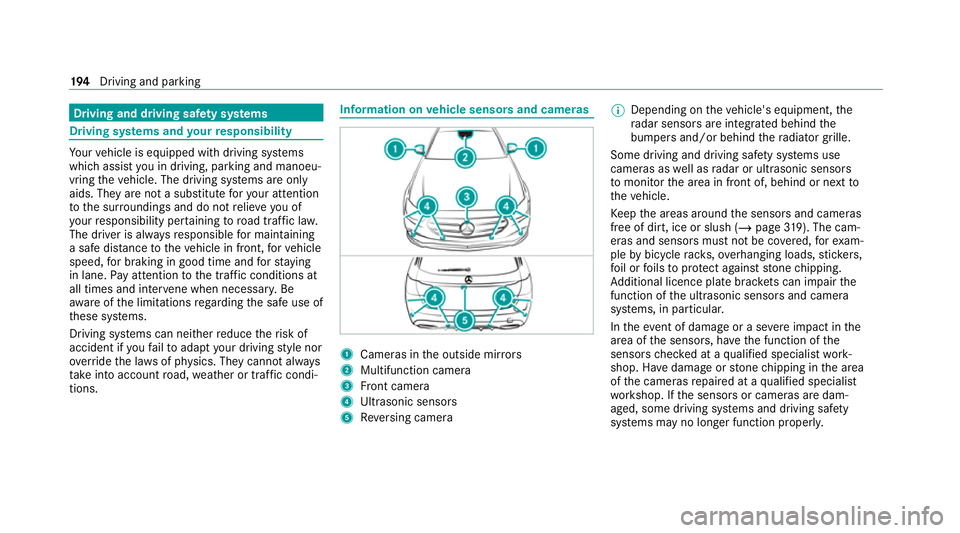
fo rm ation on vehicle sensors and cameras 1
Cameras in the outside mir rors
2 Multifunction camera
3 Front camera
4 Ultrasonic sensors
5 Reversing camera %
Depending on theve hicle's equipment, the
ra dar sensors are integ rated behind the
bumpers and/or behind thera diator grille.
Some driving and driving saf ety sy stems use
cameras as well as radar or ultrasonic sensors
to monitor the area in front of, behind or next to
th eve hicle.
Ke ep the areas around the sensors and cameras
free of dirt, ice or slush (/ page319). The cam‐
eras and sensors must not be co vered, forex am‐
ple bybicycle rack s, overhanging loads, sticke rs,
fo il or foils toprotect against stone chipping.
Ad ditional licence plate brac kets can impair the
function of the ultrasonic sensors and camera
sy stems, in particular.
In theeve nt of dama geor a se vere impact in the
area of the sensors, ha vethe function of the
sensors checked at a qualified specialist work‐
shop. Ha vedamage or stone chipping in the area
of the cameras repaired at a qualified specialist
wo rkshop. If the sensors or cameras are dam‐
aged, some driving sy stems and driving saf ety
sy stems may no longer function proper ly.194
Driving and pa rking
Page 206 of 489
Sy
stem limits
Fu ll sy stem per form ance is not available for a
fe w seconds af ter switching on the ignition or
af te r driving off.
The sy stem may be impaired or may not function
in thefo llowing situations:
R In sno w,rain, fog, heavy spr ay, if there is
gl are, in direct sunlight or in greatlyvarying
light conditions.
R Ifth e sensors are dirty, mis ted up, damaged
or co vered.
R Ifth e sensors are impaired due tointer fer‐
ence from other radar sources, e.g. strong
ra dar reflections in multi-s torey car par ks.
R If a loss of tyre pressure or a defective tyre
has been de tected and displ ayed.
R In complex traf fic situations whe reobjects
cannot always be clearly identified.
R If pedestrians or vehicles mo vequickly into
th e sensor de tection range.
R If pede strians are hidden by other objects.
R Ifth e typical outline of a pedestrian cann ot
be distinguished from the bac kground. R
If a pedestrian is not de tected as su ch, e.g.
due tospecial clo thing or other objects.
R On bends with a tight radius.
% The Active Brake Assi stsensors adjust auto‐
matically while a cer tain dis tance is being
driven af terth eve hicle has been delivered.
Ac tive Brake Assi stis una vailable or only
partially available during this teach-in period. Setting
Active Brake Assi st Re
quirements:
R The ignition is switched on.
Multimedia sy stem:
4 © 5
Settings 5
Assistance
5 Active Brake Assist #
Select the desired setting.
The setting is retained when the engine is
next star ted.
Deactivating Active Brake Assi st
% It is recommended that you alw ays lea ve
Ac tive Brake Assi stactivated. #
Select Off.
The dis tance warning function, the autono‐
mous braking function and the Evasive Steer‐
ing Assist are deactivated.
When theve hicle is next star ted, the middle
setting is automatically selected.
% IfAc tive Brake Assi stis deactivated, the
æ symbol appears inthest atus bar of the
multifunction displa y. Fu
nction of Adaptive Brake Lights Ad
aptive Brake Lights warnfollowing traf fic in an
emergency braking situation wi th thefo llowing
actions:
R Byflashing the brake lamps
R By activating the hazard warning lights
If th eve hicle is braked sharply from speeds
abo ve50 km/h, the brake lamps flash rapidl y.
This pr ovides traf fic tr avelling behind you with an
ev en more noticeable warning.
If th eve hicle is tr avelling at speeds of more than
70 km/h at the beginning of the brake applica‐ Driving and parking
203
Page 213 of 489
R
k (gre en): Active Dis tance Assi st
DISTRONIC acti ve, specified dis tance set and
ve hicle de tected
R r: Route-based speed adap tation acti ve
( / page 214).
The stored speed is shown along with the per‐
manent status display and highlighted on the
speedome ter.When Active Dis tance Assi st
DISTRONIC is passi ve,th e speed is gr eyed out.
% On mo torw ays or high-speed major roads,
th e green çvehicle symbol is displa yed
cyclically when theve hicle is ready topull
aw ay.
% Ifyo u depress the accelerator pedal be yond
th e setting of theAc tive Dis tance Assi st
DISTRONIC, the sy stem is switched topas‐
sive mode. The çsuspended message
appears in the multifunction displa y.
Display on the speedome ter
The stored speed is highlighted on the speedom‐
et er. If the speed of theve hicle in front or the
speed adjustment is less than thestored speed
due tothero ute event ahead, the segments in th
e speedome ter light up. Deactivation of Active
Dis tance Assi stDISTRONIC, as well as altera‐
tions tothe speed due tomanual or auto matic
adoption of the maximum permissible speed, are
displa yed in the control feedback of the multi‐
function display on a single line.
Sy stem limits
The sy stem may be impaired or may not function
in thefo llowing situations, forex ample:
R In sn ow,ra in, fog, heavy spr ay, if there is
gl are, in direct sunlight or in greatlyvarying
light conditions.
R The windsc reen in the area of the camera is
dirty, mis ted up, damaged or co vered.
R Ifth era dar sensors are dirty or co vered.
R In multi- stor ey car pa rks or on roads with
st eep uphill or downhill gradients.
R Ifth ere are nar rowvehicles in front, such as
bicycles or mo torcyc les.
In addition, on slippery roads, braking or accel‐
erating can cause one or se veral wheels tolose
traction and theve hicle could then skid. Do not use
Active Dis tance Assi stDISTRONIC in
th ese situations. &
WARNING Risk of accident from acceler‐
ation or braking byActive Dis tance
Assi stDISTRONIC
Ac tive Dis tance Assi stDISTRONIC may accel‐
erate or brake in thefo llowing cases, for
ex ample:
R Ifth eve hicle pulls away using Active Dis‐
ta nce Assi stDISTRONIC.
R Ifth estored speed is called up and is
considerably faster or slo werth an the
cur rently driven speed.
R IfAc tive Dis tance Assi stDISTRONIC no
longer de tects a vehicle in front or does
not react toreleva nt objects. #
Alw ays carefully obser vethe traf fic con‐
ditions and be ready tobrake at all
times. #
Take into account the tra ffic situation
before calling up thestored speed. 210
Driving and pa rking
Page 214 of 489
&
WARNING Risk of accident due toinsuf‐
fi cient decele ration byActive Dis tance
Assi stDISTRONIC
Ac tive Dis tance Assi stDISTRONIC brakes
yo ur vehicle with up to50% of the possible
deceleration. If this decele ration is not su ffi‐
cient, Active Dis tance Assi stDISTRONIC
alerts you with a visual and acoustic warning. #
Adjust your speed and main tain a suita‐
ble dis tance from theve hicle in front. #
Brake theve hicle yourself and/or take
ev asive action. &
WARNING Risk of accident if de tection
function of Active Dis tance Assi st
DISTRONIC is impaired
Ac tive Dis tance Assi stDISTRONIC does not
re act or has a limited reaction:
R when driving on a dif fere nt lane or when
ch anging lanes R
topedestrians, animals, bicycles or sta‐
tionary vehicles, or unexpected obs tacles
R tocompl extraf fic conditions
R tooncoming vehicles and crossing traf fic
As a result, Active Dis tance Assi st
DISTRONIC may nei ther give warnings nor
inter vene in su chsituations. #
Alw ays obser vethe tra ffic conditions
carefully and react accordin gly. Operating
Active Di stance Assist DIST RONIC
Re quirements:
R The elect ric pa rking brake is released.
R ESP ®
is activated and is not inter vening.
R The transmission is in position h.
R Allthe doors are closed.
R Check of thera dar sensor sy stem has been
successfully comple ted. #
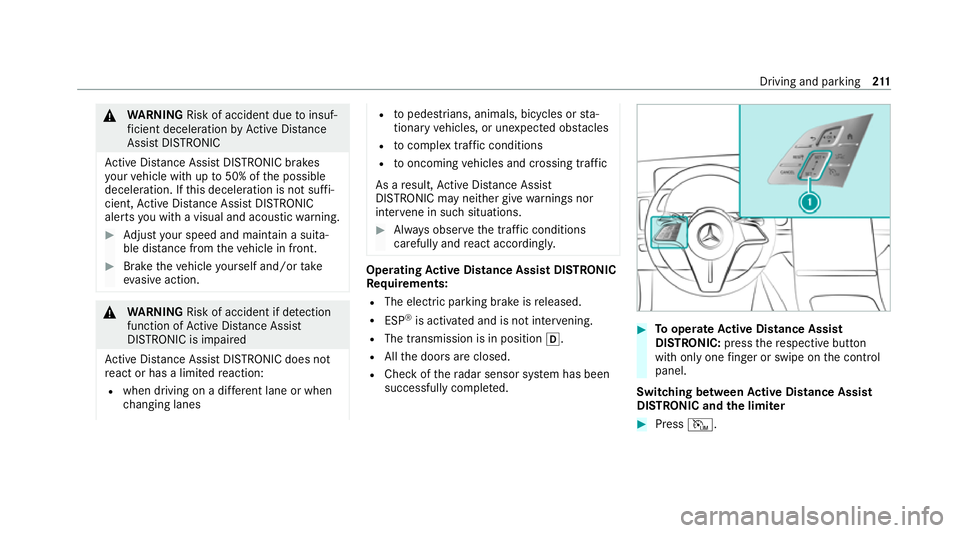
Tooperate Active Di stance Assist
DISTRO NIC:press there spective button
with only one finger or swipe on the control
panel.
Switching between Active Di stance Assist
DISTRO NIC and the limiter #
Press I. Driving and pa
rking 211
Page 226 of 489
All
vehicles except All- Terrain vehicles:
R Uptoappr oximately 30 km/h: the high le vel
can be selected rega rdless of the drive pro‐
gram.
R From appr ox. 30 km/h: theve hicle is adjus‐
te dto normal le vel,re ga rdless of drive pro‐
gram.
All- Terrain vehicles:
R Uptoappr oximately 35 km/h: the high le vel
can be selected rega rdless of the drive pro‐
gram.
R From appr oximately 35 km/h: theve hicle is
set tothe normal le velre ga rdless of the drive
prog ram.
R Below appro ximately 20 km/ h intheG
drive program, theve hicle is raised back up
to the high le vel. Pa
rking Assist PARKTRONIC Fu
nction of Parking Assist PARKTRONIC
Pa rking Assist PARKTRONIC is an electronic
parking assi stance sy stem which monitors thearea sur
rounding your vehicle and sho wsyouthe
dis tance between theve hicle and a de tected
obs tacle visually and audibly.
Pa rking Assist PARKTRONIC is on lyan aid. It is
not a substitute foryo ur attention tothe sur‐
ro undings. The responsibility for safe manoeu‐
vring and parking remains with you. Make sure
th at there are no persons, animals or objects in
th e manoeuvring area while manoeuvring and
parking in/exiting parking spaces.
The passive side impact pr otection also warns
yo u of obs tacles tothe side. During the parking
procedure or manoeuvring, objects are de tected
as theve hicle drives past. If yousteer in the
direction of a de tected obs tacle and there is a
ri sk of a lateral collision, a warning is issued. In
order for an object on the side tobe de tected,
th e sensors in the front and rear bumper must
fi rs t de tect the object while you are driving past
it.
In order for front or rear obs tacles tothe side to
be displa yed, theve hicle must firs t tr avel a dis‐
ta nce of at least half a vehicle length. Once the
ve hicle has tr avelled one vehicle length, obs ta‐
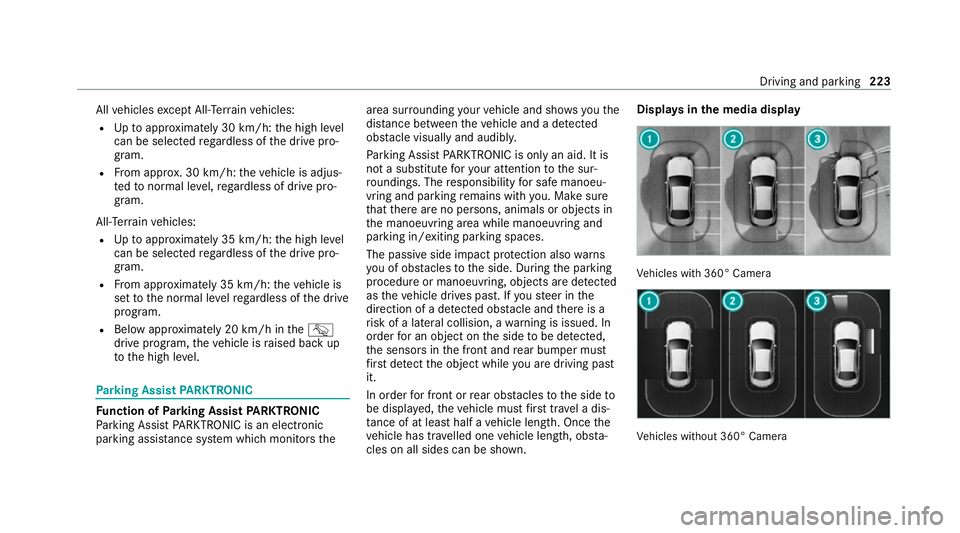
cles on all sides can be shown. Displa
ysinthe media display Ve
hicles with 360° Camera Ve
hicles without 360° Camera Driving and parking
223
Page 228 of 489
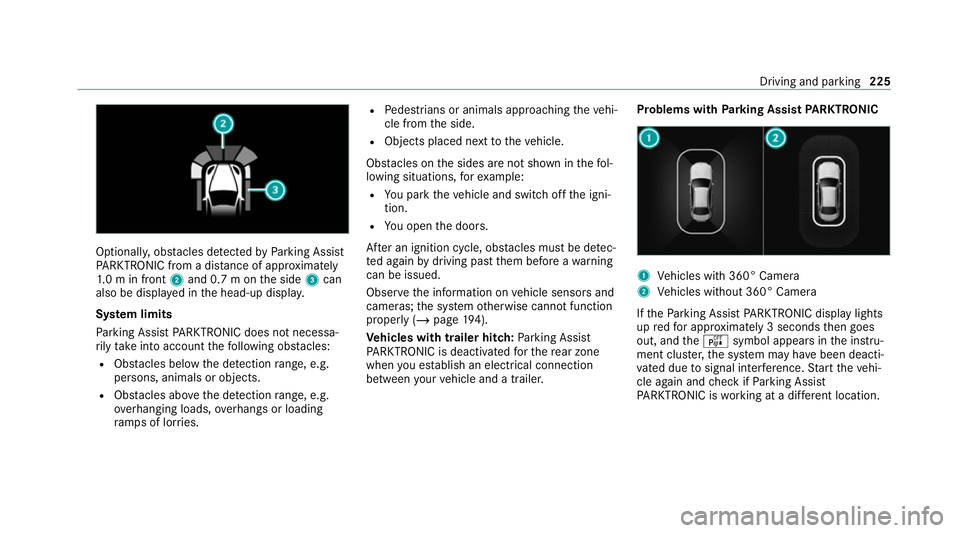
Optionally, obs
tacles de tected byParking Assist
PA RKTRONIC from a dis tance of appr oximately
1. 0 m in front 2and 0.7 m on the side 3can
also be displa yed in the head-up displa y.
Sy stem limits
Pa rking Assist PARKTRONIC does not necessa‐
ri ly take into account thefo llowing obs tacles:
R Obs tacles bel ow the detection range, e.g.
pe rsons, animals or objects.
R Obs tacles ab oveth e de tection range, e.g.
ove rhanging loads, overhangs or loading
ra mp s of lor ries. R
Pedestrians or animals approaching theve hi‐
cle from the side.
R Objects placed next totheve hicle.
Obs tacles on the sides are not shown in thefo l‐
lowing situations, forex ample:
R You park theve hicle and switch off the igni‐
tion.
R You open the doors.
Af ter an ignition cycle, obs tacles must be de tec‐
te d again bydriving past them before a warning
can be issued.
Obser vethe information on vehicle sensors and
cameras; the sy stem otherwise cannot function
properly (/ page194).
Ve hicles with trailer hitch: Parking Assist
PA RKTRONIC is deacti vatedfo rth ere ar zone
when you es tablish an elect rical connection
between your vehicle and a trailer. Problems with
Parking Assist PARKTRONIC 1
Vehicles with 360° Camera
2 Vehicles without 360° Camera
If th ePa rking Assist PARKTRONIC display lights
up redfo r appro ximately 3 seconds then goes
out, and theé symbol appears in the instru‐
ment clus ter,th e sy stem may ha vebeen deacti‐
va ted due tosignal inter fere nce. Start theve hi‐
cle again and check if Parking Assist
PA RKTRONIC is working at a dif fere nt location. Driving and pa
rking 225
Page 229 of 489
If
th eé symbol appears in the instrument
clus ter and a warning tone sounds, it may be
due toone of thefo llowing causes:
R The sensors are dirty: cleanthe sensors
and obser vethe no tes on care of vehicle
parts (/ page319).
R Parking Assist PARKTRONIC has been
deactivated due toa malfunction: restart
th eve hicle. If the problem persists, consult a
qu alified specialist workshop.
Ac tivating/deactivating Parking Assist
PA RKTRONIC
* NO
TERisk of an accident from objects
at close range Pa
rking Assist PARKTRONIC may not de tect
cer tain objects at close range. #
When pa rking or manoeuvring theve hi‐
cle, pay particular attention toany
objects which are abo veor below the
sensors, e.g. flowe rpots or dr awbars.
The vehicle or other objects could oth‐
erwise be damaged. #
Vehicles without AIR BODY CONT ROL:
press theé button in the cent reconsole.
% Vehicles with AIR BODY CONT ROL:you
can acti vate or deactivate Parking Assist
PA RKTRONIC in the multimedia sy stem
(/ page 226).
If th e indicator lamp in theé button is not lit,
Pa rking Assist PARKTRONIC is active. If the indi‐
cator lamp is lit or theé symbol appears in
th e instrument clus ter,Pa rking Assist
PA RKTRONIC is not active.
% Parking Assist PARKTRONIC is automatical ly
activated when theve hicle is star ted.
Ac tivating/deactivating Parking Assist
PA RKTRONIC using the multimedia sy stem
* NO
TERisk of an accident from objects
at close range Pa
rking Assist PARKTRONIC may not de tect
cer tain objects at close range. #
When pa rking or manoeuvring theve hi‐
cle, pay particular attention toany
objects which are abo veor below the sensors, e.g.
flowe rpots or dr awbars.
The vehicle or other objects could oth‐
erwise be damaged. Re
quirements:
R The camera menu is open.
R Or: Active Parking Assist is active.
R Or: thePA RKTRONIC pop-up window
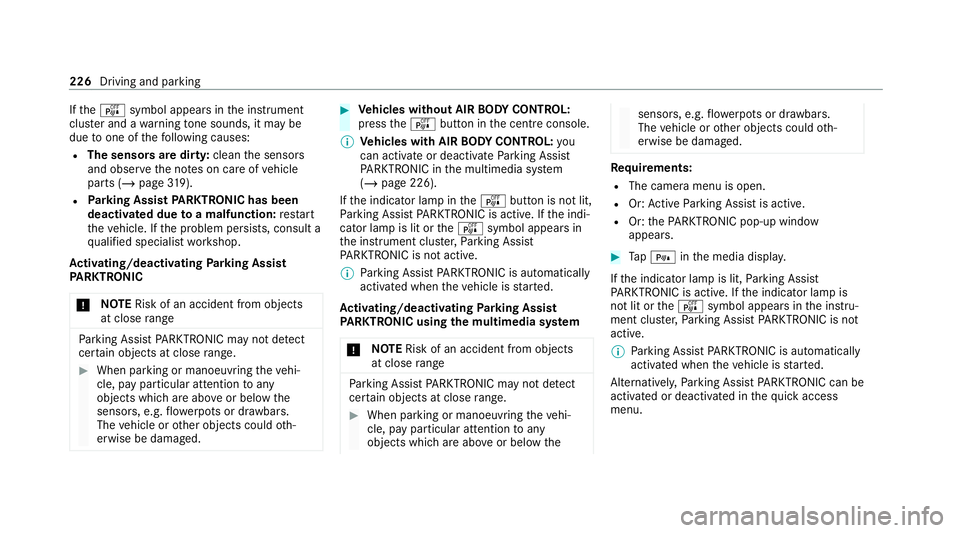
appears. #
Tap= inthe media displa y.
If th e indicator lamp is lit, Parking Assist
PA RKTRONIC is active. If the indicator lamp is
not lit or theé symbol appears in the instru‐
ment clus ter,Pa rking Assist PARKTRONIC is not
active.
% Parking Assist PARKTRONIC is automatical ly
activated when theve hicle is star ted.
Alternatively, Parking Assist PARKTRONIC can be
activated or deacti vated in thequ ick access
menu. 226
Driving and parking