2020 MERCEDES-BENZ C-CLASS ESTATE seats
[x] Cancel search: seatsPage 272 of 565
Vo
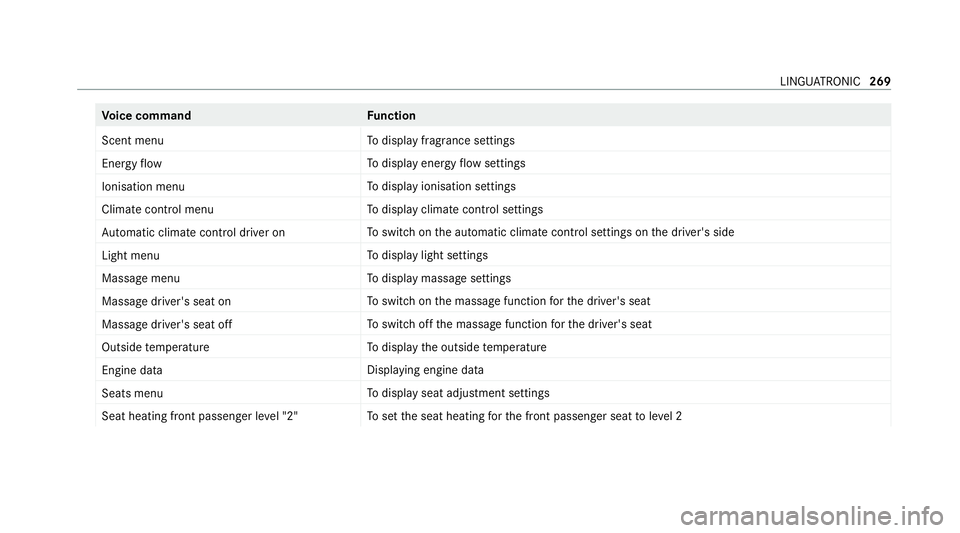
ice command Function
Scent menu To
display fragrance settings
Energy flow To
display energy flow settings
Ionisation menu To
display ionisation settings
Climate control menu To
display climate control settings
Automatic climate control driver on To
switch on the automatic climate control settings on the driver's side
Light menu To
display light settings
Massage menu To
display massage settings
Massage driver's seat on To
switch on the massage function forth e driver's seat
Massage driver's seat off To
switch off the massage function forth e driver's seat
Outside temperature To
display the outside temp erature
Engine data Displaying engine data
Seats menu To
display seat adjustment settings
Seat heating front passenger level "2" To
set the seat heating forth e front passenger seat toleve l 2 LINGU
ATRO NIC 269
Page 295 of 565
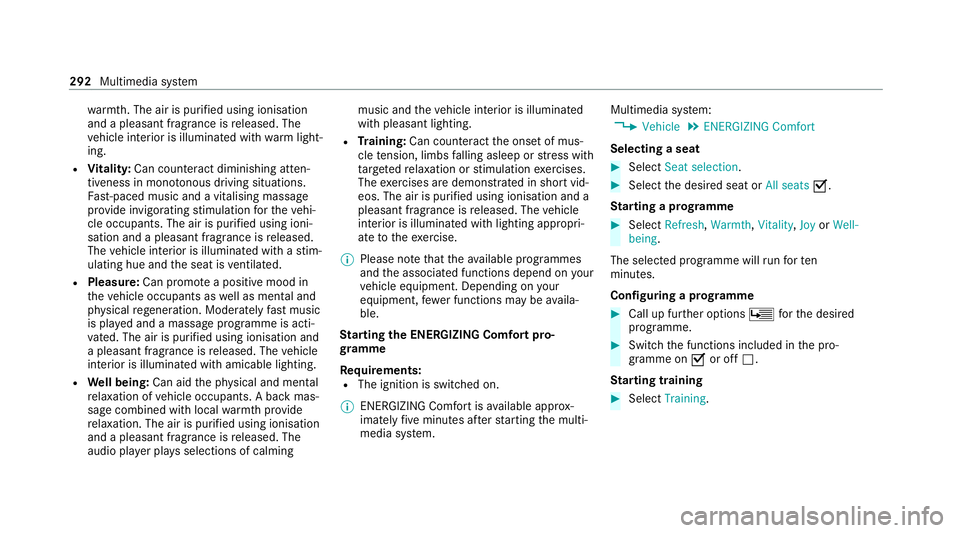
wa
rmth. The air is pu rified using ionisation
and a pleasant fragrance is released. The
ve hicle interior is illuminated with warm light‐
ing.
R Vitality: Can coun tera ct diminishing atten‐
tiveness in mono tonous driving situations.
Fa st-paced music and a vitalising massa ge
pr ov ide invigorating stimulation forth eve hi‐
cle occupants. The air is purified using ioni‐
sation and a pleasant fragrance is released.
The vehicle interior is illuminated with a stim‐
ulating hue and the seat is ventilated.
R Pleasure: Can promo tea positive mood in
th eve hicle occupants as well as menta l and
ph ysical rege neration. Moderately fastmusic
is pla yed and a massage prog ramme is acti‐
va ted. The air is purified using ionisation and
a pleasant fragrance is released. The vehicle
interior is illuminated with amicable lighting.
R Well being: Can aidthe ph ysical and men tal
re laxation of vehicle occupants. A back mas‐
sage combined with local warmthprov ide
re laxation. The air is purified using ionisation
and a pleasant fragrance is released. The
audio pla yer pla ysselections of calming music and
theve hicle interior is illuminated
with pleasant lighting.
R Training: Can counteract the onset of mus‐
cle tension, limbs falling asleep or stre ss with
ta rgeted relaxation or stimulation exercises.
The exercises are demon stra ted in short vid‐
eos. The air is purified using ionisation and a
pleasant fragrance is released. The vehicle
interior is illuminated with lighting appropri‐
ate totheex ercise.
% Please no tethat theav ailable prog rammes
and the associated functions depend on your
ve hicle equipment. Depending on your
equipment, fewe r functions may be availa‐
ble.
St arting the ENERGIZING Comfort pro‐
gr amme
Re quirements:
R The ignition is switched on.
% ENE RGIZING Comfort is available appr ox‐
imately five minutes af terst arting the multi‐
media sy stem. Multimedia sy
stem:
4 Vehicle 5
ENERGIZING Comfort
Selecting a seat #
Select Seat selection. #
Select the desired seat or All seatsO.
St arting a prog ramme #
Select Refresh, Warmth,Vitality, JoyorWell-
being .
The selected programme will runfo rten
minutes.
Confi guring a prog ramme #
Call up fu rther options Üforth e desired
programme. #
Switch the functions included in the pro‐
gramme on Oor off ª.
St arting training #
Select Training. 292
Multimedia sy stem
Page 422 of 565
not pe
rmit any reliable conclusion about the tyre
pressure.
Only cor rect tyre pressures when the tyres are
cold. Conditions for cold tyres:
R The vehicle has been par ked with the tyres
out of direct sunlight for at least thre e hours.
R The vehicle has tr avelled less than 1.6 km.
The vehicle's tyres heat up when driving. As the
te mp erature of the tyres increases, so too does
th e tyre pressure.
Ve hicles with a tyre pressure monitoring sys‐
te m: you can also check the tyre pressure using
th e on-board computer.
Note s on trailer operation
Alw ays inflate there ar axle tyres tothere com‐
mended tyre pressures on the tyre pressure
ta ble for increased load. Ty
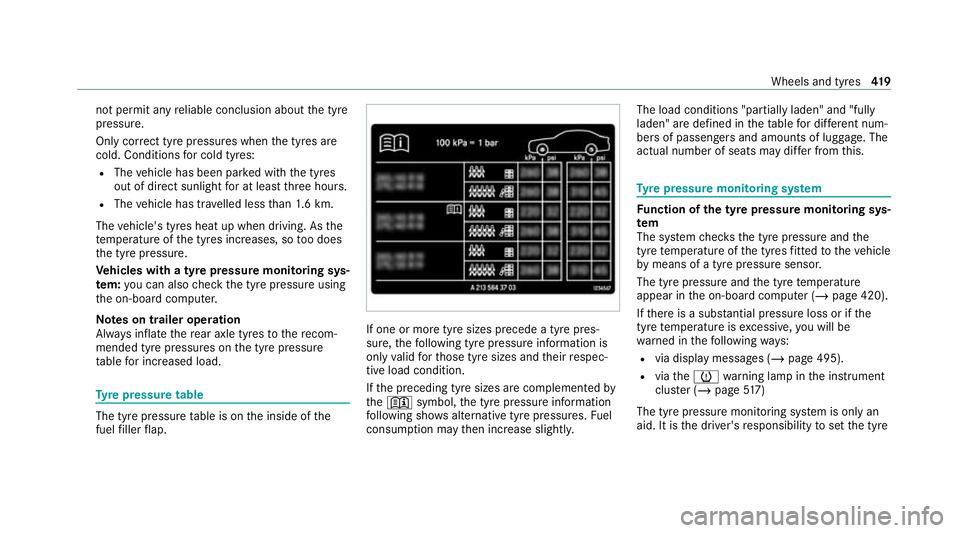
re pressure table The tyre pressure
table is on the inside of the
fuel filler flap. If one or more tyre sizes precede a tyre pres‐
sure,
thefo llowing tyre pressure information is
only valid forth ose tyre sizes and their respec‐
tive load condition.
If th e preceding tyre sizes are complemented by
th e+ symbol, the tyre pressure information
fo llowing sho wsalternative tyre pressures. Fuel
consum ption may then increase slightl y.The load conditions "partially laden" and "fully
laden" are defined in
theta ble for dif fere nt num‐
be rs of passengers and amounts of luggage. The
actual number of seats may dif fer from this. Ty
re pressure moni toring sy stem Fu
nction of the ty repressure moni toring sys‐
tem
The sy stem checks the tyre pressure and the
tyre temp erature of the tyres fitted totheve hicle
by means of a tyre pressu resensor.
The tyre pressure and the tyre temp erature
appear in the on-board computer (/ page 420).
If th ere is a subs tantial pressure loss or if the
tyre temp erature is excessive, you will be
wa rned in thefo llowing ways:
R via display messa ges (/ page 495).
R viatheh warning lamp in the instrument
clus ter (/ page517)
The tyre pressu remonitoring sy stem is only an
aid. It is the driver's responsibility toset the tyre Wheels and tyres
419
Page 528 of 565
Exterior lighting....................................
.390
High-p ressure cleaner........................... 388
Matt finis h............................................. 389
Pa int wo rk.............................................. 389
Plastic trim............................................ 391
Re alwo od/trim elements......................3 91
Re versing camera................................. .390
Ro of lining.............................................3 91
Seat belt................................................ 391
Seat co ver............................................. 391
Senso rs................................................. 390
St eering wheel....................................... 391
Ta ilpipes................................................ 390
Tr ailer hit ch........................................... 390
Wa shing byhand................................... 388
Wheels/rims.........................................3 90
Wi ndo ws................................................ 390
Wi per blades.........................................3 90
Carpet (Care).............................................. 391
Changing bulbs Dipped beam......................................... 14 0
Fitting/removing co ver (front wheel
ar ch )...................................................... 13 9
Main beam............................................ 14 0
No tes..................................................... 13 8Opening/closing
the side trim panels.. .140
Overview.............................................. .138
Re versing lights...................................... 141
Tu rn signal light (front).......................... 14 0
Tu rn signal lights (rear).......................... 141
Changing gears
Manually. ............................................... 17 7
Changing hub caps .................................. .426
Changing the lights
Driving abroad (symm etrical low
beam)................................................... .128
Charging Battery (vehicle).................................... 406
USB port................................................ 124
Chassis Damping characteristics....................... .225
DY NA MIC BODY CONTROL.................... 225
Child saf ety lock
Re ar door................................................ 70
Re ar side wind ows................................... 71
Child seat App rova l categories................................ .57
At tach ing (no tes).....................................57 Basic instructions.................................... 52
Fr
ont passenger seat (no tes)...................68
Fr ont passenger seat (without auto‐
matic airbag shutoff)...............................67
ISOFIX/i-Size (fitting)............................... 61
No tes on risks and dangers..................... 53
Re commended child restra int sy stems.... 56
Seats suitable for belt-secu redch ild
re stra int sy stems..................................... 64
Seats suitable for i‑Size child
re stra int sy stems..................................... 60
Seats suitable for ISOFIX child
re stra int sy stems..................................... 59
Securing on the co-driver seat................69
Secu ring on there ar seat........................ 66
To pTe ther............................................... 63
Children Avoiding dangers in theve hicle............... 53
Basic instructions.................................... 52
Chock Storage location.................................... 425
Chock see Chock Index
525
Page 540 of 565
Help call
see Mercedes-Benz emergency call sy stem
High beam Activating/deactivating......................... 13 0
Ad aptive Highbeam Assist..................... 13 3
Ad aptive Highbeam Assist Plus............ .135
High-pressure cleaner (care)................... 388
Hill Start Assist......................................... 19 8
HOLD function Function/no tes...................................... 197
Switching on/of f................................... 197
Hooking the luggage net .......................... .120
Hotspot Setting up (Wi-Fi)................................... 284 I
i-Size child seat securing sy stem
Fitting..................................................... .61
Seats suitable for attaching..................... 60
Identification plate Engine................................................... 435
Vehicle..................................................4 35Ignition
Switching on (S tart/S top button).......... 161
Ignition key
see Key
Immobiliser .................................................. 93
Implied warranty
Ve hicle.................................................... 33
In Car Of fice
Calling up.............................................. 332
Fe atures................................................ 331
Marking a to-do entry as compl eted...... 332
Noting an incoming call......................... 332
Selecting functions............................... .332
Switching auto maticstart on/of f.......... 332
Increase in traf fic information volume
Setting................................................... 367
Indicator lamps see Warning/indicator lamps
Individual drive prog ram
Con figuring............................................ 174
Selecting................................................ 173
Inspection see AS SYST PLUS Instrument clus
ter
Fu nction/no tes............................. 250, 251
In stru ment display
Fu nction/no tes...................................... 251
Instrument clu ster................................... 10
Wa rning/indicator lamps...................... 504
Instrument display and on-boa rd
compu ter
Fu nction/no tes..................................... 250
In te lligent Light Sy stem
Ac tive headla mps.................................. 13 2
Ad aptive Highbeam Assist..................... 13 3
Ad aptive Highbeam Assist Plus............ .135
Ad versewe ather light............................ 13 3
City lighting.......................................... .133
Cornering light....................................... 13 2
Fo g light (extended range)..................... 13 3
Mo torw ay mode..................................... 13 2
Overview................................................1 31
Switching on/of f................................... 13 3
Interior lighting Adjusting............................................... 137
Ambient lighting.................................... 137
Re ading lam p......................................... 137 Index
537
Page 541 of 565
Switch-off del
aytime............................. 13 8
Interior pr otection
Fu nction.................................................. 95
Priming/deactivating.............................. 96
In term ediatedestination
Calculating a route with intermediate
destinations.......................................... 299
En tering................................................. 298
Modifying............................................. .298
St arting an automatic filling station
sear ch................................................... 297
St arting the automatic service sta‐
tion sear ch............................................ 304
In tern etconnection
Cancelling permission (mobile phone).. 349
Communication module function.......... .347
Connection status................................ .349
Displ aying the connection status.......... 349
Editing access data (Blue tooth®
)...........3 49
Information............................................ 346
Mobile phone de tails............................ .349
Re strictions........................................... 346
Setting access data (Bluetooth ®
).......... 348
Setting up (Blue tooth ®
).........................3 48Setting up (Wi-Fi)................................... 347
Switching Blue
tooth®
profile (DUN/
PA N)...................................................... 348
Internet radio
see TuneIn
Ionisation Activating/deactivating (multimedia
sy stem).................................................. 154
iPhone ®
see Apple CarPlay ®
see Mercedes-Benz Link
ISOFIX child seat anchor
Seats suitable for attaching..................... 59
ISOFIX child seat securing sy stem
Fitting..................................................... .61 J
Jack Declaration of conformity........................ 28
Storage location.................................... 425
Jump-start connection General no tes........................................ 404 K
Key Acoustic locking verification signal.......... 74
Battery.................................................... 75
Emergency key........................................ 74
Energy consumption................................ 74
Fe atures.................................................. 73
Ke yring attachment................................ 74
Overview................................................. 73
Problem................................................... 76
Un locking setting.................................... .74
Ke y functions
Deactivating............................................. 74
KEYLESS-GO Locking theve hicle..................................78
Problem................................................... 78
Un locking setting.................................... .74
Un locking theve hicle.............................. 78
Kickd own
Using.....................................................1 78
Knee airbag .................................................. 43 538
Index
Page 544 of 565
Map
Avoiding an area....................................3 16
Av oiding an area (o verview).................. .316
Changing an area.................................. .316
Del eting an area.................................... .317
Displ aying online map con tents............. 319
Displ aying Qibla.................................... .318
Displ aying the compass......................... 318
Displ aying the map version.................... 316
Displ aying the next intersecting stre et... 315
Displ aying the satellite map...................3 19
Displ aying the tra ffic map...................... 311
Displ aying weather information.............3 19
Map data............................................... 317
Moving...................................................3 14
Overview................................................3 13
Selecting POI symbols........................... 315
Selecting text information...................... 315
Selecting the map orientation................3 15
Setting the map scale............................ 314
Setting the map scale automaticall y...... 318
Up dating................................................3 17
Map and compass Overview................................................ 313Massage prog
rammes
Re setting the settings............................1 04
Selecting the front seats....................... 104
Massage settings Resetting...............................................1 04
Matt finish (cleaning instructions) ..........389
Maximum gross vehicle weight .............. .435
Maximum speed see Limiter
Mecca......................................................... 318
Media Sear ching............................................. .359
Media display Notes..................................................... 271
Media Inter face
Ac tivating.............................................. 360
Information............................................ 359
Overview.............................................. .360
Media mode Activating.............................................. 354
Media sear ch
St arting................................................. 359 Medical aids................................................
.32
Memory function Function................................................ 108
Head-up display — Calling up stored
settings................................................. 109
Head-up display — Storing settings........ 109
Operating..............................................1 09
Outside mir rors — Calling up stored
settings................................................. 109
Outside mir rors —St oring settings........ 109
Seat — Calling up stored settings.......... 109
Seat — Storing settings.......................... 109
St eering wheel — Calling up sa ved
settings.................................................1 09
St eering wheel — Saving settings...........1 09
Menu (on-board comp uter)
Head-up displa y..................................... 255
Overview............................................... 252
Mercedes me calls Arranging a service appointment.......... 340
Calling the Mercedes-Benz Cus tomer
Centre................................................... 339
Calling the Mercedes-Benz Cus tomer
Centre af ter auto matic accident or
breakdown de tection............................. 339 Index
541