2020 MAZDA MODEL CX-5 camera
[x] Cancel search: cameraPage 369 of 714

If the Forward Sensing Camera (FSC) detects that the windshield is dirty or foggy, the
system functions related to the Forward Sensing Camera (FSC) are temporarily stopped
and the following warning lights turn on. However, this does not indicate a problem.
Remove the dirt from the windshield or press the defroster switch and defog the
windshield.
High Beam Control System (HBC) warning light (amber)
Lane-keep Assist System (LAS) & Lane Departure Warning System (LDWS) warning
indication
Mazda Radar Cruise Control with Stop & Go function (MRCC with Stop & Go
function) warning indication
Smart Brake Support/Smart City Brake Support (SBS/SCBS) warning indication/
warning light (amber)
If there are recognizable cracks or damage caused by flying gravel or debris on the
windshield, always have the windshield replaced. Consult an Authorized Mazda Dealer
for replacement.
(With Advanced Smart City Brake Support (Advanced SCBS))
The Forward Sensing Camera (FSC) recognizes pedestrians when all of the following
conditions are met:
The height of a pedestrian is about 1 to 2 meters.
An outline such as the head, both shoulders, or the legs can be determined.
In the following cases, the Forward Sensing Camera (FSC) may not be able to detect
target objects correctly:
Multiple pedestrians are walking, or there are groups of people.
A pedestrian is close to a separate object.
A pedestrian is crouching, lying, or slouching.
A pedestrian suddenly jumps into the road right in front of the vehicle.
A pedestrian opens an umbrella, or is carrying large baggage or articles.
A pedestrian is in a dark location such as during the night, or blends into the
background by wearing clothes matching the background color.
When Driving
i-ACTIVSENSE
4-211
CX-5_8HX6-EA-19I_Edition2_old 2019-9-19 9:26:07
Page 375 of 714

Front Camera/Side Cameras/Rear Camera*
Your vehicle is equipped with a front camera, side cameras, and a rear camera. The 360°
View Monitor uses each camera.
The front camera, side cameras, and rear camera shoot images of the area surrounding the
vehicle.
Each camera is installed to the following positions.
Rear camera
Side camera
Side camera
Front camera
When Driving
i-ACTIVSENSE
*Some models.4-217
CX-5_8HX6-EA-19I_Edition2_old 2019-9-19 9:26:07
Page 389 of 714

Rear View Monitor*
The rear view monitor provides visual images of the rear of the vehicle when reversing.
WA R N I N G
Always drive carefully
confirming the safety of the rear and the surrounding conditions by
looking directly with your eyes:
Reversing the vehicle by only looking at the screen is dangerous as it may cause an accident
or a collision with an object. The rear view monitor is only a visual assist device when
reversing the vehicle. The images on the scree n may be different from the actual conditions.
CAUTION
Do not use the rear view monitor under th e following conditions: Using the rear view
monitor under the following conditions is dang erous and could result in injury or vehicle
damage or both.
Icy or snow-covered roads.
Tire chains or a temporary spare tire is installed.
The liftgate is not fully closed.
The vehicle is on a road incline.
When the display is cold, images may course across the monitor or the screen and may be
dimmer than usual, which could cause difficulty in confirming the surrounding conditions
of the vehicle. Always drive carefully confirm ing the safety of the rear and the surrounding
conditions by looking directly with your eyes.
Do not apply excessive force to the camera. The camera position and angle may deviate.
Do not disassemble, modify, or remove it as it may no longer be waterproof.
The camera cover is made of plastic. Do no t apply degreasing agents, organic solvents,
wax, or glass coating agents to the camera cover. If any are spilled on the cover, wipe off
with a soft cloth immediately.
Do not rub the camera cover forcefully with an abrasive or hard brush. The camera cover or
lens may be scratched which might affect the images.
NOTE
If water, snow, or mud is stuck on the camera lens, wipe it off using a soft cloth. If it
cannot be wiped off, use a mild detergent.
If the camera temperature changes rapidly (Hot to cold, cold to hot), the rear view
monitor may not operate correctly.
When replacing the tires, consult an Authorized Mazda Dealer. Replacing the tires could
result in deviation of the guide lines which appear on the display.
When Driving
Rear View Monitor
*Some models.4-231
CX-5_8HX6-EA-19I_Edition2_old 2019-9-19 9:26:07
Page 390 of 714

If the vehicle's front, side, or rear has been involved in a collision, the alignment of the
rear view parking camera (location, installation angle) may have deviated. Always
consult an Authorized Mazda Dealer to have the vehicle inspected.
If “No Video Signal Available” is indicated in the display, there could be a problem with
the camera. Have your vehicle inspected at an Authorized Mazda Dealer.
▼ Rear View Parking Camera Location
Rear view parking camera
▼Switching to the Rear View Monitor Display
Shift the shift lever/selector leve
r to R with the ignition switched ON to switch the display
to the rear view monitor display.
NOTE
When the shift lever/selector lever is shifted from R to another shift lever/selector lever
position, the screen return s to the previous display.
When Driving
Rear View Monitor
4-232
CX-5_8HX6-EA-19I_Edition2_old 2019-9-19 9:26:07
Page 391 of 714
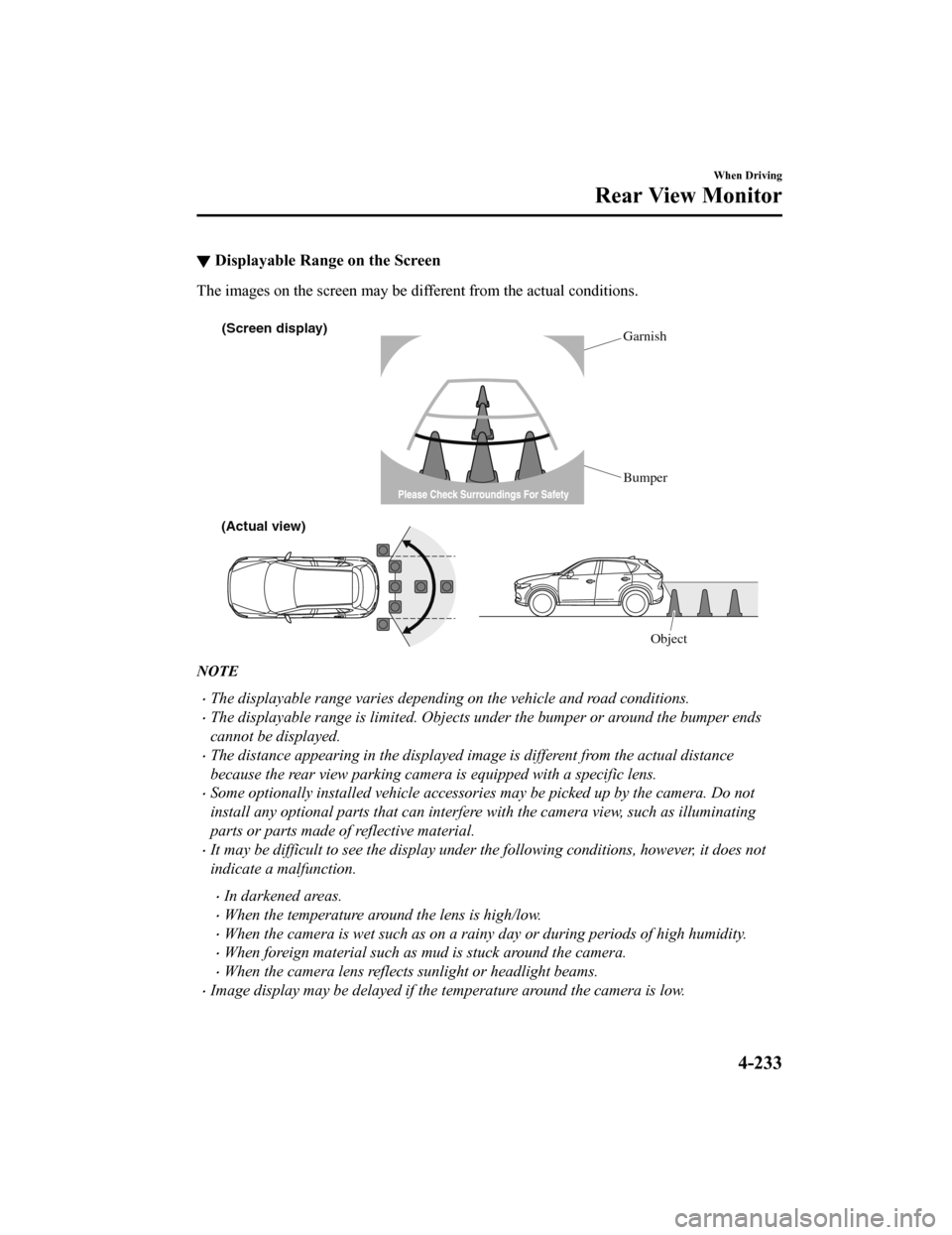
▼Displayable Range on the Screen
The images on the screen may be different from the actual conditions.
(Screen display)
Garnish
Bumper
(Actual view)
Object
NOTE
The displayable range varies depending on the vehicle and road conditions.
The displayable range is limited. Objects under the bumper or around the bumper ends
cannot be displayed.
The distance appearing in the displayed image is different from the actual distance
because the rear view parking camera is equipped with a specific lens.
Some optionally installed vehicle accessories may be picked up by the camera. Do not
install any optional parts that can interfere with the camera view, such as illuminating
parts or parts made of reflective material.
It may be difficult to see the display under the following conditions, however, it does not
indicate a malfunction.
In darkened areas.
When the temperature around the lens is high/low.
When the camera is wet such as on a rainy day or during periods of high humidity.
When foreign material such as mud is stuck around the camera.
When the camera lens reflects sunlight or headlight beams.
Image display may be delayed if the temperature around the camera is low.
When Driving
Rear View Monitor
4-233
CX-5_8HX6-EA-19I_Edition2_old 2019-9-19 9:26:07
Page 392 of 714

▼Viewing the Display
Guide lines which indicate the width of the vehicle (yellow) are displayed on the screen as a
reference to the approximate width of the vehicle in comparison to the width of the parking
space you are about to back into.
Use this display view for parking your vehicle in a parking space or garage.
b
a
a) Vehicle width guide lines (yellow)
These guide lines serve as a reference to the approximate width of the vehicle.
b) Distance guide lines. These guide lines indicate the approximate distance to a point measured from the
vehicle's rear (from the end of the bumper).
The red and yellow lines indicate the points about 50 cm (19 in) for the red line and
100 cm (39.3 in) for the yellow lines from the rear bumper (at the center point of each
of the lines).
CAUTION
The guide lines on the screen are fixed lines. They are not synced to the driver's turning of the
steering wheel. Always be careful and check th e area to the vehicle's rear and the surrounding
area directly with your eyes while backing up.
▼ Rear View Monitor Operation
The operation of the rear view monitor when
reversing the vehicle varies depending on the
traffic, road, and vehicle conditions. The amo unt of steering and the timing also varies
depending on conditions, so confirm the surrou nding conditions directly with your eyes and
steer the vehicle in accordance with the conditions.
Be well aware of the above cautions prior to using the rear view monitor.
NOTE
Images displayed on the monitor from the rear view parking camera are reversed images
(mirror images).
When Driving
Rear View Monitor
4-234
CX-5_8HX6-EA-19I_Edition2_old 2019-9-19 9:26:07
Page 616 of 714

SignalWarning
(Red)
(Turns on)
KEY Warning
Light
*
If any malfunction occurs in the keyless entry system, it illuminates continuously.
CAUTION
If the key warning indicator light illuminates or the push button start indicator light (amber)
flashes, the engine may not start. If the engine cannot be started, try starting it using the
emergency operation for starting the engine, and have the vehicle inspected at an Author‐
ized Mazda Dealer as soon as possible.
Refer to Emergency Operation for St arting the Engine on page 4-10.
(Amber)
High Beam Control System (HBC)
Warning Indication/
Wa r n i n g L i g h t
*
The light remains turned on if there is a pr oblem with the system. Have your vehicle in-
spected at an Authorized Mazda Dealer.
NOTE
If the Forward Sensing Camera (FSC) field of view is impaired during bad weather condi-
tions (such as rain, fog, and snow) and when the windshield is dirty, the warning indica-
tion/warning light for the High Beam Contro l System (HBC) may display/turn on. Howev-
er, this does not indicate a problem.
Blind Spot Monitor- ing (BSM) Warning
Indication
*
The Warning indication turns on if there is any malfunction in the Blind Spot Monitoring
(BSM). Have your vehicle inspected by an Authorized Mazda Dealer.
NOTE
If the vehicle is driven on a road with less traffic and few vehicles that the radar sensors
can detect, the system may pause. How ever, it does not indicate a malfunction.
Blind Spot Monitor-
ing (BSM) OFF In-
dicator Light
*
A problem in the system may be indicated under the following conditions.
Have your vehicle inspected at an Authorized Mazda Dealer.
The light does not turn on when the ignition is switched ON.The light remains on even when the Blind Spot Monitoring (BSM) system can be oper-
ated.
It turns on while driving the vehicle.
NOTE
If the vehicle is driven on a road with less traffic and few vehicles that the radar sensors
can detect, the system may pause (The Blin d Spot Monitoring (BSM) OFF indicator light
in the instrument cluster illuminates). Ho wever, it does not indicate a malfunction.
(Amber)
Mazda Radar Cruise Control with Stop & Go function
(MRCC with Stop & Go function)
Warning Indication
*
The message is displayed when the system ha s a malfunction. Have your vehicle inspect-
ed at an Authorized Mazda Dealer.
If Trouble Arises
Warning/Indicator Lights and Warning Sounds
7-32*Some models.
CX-5_8HX6-EA-19I_Edition2_old 2019-9-19 9:26:07
Page 706 of 714

Index
Electric Parking Brake (EPB) Warning
Beep...................................................7-45
Emergency StartingPush-starting................................ 7-16
Running out of fuel (SKYACTIV-D
2.2)............................................... 7-17
Starting a flooded engine
(SKYACTIV-G 2.0, SKYACTIV-G
2.5, and SKYACTIV-G 2.5T)...... 7-16
Emergency Towing
Tiedown hooks......... ................... 7-21
Towing description...................... 7-20
Emission Control System (SKYACTIV-
D 2.2)................................................ 3-31
Emission Control System (SKYACTIV-
G 2.0, SKYACTIV-G 2.5, SKYACTIV-G
2.5T).................................................. 3-30
Ending Screen Display.................... 4-114
Engine
Coolant.........................................6-29
Engine compartment overview.... 6-23
Exhaust gas.................................. 3-32
Hood release............. ................... 6-21
Oil................................................ 6-25
Starting...........................................4-5
Essential Information.......................... 6-2
Event Data Recorder......................... 8-21
Excessive Speed Warning................. 7-47
Exhaust Gas...................................... 3-32
Exterior Care..................................... 6-65 Aluminum wheel maintenance.... 6-69
Bright-metal maintenance........... 6-68
Maintaining the finish................. 6-66
Plastic part maintenance.............. 6-70
F
Flasher
Hazard warning........................... 4-89
Headlights.................................... 4-75
Flat Tire............................................... 7-3
Mounting the spare tire............... 7-10
Removing a flat tire...................... 7-7
Floor Mat.......................................... 3-53
Fluid
Brake............................................6-31
Washer......................................... 6-31
Fluids
Classification................................. 9-5
Fog Lights......................................... 4-81
Foot Brake.........................................4-97
Forward Sensing Camera (FSC)..... 4-207
Front Seat............................................ 2-5
Fuel
Filler lid and cap......................... 3-34
Requirements (SKYACTIV-D
2.2)............................................... 3-28
Requirements (SKYACTIV-G 2.0,
SKYACTIV-G 2.5, SKYACTIV-G
2.5T)............................................ 3-28
Tank capacity.................................9-5
Fuel Consumption Display..............4-113
Fuel Economy Monitor. .................. 4-113
Ending screen display................4-114
Fuel consumption display.......... 4-113
Fuses.................................................. 6-58
Panel description......................... 6-61
Replacement................................ 6-58
G
Gauges............................................... 4-12
Glove Compartment... ..................... 5-101
H
Hazardous Driving............................ 3-52
Hazard Warning Flasher....................4-89
Headlights
Coming home light......................4-78
Control......................................... 4-75
Headlight flashing....................... 4-78
High-low beam............................ 4-78
10-4
CX-5_8HX6-EA-19I_Edition2_old 2019-9-19 9:26:07