2020 MAZDA MODEL CX-30 lock
[x] Cancel search: lockPage 133 of 562
Drive slowly. Braking performance
can be adversely affected if snow or
ice adheres to the brake
components. If this situation occurs,
drive the vehicle slowly, releasing the
accelerator pedal and lightly applying
the brakes several times until the
brake performance returns to
normal.
▼Snow Tires
Use snow tires on all 4 wheels
Do not go faster than 120 km/h (75
mph) while driving with snow tires.
Inflate
snow tires 30 kPa (0.3 kgf/cm
2,
4.3 psi) more than recommended on
the tire pressure label (driver's door
frame), but never more than the
maximum cold-tire pressure shown on
the tires.
The vehicle is originally equipped with
all season radials designed to be used
all year around. In some extreme
climates you may find it necessary to
replace them with snow tires during
the winter months to further improve
traction on snow and ice covered
roads.
WARNING
Use only the same size and type tires
(snow, radial, or non-radial) on all 4
wheels:
Using tires different in size or type is
dangerous. Your vehicle's handling
could be greatly affected and result in
an accident.
CAUTION
Check local regulations before using
studded tires.
NOTE
The tire pressure monitoring system
may not function correctly when using
tires with steel wire reinforcement in
the sidewalls (page 4-206).
▼ Tire Chains
Check local regulations before using
tire chains.
CAUTION
Chains may aff ect handling.
Do not go faster than 50 km/h (30
mph) or the chain manufacturer's
recommended limit, whichever is
lower.
Drive carefully and avoid bumps,
holes, and sharp turns.
Avoid locked-wheel braking.
Do not use chains on a temporary
spare tire; it may result in damage to
the vehicle and to the tire.
Do not use chains on roads that are
free of snow or ice. The tires and
chains could be damaged.
Chains may scratch or chip
aluminum wheels.
NOTE
The tire pressure monitoring system
may not function correctly when
using tire chains.
Install the chains on the front tires only.
Do not use chains on the rear tires.
Please consult an Authorized Mazda
Dealer.
Installing the chains
1. If your vehicle is equipped with wheel covers remove them,
otherwise the chain bands will
scratch them.
2. Secure the chains on the front tires as tightly as possible.
Before Driving
Driving Tips
3-51
CX-30_8HG6-EA-19I_Edition1_new 2019-6-13 18:45:11
Page 137 of 562
4When Driving
Information concerning safe driving and stopping.
Start/Stop Engine..................... 4-4 Ignition Switch.......................4-4
Starting the Engine................. 4-5
Turning the Engine Off............ 4-9
Cylinder Deact ivat ion
*..........4-10
Instrument Cluster and
Display.................................. 4-11 Instrument Cluster and
Display................................4-11
Instrument Cluster............... 4-11
Active Driving Display
*......... 4-27
Manual Transmission
Operation.............................. 4-29 Manual Transmission Shift
Pattern................................ 4-29
Automatic Transmission........... 4-31 Automatic Transmission
Controls.............................. 4-31
Shift-Lock System................. 4-32
Transmission Ranges............ 4-33
Manual Shift Mode.............. 4-34
Direct Mode
*.......................4-40
Driving Tips......................... 4-41
Switches and Controls............. 4-42
Lighting Control................... 4-42
Turn and Lane-Change
Signals................................ 4-47
Windshield Wipers and
Washer............................... 4-48
Rear Window Wiper and
Washer............................... 4-52
Rear Window Defogger........ 4-53
Horn................................... 4-54
Hazard Warning Flasher....... 4-55
HomeLink Wireless Control
System
*............................... 4-55
Brake.....................................4-60 Brake System....................... 4-60
AUTOHOLD........................ 4-65
Hill Launch Assist (HLA)........4-69
ABS/TCS/DSC/Off-Road
Traction Assist.........................4-71 Antilock Brake System
(ABS).................................. 4-71
Tra c t i o n C o n t r o l Sy s te m
(TCS).................................. 4-72
Dynamic Stability Control
(DSC)................................. 4-74
Off-Road Traction Assist
*...... 4-75
Drive Selection....................... 4-77 Drive Selection
*................... 4-77
i-ACTIV AWD......................... 4-79 i-ACTIV AWD Operation
*..... 4-79
*Some models.4-1
CX-30_8HG6-EA-19I_Edition1_new 2019-6-13 18:45:11
Page 140 of 562
Ignition Switch
▼Push Button Start Positions
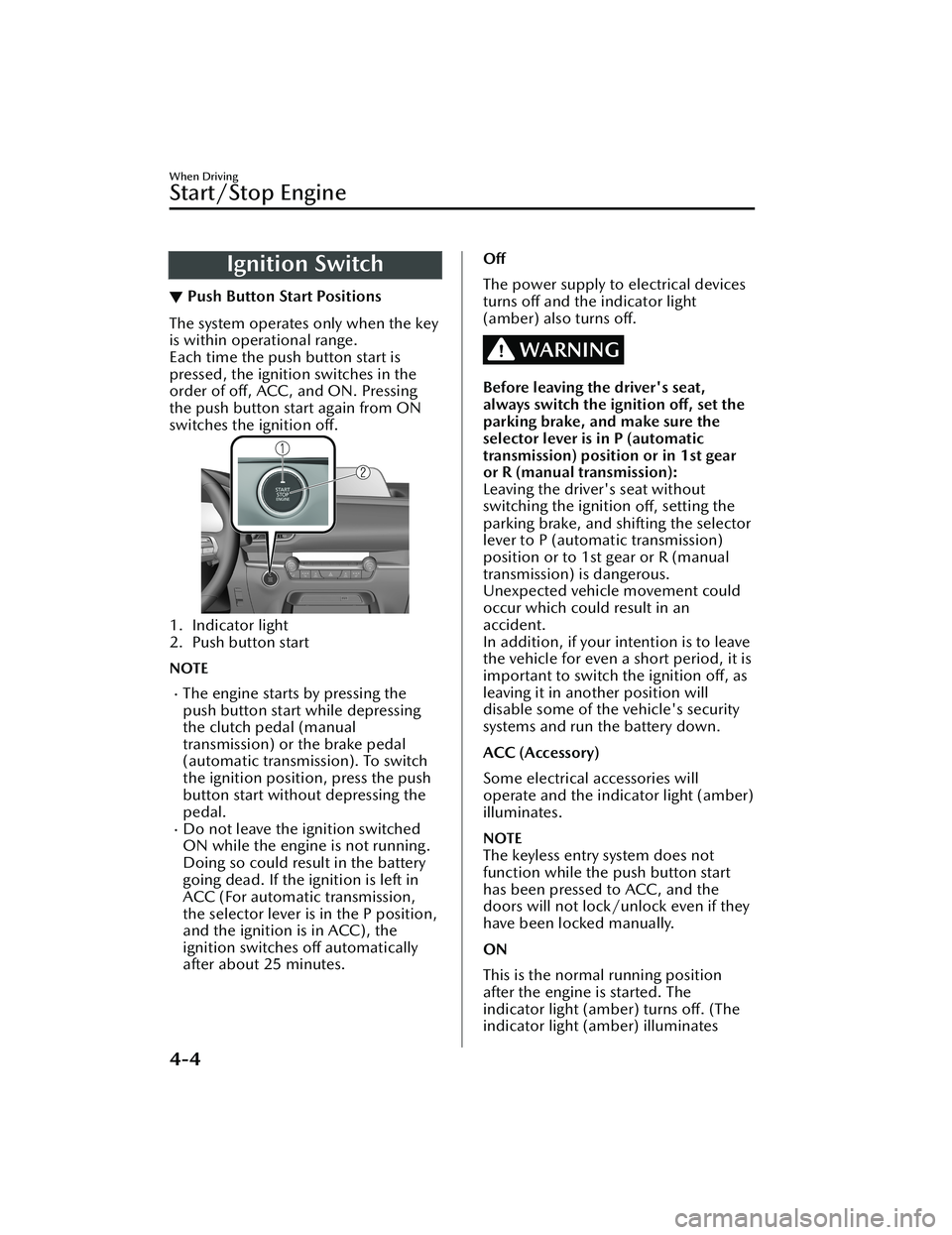
The system operates only when the key
is within operational range.
Each time the push button start is
pressed, the ignition switches in the
order of
off, ACC, and ON. Pressing
the push button start again from ON
switches the ignition off.
1. Indicator light
2. Push button start
NOTE
The engine starts by pressing the
push button start while depressing
the clutch pedal (manual
transmission) or the brake pedal
(automatic transmission). To switch
the ignition position, press the push
button start without depressing the
pedal.
Do not leave the ignition switched
ON while the engine is not running.
Doing so could result in the battery
going dead. If the ignition is left in
ACC (For automatic transmission,
the selector lever is in the P position,
and the ignition is in ACC), the
ignition switches off automatically
after about 25 minutes.
Off
The power supply to electrical devices
turns off and the indicator light
(amber) also turns off.
WARNING
Before leaving the driver's seat,
always switch the ignition off, set the
parking brake, and make sure the
selector lever is in P (automatic
transmission) position or in 1st gear
or R (manual transmission):
Leaving the driver's seat without
switching the ignition off, setting the
parking brake, and shifting the selector
lever to P (automat ic transmission)
position or to 1st gear or R (manual
transmission) is dangerous.
Unexpected vehicle movement could
occur which could result in an
accident.
In addition, if your intention is to leave
the vehicle for even a short period, it is
important to switch the ignition off, as
leaving it in another position will
disable some of the vehicle's security
systems and run the battery down.
ACC (Accessory)
Some electrical accessories will
operate and the indicator light (amber)
illuminates.
NOTE
The keyless entry system does not
function while the push button start
has been pressed to ACC, and the
doors will not lock/unlock even if they
have been locked manually.
ON
This is the normal running position
after the engine is started. The
indicator light (amber) turns off. (The
indicator light (amber) illuminates
When Driving
Start/Stop Engine
4-4
CX-30_8HG6-EA-19I_Edition1_new 2019-6-13 18:45:11
Page 167 of 562

Automatic TransmissionControls
▼Automatic Transmission Controls
1. Lock-release button
2. Selector lever
Indication Various Lockouts
Indicates that you must depress
the brake pedal and hold in the
lock-release button to shift (The ig-
nition must be switched ON).
Indicates the selector lever can be
shifted freely into any position.
Indicates that you must hold in the
lock-release button to shift.
NOTE
The Sport AT has an option that is not
included in the traditional automatic
transmission that gives the driver the
option of selecting each gear instead of
leaving it to the tr ansmission to shift
gears. Even if you intend to use the
automatic transmission functions as a
traditional automatic, you should also
be aware that you can inadvertently
shift into manual shift mode and an
inappropriate gear may be retained as
the vehicle speed increases. If you
notice the engine speed going higher
or hear the engine racing, confirm you
have not accidentally slipped into
manual shift mode (page 4-34).
When Driving
Automatic Transmission
4-31
CX-30_8HG6-EA-19I_Edition1_new 2019-6-13 18:45:11
Page 168 of 562

Shift-Lock System
▼Shift-Lock System
The shift-lock system prevents shifting
out of P unless the brake pedal is
depressed.
To s h i f t f r o m
P:
1. Depress and hold the brake pedal.
2. Start the engine.
3. Press and hold the lock-release button.
4. Move the selector lever.
NOTE
When the ignition is switched to
ACC or the ignition is switched off,
the selector lever cannot be shifted
from P position.
The ignition cannot be switched to
OFF if the selector lever is not in P
position.
▼ Shift-Lock Override
If the selector lever will not move from
P position using the proper shift
procedure, continue to hold down the
brake pedal.
1. Remove the shift-lock override
cover using a cloth-wrapped flat
head screwdriver.
2. Insert a flat screwdriver and push it down.
1. Cover
3. Press and hold the lock-release button.
4. Move the selector lever.
Take the vehicle to an Authorized
Mazda Dealer to have the system
checked.
When Driving
Automatic Transmission
4-32
CX-30_8HG6-EA-19I_Edition1_new 2019-6-13 18:45:11
Page 169 of 562

Tra n s m i s s i o n R a n ge s
▼Transmission Ranges
The shift position indication in the
instrument cluster illuminates.
Refer to Shift Position Indication on
page 4-34.
Shift the selector lever to the P or N
position to start the engine.
P (Park)
P locks the transmission and prevents
the front wheels from rotating.
WARNING
Always set the selector lever to P
position and set the parking brake:
Only setting the selector lever to the P
position without using the parking
brake to hold the vehicle is dangerous.
If P fails to hold, the vehicle could
move and cause an accident.
CAUTION
Shifting into P, N or R while the
vehicle is moving can damage your
transmission.
Shifting into a driving gear or reverse
when the engine is running faster
than idle can damage the
transmission.
R (Reverse)
In position R, the vehicle moves only
backward. You must be at a complete
stop before shifting to or from R,
except under rare circumstances as
explained in Rocking the Vehicle (page
3-50).
N (Neutral)
In N, the wheels and transmission are
not locked. The vehicle will roll freely
even on the slightest incline unless the
parking brake or brakes are on.
WARNING
If the engine is running faster than
idle, do not shift from N or P into a
driving gear:
It's dangerous to shift from N or P into
a driving gear when the engine is
running faster than idle. If this is done,
the vehicle could move suddenly,
causing an accident or serious injury.
Do not shift into N when driving the
vehicle:
Shifting into N while driving is
dangerous. Engine braking cannot be
applied when decelerating which
could lead to an accident or serious
injury.
CAUTION
Do not shift into N when driving the
vehicle. Doing so can cause
transmission damage.
NOTE
Apply the parking brake or depress the
brake pedal before moving the selector
lever from N position to prevent the
vehicle from moving unexpectedly.
D (Drive)
D is the normal driving position. From
a stop, the transmission will
automatically shift through a 6-gear
sequence.
M (Manual)
M is the manual shift mode position.
Gears can be shifted up or down by
operating the selector lever.
Refer to Manual Shift Mode on page
4-34.
When Driving
Automatic Transmission
4-33
CX-30_8HG6-EA-19I_Edition1_new 2019-6-13 18:45:11
Page 181 of 562

▼Headlight High-Low Beam
The headlights switch between high
and low beams by moving the lever
forward or backward.
1. High beam
2. Low beam
When the headlight high-beams are
on, the headlight high-beam indicator
light is turned on.
▼Flashing the Headlights
The headlights can be flashed with the
ignition switched to ON.
To flash the headligh
ts, pull the lever
fully towards you (the headlight switch
does not need to be on).
1. OFF
2. Headlight flashing
The headlight high-beam indicator
light in the instrument cluster
illuminates simultaneously. The lever
will return to the normal position when
released.
▼ Coming Home Light
The coming home light turns on the
headlights (low beams) when the lever
is operated.
To turn on the lights
When the lever is pulled with the
ignition switched to ACC or OFF, the
low beam headlights turn on.
The headlights turn off after a certain
period of time has elapsed after all of
the doors are closed.
NOTE
The time until the headlights turn
off
after all of the doors are closed can
be changed.
Refer to the Settings section in the
Mazda Connect Owner's Manual.
If no operations are done for 3
minutes after the lever is pulled, the
headlights turn off.
The headlights turn off if the lever is
pulled again while the headlights are
illuminated.
▼ Leaving Home Light
The leaving home light turns on the
lights when the transmitter unlock
button is pressed while away from the
vehicle.
When Driving
Switches and Controls
4-45
CX-30_8HG6-EA-19I_Edition1_new
2019-6-13 18:45:11
Page 182 of 562

The following lights turn on when the
leaving home light is operated.
Low beams, Parking lights, Taillights,
License plate lights.
To turn on the lights
When the ignition switch and the
headlight switch are in the following
conditions, the headlights will
illuminate when the transmitter unlock
button is pressed and the vehicle
receives the transmitter signal. The
headlights turn off after a certain
period of time has elapsed (30
seconds).
Ignition switch: off
Headlight switch: AUTO, , or
1. Lock button
2. Unlock button
NOTE
Operation of the leaving home light
can be turned on or off.
Refer to the Settings section in the
Mazda Connect Owner's Manual.
When the transmitter lock button is
pressed and the vehicle receives the
transmitter signal, the headlights turn
off.
When the headlight switch is turned
to the OFF position, the headlights
turn off.
▼ Headlight Leveling
The number of passengers and weight
of cargo in the luggage compartment
change the angle of the headlights.
Auto type
The angle of the headlights will be
automatically adjusted when turning
on the headlights.
A system malfunction or operation
conditions are indicated by a warning.
Refer to Exterior Light Warning
Indication/Warning Light on page
7-29.
Manual type
When adjusting the illumination angle
of the headlights, refer to the Settings
section in the Mazda Connect
Owner's Manual.
Select the proper headlight angle from
the following chart.
Front seat
Rearseat LoadIllumi-
nation angle
(num- ber)
Driver Passenger
× ――― 0
×× ――0
××× ―1
× × ××2
× ―― ×3.5
×: Yes
―: No
▼ Daytime Running Lights
Some countries require moving
vehicles to have their lights on
When Driving
Switches and Controls
4-46
CX-30_8HG6-EA-19I_Edition1_new
2019-6-13 18:45:11