2020 MASERATI GRANTURISMO wheel
[x] Cancel search: wheelPage 129 of 286

These applications use the MTC+
display as projector of the functions
available on the connected device.
“Apple CarPlay” allows the best use of
your iPhone
®in the car and perfect
integration with the MTC + display
and with the controls of the car,
including Siri voice control. You can
make phone calls, access to music,
send and receive messages, get
real-time directions on traffic
conditions, staying focused on the
road.
The “Android Auto” app lets you
share information while driving and
make it easier to access Google. The
interface is equipped with Google
Maps with voice guided navigation,
traffic information in real time,
on-demand access to millions of songs
in Google Play Music. It also offers the
possibility to make phone calls or send
and receive messages without takingyour hands off the steering wheel.
You can also request Google to make
any type of research. Android Auto
will give an easier access to
applications and content from the
MTC+ system display.
The following tables show the
“Screen” and “Audio” source (of
projection device
or of MTC+
System
MTC+) when a smartphone is
connected, a session is established and
the device (Table A) or the MTC+
System (Table B) is performing an
action.
Dashboard Instruments and Controls
4
125
Page 132 of 286
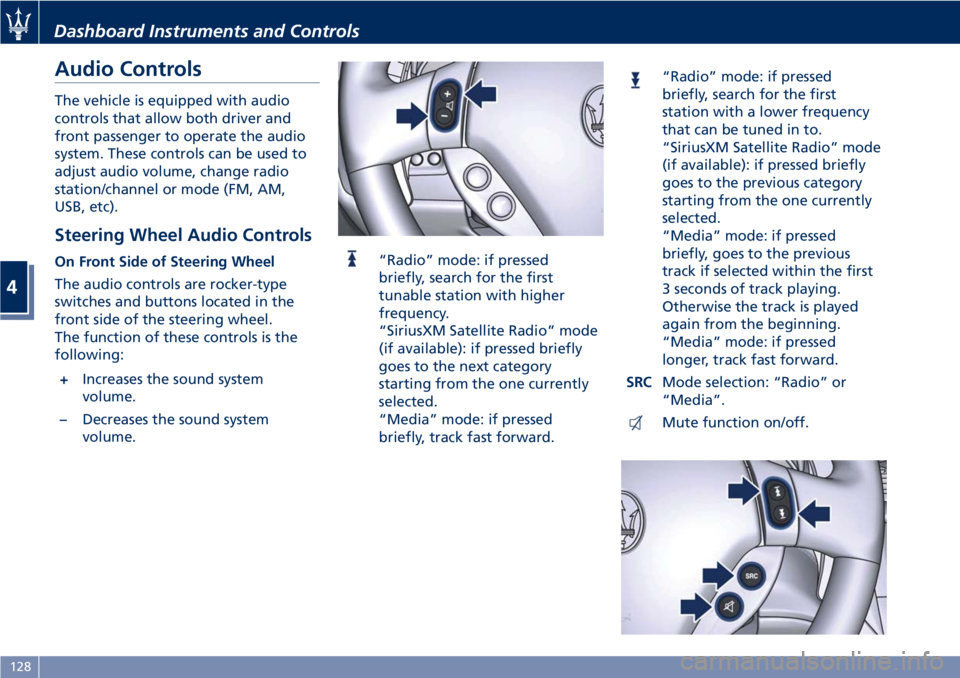
Audio Controls
The vehicle is equipped with audio
controls that allow both driver and
front passenger to operate the audio
system. These controls can be used to
adjust audio volume, change radio
station/channel or mode (FM, AM,
USB, etc).
Steering Wheel Audio Controls
On Front Side of Steering Wheel
The audio controls are rocker-type
switches and buttons located in the
front side of the steering wheel.
The function of these controls is the
following:
+Increases the sound system
volume.
–Decreases the sound system
volume.“Radio” mode: if pressed
briefly, search for the first
tunable station with higher
frequency.
“SiriusXM Satellite Radio” mode
(if available): if pressed briefly
goes to the next category
starting from the one currently
selected.
“Media” mode: if pressed
briefly, track fast forward.
“Radio” mode: if pressed
briefly, search for the first
station with a lower frequency
that can be tuned in to.
“SiriusXM Satellite Radio” mode
(if available): if pressed briefly
goes to the previous category
starting from the one currently
selected.
“Media” mode: if pressed
briefly, goes to the previous
track if selected within the first
3 seconds of track playing.
Otherwise the track is played
again from the beginning.
“Media” mode: if pressed
longer, track fast forward.
SRCMode selection: “Radio” or
“Media”.
Mute function on/off.
Dashboard Instruments and Controls
4
128
Page 133 of 286
NOTE:
“SiriusXM Satellite Radio” is the US
service only available in the 48
Continental United States and
Canadian markets. Subscription is
required. For further details refer to
the Maserati Touch Controls Plus
(MTC+) guide.
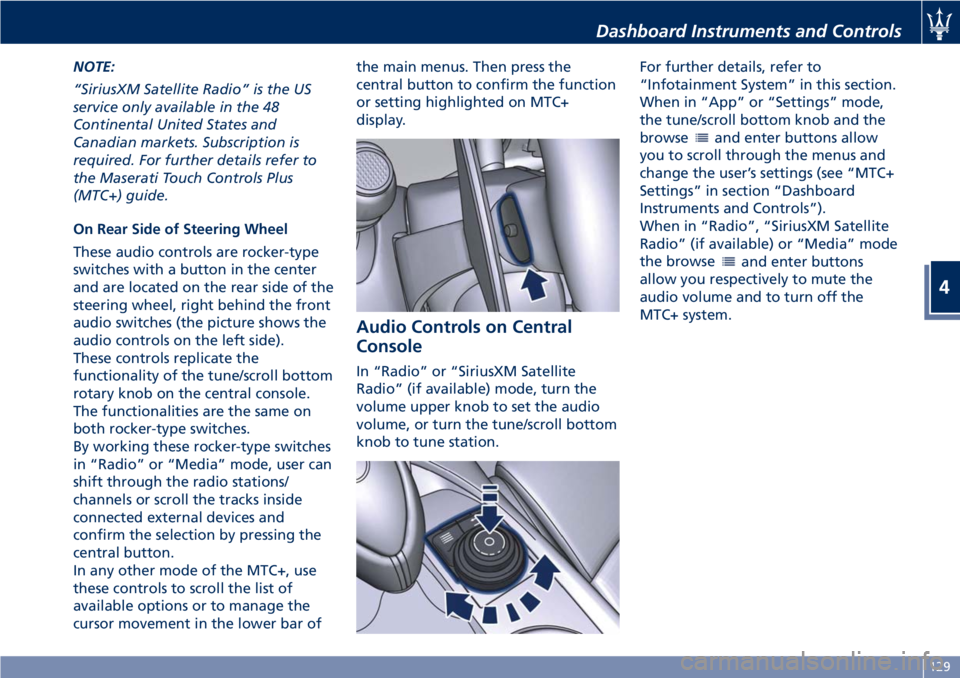
On Rear Side of Steering Wheel
These audio controls are rocker-type
switches with a button in the center
and are located on the rear side of the
steering wheel, right behind the front
audio switches (the picture shows the
audio controls on the left side).
These controls replicate the
functionality of the tune/scroll bottom
rotary knob on the central console.
The functionalities are the same on
both rocker-type switches.
By working these rocker-type switches
in “Radio” or “Media” mode, user can
shift through the radio stations/
channels or scroll the tracks inside
connected external devices and
confirm the selection by pressing the
central button.
In any other mode of the MTC+, use
these controls to scroll the list of
available options or to manage the
cursor movement in the lower bar ofthe main menus. Then press the
central button to confirm the function
or setting highlighted on MTC+
display.
Audio Controls on Central
Console
In “Radio” or “SiriusXM Satellite
Radio” (if available) mode, turn the
volume upper knob to set the audio
volume, or turn the tune/scroll bottom
knob to tune station.For further details, refer to
“Infotainment System” in this section.
When in “App” or “Settings” mode,
the tune/scroll bottom knob and the
browse
and enter buttons allow
you to scroll through the menus and
change the user’s settings (see “MTC+
Settings” in section “Dashboard
Instruments and Controls”).
When in “Radio”, “SiriusXM Satellite
Radio” (if available) or “Media” mode
the browse
and enter buttons
allow you respectively to mute the
audio volume and to turn off the
MTC+ system.
Dashboard Instruments and Controls
4
129
Page 148 of 286
• compressor enabled (the LED on the
button is illuminated);
• defrosting/defogging function (MAX
DEF) deactivated (the LED on the
button is off);
• heated rear window deactivated (the
LED on the button is off);
• open recirculation (the LED on the
button is off);
• air ventilation and distribution are
set by the system;
• REAR disabled (the LED on the
button is off), the air flows to the
rear vents.
A/C Filter
The climate control system filters
outside air containing dust, pollen and
some odors. Strong odors cannot be
totally removed by A/C filter at the
entrance of the air climate system. See
“Maintenance Procedures” in section
“Maintenance and Care” for filter
replacement instructions.
Phone and Voice Controls
on Steering Wheel
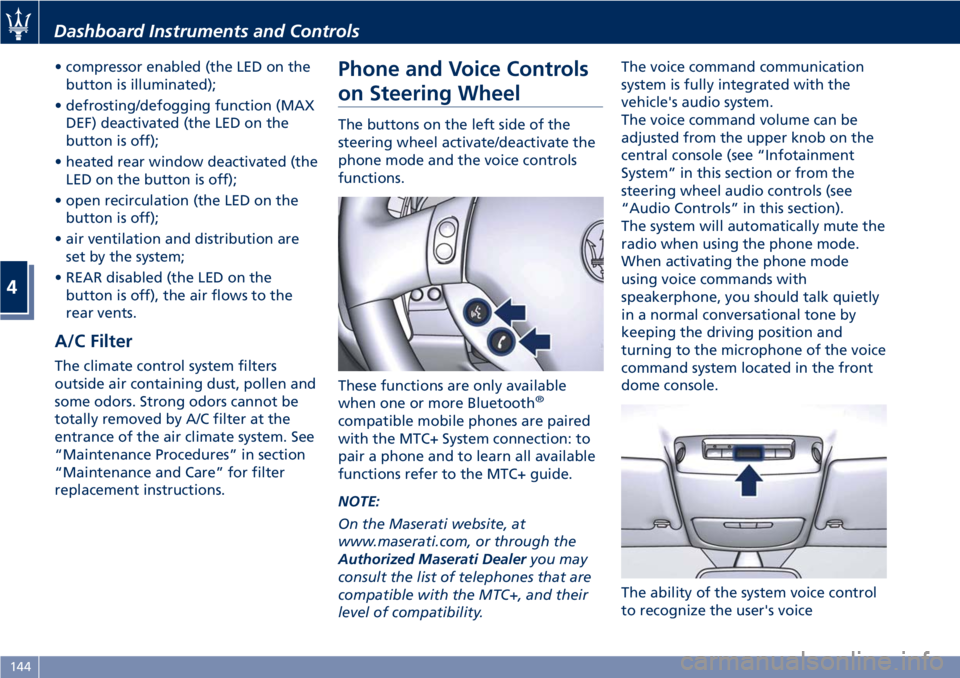
The buttons on the left side of the
steering wheel activate/deactivate the
phone mode and the voice controls
functions.
These functions are only available
when one or more Bluetooth
®
compatible mobile phones are paired
with the MTC+ System connection: to
pair a phone and to learn all available
functions refer to the MTC+ guide.
NOTE:
On the Maserati website, at
www.maserati.com, or through the
Authorized Maserati Dealeryou may
consult the list of telephones that are
compatible with the MTC+, and their
level of compatibility.The voice command communication
system is fully integrated with the
vehicle's audio system.
The voice command volume can be
adjusted from the upper knob on the
central console (see “Infotainment
System” in this section or from the
steering wheel audio controls (see
“Audio Controls” in this section).
The system will automatically mute the
radio when using the phone mode.
When activating the phone mode
using voice commands with
speakerphone, you should talk quietly
in a normal conversational tone by
keeping the driving position and
turning to the microphone of the voice
command system located in the front
dome console.
The ability of the system voice control
to recognize the user's voice
Dashboard Instruments and Controls
4
144
Page 149 of 286
commands can be invalidated when
speaking too quickly or too loudly.
WARNING!
Any voice-controlled system should be
used only in safe driving conditions
following all applicable regulations.
Full attention should be kept on
driving. Failure to do so may result in
a collision causing serious injury or
death.
Phone Mode
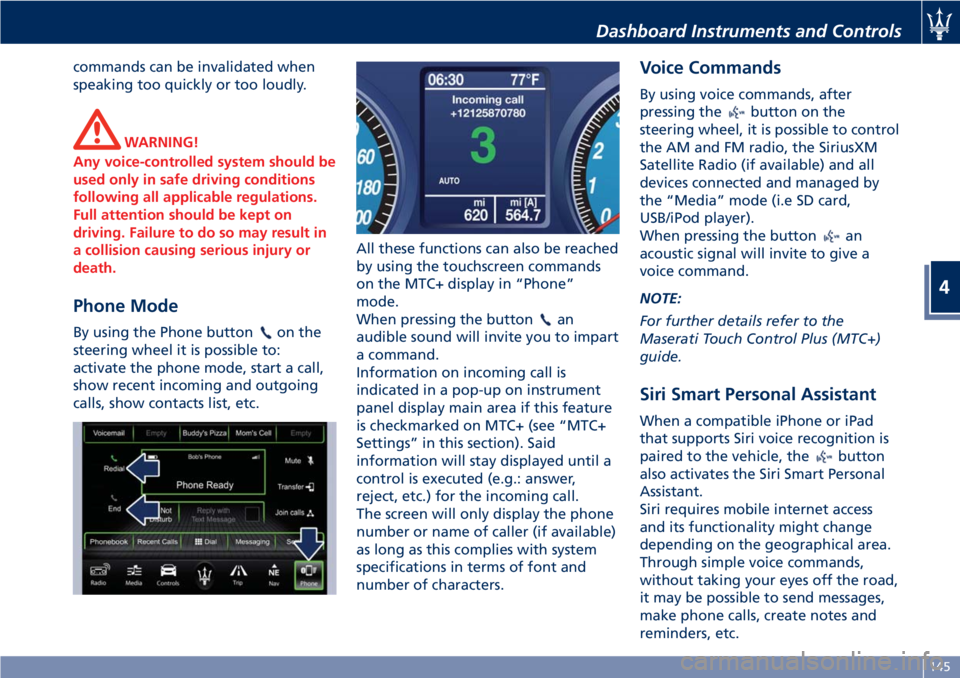
By using the Phone buttonon the
steering wheel it is possible to:
activate the phone mode, start a call,
show recent incoming and outgoing
calls, show contacts list, etc.All these functions can also be reached
by using the touchscreen commands
on the MTC+ display in “Phone”
mode.
When pressing the buttonan
audible sound will invite you to impart
a command.
Information on incoming call is
indicated in a pop-up on instrument
panel display main area if this feature
is checkmarked on MTC+ (see “MTC+
Settings” in this section). Said
information will stay displayed until a
control is executed (e.g.: answer,
reject, etc.) for the incoming call.
The screen will only display the phone
number or name of caller (if available)
as long as this complies with system
specifications in terms of font and
number of characters.
Voice Commands
By using voice commands, after
pressing the
button on the
steering wheel, it is possible to control
the AM and FM radio, the SiriusXM
Satellite Radio (if available) and all
devices connected and managed by
the “Media” mode (i.e SD card,
USB/iPod player).
When pressing the button
an
acoustic signal will invite to give a
voice command.
NOTE:
For further details refer to the
Maserati Touch Control Plus (MTC+)
guide.
Siri Smart Personal Assistant
When a compatible iPhone or iPad
that supports Siri voice recognition is
paired to the vehicle, the
button
also activates the Siri Smart Personal
Assistant.
Siri requires mobile internet access
and its functionality might change
depending on the geographical area.
Through simple voice commands,
without taking your eyes off the road,
it may be possible to send messages,
make phone calls, create notes and
reminders, etc.
Dashboard Instruments and Controls
4
145
Page 156 of 286
(Continued)
(Reverse) or MANUAL and the
Electric Parking Brake (EPB)
engaged), push the brake pedal,
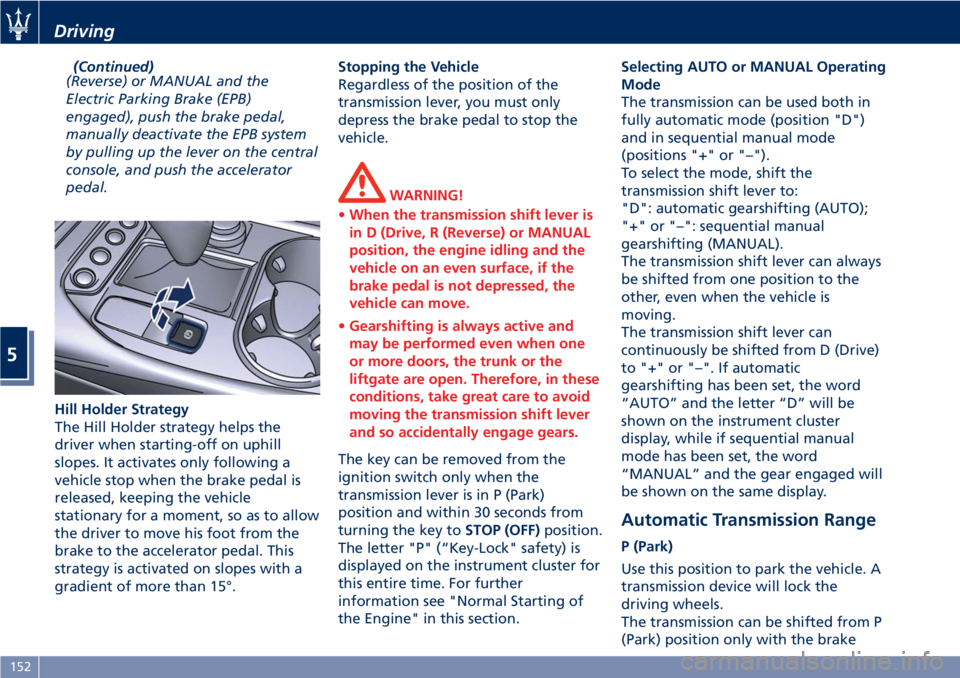
manually deactivate the EPB system
by pulling up the lever on the central
console, and push the accelerator
pedal.
Hill Holder Strategy
The Hill Holder strategy helps the
driver when starting-off on uphill
slopes. It activates only following a
vehicle stop when the brake pedal is
released, keeping the vehicle
stationary for a moment, so as to allow
the driver to move his foot from the
brake to the accelerator pedal. This
strategy is activated on slopes with a
gradient of more than 15°.Stopping the Vehicle
Regardless of the position of the
transmission lever, you must only
depress the brake pedal to stop the
vehicle.
WARNING!
•When the transmission shift lever is
in D (Drive, R (Reverse) or MANUAL
position, the engine idling and the
vehicle on an even surface, if the
brake pedal is not depressed, the
vehicle can move.
•Gearshifting is always active and
may be performed even when one
or more doors, the trunk or the
liftgate are open. Therefore, in these
conditions, take great care to avoid
moving the transmission shift lever
and so accidentally engage gears.
The key can be removed from the
ignition switch only when the
transmission lever is in P (Park)
position and within 30 seconds from
turning the key toSTOP (OFF)position.
The letter "P" (“Key-Lock" safety) is
displayed on the instrument cluster for
this entire time. For further
information see "Normal Starting of
the Engine" in this section.Selecting AUTO or MANUAL Operating
Mode
The transmission can be used both in
fully automatic mode (position "D")
and in sequential manual mode
(positions "+" or "–").
To select the mode, shift the
transmission shift lever to:
"D": automatic gearshifting (AUTO);
"+" or "–": sequential manual
gearshifting (MANUAL).
The transmission shift lever can always
be shifted from one position to the
other, even when the vehicle is
moving.
The transmission shift lever can
continuously be shifted from D (Drive)
to "+" or "–". If automatic
gearshifting has been set, the word
“AUTO” and the letter “D” will be
shown on the instrument cluster
display, while if sequential manual
mode has been set, the word
“MANUAL” and the gear engaged will
be shown on the same display.
Automatic Transmission Range
P (Park)
Use this position to park the vehicle. A
transmission device will lock the
driving wheels.
The transmission can be shifted from P
(Park) position only with the brake
Driving
5
152
Page 157 of 286
pedal pressed. To move the shift lever
from P (Park) position to any other
position, the engine must be switched
on. The engine can be regularly
started in P (Park) range. Never
attempt to use P (Park) while the
vehicle is in motion.
When parking on a level surface, you
may place the shift lever in the P
(Park) position first, and then apply
the electronic parking brake by
pulling the trigger upward.
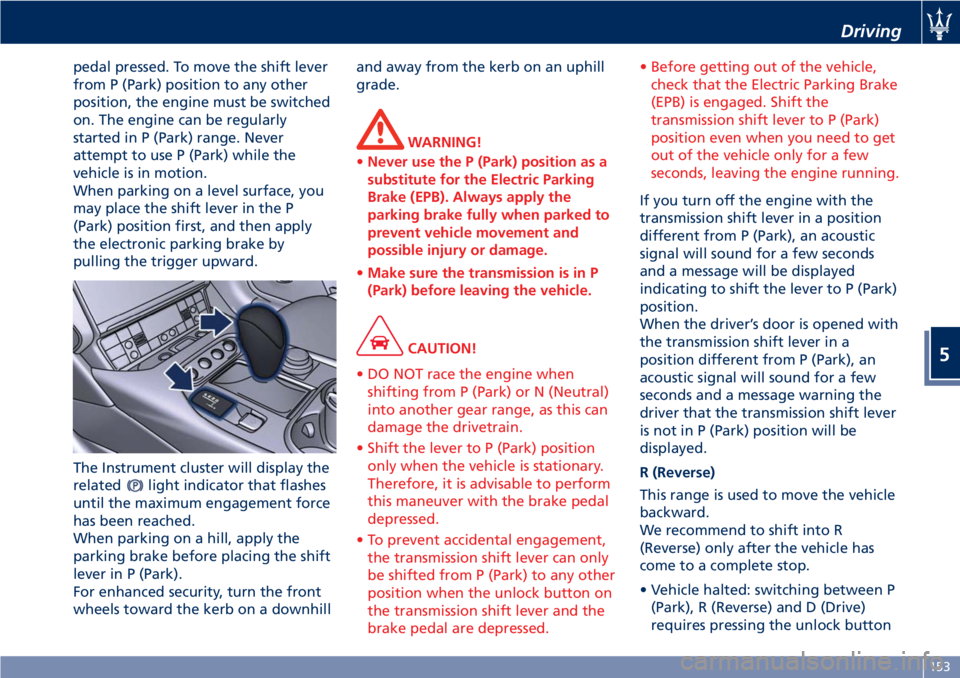
The Instrument cluster will display the
related
light indicator that flashes
until the maximum engagement force
has been reached.
When parking on a hill, apply the
parking brake before placing the shift
lever in P (Park).
For enhanced security, turn the front
wheels toward the kerb on a downhilland away from the kerb on an uphill
grade.
WARNING!
•Never use the P (Park) position as a
substitute for the Electric Parking
Brake (EPB). Always apply the
parking brake fully when parked to
prevent vehicle movement and
possible injury or damage.
•Make sure the transmission is in P
(Park) before leaving the vehicle.
CAUTION!
• DO NOT race the engine when
shifting from P (Park) or N (Neutral)
into another gear range, as this can
damage the drivetrain.
• Shift the lever to P (Park) position
only when the vehicle is stationary.
Therefore, it is advisable to perform
this maneuver with the brake pedal
depressed.
• To prevent accidental engagement,
the transmission shift lever can only
be shifted from P (Park) to any other
position when the unlock button on
the transmission shift lever and the
brake pedal are depressed.• Before getting out of the vehicle,
check that the Electric Parking Brake
(EPB) is engaged. Shift the
transmission shift lever to P (Park)
position even when you need to get
out of the vehicle only for a few
seconds, leaving the engine running.
If you turn off the engine with the
transmission shift lever in a position
different from P (Park), an acoustic
signal will sound for a few seconds
and a message will be displayed
indicating to shift the lever to P (Park)
position.
When the driver’s door is opened with
the transmission shift lever in a
position different from P (Park), an
acoustic signal will sound for a few
seconds and a message warning the
driver that the transmission shift lever
is not in P (Park) position will be
displayed.
R (Reverse)
This range is used to move the vehicle
backward.
We recommend to shift into R
(Reverse) only after the vehicle has
come to a complete stop.
• Vehicle halted: switching between P
(Park), R (Reverse) and D (Drive)
requires pressing the unlock button
Driving
5
153
Page 164 of 286
(gears are shifted at low engine
speeds).
In NORMAL mode, the system
controlling suspension damping uses a
shock absorber "softer" setting (see
"Skyhook Suspension" in section
"Understanding the Vehicle").
As SPORT mode has a lower priority
than ICE (low-grip) mode, if this is
already active when activating SPORT
mode, the system will ignore the
command.
CAUTION!
• Vs NORMAL mode, SPORT mode is
characterized by faster gearshifting,
electronic suspension management
(Skyhook), opening of by-pass
exhaust valves (above 3000 rpm with
the vehicle in motion).
• In addition to enhancing
performance, opening of the exhaust
also increases noise levels of the
vehicle.
In SPORT mode, fast gearshifting
however, always depends on the
accelerator pedal travel and on the
engine rpm, as in NORMAL mode.
When in SPORT mode, the system
controlling suspension damping uses a
shock absorber "harder" setting (see"Skyhook Suspension" in section
"Understanding the Vehicle").
In MANUAL mode, DOWN-shifts with
the accelerator pedal released, will
have a braking effect approaching the
skidding limit of the driving wheels on
dry asphalt.
Under sports-style driving conditions
with gearshifts at high engine rpm,
double-clutching when up-shifting is
performed automatically.
WARNING!
It is advisable not to use SPORT mode
on roads with low or medium grip
conditions (e.g. ice, snow, or wet
roads) as the driving wheels could skid
during gearshifts.
Therefore, excessive use of the vehicle
in SPORT mode is advisable only on
race tracks.
If you use MANUAL and SPORT mode
in combination for sports-style driving,
when starting-off or shifting gears,
you may perceive an initial slipping of
the driving wheels even on dry roads.
ICE (low-grip) Mode
This mode can be used on particularly
slippery road surfaces (e.g., rain, snow,
ice). To activate/deactivate this mode,press button "ICE" on the central
console. The word “ICE” will illuminate
on the instrument cluster display.
In “low-grip” mode, the system uses
2nd instead of 1st gear; this means
that 2nd gear will automatically be
engaged (gearshift lever in D (Drive)
position) in the event of standing
starts in automatic mode; on the other
hand, when in sequential manual
mode (transmission lever in MANUAL
"+"), moving the transmission lever
from N (Neutral), or R (Reverse) or
when the vehicle stops, 2nd gear will
automatically be engaged.
When sequential manual mode is
selected with 2nd gear engaged, a
downshift request will be ignored.
While driving, the system
automatically switches to the upper
gear if the engine reaches the
preestablished speed rate (3000 rpm).
ICE (low-grip) mode has priority over
SPORT mode and assists the ESC
system.
WARNING!
A downshift request from 6th to 5th
gear will only be accepted if the
engine speed rate in 5th gear is lower
than 3000 rpm. As ICE (low-grip) mode
Driving
5
160