2020 LINCOLN MKZ change time
[x] Cancel search: change timePage 236 of 561

Note:
When aid mode is on and the system
detects no steering activity for a short period,
the system alerts you to put your hands on
the steering wheel. The system may detect
a light grip or touch on the steering wheel
as hands off driving.
Note: The system may not function if the
camera is blocked, or if the windshield is
damaged or dirty. When you switch the system on and it
detects an unintentional drift out of your lane
is likely to occur, the system notifies or
assists you to stay in your lane through the
steering system and information display. In
Alert mode, the system provides a warning
by vibrating the steering wheel. In Aid mode,
the system provides steering assistance by
gently counter steering your vehicle back
into the lane.
When the system is functioning in the
combined Alert and Aid mode, the system
first provides steering assistance by gently
counter steering your vehicle back into the
lane, followed by a warning that vibrates the
steering wheel if the vehicle is still out of the
lane markings.
Switching the System On and Off
Note:
The system on or off setting is stored
until it is manually changed, unless a MyKey™
is detected. If the system detects a MyKey™,
it defaults to on and the mode is set to alert. Press the button on the direction indicator
stalk to switch the system on or off.
System Settings
The system has optional setting menus
available. The system stores the last-known
selection for each of these settings. You do
not need to readjust your settings each time
you switch on the system.
Mode: This setting allows you to select which
of the system features you can enable.
233
MKZ (CC9) Canada/United States of America, enUSA, Edition date: 201905, Second-Printing Driving AidsE249505 E132099
Page 238 of 561
If you switch the system on in alert mode, an
overhead graphic of a vehicle with lane
markings appears in the information display.
If you switch the system on in aid or alert and
aid mode, a separate white icon also
appears, or in some vehicles, arrows display
with the lane markings.
When you switch the system off, the lane
marking graphics do not display.
While the system is on, the color of the lane
markings change to indicate the system
status.
Gray: Indicates that the system is temporarily
unable to provide a warning or intervention
on the indicated side. This may be because:
•
Your vehicle is under the activation
speed.
• The direction indicator is active.
• Your vehicle is in a dynamic maneuver.
• The road has no or poor lane markings
in the camera field of view.
• The camera is obscured or unable to
detect the lane markings due to
environmental, traffic or vehicle
conditions. For example, significant sun
angles, shadows, snow, heavy rain or fog,
following a large vehicle that is blocking
or shadowing the lane, poor headlamp
illumination.
See Troubleshooting for additional
information. Green: Indicates that the system is available
or ready to provide a warning or intervention,
on the indicated side.
Yellow: Indicates that the system is providing
or has just provided a lane keeping aid
intervention.
Red: Indicates that the system is providing
or has just provided a lane keeping alert
warning.
The system can be temporarily suppressed
at any time by the following:
•
Quick braking.
• Fast acceleration.
• Using the direction indicator.
• Evasive steering maneuver.
• Driving too close to the lane markings.
Troubleshooting Why is the feature not available (line markings are gray) when I can s\
ee the lane markings on the road?
Your vehicle speed is outside the operational range of the feature.
The sun is shining directly into the camera lens.
A quick intentional lane change has occurred.
235
MKZ (CC9) Canada/United States of America, enUSA, Edition date: 201905, Second-Printing Driving Aids
Page 250 of 561

Time Gap
Distance Gap
Graphics
Sensitivity
Speed
>0.9sec
>82 ft (25 m)
Grey
Normal
62 mph (100 km/h)
0.6sec — 0.9sec
56–82 ft (17–25 m)
Yellow
Normal
62 mph (100 km/h)
<0.6sec
<
56 ft (17 m)
Red
Normal
62 mph (100 km/h)
Adjusting the Pre-Collision Assist
Settings
You can adjust the following settings by
using the information display controls.
See
General Information (page 109).
• You can change Alert and Distance Alert
sensitivity to one of three possible
settings.
• You can switch Distance Indication and
Alert on or off.
• If required, you can switch Active Braking
on or off. Note:
Active braking automatically turns on
every time you switch the ignition on.
Blocked Sensors If a message regarding a blocked sensor or
camera appears in the information display,
the radar signals or camera images are
obstructed. The radar sensor is located
behind a fascia cover near the driver side of
the lower grille. With an obstructed radar,
the Pre-Collision Assist system does not
function and cannot detect a vehicle ahead.
With the front camera obstructed, the
Pre-Collision Assist system does not respond
to pedestrians or stationary vehicles and the
system performance on moving vehicles
reduces. The following table lists possible
causes and actions for when this message
displays.
247
MKZ (CC9) Canada/United States of America, enUSA, Edition date: 201905, Second-Printing Driving AidsE310641
Page 252 of 561

Note:
If something hits the front end of your
vehicle or damage occurs, the radar sensing
zone may change. This could cause missed
or false vehicle detections. Contact an
authorized dealer to have the radar checked
for proper coverage and operation.
Note: If your vehicle detects excessive heat
at the camera or a potential misalignment
condition, a message may display in the
information display indicating temporary
sensor unavailability. This message
deactivates automatically when operational
conditions return to normal. For example,
when the ambient temperature around the
sensor decreases or the sensor
automatically recalibrates successfully.
DRIVE CONTROL (IF EQUIPPED)
Lincoln Drive Control
Lincoln Drive Control delivers the Lincoln
driving experience through a suite of
sophisticated electronic vehicle systems.
These systems continuously monitor your
driving inputs and the road conditions to
optimize ride comfort, steering, handling, powertrain response and sound. You can
preset your preferences for these systems
within the information display. Lincoln Drive
Control will respond to your preferences
based on what gear position you select. This
provides a single location to control multiple
systems performance settings.
Lincoln Drive Control consists of the
following systems:
•
Adaptive suspension dynamically adjusts
the shock absorbers stiffness in real time
to match the road surface and driver
inputs. This system continuously monitors
your vehicle ’s motion, suspension
position, load, speed, road conditions
and steering to adjust the suspension
damping for optimal vehicle control.
• Electronically power-assisted steering
adjusts steering effort and feel based on
your vehicle speed and your inputs.
• Active noise control utilizes your vehicle
electronics to enhance the acoustic
experience. •
Electronic stability control and traction
control maintain your vehicle control in
adverse conditions or high performance
driving.
• Electronic throttle control enhances the
powertrain response to your inputs.
Using Lincoln Drive Control
You can configure which of the drive control
modes are active when your vehicle is in
drive (D) or sport (S). The configuration
remains active until modified from the main
menu on the information display.
249
MKZ (CC9) Canada/United States of America, enUSA, Edition date: 201905, Second-Printing Driving Aids
Page 265 of 561

BREAKING-IN
You need to break in new tires for
approximately 300 mi (480 km). During this
time, your vehicle may exhibit some unusual
driving characteristics.
Avoid driving too fast during the first 1,000 mi
(1,600 km)
. Vary your speed frequently and
change up through the gears early. Do not
labor the engine.
Do not tow during the first
1,000 mi
(1,600 km).
REDUCED ENGINE PERFORMANCE WARNING:
If you continue to drive
your vehicle when the engine is
overheating, the engine could stop without
warning. Failure to follow this instruction
could result in the loss of control of your
vehicle. If the engine coolant temperature gauge
needle moves to the upper limit position, the
engine is overheating.
See Gauges (page
102).
You must only drive your vehicle for a short
distance if the engine overheats. The
distance you can travel depends on ambient
temperature, vehicle load and terrain. The
engine continues to operate with limited
power for a short period of time.
If the engine temperature continues to rise,
the fuel supply to the engine reduces. The
air conditioning switches off and the engine
cooling fan operates continually.
1. Gradually reduce your speed and stop your vehicle as soon as it is safe to do
so.
2. Immediately switch the engine off to prevent severe engine damage.
3. Wait for the engine to cool down.
4. Check the coolant level.
See Engine
Coolant Check (page 308).
5. Have your vehicle checked as soon as possible. ECONOMICAL DRIVING
Fuel economy is affected by several things
such as how you drive, the conditions you
drive under and how you maintain your
vehicle.
There are some things to keep in mind that
may improve your fuel economy:
•
Accelerate and slow down in a smooth,
moderate fashion.
• Drive at steady speeds.
• Anticipate stops; slowing down may
eliminate the need to stop.
• Combine errands and minimize
stop-and-go driving (When running
errands, go to the furthest destination
first and then work your way back home).
• Close the windows for high-speed
driving.
• Drive at reasonable speeds.
• Keep the tires properly inflated and use
only the recommended size.
• Use the recommended engine oil.
• Perform all regularly scheduled
maintenance.
262
MKZ (CC9) Canada/United States of America, enUSA, Edition date: 201905, Second-Printing Driving Hints
Page 278 of 561
Disputes submitted to the BBB AUTO LINE
program are usually decided within forty days
after you file your claim with the BBB. You
are not bound by the decision, and may
reject the decision and proceed to court
where all findings of the BBB Auto Line
dispute, and decision, are admissible in the
court action. Should you choose to accept
the BBB AUTO LINE decision, Ford is then
bound by the decision, and must comply with
the decision within 30 days of receipt of your
acceptance letter.
BBB AUTO LINE Application: Using the
information provided below, please call or
write to request a program application. You
will be asked for your name and address,
general information about your new vehicle,
information about your warranty concerns,
and any steps you have already taken to try
to resolve them. A Customer Claim Form will
be mailed that will need to be completed,
signed and returned to the BBB along with
proof of ownership. Upon receipt, the BBB
will review the claim for eligibility under the
Program Summary Guidelines.
You can get more information by calling
BBB AUTO LINE at 1-800-955-5100, or
writing to:
BBB AUTO LINE
3033 Wilson Boulevard, Suite 600
Arlington, Virginia 22201
BBB AUTO LINE applications can also be
requested by calling the Ford Motor
Company Customer Relationship Center at
1-800-392-3673.
For additional information refer to the Better
Business Bureau website.
Note:
Ford Motor Company reserves the
right to change eligibility limitations, modify
procedures, or to discontinue this process
at any time without notice and without
obligation. UTILIZING THE
MEDIATION/ARBITRATION
PROGRAM (CANADA ONLY)
For vehicles delivered to authorized
Canadian dealers. In those cases where you
continue to feel that the efforts by Ford of
Canada and the authorized dealer to resolve
a factory-related vehicle service concern
have been unsatisfactory, Ford of Canada
participates in an impartial third party
mediation/arbitration program administered
by the Canadian Motor Vehicle Arbitration
Plan (CAMVAP).
The CAMVAP program is a straight forward
and relatively speedy alternative to resolve
a disagreement when all other efforts to
produce a settlement have failed. This
procedure is without cost to you and is
designed to eliminate the need for lengthy
and expensive legal proceedings.
275
MKZ (CC9) Canada/United States of America, enUSA, Edition date: 201905, Second-Printing Customer Assistance
Page 317 of 561

Note:
Automatic transmission fluid expands
when warmed. To obtain an accurate fluid
check, drive the vehicle approximately 20 mi
(30 km) until it is warmed up. If your vehicle
has been operated for an extended period
at high speeds, in city traffic during hot
weather or pulling a trailer, the vehicle
should be switched off until normal operating
temperatures are reached to allow the fluid
to cool before checking. Depending on
vehicle use, cooling times could take up to
30 minutes or longer.
Refer to your scheduled maintenance
information for scheduled intervals for fluid
checks and changes. Your transmission does
not consume fluid. However, the fluid level
should be checked if the transmission is not
working properly. For example, if the
transmission slips or shifts slowly or if you
notice some sign of fluid leakage.
1. Drive the vehicle
20 mi (30 km) or until it
reaches normal operating temperature
2. Park the vehicle on a level surface and engage the parking brake. 3.
With the parking brake engaged and your
foot on the brake pedal, start the engine
and move the gearshift lever through all
of the gear ranges. Allow a minimum of
10 seconds for each gear to engage.
4. Put the gearshift lever in park (P) and leave the engine running.
Note: You will need to move the air filter
assembly to access the transmission
dipstick.
5. Remove the dipstick, wiping it clean with
a clean, dry lint free rag. If necessary,
refer to Under hood overview in this
chapter for the location of the dipstick.
6. Install the dipstick making sure it is fully seated in the filler tube by turning it to
the locked position.
7. Remove the dipstick and inspect the fluid
level. The fluid should be in the
designated areas for normal operating
temperature. Moving the Air Filter Assembly (Accessing
the Dipstick) WARNING:
Do not start the engine
with the air filter removed. This can cause
damage not covered by the vehicle
Warranty and can result in serious injury. 1. Shut the engine off.
2. Clean the area around the clamps that
connect the air filter assembly to the
rubber hoses (A).
314
MKZ (CC9) Canada/United States of America, enUSA, Edition date: 201905, Second-Printing MaintenanceE296775
Page 320 of 561
8. Reinstall the harness retaining clip into
the front of the air filter assembly.
BRAKE FLUID CHECK WARNING: Do not use any fluid other
than the recommended brake fluid as this
will reduce brake efficiency. Use of
incorrect fluid could result in the loss of
vehicle control, serious personal injury or
death. WARNING: Only use brake fluid from
a sealed container. Contamination with dirt,
water, petroleum products or other
materials may result in brake system
damage or failure. Failure to adhere to this
warning could result in the loss of vehicle
control, serious personal injury or death. WARNING:
Do not allow the fluid to
touch your skin or eyes. If this happens,
rinse the affected areas immediately with
plenty of water and contact your physician. WARNING:
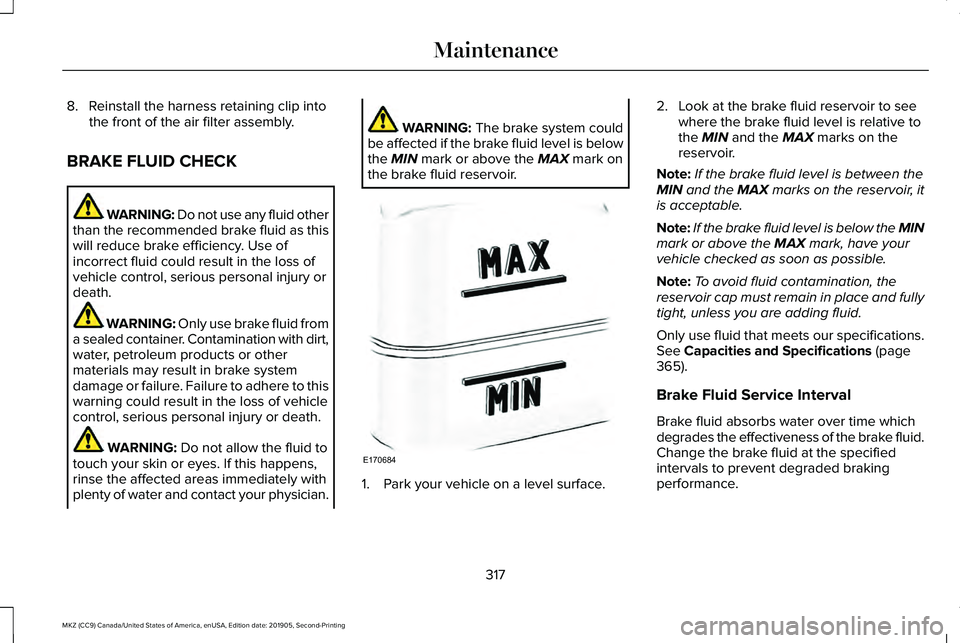
The brake system could
be affected if the brake fluid level is below
the
MIN mark or above the MAX mark on
the brake fluid reservoir. 1. Park your vehicle on a level surface.2. Look at the brake fluid reservoir to see
where the brake fluid level is relative to
the
MIN and the MAX marks on the
reservoir.
Note: If the brake fluid level is between the
MIN
and the MAX marks on the reservoir, it
is acceptable.
Note: If the brake fluid level is below the MIN
mark or above the
MAX mark, have your
vehicle checked as soon as possible.
Note: To avoid fluid contamination, the
reservoir cap must remain in place and fully
tight, unless you are adding fluid.
Only use fluid that meets our specifications.
See
Capacities and Specifications (page
365).
Brake Fluid Service Interval
Brake fluid absorbs water over time which
degrades the effectiveness of the brake fluid.
Change the brake fluid at the specified
intervals to prevent degraded braking
performance.
317
MKZ (CC9) Canada/United States of America, enUSA, Edition date: 201905, Second-Printing MaintenanceE170684