Page 187 of 591

•
Without applying the brake pedal, press
and release the button once when the
ignition is in the on mode, or when the
engine is running but the vehicle is not
moving.
On: All electrical circuits are operational and
the warning lamps and indicators illuminate.
• Without applying the brake pedal, press
and release the button once.
Note: You may have to press the push
button ignition switch twice to switch the
ignition on.
Start:
Starts the engine.
• Press the brake pedal, and then press
the button for any length of time. An
indicator light on the button illuminates
when then ignition is on and when the
engine starts. STARTING A GASOLINE ENGINE
When you start the engine, the idle speed
increases, this helps to warm up the engine.
If the engine idle speed does not slow down,
have your vehicle checked as soon as
possible.
Note:
If your vehicle has remote start, you
can start your vehicle with the remote, and
then drive away by pressing the brake pedal
and pushing a button on the transmission.
This allows you to drive away without
pressing the engine start button.
Before starting the engine, check the
following:
• Make sure all occupants have fastened
their seatbelts.
• Make sure the headlamps and electrical
accessories are off.
• Make sure the parking brake is on.
• Make sure the transmission is in park (P).
Note: Do not touch the accelerator pedal.
1. Fully press the brake pedal.
2. Press the button. The system does not function if:
•
The key frequencies are jammed.
• The key battery has no charge.
If you are unable to start the engine, do the
following: 1. Open the center console lid.
2. Slide the remote into the back-up slot.
3. With the key in this position, press the
brake pedal, then the push button
ignition switch to switch the ignition on
and start your vehicle.
184
Corsair (CTF) Canada/United States of America, enUSA, Edition date: 201906, Second-Printing Starting and Stopping the EngineE306288
Page 266 of 591
If your vehicle stays to one side of the lane
after the lane keeping aid corrects your
vehicle and then subsequently drifts out of
the lane again, the system only provides an
alert at the steering wheel.
Note:
The alert and aid diagrams illustrate
general zone coverage. They do not provide
exact zone parameters.
Intensity: This setting affects the intensity of
the steering wheel vibration used for the alert
and alert and aid modes.
This setting does
not affect the aid mode.
• Low.
• Normal.
• High. System Display
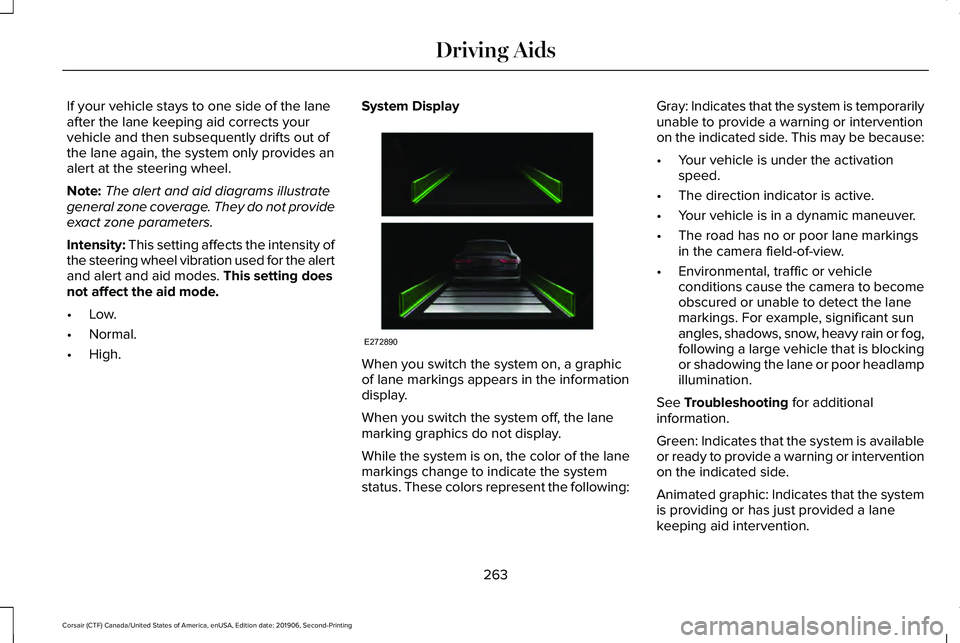
When you switch the system on, a graphic
of lane markings appears in the information
display.
When you switch the system off, the lane
marking graphics do not display.
While the system is on, the color of the lane
markings change to indicate the system
status. These colors represent the following:Gray: Indicates that the system is temporarily
unable to provide a warning or intervention
on the indicated side. This may be because:
•
Your vehicle is under the activation
speed.
• The direction indicator is active.
• Your vehicle is in a dynamic maneuver.
• The road has no or poor lane markings
in the camera field-of-view.
• Environmental, traffic or vehicle
conditions cause the camera to become
obscured or unable to detect the lane
markings. For example, significant sun
angles, shadows, snow, heavy rain or fog,
following a large vehicle that is blocking
or shadowing the lane or poor headlamp
illumination.
See
Troubleshooting for additional
information.
Green: Indicates that the system is available
or ready to provide a warning or intervention
on the indicated side.
Animated graphic: Indicates that the system
is providing or has just provided a lane
keeping aid intervention.
263
Corsair (CTF) Canada/United States of America, enUSA, Edition date: 201906, Second-Printing Driving AidsE272890
Page 321 of 591
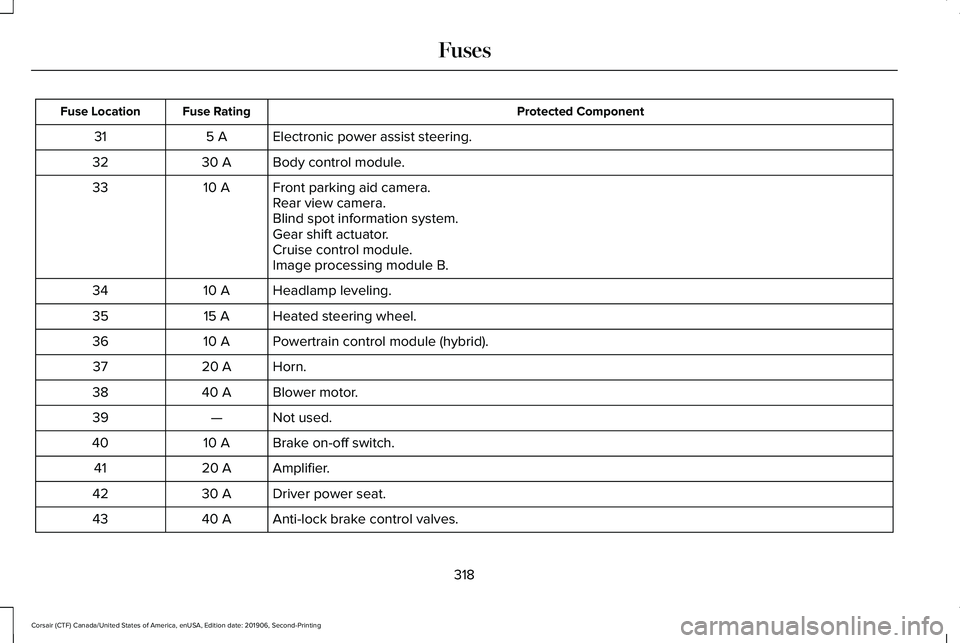
Protected Component
Fuse Rating
Fuse Location
Electronic power assist steering.
5 A
31
Body control module.
30 A
32
Front parking aid camera.
10 A
33
Rear view camera.
Blind spot information system.
Gear shift actuator.
Cruise control module.
Image processing module B.
Headlamp leveling.
10 A
34
Heated steering wheel.
15 A
35
Powertrain control module (hybrid).
10 A
36
Horn.
20 A
37
Blower motor.
40 A
38
Not used.
—
39
Brake on-off switch.
10 A
40
Amplifier.
20 A
41
Driver power seat.
30 A
42
Anti-lock brake control valves.
40 A
43
318
Corsair (CTF) Canada/United States of America, enUSA, Edition date: 201906, Second-Printing Fuses
Page 324 of 591
Protected Component
Fuse Rating
Fuse Location
Steering column lock.
20 A
75
Not used.
—
76
Not used.
—
77
Multi-contour seats.
15 A
78
Headlamp washer.
10 A
79
Fuel pump.
20 A
80
Rear window washer pump.
10 A
81
Power inverter.
40 A
82
Not used.
—
83
Auxiliary power distribution box (hybrid).
40 A
84
Rain sensor.
5 A
85
Not used.
—
86
Not used.
—
87
Not used.
—
88
Note: Spare fuse amperage may vary.
321
Corsair (CTF) Canada/United States of America, enUSA, Edition date: 201906, Second-Printing Fuses
Page 327 of 591
Protected Component
Fuse Rating
Fuse Location
Integrated control panel.
Driver power seat switch.
7.5 A
18
Passenger power seat switch.
Wireless accessory charging module.
Selectable drive mode switch.
Headlamp switch pack.
7.5 A
19
Telematics control unit module.
Bluetooth low energy module.
Not used (spare).
10 A
20
Climate control.
7.5 A
21
E-shifter module.
Instrument cluster.
7.5 A
22
Gateway module.
Steering column control module.
Audio unit.
20 A
23
Head up display.
20 A
24
Not used (spare).
30 A
25
Note: Spare fuse amperage may vary.
324
Corsair (CTF) Canada/United States of America, enUSA, Edition date: 201906, Second-Printing Fuses
Page 345 of 591
A message could appear in the information
display to alert you that battery protection
actions are active. These messages are only
for notification that an action is taking place,
and not intended to indicate an electrical
problem or that the battery requires
replacement.
After battery replacement, or in some cases,
after charging the battery with an external
charger, the battery management system
requires eight hours of vehicle sleep time to
relearn the battery state of charge. During
this time, keep your vehicle fully locked with
the ignition switched off.
Note:
Prior to relearning the battery state of
charge, the battery management system
could temporarily disable some electrical
systems. Electrical Accessory Installation
To make sure the battery management
system works correctly, do not connect an
electrical device ground connection directly
to the battery negative post. This can cause
inaccurate measurements of the battery
condition and potential incorrect system
operation.
Note:
If you add electrical accessories or
components to the vehicle, it could adversely
affect battery performance and durability.
This could also affect the performance of
other electrical systems in the vehicle.
Battery Disposal Make sure that you dispose of old
batteries in an environmentally
friendly way. Seek advice from
your local authority about recycling old
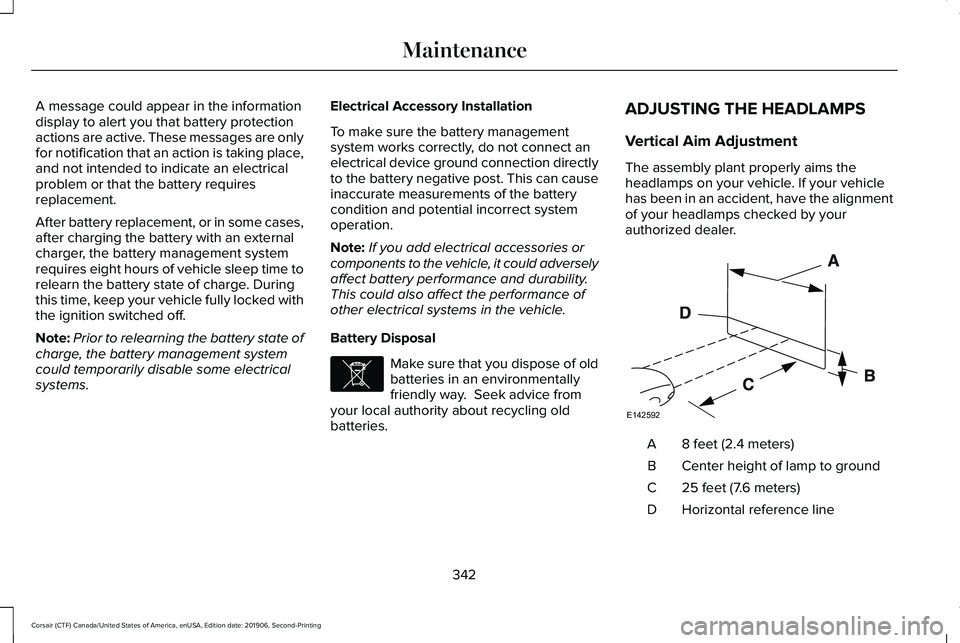
batteries. ADJUSTING THE HEADLAMPS
Vertical Aim Adjustment
The assembly plant properly aims the
headlamps on your vehicle. If your vehicle
has been in an accident, have the alignment
of your headlamps checked by your
authorized dealer.
8 feet (2.4 meters)
A
Center height of lamp to ground
B
25 feet (7.6 meters)
C
Horizontal reference line
D
342
Corsair (CTF) Canada/United States of America, enUSA, Edition date: 201906, Second-Printing MaintenanceE107998 E142592
Page 346 of 591

1.
Park the vehicle directly in front of a wall
or screen on a level surface,
approximately 25 ft (7.6 m) away.
2. Measure the height of the headlamp bulb
center from the ground and mark an 8 ft
(2.4 m)
horizontal reference line on the
vertical wall or screen at this height.
Note: To see a clearer light pattern for
adjusting, you may want to block the light
from one headlamp while adjusting the
other.
3. Switch on the low beam headlamps to light the wall or screen and open the
hood. 4. On the wall or screen, you will observe
a flat zone of high intensity light located
at the top of the right hand portion of the
beam pattern. If the top edge of the high
intensity light zone is not at the horizontal
reference line, you will need to adjust the
headlamp. 5. Locate the vertical adjuster on each
headlamp. Turn the adjuster either
clockwise or counterclockwise in order
to aim the headlamp.
6. Close the hood and switch off the lamps. Horizontal Aim Adjustment
Horizontal aim is not required for this vehicle
and is non-adjustable.
WASHER FLUID CHECK
WARNING:
If you operate your
vehicle in temperatures below 41.0°F (5°C),
use washer fluid with antifreeze protection.
Failure to use washer fluid with antifreeze
protection in cold weather could result in
impaired windshield vision and increase
the risk of injury or accident.
Note: The front and rear washer systems
are supplied from the same reservoir.
Add fluid to fill the reservoir if the level is low.
Only use a washer fluid that meets our
specifications.
See Capacities and
Specifications (page 385).
343
Corsair (CTF) Canada/United States of America, enUSA, Edition date: 201906, Second-Printing MaintenanceE142465 E171165
Page 348 of 591
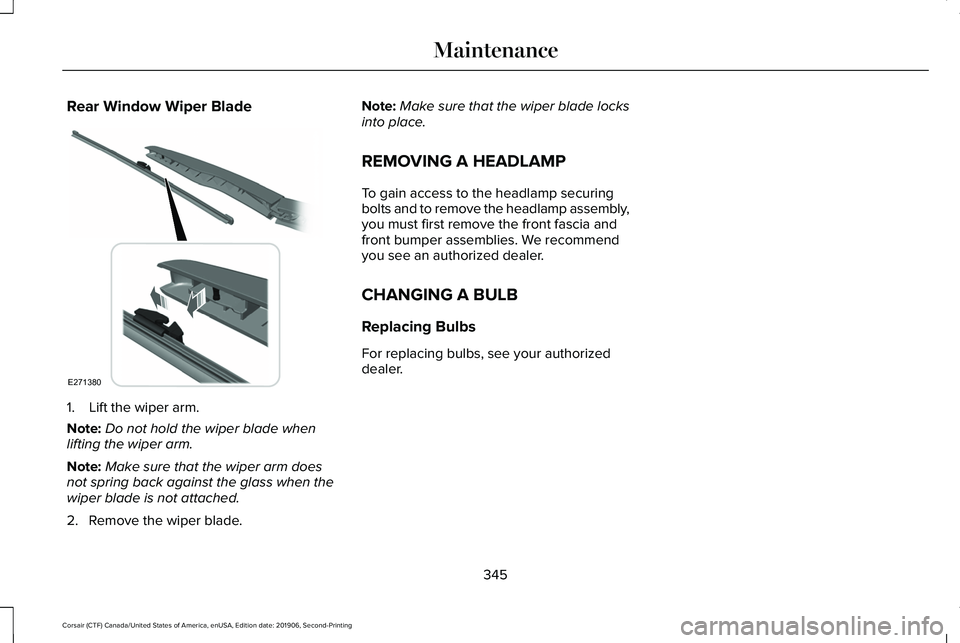
Rear Window Wiper Blade
1. Lift the wiper arm.
Note:
Do not hold the wiper blade when
lifting the wiper arm.
Note: Make sure that the wiper arm does
not spring back against the glass when the
wiper blade is not attached.
2. Remove the wiper blade. Note:
Make sure that the wiper blade locks
into place.
REMOVING A HEADLAMP
To gain access to the headlamp securing
bolts and to remove the headlamp assembly,
you must first remove the front fascia and
front bumper assemblies. We recommend
you see an authorized dealer.
CHANGING A BULB
Replacing Bulbs
For replacing bulbs, see your authorized
dealer.
345
Corsair (CTF) Canada/United States of America, enUSA, Edition date: 201906, Second-Printing MaintenanceE271380