2020 LINCOLN CONTINENTAL climate control
[x] Cancel search: climate controlPage 370 of 609

The tires on your vehicle may have
all-weather treads to provide traction in rain
and snow. However, in some climates you
may need to use snow chains.
Your vehicle may not be compatible with
snow chain or cable usage with the
factory-fitted wheels and tires. Only certain
chains or snow cables have been approved
by Ford as safe for use on your vehicle with
the following tire size: 235/50R18. You
should only install chains or cables sized at
10 mm or less in dimension as measured on
the sidewall of your tire. Not all S-class snow
chains meet these restrictions. Chains of this
size restriction will include a tensioning
device. The chains should be mounted in
pairs on the front tires only. If you need to
use chains, it is recommended that steel
wheels (of the same size and specification)
be used, as chains may chip aluminum
wheels.
Follow these guidelines when using traction
devices:
•
If possible, avoid fully loading your
vehicle
• Purchase chains or cables from a
manufacturer that clearly labels body to
tire dimension restrictions.
• When driving with snow chains or cables,
do not exceed 30 mph (48 km/h) or the
maximum speed recommended by the
chain manufacturer; whichever is less.
• Drive cautiously. If you hear the chains
or cables rub or bang against the vehicle,
stop and retighten them. If this does not
work, remove the chains or cables and
prevent vehicle damage.
• Remove the chains or cables when they
are no longer needed. Do not use the
chains or cables on dry roads.
• If a temporary spare tire is mounted on
your vehicle, do not use snow chains on
the axle with the temporary spare tire.
If you have any questions regarding snow
tires or snow chains, please contact your
authorized dealer. TIRE PRESSURE MONITORING
SYSTEM WARNING:
The tire pressure
monitoring system is not a substitute for
manually checking tire pressures. You
should periodically check tire pressures
using a pressure gauge. Failure to correctly
maintain tire pressures could increase the
risk of tire failure, loss of control, vehicle
rollover and personal injury.
Note: You should only use tire sealants in
roadside emergencies as they could cause
damage to the tire pressure monitoring
system sensor.
Note: If the tire pressure monitoring system
sensor becomes damaged, it will not
function.
367
Continental (CPL) Canada/United States of America, enUSA, Edition date: 201907, Second-Printing Wheels and Tires
Page 446 of 609

Action
Condition
Message
Use the channel guide to turn off the Lock or
Skip function on that station.
All the channels in the selected category are
either skipped or locked.
None found
Check Channel Guide
No action required.
SiriusXM has updated the channels available
for your vehicle.
Subscription Updated
USB PORT WARNING: Driving while distracted
can result in loss of vehicle control, crash
and injury. We strongly recommend that
you use extreme caution when using any
device that may take your focus off the
road. Your primary responsibility is the safe
operation of your vehicle. We recommend
against the use of any hand-held device
while driving and encourage the use of
voice-operated systems when possible.
Make sure you are aware of all applicable
local laws that may affect the use of
electronic devices while driving. The USB Port is below the climate control
and in the center console.
You can use the USB port to play media and
charge a device.
443
Continental (CPL) Canada/United States of America, enUSA, Edition date: 201907, Second-Printing Audio SystemE242003
Page 453 of 609
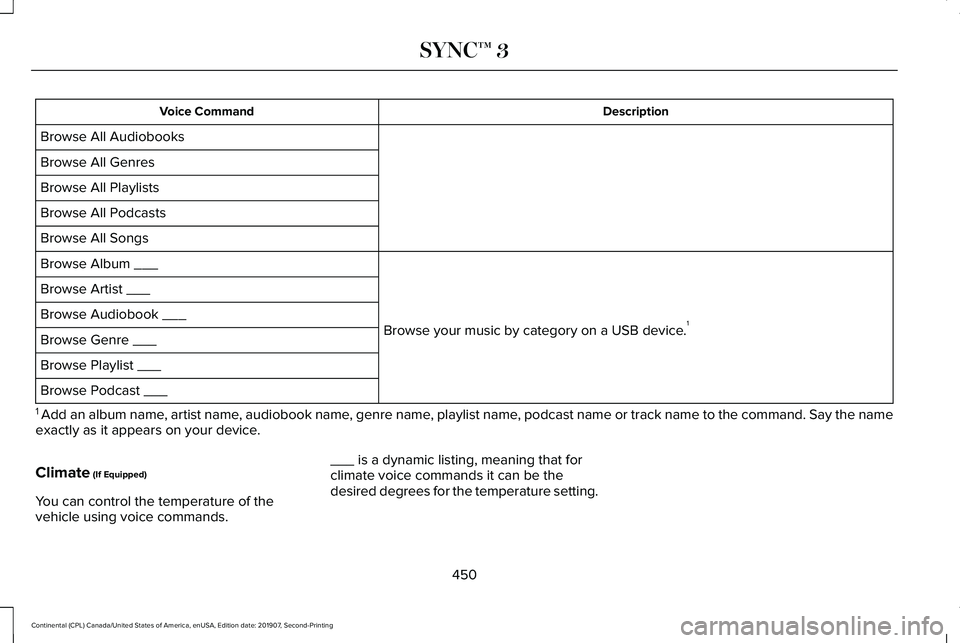
Description
Voice Command
Browse All Audiobooks
Browse All Genres
Browse All Playlists
Browse All Podcasts
Browse All Songs
Browse your music by category on a USB device.1
Browse Album ___
Browse Artist ___
Browse Audiobook ___
Browse Genre ___
Browse Playlist ___
Browse Podcast ___
1 Add an album name, artist name, audiobook name, genre name, playlist name, podcast name or track name to the command. Say the name
exactly as it appears on your device.
Climate (If Equipped)
You can control the temperature of the
vehicle using voice commands. ___ is a dynamic listing, meaning that for
climate voice commands it can be the
desired degrees for the temperature setting.
450
Continental (CPL) Canada/United States of America, enUSA, Edition date: 201907, Second-Printing SYNC™ 3
Page 473 of 609

USB Ports
The USB ports are in the center console or
behind a small access door in the instrument
panel.
This feature allows you to plug in USB media
devices, memory sticks, flash drives or thumb
drives, and charge devices if they support
this feature.
Select this option to play audio from your
USB device. Apps
The system supports the use of certain audio
apps such as iHeartRadio through a USB or
Bluetooth enabled device.
Each app gives you different on-screen
options depending on the app's content.
See Apps (page 483).
Supported Media Players, Formats and
Metadata Information
The system is capable of hosting nearly any
digital media player, including iPod, iPhone,
and most USB drives.
Supported audio formats include MP3, WMA,
WAV, AAC, and FLAC.
Supported audio file extensions include MP3,
WMA, WAV, M4A, M4B, AAC, and FLAC.
Supported USB file systems include: FAT,
exFAT, and NTFS.
SYNC 3 is also able to organize the media
from your USB device by metadata tags.
Metadata tags, which are descriptive
software identifiers embedded in the media
files, provide information about the file. If your indexed media files contain no
information embedded in these metadata
tags, SYNC 3 may classify the empty
metadata tags as unknown.
SYNC 3 is capable of indexing up to 50,000
songs per USB device, for up to 10 devices.
CLIMATE
Touch the climate button on the touchscreen
to access your climate control features.
Note:
You can switch temperature units
between Fahrenheit and Celsius.
See
Settings (page 486).
Accessing the Climate Control Menu Touch the button to access
additional controls for the front
climate system.
Directing the Airflow Touch the button to direct airflow
to the windshield air vents and
de-mister.
470
Continental (CPL) Canada/United States of America, enUSA, Edition date: 201907, Second-Printing SYNC™ 3E211463 E265038
Page 474 of 609
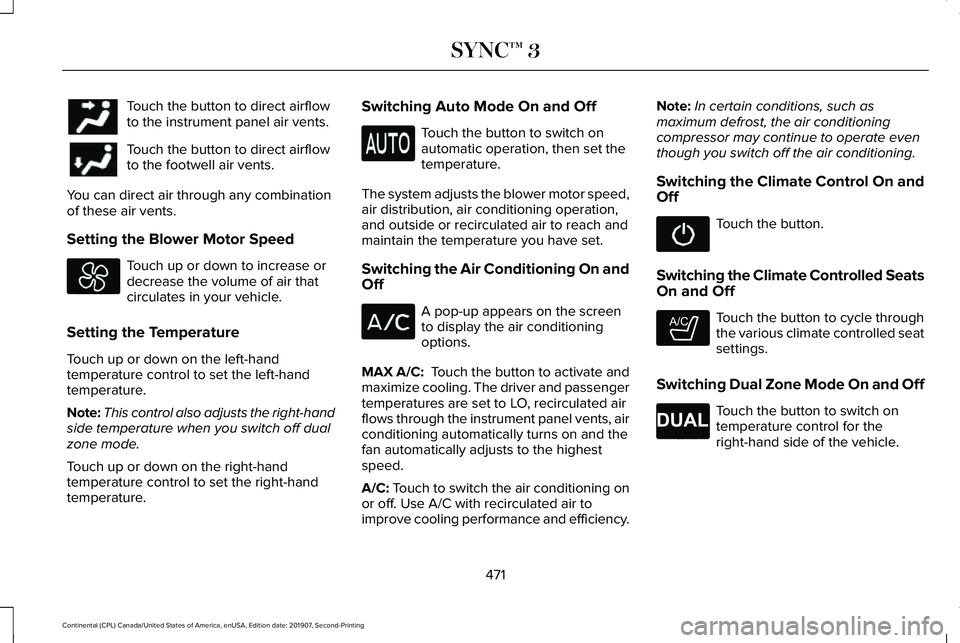
Touch the button to direct airflow
to the instrument panel air vents.
Touch the button to direct airflow
to the footwell air vents.
You can direct air through any combination
of these air vents.
Setting the Blower Motor Speed Touch up or down to increase or
decrease the volume of air that
circulates in your vehicle.
Setting the Temperature
Touch up or down on the left-hand
temperature control to set the left-hand
temperature.
Note: This control also adjusts the right-hand
side temperature when you switch off dual
zone mode.
Touch up or down on the right-hand
temperature control to set the right-hand
temperature. Switching Auto Mode On and Off Touch the button to switch on
automatic operation, then set the
temperature.
The system adjusts the blower motor speed,
air distribution, air conditioning operation,
and outside or recirculated air to reach and
maintain the temperature you have set.
Switching the Air Conditioning On and
Off A pop-up appears on the screen
to display the air conditioning
options.
MAX A/C: Touch the button to activate and
maximize cooling. The driver and passenger
temperatures are set to LO, recirculated air
flows through the instrument panel vents, air
conditioning automatically turns on and the
fan automatically adjusts to the highest
speed.
A/C: Touch to switch the air conditioning on
or off. Use A/C with recirculated air to
improve cooling performance and efficiency. Note:
In certain conditions, such as
maximum defrost, the air conditioning
compressor may continue to operate even
though you switch off the air conditioning.
Switching the Climate Control On and
Off Touch the button.
Switching the Climate Controlled Seats
On and Off Touch the button to cycle through
the various climate controlled seat
settings.
Switching Dual Zone Mode On and Off Touch the button to switch on
temperature control for the
right-hand side of the vehicle.
471
Continental (CPL) Canada/United States of America, enUSA, Edition date: 201907, Second-Printing SYNC™ 3 E265282 E265280
Page 476 of 609
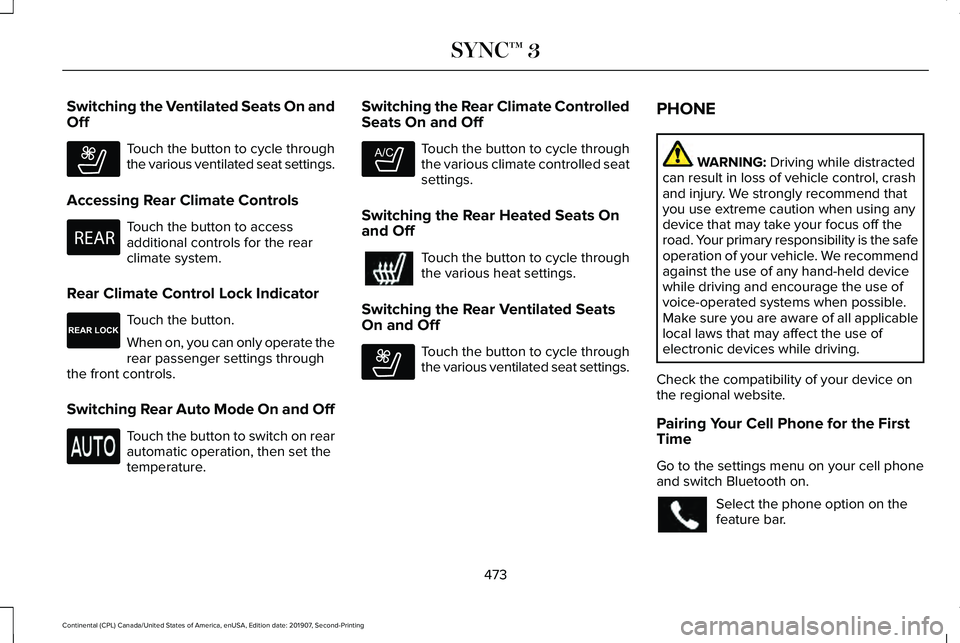
Switching the Ventilated Seats On and
Off
Touch the button to cycle through
the various ventilated seat settings.
Accessing Rear Climate Controls Touch the button to access
additional controls for the rear
climate system.
Rear Climate Control Lock Indicator Touch the button.
When on, you can only operate the
rear passenger settings through
the front controls.
Switching Rear Auto Mode On and Off Touch the button to switch on rear
automatic operation, then set the
temperature. Switching the Rear Climate Controlled
Seats On and Off Touch the button to cycle through
the various climate controlled seat
settings.
Switching the Rear Heated Seats On
and Off Touch the button to cycle through
the various heat settings.
Switching the Rear Ventilated Seats
On and Off Touch the button to cycle through
the various ventilated seat settings.PHONE WARNING: Driving while distracted
can result in loss of vehicle control, crash
and injury. We strongly recommend that
you use extreme caution when using any
device that may take your focus off the
road. Your primary responsibility is the safe
operation of your vehicle. We recommend
against the use of any hand-held device
while driving and encourage the use of
voice-operated systems when possible.
Make sure you are aware of all applicable
local laws that may affect the use of
electronic devices while driving.
Check the compatibility of your device on
the regional website.
Pairing Your Cell Phone for the First
Time
Go to the settings menu on your cell phone
and switch Bluetooth on. Select the phone option on the
feature bar.
473
Continental (CPL) Canada/United States of America, enUSA, Edition date: 201907, Second-Printing SYNC™ 3E268558 E270447 E265289 E265282 E268558
Page 596 of 609

3
360 Degree Camera...................................238
Front Camera......................................................239
Side Camera........................................................240
Using the System...............................................239
9
911 Assist...........................................................59
A
A/C See: Climate Control..........................................148
About This Manual
............................................7
ABS See: Brakes...........................................................212
ABS driving hints See: Hints on Driving With Anti-Lock
Brakes................................................................213
Accessories...................................................505
Accessories See: Replacement Parts Recommendation.....15
ACC See: Using Adaptive Cruise Control...............241
Active Park Assist
.........................................227
Using Active Park Assist...................................228 Adaptive Headlamps...................................100
System Check......................................................100
Adjusting the Headlamps...........................337 Horizontal Aim Adjustment..............................
338
Vertical Aim Adjustment....................................337
Adjusting the Steering Wheel.....................90 End of Travel Position..........................................90
Memory Feature...................................................90
AFS See: Adaptive Headlamps................................100
Airbag Disposal
...............................................58
Air Conditioning See: Climate Control..........................................148
Air Filter See: Changing the Engine Air Filter - 2.7L/
3.0L....................................................................327
See: Changing the Engine Air Filter - 3.7L....326
Alarm See: Anti-Theft Alarm...........................................89
All-Wheel Drive
.............................................203
Ambient Lighting...........................................102
Adjusting the Brightness...................................102
Changing the Color............................................102
Switching Ambient Lighting Off.......................102
Switching Ambient Lighting On.......................102
Anti-Theft Alarm
..............................................89
Arming the Alarm..................................................89
Disarming the Alarm............................................89 Appendices....................................................542
Apps
.................................................................483
SiriusXM Traffic and Travel Link......................484
Using Apps on an Android Device................484
Using Apps on an iOS Device.........................483
Using Mobile Navigation on an Android
Device...............................................................484
At a Glance
........................................................19
Audible Warnings and Indicators...............116 Headlamps On Warning Chime
........................116
Keyless Warning Alert.........................................116
Parking Brake On Warning Chime
...................116
Audio Control....................................................91 You can operate the following functions with
the control:..........................................................91
Audio System
................................................434
General Information...........................................434
Audio Unit
......................................................435
Adjusting the Volume........................................435
Changing Radio Stations..................................435
Ejecting the CD...................................................435
Inserting a CD......................................................436
Rear Passenger Audio Controls.....................436
Selecting the Audio Modes.............................436
Setting a Memory Preset..................................436
Switching the Audio Unit On and Off............
436
Using Seek, Fast Forward and Reverse.......436
593
Continental (CPL) Canada/United States of America, enUSA, Edition date: 201907, Second-Printing Index
Page 597 of 609

Auto Hold........................................................216
Using Auto Hold..................................................217
Autolamps.........................................................98 Windshield Wiper Activated Headlamps........98
Automatic Climate Control..........................148 Directing Air to the Footwell Air Vents..........148
Directing Air to the Instrument Panel Air
Vents..................................................................148
Setting the Blower Motor Speed.....................148
Setting the Temperature....................................148
Switching Auto Mode On and Off...................148
Switching Defrost On and Off..........................149
Switching Dual Zone Mode On and Off........150
Switching Maximum Air Conditioning On and Off.......................................................................150
Switching Maximum Defrost On and Off......150
Switching Recirculated Air On and Off..........150
Switching the Air Conditioning On and Off.......................................................................149
Switching the Climate Control On and Off.......................................................................149
Automatic High Beam Control...................103
Automatic High Beam Control Indicators......................................................104
Automatic Transmission...............................197 Automatic Transmission Adaptive
Learning...........................................................202
Brake-Shift Interlock Override.........................201 If Your Vehicle Gets Stuck In Mud or
Snow.................................................................202
Push Button Shift Transmission.......................197
SelectShift™ Automatic Transmission.............199
Understanding the Shift Positions of your Automatic Transmission................................197
Automatic Transmission Fluid Check............................................................333
Autowipers.......................................................95 Autowipers Settings.............................................95
Auxiliary Power Points
..................................176
AC Power Point....................................................176
DC Power Point....................................................176
Locations................................................................176
AWD See: All-Wheel Drive..........................................203
B
Battery See: Changing the 12V Battery.......................334
Blind Spot Information System.................257 Switching the System Off and On..................258
System Errors......................................................258
Using the Blind Spot Information
System..............................................................257
BLIS See: Blind Spot Information System..............257 Body Styling Kits............................................351
Bonnet Lock
See: Opening and Closing the Hood.............318
Booster Seats
..................................................32
Types of Booster Seats.......................................33
Brake Fluid Check........................................333 Brake Fluid Service Interval.............................334
Brakes..............................................................212 General Information............................................212
Breaking-In......................................................281
Bulb Specification Chart
.............................424
C
Cabin Air Filter
...............................................154
Capacities and Specifications - 2.7L........391 Air Conditioning System....................................
391
Alternative Engine Oil for Extremely Cold Climates...........................................................395
Automatic Transmission...................................392
Engine Coolant...................................................393
Engine Oil.............................................................394
Fuel Tank..............................................................397
Grease...................................................................397
Hydraulic Brake System...................................398
Locks.....................................................................398
Power Transfer Unit...........................................399
Rear Axle..............................................................400
594
Continental (CPL) Canada/United States of America, enUSA, Edition date: 201907, Second-Printing Index