2020 LEXUS RX450H park
[x] Cancel search: parkPage 245 of 777
2444-2. Driving procedures
RX350/RX350L_U
■If the shift lever cannot be shifted from P
First, check whether the brak e pedal is being depressed.
If the shift lever cannot be shifted with your foot on the brake pedal, there may be a prob-
lem with the shift lock system. Have the vehi cle inspected by your Lexus dealer immedi-
ately.
The following steps may be used as an emergency measure to ensure that the shift lever
can be shifted.
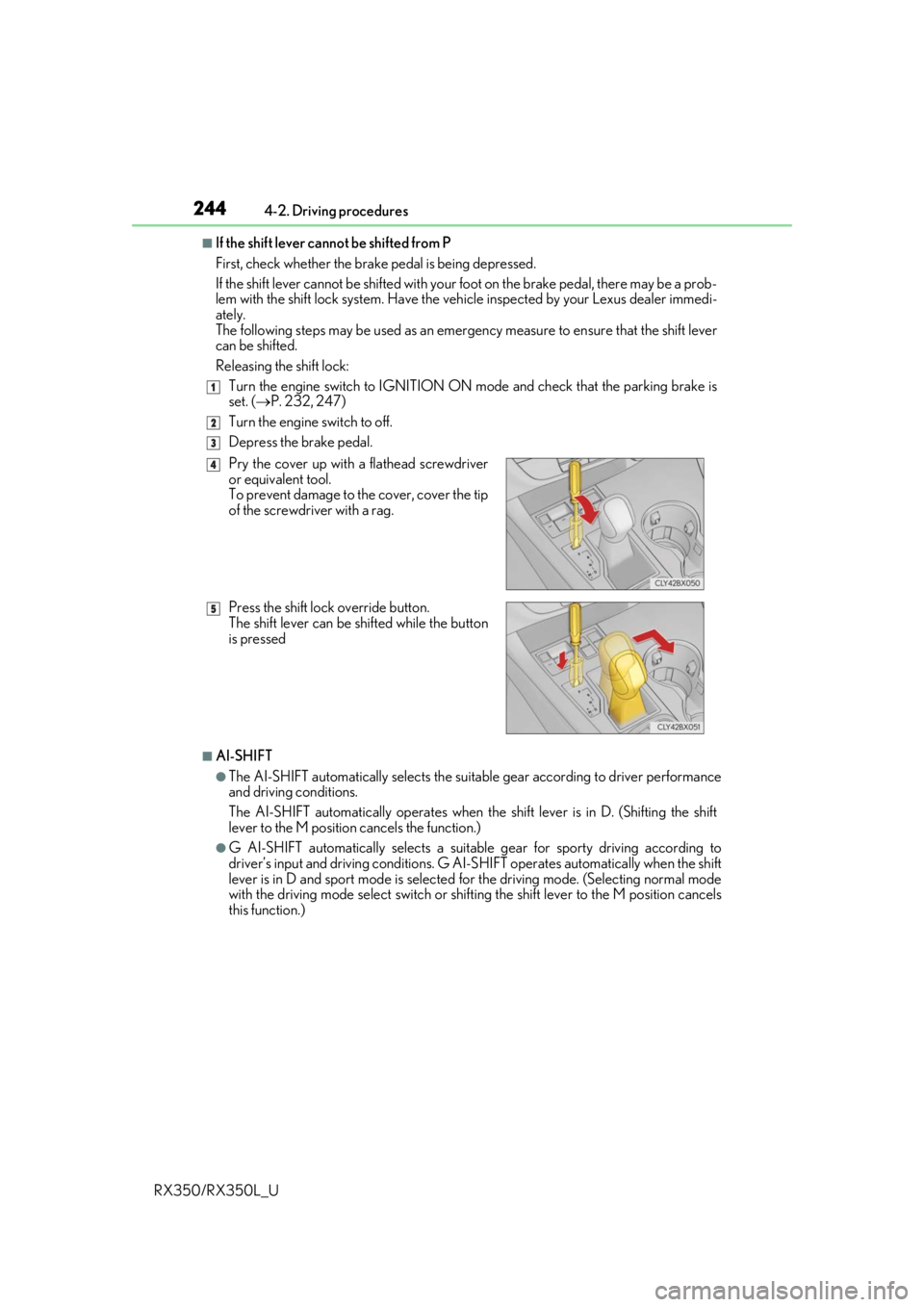
Releasing the shift lock:
Turn the engine switch to IGNITION ON mode and check that the parking brake is
set. ( P. 232, 247)
Turn the engine switch to off.
Depress the brake pedal.
■AI-SHIFT
●The AI-SHIFT automatically selects the suitab le gear according to driver performance
and driving conditions.
The AI-SHIFT automatically operates when th e shift lever is in D. (Shifting the shift
lever to the M position cancels the function.)
●G AI-SHIFT automatically selects a suitable gear for sporty driving according to
driver’s input and driving conditions. G AI-S HIFT operates automatically when the shift
lever is in D and sport mode is selected for the driving mode. (Selecting normal mode
with the driving mode select switch or shifting the shift lever to the M position cancels
this function.)
1
2
3
Pry the cover up with a flathead screwdriver
or equivalent tool.
To prevent damage to the cover, cover the tip
of the screwdriver with a rag.
Press the shift lock override button.
The shift lever can be shifted while the button
is pressed4
5
Page 246 of 777

2454-2. Driving procedures
4
Driving
RX350/RX350L_U
WARNING
■When driving on slippery road surfaces
Be careful of downshifting and sudden acceleration, as this could result in the vehicle
skidding to the side or spinning.
■To prevent an accident wh en releasing the shift lock
Before pressing the shift lock override butto n, make sure to set the parking brake and
depress the brake pedal.
If the accelerator pedal is accidentally depressed instead of the brake pedal when the
shift lock override button is pressed and the shift lever is shifted out of P, the vehicle
may suddenly start, possibly leading to an a ccident resulting in death or serious injury.
Page 248 of 777
2474-2. Driving procedures
4
Driving
RX350/RX350L_U
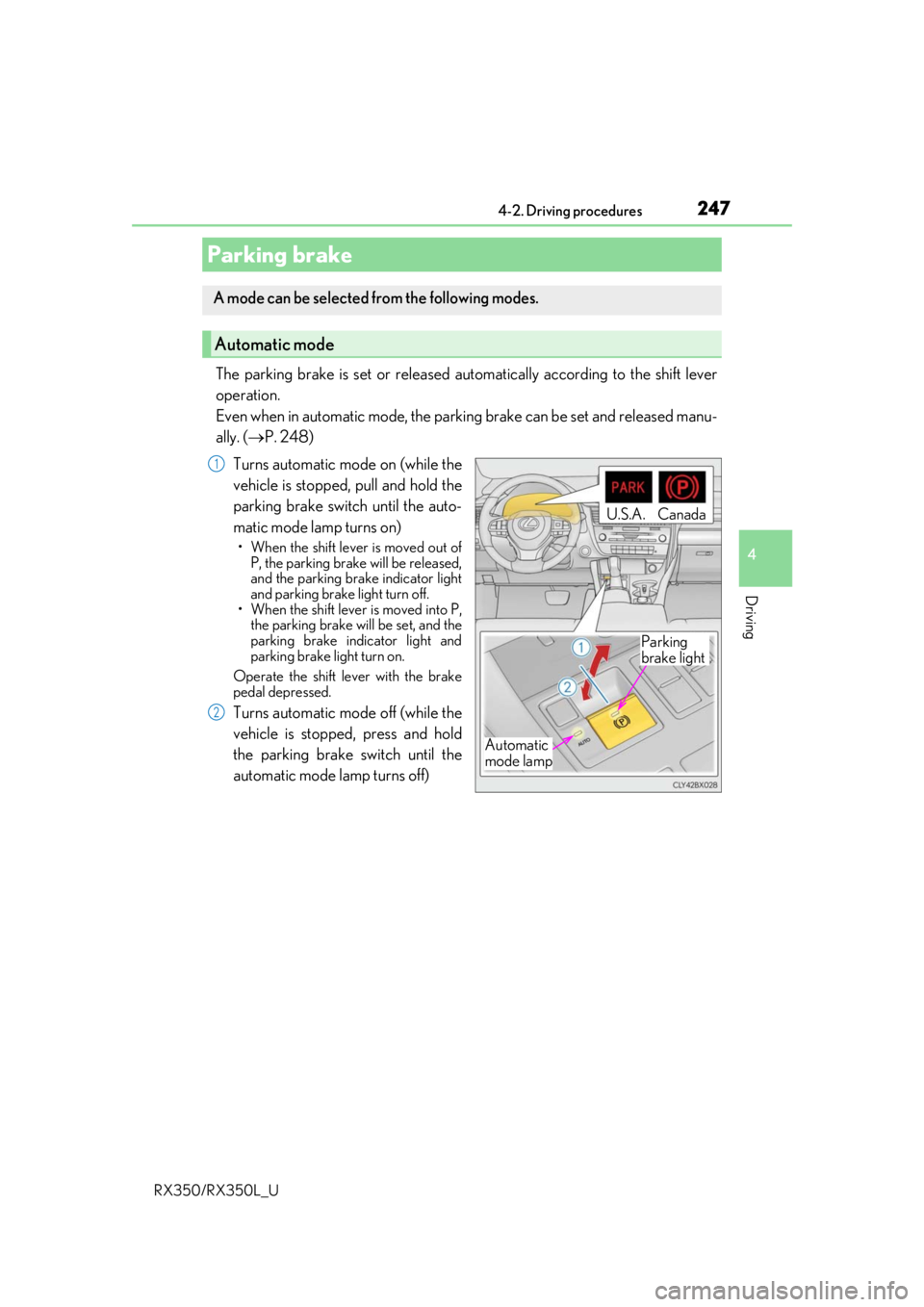
The parking brake is set or released automatically according to the shift lever
operation.
Even when in automatic mode, the parkin g brake can be set and released manu-
ally. ( P. 248)
Turns automatic mode on (while the
vehicle is stopped, pull and hold the
parking brake switch until the auto-
matic mode lamp turns on)
• When the shift lever is moved out of P, the parking brake will be released,
and the parking brake indicator light
and parking brake light turn off.
• When the shift lever is moved into P,
the parking brake will be set, and the
parking brake indicator light and
parking brake light turn on.
Operate the shift lever with the brake
pedal depressed.
Turns automatic mode off (while the
vehicle is stopped, press and hold
the parking brake switch until the
automatic mode lamp turns off)
Parking brake
A mode can be selected from the following modes.
Automatic mode
Automatic
mode lamp
U.S.A.Canada
Parking
brake light
1
2
Page 249 of 777

2484-2. Driving procedures
RX350/RX350L_U
The parking brake can be set and released manually. Sets the parking brake
The parking brake indicator light and
parking brake light will turn on.
Pull and hold the parking brake switch if
an emergency occurs and it is necessary
to operate the parking brake while driv-
ing.
Releases the parking brake
Operate the parking brake switch while
depressing the brake pedal. Make sure
that the parking brake indicator light
and parking brake light turn off.
If the parking brake indicator light and
parking brake lamp flashes, operate the
switch again. ( P. 654)
■Parking the vehicle
P. 202
■Parking brake operation
●When the engine switch is not in IGNITION ON mode, the parking brake cannot be
released using the parking brake switch.
●When the engine switch is not in IGNITION ON mode, automatic mode (automatic
brake setting and releasing) is not available.
■If “Parking Brake Overheated Parking Brak e Unavailable” is displayed on the multi-
information display
If the parking brake is operated repeatedly over a short period of time, the system may
restrict operation to prevent overheating. If this happens, refrain from operating the
parking brake. Normal operation wi ll return after about 1 minute.
■If “EPB Activation Stopped Incompletely” or “Parking Brake Unavailable” is displayed
on the multi-information display
Operate the parking brake switch. If the message does not disappear after operating the
switch several times, the system may be ma lfunctioning. Have the vehicle inspected by
your Lexus dealer immediately.
■Parking brake operation sound
When the parking brake operates, a motor so und (whirring sound) may be heard. This
does not indicate a malfunction.
Manual mode
U.S.A. Canada
Parking
brake light
1
2
Page 250 of 777

2494-2. Driving procedures
4
Driving
RX350/RX350L_U
■Parking brake indicator light and parking brake light
●Depending on the engine switch mode, the parking brake indicator light and parking
brake light will turn on and stay on as described below:
IGNITION ON mode: Comes on until the parking brake is released.
Not in IGNITION ON mode: Stays on for approximately 15 seconds.
●When the engine switch is turned off with the parking brake set, the parking brake indi-
cator light and parking brake light will stay on for about 15 seconds. This does not indi-
cate a malfunction.
■Changing the mode
When changing the automatic mode on/off , the message will be shown on the multi-
information display and the buzzer sounds.
■Parking brake engaged warning buzzer
A buzzer will sound if the vehicle is driv en with the parking brake engaged. “Release
Parking Brake” is displayed on the multi-information display.
■Warning messages and buzzers
Warning messages and buzzers are used to indicate a system malfunction or to inform
the driver of the need for caution. If a warn ing message is shown on the multi-information
display, read the message and follow the instructions.
■If the brake system warning light comes on
P. 654
■Usage in winter time
P. 385
WARNING
■When parking the vehicle
Do not leave a child in the vehicle alone. The parking brake may be released uninten-
tionally and there is the danger of the ve hicle moving that may lead to an accident
resulting in death or serious injury.
■Parking brake switch
Do not set any objects near the parking br ake switch. Objects may interfere with the
switch and may lead the parking brake to unexpectedly operate.
NOTICE
■When parking the vehicle
Before you leave the vehicle, shift the shif t lever to P, set the parking brake and make
sure that the vehicle does not move.
■When the system malfunctions
Stop the vehicle in a safe place and check the warning messages.
■When the parking brake cannot be released due to a malfunction
Driving the vehicle with the parking brake se t will lead to brake components overheat-
ing, which may affect bra king performance and increase brake wear. Contact your
Lexus dealer immediately if this occurs.
Page 251 of 777

2504-2. Driving procedures
RX350/RX350L_U
Turns the brake hold system on
The brake hold standby indicator
(green) comes on. Wh ile the system is
holding the brakes, the brake hold oper-
ated indicator (yellow) will illuminate.
■Brake hold system operating conditions
The brake hold system cannot be turn ed on in the following conditions:
●The driver’s door is not closed.
●The driver’s seat seat belt is not buckled.
If either of the conditions above are detected when the brake hold system is enabled, the
system will turn off and the brake hold standby in dicator light will go off. In addition, if any
of the conditions are detected while the sy stem is holding the brakes, a warning buzzer
will sound and a message will be shown on th e multi-information display. The parking
brake will then be set automatically.
■Brake hold function
●If the brake pedal is left released for a pe riod of about 3 minutes after the system has
started holding the brakes, the parking brake will be set automatically. In this case, a
warning buzzer sounds and a message is shown on the multi-information display.
●To turn the system off while the system is holding the brakes, firmly depress the brake
pedal and press the switch again.
●The brake hold function may not hold the vehicle when the vehicle is on a steep incline.
In this situation, it may be necessary for the driver to apply the brakes. A warning
buzzer will sound and the mult i-information display will inform the driver of this situa-
tion. If a warning message is shown on the multi-information display, read the message
and follow the instructions.
Brake Hold
Vehicles without paddle shift switches
The brake hold system keeps the brake appl ied when the shift lever is in D, S or
N with the system on and the brake peda l has been depressed to stop the vehi-
cle. The system releases the brake wh en the accelerator pedal is depressed
with the shift lever in D or S to allow smooth start off.
Vehicles with paddle shift switches
The brake hold system keeps the brake a pplied when the shift lever is in D, M
or N with the system on and the brake pedal has been depressed to stop the
vehicle. The system releases the brake when the accelerator pedal is
depressed with the shif t lever in D or M to allow smooth start off.
Page 252 of 777

2514-2. Driving procedures
4
Driving
RX350/RX350L_U
■When the parking brake is set automatically while the system is holding the brakes
Perform any of the following operat ions to release the parking brake.
●Depress the accelerator pedal. (The parking brake will not be released automatically if
the seat belt is not fastened.)
●Operate the parking brake switch with the brake pedal depressed.
Make sure that the parking brake indicator light goes off. ( P. 247)
■When an inspection at your Lexus dealer is necessary
When the brake hold standby indicator (green) does not illuminate even when the brake
hold switch is pressed with the brake hold system operating conditions met, the system
may be malfunctioning. Ha ve the vehicle inspected at your Lexus dealer.
■If “Brake Hold Fault Depress Brake to Deacti vate Visit Your Dealer” is displayed on the
multi-information display
The system may be malfunctioning. Have the vehicle inspected by your Lexus dealer.
■Warning messages and buzzers
Warning messages and buzzers are used to indicate a system malfunction or to inform
the driver of the need for caution. If a warn ing message is shown on the multi-information
display, read the message and follow the instructions.
■If the brake hold operated indicator flashes
P. 654
WARNING
■When the vehicle is on a steep incline
When using the brake hold system on a steep incline exercise caution. The brake hold
function may not hold the vehicle in such a situation.
■When stopped on a slippery road
The system cannot stop the vehicle when the gripping ability of the tires has been
exceeded. Do not use the system when stopped on a slippery road.
NOTICE
■When parking the vehicle
The brake hold system is not designed for use when parking the vehicle for a long
period of time. Turning the engine switch off while the system is holding the brakes may
release the brakes, which would cause the ve hicle to move. When operating the engine
switch, depress the brake pedal, shift the shift lever to P and set the parking brake.
Page 253 of 777
252
RX350/RX350L_U4-3. Operating the lights and wipers
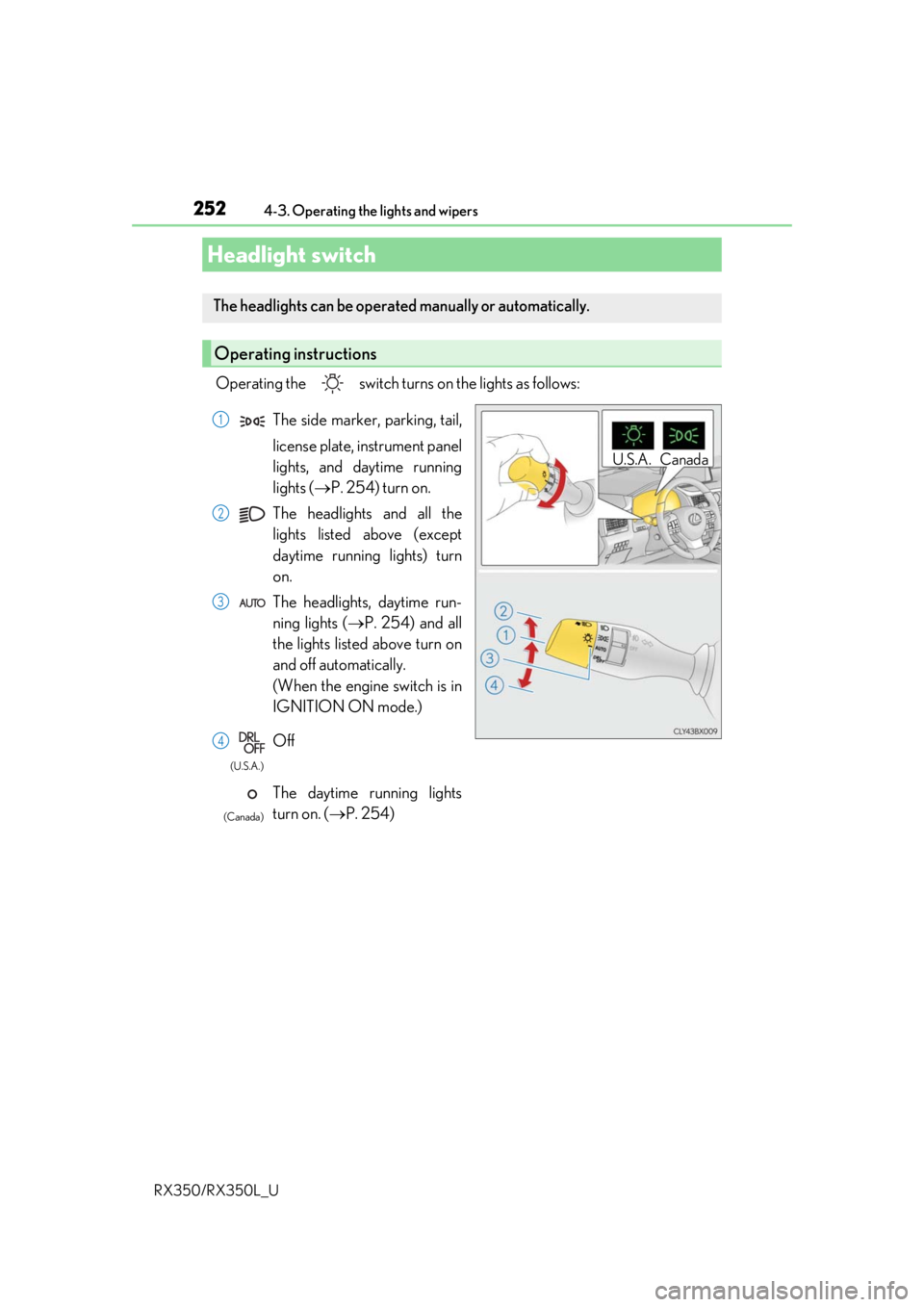
Operating the switch turn
s on the lights as follows:
Headlight switch
The headlights can be operated manually or automatically.
Operating instructions
U.S.A. Canada
The side marker, parking, tail,
license plate, instrument panel
lights, and daytime running
lights (P. 254) turn on.
The headlights and all the
lights listed above (except
daytime running lights) turn
on.
The headlights, daytime run-
ning lights ( P. 254) and all
the lights listed above turn on
and off automatically.
(When the engine switch is in
IGNITION ON mode.)
Off
The daytime running lights
turn on. ( P. 254)1
2
3
4
(U.S.A.)
(Canada)