Page 165 of 777
1643-3. Adjusting the seats
RX350/RX350L_U
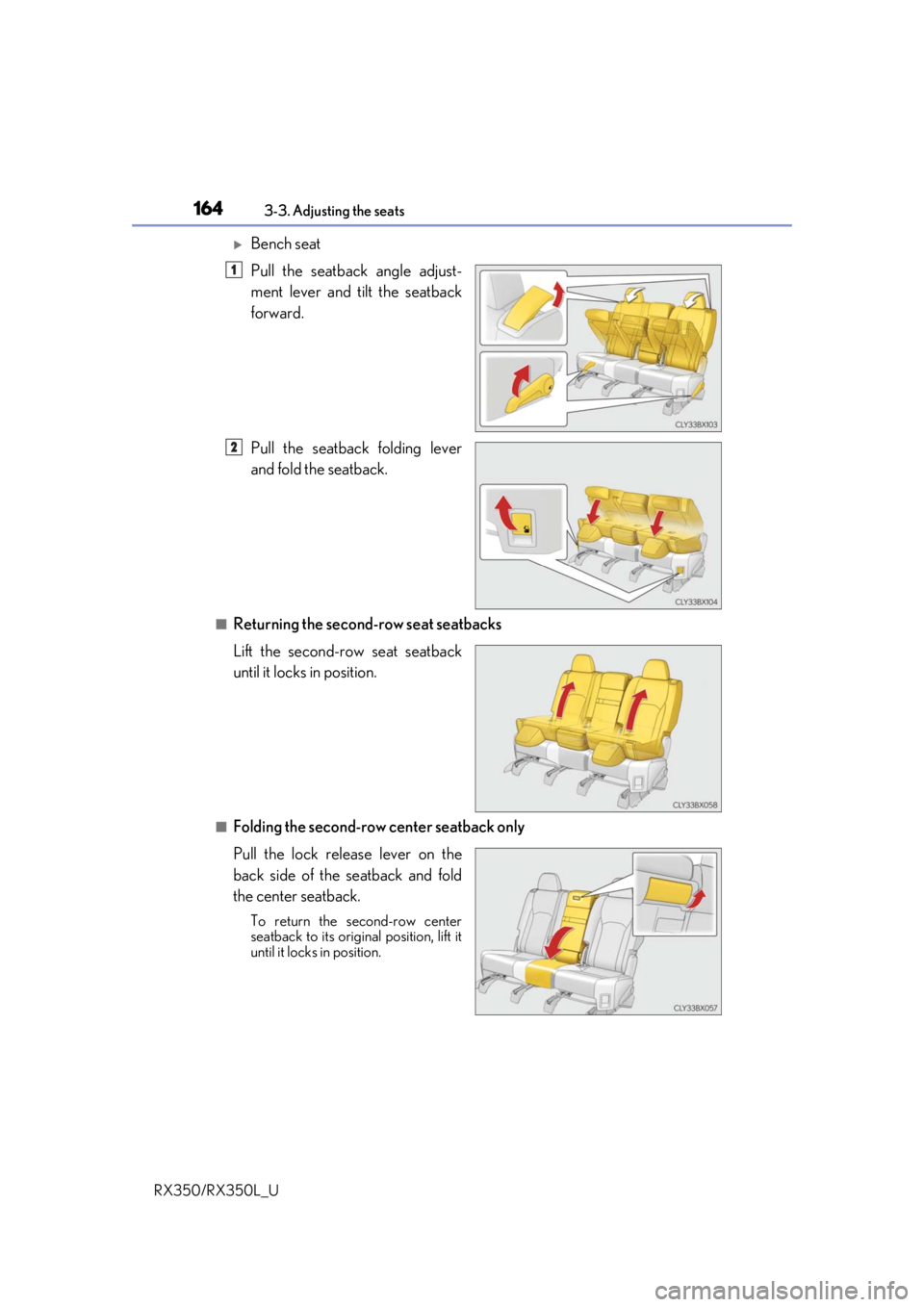
Bench seat
Pull the seatback angle adjust-
ment lever and tilt the seatback
forward.
Pull the seatback folding lever
and fold the seatback.
■Returning the second-row seat seatbacks
Lift the second-row seat seatback
until it locks in position.
■Folding the second-row center seatback only
Pull the lock release lever on the
back side of the seatback and fold
the center seatback.
To return the second-row center
seatback to its original position, lift it
until it locks in position.
1
2
Page 172 of 777
1713-3. Adjusting the seats
3
Operation of each component
RX350/RX350L_U
NOTICE
■Before folding a rear seat seatback
●Second-row seats: Make sure to stow the center seat seat belt buckle and armrest
before folding the second-row seat seatbacks. ( P. 555)
●Third-row seats: Make sure th at the third-row seats and trays are free of obstructions
before folding the seatbacks. Otherwise the seat or tray may be damaged.
■When moving the second-row seat for third-row seat access (RX350L)
Do not slide the second-row se at forward if an electronic device is connected to the
power outlet on the rear console. Otherwise, the second-row seat may contact the
electronic device, possibly resu lting in damage to the device.
■Before returning the third-row seat seatbacks to the upright position (RX350L)
If the luggage cover is installed in the luggage compartmen t, make sure to remove it
before returning the thir d-row seat seatbacks. (P. 537) Otherwise, the luggage
cover may be damaged.
Page 180 of 777
1793-3. Adjusting the seats
3
Operation of each component
RX350/RX350L_U
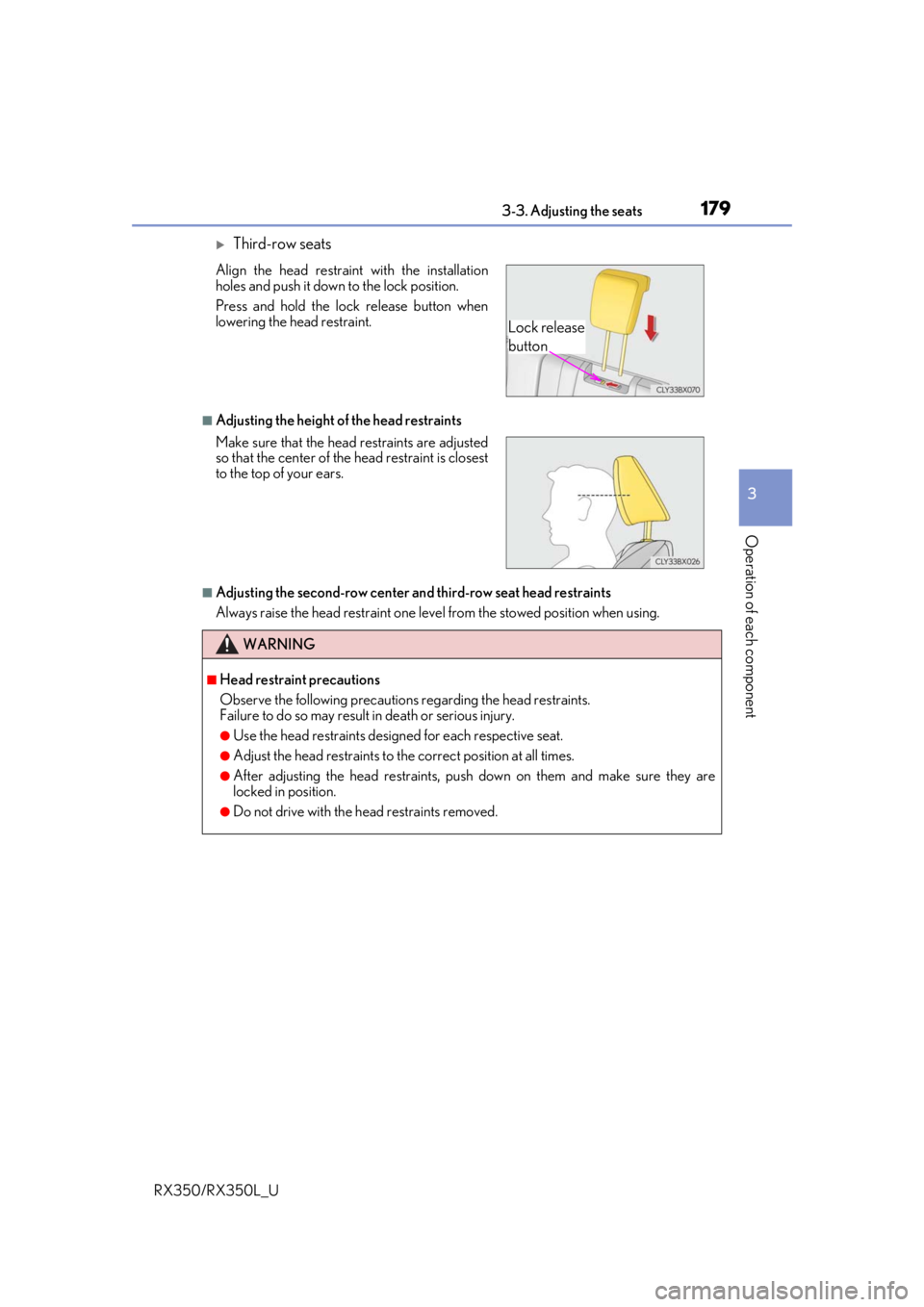
Third-row seats
■Adjusting the height of the head restraints
■Adjusting the second-row center and third-row seat head restraints
Always raise the head restraint one leve l from the stowed position when using.
Align the head restraint with the installation
holes and push it down to the lock position.
Press and hold the lock release button when
lowering the head restraint.
Make sure that the head restraints are adjusted
so that the center of the
head restraint is closest
to the top of your ears.
WARNING
■Head restraint precautions
Observe the following precautions regarding the head restraints.
Failure to do so may result in death or serious injury.
●Use the head restraints designed for each respective seat.
●Adjust the head restraints to th e correct position at all times.
●After adjusting the head restraints, push down on them and make sure they are
locked in position.
●Do not drive with the head restraints removed.
Lock release
button
Page 213 of 777

2124-1. Before driving
RX350/RX350L_U
WARNING
■Storage precautions
Observe the following precautions.
Failure to do so may prevent the pedals from being depressed properly, may block the
driver’s vision, or may result in items hittin g the driver or passengers, possibly causing
an accident.
●Stow cargo and luggage in the luggage compartment whenever possible.
●Do not stack cargo and luggage in the luggage compartment higher than the seat-
backs.
●When you fold down the rear seats, long items should not be placed directly behind
the front seats.
●Never allow anyone to ride in the luggage compartment. It is not designed for pas-
sengers. They should ride in their seats with their seat belts properly fastened.
●Do not place cargo or luggage in or on the following locations.
• At the feet of the driver
• On the front passenger or re ar seats (when stacking items)
•On the luggage cover
• On the instrument panel
•On the dashboard
●Secure all items in the occupant compartment.
■Capacity and distribution
●Do not exceed the maximum axle weight rating or the total vehicle weight rating.
●Even if the total load of occupant’s weight and the cargo load is less than the total load
capacity, do not apply the load unevenly. Improper loading may cause deterioration
of steering or braking control whic h may cause death or serious injury.
■Roof luggage carrier precautions
Observe the following precautions:
●Place the cargo so that its weight is distributed evenly between the front and rear
axles.
●If loading long or wide cargo, never exceed the vehicle overall length or width.
( P. 698)
●Before driving, make sure the cargo is secu rely fastened on the roof luggage carrier.
●Loading cargo on the roof luggage carrier will make the center of gravity of the vehi-
cle higher. Avoid high speeds, sudden star ts, sharp turns, sudden braking or abrupt
maneuvers, otherwise it may re sult in loss of control or vehicle rollover due to failure
to operate this vehicle correctly and result in death or serious injury.
●If driving for a long distance, on rough road s, or at high speeds, stop the vehicle now
and then during the trip to make sure the cargo remains in its place.
●Do not exceed 165 lb. (75 kg) cargo weight on the roof luggage carrier.
NOTICE
■When loading cargo (vehicles with a moon roof or panoramic moon roof)
Be careful not to scratch the surface of the moon roof or panoramic moon roof.
Page 254 of 777
2534-3. Operating the lights and wipers
4
Driving
RX350/RX350L_U
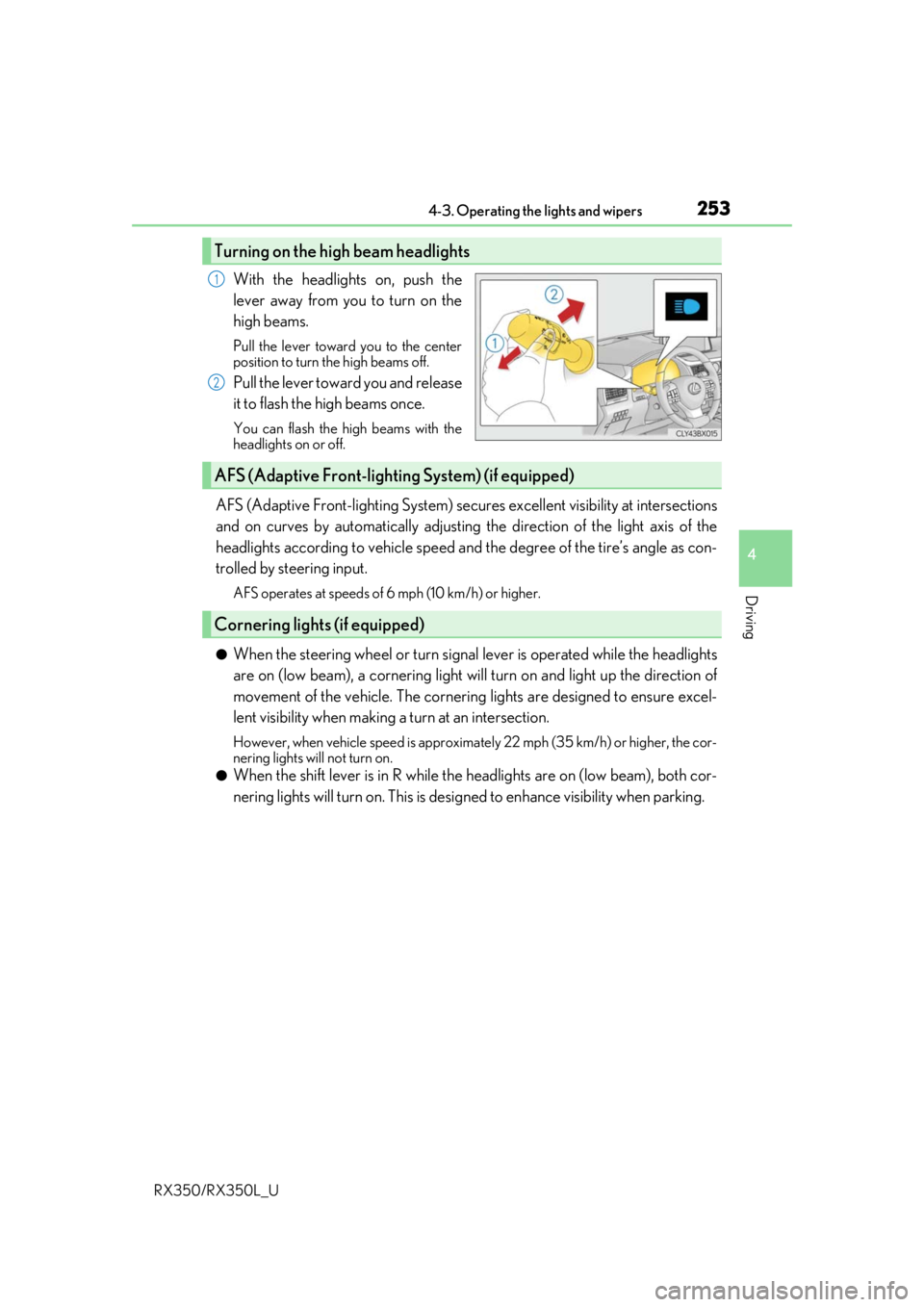
With the headlights on, push the
lever away from you to turn on the
high beams.
Pull the lever toward you to the center
position to turn the high beams off.
Pull the lever toward you and release
it to flash the high beams once.
You can flash the high beams with the
headlights on or off.
AFS (Adaptive Front-lighting System) secures excellent visibility at intersections
and on curves by automatically adjusting the direction of the light axis of the
headlights according to vehicle speed and the degree of the tire’s angle as con-
trolled by steering input.
AFS operates at speeds of 6 mph (10 km/h) or higher.
●When the steering wheel or turn signal lever is operated while the headlights
are on (low beam), a cornering light w ill turn on and light up the direction of
movement of the vehicle. The cornerin g lights are designed to ensure excel-
lent visibility when making a turn at an intersection.
However, when vehicle speed is approximately 22 mph (35 km/h) or higher, the cor-
nering lights will not turn on.
●When the shift lever is in R while the headlights are on (low beam), both cor-
nering lights will turn on. This is desi gned to enhance visibility when parking.
Turning on the high beam headlights
1
2
AFS (Adaptive Front-lighting System) (if equipped)
Cornering lights (if equipped)
Page 272 of 777
2714-4. Refueling
4
Driving
RX350/RX350L_U
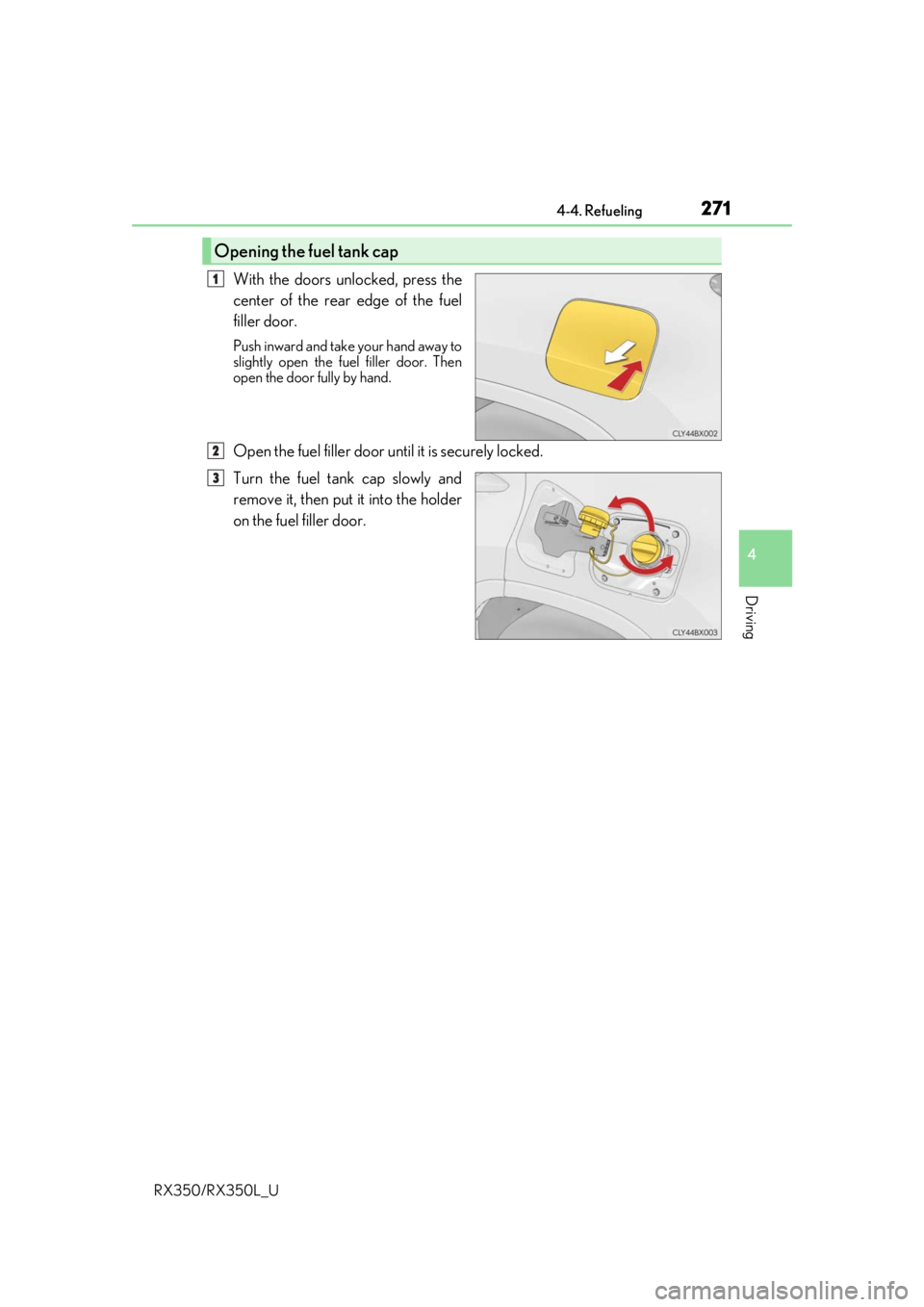
With the doors unlocked, press the
center of the rear edge of the fuel
filler door.
Push inward and take your hand away to
slightly open the fuel filler door. Then
open the door fully by hand.
Open the fuel filler door until it is securely locked.
Turn the fuel tank cap slowly and
remove it, then put it into the holder
on the fuel filler door.
Opening the fuel tank cap
1
2
3
Page 274 of 777
2734-4. Refueling
4
Driving
RX350/RX350L_U
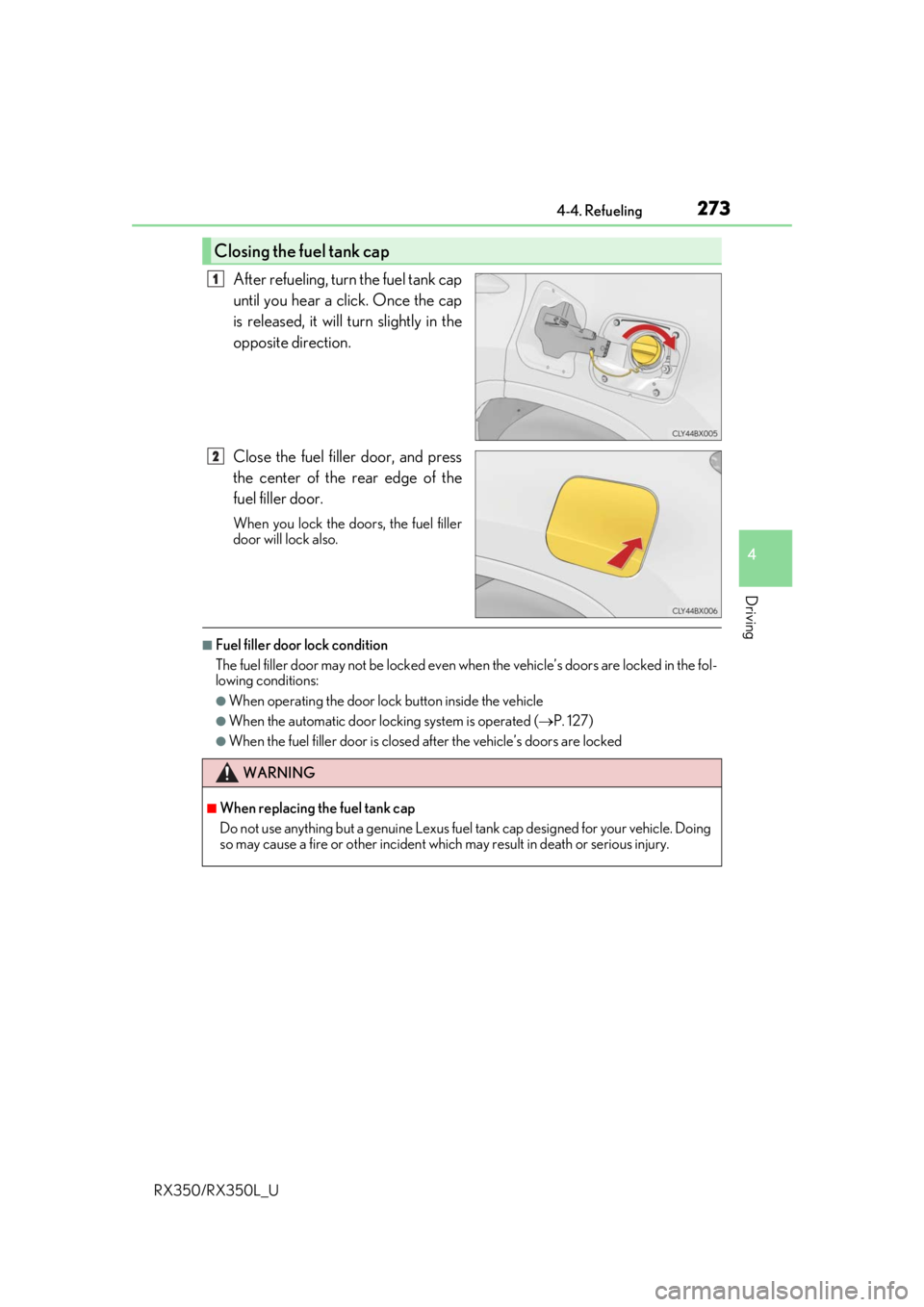
After refueling, turn the fuel tank cap
until you hear a click. Once the cap
is released, it will turn slightly in the
opposite direction.
Close the fuel filler door, and press
the center of the rear edge of the
fuel filler door.
When you lock the doors, the fuel filler
door will lock also.
■Fuel filler door lock condition
The fuel filler door may not be locked even when the vehicle’ s doors are locked in the fol-
lowing conditions:
●When operating the door lock button inside the vehicle
●When the automatic door lock ing system is operated (P. 127)
●When the fuel filler door is closed after the vehicle’s doors are locked
Closing the fuel tank cap
1
2
WARNING
■When replacing the fuel tank cap
Do not use anything but a genuine Lexus fuel tank cap designed for your vehicle. Doing
so may cause a fire or other incident whic h may result in death or serious injury.
Page 278 of 777

2774-5. Using the driving support systems
4
Driving
RX350/RX350L_U
WARNING
■To avoid malfunction of the camera sensor
Observe the following precautions.
Otherwise, the camera sensor may not operate properly, possibly leading to an acci-
dent resulting in deat h or serious injury.
●Keep the windshield clean at all times.
• If the windshield is dirty or covered with an oily film, water droplets, snow, etc.,
clear the windshield.
• If a glass coating agent is applied to the wi ndshield, it will still be necessary to use
the windshield wipers to remove water droplets, etc. from the area of the wind-
shield in front of the camera sensor.
• If the inner side of the windshield where th e camera sensor is installed is dirty, con-
tact your Lexus dealer.
●If the part of the windshield in front of the camera sensor is fogged up or covered with
condensation or ice, use the windshield defogger to remove the fog, condensation or
ice. ( P. 513)
●If water droplets cannot be properly removed from the area of the windshield in front
of the camera sensor by th e windshield wipers, replace the wiper insert or wiper
blade.
• To replace the wiper insert: P. 621
• If the wiper blades need to be re placed, contact your Lexus dealer.
●Do not attach window tinting to the windshield.
●Replace the windshield if it is damaged or cracked.
If the windshield needs to be re placed, contact your Lexus dealer.
●Do not get the camera sensor wet.
●Do not allow bright lights to shine into the camera sensor.
●Do not dirty or damage the camera sensor.
When cleaning the inside of the windshield , do not allow glass cleaner to contact the
lens. Also, do not touch the lens.
If the lens is dirty or damaged, contact your Lexus dealer.
●Do not attach objects, such as stickers, trans-
parent stickers, and so forth, to the outer side
of the windshield in front of the camera sensor
(shaded area in the illustration).
A: From the top of the windshield to approxi-
mately 0.4 in. (1 cm) below the bottom of the
camera sensor
B: Approximately 7.9 in. (20 cm) (Approxi-
mately 4.0 in. [10 cm] to the right and left
from the center of the camera sensor)