Page 81 of 777
80
RX350/RX350L_U2. Instrument cluster
Except F SPORT models
F SPORT models
The units used on the meter and some indicators may differ depending on the
target region.
Warning lights and indicators
The warning lights and indicators on the instrument cluster, center panel and
outside rear view mirrors inform the driver of the status of the vehicle’s vari-
ous systems.
For the purpose of explanation, the following illustrations display all warning
lights and indicators illuminated.
Page 83 of 777

822. Instrument cluster
RX350/RX350L_U
*1: These lights turn on when the engine switch is turned to IGNITION ON mode to indicate that a system check is being performed. They will turn off after the engine is
started, or after a few seconds. There may be a malfunction in a system if a light does
not come on, or turn off. Have the ve hicle inspected by your Lexus dealer.
*2: This light flashes to indicate a malfunction.
*3: This light flashes or illuminates to indicate a malfunction.
*4: This light illuminates on the center panel.
*5:RX350
*6:RX350L
The indicators inform the driver of the op erating state of the vehicle’s various sys-
tems.
Low fuel level warning light
( P. 656)*4, 6Rear passengers’ seat
belt reminder light
( P. 656)
Driver’s and front
passenger’s seat belt
reminder light ( P. 656)
*1Tire pressure warning light
( P. 656)
*4, 5Rear passengers’ seat
belt reminder light
( P. 656)*1Master warning light
( P. 657)
Indicators
Turn signal indicator
( P. 246) Fog light indicator
(
P. 260)
(U.S.A.)
Headlight indicator
( P. 252) Cruise control indicator
(
P. 300)
(Canada)
Tail light indicator
( P. 252) Radar cruise control
indicator (
P. 300)
Headlight high beam
indicator ( P. 253) Cruise control “SET”
indicator (
P. 300)
*1Automatic High Beam
indicator ( P. 256) LKA indicator (
P. 291)
Page 85 of 777

842. Instrument cluster
RX350/RX350L_U
●Drive mode indicators
Except F SPORT models
F SPORT models
*1: These lights turn on when the engine switch is turned to the IGNITION ON mode to indicate that a system check is being performed. They will turn off after the engine is
started, or after a few seconds. There may be a malfunction in a system if a light does
not come on, or turn off. Have the ve hicle inspected by your Lexus dealer.
*2: In order to confirm operation, the BSM ou tside rear view mirror indicators illuminate
in the following situations:
• When the BSM function is enabled on of the multi-information display, the
engine switch is turned to IGNITION ON mode.
• When the engine switch is in IGNITION ON mode, the BSM function is enabled
on of the multi-information display.
If the system is functioning correctly, the BSM outside rear view mirror indicators will
turn off after a few seconds.
If the BSM outside rear view mirror indicators do not illuminate or do not turn off,
there may be a malfunction in the system.
If this occurs, have the vehicle inspected by your Lexus dealer.
*3: This light illuminates on the outside rear view mirrors.
*4: This light flashes to indicate that the system is operating.
*5: The light comes on when the system is turned off.
*6: This light illuminates on the center panel.
*7: When the outside temperature is approximately 37 F (3 C) or lower, this indicator
will flash for approximately 10 seconds, then stay on. Eco drive mode indicator
(
P. 373) “SPORT” indicator
(
P. 373)
Eco drive mode indicator
( P. 373) “SPORT S” indicator
(
P. 373)
“SPORT S+” indicator
( P. 373) “CUSTOMIZE” indicator
(
P. 373)
Page 98 of 777

972. Instrument cluster
2
Instrument cluster
RX350/RX350L_U
◆Changing settings
Use the meter control switches on the steering wheel to change settings.
Press or to select .
Operate the switches to select a desired item.
Change the setting by referring to the message displayed on the screen.
◆Setting items
■ LKA (Lane-Keeping Assist) ( P. 291)
The following LKA system settings can be changed:
*1: If the lane centering function is enabled/ disabled, steering wheel assistance will also
be enabled/disabled accordingly.
*2: If the steering wheel assistance is disabled, lane cent ering function will also be dis-
abled automatically.
Settings display ( )
1
2
3
ItemSettingsDetails
Lane center tracing On
Select to enable/disable the lane cen-
tering function.
*1Off
Steering assistOnSelect to enable/disable steering
wheel assistance.
*2Off
Alert
Select to set a vibrator or buzzer as
the notification method used to warn
the driver.
Alert sensitivityHighSelect to set the warning sensitivity.Normal
Sway warningOnSelect to enable/disable the vehicle
sway warning.
Off
Sway sensitivity
High
Select to set the vehicle sway warning
sensitivity.Medium
Low
Page 150 of 777

1493-2. Opening, closing and locking the doors
3
Operation of each component
RX350/RX350L_U
■Note for the entry function
●Even when the electronic key is within the effective range (detection areas), the system
may not operate properly in the following cases:
• The electronic key is too close to the window or outside door handle, near the ground, or in a high place when the doors are locked or unlocked.
• The electronic key is near the ground or in a high place, or too close to the rear
bumper center when the back door is opened.
• The electronic key is on th e instrument panel, luggage co mpartment, floor, or in the
door pockets or glove box when the engine is started or engine switch modes are
changed.
●Do not leave the electronic key on top of th e instrument panel or near the door pockets
when exiting the vehicle. Depending on the radio wave reception conditions, it may be
detected by the antenna outs ide the cabin and the door will become lockable from the
outside, possibly trapping the electronic key inside the vehicle.
●As long as the electronic key is within th e effective range, the doors may be locked or
unlocked by anyone.
●Even if the electronic key is not inside the vehicle, it may be possible to start the engine
if the electronic key is near the window.
●The doors may unlock if a large amount of wa ter splashes on the door handle, such as in
the rain or in a car wash when the electronic key is within the effective range. (The door
will automatically be locked after approx imately 60 seconds if the doors are not
opened and closed.)
●If the wireless remote control is used to lo ck the doors when the electronic key is near
the vehicle, there is a possibility that the d oor may not be unlocked by the entry func-
tion. (Use the wireless remote control to unlock the doors.)
●Touching the door lock sensor while wearin g gloves may delay or prevent lock opera-
tion. Remove the gloves and touch the lock sensor again.
●When the lock operation is performed using the lock sensor, recognition signals will be
shown up to two consecutive times. After this, no recognition signals will be given.
*
●If the door handle becomes wet while the el ectronic key is within the effective range,
the door may lock and unlock repeatedly. In that case, follow the following correction
procedures to wash the vehicle:
• Place the electronic key in a location 6 ft. (2 m) or more away from the vehicle. (Take care to ensure that the key is not stolen.)
• Set the electronic key to battery-saving mode to disable the smart access system with push-button start. ( P. 148)
●If the electronic key is inside the vehicle and a door handle becomes wet during a car
wash, a message may be shown on the mult i-information display and a buzzer will
sound outside the vehicle. To turn off the alarm, lock all the doors.
●The lock sensor may not work properly if it comes into contact with ice, snow, mud, etc.
Clean the lock sensor and attempt to operate it again.
●A sudden approach to the effective range or door handle may prevent the doors from
being unlocked. In this case, return the door handle to the original position and check
that the doors unlock before pulling the door handle again.
●If there is another electronic key in the de tection area, it may take slightly longer to
unlock the doors after the door handle is gripped.
Page 161 of 777
1603-3. Adjusting the seats
RX350/RX350L_U
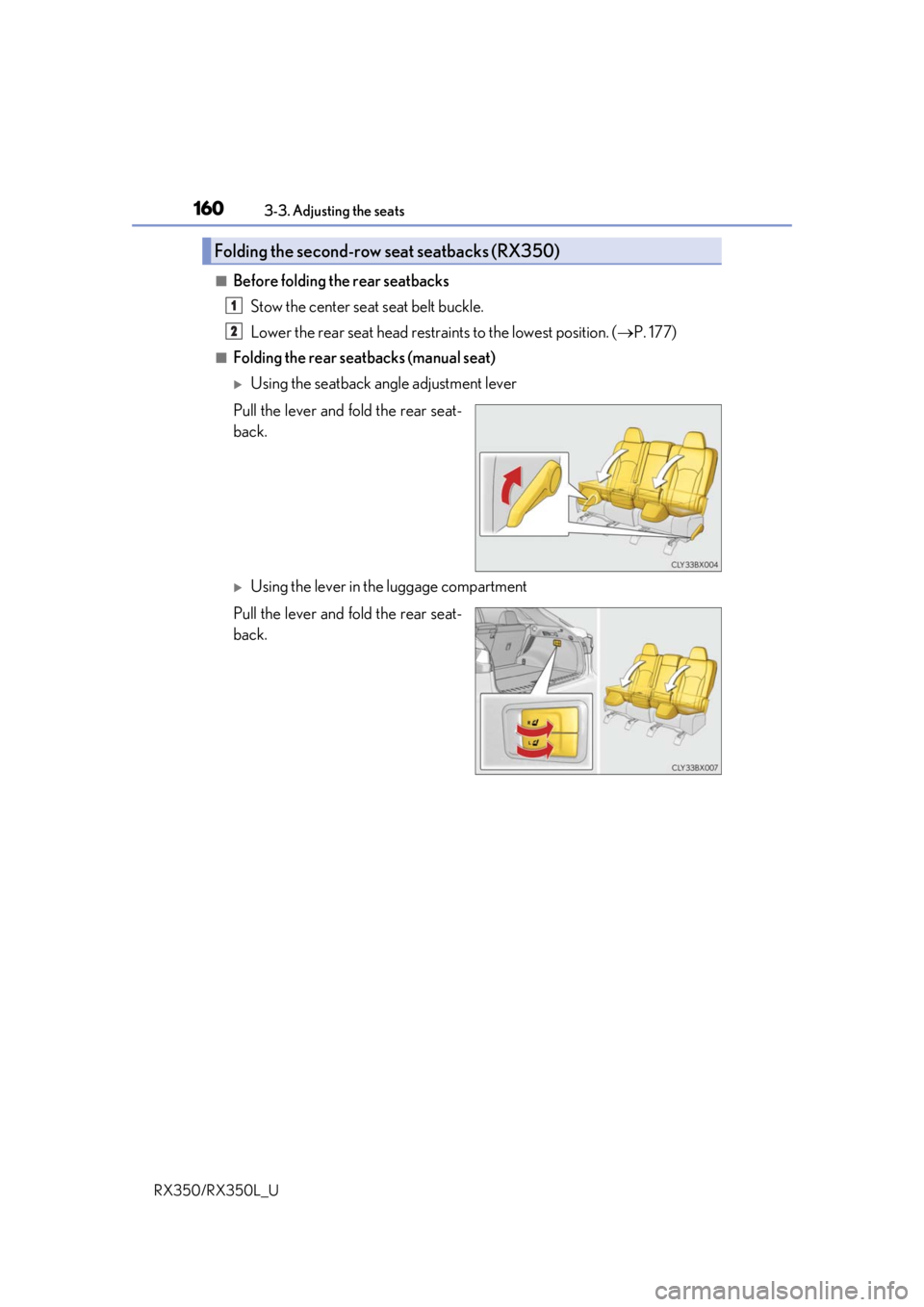
■Before folding the rear seatbacks Stow the center seat seat belt buckle.
Lower the rear seat head restra ints to the lowest position. (P. 177)
■Folding the rear seatbacks (manual seat)
Using the seatback angle adjustment lever
Pull the lever and fold the rear seat-
back.
Using the lever in the luggage compartment
Pull the lever and fold the rear seat-
back.
Folding the second-row seat seatbacks (RX350)
1
2
Page 163 of 777
1623-3. Adjusting the seats
RX350/RX350L_U
■Returning the rear seatbacks (power seat) Press and hold the return switch until the rear seatback begins to operate.
A buzzer will sound and then the operation will start. When the operation is com-
pleted, the buzzer will sound twice again.
To stop the operation partway, press either side of the switch for the operating seat.
Any rear seat operation switch for the op erating seat, regardless of location, can
be used to stop the operation. (A buzzer may sound depending on the position
that the rear seatback is stopped.)
Check that the plate of the seat
belt is on the front side of the seat-
back.
■Folding the rear center seatback only
Pull the lock release lever on the
back side of the seatback and fold
the center seatback.
To return the rear center seatback to
its original position, li ft it until it locks
in position.
1
Using the seatback angle adjust-
ment switchUsing the switch in the luggage
compartment
2
Page 164 of 777
1633-3. Adjusting the seats
3
Operation of each component
RX350/RX350L_U
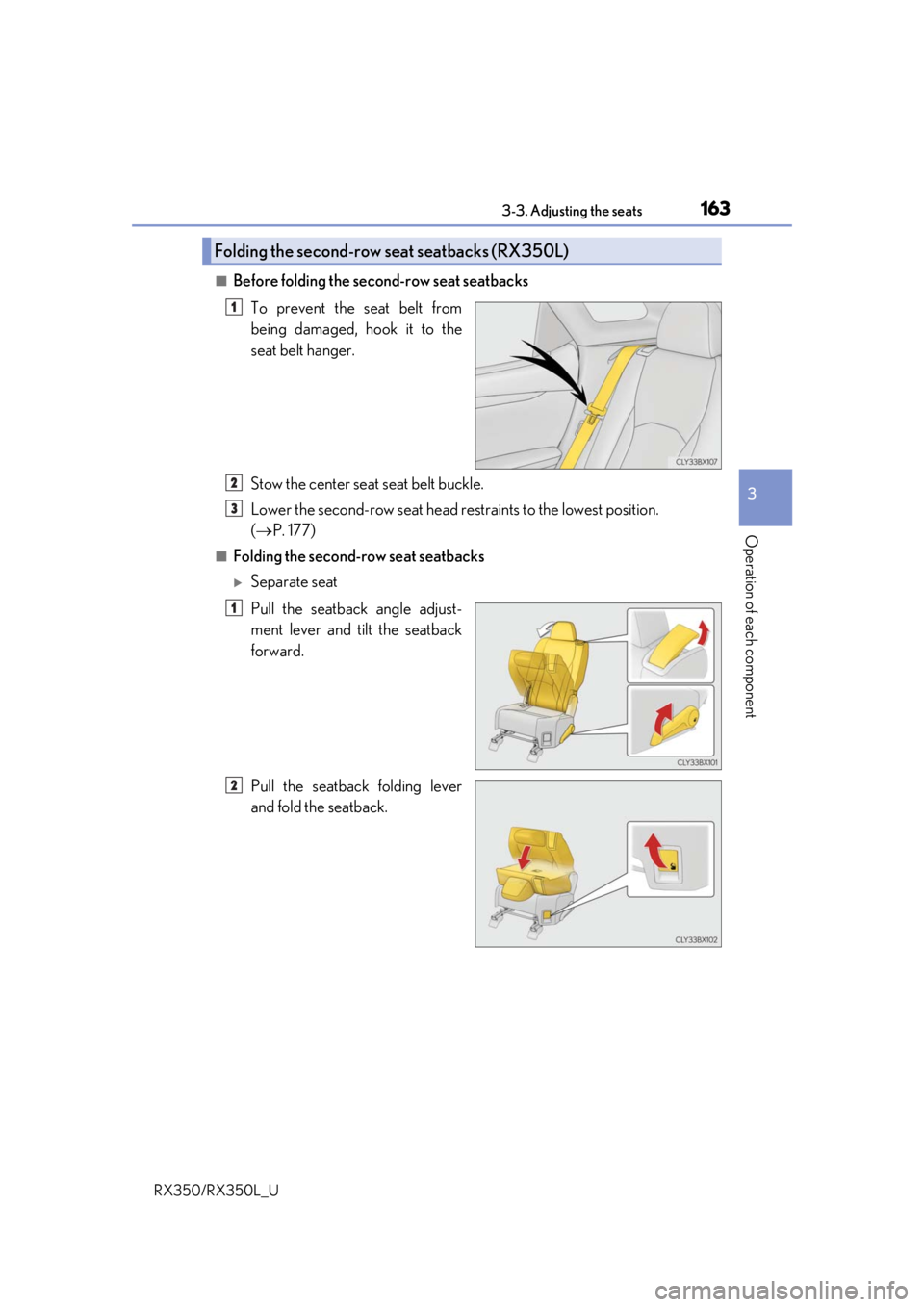
■Before folding the second-row seat seatbacksTo prevent the seat belt from
being damaged, hook it to the
seat belt hanger.
Stow the center seat seat belt buckle.
Lower the second-row seat head re straints to the lowest position.
( P. 177)
■Folding the second-row seat seatbacks
Separate seat
Pull the seatback angle adjust-
ment lever and tilt the seatback
forward.
Pull the seatback folding lever
and fold the seatback.
Folding the second-row seat seatbacks (RX350L)
1
2
3
1
2