Page 324 of 516
3245-5. Using the storage features
RX350: After removing the luggage
cover, place it somewhere other than the
passenger compartment.
RX350L: Stow the luggage cover under
the deck board and side auxiliary box
cover.
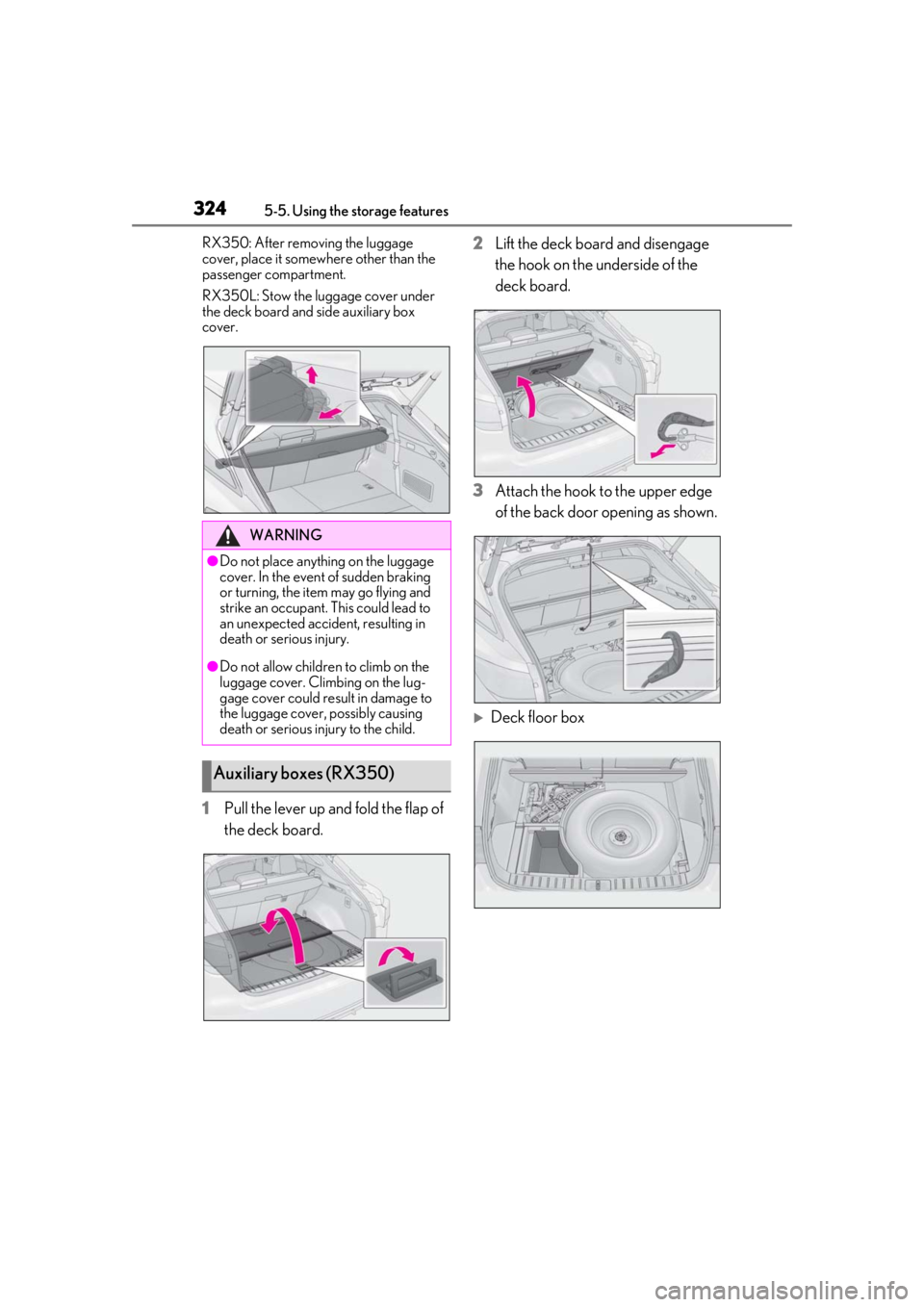
1Pull the lever up and fold the flap of
the deck board. 2
Lift the deck board and disengage
the hook on the underside of the
deck board.
3 Attach the hook to the upper edge
of the back door opening as shown.
Deck floor box
WARNING
●Do not place anything on the luggage
cover. In the event of sudden braking
or turning, the item may go flying and
strike an occupant. This could lead to
an unexpected accident, resulting in
death or serious injury.
●Do not allow children to climb on the
luggage cover. Climbing on the lug-
gage cover could result in damage to
the luggage cover, possibly causing
death or serious injury to the child.
Auxiliary boxes (RX350)
Page 325 of 516
3255-5. Using the storage features
5
Interior features
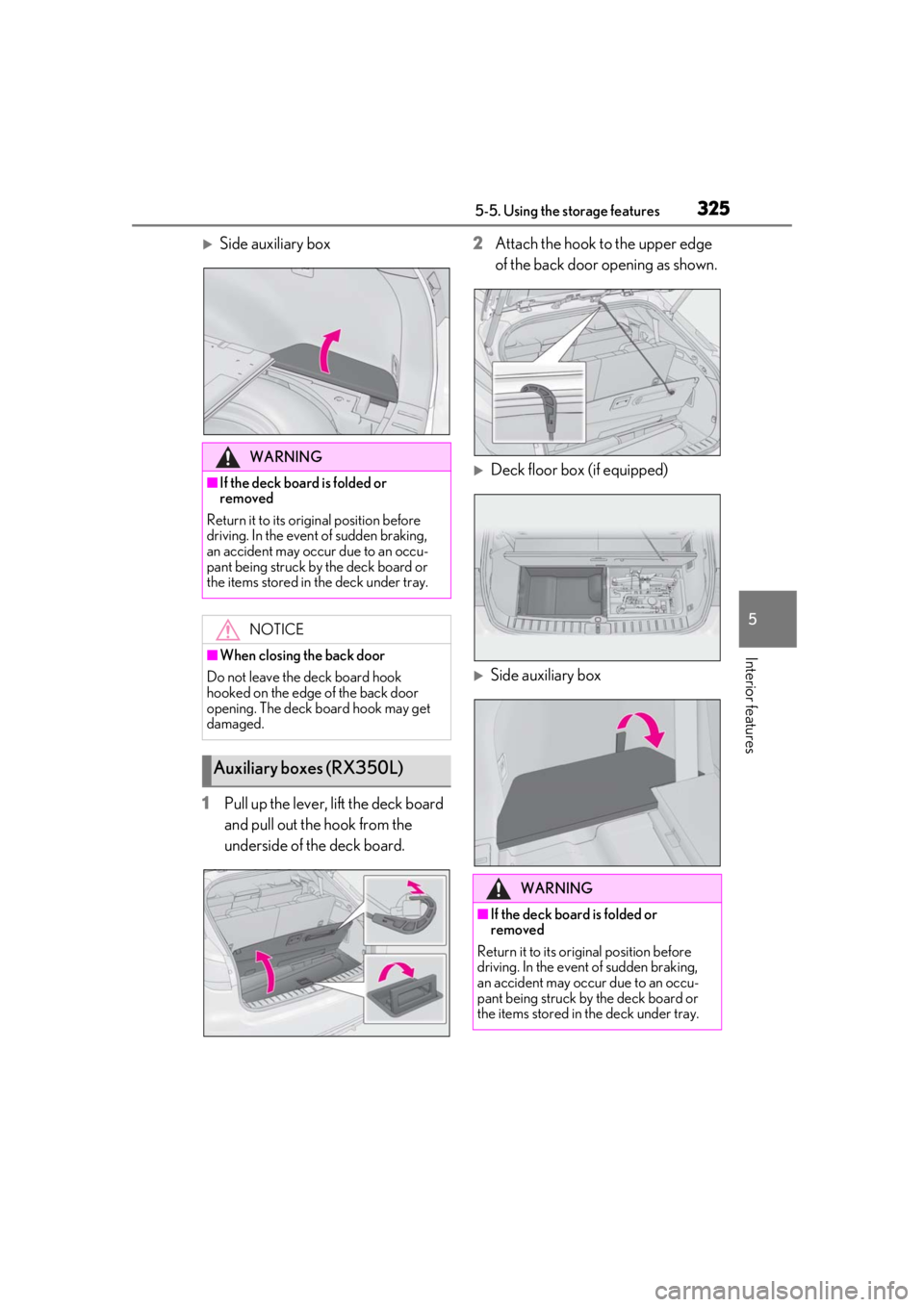
Side auxiliary box
1 Pull up the lever, lift the deck board
and pull out the hook from the
underside of the deck board. 2
Attach the hook to the upper edge
of the back door opening as shown.
Deck floor box (if equipped)
Side auxiliary box
WARNING
■If the deck board is folded or
removed
Return it to its original position before
driving. In the event of sudden braking,
an accident may occur due to an occu-
pant being struck by the deck board or
the items stored in the deck under tray.
NOTICE
■When closing the back door
Do not leave the deck board hook
hooked on the edge of the back door
opening. The deck board hook may get
damaged.
Auxiliary boxes (RX350L)
WARNING
■If the deck board is folded or
removed
Return it to its original position before
driving. In the event of sudden braking,
an accident may occur due to an occu-
pant being struck by the deck board or
the items stored in the deck under tray.
Page 326 of 516
3265-5. Using the storage features
WARNING
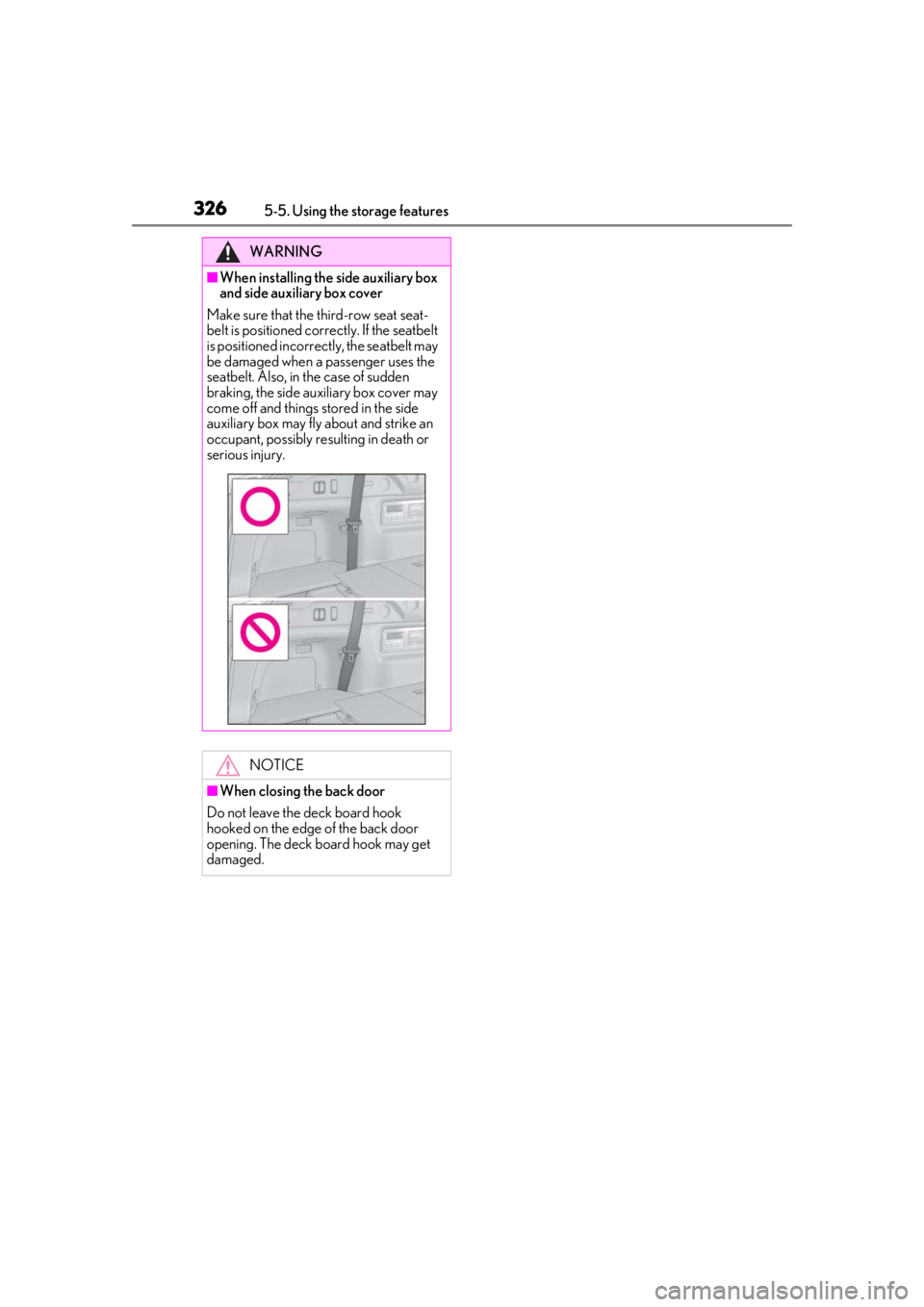
■When installing the side auxiliary box
and side auxiliary box cover
Make sure that the third-row seat seat-
belt is positioned corre ctly. If the seatbelt
is positioned incorrectly, the seatbelt may
be damaged when a passenger uses the
seatbelt. Also, in th e case of sudden
braking, the side auxiliary box cover may
come off and things stored in the side
auxiliary box may fly about and strike an
occupant, possibly resulting in death or
serious injury.
NOTICE
■When closing the back door
Do not leave the deck board hook
hooked on the edge of the back door
opening. The deck board hook may get
damaged.
Page 334 of 516
3345-6. Using the other interior features
WARNING
■Caution while driving
When charging a portable device while
driving, for safety reasons, the driver
should not operate the portable device.
■Caution regarding interference with
electronic devices
People with implantable cardiac pace-
makers, cardiac resy nchronization ther-
apy pacemakers or implantable
cardioverter defibrillators, as well as any
other electrical medical device, should
consult their physician about the usage of
the wireless charger.
Operations of the wireless charger may
have an affect on medical devices.
■To prevent damage or burns
Observe the following precautions.
Failure to do so may result in the possibil-
ity of fire, equipment failure or damage,
or burns due to heat.
●Do not put any metallic objects
between the charging area and the
portable device while charging.
●Do not attach metallic objects, such as
aluminum stickers, to the charging
area.
●Do not cover the wireless charger with
a cloth or other obje ct while charging.
●Do not attempt to charge portable
devices which are not compatible with
the Qi wireless charging standard.
●Do not disassemble, modify or remove
the wireless charger.
●Do not apply force or impact to the
wireless charger.
NOTICE
■Conditions in which the wireless
charger may not operate correctly
In the following situations, the wireless
charger may not operate correctly:
●When a portable device is fully
charged
●When there is a foreign object
between the charging area and porta-
ble device
●When a portable device becomes hot
while charging
●When a portable device is placed on
the wireless area with its charging sur-
face facing up
●When a portable device is not cen-
tered on the charging area
●When the vehicle is near a TV tower,
electric power plant, gas station, radio
station, large display, airport or other
facility that generates strong radio
waves or electrical noise
●When the portable device is in contact
with, or is covered by any of the follow-
ing metallic objects:
• Cards to which aluminum foil is attached
• Cigarette boxes that have aluminum foil inside
• Metallic wallets or bags
•Coins
•Metal hand warmers
• Media such as CDs and DVDs
●When wireless keys (that emit radio
waves) other than those of your vehicle
are being used nearby.
If in situations other than above the wire-
less charger does not operate properly
or the operation indicator light is blink-
ing, the wireless charger may be mal-
functioning. Contact your Lexus dealer.
Page 335 of 516
3355-6. Using the other interior features
5
Interior features
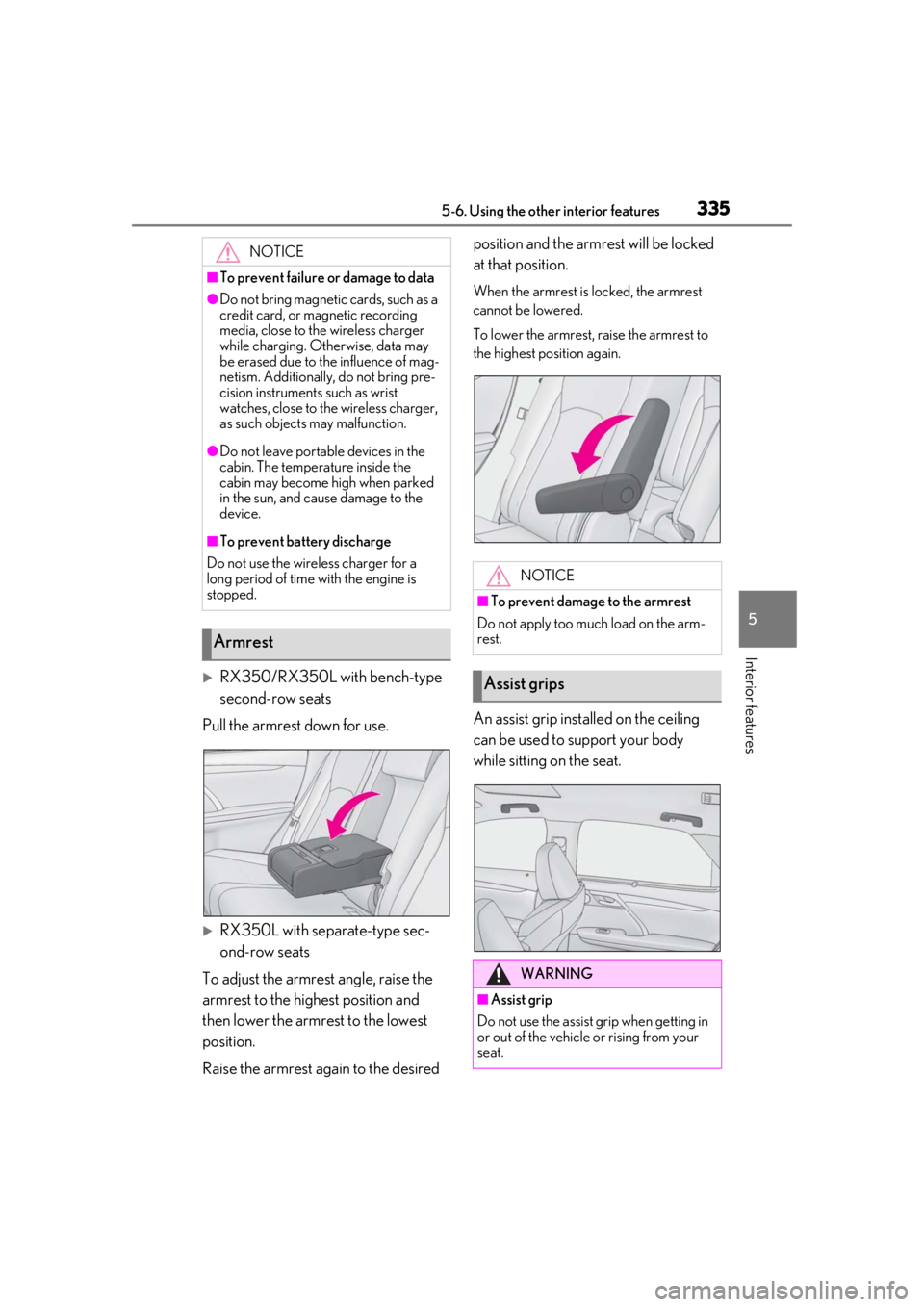
RX350/RX350L with bench-type
second-row seats
Pull the armrest down for use.
RX350L with separate-type sec-
ond-row seats
To adjust the armrest angle, raise the
armrest to the highest position and
then lower the armrest to the lowest
position.
Raise the armrest again to the desired position and the armrest will be locked
at that position.
When the armrest is locked, the armrest
cannot be lowered.
To lower the armrest, raise the armrest to
the highest position again.
An assist grip installed on the ceiling
can be used to support your body
while sitting on the seat.
NOTICE
■To prevent failure or damage to data
●Do not bring magnetic cards, such as a
credit card, or magnetic recording
media, close to the wireless charger
while charging. Otherwise, data may
be erased due to the influence of mag-
netism. Additionally, do not bring pre-
cision instruments such as wrist
watches, close to the wireless charger,
as such objects may malfunction.
●Do not leave portab
le devices in the
cabin. The temperature inside the
cabin may become high when parked
in the sun, and cause damage to the
device.
■To prevent battery discharge
Do not use the wireless charger for a
long period of time with the engine is
stopped.
Armrest
NOTICE
■To prevent damage to the armrest
Do not apply too much load on the arm-
rest.
Assist grips
WARNING
■Assist grip
Do not use the assist grip when getting in
or out of the vehicle or rising from your
seat.
Page 336 of 516

3365-6. Using the other interior features
The coat hooks are provided with the
rear assist grips.
The GPS clock's time is automatically
adjusted by utilizing GPS time infor-
mation.
For details, refer to “NAVIGATION AND
MULTIMEDIA SYSTEM OWNER’S
MANUAL”.
Please use as a power supply for elec-
tronic goods that use less than 12
VDC/10 A (power consumption of
120 W).
Observe the following when using
electronic goods:
Make sure that the power consump-
tion of all the connected power out-
lets on the instrument panel and in
the luggage compartment is less
than 120 W.
Make sure that the power consump-
tion of all the connected power out-
lets inside the console box is less
than 120 W.
On the instrument panel
Remove the cap.
Inside the console box
Open the lid.
NOTICE
■To prevent damage to the assist grip
Do not hang any heavy object or put a
heavy load on th e assist grip.
Coat hooks
WARNING
■Items that must not be hung on the
hook
Do not hang coat hangers or other hard
or sharp objects on the hook. If the SRS
curtain shield airbags deploy, these items
may become projectiles, causing death
or serious injury.
Clock
Power outlets
Page 338 of 516
3385-6. Using the other interior features
3To use the side extender, place the
visor in the side position, then slide
it backward.
Slide the cover to open.
The light turns on when the cover is
opened.
■To prevent battery discharge
If the vanity lights remain on when the
engine switch is turned off, the lights will go
off automatically after 20 minutes.
Use the front passenger footwell hooks
to help support and prevent objects
placed on the floor, such as a grocery
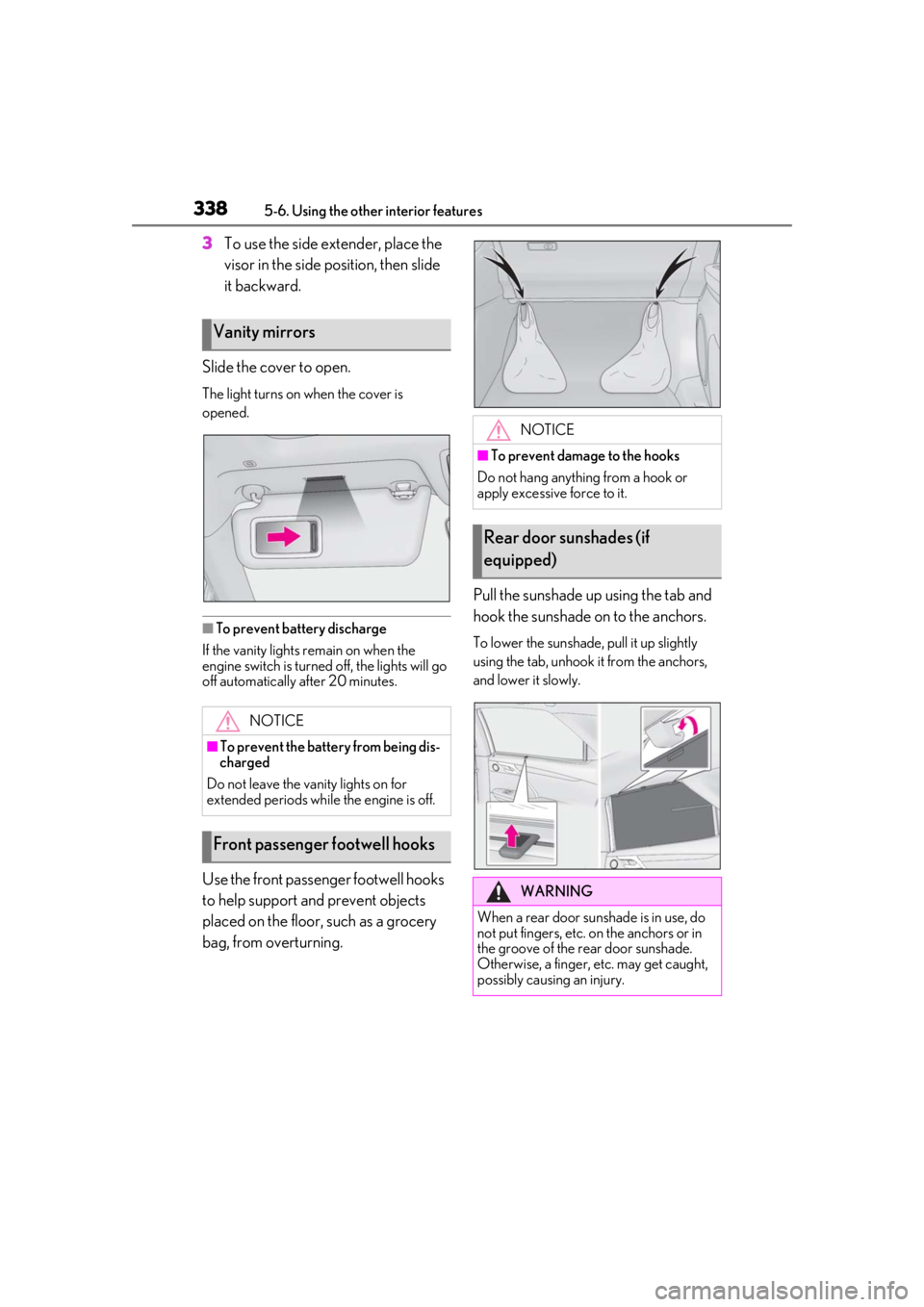
bag, from overturning. Pull the sunshade up using the tab and
hook the sunshade on to the anchors.
To lower the sunshade, pull it up slightly
using the tab, unhook it from the anchors,
and lower it slowly.
Vanity mirrors
NOTICE
■To prevent the battery from being dis-
charged
Do not leave the vanity lights on for
extended periods while the engine is off.
Front passenger footwell hooks
NOTICE
■To prevent damage to the hooks
Do not hang anything from a hook or
apply excessive force to it.
Rear door sunshades (if
equipped)
WARNING
When a rear door sunshade is in use, do
not put fingers, etc. on the anchors or in
the groove of the rear door sunshade.
Otherwise, a finger, etc. may get caught,
possibly causing an injury.
Page 341 of 516
3415-6. Using the other interior features
5
Interior features
■When support is necessary
Visit on the web at www.home-
link.com/lexus or call 1-800-355-3515.
WARNING
■When programming a garage door or
other remote control device
The garage door or other device may
operate, so ensure people and objects
are out of danger to prevent potential
harm.
■Conforming to federal safety stan-
dards
Do not use the HomeLink
® compatible
transceiver with any garage door opener
or device that lacks safety stop and
reverse features as required by federal
safety standards.
This includes any garage door that can-
not detect an interf ering object. A door
or device without these features
increases the risk of death or serious
injury.
■When operating or programming
HomeLink®
Never allow a child to operate or play
with the HomeLink® buttons.