2020 LEXUS NX300 mirror
[x] Cancel search: mirrorPage 281 of 468

2815-2. Using the air conditioning system and defogger
LEXUS NX300 Owners Manual_USA_M78389_en
5
Interior features
Press the rear windshield and outside
rear view mirror defogger switch.
The defoggers will automatically turn off
after a period of time.
■Windshield wiper de-icer (if
equipped)
P.284
■When the outside temperature exceeds
75°F (24°C) and the air conditioning
system is on
●In order to reduce the air conditioning
power consumption, the air conditioning
system may switch to recirculated air
mode automatically.
This may also reduce fuel consumption.
●Recirculated air mode is selected as a
default mode when the engine switch is
turned to IGNITION ON mode.
●It is possible to switch to outside air mode
at any time by pressing the outside/recir-
culated air mode switch.
■Fogging up of the windows
●The windows will easily fog up when the
humidity in the vehicle is high. Pressing
“A/C” button or selecting “A/C” will
dehumidify the air from the outlets and
defog the windshield effectively.
●If you turn “A/C” off, the windows may
fog up more easily.
●The windows may fog up if the recircu-
lated air mode is used.
■When driving on dusty roads
Close all windows. If dust thrown up by the
vehicle is still drawn into the vehicle after
closing the windows, it is recommended
that the air intake mode be set to outside air
mode and the fan speed to any setting
except off.
■Outside/recirculated air mode
●Setting to the recirculated air mode tem-
porarily is recommended in preventing
dirty air from entering the vehicle interior
and helping to cool the vehicle when the
outside air temperature is high.
●Outside/recirculated air mode may auto-
matically switch depending on the tem-
perature setting or the inside
temperature.
■Registering air conditioning settings to
electronic keys (vehicles with driving
position memory)
●Unlocking the vehicle using an electronic
key and turning the engine switch to
IGNITION ON mode will recall that
key’s registered air conditioning settings.
●When the engine switch is turned off, the
current air conditioning settings will auto-
matically be registered to the electronic
key that was used to unlock the vehicle.
●The system may not operate correctly if
more than one electr onic key is in the
vicinity or if the smart access system with
push-button start is used to unlock a pas-
senger door.
●The doors that can recall the air condi-
tioning setting when unlocked using the
smart access system with push-button
start can be changed.
* For details, con-
tact your Lexus dealer.
*: The doors that can recall the driving posi-
tion memory are changed at the same
time.
■Operation of the air conditioning sys-
tem in Eco mode
●In the Eco mode, the air conditioning sys-
tem is controlled as follows to prioritize
fuel efficiency
• Engine speed and compressor operation
controlled to restrict heating/cooling
capacity
• Fan speed restricted when automatic
mode is selected
●To improve air conditioning performance,
perform the following operations
• Adjust the fan speed
• Adjust the temperature setting
• Turn off Eco mode
●Even when the driving mode is set to Eco
mode, the air conditioning eco mode can
be turned off by selecting the
.
Page 282 of 468

2825-2. Using the air conditioning system and defogger
LEXUS NX300 Owners Manual_USA_M78389_en
■When the outside temperature is low
The dehumidification function may not
operate even when “A/C” is pressed or
“A/C” is selected.
■Ventilation and air conditioning odors
●To let fresh air in, set the air conditioning
system to the outside air mode.
●During use, various odors from inside and
outside the vehicle may enter into and
accumulate in the air conditioning sys-
tem. This may then cause odor to be
emitted from the vents.
●To reduce potential odors from occur-
ring:
• It is recommended that the air condition-
ing system be set to outside air mode
prior to turning the vehicle off.
• The start timing of the blower may be
delayed for a short period of time imme-
diately after the air conditioning system is
started in automatic mode.
■Air conditioning filter
P.355
■Customization
Settings (e.g. A/C automatic mode switch
operation) can be changed.
(Customizable features: P.427)
■Main control screen
Using the touchpad of the Remote
Touch ( P.274), select the button on
the screen.
to can be adjusted by perform-
ing the following operations.
Flick operation: Move the pointer to
the desired item and flick the touchpad
up or down.
The item can be adjusted by one level.
Trace operation: After selecting the
desired item, slide your finger up or
down.
The item can be adjusted by the amount
that you trace.
Trace operation cannot be used while driv-
ing.
WARNING
■To prevent the windshield from fog-
ging up
●Do not use the front windshield defog-
ger switch during cool air operation in
extremely humid weather. The differ-
ence between the temperature of the
outside air and that of the windshield
can cause the outer surface of the
windshield to fog up, blocking your
vision.
■To prevent burns
●Do not touch the rear view mirror sur-
faces when the outside rear view mir-
ror defoggers are on.
●Vehicles with windshield wiper de-
icer: Do not touch the glass at lower
part of the windshield or to the side of
the front pillars when the windshield
wiper de-icer is on.
NOTICE
■To prevent battery discharge
Do not leave the air conditioning system
on longer than necessary when the
engine is off.
Air conditioning control screen
BE
Page 295 of 468

2955-4. Using the storage features
LEXUS NX300 Owners Manual_USA_M78389_en
5
Interior features
●The back side of the auxiliary box lid can
be used as a vanity mirror.
Raise the hook to use.
The cargo hooks are provided for securing
loose items.
Raise the hook to use.
The cargo net can be hanged, using the
hook.
Luggage compartment fea-
tures
Cargo hooks
WARNING
■When cargo hooks are not in use
To avoid injury, always return the hooks
to their stowed positions when not in use.
Cargo net hooks
Page 299 of 468

2995-5. Using the other interior features
LEXUS NX300 Owners Manual_USA_M78389_en
5
Interior features
5-5.Using the other interior features
1To set the visor in the forward posi-
tion, flip it down.
2
To set the visor in the side position,
flip down, unhook, and swing it to
the side.
3
To use the side extender, place the
visor in the side position, then slide
it backward.
■Sun visors
Slide the cover to open.
The light turns on when the cover is
opened.
■Auxiliary box
Remove the lid of auxiliary box using the strap . (
P.294)
There is a vanity mirror on the back side of
the lid.
■Automatic light off to prevent battery
discharge
If the vanity lights remain on when the
engine switch is turned off, the lights will go
off automatically after 20 minutes.
The GPS clock’s time is automatically
adjusted by utilizing GPS time infor-
mation.
For details, refer to the “NAVIGA-
TION AND MULTIMEDIA SYSTEM
OWNER’S MANUAL”.
Other interior features
Sun visors
Vanity mirrors
NOTICE
■To prevent damage to the vanity mir-
ror
When the lid of auxiliary box is removed,
do not subject it to strong impacts or set
heavy objects on top of it.
■To prevent battery discharge
Do not leave the vanity lights on for
extended periods while the engine is off.
Clock
A
Page 311 of 468

3115-5. Using the other interior features
LEXUS NX300 Owners Manual_USA_M78389_en
5
Interior features
■Before programming the Home-
Link
®
During programming, it is possible
that garage doors, gates, or other
devices may operate. For this rea-
son, make sure that people and
objects are clear of the garage door
or other devices to prevent injury or
other potential harm.
It is recommended that a new bat-
tery be placed in the remote control
transmitter for more accurate pro-
gramming.
Garage door opener motors manu-
factured after 1995 may be
equipped with rolling code protec-
tion. If this is the case, you may need
a stepladder or other sturdy, safe
device to reach the “learn” or
“smart” button on the garage door
opener motor.
■Programming the HomeLink®
Steps 1 through 3 must be performed
within 60 seconds, otherwise the indi-
cator light will stop flashing and pro-
gramming will not be able to be
completed.
1 Press and release the HomeLink
®
button you want to program and
check that the HomeLink
® indica-
tor light flashes orange.
2 Point the remote control transmit-
ter for the device at the rear view
mirror, 1 to 3 in. (25 to 75 mm)
from the HomeLink
® buttons.
Keep the HomeLink® indicator light in
view while programming.
3 Program a device.
Programming a device other than
an entry gate (for U.S.A. owners)
Press and hold the remote control trans-
mitter button until the HomeLink
® indica-
tor light changes from slowly flashing
orange to rapidly flashing green (rolling
code) or continuously lit green (fixed
code), then release the button.
Programming an entry gate (for
U.S.A. owners)/Programming a
device in the Canadian market
Press and release the remote control trans-
mitter button at 2 second intervals, repeat-
edly, until the HomeLink
® indicator light
changes from slowly flashing orange to
rapidly flashing green (rolling code) or
continuously lit green (fixed code).
4 Test the HomeLink® operation by
pressing the newly programmed
Programming the HomeLink®
Page 315 of 468
3155-5. Using the other interior features
LEXUS NX300 Owners Manual_USA_M78389_en
5
Interior features
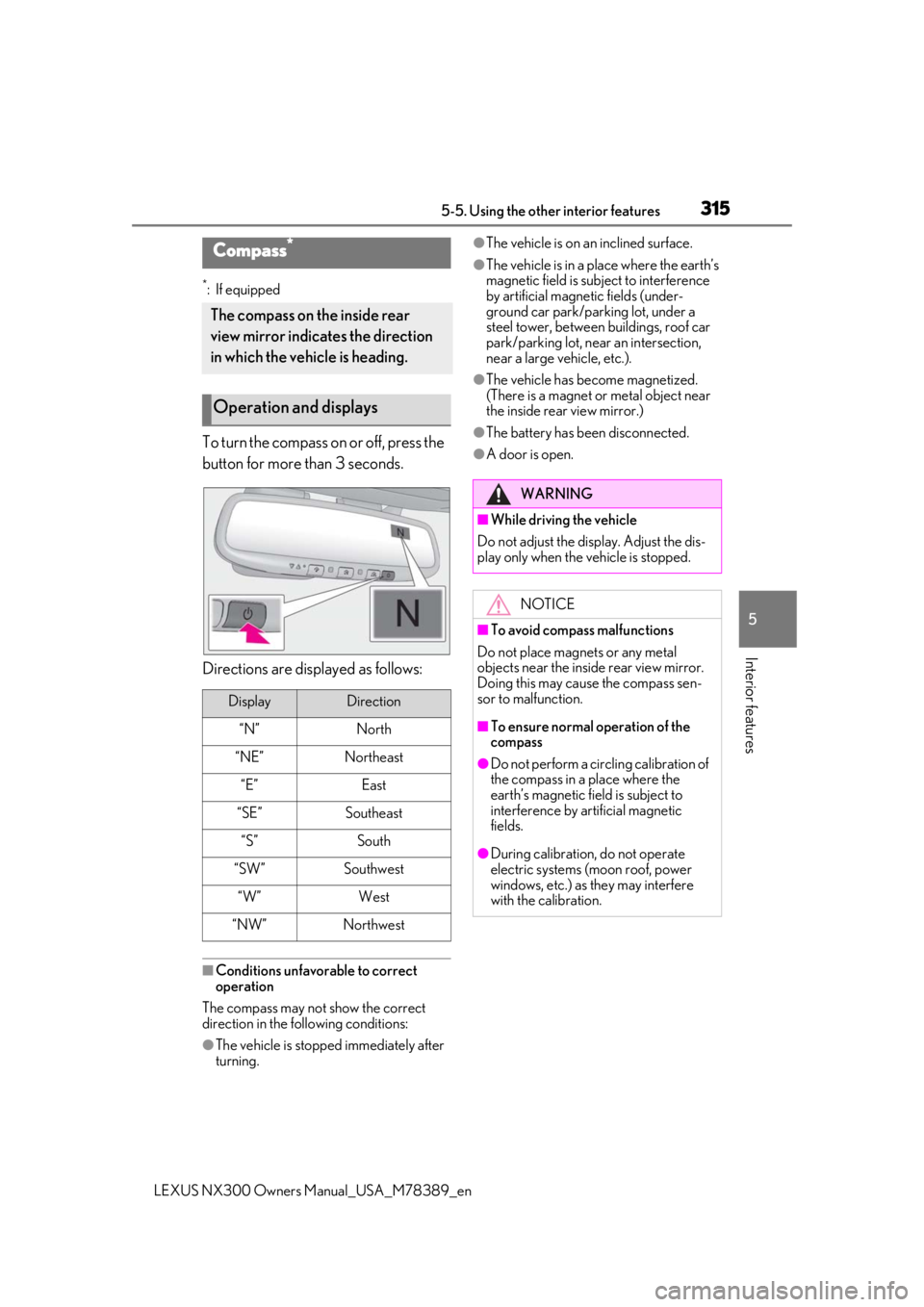
*: If equipped
To turn the compass on or off, press the
button for more than 3 seconds.
Directions are displayed as follows:
■Conditions unfavorable to correct
operation
The compass may not show the correct
direction in the following conditions:
●The vehicle is stopped immediately after
turning.
●The vehicle is on an inclined surface.
●The vehicle is in a place where the earth’s
magnetic field is subject to interference
by artificial magnetic fields (under-
ground car park/parking lot, under a
steel tower, between buildings, roof car
park/parking lot, near an intersection,
near a large vehicle, etc.).
●The vehicle has become magnetized.
(There is a magnet or metal object near
the inside rear view mirror.)
●The battery has been disconnected.
●A door is open.
Compass*
The compass on the inside rear
view mirror indicates the direction
in which the vehicle is heading.
Operation and displays
DisplayDirection
“N”North
“NE”Northeast
“E”East
“SE”Southeast
“S”South
“SW”Southwest
“W”West
“NW”Northwest
WARNING
■While driving the vehicle
Do not adjust the display. Adjust the dis-
play only when the vehicle is stopped.
NOTICE
■To avoid compass malfunctions
Do not place magnets or any metal
objects near the inside rear view mirror.
Doing this may cause the compass sen-
sor to malfunction.
■To ensure normal operation of the
compass
●Do not perform a circling calibration of
the compass in a place where the
earth’s magnetic field is subject to
interference by artificial magnetic
fields.
●During calibration, do not operate
electric systems (moon roof, power
windows, etc.) as they may interfere
with the calibration.
Page 320 of 468

3206-1. Maintenance and care
LEXUS NX300 Owners Manual_USA_M78389_en
6-1.Maintenance and care
Working from top to bottom, liber-
ally apply water to the vehicle body,
wheel wells and underside of the
vehicle to remove any dirt and dust.
Wash the vehicle body using a
sponge or soft cloth, such as a
chamois.
For hard-to-remove marks, use car
wash soap and rinse thoroughly with
water.
Wipe away any water.
Wax the vehicle when the water-
proof coating deteriorates.
If water does not bead on a clean surface,
apply wax when the vehicle body is cool.
■Self-restoring coat
The vehicle body has a self-restoring coat-
ing that is resistant to small surface
scratches caused in a car wash, etc.
●The coating lasts for 5 to 8 years from
when the vehicle is delivered from the
plant.
●The restoration time differs depending on
the depth of the scratch and outside tem-
perature. The restoration time may
become shorter when the coating is
warmed by applying warm water.
●Deep scratches caused by keys, coins,
etc. cannot be restored.
●Do not use wax that contain abrasives.
■Automatic car washes
●Before washing the vehicle:
• Fold the mirrors
• Turn off the power back door (if equipped)
Start washing from the front of the vehicle.
Extend the mirrors before driving.
●Brushes used in automatic car washes
may scratch the vehicl e surface and harm
your vehicle’s paint.
●Rear spoiler may not be washable in
some automatic car washes. There may
also be an increased risk of damage to
vehicle.
■High pressure car washes
As water may enter the cabin, do not bring
the nozzle tip near the gaps around the
doors or perimeter of the windows, or spray
these areas continuously.
■Note for a smart access system with
push-button start
●If the door handle becomes wet while the
electronic key is within the effective
range, the door may lock and unlock
repeatedly. In that case, follow the follow-
ing correction procedures to wash the
vehicle:
• Place the electronic key in a location 6 ft.
(2 m) or more away from the vehicle.
(Take care to ensure that the key is not
stolen.)
• Set the electronic key to battery-saving mode to disable the smart access system
with push-button start. ( P.117)
■Aluminum wheels
●Remove any dirt immediately by using a
neutral detergent.
●Wash detergent off with water immedi-
ately after use.
●To protect the paint from damage, make
sure to observe the following precau-
tions.
• Do not use acidic, alkaline or abrasive detergent
• Do not use hard brushes
• Do not use detergent on the wheels when
they are hot, such as after driving or park-
ing in hot weather
Cleaning and protecting the
vehicle exterior
Perform cleaning in a manner
appropriate to each component
and its material.
Cleaning instructions
Page 434 of 468

4348-2. Customization
LEXUS NX300 Owners Manual_USA_M78389_en
■Parking Support Brake function (for static objects)* ( P.241)
*:If equipped
■Driving position memory* ( P.128)
*:If equipped
■Outside rear view mirrors ( P.136)
■LTA (Lane Tracing Assist)* ( P.206)
FunctionDefault settingCustomized set-
ting
Parking Support Brake func-
tion (for static objects)OnOff—O——
FunctionDefault settingCustomized set-ting
Driver’s seat movement when
exiting the vehicleStandardOffO—O—Partial
Selection the door linking
driving position memory with
door unlock operation
Driver’s doorAll doors——O—
FunctionDefault settingCustomized set-ting
Automatic mirror folding and
extending operationLinked to the
locking/unlock- ing of the doorsOff
——O—Linked to opera-
tion of the engine switch
Linked mirror function when
reversingOnOff——O—
FunctionDefault settingCustomized set- ting
Lane centering functionOnOff—O——
Steering assist functionOnOff—O——
Alert typesSteering wheel vibrationBuzzer—O——
Alert sensitivityHighStandard—O——
ABCD
ABCD
ABCD
ABCD