2020 LEXUS LX570 low
[x] Cancel search: lowPage 454 of 636

454
LX570_OM_OM60R61U_(U)5-6. Using the other interior features
Garage door opener
The HomeLink® wireless control system in your vehicle has 3 buttons which can
be programmed to operate 3 different de vices. Refer to the programming meth-
ods on the following pages to determine the method which is appropriate for the
device.
HomeLink
® indicator light
Garage door operation indicators
HomeLink
® icon
Illuminates while HomeLink® is operat-
ing.
Buttons
■Before programming HomeLink®
●During programming, it is possible that garage doors, gates, or other
devices may operate. For this reason, make sure that people and objects
are clear of the garage door or othe r devices to prevent injury or other
potential harm.
●It is recommended that a new batter y be placed in the remote control
transmitter for more accurate programming.
●Garage door opener motors manufa ctured after 1995 may be equipped
with rolling code protection. If this is the case, you may need a stepladder
or other sturdy, safe device to reach the “Learn” or “Smart” button on the
garage door opener motor.
The garage door opener can be programmed to operate garage doors, gates,
entry doors, door locks, home lightin g systems, security systems, and other
devices.
Programming HomeLink®
1
2
3
4
Page 455 of 636

LX570_OM_OM60R61U_(U)
4555-6. Using the other interior features
5
Interior features
■Programming the HomeLink®
Steps through must be performed within 60 seconds, otherwise the
indicator light will stop flashing and pr ogramming will not be able to be com-
pleted.
Press and release the HomeLink
® button you want to program and check
that the HomeLink® indicator light flashes (orange).
Point the remote control transmit-
ter for the device at the rear view
mirror, 1 to 3 in. (25 to 75 mm)
from the HomeLink
® buttons.
Keep the HomeLink® indicator light
in view while programming.
Program a device.
Programming a device other
than an entry gate (for U.S.A.
owners)
Press and hold the remote control
transmitter button until the
HomeLink
® indicator light
changes from slowly flashing
orange to rapidly flashing green
(rolling code) or continuously lit
green (fixed code), then release
the button.
Programming an entry gate (for U. S.A. owners)/Programming a device
in the Canadian market
Press and release the remote control transm itter button at 2 second inter-
vals, repeatedly, until the HomeLink
® indicator light changes from slowly
flashing (orange) to rapidly flashing (green) (rolling code) or continuously
lit (green) (fixed code).
Test the HomeLink
® operation by pressing the newly programmed button
and observing the indicator light:
●Indicator light illuminates: Programming of a fixed code device has com-
pleted. The garage door or other de vice should operate when a Home-
Link
® button is pressed and released.
13
1
2
3
4
Page 457 of 636

LX570_OM_OM60R61U_(U)
4575-6. Using the other interior features
5
Interior features
■Enabling 2-way communication with a garage door (only available for com-
patible devices)
When enabled, 2-way communication allows you to check the status of the
opening and closing of a garage door through indicators in your vehicle.
2-way communication is only available if the garage door opener motor used
is a compatible device. (To check devi ce compatibility, refer to www.Home-
Link.com.)
Within 5 seconds after programming the garage door opener has been
completed, if the garage door op ener motor is trained to HomeLink
®,
both garage door operation indicator s will flash rapidly (green) and the
light on the garage door opener moto r will blink twice, indicating that 2-
way communication is enabled.
If the indicators do not flash, perform and within the first 10 presses of
the HomeLink
® button after programming has been completed.
Press a programmed HomeLink
® button to operate a garage door.
Within 1 minute of pressing the HomeLink
® button, after the garage door
operation has stopped, press the “Learn” or “Smart” button on the garage
door opener motor. Within 5 seconds of the establishment of 2-way com-
munication with the garage door opener, both garage door operation indi-
cators in the vehicle will flash rapidly (green) and the light on the garage
door opener motor will blink twice, indicating that 2-way communication is
enabled.
■Reprogramming a single HomeLink® button
When the following procedure is performed, buttons which already have
devices registered to them can be overwritten: With one hand, press and hold the desired HomeLink
® button.
When the HomeLink
® indicator starts flashing (orange), continue to hold
the HomeLink® button and perform “Programming HomeLink®” (it
takes 20 seconds for the HomeLink® indicator to start flashing).
Press the appropriate HomeLink
® button. The HomeLink® indicator light
should turn on.
Operating HomeLink®
1
23
2
3
1
2
1
Page 460 of 636

460
LX570_OM_OM60R61U_(U)5-6. Using the other interior features
WARNING
■When programming a garage door
or other remote control device
The garage door or other device may operat e, so ensure people and objects are out of
danger to prevent potential harm.
■Conforming to federal safety standards
Do not use the HomeLink® compatible transceiver with any garage door opener or
device that lacks safety stop and reverse features as requ ired by federal safety stan-
dards.
This includes any garage door that canno t detect an interfering object. A door or
device without these features increases the risk of death or serious injury.
■When operating or programming HomeLink®
Never allow a child to operat e or play with the HomeLink® buttons.
Page 462 of 636

462
LX570_OM_OM60R61U_(U)6-1. Maintenance and care
Cleaning and protecting the vehicle exterior
●Working from top to bott
om, liberally apply water to the vehicle body, wheel
wells and underside of the vehicl e to remove any dirt and dust.
●Wash the vehicle body using a sponge or soft cloth, such as a chamois.
●For hard-to-remove marks, use car wa sh soap and rinse thoroughly with
water.
●Wipe away any water.
●Wax the vehicle when the waterproof coating deteriorates.
If water does not bead on a clean surface, apply wax when the vehicle body is cool.
■Automatic car washes
●Fold the mirrors back before washing the ve hicle. Start washing from the front of the
vehicle. Make sure to extend the mirrors before driving.
●Brushes used in automatic car washes may scratch the vehicle surface and harm your
vehicle’s paint.
●Rear spoiler may not be wash able in some automatic car washes. There may also be an
increased risk of damage to vehicle.
■High pressure car washes
As water may enter the cabin, do not bring th e nozzle tip near the gaps around the doors
or perimeter of the windows, or spray these areas continuously.
■Wheels (including surrounding parts)
●Remove any dirt immediately by using a neut ral detergent. Do not use hard brushes or
abrasive cleaners. Do not use strong or harsh chemical cleaners. Use the same mild
detergent and wax as used on the paint.
●Do not use detergent on the wheels when they are hot, for example after driving for
long distance in the hot weather.
●Wash detergent from the wheels immediately after use.
■Bumpers
Do not scrub with abrasive cleaners.
Perform the following to protect the ve hicle and maintain it in prime condi-
tion:
Page 463 of 636
LX570_OM_OM60R61U_(U)
4636-1. Maintenance and care
6
Maintenance and care
■Notes for a smart access system with push-button start
●If the door handle becomes wet while the electronic key is within the effective range,
the door may lock and unlock repeatedly. Place the key in a position 6 ft. (2 m) or more
separate from the vehicle while the vehicle is being washed. (Take care to ensure that
the key is not stolen.)
●If the electronic key is inside the vehicle and a door handle becomes wet during a car
wash, a message may be shown on the mult i-information display and a buzzer will
sound outside the vehicle. To turn off the alarm, lock all the doors.
■Plated portions
If dirt cannot be removed, clean the parts as follows:
●Use a soft cloth dampened with an approxim ately 5% solution of neutral detergent and
water to clean the dirt off.
●Wipe the surface with a dry, soft cl oth to remove any remaining moisture.
●To remove oily deposits, use alcohol wet wipes or a similar product.
WARNING
■When washing the vehicle
Do not apply water to the inside of the engine compartment. Doing so may cause the
electrical components etc. to catch fire.
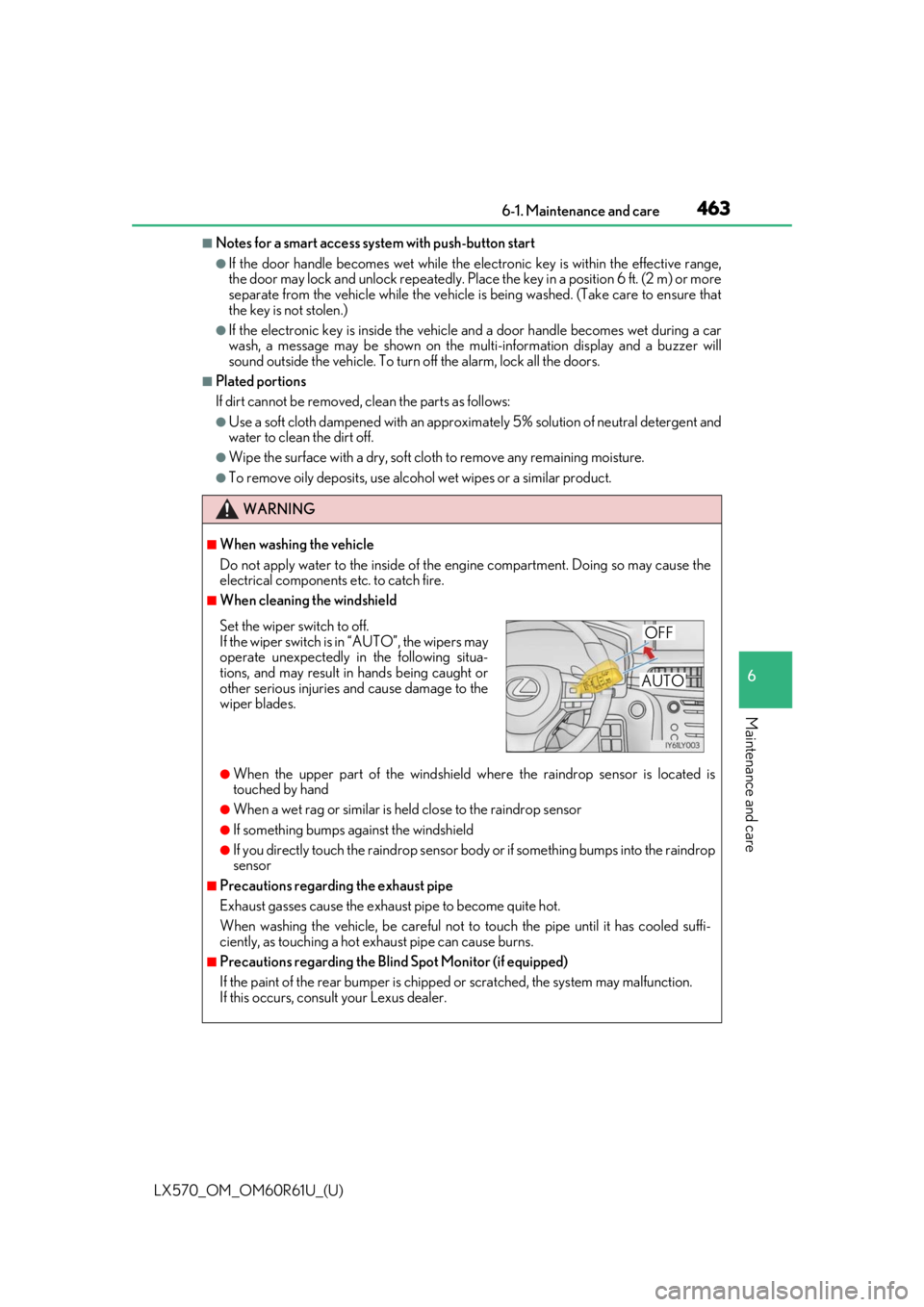
■When cleaning the windshield
●When the upper part of the windshield where the raindrop sensor is located is
touched by hand
●When a wet rag or similar is held close to the raindrop sensor
●If something bumps against the windshield
●If you directly touch the raindrop sensor bo dy or if something bumps into the raindrop
sensor
■Precautions regarding the exhaust pipe
Exhaust gasses cause the exhaust pipe to become quite hot.
When washing the vehicle, be careful not to touch the pipe until it has cooled suffi-
ciently, as touching a hot exhaust pipe can cause burns.
■Precautions regarding the Blind Spot Monitor (if equipped)
If the paint of the rear bump er is chipped or scratched, the system may malfunction.
If this occurs, consult your Lexus dealer.
Set the wiper switch to off.
If the wiper switch is in “AUTO”, the wipers may
operate unexpectedly in the following situa-
tions, and may result in hands being caught or
other serious injuries and cause damage to the
wiper blades.OFF
AUTO
Page 464 of 636

464
LX570_OM_OM60R61U_(U)6-1. Maintenance and care
NOTICE
■To prevent paint deterioration and corrosion
on the body and components (aluminum
wheels etc.)
●Wash the vehicle immediatel y in the following cases:
• After driving near the sea coast
• After driving on salted roads
• If coal tar or tree sap is present on the paint surface
• If you see dead insects, insect drop pings or bird droppings on the paint
• After driving in an area contaminated wi th soot, oily smoke, mine dust, iron pow-
der or chemical substances
• If the vehicle becomes heavily soiled in dust or mud
• If liquids such as benzene and gasoli ne are spilled on the paint surface
●If the paint is chipped or scratched, have it repaired immediately.
●To prevent the wheels from corroding, remove any dirt and store in a place with low
humidity when storing wheels.
■Cleaning the exterior lights
●Wash carefully. Do not use organic subs tances or scrub with a hard brush.
This may damage the surfaces of the lights.
●Do not apply wax on the surfaces of the lights.
Wax may cause damage to the lenses.
■When using an automatic car wash
Set the wiper switch to the off position.
If the wiper switch is in “AUTO”, the wipers may operate and the wiper blades may be
damaged.
■When using a high pressure car wash
●Do not bring the nozzle tip close to boots (rubber or resin manufactured cover), con-
nectors or the following parts. The parts may be damaged if they come into contact
with high-pressure water.
• Traction related parts
• Steering parts
• Suspension parts
•Brake parts
●Keep the cleaning nozzle at least 11.9 in. (30 cm) away from the vehicle body. Other-
wise resin section, such as moldings and bumpers, may be deformed and damaged.
Also, do not continuously hold the nozzle in the same place.
●Do not spray the lower part of the windshield continuously. If water enters the air con-
ditioning system intake located near the lo wer part of the windshield, the air condi-
tioning system may not operate correctly.
Page 465 of 636

465
LX570_OM_OM60R61U_(U)6-1. Maintenance and care
6
Maintenance and care
Cleaning and protecting the vehicle interior
●Remove dirt and dust using a vacuum cleaner. Wipe dirty surfaces with a cloth
dampened with lukewarm water.
●If dirt cannot be removed, wipe it off with a soft cloth dampened with neutral
detergent diluted to approximately 1%.
●Wring out any excess water from the clot
h and thoroughly wipe off remaining
traces of detergent and water.
●Remove dirt and dust using a vacuum cleaner.
●Wipe any excess dirt and dust with a so ft cloth dampened with diluted deter-
gent.
Use a diluted water solution of appr oximately 5% neutral wool detergent.
●Wring out any excess water from the clot h and thoroughly wipe off all remain-
ing traces of detergent.
●Wipe the surface with a dry, soft cl oth to remove any remaining moisture.
Allow the leather to dry in a shaded ventilated area.
●Remove dirt and dust using a vacuum cleaner.
●Wipe it off with a soft cloth dampened with neutral detergent diluted to
approximately 1%.
●Wring out any excess water from the clot h and thoroughly wipe off remaining
traces of detergent and water.
The following procedures will help prot ect your vehicle’s interior and keep it
in top condition:
Protecting the vehicle interior
Cleaning the leather areas
Cleaning the synthetic leather areas