2020 KIA SPORTAGE trailer
[x] Cancel search: trailerPage 9 of 611
Introduction
61
As with other vehicles of this type,
failure to operate this vehicle correct-
ly may result in loss of control, an
accident or vehicle rollover.
Specific design characteristics (high-
er ground clearance, track, etc.) give
this vehicle a higher center of gravity
than other types of vehicles. In other
words they are not designed for cor-
nering at the same speeds as con-
ventional 2-wheel drive vehicles.
Avoid sharp turns or abrupt maneu-
vers. Again, failure to operate this
vehicle correctly may result in loss of
control, an accident or vehicle
rollover.Be sure to read the
“Reducing the risk of a rollover”
driving guidelines, in chapter 6 of
this manual. This vehicle should not be modified.
Modification of your vehicle could
affect its performance, safety or dura-
bility and may even violate govern-
mental safety and emissions regula-
tions.
In addition, damage or performance
problems resulting from any modifi-
cation may not be covered under war-
ranty.
If you use unauthorized electronic
devices, it may cause the vehicle to
operate abnormally, wire damage,
battery discharge and fire. For your
safety, do not use unauthorized
electronic devices. No special break-in period is needed.
By following a few simple precautions
for the first 1,000 km (600 miles) you
may add to the performance, econo-
my and life of your vehicle.
Do not race the engine.
While driving, keep your engine
speed (rpm, or revolutions per
minute) between 2,000 rpm and
4,000 rpm.
Do not maintain a single speed for long periods of time, either fast or
slow. Varying engine speed is
needed to properly break-in the
engine.
Avoid hard stops, except in emer- gencies, to allow the brakes to seat
properly.
Don't tow a trailer during the first 2,000 km (1,200 miles) of operation.
VEHICLE MODIFICATIONS
VEHICLE HANDLING
INSTRUCTIONS VEHICLE BREAK-IN
PROCESS
Page 207 of 611
4119
Features of your vehicle
6. Wireless transmitters or mobilephones are within range of the
sensor.
7. The sensor is covered with snow.
8. Trailer towing The detecting range may decrease
when:
1. The sensor is covered with foreign
matter such as snow or water.
(The sensing range will return to
normal when removed.)
2. Outside air temperature is extremely hot or cold.
The following objects may not be
recognized by the sensor:
1. Sharp or slim objects such as ropes, chains or small poles.
2. Objects which tend to absorb the sensor frequency such as clothes,
sound absorbent material or snow.
3. Undetectable objects smaller than 1 m (40 in.) in height and narrower
than 14 cm (6 in.) in diameter.Parking distance warning-
reverse precautions
The parking distance warning-reverse may not sound consistent-
ly depending on the speed and
shapes of the objects detected.
The parking distance warning- reverse may malfunction if the vehi-
cle bumper height or sensor instal-
lation has been modified or dam-
aged. Any non-factory installed
equipment or accessories may also
interfere with the sensor perform-
ance.
The sensor may not recognize objects less than 30 cm (11 in.)
from the sensor, or it may sense an
incorrect distance. Use caution.
When the sensor is frozen or cov- ered with snow, dirt, or water, the
sensor may be inoperative until the
material is removed using a soft
cloth.
To prevent damage, do not push, scratch or strike the sensor.
Page 284 of 611
5
Winter driving . . . . . . . . . . . . . . . . . . . . . . . . . . . 5-149
. . . . . . . . . . . . . . . . . . . . . . 5-149
. . . . . . . . . 5-150
. . . . . . . . . . . . . . . . . . . . . 5-150
. . . . . . 5-150
. . . . . . . . . . . . . . . . . . . 5-151
. 5-151
. . . . . . . . . . . . 5-151
. . . 5-151
. . . . . . . . . . . . . . . . . . 5-151
Trailer Towing . . . . . . . . . . . . . . . . . . . . . . . . . . . 5-152
. . . . . . . . . . . . . . . . . . . . . . . . . . . . . . . . . . . . \
5-153
. . . . . . . . . . . . . . . . . . . . . . . . . . . . . . . 5-153
. . . . . . . . . . . . . . . . . . . . . . . . . . . . . . 5-153
. . . . . . . . . . . . . . . . . . . . . . . . 5-154
. . . . . . . . . . . . . . 5-157
. . . . . . . . . . . . . . . 5-158
Vehicle load limit . . . . . . . . . . . . . . . . . . . . . . . . . 5-160
. . . . . . . . . . . . . 5-160
. . . . . . . . . . . . . . . . . . . . . . . . . . . 5-164
Vehicle weight . . . . . . . . . . . . . . . . . . . . . . . . . . . . 5-165
Page 316 of 611
535
Driving your vehicle
Also, the EPB is applied automatical-
ly if the Auto Hold button is on when
the engine is turned off. However, if
you press the EPB switch after the
engine is turned off, the EPB will not
be Applied.
✽ ✽NOTICE
On a steep incline or when pulling a
trailer, if the vehicle does not remain
at a standstill, do as follows:
1. Apply the EPB.
2. Pull up the EPB switch for more
than 3 seconds.
Do not operate the parking brake/
EPB while the vehicle is moving
except in an emergency situation.
✽ ✽NOTICE
A click or electric brake motor
whine sound may be heard while
operating or releasing the EPB, but
these conditions are normal and
indicate that the EPB is functioning
properly.
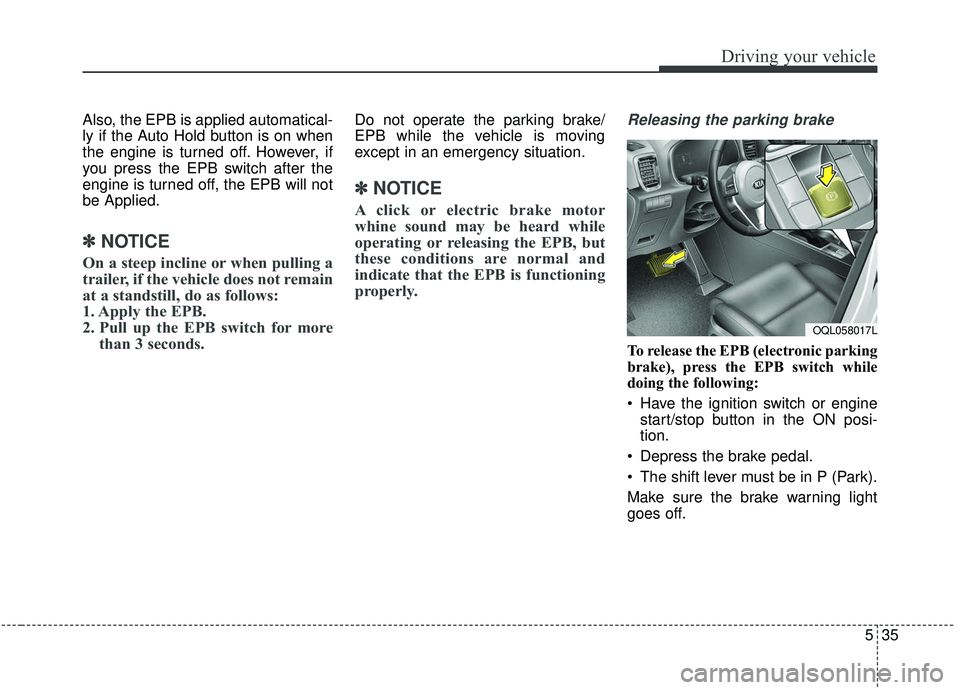
Releasing the parking brake
To release the EPB (electronic parking
brake), press the EPB switch while
doing the following:
Have the ignition switch or engine
start/stop button in the ON posi-
tion.
Depress the brake pedal.
The shift lever must be in P (Park).
Make sure the brake warning light
goes off.
OQL058017L
Page 343 of 611
Driving your vehicle
62
5
Detecting vehicles
The sensor may be limited when:
The camera is covered with a for-
eign object or debris
The camera lens is contaminated due to tinted, filmed or coated
windshield, damaged glass, or
stuck of foreign matter (sticker,
bug, etc.) on the glass
Inclement weather such as heavy rain or snow obscures the field of
view of the camera
The camera recognition is limited
The vehicle in front is too small to be detected (for example a motor-
cycle or a bicycle, etc.)
The vehicle in front is an oversize vehicle or trailer that is too big to
be detected by the camera recog-
nition system. (for example a trac-
tor, trailer, etc.)
The camera's field of view is not well illuminated (either too dark or too
much reflection or too much back-
light that obscures the field of view) The vehicle in front does not have
their rear lights properly turned ON
or their rear lights are located
unusually.
The outside brightness changes suddenly, for example when enter-
ing or exiting a tunnel
When light coming from a street light or an oncoming vehicle is
reflected on a wet road surface
such as a puddle in the road.
The field of view in front is obstructed by sun glare or head-
light of oncoming vehicle.
The windshield glass is fogged up.
The vehicle in front is driving errat- ically.
The vehicle is on unpaved or uneven rough surfaces, or roads
with sudden gradient changes.
The vehicle is drives inside a build- ing, such as a basement parking lot
The camera does not recognize the entire vehicle in front.
The camera is damaged. The brightness outside is too low
such as when the headlamps are
not on at night or the vehicle is
going through a tunnel.
Adverse road conditions cause excessive vehicle vibrations while
driving
The sensor recognition changes suddenly when passing over a
speed bump
The shadow is on the road by a median strip, trees, etc.
The vehicle drives through a toll- gate.
The rear part of the vehicle in front is not fully visible.
The vehicle in front is moving verti- cally to the driving direction
The vehicle in front is stopped ver- tically
The vehicle in front is driving towards your vehicle or reversing
You are on a roundabout and the vehicle in front circles
Page 356 of 611
575
Driving your vehicle
Limitation of the system
The Forward Collision-Avoidance
Assist (FCA) system is designed to
monitor the vehicle or a pedestrian
ahead in the roadway through radar
signals and camera recognition to
warn the driver that a collision is
imminent, and if necessary, apply
emergency braking.
In certain situations, the radar sen-
sor or the camera may not be able to
detect the vehicle ahead. In these
cases, the FCA system may not
operate normally. The driver must
pay careful attention in the following
situations where the FCA operation
may be limited.
Detecting vehicles
The sensor may be limited when:
The radar sensor or camera is cov-ered with a foreign object or debris
The camera lens is contaminated due to tinted, filmed or coated
windshield, damaged glass, or
stuck of foreign matter (sticker,
bug, etc.) on the glass
Inclement weather such as heavy rain or snow obscures the field of
view of the radar sensor or camera
There is interference by electro- magnetic waves
Something in the path of travel deflects the radar waves.
The radar/camera recognition is limited
The vehicle in front is too small to be detected (for example a motor-
cycle or a bicycle, etc.)
The vehicle in front is an oversize vehicle or trailer that is too big to
be detected by the camera recog-
nition system. (for example a trac-
tor, trailer, etc.)WARNING
The FCA system does notoperate when the vehicle is in
reverse.
The FCA system is not designed to detect other
objects on the road such as
animals.
The FCA system does not detect vehicles in the opposite
lane.
The FCA system does not detect cross traffic vehicles
that are approaching.
The FCA system cannot detect the driver approaching the side
view of a parked vehicle (for
example on a dead end street.)
In these cases, you must main-
tain a safe braking distance,
and if necessary, depress the
brake pedal to reduce the driv-
ing speed in order to maintain a
safe distance.
Page 385 of 611
Driving your vehicle
104
5
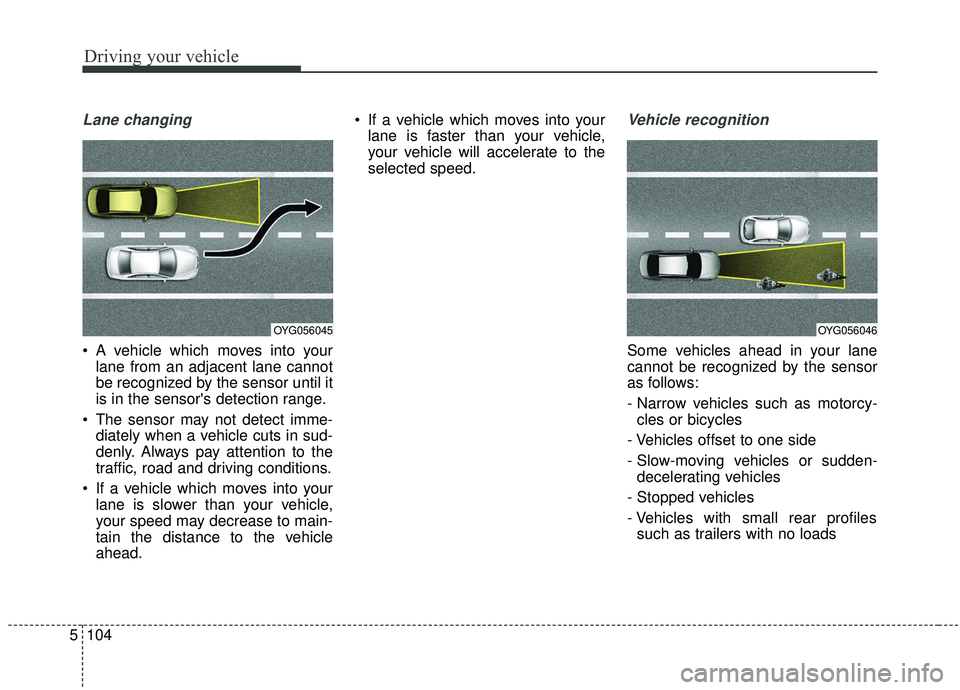
Lane changing
A vehicle which moves into your
lane from an adjacent lane cannot
be recognized by the sensor until it
is in the sensor's detection range.
The sensor may not detect imme- diately when a vehicle cuts in sud-
denly. Always pay attention to the
traffic, road and driving conditions.
If a vehicle which moves into your lane is slower than your vehicle,
your speed may decrease to main-
tain the distance to the vehicle
ahead. If a vehicle which moves into your
lane is faster than your vehicle,
your vehicle will accelerate to the
selected speed.
Vehicle recognition
Some vehicles ahead in your lane
cannot be recognized by the sensor
as follows:
- Narrow vehicles such as motorcy-cles or bicycles
- Vehicles offset to one side
- Slow-moving vehicles or sudden- decelerating vehicles
- Stopped vehicles
- Vehicles with small rear profiles such as trailers with no loads
OYG056045OYG056046
Page 409 of 611
Driving your vehicle
128
5
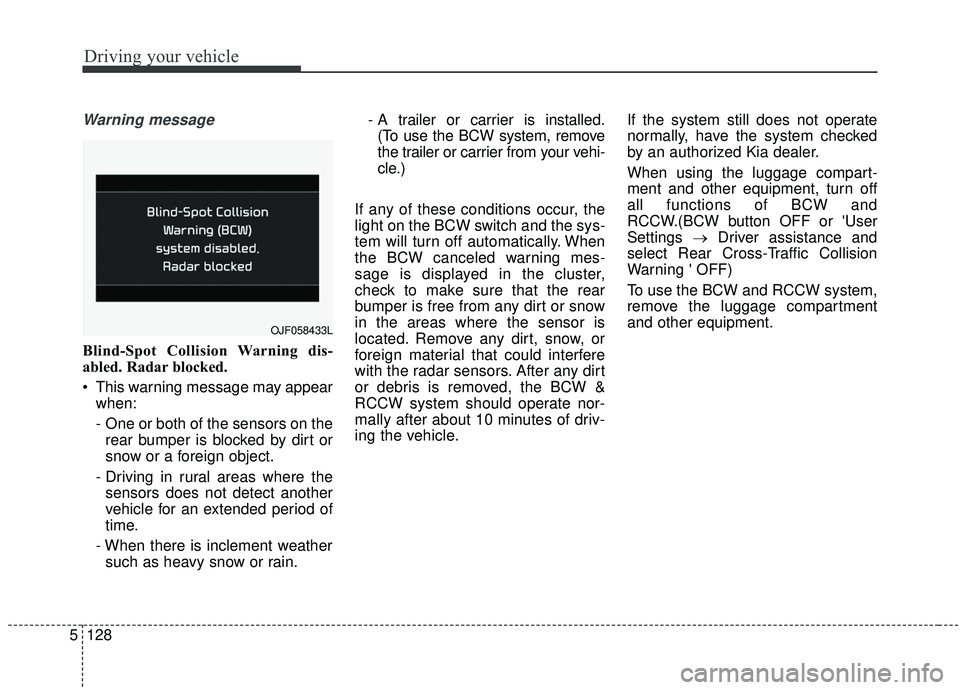
Warning message
Blind-Spot Collision Warning dis-
abled. Radar blocked.
This warning message may appear
when:
- One or both of the sensors on therear bumper is blocked by dirt or
snow or a foreign object.
- Driving in rural areas where the sensors does not detect another
vehicle for an extended period of
time.
- When there is inclement weather such as heavy snow or rain. - A trailer or carrier is installed.
(To use the BCW system, remove
the trailer or carrier from your vehi-
cle.)
If any of these conditions occur, the
light on the BCW switch and the sys-
tem will turn off automatically. When
the BCW canceled warning mes-
sage is displayed in the cluster,
check to make sure that the rear
bumper is free from any dirt or snow
in the areas where the sensor is
located. Remove any dirt, snow, or
foreign material that could interfere
with the radar sensors. After any dirt
or debris is removed, the BCW &
RCCW system should operate nor-
mally after about 10 minutes of driv-
ing the vehicle. If the system still does not operate
normally, have the system checked
by an authorized Kia dealer.
When using the luggage compart-
ment and other equipment, turn off
all functions of BCW and
RCCW.(BCW button OFF or 'User
Settings
→Driver assistance and
select Rear Cross-Traffic Collision
Warning ' OFF)
To use the BCW and RCCW system,
remove the luggage compartment
and other equipment.
OJF058433L