2020 KIA SPORTAGE ECO mode
[x] Cancel search: ECO modePage 277 of 611
4189
Features of your vehicle
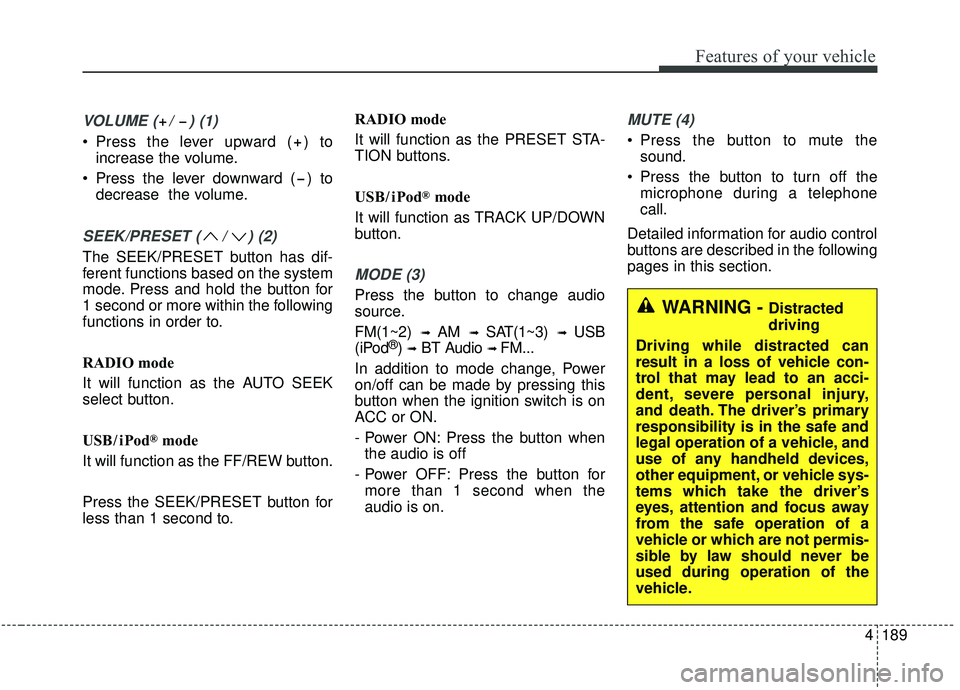
VOLUME ( / ) (1)
Press the lever upward ( ) toincrease the volume.
Press the lever downward ( ) to decrease the volume.
SEEK/PRESET ( / ) (2)
The SEEK/PRESET button has dif-
ferent functions based on the system
mode. Press and hold the button for
1 second or more within the following
functions in order to.
RADIO mode
It will function as the AUTO SEEK
select button.
USB / i Pod
®mode
It will function as the FF/REW button.
Press the SEEK/PRESET button for
less than 1 second to. RADIO mode
It will function as the PRESET STA-
TION buttons.
USB / i Pod
®mode
It will function as TRACK UP/DOWN
button.
MODE (3)
Press the button to change audio
source.
FM(1~2)
➟ AM ➟ SAT(1~3) ➟ USB
(iPod®) ➟BT Audio ➟ FM...
In addition to mode change, Power
on/off can be made by pressing this
button when the ignition switch is on
ACC or ON.
- Power ON: Press the button when the audio is off
- Power OFF: Press the button for more than 1 second when the
audio is on.
MUTE (4)
Press the button to mute the sound.
Press the button to turn off the microphone during a telephone
call.
Detailed information for audio control
buttons are described in the following
pages in this section.
WARNING - Distracted
driving
Driving while distracted can
result in a loss of vehicle con-
trol that may lead to an acci-
dent, severe personal injury,
and death. The driver’s primary
responsibility is in the safe and
legal operation of a vehicle, and
use of any handheld devices,
other equipment, or vehicle sys-
tems which take the driver’s
eyes, attention and focus away
from the safe operation of a
vehicle or which are not permis-
sible by law should never be
used during operation of the
vehicle.
Page 283 of 611
Cruise Control system . . . . . . . . . . . . . . . . . . . . . . 5-84
. . . . . . . . . . . . . . . . . . . . . 5-85
. . . . . . . . . . . . . . . . . . 5-86
. 5-86
do one of the following . . . 5-86
approximately 30 km/h (20 mph) . . . . . . . . . . . . . . 5-87
do one of the following . . 5-87
Smart cruise control with Stop & Go system . . . 5-88
. . . . . . . . . . . . . . . . . . . . 5-90
. . . . . . . . . . . . . . . . . . . . 5-90
. . . . . . . . . . . . . . . 5-95
. . . . . . . . . . . . . . . . . . . 5-96
. . 5-101
. . . . . . . . . . . . . . 5-102
. . . . . . . . . . . . . . . . . . . . . 5-102
Drive mode integrated control system . . . . . . . . 5-109
. . . . . . . . . . . . . . . . . . . . . . . . . . . . . . . . . 5-109
Lane Keeping Assist (LKA) system . . . . . . . . . . 5-111
. . . . . . . . . . . . . . . . . . . . . . . . . . . . . . 5-113
. . . . . . . . . . . . . . . . . . 5-117
Blind spot Collision Warning (BCW)/ Rear Cross-traffic Collision Warning (RCCW) . 5-120
. . . . . . . . . . . 5-120
. . . . . . . . . . . . . . . . . . 5-121
. . . 5-124
. . . . . . . . . . . . . . . . . . 5-124
. . . . . . . . . . . . . . . . . . . . . 5-129
Driver Attention Warning (DAW). . . . . . . . . . . . 5-136
. . . . . . . . . . . . . . . . . . 5-136
. . . . . . . . . . . . . . . . . . . . . . . . . 5-138
. . . . . . . . . . . . . . . . . . . . . . . . . . . . . 5-138
. . . . . . . . . . . . . . . . . . . . . . . . . . 5-138
Economical operation . . . . . . . . . . . . . . . . . . . . . 5-141
Special driving conditions . . . . . . . . . . . . . . . . . . 5-143
. . . . . . . . . . . . . . . . . 5-143
. . . . . . . . . . . . . . . . . . . . . . . . . . 5-145
. . . . . . . . . . . . . . . . . . . . . . . . . . . 5-145
. . . . . . . . . . . . . . . . . . . . . . . . . . . . . 5-146
. . . . . . . . . . . . . . . . . . . . . . . . . . . 5-146
. . . . . . . . . . . . . . . . . . . . . . 5-147
. . . . . . . . . . . . . . . . . . . . . . . . . . . . . 5-147
. . . . . . . . . . . . . . . . . . . . . . . . . . . . 5-147
5
Page 290 of 611
59
Driving your vehicle
Starting the engine
1.Make sure the parking brake isapplied.
2.Place the transmission shift lever in P (Park). Depress the brake pedal
fully.
You can also start the engine when
the shift lever is in the N (Neutral)
position. 3.Turn the ignition switch to START
and hold it there until the engine
starts (a maximum of 10 seconds),
then release the key.
It should be started withoutdepressing the accelerator.
4.Do not wait for the engine to warm up while the vehicle remains sta-
tionary.
Start driving at moderate engine
speeds. (Steep accelerating and
decelerating should be avoided.) If the engine stalls while you are in
motion, do not attempt to move the
shift lever to the P (Park) position. If
traffic and road conditions permit,
you may put the shift lever in the N
(Neutral) position while the vehicle is
still moving and turn the ignition
switch to the START position in an
attempt to restart the engine.
CAUTION- Starter
Do not engage the starter for
more than 10 seconds. If theengine stalls or fails to start,wait 5 to 10 seconds before re-engaging the starter. Improperuse of the starter may damageit.
WARNING- Steering
wheel
Never reach for any controls
through the steering wheel
while the vehicle is in motion.
The presence of your hand or
arm in this area could cause a
loss of vehicle control.
Page 294 of 611
513
Driving your vehicle
✽ ✽
NOTICE
If you leave the ENGINE START/
STOP button in the ACC or ON
position for a long time, the battery
will discharge.
Starting the engine with a
smart key
1.Carry the smart key or place it
inside the vehicle.
2.Make sure the parking brake is firmly applied
3.Place the transmission shift lever in P (Park). Depress the brake pedal
fully.
You can also start the engine whenthe shift lever is in the N (Neutral)position.
4.Press the ENGINE START/STOP button while depressing the brake
pedal.
It should be started withoutdepressing the accelerator.
5.Do not wait for the engine to warm up while the vehicle remains sta-
tionary.
Start driving at moderate engine
speeds. (Steep accelerating and
decelerating should be avoided.) Starting and stopping the engine for
turbocharger intercooler
1. Do not race or accelerate the
engine immediately after starting.
If the engine is cold, idle for sever-
al seconds before sufficient lubri-
cation is ensured in the tur-
bocharger unit.
2. After high speed or extended driv- ing, requiring a heavy engine load,
idle the engine about 1 minute
before turning it off.
This idle time will allow the tur- bocharger to cool prior to shutting
the engine off.
WARNING- Starting
vehicle
Never press the ENGINE
START/STOP button while the
vehicle is in motion except in an
emergency. This would result in
loss of directional control and
braking function, which could
cause an accident.
CAUTION
Do not turn the engine off imme- diately after it has been subject-ed to a heavy load. Doing somay cause severe damage tothe engine or turbocharger unit.
Page 299 of 611
![KIA SPORTAGE 2020 Owners Manual Driving your vehicle
18
5
4. Change the gear shift lever to [N]
(Neutral) while pressing the brake
pedal and pushing [SHIFT LOCK
RELEASE] button or inserting,
pressing down a tool (e.g. flathead
screw](/manual-img/2/40479/w960_40479-298.png "KIA SPORTAGE 2020 Owners Manual Driving your vehicle
18
5
4. Change the gear shift lever to [N]
(Neutral) while pressing the brake
pedal and pushing [SHIFT LOCK
RELEASE] button or inserting,
pressing down a tool (e.g. flathead
screw")
Driving your vehicle
18
5
4. Change the gear shift lever to [N]
(Neutral) while pressing the brake
pedal and pushing [SHIFT LOCK
RELEASE] button or inserting,
pressing down a tool (e.g. flathead
screw-driver) into the [SHIFT
LOCK RELEASE] access hole at
the same time. Then, the vehicle
will move when external force is
applied. D (Drive)
This is the normal forward driving
position. The transmission will auto-
matically shift through a 6-gear
sequence, providing the best fuel
economy and power.
For extra power when passing anoth-
er vehicle or climbing grades,
depress the accelerator fully, at
which time the transmission will
automatically downshift to the next
lower gear.
Manual mode
Whether the vehicle is stationary or
in motion, manual mode is selected
by pushing the shift lever from the D
(Drive) position into the manual gate.
To return to D (Drive) range opera-
tion, push the shift lever back into the
main gate.
WARNING- Parking In
Neutral
With the exception of parking in neutral gear, always park
the vehicle in [P] (Park) for
safety and apply the parking
brake.
Before parking in [N] (Neutral) gear, make sure the parking
ground is level and flat. Do not
park in [N] gear on any slopes
or gradients. If parked and left
in [N], the vehicle may move
and cause serious damage or
injury.OQL055009
Manual
mode
+ +
+ +
( (
( (
U U
U U
P P
P P
) )
) )
- -
- -
( (
( (
D D
D D
O O
O O
W W
W W
N N
N N
) )
) )
Page 301 of 611
![KIA SPORTAGE 2020 Owners Manual Driving your vehicle
20
5
With the shift lever in the D position
The paddle shifter will operate when
the vehicle speed is more than
6.2mph(10km/h).
Pull the [+] or [-] paddle shifter once
to shift u](/manual-img/2/40479/w960_40479-300.png "KIA SPORTAGE 2020 Owners Manual Driving your vehicle
20
5
With the shift lever in the D position
The paddle shifter will operate when
the vehicle speed is more than
6.2mph(10km/h).
Pull the [+] or [-] paddle shifter once
to shift u")
Driving your vehicle
20
5
With the shift lever in the D position
The paddle shifter will operate when
the vehicle speed is more than
6.2mph(10km/h).
Pull the [+] or [-] paddle shifter once
to shift up or down one gear and the
system changes from automatic
mode to manual mode.
When the vehicle speed is lower than
6.2mph(10km/h), if you depress the
accelerator pedal for more than 5
seconds or if you shift the shift lever
from D (Drive) to manual mode and
shift it from manual mode to D (Drive)
again, the system changes from
manual mode to automatic mode.
With the shift lever in the manual mode
Pull the [+] or [-] paddle shifter once
to shift up or down one gear.
✽ ✽
NOTICE
If you pull the [+] and [-] paddle
shifters at the same time, you cannot
shift the gear.
Shift lock system
For your safety, the automatic trans-
mission has a shift lock system
which prevents shifting the transmis-
sion from P (Park) into R (Reverse)
unless the brake pedal is depressed.
To shift the transmission from P
(Park) into R (Reverse):
1.Depress and hold the brake pedal.
2.Start the engine or turn the ignition
switch to the ON position.
3.Move the shift lever.
If the brake pedal is repeatedly
depressed and released with the
shift lever in the P (Park) position, a
chattering noise & vibration near the
shift lever may be heard. It is a nor-
mal condition.WARNING- Shifting from park
Always fully depress the brake
pedal before and while shifting
out of the P (Park) position into
another position to avoid inad-
vertent motion of the vehicle
which could injure persons in
or around the vehicle.
Page 363 of 611
Driving your vehicle
82
5
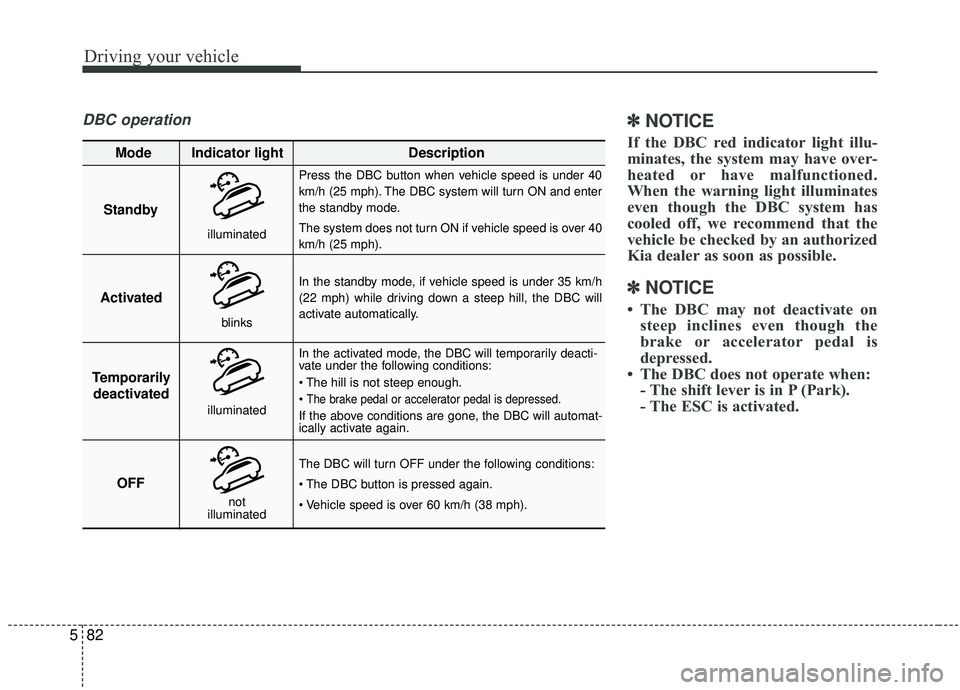
DBC operation✽ ✽
NOTICE
If the DBC red indicator light illu-
minates, the system may have over-
heated or have malfunctioned.
When the warning light illuminates
even though the DBC system has
cooled off, we recommend that the
vehicle be checked by an authorized
Kia dealer as soon as possible.
✽ ✽NOTICE
• The DBC may not deactivate on
steep inclines even though the
brake or accelerator pedal is
depressed.
• The DBC does not operate when: - The shift lever is in P (Park).
- The ESC is activated.
Standby
Press the DBC button when vehicle speed is under 40
km/h (25 mph). The DBC system will turn ON and enter
the standby mode.
The system does not turn ON if vehicle speed is over 40
km/h (25 mph).
In the standby mode, if vehicle speed is under 35 km/h
(22 mph) while driving down a steep hill, the DBC will
activate automatically.
In the activated mode, the DBC will temporarily deacti-
vate under the following conditions:
The brake pedal or accelerator pedal is depressed.
If the above conditions are gone, the DBC will automat-
ically activate again.
The DBC will turn OFF under the following conditions:
Activated
Temporarily deactivated
OFF
Mode Indicator light
Description
blinks
illuminated
not
illuminated
illuminated
Page 383 of 611
Driving your vehicle
102
5
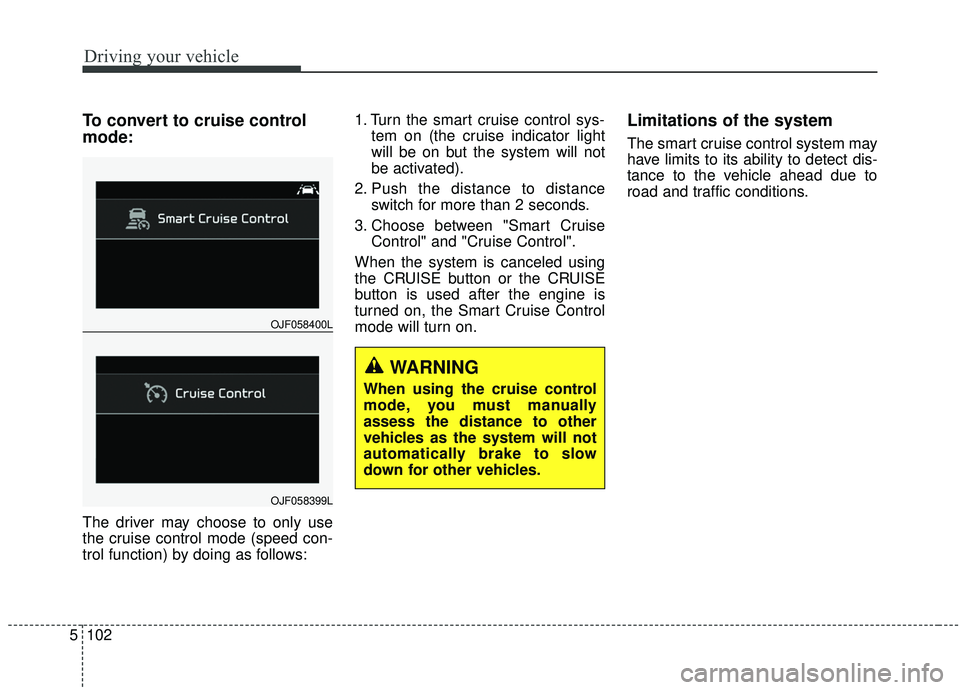
To convert to cruise control
mode:
The driver may choose to only use
the cruise control mode (speed con-
trol function) by doing as follows: 1. Turn the smart cruise control sys-
tem on (the cruise indicator light
will be on but the system will not
be activated).
2. Push the distance to distance switch for more than 2 seconds.
3. Choose between "Smart Cruise Control" and "Cruise Control".
When the system is canceled using
the CRUISE button or the CRUISE
button is used after the engine is
turned on, the Smart Cruise Control
mode will turn on.
Limitations of the system
The smart cruise control system may
have limits to its ability to detect dis-
tance to the vehicle ahead due to
road and traffic conditions.
OJF058400L
OJF058399L
WARNING
When using the cruise control
mode, you must manually
assess the distance to other
vehicles as the system will not
automatically brake to slow
down for other vehicles.