Page 139 of 604

Features of your vehicle
30
4
When pressing the left portion (2)
of the switch, all vehicle doors will
unlock.
If the key is in the ignition switch (or if the smart key is in the vehicle)
and any front door is opened, the
doors will not lock even though the
front portion (1) of the central door
lock switch is pressed.
WARNING
-
Unattended children/
animals
Never leave children or animals
unattended in your vehicle. An
enclosed vehicle can become
extremely hot, causing death or
severe injury to unattended
children or animals who cannot
escape the vehicle
CAUTION - Sliding door
hinge
When getting in and out of the sliding door, do not step on thesliding door hinge or drop orput heavy objects on the hinge.The door may not open or closenormally if the door hinge orwire is damaged.
OYP044175K
WARNING - Doors
The doors should always be fully closed and locked while
the vehicle is in motion to pre-
vent accidental opening of the
door.
Be careful when opening doors and watch for vehicles, motor-
cycles, bicycles or pedestrians
approaching the vehicle in the
path of the door. Opening a
door when something is
approaching can cause dam-
age or injury.
Page 141 of 604
Features of your vehicle
32
4
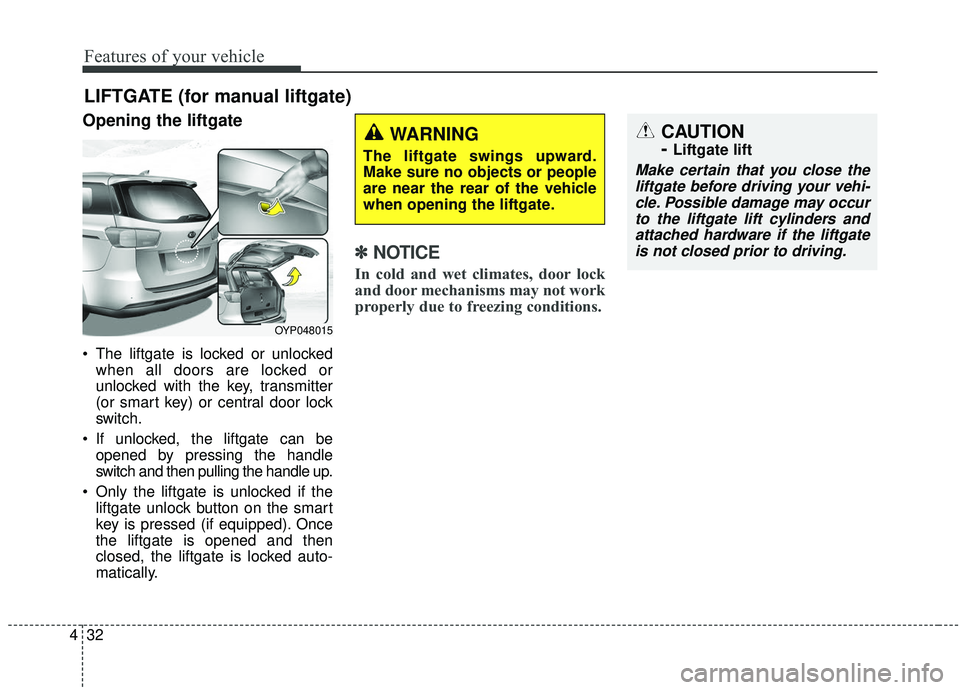
Opening the liftgate
The liftgate is locked or unlocked
when all doors are locked or
unlocked with the key, transmitter
(or smart key) or central door lock
switch.
If unlocked, the liftgate can be opened by pressing the handle
switch and then pulling the handle up.
Only the liftgate is unlocked if the liftgate unlock button on the smart
key is pressed (if equipped). Once
the liftgate is opened and then
closed, the liftgate is locked auto-
matically.
✽ ✽ NOTICE
In cold and wet climates, door lock
and door mechanisms may not work
properly due to freezing conditions.
LIFTGATE (for manual liftgate)
CAUTION
-
Liftgate lift
Make certain that you close the
liftgate before driving your vehi-cle. Possible damage may occurto the liftgate lift cylinders andattached hardware if the liftgateis not closed prior to driving.
OYP048015
WARNING
The liftgate swings upward.
Make sure no objects or people
are near the rear of the vehicle
when opening the liftgate.
Page 144 of 604
435
Features of your vehicle
POWER SLIDING DOOR AND POWER LIFTGATE (IF EQUIPPED)
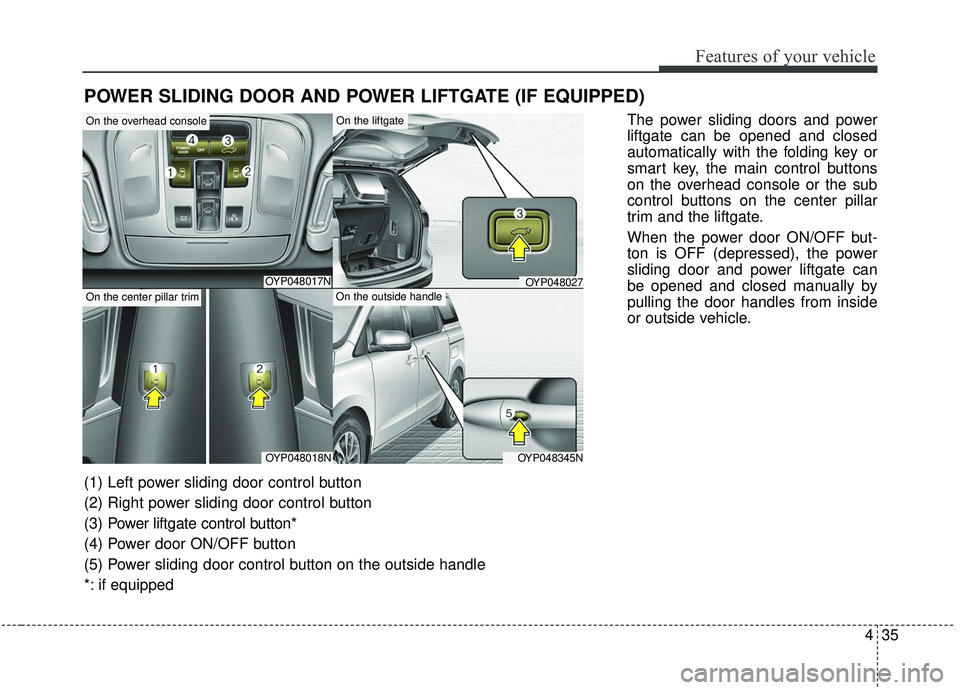
The power sliding doors and power
liftgate can be opened and closed
automatically with the folding key or
smart key, the main control buttons
on the overhead console or the sub
control buttons on the center pillar
trim and the liftgate.
When the power door ON/OFF but-
ton is OFF (depressed), the power
sliding door and power liftgate can
be opened and closed manually by
pulling the door handles from inside
or outside vehicle.
OYP048017N
OYP048018NOYP048345N
OYP048027
On the overhead console
On the center pillar trim
On the liftgate
On the outside handle
(1) Left power sliding door control button
(2) Right power sliding door control button
(3) Power liftgate control button*
(4) Power door ON/OFF button
(5) Power sliding door control button on the outside handle
*: if equipped
Page 152 of 604

443
Features of your vehicle
The half-opened power sliding dooris automatically opened or closed
fully by pushing the door forward or
backward without pulling the door
handle while the power door
ON/OFF button is in ON (not
depressed). However, when the
door is in partially opened position
(less than 300 mm/12 in.), the door
is not closed automatically.Power sliding door non-opening
conditions
The power sliding door is not auto-
matically opened, but closed under
the following conditions. If the main
or sub control button is pushed for
power opening operation, the chime
sounds once.
When the ignition switch is in the ON
position,
1. Vehicle is moving above 5 km/h (3 mph).
2. The gearshift lever is not in P (Park) for automatic transmission.
Power liftgate operation
(if equipped)
Push the power liftgate main con-trol button for approximately 1 sec-
ond on the overhead console to
open or close the power liftgate.
However, the power liftgate will not
open with the main control button
when all power sliding doors and
power liftgate are locked and
closed. But the power liftgate will
be opened with the folding key (or
smart key).
OYP044026K
Page 157 of 604
Features of your vehicle
48
4
Smart Liftgate (if equipped)
On a vehicle equipped with a smart
key, the liftgate can be opened using
the Smart liftgate system.
If the power door ON/OFF button is
in the OFF (depressed) position, the
smart liftgate will not operate.
How to use the Smart Liftgate
The liftgate can be opened with no
touch activation if the conditions
below are satisfied :
After 15 seconds when all doors
are closed and locked
The smart key in the detecting area for more than 3 seconds.
✽ ✽ NOTICE
• The Smart Liftgate does not oper-
ate when:
- The smart key is detected within15 seconds after the doors are
closed and locked, and is contin-
uously detected.
- The smart key is detected within 15 seconds after the doors are
closed and locked, and within 1.5
m (60 inches) from the front door
handles. (for vehicles equipped
with Welcome Light)
- A door is not locked or closed.
- The smart key is in the vehicle.
OYP048028
Page 158 of 604
449
Features of your vehicle
1. Setting
To activate the Smart Liftgate, go to
User Settings Mode and select
Smart Liftgate on the LCD display.❈ ❈
For more information, refer to
the “LCD Display” section in
this chapter.
2. Detect and Alert
If you are positioned in the detecting
area (50 ~ 100 cm (20 ~ 40 inches)
behind the vehicle) carrying a smart
key, the hazard warning lights will
blink and chime will sound for about
3 seconds to alert you the smart key
has been detected and the liftgate
will open.✽ ✽NOTICE
Do not approach the detecting area
if you do not want the liftgate to
open. If you have unintentionally
entered the detecting area and the
hazard warning lights and chime
starts to operate, leave the detecting
area with the smart key. The liftgate
will stay closed.
OYP048029
Page 159 of 604
Features of your vehicle
50
4
3. Automatic opening
The hazard warning lights will blink
and chime will sound 2 times and
then the liftgate will open. Make sure you close the liftgate
before driving your vehicle.
Make sure there are no people or
objects around the liftgate before
opening or closing the liftgate. Make
sure objects in the liftgate do not
come out when opening the liftgate
on a slope. It may cause serious
injury. Make sure to deactivate the
Smart Liftgate when washing your
vehicle. Otherwise, the liftgate may
open inadvertently.
CAUTION
-
Liftgate lift
Make certain that you close the
liftgate before driving your vehi-cle. Possible damage may occurto the liftgate lift cylinders andattached hardware if the liftgateis not closed prior to driving.
OYP048030
WARNING
The key should be kept out of
reach of children. Children may
inadvertently open the Smart
Liftgate while playing around
the rear area of the vehicle.
Page 160 of 604

451
Features of your vehicle
How to deactivate the SmartLiftgate function using the smartkey
1. Door lock
2. Door unlock
3. Liftgate open/close
4. Panic
5. Right side power sliding door open/close
6. Left side power sliding door open/close If you press any button of the smart
key during the Detect and Alert
stage, the Smart Liftgate function will
be deactivated.
Make sure to be aware of how to
deactivate the Smart Liftgate func-
tion for emergency situations.
✽ ✽
NOTICE
• If you press the door unlock but-
ton (2), the Smart Liftgate func-
tion will be deactivated temporar-
ily. But, if you do not open any
door for 30 seconds, the smart lift-
gate function will be activated
again.
• If you press the liftgate open but- ton (3) for more than 1 second, the
liftgate opens.
• If you press the door lock button (1) or liftgate open button (3)
when the Smart Liftgate function
is not in the Detect and Alert stage,
the smart liftgate function will not
be deactivated.
• In case you have deactivated the Smart Liftgate function by press-
ing the smart key button and
opened a door, the smart liftgate
function can be activated again by
closing and locking all doors.
OYP044078K