2020 KIA SEDONA height
[x] Cancel search: heightPage 109 of 604

393
Safety features of your vehicle
Adding equipment to or modi-
fying your air bag-equipped
vehicle
If you modify your vehicle by chang-
ing your vehicle's frame, bumper sys-
tem, front end or side sheet metal or
ride height, this may affect the opera-
tion of your vehicle's air bag system.
Air bag warning label
Air bag warning labels, some
required by the Canada Motor
Vehicle Safety Standards (CMVSS),
are attached to the sunvisor to alert
the driver and passengers of poten-
tial risks of the air bag system
WARNING- Tamperingwith SRS
Do not tamper with or discon-
nect SRS wiring, or other com-
ponents of the SRS system.
Doing so could result in the
accidental inflation of the air
bags or by rendering the SRS
inoperative.
WARNING- Towing Vehicle
Always have the ignition off
when your vehicle is being
towed. The side air bags may
inflate if the vehicle is tilted
such as when being towed
because of the rollover sensors
in the vehicle.
OYP034047N
Page 110 of 604

Features of your vehicle
Folding key . . . . . . . . . . . . . . . . . . . . . . . . . . . . . . . . 4-5
• Record your key number . . . . . . . . . . . . . . . . . . . . . . . 4-5
• Key operations . . . . . . . . . . . . . . . . . . . . . . . . . . . . . . . . 4-5
• Transmitter precautions . . . . . . . . . . . . . . . . . . . . . . . . 4-9
• Battery replacement . . . . . . . . . . . . . . . . . . . . . . . . . . 4-10
• Immobilizer system . . . . . . . . . . . . . . . . . . . . . . . . . . . 4-11
• Limp home (override) procedure . . . . . . . . . . . . . . . 4-13
Smart key . . . . . . . . . . . . . . . . . . . . . . . . . . . . . . . . 4-14
• Record your key number . . . . . . . . . . . . . . . . . . . . . . 4-14
• Smart key function . . . . . . . . . . . . . . . . . . . . . . . . . . . 4-14
• Loss of the smart key . . . . . . . . . . . . . . . . . . . . . . . . . 4-18
• Smart key precautions . . . . . . . . . . . . . . . . . . . . . . . . 4-19
• Battery replacement . . . . . . . . . . . . . . . . . . . . . . . . . . 4-20
• Smart key immobilizer system . . . . . . . . . . . . . . . . . . 4-21
Theft-alarm system . . . . . . . . . . . . . . . . . . . . . . . . 4-23
• Armed stage . . . . . . . . . . . . . . . . . . . . . . . . . . . . . . . . . 4-23
• Theft-alarm stage . . . . . . . . . . . . . . . . . . . . . . . . . . . . 4-24
• Disarmed stage. . . . . . . . . . . . . . . . . . . . . . . . . . . . . . . 4-24
Door locks . . . . . . . . . . . . . . . . . . . . . . . . . . . . . . . . 4-26
• Operating door locks from outside the vehicle. . . . . 4-26
• Operating door locks from inside the vehicle . . . . . . 4-28
• Impact sensing door unlock system . . . . . . . . . . . . . . 4-31
• Automatic door lock system . . . . . . . . . . . . . . . . . . . . 4-31
• Child-protector rear door lock. . . . . . . . . . . . . . . . . . 4-31
Liftgate (for manual liftgate) . . . . . . . . . . . . . . . . 4-32
• Opening the liftgate . . . . . . . . . . . . . . . . . . . . . . . . . . . 4-32
• Closing the liftgate. . . . . . . . . . . . . . . . . . . . . . . . . . . . 4-33
• Emergency liftgate safety release. . . . . . . . . . . . . . . . 4-34
Power sliding door and power liftgate . . . . . . . . . 4-35
• Automatic stop and reversal . . . . . . . . . . . . . . . . . . . 4-37
• How to reset the power sliding door and power liftgate . . . . . . . . . . . . . . . . . . . . . . . . . . . . . . . 4-38
• Power door on/off button . . . . . . . . . . . . . . . . . . . . . . 4-39
• Power sliding door operation . . . . . . . . . . . . . . . . . . . 4-40
• Power liftgate operation . . . . . . . . . . . . . . . . . . . . . . . 4-43
• Power liftgate opening height user setting . . . . . . . . 4-46
• Emergency liftgate safety release. . . . . . . . . . . . . . . . 4-47
• Smart liftgate . . . . . . . . . . . . . . . . . . . . . . . . . . . . . . . . 4-48
Windows . . . . . . . . . . . . . . . . . . . . . . . . . . . . . . . . . 4-53
• Power windows . . . . . . . . . . . . . . . . . . . . . . . . . . . . . . 4-54
Hood. . . . . . . . . . . . . . . . . . . . . . . . . . . . . . . . . . . . \
. 4-58
• Opening the hood . . . . . . . . . . . . . . . . . . . . . . . . . . . . 4-58
• Closing the hood . . . . . . . . . . . . . . . . . . . . . . . . . . . . . 4-59
Fuel filler lid . . . . . . . . . . . . . . . . . . . . . . . . . . . . . . 4-61
• Opening the fuel filler lid . . . . . . . . . . . . . . . . . . . . . . 4-61
• Closing the fuel filler lid . . . . . . . . . . . . . . . . . . . . . . . 4-61
• Emergency fuel filler lid release . . . . . . . . . . . . . . . . 4-64
4
Page 155 of 604

Features of your vehicle
46
4
Power liftgate non-opening condi-
tions
The power liftgate will not open auto-
matically, but will close under the fol-
lowing conditions.
When the ignition switch is in the ON
position,
1. Vehicle is moving above 3 km/h (2 mph).
2. The gearshift lever is not in P (Park) for automatic transmission.
The chime will sound continuously if
you drive over 3 km/h (2 mph) with
the liftgate opened. Stop your vehicle
at a safe place as soon as possible
to check if your liftgate is opened.
Power liftgate opening height
user setting
The driver may set the height of a
fully opened liftgate by following the
below instruction.
1. Confirm the position of the power door ON/OFF button is ON (not
depressed).
2. Position the liftgate manually or via automatic operation to the
height you prefer.
OYP048446
WARNING
• Make sure there are no peopleor objects around the liftgate
before operating the power
liftgate. Wait until the liftgate
is open fully and stopped
before loading or unloading
cargo or passengers from the
vehicle.
Make sure the liftgate is closed firmly before driving. If
the liftgate is open, you will
draw dangerous exhaust
fumes into your vehicle which
can cause serious injury or
death to vehicle occupants.
Page 156 of 604
447
Features of your vehicle
3. Press the liftgate close button formore than 3 seconds.
4. You will hear the system beep twice indicating height has been
set up.
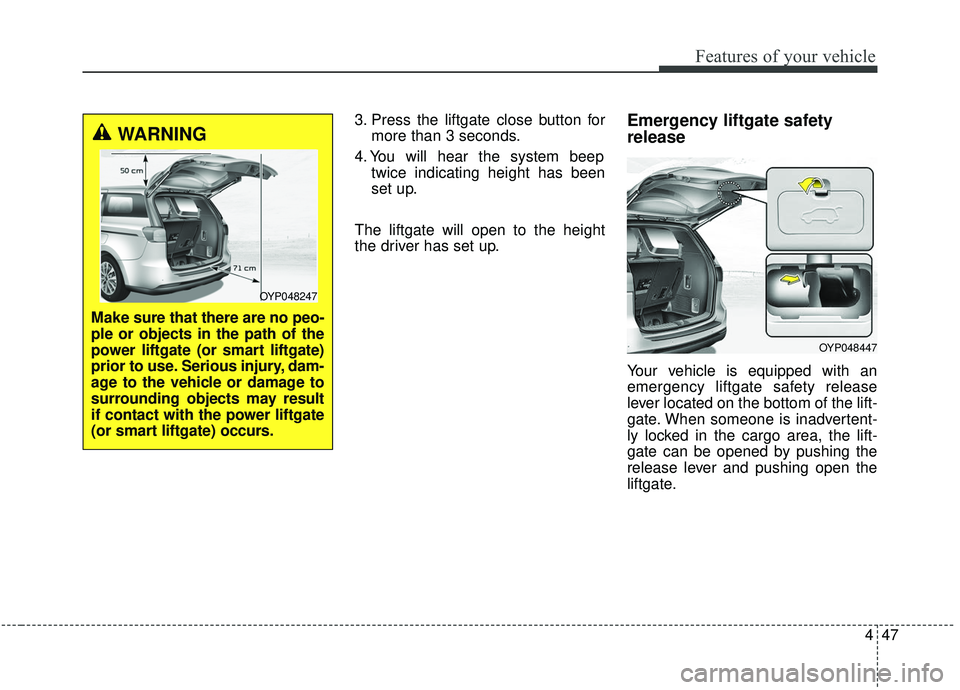
The liftgate will open to the height
the driver has set up.Emergency liftgate safety
release
Your vehicle is equipped with an
emergency liftgate safety release
lever located on the bottom of the lift-
gate. When someone is inadvertent-
ly locked in the cargo area, the lift-
gate can be opened by pushing the
release lever and pushing open the
liftgate.
OYP048447
WARNING
Make sure that there are no peo-
ple or objects in the path of the
power liftgate (or smart liftgate)
prior to use. Serious injury, dam-
age to the vehicle or damage to
surrounding objects may result
if contact with the power liftgate
(or smart liftgate) occurs.
OYP048247
Page 183 of 604

Features of your vehicle
74
4
To change the steering wheel angle,
pull down the lock-release lever (1),
adjust the steering wheel to the
desired angle (2) and height (3) then
pull up the lock-release lever (4) to
lock the steering wheel in place. Be
sure to adjust the steering wheel to
the desired position before driving.
Heated steering wheel
(if equipped)
With the ignition switch in the ON
position, pressing the heated steer-
ing wheel button warms the steering
wheel. The indicator on the button
will illuminate and notify you on the
LCD display.
To turn the heated steering wheel off,
press the button once again. The
indicator on the button will turn off
and notify you on the LCD display. The heated steering wheel will turn
off automatically approximately 30
minutes after the heated steering
wheel is turned on.
If you turn off the engine within 30
minutes while the heated steering
wheel is ON, the heated steering
wheel will turn on automatically
when you set the ignition switch in
the ON position.
OYP048430
CAUTION
Do not install any grip or acces-
sory to operate the steeringwheel. This causes damage tothe heated steering wheel sys-tem.
OYP047050WARNING
If the steering wheel becomes
too warm, turn the system off.
The heated steering wheel may
cause burns even at low tem-
peratures, especially if used for
long periods of time.
Page 239 of 604

Features of your vehicle
130
4
The detecting range may decrease
when:
1. The sensor is stained with foreign
matter such as snow or water.
(The sensing range will return to
normal when removed.)
2. Outside air temperature is extremely hot or cold.
The following objects may not be
recognized by the sensor:
1. Sharp or slim objects such as ropes, chains or small poles.
2. Objects which tend to absorb the sensor frequency such as clothes,
spongy material or snow.
3. Undetectable objects smaller than 1 m (40 in.) in height and narrower
than 14 cm (6 in.) in diameter.Parking distance warning-
reverse precautions
The parking distance warning-reverse may not sound consistent-
ly depending on the speed and
shapes of the objects detected.
The parking distance warning- reverse may malfunction if the vehi-
cle bumper height or sensor instal-
lation has been modified or dam-
aged. Any non-factory installed
equipment or accessories may also
interfere with the sensor perform-
ance.
The sensor may not recognize objects less than 40 cm (15 in.)
from the sensor, or it may sense an
incorrect distance. Use caution.
When the sensor is frozen or cov- ered with snow, dirt, or water, the
sensor may be inoperative until the
material is removed using a soft
cloth.
Do not push, scratch or strike the sensor. Sensor damage could
occur.
✽ ✽ NOTICE
This system can only sense objects
within the range and location of the
sensors. It cannot detect objects in
other areas where sensors are not
installed. Also, small or slim objects,
such as poles or objects located
between sensors may not be detected
by the sensors.
Always visually check behind the
vehicle when backing up.
Be sure to inform any drivers of the
vehicle that may be unfamiliar with
the system regarding the systems
capabilities and limitations.
Page 244 of 604

4135
Features of your vehicle
There is a possibility of parkingdistance warning malfunctionwhen:
1. Driving on uneven road surfaces such as unpaved roads, gravel,
bumps, or gradient.
2. Objects generating excessive noise such as vehicle horns, loud motor-
cycle engines, or truck air brakes
can interfere with the sensor.
3. The weather conditions produce heavy rain or water spray.
4. Wireless transmitters or mobile phones are present near the sen-
sor.
5. Sensor is covered with snow.
Detecting range may decrease when:
1. Outside air temperature is extremely hot or cold.
2. Undetectable objects smaller than 1 m (39 in.) and narrower than 14
cm (5.5 in.) in diameter.
The following objects may not be
recognized by the sensor:
1. Sharp or slim objects such as ropes, chains or small poles.
2. Objects, which tend to absorb sen- sor frequency such as clothes,
spongy material or snow.
✽ ✽NOTICE
1. The warning may not sound
depending on the speed and
shapes of the objects detected.
2. The parking distance warning may malfunction if the vehicle
bumper height or sensor installa-
tion has been modified. Any non-
factory installed equipment or
accessories may also interfere
with the sensor performance.
3. Sensor may not recognize objects less than 30 cm (12 in.) from the
sensor, or it may sense an incor-
rect distance. Use with caution.
4. When the sensor is frozen or stained with snow or water, the
sensor may be inoperative until
the stains are removed using a
soft cloth.
5. Do not push, scratch or strike the sensor with any hard objects that
could damage the surface of the
sensor. Sensor damage could occur.
Page 362 of 604
533
Driving your vehicle
If there is a malfunction with the dri-
ver’s door, engine hood or trunk open
detection system, the Auto Hold may
not work properly.
Take your vehicle to an authorized Kia
dealer and have the system checked.
✽ ✽NOTICE
A click or electric brake motor
whine sound may be heard while
operating or releasing the EPB, but
these conditions are normal and
indicate that the EPB is functioning
properly.
Anti-lock brake system (ABS)
ABS (or ESC) will not prevent acci-
dents due to improper or dangerous
driving maneuvers. Even though
vehicle control is improved during
emergency braking, always maintain
a safe distance between you and
objects ahead. Vehicle speeds
should always be reduced during
extreme road conditions. The vehicle
should be driven at reduced speeds
in the following circumstances:
When driving on rough, gravel or
snow-covered roads
When driving on roads where the road surface is pitted or has differ-
ent surface heights.
Driving in these conditions increase
the stopping distance for your vehi-
cle. The ABS continuously senses the
speed of the wheels. If the wheels
are going to lock, the ABS system
repeatedly modulates the hydraulic
brake pressure to the wheels.
When you apply your brakes under
conditions which may lock the
wheels, you may hear a “tik-tik’’
sound from the brakes, or feel a cor-
responding sensation in the brake
pedal. This is normal and it means
your ABS is active.
In order to obtain the maximum ben-
efit from your ABS in an emergency
situation, do not attempt to modulate
your brake pressure and do not try to
pump your brakes. Press your brake
pedal as hard as possible or as hard
as the situation allows the ABS to
control the force being delivered to
the brakes.WARNING
To reduce the risk of an acci-
dent, do not activate Auto Hold
while driving downhill, backing
up or parking your vehicle.