2020 Hyundai Tucson cruise control
[x] Cancel search: cruise controlPage 18 of 637
1-5
Your vehicle at a glance
1
I IN
NS
ST
TR
RU
UM
ME
EN
NT
T
P
PA
AN
NE
EL
L
O
OV
VE
ER
RV
VI
IE
EW
W
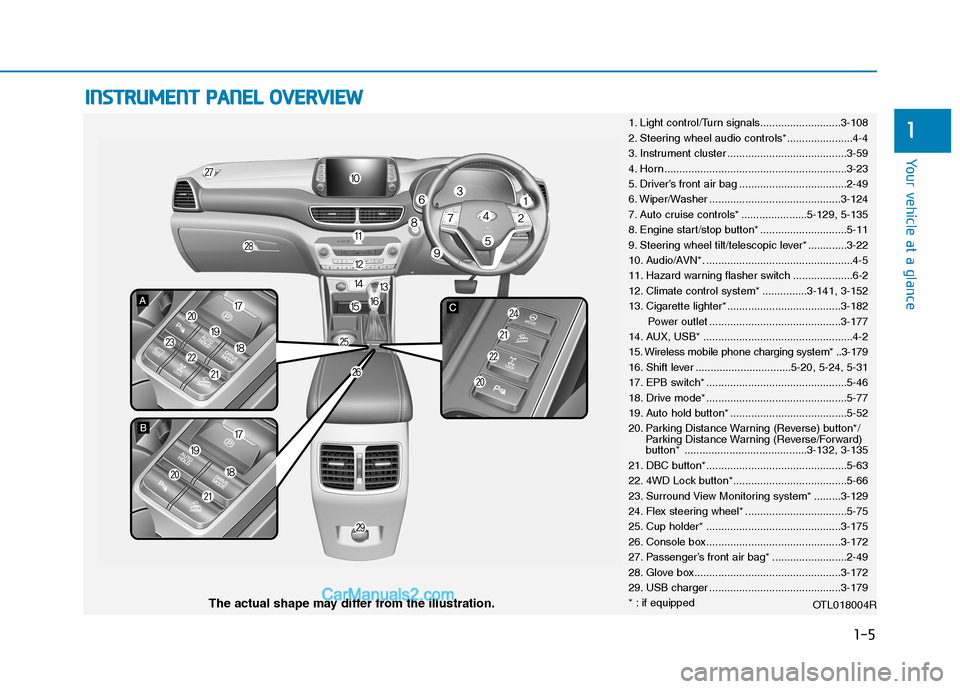
1. Light control/Turn signals...........................3-108
2. Steering wheel audio controls*......................4-4
3. Instrument cluster ........................................3-59
4. Horn .............................................................3-23
5. Driver’s front air bag ....................................2-49
6. Wiper/Washer ............................................3-124
7. Auto cruise controls* ......................5-129, 5-135
8. Engine start/stop button* .............................5-11
9. Steering wheel tilt/telescopic lever* .............3-22
10. Audio/AVN*. .................................................4-5
11. Hazard warning flasher switch ....................6-2
12. Climate control system* ...............3-141, 3-152
13. Cigarette lighter* ......................................3-182
Power outlet ............................................3-177
14. AUX, USB* ..................................................4-2
15. Wireless mobile phone charging system* ..3-179
16. Shift lever ................................5-20, 5-24, 5-31
17. EPB switch* ...............................................5-46
18. Drive mode* ...............................................5-77
19. Auto hold button* .......................................5-52
20. Parking Distance Warning (Reverse) button*/
Parking Distance Warning (Reverse/Forward)
button* .........................................3-132, 3-135
21. DBC button*...............................................5-63
22. 4WD Lock button*......................................5-66
23. Surround View Monitoring system* .........3-129
24. Flex steering wheel* ..................................5-75
25. Cup holder* .............................................3-175
26. Console box.............................................3-172
27. Passenger’s front air bag* .........................2-49
28. Glove box.................................................3-172
29. USB charger ............................................3-179
* : if equipped
OTL018004R
The actual shape may differ from the illustration.
Page 158 of 637
3-72
Convenient features of your vehicle
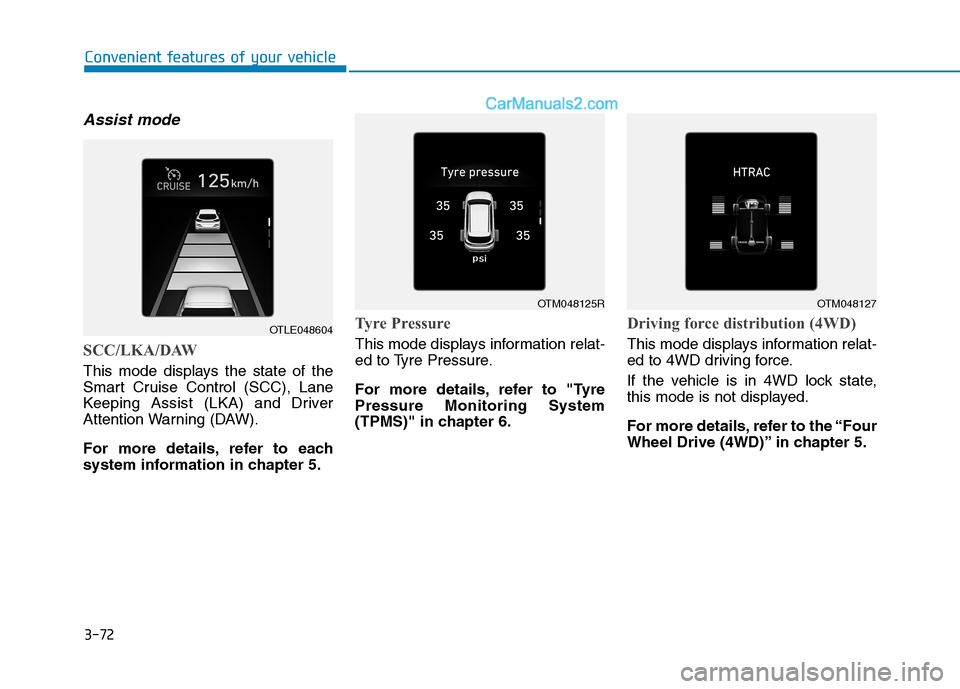
Assist mode
SCC/LKA/DAW
This mode displays the state of the
Smart Cruise Control (SCC), Lane
Keeping Assist (LKA) and Driver
Attention Warning (DAW).
For more details, refer to each
system information in chapter 5.
Tyre Pressure
This mode displays information relat-
ed to Tyre Pressure.
For more details, refer to "Tyre
Pressure Monitoring System
(TPMS)" in chapter 6.
Driving force distribution (4WD)
This mode displays information relat-
ed to 4WD driving force.
If the vehicle is in 4WD lock state,
this mode is not displayed.
For more details, refer to the “Four
Wheel Drive (4WD)” in chapter 5.
OTLE048604
OTM048125ROTM048127
Page 160 of 637
3-74
Convenient features of your vehicle
ItemsExplanation
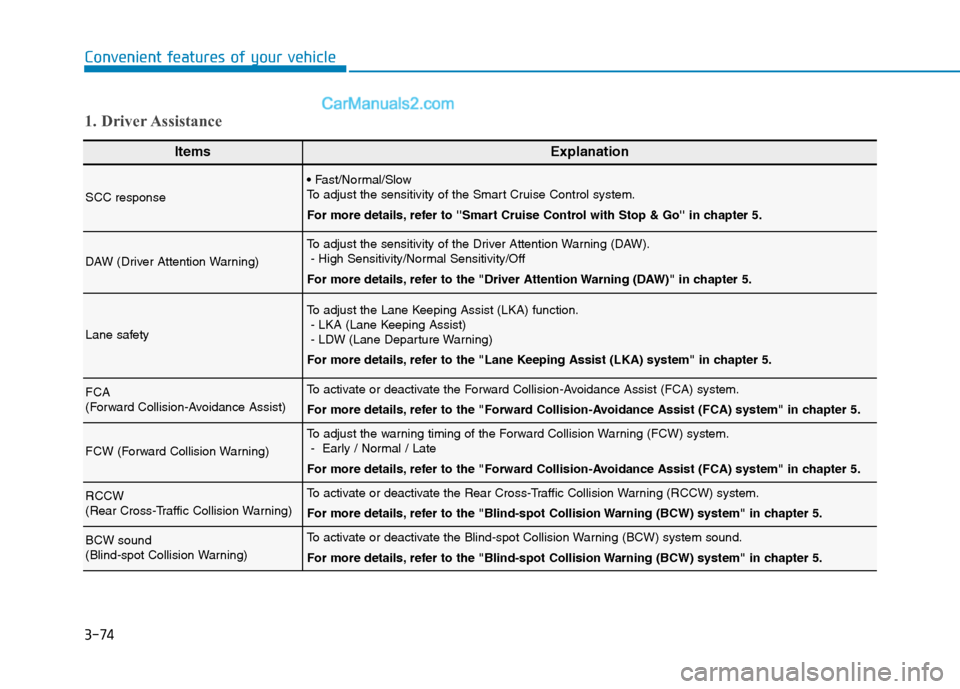
SCC response
To adjust the sensitivity of the Smart Cruise Control system.
For more details, refer to ''Smart Cruise Control with Stop & Go'' in chapter 5.
DAW (Driver Attention Warning)
To adjust the sensitivity of the Driver Attention Warning (DAW).
- High Sensitivity/Normal Sensitivity/Off
For more details, refer to the "Driver Attention Warning (DAW)" in chapter 5.
Lane safety
To adjust the Lane Keeping Assist (LKA) function.
- LKA (Lane Keeping Assist)
- LDW (Lane Departure Warning)
For more details, refer to the "Lane Keeping Assist (LKA) system" in chapter 5.
FCA
(Forward Collision-Avoidance Assist)To activate or deactivate the Forward Collision-Avoidance Assist (FCA) system.
For more details, refer to the "Forward Collision-Avoidance Assist (FCA) system" in chapter 5.
FCW (Forward Collision Warning)
To adjust the warning timing of the Forward Collision Warning (FCW) system.
- Early / Normal / Late
For more details, refer to the "Forward Collision-Avoidance Assist (FCA) system" in chapter 5.
RCCW
(Rear Cross-Traffic Collision Warning)To activate or deactivate the Rear Cross-Traffic Collision Warning (RCCW) system.
For more details, refer to the "Blind-spot Collision Warning (BCW) system" in chapter 5.
BCW sound
(Blind-spot Collision Warning)To activate or deactivate the Blind-spot Collision Warning (BCW) system sound.
For more details, refer to the "Blind-spot Collision Warning (BCW) system" in chapter 5.
1. Driver Assistance
Page 319 of 637
5
System malfunction......................................................5-100
Limitations of the system ...........................................5-101
Blind-spot collision warning (BCW) system ..5-107
BCW ..................................................................................5-108
RCCW (Rear Cross-Traffic Collision Warning).......5-110
Detecting sensor ...........................................................5-112
Limitations of the system ...........................................5-113
Lane keeping assist (LKA) system ..................5-115
LKA operation ................................................................5-116
Warning light and message ........................................5-121
Limitations of the System...........................................5-122
LKA system function change .....................................5-123
Driver attention warning (DAW) system ........5-124
System setting and activation ...................................5-124
Resetting the system ...................................................5-126
System standby .............................................................5-126
System malfunction......................................................5-126
Cruise control .....................................................5-129
Cruise Control operation .............................................5-129
Smart cruise control with stop & go system .5-135
Smart Cruise Control (SCC) Switch ...........................5-136
Smart Cruise Control (SCC) speed ............................5-136
Smart Cruise Control (SCC) Vehicle-to-Vehicle
Distance ...........................................................................5-141
Sensor to detect distance to the vehicle ahead ...5-144To adjust the sensitivity of Smart Cruise Control
(SCC) ................................................................................5-146
To convert to Cruise Control mode ..........................5-147
Limitations of the system ...........................................5-147
Special driving conditions .................................5-152
Hazardous driving conditions ....................................5-152
Rocking the vehicle ......................................................5-152
Smooth cornering .........................................................5-153
Driving at night ..............................................................5-153
Driving in the rain .........................................................5-153
Driving in flooded areas..............................................5-154
Highway driving .............................................................5-154
Reducing the risk of a rollover .................................5-155
Winter driving .....................................................5-156
Snow or icy conditions ................................................5-156
Winter Precautions .......................................................5-158
Trailer towing .....................................................5-161
If you decide to pull a trailer?...................................5-161
Trailer towing equipment ............................................5-165
Driving with a trailer ....................................................5-166
Maintenance when towing a trailer .........................5-170
Vehicle weight ....................................................5-171
Overloading ....................................................................5-171
Page 376 of 637
5-59
Driving your vehicle
5
ESC operation
ESC ON condition
When the ignition switch is in the ON
position, the ESC and the ESC OFF
indicator lights illuminate for approxi-
mately three seconds and go off,
then the ESC is turned on.
When operating
When the ESC is in opera-
tion, the ESC indicator light
blinks:
conditions which may lock the
wheels, you may hear sounds from
the brakes, or feel a corresponding
sensation in the brake pedal. This is
normal and it means your ESC is
active.
engine may not respond to the
accelerator as it does under routine
conditions.
when the ESC activates, the Cruise
Control automatically disengages.
The Cruise Control can be reen-
gaged when the road conditions
allow.See "Cruise Control System"
later in this chapter(if equipped).
driving on a slippery road, the
engine rpm (revolutions per minute)
may not increase even if you press
the accelerator pedal deeply. This is
to maintain the stability and traction
of the vehicle and does not indicate
a problem. Never drive too fast for the road
conditions or too quickly when
cornering. The ESC system will
not prevent accidents.
Excessive speed in turns, abrupt
manoeuvres, and hydroplaning
on wet surfaces can result in
severe accidents.WARNING
Page 445 of 637
5-128
Driving your vehicle
The vehicle drives on a
bumpy road.
The vehicle is controlled by
the following driving assist
systems:
- Lane Keeping Assist (LKA)
system
- Forward Collision-
Avoidance Assist (FCA) sys-
tem
- Smart Cruise Control system
Playing the vehicle audio sys-
tem at high volume may offset
the Driver Attention Warning
(DAW) system warning sounds.
CAUTION
The Driver Attention Warning
(DAW) system may not properly
operate with limited alerting in
the following situations:
The lane detection perform-
ance is limited. (For more
details, refer to "Lane Keeping
Assist (LKA) system" in this
chapter.)
The vehicle is violently driven
or is abruptly turned for
obstacle avoidance (e.g. con-
struction area, other vehicles,
fallen objects, bumpy road).
Forward drivability of the
vehicle is severely under-
mined (possibly due to wide
variation in tyre pressures,
uneven tyre wear-out, toe-
in/toe-out alignment).
The vehicle drives on a curvy
road.
The vehicle drives through a
windy area.
CAUTION
Page 446 of 637
5-129
Driving your vehicle
5
Cruise Control operation
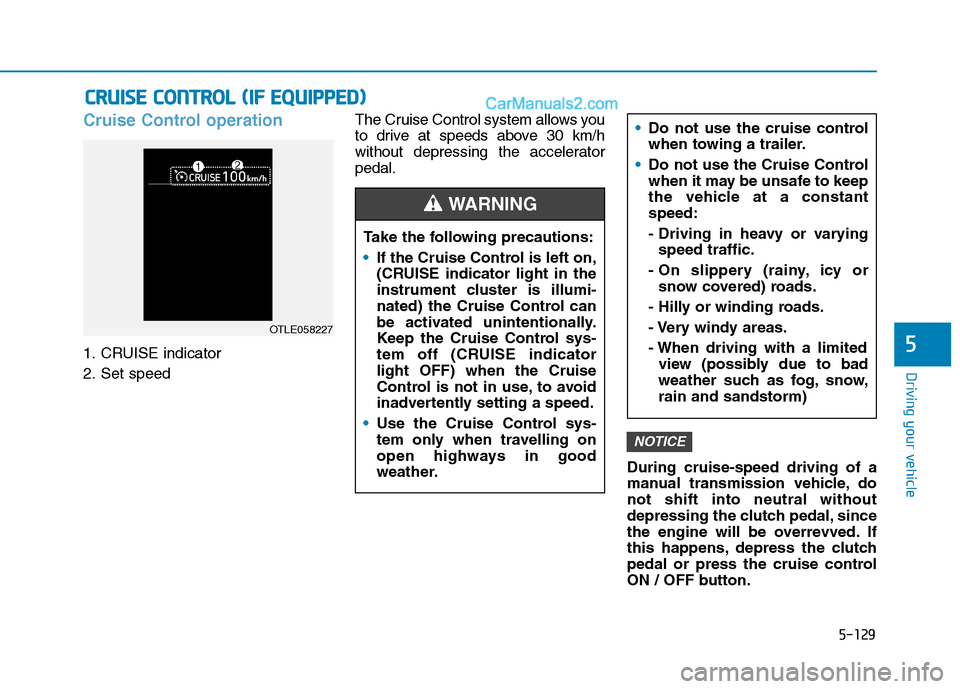
1. CRUISE indicator
2. Set speedThe Cruise Control system allows you
to drive at speeds above 30 km/h
without depressing the accelerator
pedal.
During cruise-speed driving of a
manual transmission vehicle, do
not shift into neutral without
depressing the clutch pedal, since
the engine will be overrevved. If
this happens, depress the clutch
pedal or press the cruise control
ON / OFF button.
NOTICE
C CR
RU
UI
IS
SE
E
C
CO
ON
NT
TR
RO
OL
L
(
(I
IF
F
E
EQ
QU
UI
IP
PP
PE
ED
D)
)
Take the following precautions:
If the Cruise Control is left on,
(CRUISE indicator light in the
instrument cluster is illumi-
nated) the Cruise Control can
be activated unintentionally.
Keep the Cruise Control sys-
tem off (CRUISE indicator
light OFF) when the Cruise
Control is not in use, to avoid
inadvertently setting a speed.
Use the Cruise Control sys-
tem only when travelling on
open highways in good
weather.
Do not use the cruise control
when towing a trailer.
Do not use the Cruise Control
when it may be unsafe to keep
the vehicle at a constant
speed:
- Driving in heavy or varying
speed traffic.
- On slippery (rainy, icy or
snow covered) roads.
- Hilly or winding roads.
- Very windy areas.
- When driving with a limited
view (possibly due to bad
weather such as fog, snow,
rain and sandstorm)
WARNING
OTLE058227
Page 447 of 637
5-130
Driving your vehicle
Information
• During normal cruise control opera-
tion, when the SET switch is activat-
ed or reactivated after applying the
brakes, the cruise control will ener-
gize after approximately 3 seconds.
This delay is normal.
• To activate cruise control, depress
the brake pedal at least once after
turning the ignition switch to the
ON position or starting the engine.
This is to check if the brake switch
which is important part to cancel
cruise control is in normal condi-
tion.
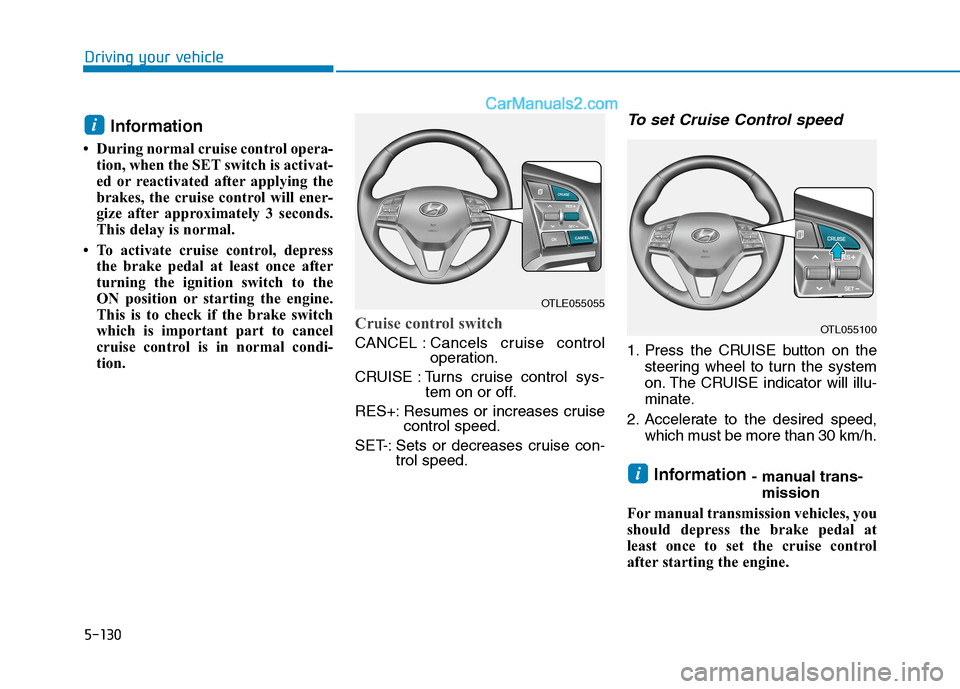
Cruise control switch
CANCEL :Cancels cruise control
operation.
CRUISE : Turns cruise control sys-
tem on or off.
RES+: Resumes or increases cruise
control speed.
SET-: Sets or decreases cruise con-
trol speed.
To set Cruise Control speed
1. Press the CRUISE button on the
steering wheel to turn the system
on. The CRUISE indicator will illu-
minate.
2. Accelerate to the desired speed,
which must be more than 30 km/h.
Information - manual trans-
mission
For manual transmission vehicles, you
should depress the brake pedal at
least once to set the cruise control
after starting the engine.i
i
OTLE055055
OTL055100