2020 Hyundai Tucson USB port
[x] Cancel search: USB portPage 265 of 637
3-179
Convenient features of your vehicle
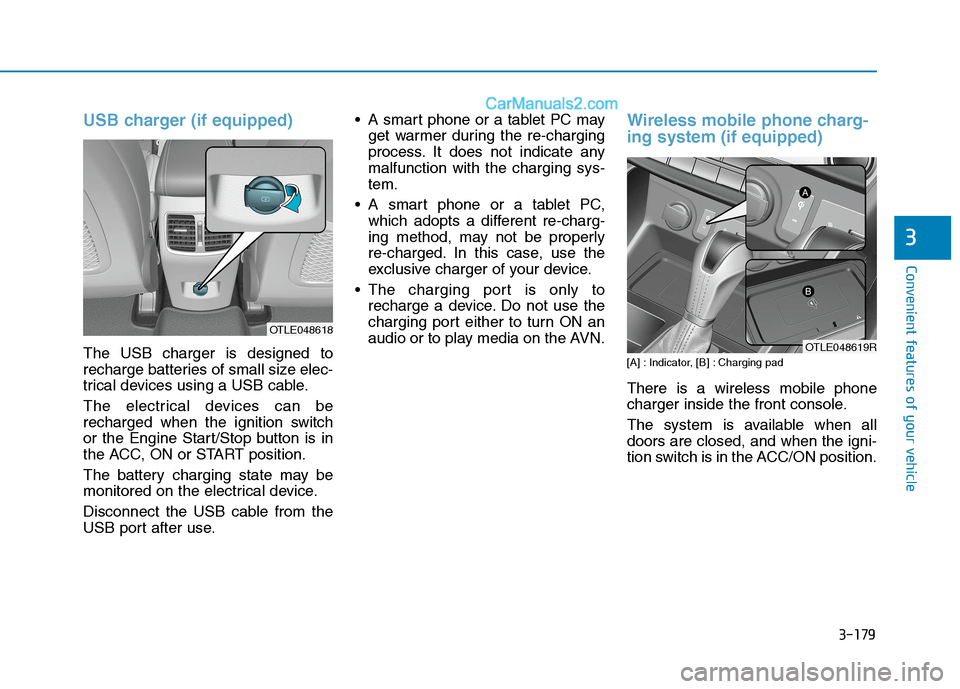
USB charger (if equipped)
The USB charger is designed to
recharge batteries of small size elec-
trical devices using a USB cable.
The electrical devices can be
recharged when the ignition switch
or the Engine Start/Stop button is in
the ACC, ON or START position.
The battery charging state may be
monitored on the electrical device.
Disconnect the USB cable from the
USB port after use. A smart phone or a tablet PC may
get warmer during the re-charging
process. It does not indicate any
malfunction with the charging sys-
tem.
A smart phone or a tablet PC,
which adopts a different re-charg-
ing method, may not be properly
re-charged. In this case, use the
exclusive charger of your device.
The charging port is only to
recharge a device. Do not use the
charging port either to turn ON an
audio or to play media on the AVN.
Wireless mobile phone charg-
ing system (if equipped)
[A] : Indicator, [B] : Charging pad
There is a wireless mobile phone
charger inside the front console.
The system is available when all
doors are closed, and when the igni-
tion switch is in the ACC/ON position.
3
OTLE048618
OTLE048619R
Page 276 of 637
Multimedia System
Multimedia system .................................................4-2
AUX, USB and iPod®port ...............................................4-2
Antenna ...............................................................................4-3
Steering wheel audio control .........................................4-4
Audio / Video / Navigation system (AVN) ..................4-5
Bluetooth®Wireless Technology hands-free ............4-5
How Vehicle Audio Works ...............................................4-6
Audio ......................................................................4-10
Radio...................................................................................4-17
Media player ....................................................................4-19
Bluetooth ...........................................................................4-26
Setup ..................................................................................4-37
System status icons........................................................4-39
Audio system specifications .........................................4-40
Trademarks .......................................................................4-42
Declaration of conformity ............................................4-42
4
Page 277 of 637
Information
• If you install aftermarket HID head-lamps, your vehicle’s audio and elec-
tronic device may malfunction.
• Prevent chemicals such as perfume, cosmetic oil, sun cream, hand
cleanser, and air freshener from con-
tacting the interior parts because
they may cause damage or dis-
colouration.
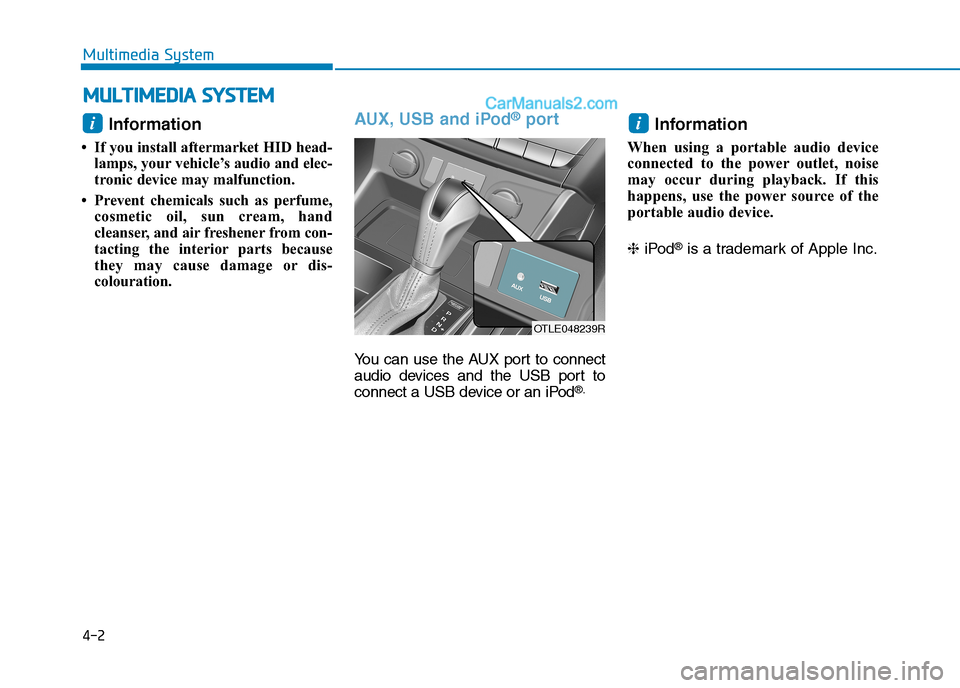
AUX, USB and iPod®port
You can use the AUX port to connect
audio devices and the USB port to
connect a USB device or an iPod
®.
Information
When using a portable audio device
connected to the power outlet, noise
may occur during playback. If this
happens, use the power source of the
portable audio device.
❈ iPod
®is a trademark of Apple Inc.
ii
M MU
UL
LT
T I
IM
M E
ED
D I
IA
A
S
S Y
Y S
ST
T E
EM
M
4-2
Multimedia System
OTLE048239R
Page 294 of 637
4-19
Multimedia System
4
Using the media player
You can play music stored in various
media storage devices, such as USB
storage devices, smartphones, and
iPods.
1. Connect a device to the USB port
or the AUX port in your vehicle.
Playback may start immediately
depending on the device that
you connect to the system.
2. On the control panel, press the
[MEDIA] button.
If you have multiple media stor-
age devices, press the [MEDIA]
button again and press the cor-
responding number button to
select the desired mode. When you connect an Apple
device, playback does not start
automatically. To start the media
player in the iPod mode, press
the [MEDIA] button on the con-
trol panel.
You can also change the mode
by pressing the [MODE] button
repeatedly on the steering
wheel.
Make sure to connect or discon-
nect external USB devices with
the system power turned off.
Depending on vehicle model
and specifications, available
buttons or the appearance and
layout of the USB/AUX ports in
your vehicle may vary.
Do not connect a smartphone or
an MP3 device to the system via
multiple methods such as USB,
Bluetooth, and AUX, simultane-
ously. Doing so may cause a dis-
torted noise or a system mal-
function. When the equaliser function of
the connected device and
Equaliser (Tone) settings of the
system are both activated, the
effects may interfere with each
other and may lead to sound
degradation or distortion.
Deactivate the device’s equalis-
er function if possible.
Noise may occur when an Apple
device or AUX device is con-
nected. When such devices are
not being used, disconnect the
device for storage.
When the Apple device or AUX
device power is connected to
the power jack, playing the
external device may result in
noise. In such cases, disconnect
the power connection before
use.
NOTICE
M ME
ED
DI
IA
A
P
PL
LA
AY
YE
ER
R
Page 295 of 637
4-20
Multimedia System
Using the USB mode
You can play media files stored in
portable devices, such as USB stor-
age devices and MP3 players. Check
compatible USB storage devices and
file specifications before using the
USB mode.
Connect your USB device to the
USB port in the vehicle.
Playback starts immediately.
If a USB device is already connect-
ed to the system, press the
[MEDIA] button and press the [1]
button to select USBfrom the
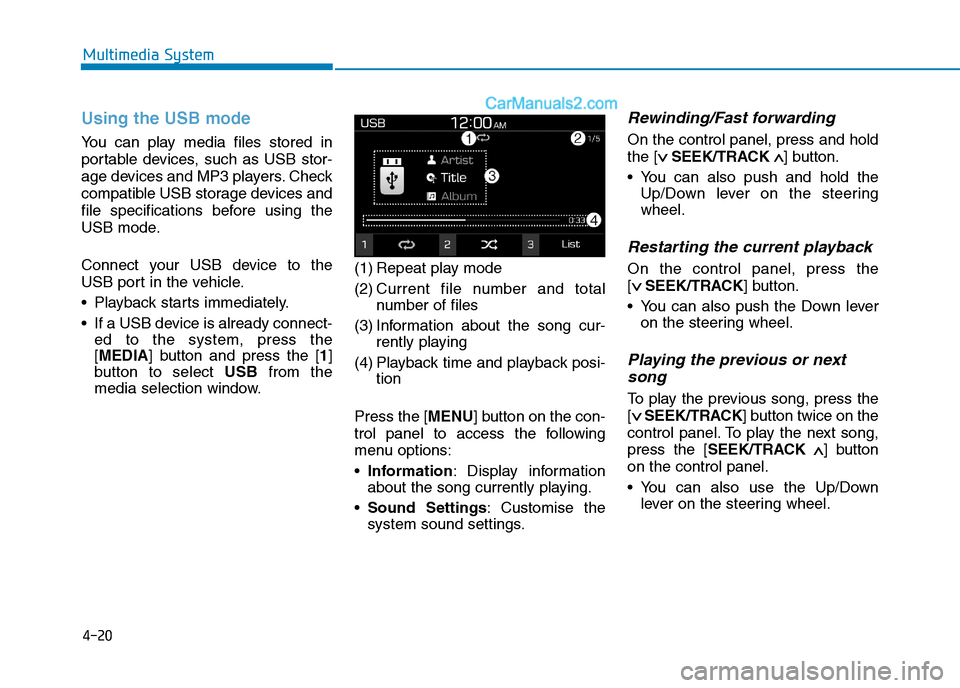
media selection window.(1) Repeat play mode
(2) Current file number and total
number of files
(3) Information about the song cur-
rently playing
(4) Playback time and playback posi-
tion
Press the [MENU] button on the con-
trol panel to access the following
menu options:
Information: Display information
about the song currently playing.
Sound Settings: Customise the
system sound settings.
Rewinding/Fast forwarding
On the control panel, press and hold
the [∨ ∨
SEEK/TRACK∧ ∧
] button.
You can also push and hold the
Up/Down lever on the steering
wheel.
Restarting the current playback
On the control panel, press the
[∨ ∨
SEEK/TRACK] button.
You can also push the Down lever
on the steering wheel.
Playing the previous or next
song
To play the previous song, press the
[∨ ∨
SEEK/TRACK] button twice on the
control panel. To play the next song,
press the [SEEK/TRACK∧ ∧
] button
on the control panel.
You can also use the Up/Down
lever on the steering wheel.
Page 296 of 637
![Hyundai Tucson 2020 Owners Manual - RHD (UK, Australia) 4-21
Multimedia System
4
On the control panel, turn the
[FILE] knob to find the desired
song and press the knob within
five seconds to play the file.
If no control is detected within
five seconds, t](/manual-img/35/19693/w960_19693-295.png "Hyundai Tucson 2020 Owners Manual - RHD (UK, Australia) 4-21
Multimedia System
4
On the control panel, turn the
[FILE] knob to find the desired
song and press the knob within
five seconds to play the file.
If no control is detected within
five seconds, t")
4-21
Multimedia System
4
On the control panel, turn the
[FILE] knob to find the desired
song and press the knob within
five seconds to play the file.
If no control is detected within
five seconds, the search is can-
celled and the screen displays
information about the song cur-
rently playing.
Playing repeatedly
On the control panel, press the [1]
button. The repeat play mode
changes each time you press it. The
corresponding mode icon will be dis-
played on the screen.
Playing in random order
On the control panel, press the [2]
button. The shuffle play mode is acti-
vated or deactivated each time you
press it. When you activate the shuf-
fle mode, the corresponding mode
icon will be displayed on the screen.
Searching for music files on a
file list
1. On the control panel, press the [3]
button to select List.
2. Turn the [TUNE] knob to select the
desired category and file, and
then press the knob to play the
music file.
Information
• Start the engine of your vehicle
before connecting a USB device to
your system. Starting the engine
with a USB device connected to the
system may damage the USB device.
• Be careful of static electricity when
connecting or disconnecting a USB
device. A static discharge may cause
a system malfunction.
• Be careful not to let your body or
external objects contact the USB
port. Doing so may cause an acci-
dent or a system malfunction.
• Do not connect and disconnect a
USB connector repeatedly in a short
time. Doing so may cause an error in
the device or a system malfunction.
• Do not use a USB device for purpos-
es other than playing files. Using
USB accessories for charging or
heating may cause poor perform-
ance or a system malfunction.
iNOTICE
Page 297 of 637
4-22
Multimedia System
When connecting a USB storage
device, do not use an extension
cable. Connect it directly to the
USB port. If you use a USB hub
or an extension cable, the device
may not be recognised.
Fully insert a USB connector
into the USB port. Failure to do
so may cause a communication
error.
When you disconnect a USB
storage device, a distorted noise
may occur.
The system can play only files
encoded in a standard format.
The following types of USB
devices may not be recognised
or work correctly:
- Encrypted MP3 players
- USB devices not recognised
as removable disks
A USB device may not be recog-
nised depending on its condi-
tion.
Some USB devices may be
incompatible with your system. Depending on the USB device’s
type, capacity, or the format of
files, USB recognition time may
be longer.
Image and video playback are
not supported.
Using the iPod mode
You can listen to music stored on
your Apple devices, such as an iPod
or an iPhone.
1. Connect your Apple device to the
USB port in your vehicle using the
cable supplied with the Apple
device.
When connected, the device will
begin charging. Music playback
will not start automatically.2. On the control panel, press the
[MEDIA] button.
If multiple devices are connect-
ed to the system, press the
[MEDIA] button and press the
[1] button to select iPodfrom the
media selection window.
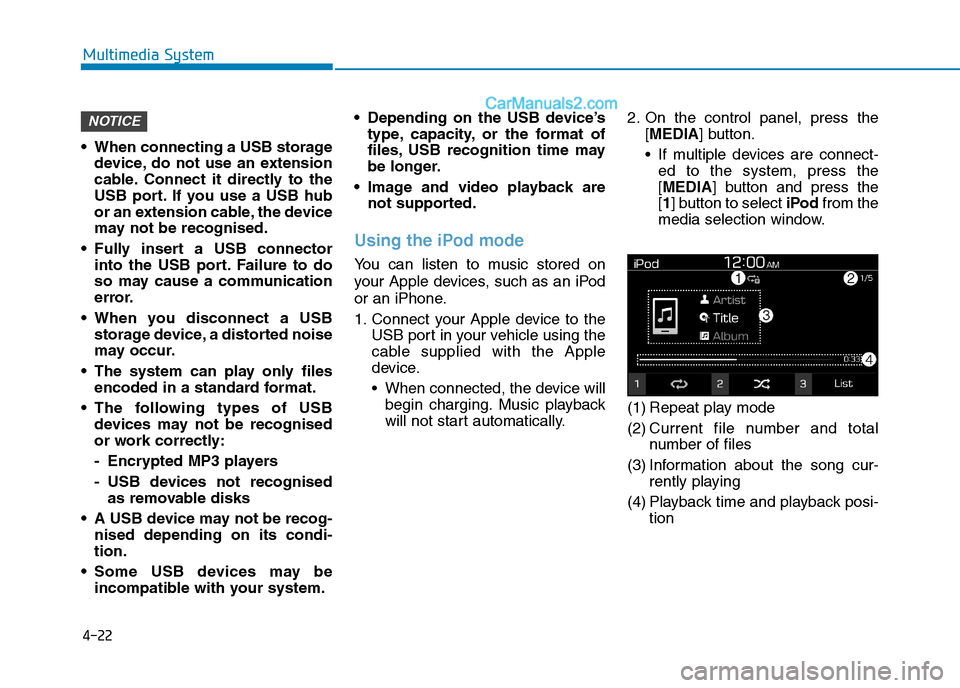
(1) Repeat play mode
(2) Current file number and total
number of files
(3) Information about the song cur-
rently playing
(4) Playback time and playback posi-
tion
NOTICE
Page 299 of 637
4-24
Multimedia System
Notes on connecting Apple devices
Ensure that the iOS and firmware
of your device is up-to-date before
connecting it to your system.
Outdated devices may cause a
system error.
If your device’s battery is low, the
device may not be recognised.
Check the battery level and, if nec-
essary, charge the battery before
connecting the device to your sys-
tem.
Use an Apple-approved cable.
Using an unapproved cable may
cause a distorted noise or an error
during playback.
Use a cable shorter than 1 metre in
length, such as the one originally
supplied with a new Apple device.
Longer cables may lead to the
audio system not recognising the
Apple device.
Fully insert a USB connector into
the USB port. Failure to do so may
cause a communication error. When your device is connected to
the USB port and the AUX port
simultaneously, it is recognised in
the AUX mode. The device stays in
the AUX mode even if the AUX
cable is not connected to the sys-
tem. To play music in iPod mode,
disconnect the AUX cable from the
device or change audio output of
the device to “Dock”.
If you connect your device to the
system whilst playback is in
progress on the device, you may
hear a high pitch sound just after
the connection. Connect the device
after stopping or pausing playback.
Connecting your device during a
download or synchronizing with
iTunes may cause an error.
Connect the device after the down-
load or synchronization is com-
plete.
If you connect an iPod nano
(except for the 6th generation) or
an iPod classic, the brand logo will
be displayed on the device screen.
For an iPhone and an iPod touch,
the logo will not be displayed.
Notes on playing Apple devices
Depending on the model, your
device may not be recognised due
to unsupported communication
protocols.
The order of the songs displayed
or played on the system may differ
from the order of the songs stored
in your device.
Depending on the music player
application you are using, informa-
tion displayed on the system may
differ.
In an iPhone, the audio streaming
function and iPod mode control
may conflict. If an error occurs, dis-
connect and reconnect the USB
cable.
When using an iPhone or an iPod
touch, do not control the device
whilst it is connected to your sys-
tem. An error may occur.
If you make or receive a call during
playback via an iPhone, the music
may remain paused after you end
the call. If you do not hear the
music after ending a call, check the
device to see if the music has
paused.