2020 Hyundai Sonata DRIVER SIDE MIRROR
[x] Cancel search: DRIVER SIDE MIRRORPage 131 of 537

5. Convenient Features
Accessing Your Vehicle ........................................................................\
.......... 5-4Remote Key ........................................................................\
...................................... 5-4
Smart Key ........................................................................\
..........................................5-7
Immobilizer System ........................................................................\
........................ 5-14
Hyundai Digital Key ........................................................................\
......................... 5-15
Door Locks ........................................................................\
............................. 5-31Operating Door Locks from Outside the Vehicle .................................................. 5-31
Operating Door Locks from Inside the Vehicle .................................................... 5-32
Automatic Door Lock and Unlock Features .......................................................... 5-34
Child-Protector Rear Door Locks ........................................................................\
.. 5-35
Rear Occupant Alert (ROA) System ....................................................................... 5-36
Theft-Alarm System ........................................................................\
............. 5-38
Driver Position Memory System ................................................................. 5-39
Storing Positions into Memory ........................................................................\
..... 5-39
Recalling Positions from Memory ........................................................................\
.5-40
Resetting the Driver’s Seat Memory System ........................................................5-40
Easy Access Function ........................................................................\
......................5-41
Steering Wheel ........................................................................\
..................... 5-42Electric Power Steering (EPS) ........................................................................\
........ 5-42
Tilt Steering / Telescope Steering ........................................................................\
. 5-43
Heated Steering Wheel ........................................................................\
.................. 5-44
Horn........................................................................\
................................................. 5-45
Mirrors ......................................................................\
....................................5-46Inside Rearview Mirror ........................................................................\
................... 5-46
Side View Mirrors ........................................................................\
........................... 5-53
Reverse Parking Aid Function ........................................................................\
........ 5-55
Windows ......................................................................\
................................. 5-56Power Windows ........................................................................\
.............................. 5-57
Panoramic Sunroof ........................................................................\
..............5-60Sunshade ...............................................................\
..................................................5-61
Sliding the Sunroof ........................................................................\
..........................5-61
Tilting the Sunroof ........................................................................\
..........................5-61
Closing the Sunroof ........................................................................\
....................... 5-62
Resetting the Sunroof ........................................................................\
.................... 5-63
Sunroof Open Warning ........................................................................\
.................. 5-63
Exterior Features ........................................................................\
..................5-64Hood ....................................................................\
.................................................... 5-64
Trunk ...................................................................\
..................................................... 5 -65
Emergency Trunk Safety Release ........................................................................\
.. 5-66
Fuel Filler Door ........................................................................\
............................... 5-70
5
Page 169 of 537

05
5-39
ODN8A059019ODN8A059019
The Driver Position Memory System is
provided to store and recall the following
memory settings with a simple button
operation.
- Driver’s seat position (Power seat)
- Side view mirror position
- Instrument panel illumination intensity
- Head Up Display (HUD) position and brightness (if equipped)
WARNING
Never attempt to operate the driver
position memory system while the
vehicle is moving.
This could result in loss of control, and
an accident causing death, serious
injury, or property damage.
Information
• If the battery is disconnected, the
memory settings will be erased.
• If the Driver Position Memory System
does not operate normally, have the
system checked by an authorized
HYUNDAI dealer.
Storing Positions into Memory
1. Shift to P (Park) while the ignition
switch is in the ON position.
2. Adjust the driver’s seat position, side view mirror position, instrument panel
illumination intensity and head-up
display height/brightness to positions
comfortable for the driver.
3. Press the SET button. The system will beep once and notify you “Press
button to save settings” on the cluster
LCD display.
4. Press one of the memory buttons (1 or 2) within 4 seconds. The system
will beep twice when the memory has
been successfully stored.
5. “Settings 1 (or 2) saved” will appear on the cluster LCD display.
DRIVER POSITION MEMORY SYSTEM (IF EQUIPPED)
Page 170 of 537

Convenient Features5-40
Recalling Positions from Memory
1. Shift to P (Park) while the ignition switch is in the ON position.
2. Press the desired memory button (1 or 2). The system will beep once,
and then the driver’s seat position,
side view mirror position, instrument
panel illumination intensity and
head-up display height/brightness
will automatically adjust to the stored
positions.
3. “Settings 1 (or 2) applied” will appear on the cluster LCD display.
If your vehicle is equipped with
additional navigation, please refer to the
infotainment system manual separately
supplied.
Information
• While recalling the “1” memory
position, pressing the SET or 1 button
temporarily stops the adjustment of
the recalled memory position. Pressing
the 2 button recalls the “2” memory
position.
• While recalling the “2” memory
position, pressing the SET or 2 button
temporarily stops the adjustment of
the recalled memory position. Pressing
the 1 button recalls the “1” memory
position.
• While recalling the stored positions,
pressing one of the control buttons
for the driver’s seat, side view mirror,
instrument panel illumination or head-
up display will cause the movement of
that component to stop and move in
the direction that the control button is
pressed.
Resetting the Driver’s Seat
Memory System
Take the following procedures to reset
the driver’s seat memory system, when it
does not operate properly.
To reset the driver’s seat memory
system
1. Place the ignition switch to the ON
position, shift to P (Park), and open
the driver’s door.
2. Operate the control switch to set the driver’s seat and seatback to the
foremost position.
3. Simultaneously press the SET button and push forward the seat movement
switch over 2 seconds.
While resetting the driver’s seat
memory system
1. It starts with the notification sound.
2. The driver’s seat and seatback is adjusted to the rearward position with
the notification sound.
3. The driver’s seat and seatback is re-adjusted to the default position
(central position) with the notification
sound.
However, in the following cases, the
resetting procedure and the notification
sound may stop.
- The memory button is pressed.
- The control switch is operated.
- The gear is shifted out of P (Park) .
- The driving speed exceeds 2 mph (3 km/h).
- The driver’s door is closed.
Page 184 of 537
Convenient Features5-54
Side View Mirror Adjustment
ODN8A059026ODN8A059026
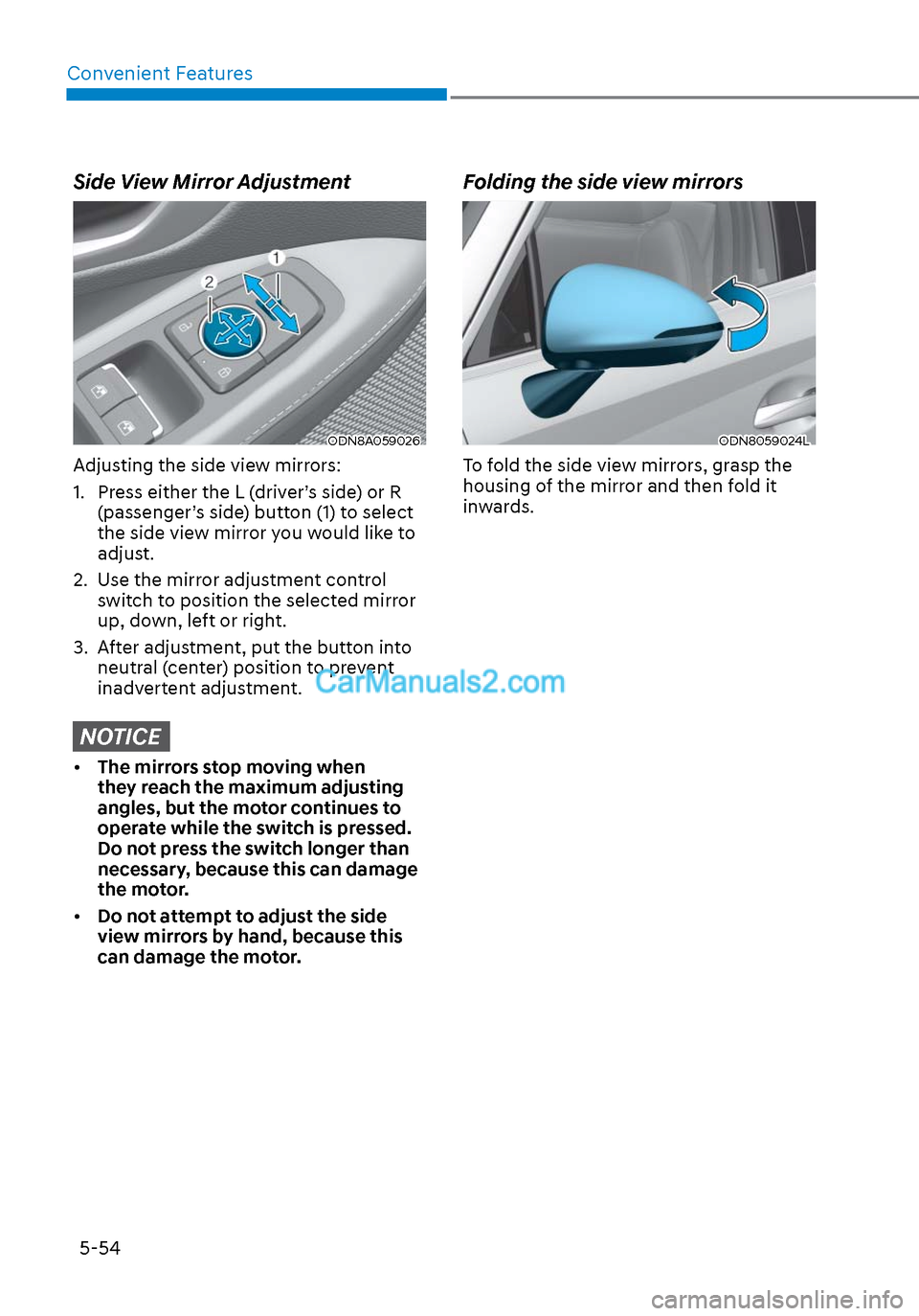
Adjusting the side view mirrors:
1. Press either the L (driver’s side) or R (passenger’s side) button (1) to select
the side view mirror you would like to
adjust.
2. Use the mirror adjustment control switch to position the selected mirror
up, down, left or right.
3. After adjustment, put the button into neutral (center) position to prevent
inadvertent adjustment.
NOTICE
• The mirrors stop moving when
they reach the maximum adjusting
angles, but the motor continues to
operate while the switch is pressed.
Do not press the switch longer than
necessary, because this can damage
the motor.
• Do not attempt to adjust the side
view mirrors by hand, because this
can damage the motor.
Folding the side view mirrors
ODN8059024LODN8059024L
To fold the side view mirrors, grasp the
housing of the mirror and then fold it
inwards.
Page 208 of 537
Convenient Features5-78
2. When the High Beam Assist camera is adversely affected by an external
condition. Such examples may
include:
• When the vehicle’s headlamps
have been damaged or not
repaired properly.
• When the vehicle headlamps are
not aimed properly.
• When the vehicle is driven on a
narrow curved road or rough road
• When the vehicle is driven on an
uphill road or downhill road
• When only part of the vehicle in
front is visible on a crossroad or
curved road.
• When there is a traffic light,
reflecting sign, flashing sign or
mirror.
• When the road conditions are bad
such as being wet or covered with
snow.
• When a vehicle suddenly appears
from a curve.
• When the vehicle is tilted from a
flat tire or being towed.
• When Lane Keeping Assist system
warning light illuminates.
• When the light from the on-coming
or front vehicle is not detected
because of exhaust fume, smoke,
fog, snow, etc.
• When the front window is covered
with foreign matters such as ice,
dust, fog, or is damaged.
3. When the forward visibility is poor. Such examples may include:
• When the headlamps of an on-
coming vehicle or a vehicle in front
is not detected due to poor outside
visibility (smog, smoke, dust, fog,
heavy rain, snow, etc.).
• When the windshield visibility is
poor. WARNING
• Do not attempt to disassemble
the front view camera without the
assistance of an authorized HYUNDAI
dealer technician. If the front camera
is removed for any reason, the
system may need to be re-calibrated.
Have the system inspected by an
authorized HYUNDAI dealer.
• If the windshield of your vehicle is
replaced, most likely the front view
camera will need to be re-calibrated.
If this occurs, have your vehicle
inspected and have the system re-
calibrated by an authorized HYUNDAI
dealer.
• Be careful that water doesn’t get into
High Beam Assist unit and do not
remove or damage related parts of
High Beam Assist system.
• Do not place objects on the crash
pad that reflect light such as mirrors,
white paper, etc. The system may
malfunction if sunlight is reflected.
• At times, High Beam Assist system
may not work properly. The system
is for your convenience only. It is the
responsibility of the driver for safe
driving practices and always check
the road conditions for your safety.
• When the system does not operate
normally, change the headlamp
position manually between the high
beam and low beam.
Page 218 of 537

Convenient Features5-88
SURROUND VIEW MONITOR (SVM) (IF EQUIPPED)
ODN8059265ODN8059265
Surround View Monitor system can assist
in parking by allowing the driver to see
around the vehicle.
Operating Conditions
• The engine is running.
• The Surround View Monitor button (1) is pressed (indicator ON).
• The gear status is on D (Drive), N (Neutral), R (Reverse). (On P (Park), it
doesn’t work.)
• Vehicle speed is under 10 mph (15 km/h).
Deactivations
• The Surround View Monitor button (1) is pressed again (indicator OFF).
• Vehicle speed is over 10 mph (15 km/h).
System operation
• When vehicle speed is over 10 mph (15 km/h), the system will turn off. The
system will not automatically turn on
again, even though vehicle speed gets
below 10 mph (15 km/h). Press the
button (1, indicator ON) again, to turn
on the system. • When the vehicle is backing up,
the system will turn ON regardless
of vehicle speed or button status.
However, if vehicle speed is over 10
mph (15 km/h) when driving forward,
Surround View Monitor system will
turn off.
• An indicator on the screen appears when:
- The trunk is opened
- The driver/passenger’s door is opened
- The side view mirror is folded
• When you set up ‘Surround View Monitor Auto On’ on the user setting
menu, you can choose the Surround
View Monitor system to turn on
automatically in case of the parking
alarm sounds.
• If the system is not operating normally, have the vehicle inspected
by an authorized HYUNDAI dealer.
CAUTION
• Surround View Monitor system is
a parking assist system. Because
the images of the four cameras on
the front, rear, left, and right are
synthesized, the SVM view and
parking guidelines may differ from
the actual vehicle location. So, check
all directions for safety.
• Always keep the camera lenses on
the front, rear, left and right clean.
If lenses are covered with foreign
matter, the camera may not operate
normally.
Page 289 of 537
06
6-5
Before Entering the Vehicle
• Be sure all windows, outside mirror(s), and outside lights are clean and
unobstructed.
• Remove frost, snow, or ice.
• Visually check the tires for uneven wear and damage.
• Check under the vehicle for any sign of leaks.
• Be sure there are no obstacles behind you if you intend to back up.
Before Starting
• Make sure the hood, the trunk, and the doors are securely closed and
locked.
• Adjust the position of the seat and steering wheel.
• Adjust the inside and side view mirrors.
• Verify all the lights work.
• Fasten your seatbelt. Check that all passengers have fastened their
seatbelts.
• Check the gauges and indicators in the instrument panel and the
messages on the instrument display
when the ignition switch is in the ON
position.
• Check that any items you are carrying are stored properly or fastened down
securely.
WARNING
To reduce the risk of SERIOUS INJURY or
DEATH, take the following precautions:
• ALWAYS wear your seat belt. All
passengers must be properly belted
whenever the vehicle is moving.
For more information, refer to "Seat
Belts" in chapter 3.
• Always drive defensively. Assume
other drivers or pedestrians may be
careless and make mistakes.
• Stay focused on the task of driving.
Driver distraction can cause
accidents.
• Leave plenty of space between you
and the vehicle in front of you.
WARNING
NEVER drink alcohol or take drugs and
drive.
Drinking alcohol or taking drugs and
driving is dangerous and may result in
an accident and SERIOUS INJURY or
DEATH.
Drunk driving is the number one
contributor to the highway death
toll each year. Even a small amount
of alcohol will affect your reflexes,
perceptions and judgment. Just
one drink can reduce your ability to
respond to changing conditions and
emergencies and your reaction time
gets worse with each additional drink.
Driving while under the influence
of drugs is as dangerous or more
dangerous than driving under the
influence of alcohol.
You are much more likely to have a
serious accident if you drink or take
drugs and drive. If you are drinking or
taking drugs, don't drive. Do not ride
with a driver who has been drinking
or taking drugs. Choose a designated
driver or call a taxi.
BEFORE DRIVING
Page 354 of 537

While Driving6-70
Warning and System Control
Blind-Spot Collision Warning
Left sideLeft side
Right sideRight side
ODN8069028ODN8069028
First stage alert
If a vehicle is detected within the
boundary o
f the system, a warning light
will illuminate on the side view mirror
and the head up display (if equipped).
Once the detected vehicle is no longer
within the blind spot area, the warning
will turn off according to the driving
conditions of the vehicle.
Left sideLeft side
ODN8069029ODN8069029
Right sideRight side
ODN8069030ODN8069030
[A] : Warning sound
Second stage alert
A warning chime to alert the driver will
activ
ate when:
1. A vehicle has been detected in the blind spot area by the radar system
AND.
2. The turn signal is applied (same side as where the vehicle is being
detected).
When this alert is activated, the warning
light on the side view mirror and the
head up display (if equipped) will also
blink. And a warning chime will sound.
If you turn off the turn signal indicator,
the second stage alert will be
deactivated.
Once the detected vehicle is no longer
within the blind spot area, the warning
will turn off according to the driving
conditions of the vehicle.