2020 Hyundai Sonata Led
[x] Cancel search: LedPage 235 of 537

05
5-105
Operating Condition
ODN8059072ODN8059072
Use Remote Smart Parking
Assist system when all the below
conditions are met
• When the parking space is a straight line
• When there is enough space to move or exit the vehicle
Non-operating Condition
In the following conditions, Remote
Smart Parking Assist system may not
operate properly or cancelled. Drive the
vehicle manually in the below conditions.
• Curved or diagonal parking space
• An obstacle such as a trash can, bicycle, motorcycle, shopping cart,
narrow pillar etc. is near
• Near a circular pillar or narrow pillar, or a pillar surrounded by objects such
as fire extinguisher, etc.
• Heavy snow, rain or wind
• Bumpy roads
• A vehicle equipped with a snow chain or spare tire
• Tire pressure lower or higher than the standard tire pressure
• Slippery or uneven road
• A vehicle loaded with longer or wider cargo compared to the vehicle or a
trailer connected to the vehicle
• The sensor is positioned incorrectly by an impact to the bumper
• Inclined roads parking
• A problem with the wheel alignment
• Vehicle leaned severely to one side
• Front or rear distance sensors are malfunction or not working properly.
(Refer to Parking Distance Warning
system in this chapter)
• Low battery level of the smart key that requires battery replacement.
Page 237 of 537
05
5-107
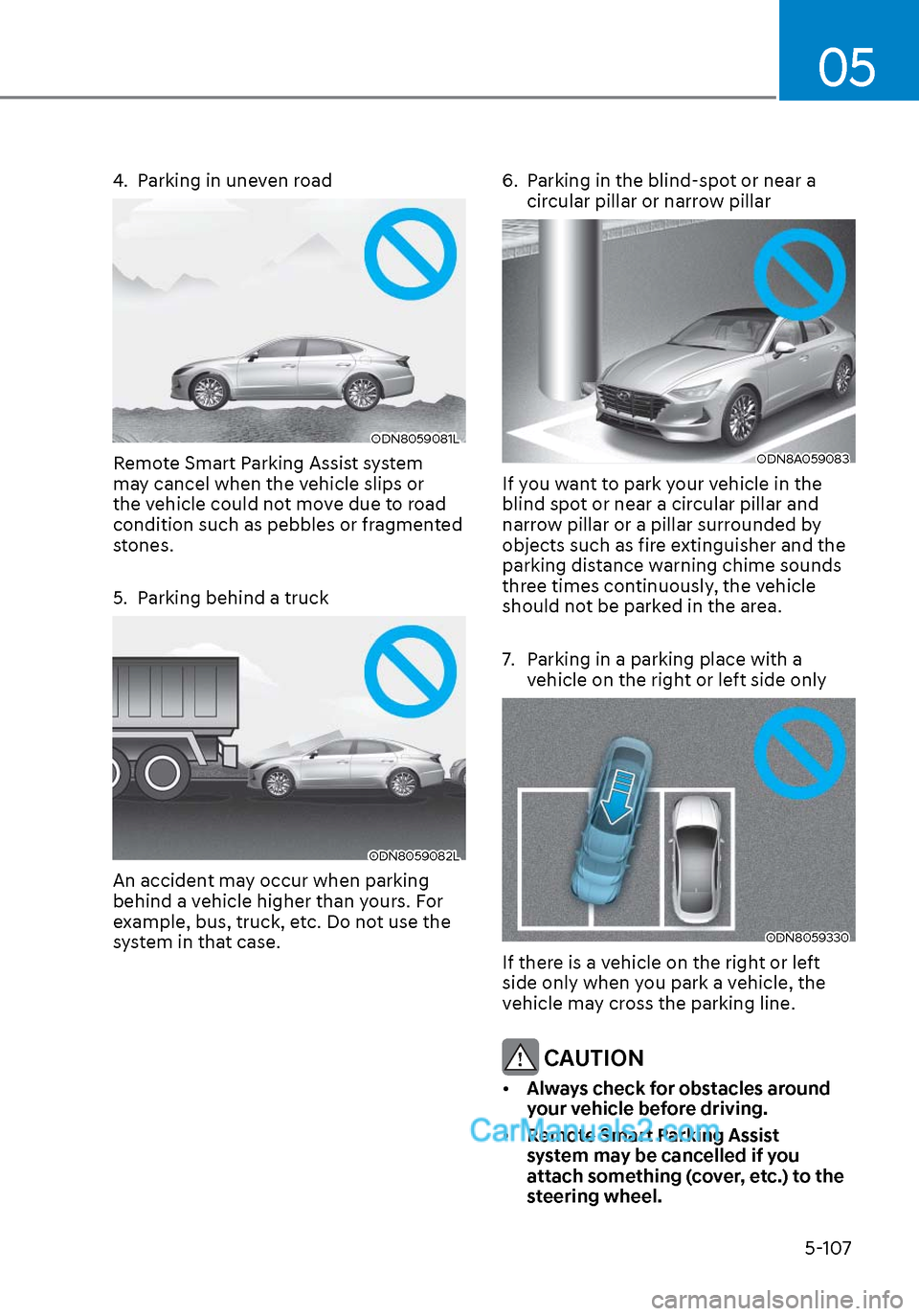
4. Parking in uneven road
ODN8059081LODN8059081L
Remote Smart Parking Assist system
may cancel when the vehicle slips or
the vehicle could not move due to road
condition such as pebbles or fragmented
stones.
5. Parking behind a truck
ODN8059082LODN8059082L
An accident may occur when parking
behind a vehicle higher than yours. For
example, bus, truck, etc. Do not use the
system in that case.6. Parking in the blind-spot or near a
circular pillar or narrow pillar
ODN8A059083ODN8A059083
If you want to park your vehicle in the
blind spot or near a circular pillar and
narrow pillar or a pillar surrounded by
objects such as fire extinguisher and the
parking distance warning chime sounds
three times continuously, the vehicle
should not be parked in the area.
7. Parking in a parking place with a vehicle on the right or left side only
ODN8059330ODN8059330
If there is a vehicle on the right or left
side only when you park a vehicle, the
vehicle may cross the parking line.
CAUTION
• Always check for obstacles around
your vehicle before driving.
• Remote Smart Parking Assist
system may be cancelled if you
attach something (cover, etc.) to the
steering wheel.
Page 239 of 537

05
5-109
ODN8A059248ODN8A059248
(2) Park the vehicle in front of the space where you desire to use
the Remote Moving Forward/
Backward. Press Remote Smart
Parking Assist system button
and select the Remote Moving
Forward/Backward. Exit the
vehicle possessing the smart key
and check whether all the doors
are closed. The hazard warning
light blinks and Remote Moving
Forward/Backward displays
whether the vehicle is movable or
not.
You will hear frequent beep sounds if
the driver gets off the vehicle after the
Remote Moving Forward/Backward is
ready.
ODN8059095ODN8059095
2. Remote Moving Forward/Backward
Assist
With the vehicle stopped, press and hold one of the moving forward/
backward button on the smart key
and then steering wheel, gear shift
and vehicle speed are controlled
automatically If the driver releases
the moving forward/backward button
while the Remote Moving Forward/
Backward button is in activation, the
control will stop temporarily. Press the
button again to resume the control.
For your safety, the assist is activated only when the smart key is within
about 10-16 ft. (3-5 m) from the
vehicle.
The vehicle can travel up to 23 ft. (7 m) per move. Press the moving forward/
backward button to make additional
movement.
Press the moving forward/backward
button again after checking the
distance from the vehicles if the
vehicle didn’t move after pressing
and holding the smart key button for
about 5 seconds.
Under cold weather, take enough time
before pressing the moving forward/
backward button of the smart key
after turning on the vehicle remotely.
It may take more time until the vehicle
moves.
Page 240 of 537
Convenient Features5-110
When the Remote Moving Forward
is ready by the above No. (1)
method, the vehicle recognizes the
condition as exit. After confirming
the surroundings within 13 ft. (4 m), it
allows to operate the steering wheel
up to the conditions ahead.
When Remote Moving Forward is
ready by the above No. (2) method,
the vehicle recognizes the condition
as entering to the parking space.
According to the front condition, it
immediately allows the vehicle to
enter to the parking space and line
up with the steering wheel control.
However, the function performance
can be degraded up to the shape or
position of the surrounding objects.
If you select the remote moving
backward, both of the No. (1) and (2)
methods make the vehicle go straight
after lining up.
While Remote Moving Forward/
Backward assist is operating, the
brake light turns on.
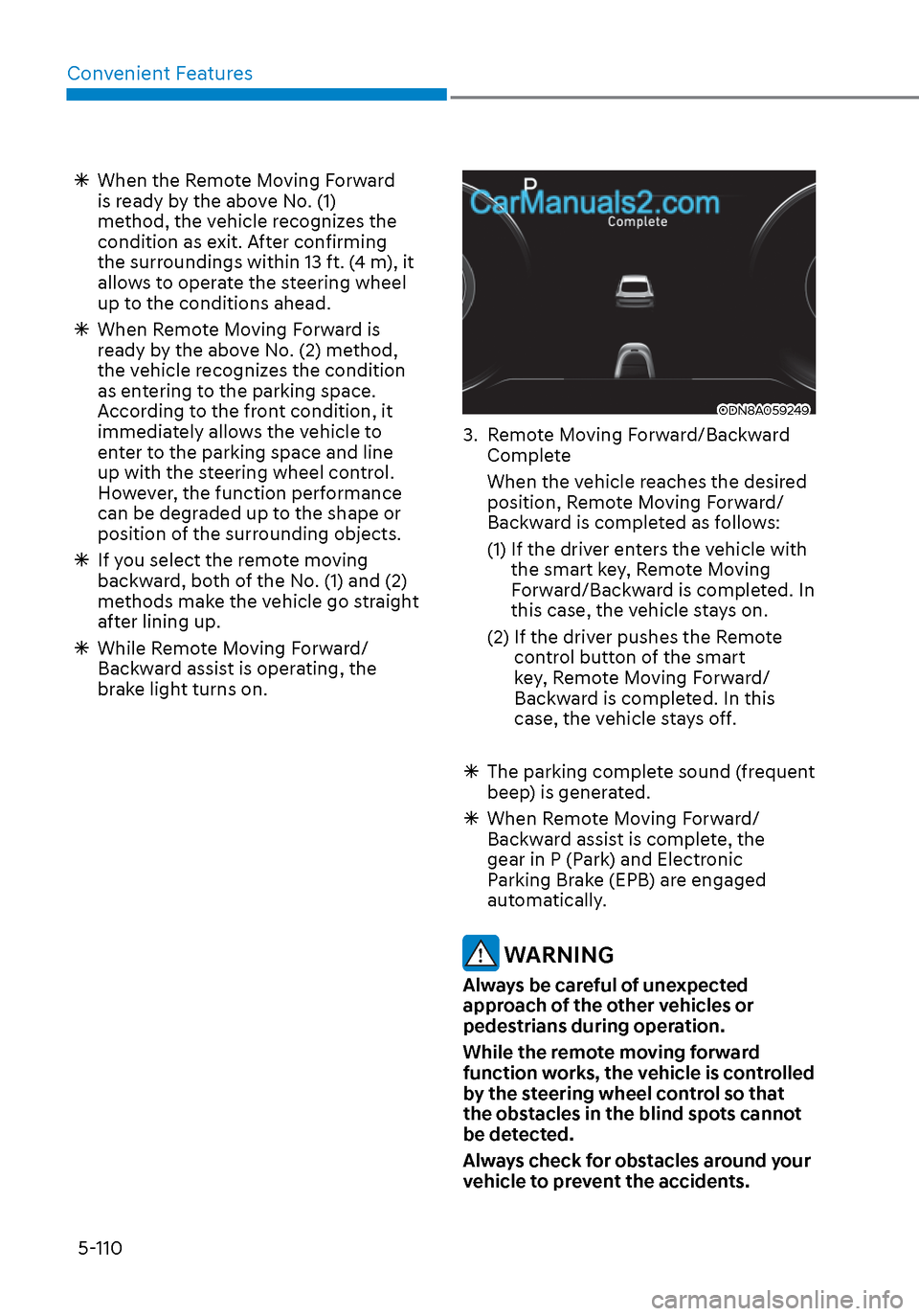
ODN8A059249ODN8A059249
3. Remote Moving Forward/Backward
Complete
When the vehicle reaches the desired position, Remote Moving Forward/
Backward is completed as follows:
(1) If the driver enters the vehicle with the smart key, Remote Moving
Forward/Backward is completed. In
this case, the vehicle stays on.
(2) If the driver pushes the Remote control button of the smart
key, Remote Moving Forward/
Backward is completed. In this
case, the vehicle stays off.
The parking complete sound (frequent
beep) is generated.
When Remote Moving Forward/
Backward assist is complete, the
gear in P (Park) and Electronic
Parking Brake (EPB) are engaged
automatically.
WARNING
Always be careful of unexpected
approach of the other vehicles or
pedestrians during operation.
While the remote moving forward
function works, the vehicle is controlled
by the steering wheel control so that
the obstacles in the blind spots cannot
be detected.
Always check for obstacles around your
vehicle to prevent the accidents.
Page 241 of 537
05
5-111
CAUTION
• The driver should check for obstacles
directly around the vehicle.
• The function may be cancelled if you
attach something (cover, etc.) to the
steering wheel.
• Make sure all the passengers exit the
vehicle when the Remote Moving
Forward/Backward is in activation.
• Make sure all the smart keys are
outside the vehicle when the Remote
Moving Forward/Backward assist is
in activation.
• The detection range of the smart key
can be differed by the surroundings
(ex: Indoor/outdoor, strong electric
field area)
• If the parking distance warning
sounds three consecutive times
during operating the Remote Moving
Forward/Backward system, you
should not move your vehicle in that
direction since the objects are too
close. The driver should operate the
vehicle manually.
To cancel the Remote Moving
Forward/Backward while in
operation
1. Press the remote start button on the
smart key.
2. The driver should press Remote Smart Parking Assist system button while
Remote Moving Forward/Backward is
instructed.
3. The driver should shift the gear besides P (parking) while Remote
Moving Forward/Backward is
instructed.
4. The driver should press Parking Distance Warning system button
while the Remote Moving Forward/
Backward is instructed.
5. During Remote Moving Forward/ Backward operation, the vehicle
turns off when the driver presses the
remote start button on the smart key.
6. The function is cancelled but the vehicle stays on when the driver
enters the vehicle with the smart key
and all the doors are open.
Page 242 of 537

Convenient Features5-112
The Remote Moving Forward/
Backward assist will stop
temporarily when:
7. An obstacle is detected at the direction the vehicle is heading.
8. The door or trunk is opened.
9. The moving forward/backward button on the smart key is released.
10. Multiple buttons on the smart key are pressed at the same time.
11. The distance between the smart key and vehicle is over 13 ft. (4 m).
12. A button on the other smart key is pressed during operation.
13. Rear Cross-Traffic Collision-Avoidance Assist system is activated while
reserving.
14. The vehicle moves 23 ft. (7 m) with the Remote Moving Forward/Backward
while the smart key is pressed.
(Maximum travel distance per move)
The vehicle stops when the Remote
Smart Parking Assist system will stop
temporarily and the function will
resume when the above condition is
cleared.
The Remote Moving Forward/
Backward assist is cancelled while
in operation when:
1. The driver holds the steering wheel
while the steering wheel is controlled.
2. The gear is shifted or the Electronic Parking Brake (EPB) is activated.
3. The hood opens.
4. The vehicle speed exceeds 3 mph (5km/h).
5. The vehicle accelerates suddenly.
6. The vehicle slips back while controlling the vehicle speed.
7. The wheel is stuck and the vehicle is unable to move.
8. About 3 minutes and 50 seconds have passed after the Remote Moving
Forward/Backward assist starts. 9. The gradient of the road exceeds
the range supported by the Remote
Moving Forward/Backward assist.
10. The steering, shifting gear and drive assist are difficult.
11. The suspended status lasts for over 1 minute.
12. The driver continuously presses and releases the smart key’s moving
forward/backward button over 10
times.
13. The Traction Control System (TCS) is activated while controlling the vehicle
speed.
14. The smart key is damaged.
15. The accelerator/brake pedal is depressed while all the doors are
closed.
16. The brake pedal is depressed while the driver’s door is open and the smart
key is outside the vehicle.
17. The vehicle travels more than 46 ft. (14 m) after the Remote Moving Forward/
Backward assist is activated.
18. The theft alarm system is activated.
When the Remote Moving Forward/
Backward is completed, the gear in
P(Park) and Electronic Parking Brake
(EPB) are engaged automatically and
the vehicle turns off.
The frequent beep sounds are
generated to show the deactivation
status.
Page 243 of 537

05
5-113
Additional Instructions
When the Remote Smart Parking Assist
system is in operation, the system may
be cancelled regardless of the instruction
order.
The appeared messages could be
differed according to the circumstances.
Follow the instructions provided while
driving your vehicle with the Remote
Smart Parking Assist system in activation.
When the function works, please follow
the displayed messages and the driver
should be cautious for safety.
Malfunction warning
ODN8A059262ODN8A059262
If there is a problem with Remote
Smart Parking Assist system, the above
message will appear when the system is
turned on.
In addition, the indicator on Remote
Smart Parking Assist system button
will blink and the warning sound will
beep three times. (The Parking Distance
Warning system can be operable
depending on the failure type.)
If you recognize any problem, have
the vehicle checked by an authorized
HYUNDAI dealer.
Parking assist conditions not met
ODN8A059261ODN8A059261
When Remote Smart Parking Assist
system is not getting ready for activation,
the above message will appear when
Remote Smart Parking Assist system
button is pressed.
Press the button again after a while and
check whether the function operates
properly.
Remote Smart Parking Assist system is
on standby for a while, you should not
use the Remote Smart Parking Assist
system and have your vehicle checked
by an authorized HYUNDAI dealer.
Page 244 of 537
Convenient Features5-114
Display Operation Status
While Remote Smart Parking Assist system is on, Smart key / Hazard lamp
status is displayed
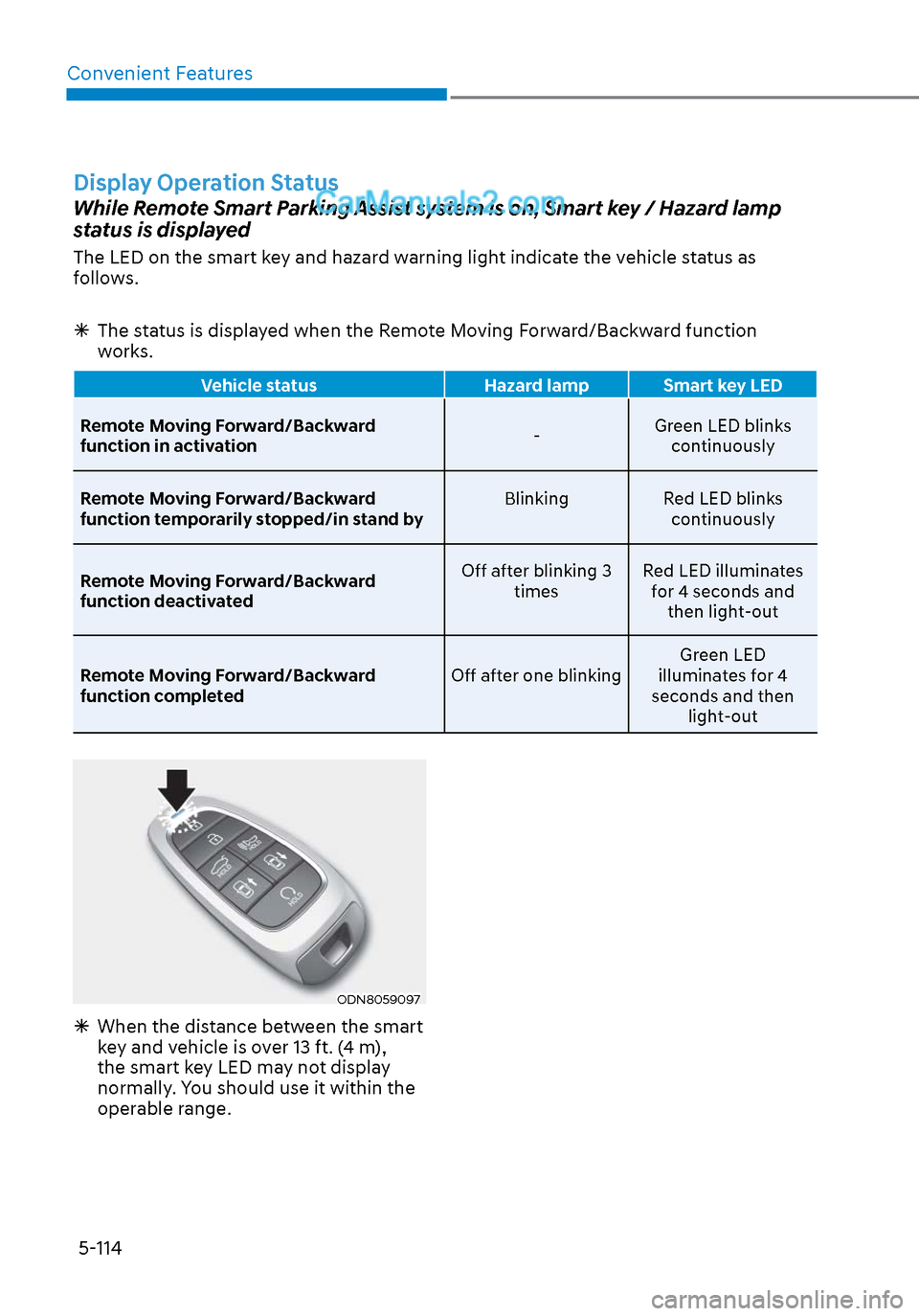
The LED on the smart key and hazard warning light indicate the vehicle status as
follows.
The status is displayed when the Remote Moving Forward/Backward function
works.
Vehicle status Hazard lamp Smart key LED
Remote Moving Forward/Backward
function in activ
ation -Green LED blinks
continuously
Remote Moving Forward/Backward
function temporarily stopped/in stand by Blinking
Red LED blinks
continuously
Remote Moving Forward/Backward
function deactivated Off after blinking 3
times Red LED illuminates
for 4 seconds and then light-out
Remote Moving Forward/Backward
function completed Off after one blinkingGreen LED
illuminates for 4
seconds and then light-out
ODN8059097ODN8059097
When the distance between the smart
key and vehicle is over 13 ft. (4 m),
the smart key LED may not display
normally. You should use it within the
operable range.