2020 Hyundai Sonata Brake system
[x] Cancel search: Brake systemPage 336 of 537

While Driving6-52
OADAS012SDOADAS012SD
OADAS011SDOADAS011SD
OADAS010SDOADAS010SD
• Driving on a slope The performance of Forward Collision-
Avoidance Assist system may be
decreased while driving upward or
downward on a slope.
The front view camera or front radar
sensor recognition may not detect the
vehicle, pedestrian or cyclist in front.
This may result in unnecessary alarm
and braking or no alarm and braking
when necessary.
When the system suddenly recognizes
the vehicle, pedestrian or cyclist in
front while passing over a slope, you
may experience sharp deceleration.
Always keep your eyes forward while
driving upward or downward on a
slope, and, if necessary, depress the
brake pedal to reduce your driving
speed in order to maintain distance.
Page 337 of 537
06
6-53
ODN8H069196ODN8H069196
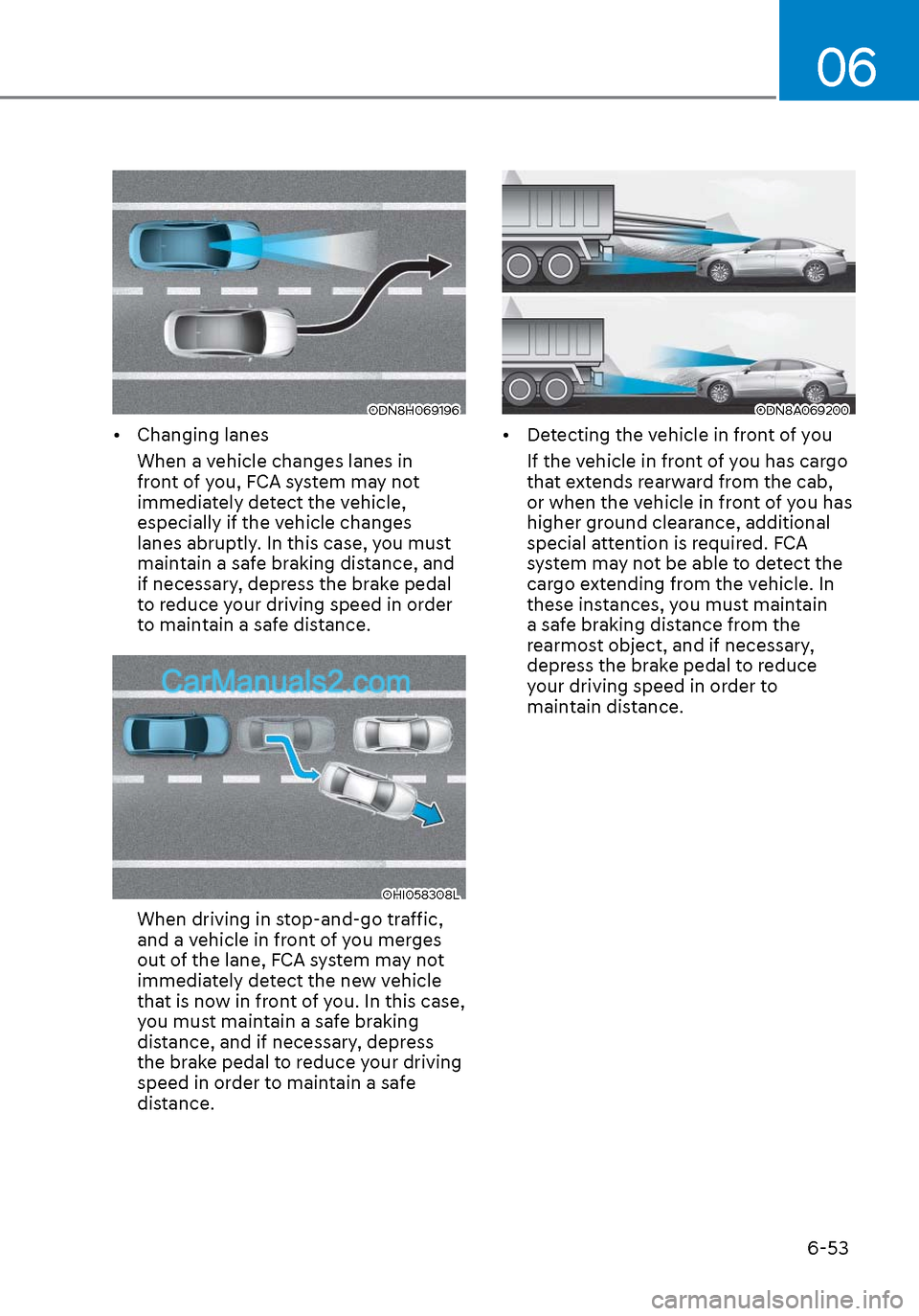
• Changing lanesWhen a vehicle changes lanes in
front of you, FCA system may not
immediately detect the vehicle,
especially if the vehicle changes
lanes abruptly. In this case, you must
maintain a safe braking distance, and
if necessary, depress the brake pedal
to reduce your driving speed in order
to maintain a safe distance.
OHI058308LOHI058308L
When driving in stop-and-go traffic,
and a vehicle in front of you merges
out of the lane, FCA system may not
immediately detect the new vehicle
that is now in front of you. In this case,
you must maintain a safe braking
distance, and if necessary, depress
the brake pedal to reduce your driving
speed in order to maintain a safe
distance.
ODN8A069200ODN8A069200
• Detecting the vehicle in front of youIf the vehicle in front of you has cargo
that extends rearward from the cab,
or when the vehicle in front of you has
higher ground clearance, additional
special attention is required. FCA
system may not be able to detect the
cargo extending from the vehicle. In
these instances, you must maintain
a safe braking distance from the
rearmost object, and if necessary,
depress the brake pedal to reduce
your driving speed in order to
maintain distance.
Page 340 of 537
While Driving6-56
Prerequisite for activation
FCA system is on and ready if you select
“Active assist” or “Warning only” on
the infotainment system and when the
following prerequisites are satisfied: - The system detects a oncoming vehicle in front, which may collide
with your vehicle. It may be activated
when the system recognise the
collision risk at a junction in each
situation.
- The ESC (Electronic Stability Control) is on.
- The vehicle speed moving toward your vehicle exceeds approximately 19
mph (30 km/h) or decreases under 44
mph (70 km/h).
- Driving speed exceeds approximately 6 mph (10 km/h) or decreases under
19 mph (30 km/h)
- Direction signals turn on.
CAUTION
• FCA system may not work or only
some part of the warning system may
perform according to the condition,
driving direction or speed of the
vehicle moving toward your vehicle.
• If you select “Warning only”, FCA
system activates and produces only
warning alarms.
WARNING
• FCA system may not produce the
warning alarm or be activated too
late due to the unexpected driving
caused by the approaching vehicles.
• While turning left, only when the turn
signal is on along with the driving
direction, FCA system is activated
toward the approaching vehicles.
FCA warning message and function
control
FCA produces warning messages and
warning alarms as well as vibrates the
steering wheel in accordance with the
collision risk levels whilst the vehicle
turns left at the crossroads. In addition,
the system controls the brakes according
to the collision risk levels.
ODN8A069201ODN8A069201
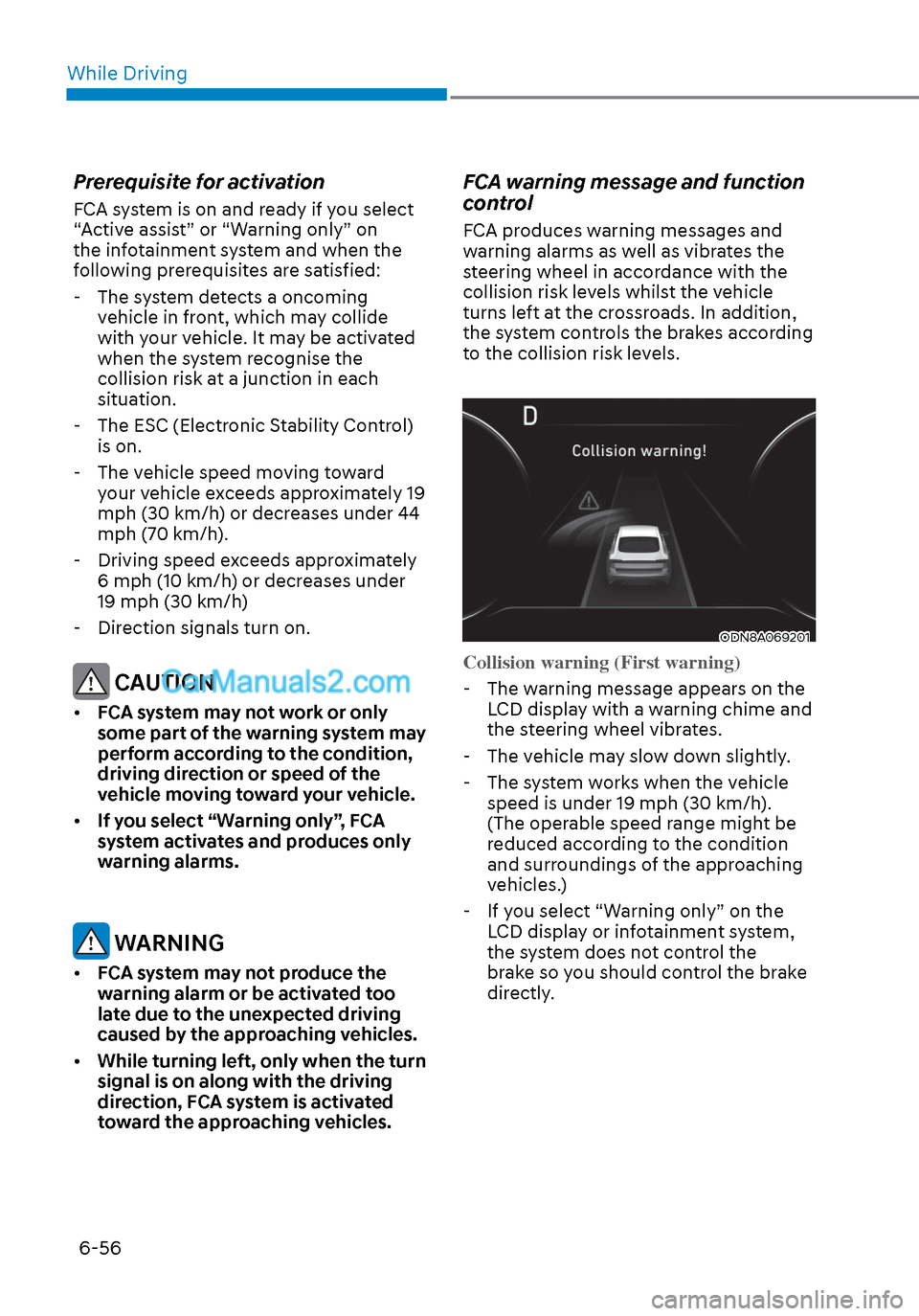
Collision warning (First warning)
-
The warning message appears on the LCD display with a warning chime and
the steering wheel vibrates.
- The vehicle may slow down slightly.
- The system works when the vehicle speed is under 19 mph (30 km/h).
(The operable speed range might be
reduced according to the condition
and surroundings of the approaching
vehicles.)
- If you select “Warning only” on the LCD display or infotainment system,
the system does not control the
brake so you should control the brake
directly.
Page 341 of 537
06
6-57
ODN8A069202ODN8A069202
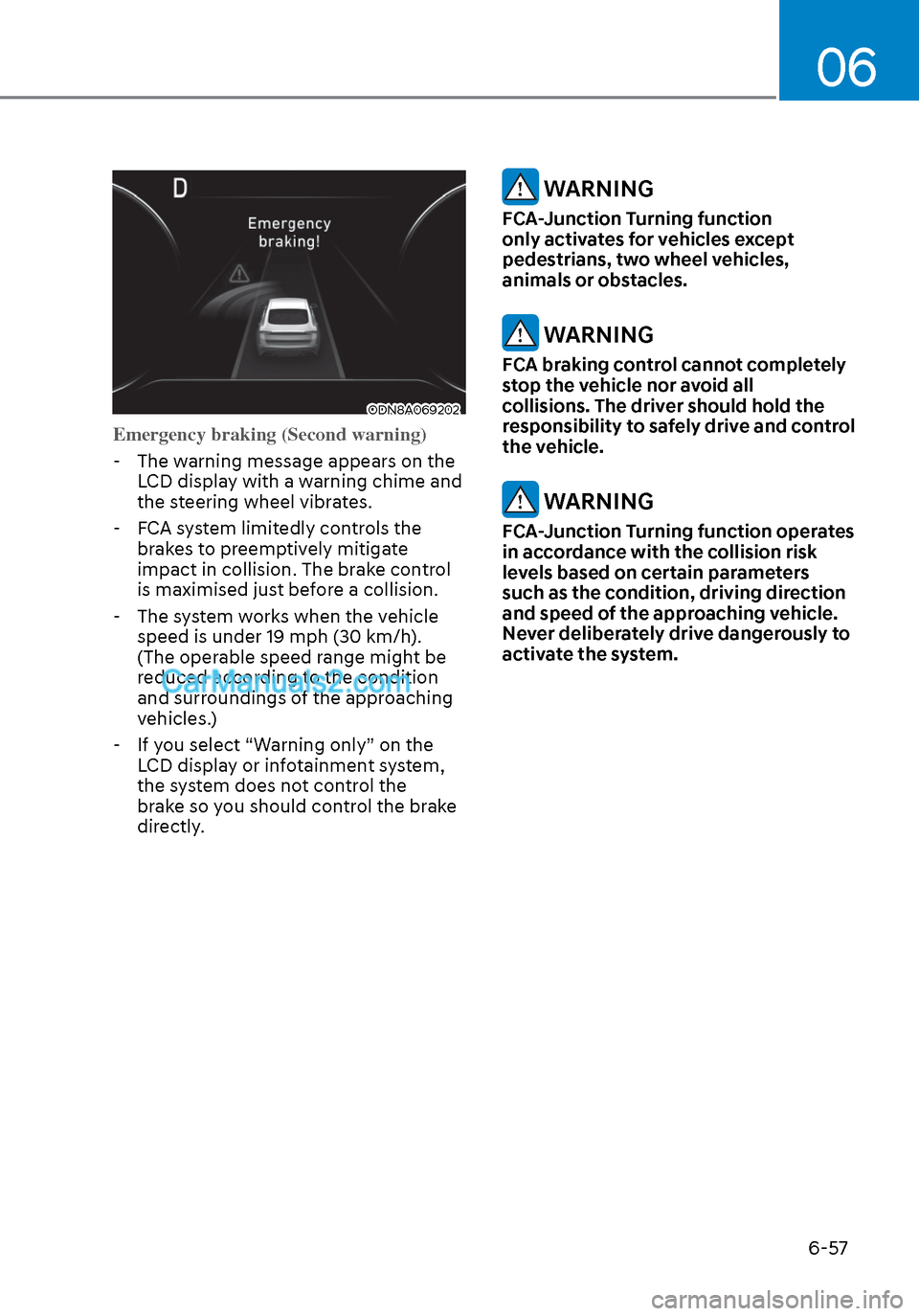
Emergency braking (Second warning) -
The warning message appears on the LCD display with a warning chime and
the steering wheel vibrates.
- FCA system limitedly controls the
brakes to preemptively mitigate
impact in collision. The brake control
is maximised just before a collision.
- The system works when the vehicle speed is under 19 mph (30 km/h).
(The operable speed range might be
reduced according to the condition
and surroundings of the approaching
vehicles.)
- If you select “Warning only” on the LCD display or infotainment system,
the system does not control the
brake so you should control the brake
directly.
WARNING
FCA-Junction Turning function
only activates for vehicles except
pedestrians, two wheel vehicles,
animals or obstacles.
WARNING
FCA braking control cannot completely
stop the vehicle nor avoid all
collisions. The driver should hold the
responsibility to safely drive and control
the vehicle.
WARNING
FCA-Junction Turning function operates
in accordance with the collision risk
levels based on certain parameters
such as the condition, driving direction
and speed of the approaching vehicle.
Never deliberately drive dangerously to
activate the system.
Page 348 of 537
While Driving6-64
Warning Light and Message
Type AType AType BType B
OIK057121NOIK057121NOIK057122NOIK057122N
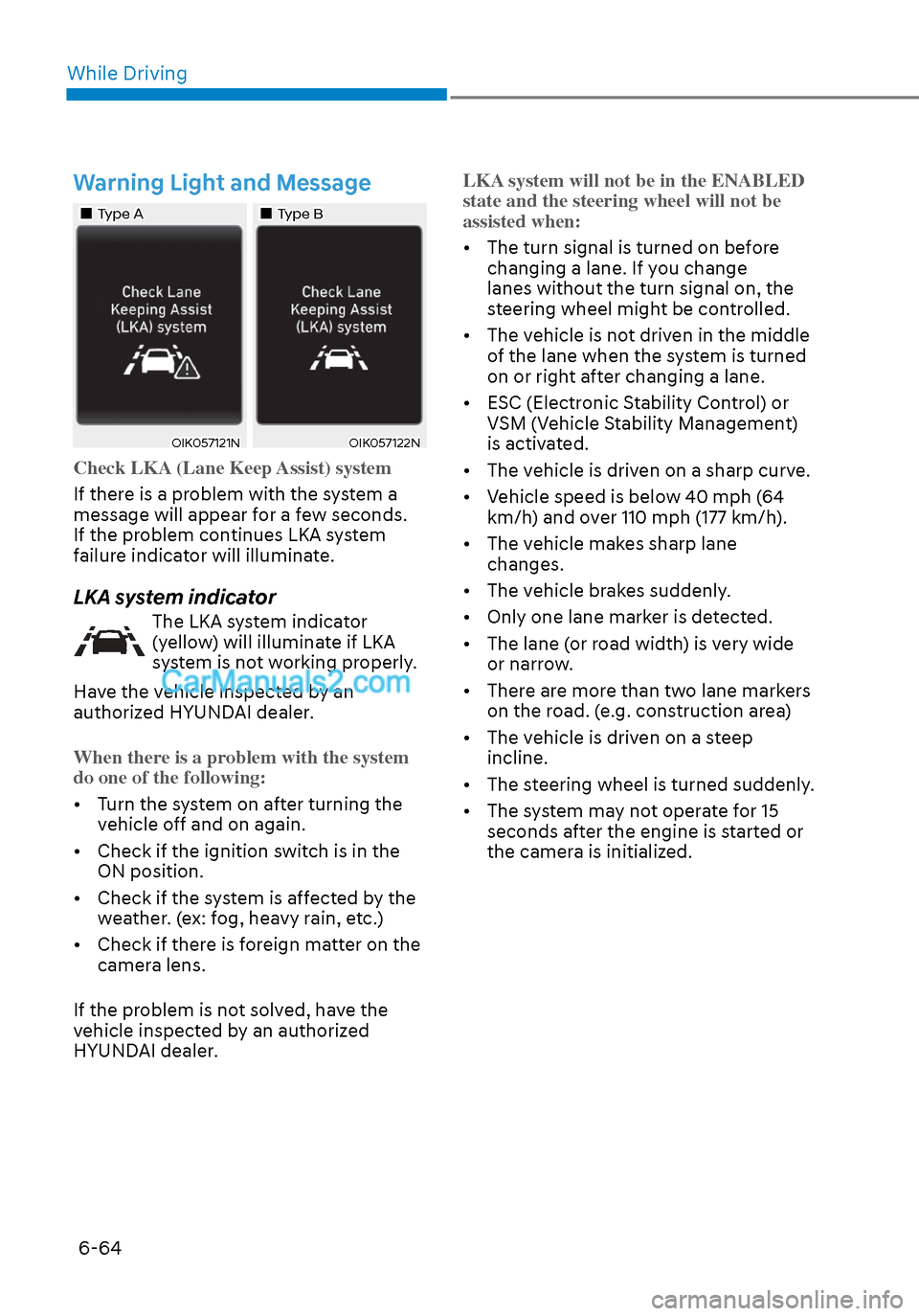
Check LKA (Lane Keep Assist) system
If there is a problem with the system a
message will appear f
or a few seconds.
If the problem continues LKA system
failure indicator will illuminate.
LKA system indicator
The LKA system indicator
(yellow) will illuminate if LKA
system is not working properly.
Have the vehicle inspected by an
authorized HYUNDAI dealer.
When there is a problem with the system
do one of the following:
• Turn the system on after turning the v
ehicle off and on again.
• Check if the ignition switch is in the ON position.
• Check if the system is affected by the weather. (ex: fog, heavy rain, etc.)
• Check if there is foreign matter on the camera lens.
If the problem is not solved, have the
vehicle inspected by an authorized
HYUNDAI dealer. LKA system will not be in the ENABLED
state and the steering wheel will not be
assisted when:
• The turn signal is turned on before
changing a lane. If y
ou change
lanes without the turn signal on, the
steering wheel might be controlled.
• The vehicle is not driven in the middle of the lane when the system is turned
on or right after changing a lane.
• ESC (Electronic Stability Control) or VSM (Vehicle Stability Management)
is activated.
• The vehicle is driven on a sharp curve.
• Vehicle speed is below 40 mph (64 km/h) and over 110 mph (177 km/h).
• The vehicle makes sharp lane changes.
• The vehicle brakes suddenly.
• Only one lane marker is detected.
• The lane (or road width) is very wide or narrow.
• There are more than two lane markers on the road. (e.g. construction area)
• The vehicle is driven on a steep incline.
• The steering wheel is turned suddenly.
• The system may not operate for 15 seconds after the engine is started or
the camera is initialized.
Page 355 of 537

06
6-71
WARNING
• The warning light on the side view
mirror will illuminate whenever a
vehicle is detected at the rear side by
the system.
To avoid accidents, do not focus only
on the warning light and neglect to
see the surrounding of the vehicle.
• Drive safely even though the
vehicle is equipped with Blind-Spot
Collision-Avoidance Assist system.
Do not solely rely on the system
but check your surrounding before
changing lanes or backing the
vehicle up.
• The system may not alert the driver
in some conditions so always check
your surroundings while driving.
CAUTION
• The driver should always use
extreme caution while operating
the vehicle, whether or not the
warning light on the side view mirror
illuminates or there is a warning
alarm.
• Playing the vehicle audio system at
high volume may offset the Blind-
Spot Collision Warning system
warning sounds.
• The warning of Blind-Spot Collision-
Avoidance Assist system may not
sound while other system’s warning
sounds.
Blind-Spot Collision-Avoidance
Assist
Blind-Spot Collision-Avoidance Assist
system may apply braking power, when
an approaching vehicle is detected
within a certain distance next to or
behind your vehicle.
It gently applies braking power on the
tire, which is located in the opposite
side of the possibly-colliding point. The
instrument cluster will inform the driver
of the system activation.
Blind-Spot Collision-Avoidance Assist
system is automatically deactivated
when:
- The vehicle drives a certain distance away
- The vehicle direction is changed against the possible-colliding point
- The steering wheel is abruptly moved
- The brake pedal is depressed
- After a certain period of time
The driver should drive the vehicle in the
middle of the vehicle lanes to keep the
system in the ready status.
When the vehicle drives too close to one
side of the vehicle lanes, the system may
not properly operate.
In addition, the system may not properly
control your vehicle in accordance with
driving situations. Thus, always pay close
attention to road situations.
Page 372 of 537
While Driving6-88
ODN8A069211ODN8A069211
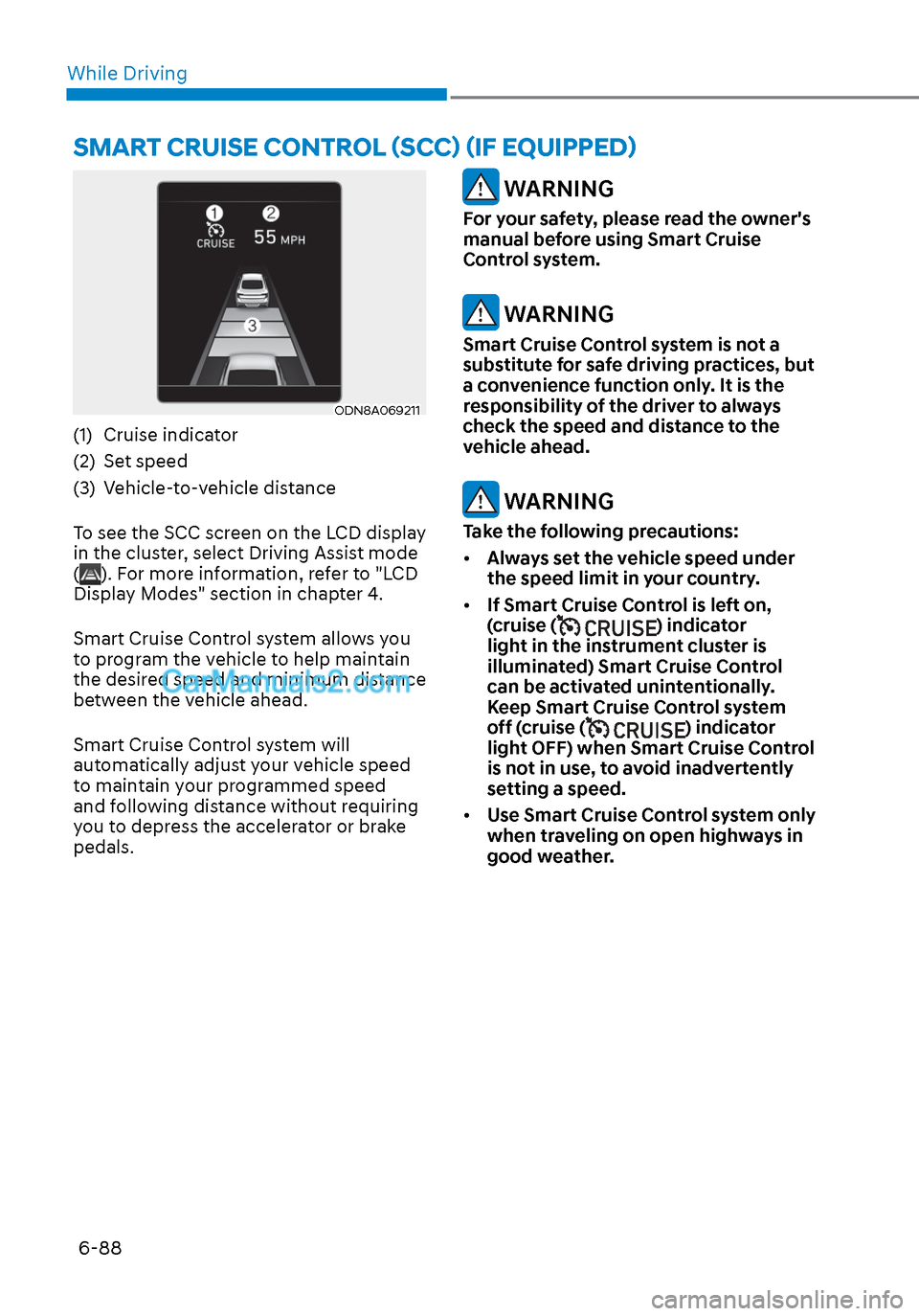
(1) Cruise indicator
(2) Set speed
(3) Vehicle-to-vehicle distance
To see the SCC screen on the LCD display
in the cluster, select Driving Assist mode
(
). For more information, refer to "LCD
Display Modes" section in chapter 4.
Smart Cruise Control system allows you
to program the vehicle to help maintain
the desired speed and minimum distance
between the vehicle ahead.
Smart Cruise Control system will
automatically adjust your vehicle speed
to maintain your programmed speed
and following distance without requiring
you to depress the accelerator or brake
pedals.
WARNING
For your safety, please read the owner's
manual before using Smart Cruise
Control system.
WARNING
Smart Cruise Control system is not a
substitute for safe driving practices, but
a convenience function only. It is the
responsibility of the driver to always
check the speed and distance to the
vehicle ahead.
WARNING
Take the following precautions:
• Always set the vehicle speed under
the speed limit in your country.
• If Smart Cruise Control is left on,
(cruise (
) indicator
light in the instrument cluster is
illuminated) Smart Cruise Control
can be activated unintentionally.
Keep Smart Cruise Control system
off (cruise (
) indicator
light OFF) when Smart Cruise Control
is not in use, to avoid inadvertently
setting a speed.
• Use Smart Cruise Control system only
when traveling on open highways in
good weather.
SMART CRUISE CONTROL (SCC) (IF EQUIPPED)
Page 373 of 537
06
6-89
• Do not use Smart Cruise Control
when it may not be safe to keep the
vehicle at a constant speed:
- When driving in heavy traffic or
when traffic conditions make it
difficult to drive at a constant
speed
- When driving on rainy, icy, or
snow-covered roads
- When driving on a steep downhill
or uphill
- When driving in windy areas
- When driving in parking lots
- When driving near crash barriers
- When driving on a sharp curve
- When driving with limited view
(possibly due to bad weather, such
as fog, snow, rain or sandstorm)
- When the vehicle sensing
ability decreases due to vehicle
modification resulting level
difference of the vehicle's front
and rear
• Unexpected situations may lead to
possible accidents. Pay attention
continuously to road conditions
and driving even when smart cruise
control system is being operated.Smart Cruise Control Switch
CRUISE/:Turns cruise control system
on or off.
RES+: Resumes or increases cruise control speed.
SET-: Sets or decreases cruise control speed.
:
Sets vehicle-to-vehicle distance.
CANCEL (CNCL): Cancels cruise control operation.
To Convert to Cruise Control
Mode
The driver may choose to only use the
conventional Cruise Control mode
(speed control function) by doing as
follows:
1. Turn Smart Cruise Control system on (the cruise indicator light will be on
but the system will not be activated).
2. Push and hold the Vehicle-to-Vehicle Distance button for more than 2
seconds.
3. Choose between “Smart Cruise Control” and “Cruise Control”.
When the system is canceled using the
CRUISE/
button or the CRUISE button
is used after the engine is turned on, the
Smart Cruise Control mode will turn on.
WARNING
When using the Cruise Control mode,
you must manually adjust the distance
to other vehicles by depressing the
brake pedal. The system does not
automatically adjust the distance to
vehicles in front of you.